Holiday Hunting With Aquatone
A web page test application was vulnerable to server-side request forgery, allowing an attacker to make requests to internal services and cloud metadata endpoints. This enabled access to Google VM metadata and enumeration of internal HTTP ports, and a separate exposed portal revealed tickets without authentication.
 Published on kuldeep.io
Before going to the blog, I would like to give a little context on what happened here. I went on a workcation in April 2022 with my hacker friends (@N0M3gaHacks, @AyushBawariya1 and @x30r).
The full write-up lives on its author's site
It belongs to its author, so we link to it rather than copy it. The other two tabs are our own rewrites, checked against it.
Context
This is an account of a hunt on a Synack Red Team target whose infrastructure was hosted on GCP. The researcher had previously found that running aquatone against in-scope HTTP servers was an effective way to surface interesting applications, without even needing a port scan to find HTTP services on ports such as 8443 and 8080. During a workcation in April 2022 with @N0_M3ga_Hacks, @AyushBawariya1 and @x30r_, the researcher demonstrated the approach in practice: httpx was run across all in-scope IPs to find live HTTP services, then aquatone was run across all the IPs.
Three vulnerabilities came out of that sweep:
| Vulnerability Title | Reward |
|---|---|
| SSRF Allowing To Access Google VM Metadata | $2400 |
| SSRF Allowing To Access Internal Ports | $500 |
| Exposed XXXX Portal Revealing Tickets | $705 |
Setup
The only tooling described is httpx for live host discovery, aquatone for screenshots, Burp Suite Intruder for fuzzing, and a TUPoC URL used as an attacker-controlled endpoint. No accounts, roles or versions are given. The precondition for the whole hunt is simply that the in-scope IPs expose HTTP services that aquatone can screenshot.
Finding it
What stood out from the aquatone results was a web page test application. Its web root asked for a website URL in order to "start test".
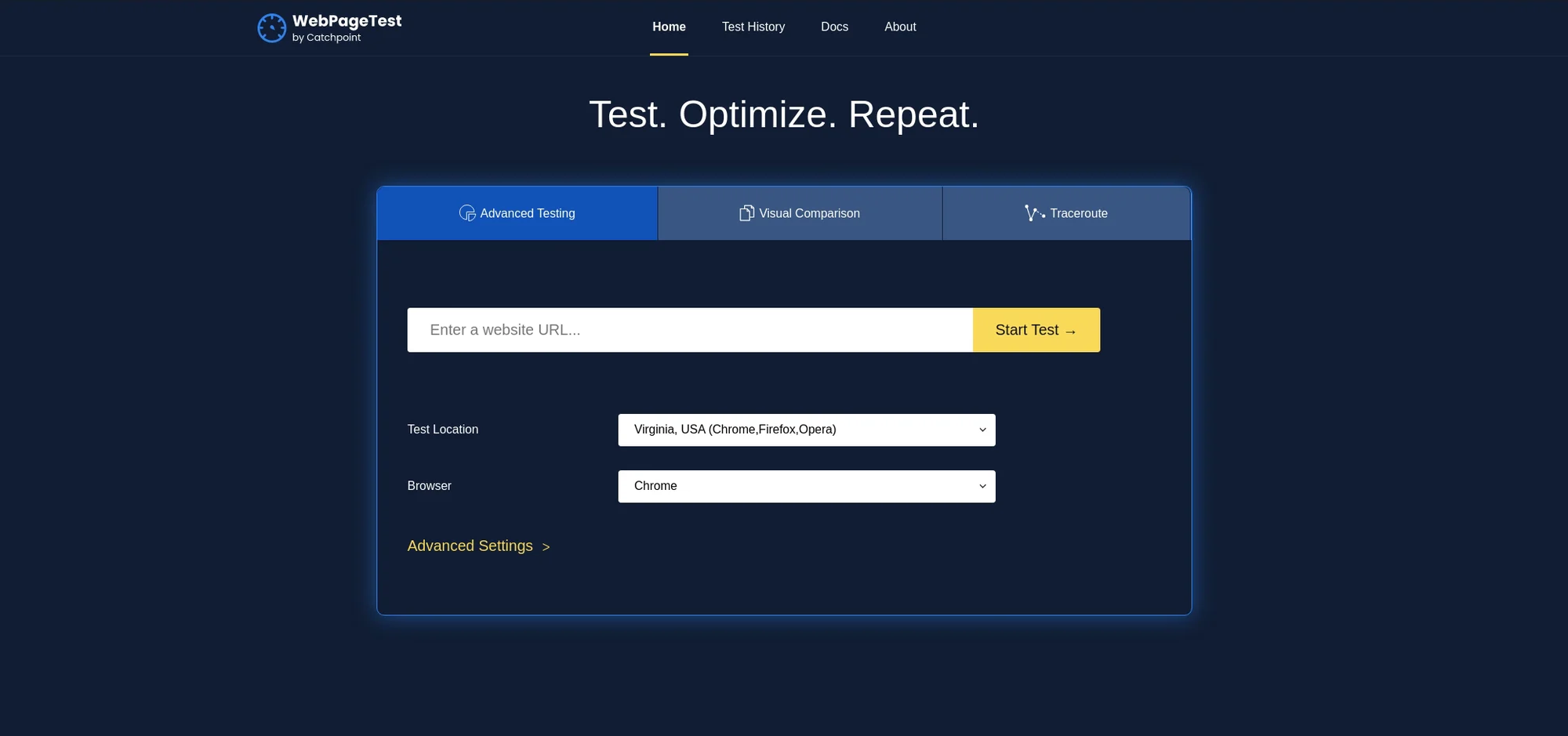
The researcher did not know what kind of test the application would perform, so the first input was https://example.com. The application did something for a while and then returned a screenshot of https://example.com along with a lot of other performance metrics.
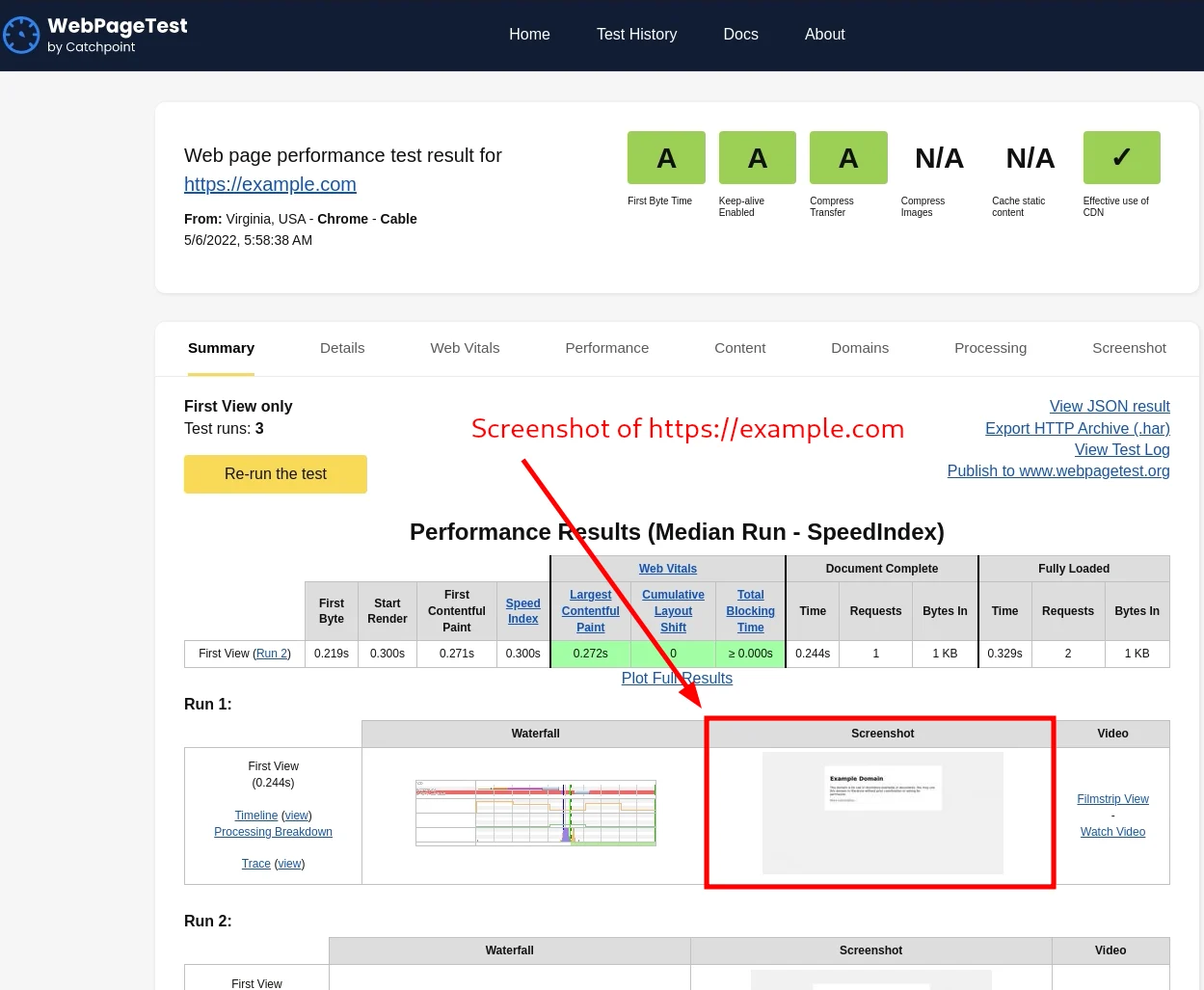
The interesting part was the screenshot: the application had sent a request to https://example.com and returned an image of the result. As the researcher notes, the ability to request arbitrary URLs is the intended behaviour and is not a vulnerability in itself. The vulnerability arises when the application makes requests to restricted URLs, such as cloud metadata URLs or localhost, that do have sensitive information exposed.
Exploitation
Step 1: probing localhost
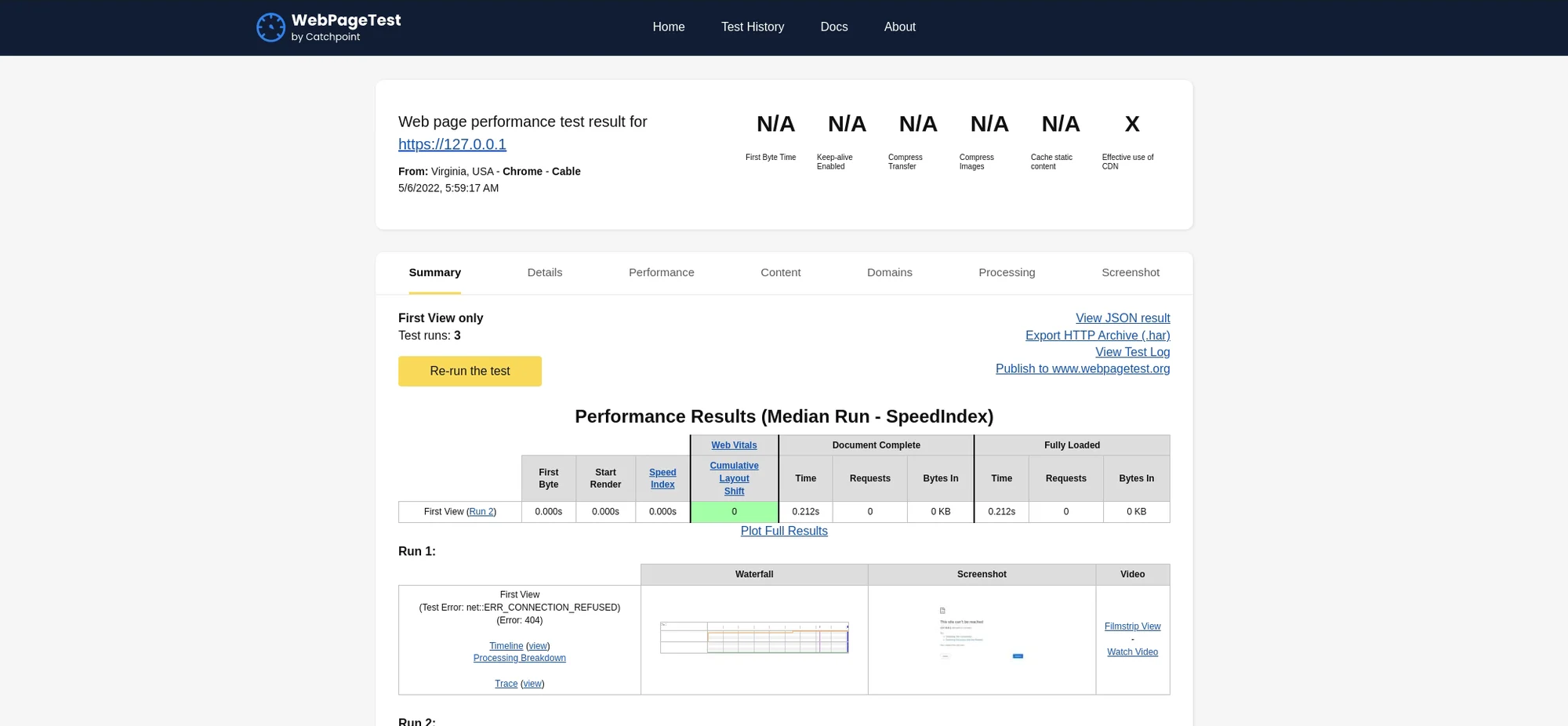
The next input was https://127.0.0.1. The application again did something for a while and returned results, but this time they were disappointing: an error saying "This site can't be reached".
Step 2: the failed port scan through Intruder
The request was sent to Burp Suite Intruder and a port scan of the top 1000 ports was started, but it took a lot of time. Each test took 2-3 minutes to complete. Even at a best case of 2 minutes per test, 1000 ports would require 2000 minutes, or 33.33 hours. That was the wrong way.
To find a workaround, the researcher played with the application's settings and found an option to disable the "tests" that were assumed to take most of the time. The tests were disabled and the attempt repeated, but the 2-3 minute delay remained whether the tests were on or off, so the researcher believes it was some kind of internet or browser issue.
While testing this, a large mess was created. Before a new URL can be submitted for testing, all the old URL tests are supposed to be finished; if they are not finished, the new URL tests stay pending. Since 1000 requests had already been sent for port scanning, further testing could not proceed without waiting 33.33 hours. The researcher wished someone would reboot the server, but the server seemed unused: nobody sent any tests during those 33.33 hours, and checking the old tests showed there were no tests before the ones that had been sent.
After two days, all the tests were finished. The results were scraped, all the screenshots found and downloaded. None of the ports were running HTTP services, so even after waiting two days nothing was found.
Step 3: file:// and the first metadata attempts
The file:// protocol was tried to retrieve /etc/passwd, but that also did not work.
The next idea was to retrieve cloud metadata, which the researcher notes should have been the most obvious choice since the client hosted all their infrastructure on GCP. At the time, however, the focus was on internally exposed services rather than cloud metadata.
To retrieve Google metadata, the http://metadata.[redacted]/computeMetadata/v1/ URL must be requested with two custom headers:
- X-Google-Metadata-Request: True
- Metadata-Flavor: Google
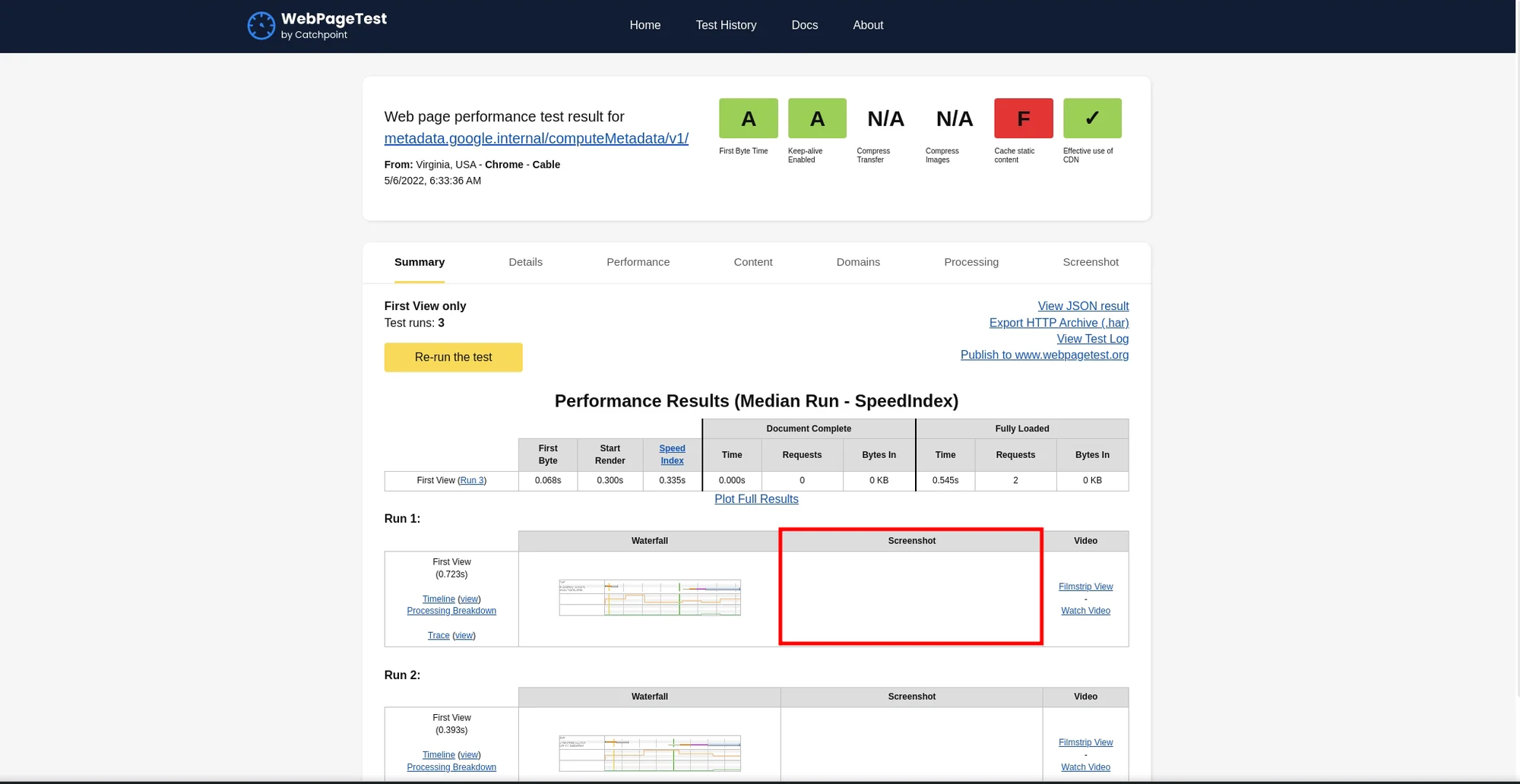
Luckily, the application also provided functionality to add additional headers before starting the web page test. The headers were added and the test started on http://metadata.[redacted]/computeMetadata/v1/. This time it took more than 2-3 minutes to finish, which was exciting, but the result was an empty screenshot.
The cloud metadata idea was abandoned and a few common ports such as 8080, 8125, 80 and 5000 were tried. These produced the same output as the previous port scan attempts, so the researcher stepped away for a break.
Step 4: enumerating metadata endpoints
After 5 days the researcher was hooked on retrieving the Google metadata again. Several other endpoints were tried, including:
/computeMetadata/v1/instance/hostname/computeMetadata/v1/instance/id/computeMetadata/v1/instance/image
The list goes on, and the much useful Cloud Metadata Wordlist Gist was also used. None of these endpoints seemed to work.
A search for "google cloud metadata" returned the official documentation on how to access VM metadata as the first result. While reading it, the following endpoint was mentioned:
/computeMetadata/v1/instance/tags
That endpoint was given to the application for testing and, to the researcher's surprise, it returned output.
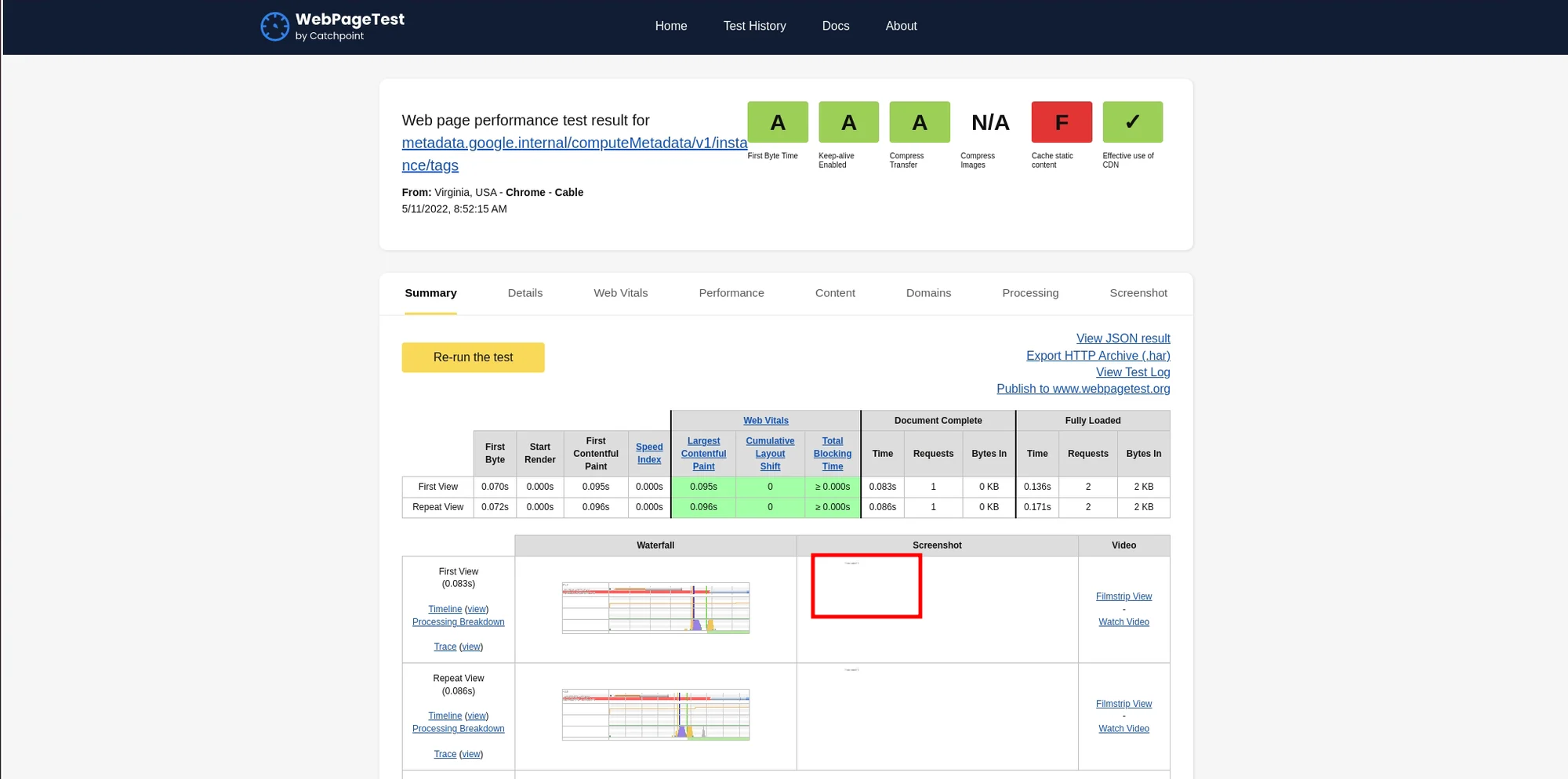
The screenshot quality was really bad, too small to be readable, so another way to view metadata that makes sense was needed.
Step 5: reading the raw HTML through the JSON result
After poking around with different features, a way to view the resulting HTML content was found: clicking the "View JSON result" button. The application then showed the performance metrics and all the other information in JSON format.
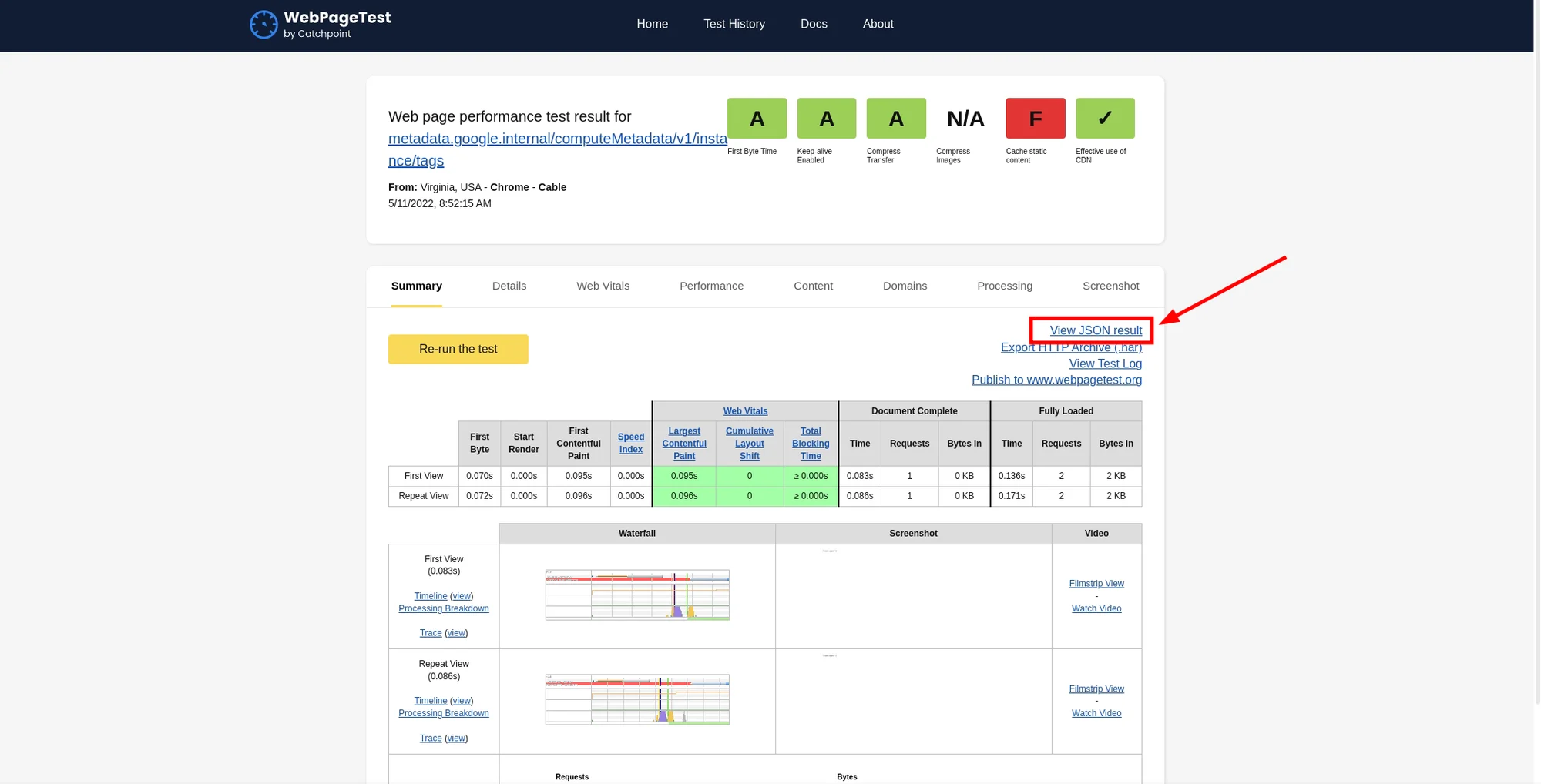
The resulting HTML content was visible in a JSON field called "html".
Step 6: listing the disks
The Cloud Metadata Wordlist Gist was checked again and one endpoint shown in the wordlist had not been tried:
/computeMetadata/v1/instance/disks/?recursive=true
That endpoint was entered quickly and the HTML in the JSON result checked. It successfully listed all the disks.

The finding was reported with all the required pieces of evidence and was accepted.
Step 7: other vulnerable features
The same application offered other functionalities: running a custom testing script, bulk testing, bulk testing using file upload, and so on. All of them were vulnerable to this. The researcher does not explain each of them, but an exploit using a custom testing script looked like this:
addHeader Metadata-Flavor: Google
navigate http://metadata.[redacted]/computeMetadata/v1/instance/disks/?recursive=true
The first line adds the metadata header to the request the script makes, and the second navigates to the disks endpoint with recursive listing enabled, the same endpoint that worked through the UI.
Step 8: SSRF against internal ports
The web application root of another IP showed a search functionality.
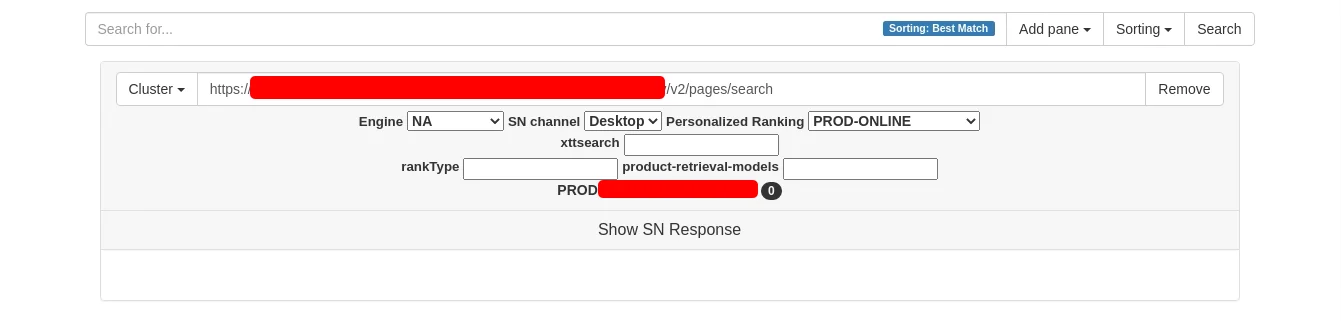
A URL is shown beside the "cluster" drop-down. Changing the cluster dropdown to other options changes the URL. The researcher's best guess is that the cluster switches between dev and prod environments.
Upon searching the string "test", a POST request to the /search endpoint is sent along with a lot of other parameters.
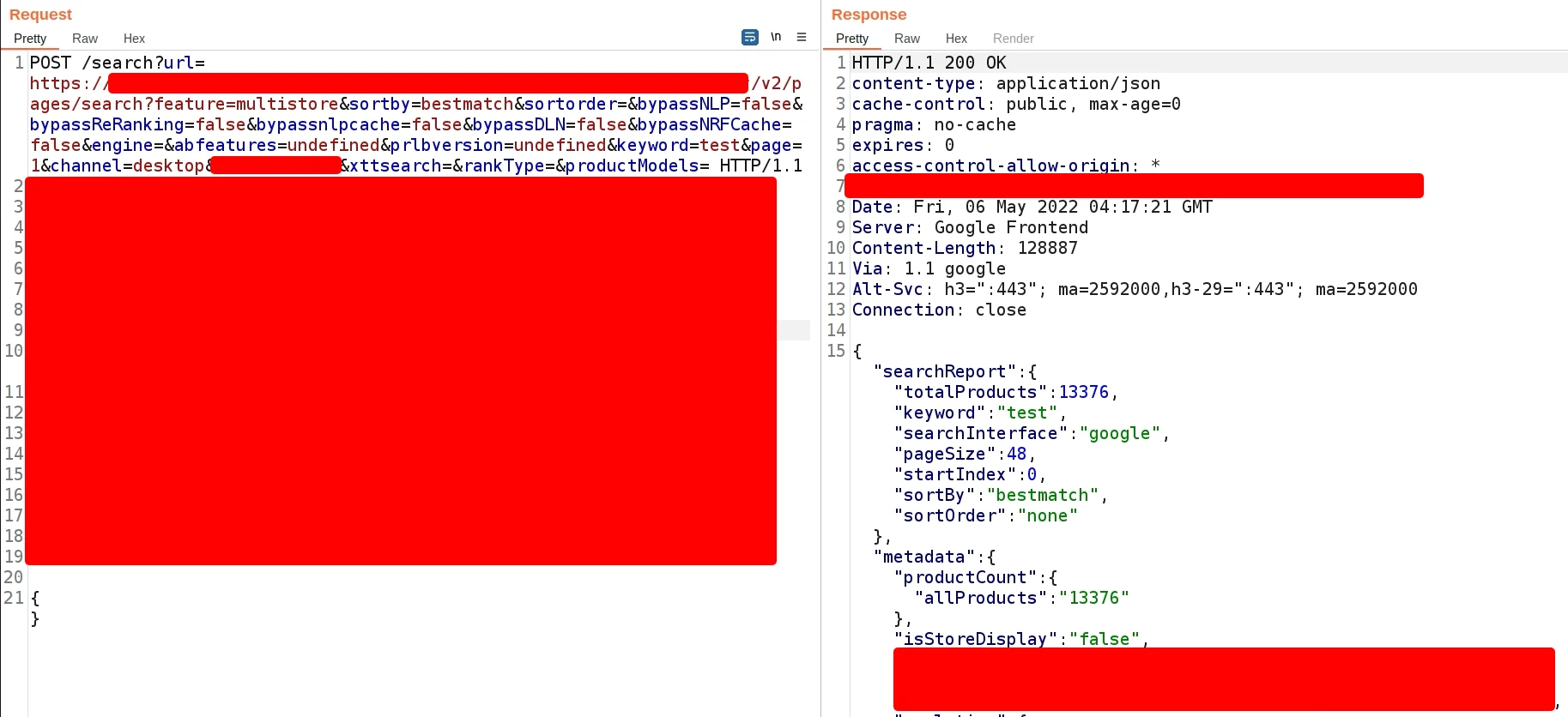
A breakdown of a few crucial parameters:
| Parameter | Explanation |
|---|---|
| url | The URL to which the search request was sent. Changing the cluster using the drop-down changes this URL. |
| sortby | The column/criteria on which the result would be sorted. |
| sortorder | Ascending or descending depending on the value. |
| keyword | The keyword to search in the cluster. |
| page | Used for pagination purposes. |
| storeid | The store identifier in which to search. |
From these parameters, the researcher assumed a sequence like the following might be used by the web application:
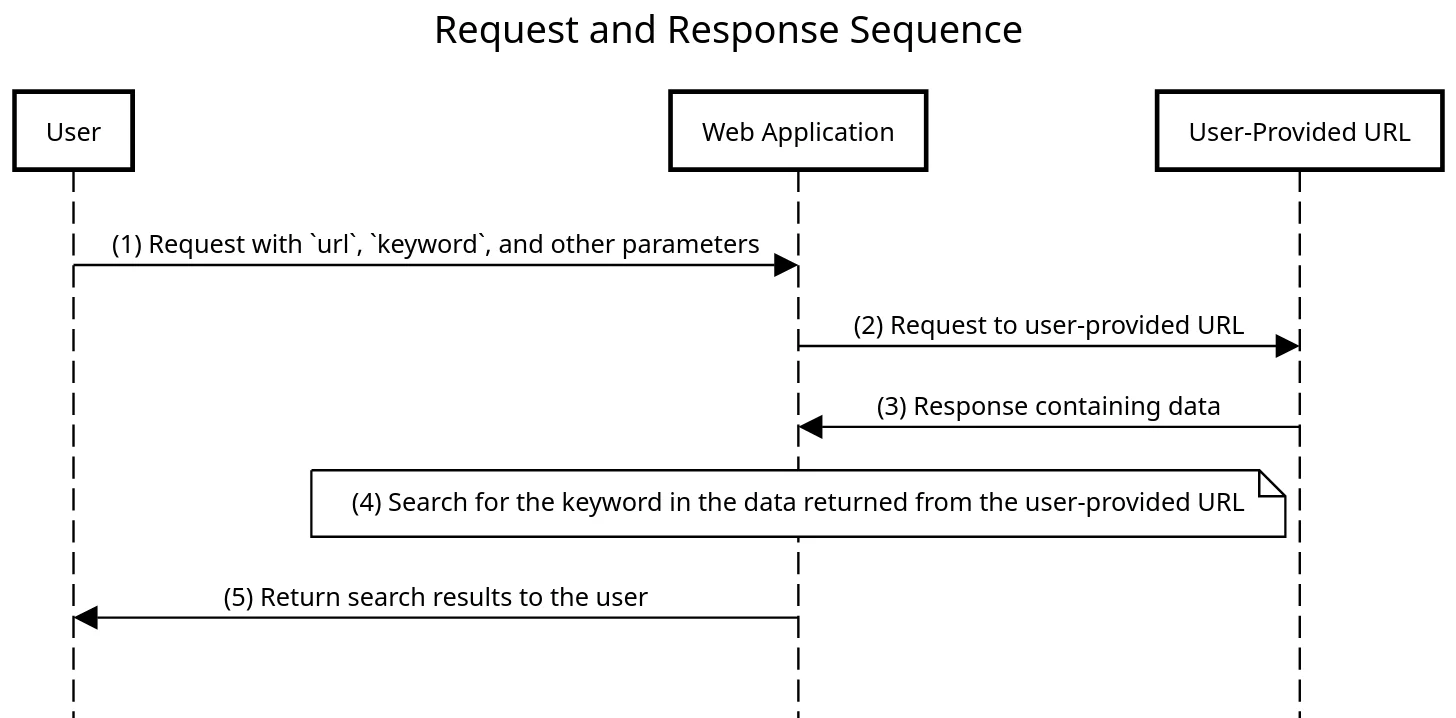
The url parameter immediately looked like an SSRF, but it was set aside while SQL injection was hunted first. All the parameters and all the cluster URLs were tested for SQL injection, but all of them were secure and SQL injection was not possible in any of the clusters.
Back to the SSRF: the url parameter was changed to the TUPoC URL and the server responded with a JSONDecodeError and a detailed stack trace.
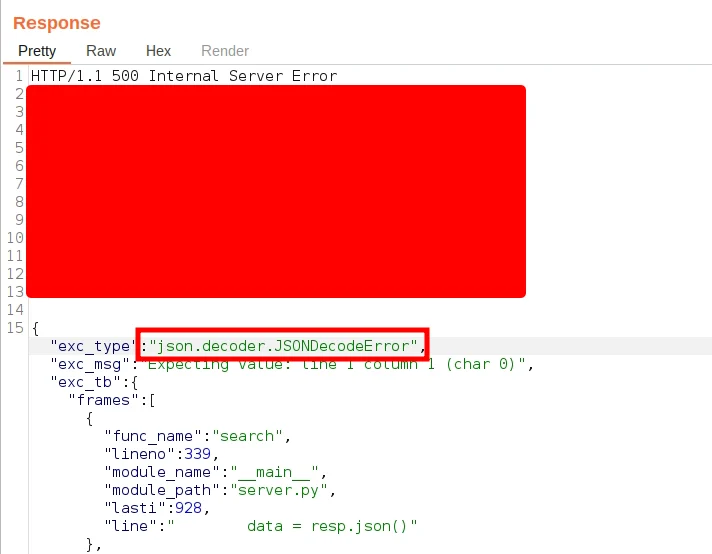
The exception occurs because the web application tries to JSON decode the data returned from the TUPoC URL, but that URL sends normal HTML rather than valid JSON. This verbose error can be used to enumerate open HTTP services on the vulnerable server: if a web service is running on the server it returns some HTML data, the application tries to JSON decode that HTML, and an exception is thrown. That is the enumeration signal.
Step 9: fuzzing the top 5000 ports
The request was sent to Burp Suite Intruder and the url parameter changed to http://[redacted]:§1§, with Intruder run from 1 to 5000 to fuzz the top 5000 ports. Once the attack was complete, port 5000 was found open and running the vulnerable service.
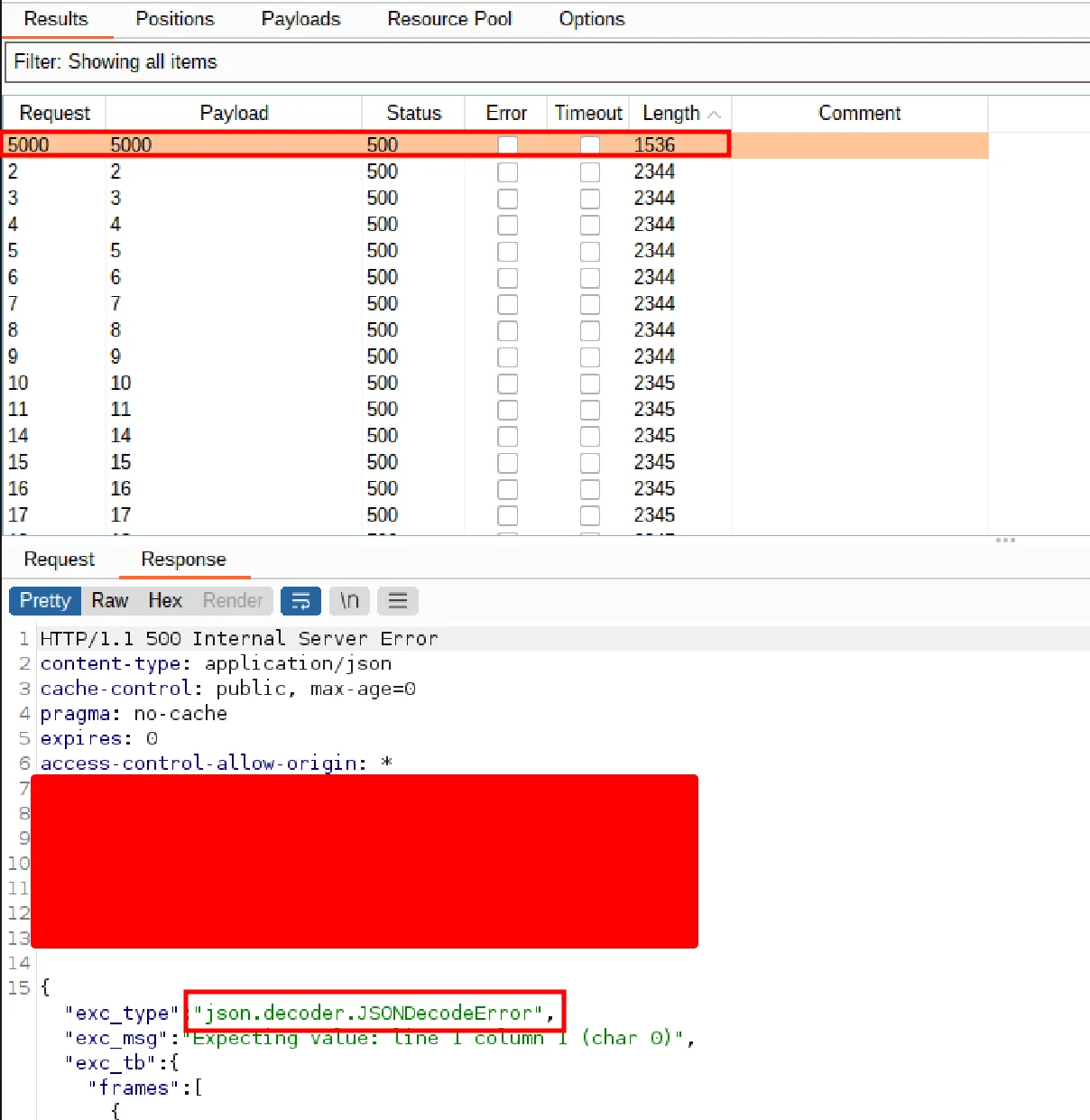
All the other ports returned a ConnectionError exception.
Step 10: the exposed portal
The web root of another host showed some kind of dashboard.
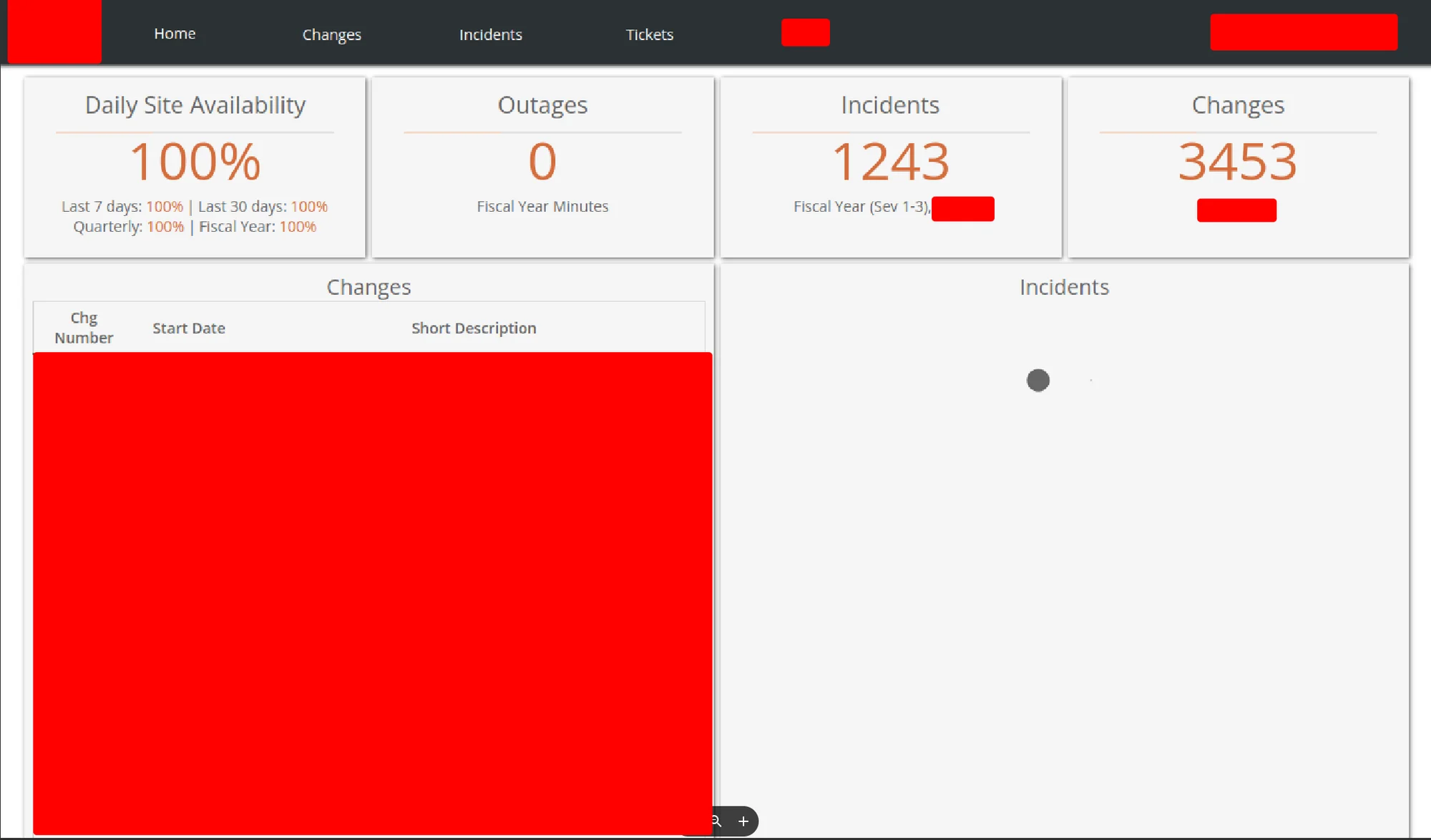
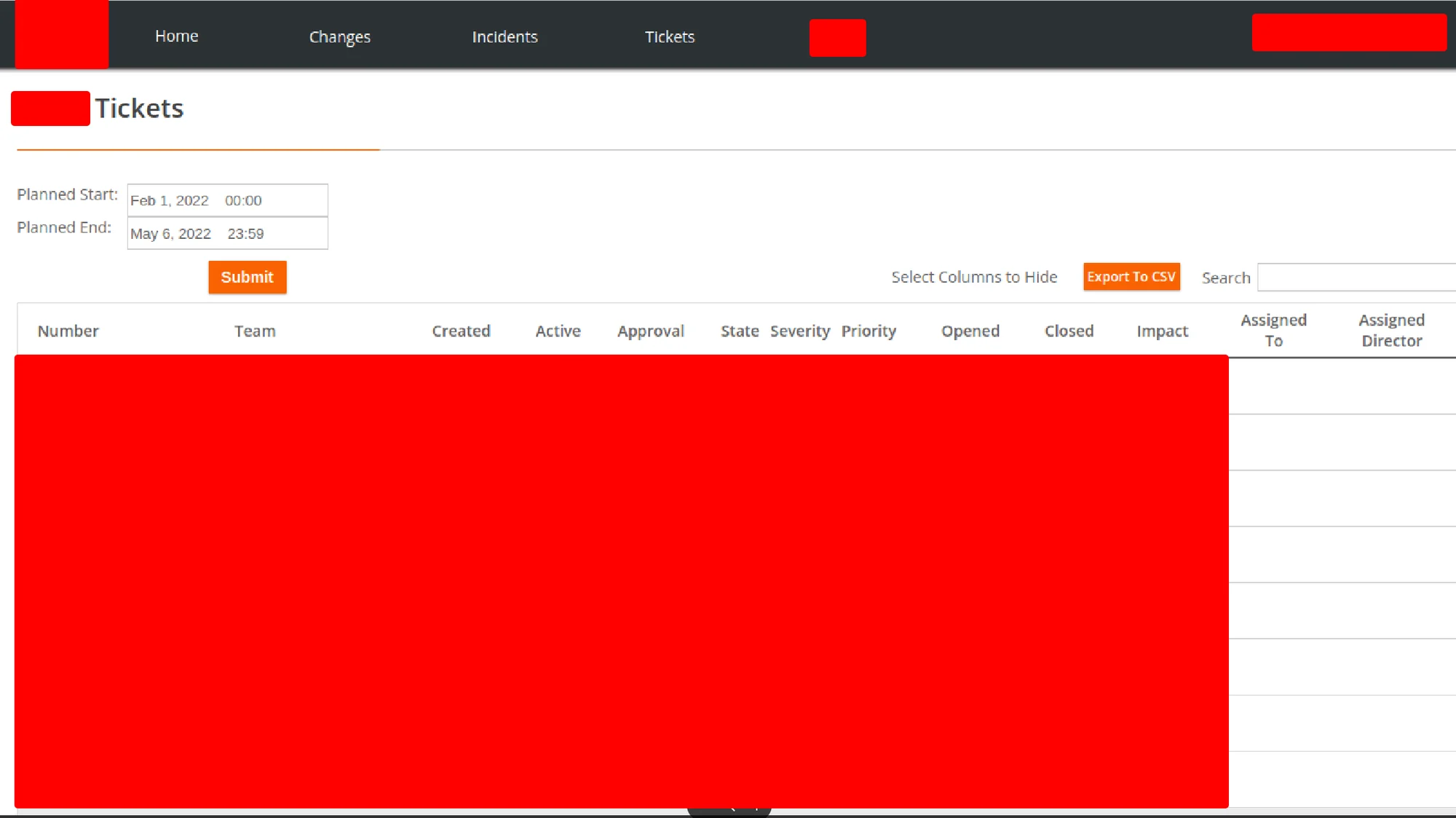
It showed different functionalities such as incidents, tickets and changes. The API was restricting access to some of the functionalities, but only some were protected: most were accessible without any sort of authentication. Through this, all the open tickets could be viewed.
Root cause
The web page test application fetches a user-supplied URL server-side and renders the result, with no restriction on the destination. The same fetch capability is exposed through the custom testing script, bulk testing and bulk testing using file upload features, so the missing restriction is not confined to one entry point. The application also lets the user add arbitrary request headers, which is what makes the GCP metadata endpoint reachable, since it requires the Metadata-Flavor: Google header. The verbose JSONDecodeError with a stack trace, returned when the fetched content is not JSON, turns the same SSRF into a port scanner.
In the search application, the url parameter is taken from the request and used as the destination of the search request, so a user-controlled value decides where the server connects. The SQL injection testing found the parameters and cluster URLs secure, but the SSRF was not blocked.
In the portal, authorisation checks were applied to only some of the API functionalities, leaving the rest reachable without authentication.
Impact
On the web page test application, an attacker could make the server request arbitrary URLs, including the GCP metadata service, and read the responses through the screenshot or the "html" field of the JSON result. With the metadata endpoint reachable, instance metadata such as tags and the list of disks could be retrieved. The same SSRF was present in the custom testing script, bulk testing and bulk testing using file upload features. The researcher notes that arbitrary URL fetching is intended behaviour and only becomes a vulnerability where restricted URLs with sensitive information are reachable.
On the search application, the SSRF allowed enumeration of open HTTP services on the vulnerable server through the difference between a JSONDecodeError (an HTTP service answered) and a ConnectionError (nothing answered), and port 5000 was found running the vulnerable service.
On the portal, most functionalities were accessible without authentication, and all open tickets could be viewed.
Fix
The report does not describe any remediation. Based on the findings, the web page test application should restrict the destinations it will fetch, in particular blocking cloud metadata addresses and localhost, and should not return raw stack traces to the user. The search application should not accept a user-supplied url as the destination of a server-side request. The portal should apply authentication and authorisation checks consistently across all API functionalities, not only some of them.
Variants to test
- Run aquatone across in-scope hosts and look for applications that take a URL and return a screenshot or rendered page. A positive result is a screenshot of a host you supplied, showing the server fetched it.
- Submit
https://[redacted]and common ports (8080, 8125, 80, 5000) to such an application. A positive result is a screenshot or rendered response from a local service rather than a "can't be reached" error. - Add the GCP metadata headers and request
http://metadata.[redacted]/computeMetadata/v1/instance/tags. A positive result is metadata content in the screenshot or in the "html" field of the JSON result. - Try the metadata endpoints from the Cloud Metadata Wordlist Gist, including
/computeMetadata/v1/instance/disks/?recursive=true. A positive result is a listing of disks or other instance data. - Try
file://against/etc/passwd. A positive result is the file contents rendered back. - Look for a custom testing script or bulk testing feature on the same application and use
addHeaderplusnavigateto reach the metadata endpoint. A positive result is the same metadata output through that path. - On applications with a user-controlled
urlparameter, point it at an attacker-controlled endpoint that returns HTML. A positive result is aJSONDecodeErrorwith a stack trace, which indicates the server fetched your URL and tried to parse it. - Fuzz
http://[redacted]:§1§from 1 to 5000 and compareJSONDecodeErroragainstConnectionError. A positive result is a port that returns the decode error, meaning an HTTP service is listening there. - On dashboard or portal applications, request each API functionality without credentials. A positive result is data such as open tickets, incidents or changes returned without authentication.
What happened, in plain words
A security researcher spent a workcation in April 2022 with three hacker friends. During the day they hacked, in the evenings they partied. One day the researcher was telling a friend how easy it was to find bugs on a particular target on the Synack Red Team platform, a place where companies pay researchers to test their systems. The researcher said that simply running a tool called aquatone against the in-scope web servers was enough, without even doing a port scan to discover services on other ports such as 8443 and 8080.
To prove it, the researcher ran httpx across all the in-scope IP addresses to find live web services, then ran aquatone across all of them. Three vulnerabilities came out of that sweep:
| Vulnerability Title | Reward |
|---|---|
| SSRF Allowing To Access Google VM Metadata | $2400 |
| SSRF Allowing To Access Internal Ports | $500 |
| Exposed XXXX Portal Revealing Tickets | $705 |
This article walks through each of them slowly, explaining every idea from scratch. If you can use a browser and a computer, you can follow along.
The tools, explained from zero
Before the findings, a short tour of the words that appear throughout.
- IP address: the numeric address of a computer on a network, like a postal address for machines.
[redacted]is a special address that always means "this same computer", so asking a server to fetch[redacted]is asking it to talk to itself. - Port: a numbered door on a computer. One machine can run many services, each listening on a different port. Web traffic normally uses port 80 (plain HTTP) or 443 (HTTPS), but services also hide on ports like 8080, 8443 or 5000.
- Port scan: trying many ports in turn to see which ones answer. It is like walking down a corridor knocking on every door to find out which rooms are occupied.
- HTTP and HTTPS: the language browsers and servers use to exchange pages. HTTPS is the same conversation with encryption.
- Header: an extra line of information sent along with a web request or response, such as the browser telling the server what kind of content it accepts. Headers are like the label on a parcel: the contents are the body, the label carries instructions.
- API: a way for one program to ask another program for data, without a human clicking anything. Think of a restaurant: the menu is the API, the kitchen is the server, and your order is the request.
- JSON: a simple text format for structured data, made of names and values in curly braces. It is what many APIs send back instead of a web page.
- SSRF (Server-Side Request Forgery): a bug where an application takes a URL from the user and fetches it from the server's own network position. The attacker cannot reach the internal network directly, but the server can, so the attacker borrows the server's access. It is like convincing a building's receptionist to walk into the staff-only room and read you what is on the whiteboard.
- Cloud metadata: cloud providers such as Google Cloud (GCP) run a special internal service on every virtual machine that answers questions about that machine: its name, its tags, its disks. It is reachable only from inside the machine, at a special internal address, and it is a favourite SSRF target because it often contains credentials and configuration.
- localhost: another name for
[redacted], the machine itself. - Burp Suite: a tool for intercepting and editing web traffic. Its Repeater lets you resend one request with changes, and its Intruder lets you send the same request many times with one part swapped each time, which is how fuzzing is done.
- Fuzzing: sending many variations of an input automatically to see which ones produce a different, interesting response.
- TUPoC URL: an attacker-controlled web address used as a test destination. When the vulnerable server fetches it, the researcher can see the request arrive and control what is sent back.
- Stack trace: a debugging message a program prints when it crashes, showing the internal steps that led to the error. Useful to developers, revealing to attackers.
- SQL injection: a bug where user input is pasted into a database query and changes its meaning. Not the subject of the first finding, but it is tested along the way.
- Authentication: proving who you are, usually by logging in. Authorisation is what you are then allowed to do.
Setup
The only tooling described is httpx for live host discovery, aquatone for screenshots, Burp Suite Intruder for fuzzing, and a TUPoC URL used as an attacker-controlled endpoint. No accounts, roles or versions are given. The precondition for the whole hunt is simply that the in-scope IPs expose HTTP services that aquatone can screenshot.
Finding it
What stood out from the aquatone results was a web page test application. Its web root asked for a website URL in order to "start test".
The screenshot shows the web root of the application, which asked for a website URL to start test. The researcher did not know what kind of test the application would perform, so the first input was https://example.com. The application did something for a while and then returned a screenshot of https://example.com along with a lot of other performance metrics.
The application returned a screenshot of example.com with performance metrics. The interesting part was the screenshot: the application had sent a request to https://example.com and returned an image of the result. As the researcher notes, the ability to request arbitrary URLs is the intended behaviour and is not a vulnerability in itself. The vulnerability arises when the application makes requests to restricted URLs, such as cloud metadata URLs or localhost, that do have sensitive information exposed.
That distinction matters. A tool that fetches any URL you give it is doing its job. The bug appears when the same tool will fetch addresses that only the server can reach, and then shows you what it found there.
Exploitation
Step 1: probing localhost
The next input was https://127.0.0.1. The application again did something for a while and returned results, but this time they were disappointing: an error saying "This site can't be reached".
The result showed an error saying "This site can't be reached". The researcher was asking the application to fetch the server's own address. The screenshot shows the error page instead of a rendered site. Either way, the application did try, which is the important part: it is willing to fetch internal addresses.
Step 2: the failed port scan through Intruder
The request was sent to Burp Suite Intruder and a port scan of the top 1000 ports was started, but it took a lot of time. Each test took 2-3 minutes to complete. Even at a best case of 2 minutes per test, 1000 ports would require 2000 minutes, or 33.33 hours. That was the wrong way.
The arithmetic is worth spelling out: one test per port, two minutes each, one thousand ports. That is 2000 minutes, which is 33.33 hours. A port scan through a slow screenshot service is not practical.
To find a workaround, the researcher played with the application's settings and found an option to disable the "tests" that were assumed to take most of the time. The tests were disabled and the attempt repeated, but the 2-3 minute delay remained whether the tests were on or off, so the researcher believes it was some kind of internet or browser issue.
While testing this, a large mess was created. Before a new URL can be submitted for testing, all the old URL tests are supposed to be finished; if they are not finished, the new URL tests stay pending. Since 1000 requests had already been sent for port scanning, further testing could not proceed without waiting 33.33 hours. The researcher wished someone would reboot the server, but the server seemed unused: nobody sent any tests during those 33.33 hours, and checking the old tests showed there were no tests before the ones that had been sent.
This is a useful lesson about shared services: the queue is global, so one person's flood of tests blocks everyone, including the person who caused it.
After two days, all the tests were finished. The results were scraped, all the screenshots found and downloaded. None of the ports were running HTTP services, so even after waiting two days nothing was found.
Step 3: file:// and the first metadata attempts
The file:// protocol was tried to retrieve /etc/passwd, but that also did not work.
A quick explanation: file:// is the address scheme a browser uses to open a file on the local disk instead of a web page. /etc/passwd is a standard file on Linux systems that lists user accounts. If the application had fetched it and shown it back, that would have been a serious information leak. It did not work.
The next idea was to retrieve cloud metadata, which the researcher notes should have been the most obvious choice since the client hosted all their infrastructure on GCP. At the time, however, the focus was on internally exposed services rather than cloud metadata.
To retrieve Google metadata, the http://metadata.[redacted]/computeMetadata/v1/ URL must be requested with two custom headers:
- X-Google-Metadata-Request: True
- Metadata-Flavor: Google
Why headers? Google's metadata service refuses to answer unless the request carries a header proving it was sent deliberately by software that knows the protocol, rather than by a random web page. The header acts like a password written on the envelope.
Luckily, the application also provided functionality to add additional headers before starting the web page test. The headers were added and the test started on http://metadata.[redacted]/computeMetadata/v1/. This time it took more than 2-3 minutes to finish, which was exciting, but the result was an empty screenshot.
The result was an empty screenshot. The longer wait suggested the server had reached something, but the screenshot was blank, so nothing useful could be read.
The cloud metadata idea was abandoned and a few common ports such as 8080, 8125, 80 and 5000 were tried. These produced the same output as the previous port scan attempts, so the researcher stepped away for a break.
Step 4: enumerating metadata endpoints
After 5 days the researcher was hooked on retrieving the Google metadata again. Several other endpoints were tried, including:
/computeMetadata/v1/instance/hostname/computeMetadata/v1/instance/id/computeMetadata/v1/instance/image
An endpoint is one specific address inside a service, like one page of a website. The metadata service has many of them, each answering a different question about the machine.
The list goes on, and the much useful Cloud Metadata Wordlist Gist was also used. None of these endpoints seemed to work.
A wordlist is simply a long list of likely names to try, one after another. It saves you from guessing.
A search for "google cloud metadata" returned the official documentation on how to access VM metadata as the first result. While reading it, the following endpoint was mentioned:
/computeMetadata/v1/instance/tags
That endpoint was given to the application for testing and, to the researcher's surprise, it returned output.
The tags endpoint returned output, but the screenshot was too small to read. Tags are labels attached to a cloud machine.
The screenshot quality was really bad, too small to be readable, so another way to view metadata that makes sense was needed.
Step 5: reading the raw HTML through the JSON result
After poking around with different features, a way to view the resulting HTML content was found: clicking the "View JSON result" button. The application then showed the performance metrics and all the other information in JSON format.
Clicking "View JSON result" showed the performance metrics and other information in JSON format. The resulting HTML content was visible in a JSON field called "html".
In plain words: the screenshot was too small to read, but the same page content was also available as text inside the JSON output, under the name "html". Reading text is far easier than squinting at an image.
Step 6: listing the disks
The Cloud Metadata Wordlist Gist was checked again and one endpoint shown in the wordlist had not been tried:
/computeMetadata/v1/instance/disks/?recursive=true
That endpoint was entered quickly and the HTML in the JSON result checked. It successfully listed all the disks.
The HTML in the JSON result showed the disk listing returned by the metadata service. The ?recursive=true part asks the service to include everything nested inside the answer, not just the top level, like asking for a whole folder tree instead of only the folder names.
The finding was reported with all the required pieces of evidence and was accepted.
Step 7: other vulnerable features
The same application offered other functionalities: running a custom testing script, bulk testing, bulk testing using file upload, and so on. All of them were vulnerable to this. The researcher does not explain each of them, but an exploit using a custom testing script looked like this:
addHeader Metadata-Flavor: Google
navigate http://metadata.[redacted]/computeMetadata/v1/instance/disks/?recursive=true
Line by line:
addHeader Metadata-Flavor: Googletells the testing script to attach the Google metadata header to every request it makes. Without it, the metadata service refuses to answer.navigate http://metadata.[redacted]/computeMetadata/v1/instance/disks/?recursive=truetells the script to visit the disks endpoint, the same one that worked through the user interface.
So the same weakness exists in more than one door of the same house. Fixing only the URL field would not have been enough.
Step 8: SSRF against internal ports
The web application root of another IP showed a search functionality.
The web application root showed a search functionality. A URL is shown beside the "cluster" drop-down. Changing the cluster dropdown to other options changes the URL. The researcher's best guess is that the cluster switches between dev and prod environments.
A cluster here means a group of servers that hold the data being searched. Dev and prod are short for development and production: the test environment and the real one.
Upon searching the string "test", a POST request to the /search endpoint is sent along with a lot of other parameters.
Upon searching "test", a POST request to the /search endpoint is sent with many parameters. A POST request is one that carries data in its body, as opposed to a GET request that puts everything in the address. Parameters are the named values in that body.
A breakdown of a few crucial parameters:
| Parameter | Explanation |
|---|---|
| url | The URL to which the search request was sent. Changing the cluster using the drop-down changes this URL. |
| sortby | The column/criteria on which the result would be sorted. |
| sortorder | Ascending or descending depending on the value. |
| keyword | The keyword to search in the cluster. |
| page | Used for pagination purposes. |
| storeid | The store identifier in which to search. |
Pagination means splitting results into pages, so page says which page you want.
From these parameters, the researcher assumed a sequence like the following might be used by the web application:
From the parameters, the researcher assumed a sequence like this might be used by the web application. The key point is that the application, not the browser, makes the second request. That is exactly the shape of an SSRF.
The url parameter immediately looked like an SSRF, but it was set aside while SQL injection was hunted first. All the parameters and all the cluster URLs were tested for SQL injection, but all of them were secure and SQL injection was not possible in any of the clusters.
All the parameters and cluster URLs were tested for SQL injection, but all were secure.
Back to the SSRF: the url parameter was changed to the TUPoC URL and the server responded with a JSONDecodeError and a detailed stack trace.
The server responded with a JSONDecodeError and a detailed stack trace. The exception occurs because the web application tries to JSON decode the data returned from the TUPoC URL, but that URL sends normal HTML rather than valid JSON. This verbose error can be used to enumerate open HTTP services on the vulnerable server: if a web service is running on the server it returns some HTML data, the application tries to JSON decode that HTML, and an exception is thrown. That is the enumeration signal.
In everyday terms: the application expects a parcel containing a form, and you sent a parcel containing a letter. It complains loudly about the wrong contents, and that complaint tells you the parcel arrived at all.
Step 9: fuzzing the top 5000 ports
The request was sent to Burp Suite Intruder and the url parameter changed to http://[redacted]:§1§, with Intruder run from 1 to 5000 to fuzz the top 5000 ports. Once the attack was complete, port 5000 was found open and running the vulnerable service.
Port 5000 was found open and running the vulnerable service. The §1§ markers are Intruder's way of saying "put the next value from the list here". Each run replaces them with a number from 1 to 5000, so the application is asked to fetch http://[redacted]:1, then http://[redacted]:2, and so on.
All the other ports returned a ConnectionError exception.
So the two error types become a map: JSONDecodeError means something answered with a web page, ConnectionError means nothing was there. Port 5000 answered.
Step 10: the exposed portal
The web root of another host showed some kind of dashboard.
The web root of the host showed some kind of dashboard. It showed different functionalities such as incidents, tickets and changes. The API was restricting access to some of the functionalities, but only some were protected: most were accessible without any sort of authentication. Through this, all the open tickets could be viewed.
All the open tickets could be viewed. In plain words: the portal had a lock on some doors and no lock at all on most of them. Anyone who knew the address could read the tickets.
Root cause
The web page test application fetches a user-supplied URL server-side and renders the result, with no restriction on the destination. The same fetch capability is exposed through the custom testing script, bulk testing and bulk testing using file upload features, so the missing restriction is not confined to one entry point. The application also lets the user add arbitrary request headers, which is what makes the GCP metadata endpoint reachable, since it requires the Metadata-Flavor: Google header. The verbose JSONDecodeError with a stack trace, returned when the fetched content is not JSON, turns the same SSRF into a port scanner.
In the search application, the url parameter is taken from the request and used as the destination of the search request, so a user-controlled value decides where the server connects. The SQL injection testing found the parameters and cluster URLs secure, but the SSRF was not blocked.
In the portal, authorisation checks were applied to only some of the API functionalities, leaving the rest reachable without authentication.
Impact
On the web page test application, an attacker could make the server request arbitrary URLs, including the GCP metadata service, and read the responses through the screenshot or the "html" field of the JSON result. With the metadata endpoint reachable, instance metadata such as tags and the list of disks could be retrieved. The same SSRF was present in the custom testing script, bulk testing and bulk testing using file upload features. The researcher notes that arbitrary URL fetching is intended behaviour and only becomes a vulnerability where restricted URLs with sensitive information are reachable.
On the search application, the SSRF allowed enumeration of open HTTP services on the vulnerable server through the difference between a JSONDecodeError (an HTTP service answered) and a ConnectionError (nothing answered), and port 5000 was found running the vulnerable service.
On the portal, most functionalities were accessible without authentication, and all open tickets could be viewed.
Fix
The report does not describe any remediation. Based on the findings, the web page test application should restrict the destinations it will fetch, in particular blocking cloud metadata addresses and localhost, and should not return raw stack traces to the user. The search application should not accept a user-supplied url as the destination of a server-side request. The portal should apply authentication and authorisation checks consistently across all API functionalities, not only some of them.
Variants to test
- Run aquatone across in-scope hosts and look for applications that take a URL and return a screenshot or rendered page. A positive result is a screenshot of a host you supplied, showing the server fetched it.
- Submit
https://[redacted]and common ports (8080, 8125, 80, 5000) to such an application. A positive result is a screenshot or rendered response from a local service rather than a "can't be reached" error. - Add the GCP metadata headers and request
http://metadata.[redacted]/computeMetadata/v1/instance/tags. A positive result is metadata content in the screenshot or in the "html" field of the JSON result. - Try the metadata endpoints from the Cloud Metadata Wordlist Gist, including
/computeMetadata/v1/instance/disks/?recursive=true. A positive result is a listing of disks or other instance data. - Try
file://against/etc/passwd. A positive result is the file contents rendered back. - Look for a custom testing script or bulk testing feature on the same application and use
addHeaderplusnavigateto reach the metadata endpoint. A positive result is the same metadata output through that path. - On applications with a user-controlled
urlparameter, point it at an attacker-controlled endpoint that returns HTML. A positive result is aJSONDecodeErrorwith a stack trace, which indicates the server fetched your URL and tried to parse it. - Fuzz
http://[redacted]:§1§from 1 to 5000 and compareJSONDecodeErroragainstConnectionError. A positive result is a port that returns the decode error, meaning an HTTP service is listening there. - On dashboard or portal applications, request each API functionality without credentials. A positive result is data such as open tickets, incidents or changes returned without authentication.
Takeaways
- Collaborate with like-minded people.
- Do not give up if your way of exploiting does not work. Take a break and try again.
- Hacking is not as easy as it looks. Sometimes the researcher hacks for more than 12 hours without finding a vulnerability or even something to play with, and sometimes a simple tool like aquatone turns up several bugs.
- Take vacations and holidays.
Glossary
- Aquatone: a tool that visits many web hosts and takes screenshots of what it finds, so you can scan the results visually.
- Authorisation: what an authenticated (or unauthenticated) user is allowed to do.
- Burp Suite: a tool for intercepting, editing and replaying web traffic.
- Cluster: a group of servers that hold the data being searched; here, likely a development or production environment.
- Cloud metadata: an internal service on a cloud machine that answers questions about that machine, such as its name, tags and disks.
- ConnectionError: an error meaning nothing answered at the address that was contacted.
- Endpoint: one specific address inside a service, like one page of a website.
- GCP: Google Cloud Platform, Google's cloud computing service.
- Header: an extra line of information sent with a web request or response.
- HTML: the language web pages are written in.
- HTTP / HTTPS: the language browsers and servers use to exchange pages; HTTPS is the encrypted version.
- httpx: a tool that probes many hosts quickly to find which ones serve web pages.
- Intruder: the part of Burp Suite that sends the same request many times with one part swapped each time.
- IP address: the numeric address of a computer on a network.
- JSON: a simple text format for structured data, made of names and values.
- JSONDecodeError: an error raised when a program tries to read text as JSON and the text is not valid JSON.
- localhost: another name for
[redacted], meaning the machine itself. - Pagination: splitting results into pages so they can be browsed one page at a time.
- Parameter: a named value sent with a request, such as
keywordorpage. - Port: a numbered door on a computer where a service listens.
- POST request: a request that carries data in its body rather than in the address.
- Repeater: the part of Burp Suite that lets you resend one request with changes.
- SSRF (Server-Side Request Forgery): a bug where an application fetches a URL chosen by the user from the server's own network position.
- Stack trace: a debugging message printed when a program crashes, showing the internal steps that led to the error.
- Wordlist: a long list of likely names to try, one after another.