Host Header Injection to Complete Organization takeover
The application trusted the X-Forwarded-Host header, causing server-side requests to an attacker-controlled host that included the user's cookies and asked for authorization data. By responding with a modified JSON field, the attacker escalated to admin and then created a new admin user, leading to organisation takeover.
 Published on medium.com
By changing the X-Forwarded-Host value to an attacker-controlled server, I was able to perform SSRF. In the SSRF requests authentication and authorization of a user was happening.
The full write-up lives on its author's site
It belongs to its author, so we link to it rather than copy it. The other two tabs are our own rewrites, checked against it.
Context
The target was a subdomain of a private bug bounty program, referred to throughout as abc.victim.com. The site at https://abc.victim.com/ is an application where, on every visit, the backend decides whether the user is authentic and which authorization permissions should be granted to that user. To make that decision, the server initiates different HTTP requests and assigns permissions according to the responses it receives. That request-and-response permission check is the feature at the centre of this write-up.
The chain described here has three stages: a Host header injection that turns into SSRF, the SSRF being used to escalate a low-privileged account to an admin, and a flawed 'add a new user' feature that allows a new admin to be created, ending in takeover of the victim's organization.
Setup
The testing was done against a private program, on a subdomain the author calls abc.victim.com. The tools used were Burp Suite (including Burp Collaborator) and a Node.js server controlled by the researcher, referred to as attacker.com. The author describes the attacker as having low privileges on the application. No versions or specific configurations are given in the report.
Finding it
The author tested https://abc.victim.com/ for Host Header Injection by adding an X-Forwarded-Host header:
X-Forwarded-Host: a.com
The response to that request was 500 Internal Server Error. That error was the signal that the header was somehow affecting the server. To see where the server was sending requests, the author replaced the value with a Burp Collaborator payload:
X-Forwarded-Host: {burp-collaborator.com}
After sending the request, Burp Collaborator received multiple requests originating from the abc.victim.com server. Two things stood out: the requests contained the cookies from the request whose Host header had been injected, and they were asking the Collaborator for the authorization level that should be assigned to the user.
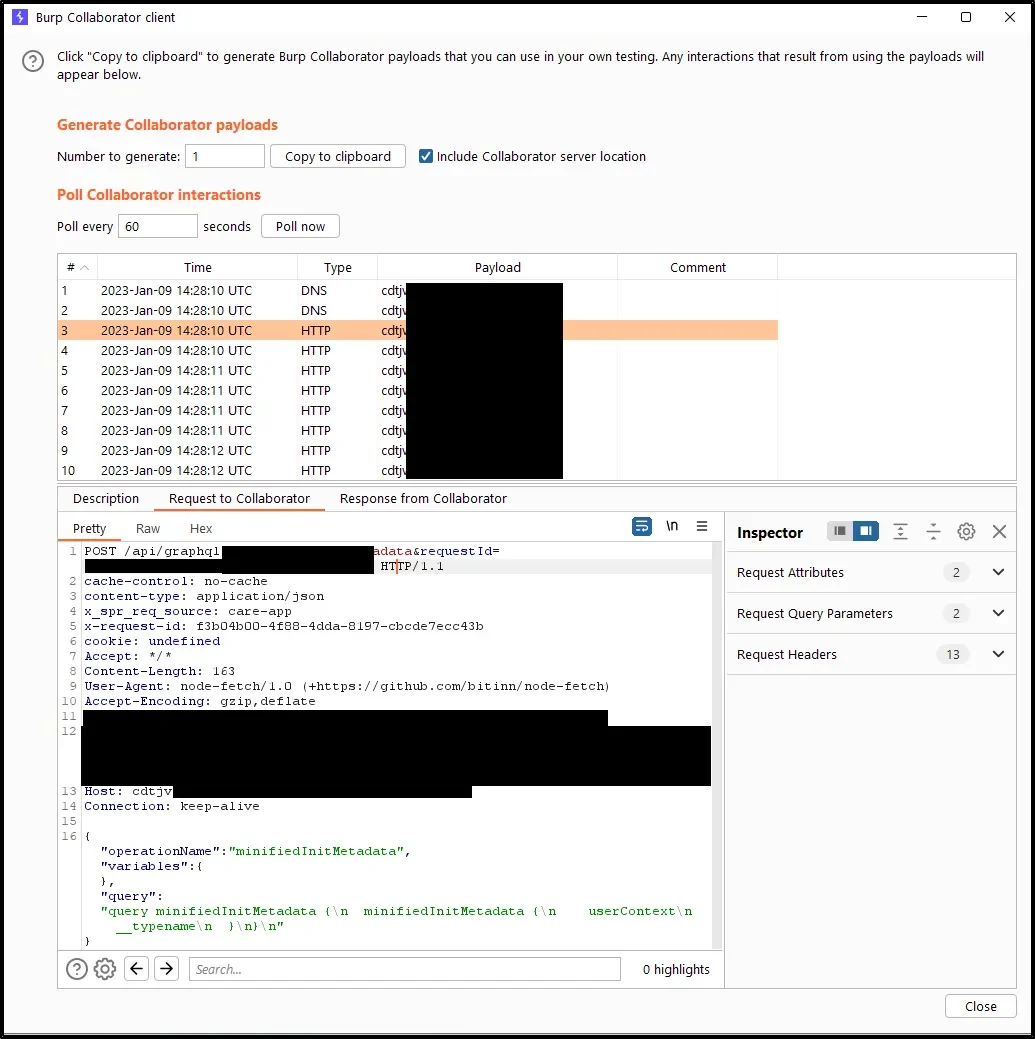
Exploitation
Step 1: Turn the header injection into SSRF
Because the server was making outbound requests to whatever host was placed in X-Forwarded-Host, and those requests carried the user's cookies and asked for the user's authorization level, the author could answer them. To do that, the author used a server under their control, attacker.com, and pointed the header at it:
X-Forwarded-Host: attacker.com
The normal flow and the attack flow are illustrated below.
Normal flow:
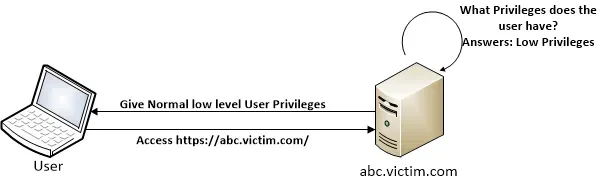
Attack flow:

Step 2: Learn the responses the server expects
To know what to answer, the author collected all the requests that arrived at Burp Collaborator and replayed the same requests against abc.victim.com in Burp Suite. abc.victim.com responded to those requests by returning the data. The author then programmed the Node.js server to respond with the same responses.
With that in place, accessing https://abc.victim.com/ with X-Forwarded-Host: attacker.com allowed the author to log into their own account, and the server no longer returned 500 Internal Server Error.
Step 3: Escalate to admin by editing the authorization response
Among the requests received on Burp Collaborator, one had a response with a JSON body containing the field:
"type": "user"
The author changed the value to:
"type": "admin"
and programmed attacker.com so that it would return the edited response to abc.victim.com.
Accessing https://abc.victim.com/ with X-Forwarded-Host: attacker.com then logged the author in as a high-privileged admin. Browsing the site as that admin, the author could read highly sensitive data, but could not add or update any data.
Step 4: Create a new admin through the flawed user feature
While surfing the site as an admin, the author came upon the 'add a new user' feature, whose logic was flawed. When a new user was created, the server returned a 403 Forbidden response, but a new user was created anyway. Using this, the author could create a new admin. The new admin had high privileges, so as an attacker the author was able to add a new admin, by which the victim's organization could be taken over.

Root cause
The application used the client-supplied X-Forwarded-Host value when making the requests it uses for authentication and authorization. Because the value was attacker-controlled, the server sent those requests, including the user's cookies, to an arbitrary host. The server then trusted the responses from that host to decide the user's permissions. The authorization decision was therefore delegated to an external party that the attacker could impersonate. The 500 Internal Server Error on the first test showed the header was somehow affecting the server.
The second flaw is in the 'add a new user' feature: the server returned 403 Forbidden while still creating the user, so the response did not reflect what the backend had actually done.
Impact
An attacker with a low-privileged account could escalate to a high-privileged admin and read highly sensitive data. The admin session could not add or update data directly, but the flawed 'add a new user' feature allowed the attacker to create a new admin account, which the author states allows takeover of the victim's organization.
Fix
The report does not describe any fix that was applied. To prevent this class of issue, the application should not derive the destination of its authentication and authorization requests from a client-supplied header such as X-Forwarded-Host; those destinations should be fixed in configuration. Where a forwarded-host header must be honoured, it should be validated against an allowlist of trusted hosts. The 'add a new user' endpoint should also return a response that matches the action actually performed, rather than returning 403 Forbidden after creating the user.
Variants to test
- Send
X-Forwarded-Host,X-Forwarded-For,ForwardedandHostwith a Collaborator payload on other subdomains and observe whether the target server makes outbound requests to the Collaborator. A positive result is any interaction arriving from the target's infrastructure. - Check whether the outbound requests carry session cookies or authorization headers. A positive result is cookies or tokens appearing in the Collaborator interactions.
- Replay the captured requests against the target and inspect the responses for JSON fields that describe the user's role or permissions, such as
"type",roleorisAdmin. A positive result is a field whose value can be changed to a higher privilege level. - Serve the modified response from a controlled server and check whether the application grants the elevated role. A positive result is access to admin-only pages or data.
- Test user-creation and similar state-changing endpoints for responses that do not match the action performed, such as a
403followed by a created account. A positive result is a new account existing despite the error response.
What happened, in plain words
A website had a feature that decided, on every visit, what you were allowed to see and do. To make that decision, the website's own server quietly asked another computer a question: "what permission level should this user get?" The problem was that the website let the visitor choose which computer to ask. By pointing that question at a server they controlled, the researcher could answer it themselves and say "this user is an admin". That gave them admin-level reading access. They still could not change anything, but they found a second bug in the 'add a new user' feature: it said the request had failed while actually creating the account. Combining the two, they created a brand new admin account and could take over the organisation.
This article walks through the whole chain from zero. You only need to know how to use a browser. Every technical term is explained the first time it appears, and there is a glossary at the end.
Some background first
What a server and a request are
When you type an address into your browser, your browser sends a message to a computer somewhere else, called a server. That message is called a request, and the server's reply is called a response. Think of it like posting a letter with a question in it and getting an answer back.
What a header is
Every request carries extra labels alongside the address, a bit like the fields on the outside of an envelope: who it is for, what kind of content it carries, and so on. These labels are called headers. Each header has a name and a value, written as Name: value.
What a cookie is
A cookie is a small piece of text that a website asks your browser to store and send back with every request. It is how the site remembers that you are logged in. If someone else gets your cookie, they can often act as you, which is why cookies are sensitive. A session cookie specifically identifies your current logged-in session.
What an API is
An API is a way for one piece of software to talk to another. Instead of a human clicking buttons, one program sends a request to another program and gets structured data back. Many websites are built from several internal services that talk to each other through APIs. In this story, the website's server talks to another service through an API to ask what permissions a user should have.
What JSON is
JSON is a simple text format for structured data. It looks like {"name": "value"}. Programs use it to send information to each other in a way both sides can read. You will see a JSON snippet later where a field describes the user's role.
What the vulnerability classes mean
Host Header Injection is when a website takes a header that is supposed to describe the destination (the host) and trusts whatever value a visitor puts there, instead of only accepting values it controls. If the site then uses that value to decide where to send requests, an attacker can redirect those requests.
SSRF, short for Server-Side Request Forgery, is when an attacker can make a server send a request to a destination the attacker chooses. The server is doing the fetching, not the attacker's browser, so the attacker can reach places the browser could not, or make the server talk to the attacker's own machine.
Privilege escalation means going from a lower level of access to a higher one, for example from a normal user to an administrator.
The target and the feature
The target was a subdomain of a private bug bounty program, referred to throughout as abc.victim.com. A bug bounty program is a scheme where an organisation invites security researchers to look for problems in its systems and report them, sometimes for a reward.
The site at https://abc.victim.com/ is an application where, on every visit, the backend decides whether the user is authentic and which authorization permissions should be granted to that user. Authentication means proving who you are (logging in). Authorization means deciding what you are allowed to do once you are known. To make that decision, the server initiates different HTTP requests and assigns permissions according to the responses it receives. That request-and-response permission check is the feature at the centre of this write-up.
The chain described here has three stages: a Host header injection that turns into SSRF, the SSRF being used to escalate a low-privileged account to an admin, and a flawed 'add a new user' feature that allows a new admin to be created, ending in takeover of the victim's organization.
The tools used
The testing was done against a private program, on a subdomain the author calls abc.victim.com. The tools used were Burp Suite (including Burp Collaborator) and a Node.js server controlled by the researcher, referred to as attacker.com. The author describes the attacker as having low privileges on the application. No versions or specific configurations are given in the report.
A few of those need explaining:
- Burp Suite is a tool that sits between your browser and a website so you can look at, and change, the requests and responses. It is like an inspector for the letters you post.
- Burp Collaborator is a service that gives you a unique address you can put into a request. If anything ever contacts that address, Collaborator records it. It is a way of detecting whether a server is making requests to a place you chose.
- Node.js is a way of running JavaScript programs outside a browser, commonly used to build small web servers. The researcher used it to build a server that would answer the target's requests.
Finding it
The author tested https://abc.victim.com/ for Host Header Injection by adding an X-Forwarded-Host header:
X-Forwarded-Host: a.com
Line by line: X-Forwarded-Host is a header name. It is meant to tell a server the original host that a request was addressed to, which is useful when a request passes through a proxy or load balancer. Here the researcher set its value to a.com, a host they do not control, just to see what the server would do with it.
The response to that request was 500 Internal Server Error. A 500 Internal Server Error is a standard HTTP status code meaning the server hit an unexpected problem while handling the request. That error was the signal that the header was somehow affecting the server: if the header were simply ignored, the page would have loaded normally. The error told the researcher that the value was reaching code that used it.
To see where the server was sending requests, the author replaced the value with a Burp Collaborator payload:
X-Forwarded-Host: {burp-collaborator.com}
Line by line: the header name is the same. The value is now the unique address that Burp Collaborator gave the researcher. If the server takes this value and makes a request to it, Collaborator will record that contact, and the researcher will know the server is fetching from an address they supplied.
After sending the request, Burp Collaborator received multiple requests originating from the abc.victim.com server. Two things stood out: the requests contained the cookies from the request whose Host header had been injected, and they were asking the Collaborator for the authorization level that should be assigned to the user.
This is the key moment. The server was not just contacting an arbitrary address; it was sending along the user's cookies and asking that address to decide the user's permissions. In other words, the website had handed the permission decision to whoever controlled the address in the header.
Exploitation
Step 1: Turn the header injection into SSRF
Because the server was making outbound requests to whatever host was placed in X-Forwarded-Host, and those requests carried the user's cookies and asked for the user's authorization level, the author could answer them. To do that, the author used a server under their control, attacker.com, and pointed the header at it:
X-Forwarded-Host: attacker.com
Line by line: the header name is unchanged. The value is now the researcher's own server. From this point on, whenever the target server needs to ask "what permissions does this user have?", it will ask attacker.com instead of its own trusted service, and the researcher can reply with whatever they like.
The normal flow and the attack flow are illustrated below.
Normal flow:
Attack flow:
Step 2: Learn the responses the server expects
To know what to answer, the author collected all the requests that arrived at Burp Collaborator and replayed the same requests against abc.victim.com in Burp Suite. abc.victim.com responded to those requests by returning the data. The author then programmed the Node.js server to respond with the same responses.
Why this step matters: to impersonate the trusted service convincingly, the researcher first had to learn what a real answer looks like. By sending the captured requests back to the real site, they could see the genuine responses, then copy them. It is like learning the exact wording of a form letter so you can produce a convincing fake.
With that in place, accessing https://abc.victim.com/ with X-Forwarded-Host: attacker.com allowed the author to log into their own account, and the server no longer returned 500 Internal Server Error. The absence of the error was a sign that the fake answers were well-formed enough for the site to accept them.
Step 3: Escalate to admin by editing the authorization response
Among the requests received on Burp Collaborator, one had a response with a JSON body containing the field:
"type": "user"
Line by line: this is a fragment of JSON. type is the name of a field, and user is its value. It is the trusted service telling the site that this person is an ordinary user, not an administrator.
The author changed the value to:
"type": "admin"
Line by line: the field name is the same, but the value is now admin. This is the researcher's fake answer claiming the user is an administrator.
and programmed attacker.com so that it would return the edited response to abc.victim.com.
Accessing https://abc.victim.com/ with X-Forwarded-Host: attacker.com then logged the author in as a high-privileged admin. Browsing the site as that admin, the author could read highly sensitive data, but could not add or update any data.
So the escalation worked for reading, but not for writing. That is why a second bug was needed.
Step 4: Create a new admin through the flawed user feature
While surfing the site as an admin, the author came upon the 'add a new user' feature, whose logic was flawed. When a new user was created, the server returned a 403 Forbidden response, but a new user was created anyway. Using this, the author could create a new admin. The new admin had high privileges, so as an attacker the author was able to add a new admin, by which the victim's organization could be taken over.
A 403 Forbidden status code normally means the server refused to do what was asked. Here the message and the action disagreed: the server said no while quietly doing it. This is a logic flaw, because the response did not reflect what the backend had actually done.
Root cause
The application used the client-supplied X-Forwarded-Host value when making the requests it uses for authentication and authorization. Because the value was attacker-controlled, the server sent those requests, including the user's cookies, to an arbitrary host. The server then trusted the responses from that host to decide the user's permissions. The authorization decision was therefore delegated to an external party that the attacker could impersonate. The 500 Internal Server Error on the first test showed the header was somehow affecting the server.
The second flaw is in the 'add a new user' feature: the server returned 403 Forbidden while still creating the user, so the response did not reflect what the backend had actually done.
Impact
An attacker with a low-privileged account could escalate to a high-privileged admin and read highly sensitive data. The admin session could not add or update data directly, but the flawed 'add a new user' feature allowed the attacker to create a new admin account, which the author states allows takeover of the victim's organization.
Fix
The report does not describe any fix that was applied. To prevent this class of issue, the application should not derive the destination of its authentication and authorization requests from a client-supplied header such as X-Forwarded-Host; those destinations should be fixed in configuration. Where a forwarded-host header must be honoured, it should be validated against an allowlist of trusted hosts. An allowlist is a list of values that are explicitly permitted, with everything else rejected. The 'add a new user' endpoint should also return a response that matches the action actually performed, rather than returning 403 Forbidden after creating the user.
Variants to test
If you want to look for similar problems, these are checks worth trying:
- Send
X-Forwarded-Host,X-Forwarded-For,ForwardedandHostwith a Collaborator payload on other subdomains and observe whether the target server makes outbound requests to the Collaborator. A positive result is any interaction arriving from the target's infrastructure. - Check whether the outbound requests carry session cookies or authorization headers. A positive result is cookies or tokens appearing in the Collaborator interactions.
- Replay the captured requests against the target and inspect the responses for JSON fields that describe the user's role or permissions, such as
"type",roleorisAdmin. A positive result is a field whose value can be changed to a higher privilege level. - Serve the modified response from a controlled server and check whether the application grants the elevated role. A positive result is access to admin-only pages or data.
- Test user-creation and similar state-changing endpoints for responses that do not match the action performed, such as a
403followed by a created account. A positive result is a new account existing despite the error response.
Glossary
- API: a way for one piece of software to talk to another, sending requests and receiving structured data back.
- Allowlist: a list of values that are explicitly permitted, with everything else rejected.
- Authentication: the process of proving who you are, such as logging in.
- Authorization: the process of deciding what a known user is allowed to do.
- Bug bounty program: a scheme where an organisation invites researchers to find and report security problems, sometimes for a reward.
- Burp Collaborator: a service that provides a unique address and records any contact made to it, used to detect outbound requests from a server.
- Burp Suite: a tool that sits between a browser and a website so requests and responses can be inspected and modified.
- Cookie: a small piece of text a website asks your browser to store and send back with each request, often used to keep you logged in.
- Header: an extra label on a request or response, written as
Name: value, carrying information such as the destination or content type. - Host Header Injection: a flaw where a website trusts a client-supplied header describing the destination host and uses it in ways it should not.
- JSON: a simple text format for structured data, written as
{"name": "value"}. - Node.js: a way of running JavaScript programs outside a browser, often used to build small web servers.
- Privilege escalation: going from a lower level of access to a higher one, for example from a normal user to an administrator.
- Request: a message a browser or program sends to a server asking for something.
- Response: the server's reply to a request.
- Server: a computer that answers requests from browsers and other programs.
- Session cookie: a cookie that identifies your current logged-in session.
- SSRF (Server-Side Request Forgery): a flaw where an attacker can make a server send a request to a destination the attacker chooses.
- Status code: a number in a response saying how the request went, such as
500 Internal Server Erroror403 Forbidden. - 500 Internal Server Error: a status code meaning the server hit an unexpected problem while handling the request.
- 403 Forbidden: a status code meaning the server refused to do what was asked.



