How a company killed its users with no way for recovery.
The platform used long-lived JWT session tokens stored insecurely, and neither logging out nor changing the password invalidated them. An attacker who obtained a token could keep using the account for up to 95 days, and the user had no way to revoke access.

medium.com
Published on medium.com
Cybersecurity
The full write-up lives on its author's site
It belongs to its author, so we link to it rather than copy it. The other two tabs are our own rewrites, checked against it.
Context
The target was a shopping platform that let merchants create and run their own stores, with the usual shopping features on top. The author describes the work as a deep bug bounty assessment of that platform, and the part that mattered was not the login form but what happens to a user after they are authenticated.
Authentication itself held up: a simple username and password system, working rate limits, OTP and email binding. The failure was in session management, meaning how the platform issues, stores and, above all, revokes the tokens that represent a logged-in user.
Setup
The report does not describe any special accounts, roles, tooling versions or preconditions. The testing was done against the platform's own authentication and session handling, and the cookie inspection was carried out in Firefox, where the storage view is opened with shift + F9.
Finding it
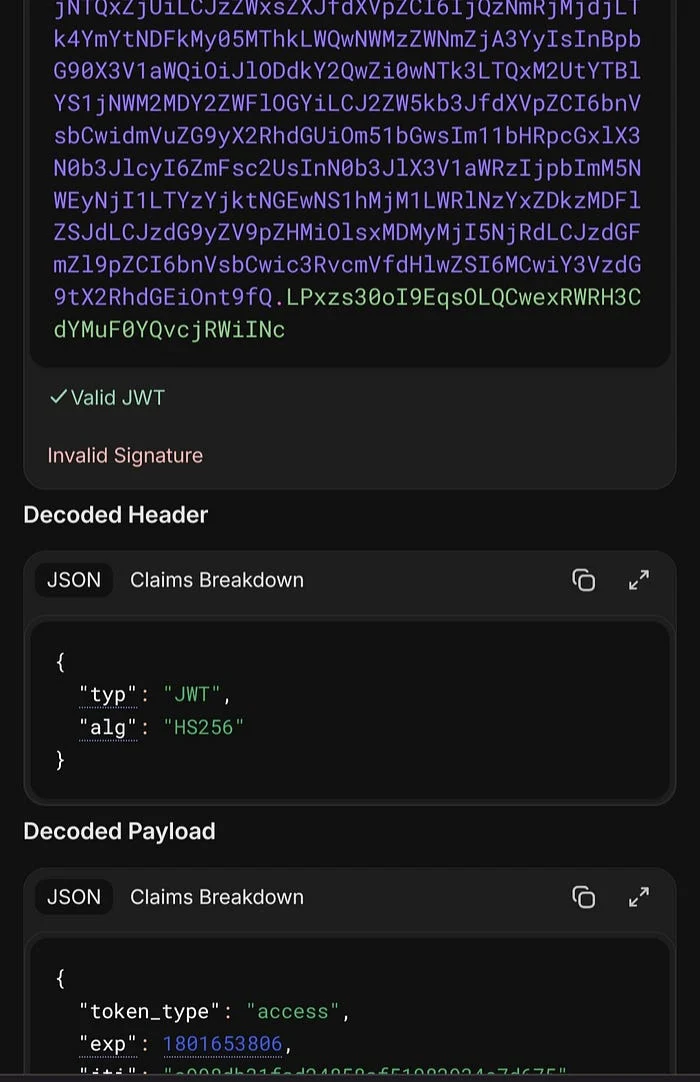
The platform used JWT (JSON web tokens) for session management. After decoding the token, one property stood out: an extremely long lifetime. The token was valid for 95 days, and this was the case even though the application had no "Keep me signed-in" option. The token stayed valid for months, and the application offered no "Keep me signed-in" option. That was the first issue in the session management and the signal to keep digging.
Next the author opened the browser's cookie storage to look at how the token was actually stored. The token was present in local storage, where JavaScript can read it, and also in normal cookies under a different name. The cookie's security flags were samesite none, httponly false and secure= false.
The screenshot shows that cookie configuration. The combination matters: httponly false means script can read the cookie, secure= false means it can travel over plain HTTP, and samesite none means it is sent on cross-site requests. Together with a copy in local storage, this opens the door to man-in-the-middle attacks, CSRF or CORS attacks, and XSS being able to steal the token from local storage. As the author puts it, a complete disaster, and there was more to come.
Exploitation
Step 1: Think like a victim
The author then reasoned from the user's side. If an attacker obtained the cookies by any means, what would the victim do first? Change the password, or sign out of the signed-in devices. Those are the two recovery actions a user has, so those are the two things that were tested.
Step 2: Sign out
Signing out did not invalidate the JWT. The token remained usable after logout.
Step 3: Change the password
Changing the password did not invalidate the JWT either. The old token kept working.
Both recovery paths were broken. There is no request or response captured in the report for either step; the result is stated as the outcome of the testing.
Step 4: The amplifier
The last point is not a technical vulnerability but it multiplies the others: the company had suffered a recent data breach. An attacker who obtains a user's credentials therefore has access to the merchant's account for the next 95 days, and the worst part is that the merchant cannot do anything about it, because neither logout nor a password change revokes the token.
Root cause
Two design mistakes combine here.
- Tokens are not revocable. Logout and password change did not invalidate the JWT, so the token stayed usable until it expired.
- The lifetime is far too long. A 95-day validity window turns every leaked token into a 95-day credential, and the absence of a "Keep me signed-in" option means users never chose a persistent session.
The storage configuration removes the defences that would otherwise limit exposure. httponly false lets any XSS read the cookie, and the duplicate copy in local storage is readable by JavaScript by definition. secure= false means the cookie can be sent over unencrypted connections, which the author links to man-in-the-middle risk. samesite none allows the cookie to be attached to cross-site requests, which is the CSRF and CORS exposure the author names. None of these flags would matter much if the token could be revoked, but with a 95-day lifetime and no revocation, a single leak is durable.
Impact
An attacker who obtains a user's credentials keeps access to that account for the next 95 days. The victim cannot cut that access off: signing out does not invalidate the token and changing the password does not invalidate it either. Because the platform hosts merchant stores, the affected accounts include merchant accounts, and the author notes that a recent data breach at the company makes credential-based access to those accounts more likely. The report does not quantify how many users or merchants were affected.
Fix
The report does not say what the company changed, if anything. Based on the findings, the fixes would be:
- Make sessions revocable: invalidate all outstanding tokens for a user on logout and on password change, for example with a server-side session record or a token version that is checked on every request.
- Shorten the token lifetime substantially and use refresh tokens for continuity, so a stolen access token expires quickly.
- Set
HttpOnly,Secureand an appropriateSameSitevalue on the session cookie, and stop storing the token in local storage.
Variants to test
- Logout revocation. Capture a token, log out, then replay the token against an authenticated endpoint. A positive result is a normal response instead of a 401 or redirect to login.
- Password change revocation. Capture a token, change the password from another session, then replay the old token. A positive result is that the old token still works.
- Token lifetime. Decode the JWT and read
expandiat. A positive result is a lifetime measured in weeks or months, especially where the UI offers no persistent-login option. - Cookie flags. Inspect the session cookie in the browser's storage view. A positive result is
HttpOnlyfalse,Securefalse orSameSite=Noneon a session cookie. - Duplicate storage. Check whether the same token appears in both cookies and local storage. A positive result is a copy readable by JavaScript, which any XSS can exfiltrate.
- Other revocation triggers. Try actions that should end a session, such as an administrative lock, an email change or a password reset, and replay the token afterwards. A positive result is that the token survives the action.
What happened, in plain words
A security researcher tested a shopping platform where people can set up their own online stores. The login system itself was solid: it had rate limits (so you cannot guess passwords endlessly), one-time codes sent by email, and email binding. But the way the platform kept users logged in was badly broken. It used a token (a kind of digital pass) that stayed valid for 95 days, even though there was no "keep me signed in" option. The token was stored in two places in the browser, and the cookie had security settings that made it easy to steal. Worse, when a user tried to log out or change their password, the token still worked. So if an attacker got hold of the token, they could keep using the account for up to 95 days, and the victim could do nothing to stop it. The company had also recently suffered a data breach, which made it more likely that attackers already had usernames and passwords. This article explains each part in simple terms.
Context
The target was a shopping platform that let merchants create and run their own stores, with the usual shopping features on top. The author describes the work as a deep bug bounty assessment of that platform. Bug bounty means a company pays independent researchers to find security holes. The part that mattered was not the login form but what happens to a user after they are authenticated, that is, after they have proven who they are.
Authentication itself held up: a simple username and password system, working rate limits, OTP and email binding. Rate limits stop someone from trying thousands of passwords quickly. OTP (one-time password) is a code sent to your email or phone that you must enter, and email binding means the account is tied to a specific email address. The failure was in session management, meaning how the platform issues, stores and, above all, revokes the tokens that represent a logged-in user. Revoke means to cancel or invalidate. Think of a session as a temporary pass you get when you enter a building; session management is how the building hands out, checks and takes back those passes.
Setup
The report does not describe any special accounts, roles, tooling versions or preconditions. The testing was done against the platform's own authentication and session handling, and the cookie inspection was carried out in Firefox, where the storage view is opened with shift + F9.
Finding it
The platform used JWT (JSON web tokens) for session management. A JWT is a small string of text that the server gives you after you log in, and you send it back with each request to prove who you are. It is like a wristband at a festival: once you have it, you can go in and out without showing your ID again. After decoding the token (JWTs are encoded, not encrypted, so anyone can read their contents), one property stood out: an extremely long lifetime. The token was valid for 95 days, and this was the case even though the application had no "Keep me signed-in" option. The token stayed valid for months, and the application offered no "Keep me signed-in" option. That was the first issue in the session management and the signal to keep digging.
Next the author opened the browser's cookie storage to look at how the token was actually stored. Cookies are small pieces of data that websites ask your browser to keep and send back with requests. The token was present in local storage, where JavaScript can read it, and also in normal cookies under a different name. Local storage is another place in the browser where websites can save data, and any JavaScript running on the page can read it. The cookie's security flags were samesite none, httponly false and secure= false.
The screenshot shows that cookie configuration. The combination matters: httponly false means script can read the cookie, secure= false means it can travel over plain HTTP (unencrypted connections), and samesite none means it is sent on cross-site requests (requests coming from a different website). Together with a copy in local storage, this opens the door to man-in-the-middle attacks (where an attacker secretly intercepts traffic between you and the website), CSRF or CORS attacks (ways to make your browser send requests you did not intend), and XSS being able to steal the token from local storage. XSS (cross-site scripting) is when an attacker manages to run their own JavaScript on a page you visit. As the author puts it, a complete disaster, and there was more to come.
Exploitation
Step 1: Think like a victim
The author then reasoned from the user's side. If an attacker obtained the cookies by any means, what would the victim do first? Change the password, or sign out of the signed-in devices. Those are the two recovery actions a user has, so those are the two things that were tested. The idea is: if you lose your house keys, you change the locks. Here, the researcher wanted to see if changing the password or logging out actually changes the locks.
Step 2: Sign out
Signing out did not invalidate the JWT. The token remained usable after logout. In other words, even after you click "log out", the old token still works, as if the key still opens the door after you thought you had changed the lock.
Step 3: Change the password
Changing the password did not invalidate the JWT either. The old token kept working. So even if you change your password, an attacker who already has the token can continue to use it.
Both recovery paths were broken. There is no request or response captured in the report for either step; the result is stated as the outcome of the testing.
Step 4: The amplifier
The last point is not a technical vulnerability but it multiplies the others: the company had suffered a recent data breach. A data breach is when attackers get into a company's systems and steal data, often usernames and passwords. An attacker who obtains a user's credentials therefore has access to the merchant's account for the next 95 days, and the worst part is that the merchant cannot do anything about it, because neither logout nor a password change revokes the token.
Root cause
Two design mistakes combine here.
- Tokens are not revocable. Logout and password change did not invalidate the JWT, so the token stayed usable until it expired. A revocation list is like a list of cancelled tickets that the door staff check; here, there is no such list. Server-side session state means the server keeps a record of who is logged in; without it, the server cannot cancel a session.
- The lifetime is far too long. A 95-day validity window turns every leaked token into a 95-day credential, and the absence of a "Keep me signed-in" option means users never chose a persistent session. A credential is something that proves your identity, like a password or a token.
The storage configuration removes the defences that would otherwise limit exposure. httponly false lets any XSS read the cookie, and the duplicate copy in local storage is readable by JavaScript by definition. secure= false means the cookie can be sent over unencrypted connections, which the author links to man-in-the-middle risk. samesite none allows the cookie to be attached to cross-site requests, which is the CSRF and CORS exposure the author names. None of these flags would matter much if the token could be revoked, but with a 95-day lifetime and no revocation, a single leak is durable.
Impact
An attacker who obtains a user's credentials keeps access to that account for the next 95 days. The victim cannot cut that access off: signing out does not invalidate the token and changing the password does not invalidate it either. Because the platform hosts merchant stores, the affected accounts include merchant accounts, and the author notes that a recent data breach at the company makes credential-based access to those accounts more likely. The report does not quantify how many users or merchants were affected.
Fix
The report does not say what the company changed, if anything. Based on the findings, the fixes would be:
- Make sessions revocable: invalidate all outstanding tokens for a user on logout and on password change, for example with a server-side session record or a token version that is checked on every request.
- Shorten the token lifetime substantially and use refresh tokens for continuity, so a stolen access token expires quickly. A refresh token is a separate token used to get a new access token without logging in again.
- Set
HttpOnly,Secureand an appropriateSameSitevalue on the session cookie, and stop storing the token in local storage.
Variants to test
- Logout revocation. Capture a token, log out, then replay the token against an authenticated endpoint. A positive result is a normal response instead of a 401 or redirect to login. An endpoint is a specific URL that the application responds to; replay means sending the same request again.
- Password change revocation. Capture a token, change the password from another session, then replay the old token. A positive result is that the old token still works.
- Token lifetime. Decode the JWT and read
expandiat. A positive result is a lifetime measured in weeks or months, especially where the UI offers no persistent-login option.expis the expiry time andiatis the issued-at time. - Cookie flags. Inspect the session cookie in the browser's storage view. A positive result is
HttpOnlyfalse,Securefalse orSameSite=Noneon a session cookie. - Duplicate storage. Check whether the same token appears in both cookies and local storage. A positive result is a copy readable by JavaScript, which any XSS can exfiltrate. Exfiltrate means to steal data out of the browser.
- Other revocation triggers. Try actions that should end a session, such as an administrative lock, an email change or a password reset, and replay the token afterwards. A positive result is that the token survives the action.
Glossary
- Authentication: The process of proving who you are, usually with a username and password.
- Bug bounty: A program where companies pay independent researchers to find and report security vulnerabilities.
- Cookie: A small piece of data a website asks your browser to store and send back with future requests.
- CORS: Cross-Origin Resource Sharing, a mechanism that controls whether a web page from one origin can make requests to another origin.
- Credential: Something that proves your identity, such as a password, a token, or a certificate.
- CSRF: Cross-Site Request Forgery, an attack that tricks a logged-in user's browser into sending an unwanted request to a site where they are authenticated.
- Data breach: An incident where unauthorised people gain access to and steal data from a company's systems.
- Endpoint: A specific URL or address that a web application responds to.
- Exfiltrate: To steal data, often by sending it out of the browser to an attacker-controlled server.
- Exp (expiration time): A claim in a JWT that states when the token expires.
- HttpOnly: A cookie flag that, when set, prevents JavaScript from reading the cookie.
- Iat (issued at): A claim in a JWT that states when the token was issued.
- JWT (JSON Web Token): A compact, URL-safe means of representing claims to be transferred between two parties; often used for authentication.
- Local storage: A browser feature that lets websites store data persistently; it is accessible to JavaScript.
- Man-in-the-middle (MITM): An attack where an attacker secretly intercepts and possibly alters communication between two parties.
- OTP (One-Time Password): A password that is valid for only one login session or transaction, often sent via email or SMS.
- Rate limiting: A technique to control the amount of requests a client can make in a given time period, to prevent abuse.
- Refresh token: A credential used to obtain a new access token without requiring the user to log in again.
- Revoke: To cancel or invalidate a token or session so it can no longer be used.
- SameSite: A cookie attribute that controls whether the cookie is sent with cross-site requests; values include Strict, Lax, and None.
- Secure: A cookie flag that, when set, ensures the cookie is only sent over HTTPS.
- Session management: The process of handling user sessions, including creating, maintaining, and terminating them.
- Session token: A piece of data that represents a user's session, often stored in a cookie or local storage.
- XSS (Cross-Site Scripting): A vulnerability that allows an attacker to inject malicious scripts into web pages viewed by other users.



