How a Simple Stored XSS Turned Into an Account Action Chain
 Published on medium.com
Bug Bounty
The full write-up lives on its author's site
It belongs to its author, so we link to it rather than copy it. The other two tabs are our own rewrites, checked against it.
Context
The target was a community management platform where users could create public events and customise their event pages with a rich-text editor. The same editor component was reused for event descriptions, community announcements and webinar descriptions. The researcher's interest was in what the editor accepted and, more importantly, what the JavaScript that survived it could reach once it ran inside the application's origin.
Setup
The testing was done against accounts the researcher controlled, and a test account was used for the impact demonstration so that nothing important was modified. No tooling, versions or specific roles are described in the report beyond that.
Finding it
The starting question was simple: what happens if something unusual is placed into the rich-text editor? The first payload was the standard image error handler:
<img src=x onerror=confirm(1)>
It was blocked. A few variations were tried and were also blocked. A plain javascript: URL was then tried:
<a href="javascript:confirm(1)">VIEW EVENT</a>
That was blocked too, so the filtering looked reasonably effective at first glance. Rather than switching to entirely different payloads, the researcher started thinking about how the HTML was being parsed and decoded, and tried encoding the colon in the scheme:
<a href="javascript:confirm('xss_71337')"> VIEW EVENT</a>
This version was accepted. The event was published, the public page was opened, and the link was clicked. The popup fired with xss_71337, confirming stored XSS.
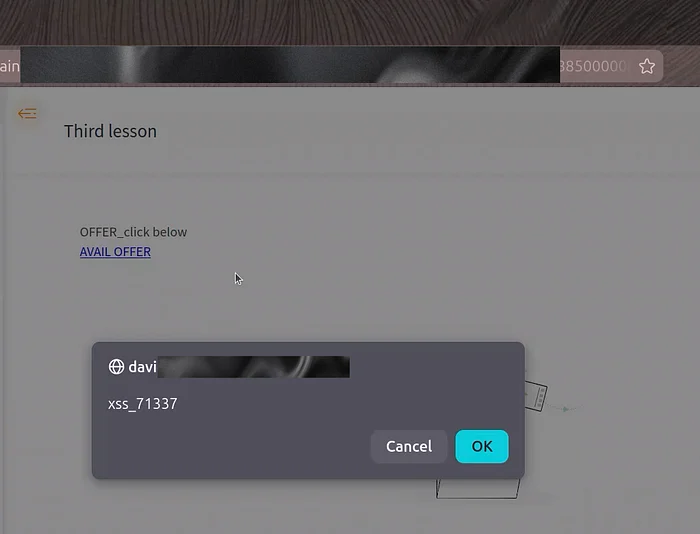
The filter blocked the obvious javascript: representation, but the encoded version survived sanitisation and was later interpreted by the browser.
Exploitation
Step 1: Confirm execution in the editor
The encoded-colon link was stored through the event editor and executed when a visitor clicked it on the published event page. That established the basic primitive: arbitrary JavaScript in the application's origin, persisted server-side.
Step 2: Map the other injection points
The same editor component appeared in more than one place, so each location was checked. The same behaviour was found in:
- Event descriptions
- Community announcements
- Webinar descriptions
This pointed to a shared sanitisation issue in the editor component rather than a problem with a single input. The attack surface was therefore the editor feeding three separate features:
Rich Text Editor │ Weak Sanitization │ ┌───────────┼───────────┐ ↓ ↓ ↓ Events Announcements Webinars ┼─────────────┼───────────────┼ Stored XSS
Step 3: Establish what the JavaScript can do
A confirm() popup only proves execution. The more relevant question is what an attacker can do with JavaScript running inside the application's origin, so testing continued with controlled accounts. The JavaScript could interact with authenticated functionality available to the logged-in user. The report lists the following as demonstrated:
- Reading information available to the authenticated user
- Accessing data rendered inside authenticated pages
- Modifying profile information
- Changing the profile image (for a safe demo)
- Sending authenticated
POST/PUTrequests - Triggering account actions
- Modifying other user-controlled settings
Step 4: Inspect the CSRF protection
While looking at the application's requests, the researcher noticed that state-changing requests were protected by CSRF tokens. The relevant values are referred to in the write-up as:
Cookie:APP_SESSION_CSRF
Header:X-APP-CSRF
The important detail was that the CSRF cookie was not marked HttpOnly, so JavaScript on the page could read it through document.cookie. That raised the question of whether the XSS could read the CSRF token and use it in an authenticated request. It was tested, and it could.
Step 5: Chain the two issues
The chain was short:
Stored XSS ↓JavaScript executes ↓Read CSRF token ↓Add token to request ↓Authenticated request ↓Account modification (POST,PUT,DELETE)
The XSS supplied JavaScript execution; the non-HttpOnly CSRF cookie supplied the token. Together they allowed an authenticated state-changing action to be demonstrated.
Step 6: Build a safe proof of concept
To show impact without touching anything important, the researcher used a test account and changed its display name to:
XSS-TEST
The token was read from the cookie with:
const token = document.cookie.match(/APP_SESSION_CSRF=([^;]+)/)?.[1] || '';
and the request was sent with:
fetch('/api/v2/account/profile', { method: 'PUT', credentials: 'include', headers: { 'X-APP-CSRF': token, 'Content-Type': 'application/json' }, body: JSON.stringify({ displayName: 'XSS-TEST' })});
The credentials: 'include' option sends the session cookie, the X-APP-CSRF header carries the token read from document.cookie, and the JSON body sets the display name. The report also shows the equivalent request as a curl command, with the full payload embedded in an event description:
curl -X PUT ‘https://demo.example/api/v2/events/12345' \
-H ‘Content-Type: application/json’ \
-H ‘Cookie: APP_SESSION=<TEST_SESSION>’ \
— data-raw ‘{
“description”: “<a href=\”javascript:const t=document.cookie.match(/APP_SESSION_CSRF=([^;]+)/)?.[1]||’’’’;fetch(‘\’’/api/v2/account/profile’\’’,{method:’\’’PUT’\’’,credentials:’\’’include’\’’,headers:{‘\’’X-APP-CSRF’\’’:t,’\’’Content-Type’\’’:’\’’application/json’\’’},body:JSON.stringify({displayName:’\’’XSS-TEST’\’’})})\”>VIEW EVENT</a>”
}’
This stores the payload in the description of event 12345 through the API, using a test session. The payload itself reads the CSRF cookie, sends a PUT to the profile endpoint with the token in the X-APP-CSRF header, and sets the display name to XSS-TEST.
Step 7: The final chain
Putting it together:
HTML Sanitization Bypass ↓ Stored XSS ↓ JavaScript Execution ↓ Read CSRF Token ↓ Authenticated API Request (POST,PUT,DELETE) ↓ Account Modification
The popup was only proof that the first door was open; the value was in what sat behind it.
Root cause
The sanitisation of the rich-text editor blocked the literal javascript: scheme but did not account for HTML entity encoding of the colon. The encoded form passed the filter and was decoded by the browser into a working javascript: URL when the link was clicked. Because the same editor component was reused across events, announcements and webinars, the weakness applied to all three features.
The second half of the chain is a design issue: the CSRF cookie APP_SESSION_CSRF was not marked HttpOnly, so any script running in the origin could read it with document.cookie and replay it in the X-APP-CSRF header. CSRF protection therefore did not defend against an attacker who already had script execution in the same origin. The report does not describe the server-side sanitisation code, so the exact parsing and decoding behaviour is likely a mismatch between the filter's view of the attribute value and the browser's.
Impact
An attacker who can store content through the editor can run JavaScript in the application's origin for a user who views the affected event, announcement or webinar and clicks the injected link. In the researcher's testing with controlled accounts, that script could read information available to the authenticated user, access data rendered inside authenticated pages, modify profile information including the profile image, send authenticated POST and PUT requests, trigger account actions and modify other user-controlled settings. The non-HttpOnly CSRF cookie allowed those state-changing requests to satisfy the application's CSRF check. The demonstration was limited to changing a test account's display name to XSS-TEST.
Fix
The report states that the vulnerability was fixed on Day 10 after acknowledgement on Day 1, and that a bounty was awarded on Day 25 after validation. It does not describe the specific code change. The two areas that needed addressing are the editor's sanitisation, so that encoded scheme representations such as javascript: are rejected or neutralised consistently with how the browser decodes them, and the CSRF cookie, which should be marked HttpOnly so that script cannot read it.
Variants to test
- Encoded scheme characters in other attributes. Try entity-encoded colons and other characters in
href,src,actionandformactionvalues. A positive result is a stored link or resource that executes script when clicked or loaded. - Other editor-backed features. Enumerate every place the same rich-text component is rendered, including descriptions, announcements and webinar pages, and submit the same payload to each. A positive result is execution on any public page that renders the stored content.
- CSRF cookie flags. Inspect state-changing requests for CSRF cookies and check whether they are
HttpOnly. A cookie readable fromdocument.cookiethat is also accepted in a request header is the condition needed for this chain. - Token-in-header checks. Where CSRF tokens are sent in a custom header, test whether a script in the origin can read the token from the cookie or the DOM and replay it. A positive result is a state-changing request succeeding from injected JavaScript.
- Sanitisation versus browser parsing. Compare what the filter accepts with what the browser interprets, using entity encoding, case variation and whitespace inside attribute values. A positive result is any payload that passes the filter and executes in the browser.
What happened, in plain words
A security researcher was testing a website where people can create and manage community events. The site had a text editor, the kind where you can make words bold, add links and format text, a bit like writing a post in a word processor that runs in your browser. The researcher asked a simple question: what happens if I put something strange into this editor?
After a few attempts that the site refused, one specially written link got through. When someone clicked that link on the public event page, the browser ran a small piece of code that the researcher had planted. That is the bug called stored cross-site scripting, or stored XSS for short. The popup that appeared was only the proof. The real story is what that running code could then do: read the CSRF token the site uses to protect actions, and use it to change a test account's display name.
This article walks through the whole thing from zero. You only need to know how to use a browser. Every technical word is explained the first time it appears, and there is a glossary at the end.
The target and the setup
The target was a community management platform. Think of it as a website where organisations or groups can publish events, post announcements and run webinars, and where each of those has a page the public can visit. The pages were not plain text: users could format them with a rich-text editor.
A rich-text editor is the box you type into that lets you add bold, italics, links and images without writing code. Under the surface, it produces HTML, the language browsers use to describe a page. HTML is made of tags, which look like <a href="...">some words</a>. The <a> tag makes a link, href says where the link goes, and the words between the tags are what you click.
The same editor component was reused in three places: event descriptions, community announcements and webinar descriptions. A component here means a ready-made piece of the website that the developers drop into several pages instead of writing it again each time. That reuse matters later, because a weakness in one component appears everywhere the component is used.
The testing was done against accounts the researcher controlled, and a test account was used to demonstrate the impact, so nothing important was modified. The report does not describe any tools, software versions or user roles beyond that.
Finding the XSS
The starting question was simple: what happens if something unusual is placed into the rich-text editor? The first attempt was a classic payload. A payload is the piece of text an attacker submits hoping the site will treat it as code.
<img src=x onerror=confirm(1)>
Line by line:
<img ...>is the HTML tag for an image.src=xtells the browser the image is at a location calledx. No such image exists, so loading it fails.onerror=confirm(1)is an event handler. It tells the browser: when this image fails to load, run the JavaScriptconfirm(1).confirm(1)is a built-in browser function that shows a small popup box with the number 1 and an OK button. Security testers use it because it is a harmless, visible sign that code ran.
The site blocked it. A few variations were tried and were also blocked. Then a plain javascript: link was tried:
<a href="javascript:confirm(1)">VIEW EVENT</a>
Line by line:
<a href="...">is a link tag, andhrefis the address it points to.javascript:is a special address scheme. Instead of opening a web page, the browser runs whatever JavaScript follows it. It is like a door labelled "run this code".confirm(1)is the popup again.VIEW EVENTis the visible text a visitor would click.
That was blocked too. At this point the filtering looked reasonably effective. Filtering, or sanitisation, is the site's cleaning process: it inspects what a user submits and removes or rejects anything dangerous before saving it.
Rather than switching to completely different payloads, the researcher started thinking about how the HTML was being parsed and decoded. Parsing is how a browser reads the raw characters of a page and works out the structure. Decoding is how it turns special written forms back into the characters they stand for. HTML has a feature called entities: a character can be written in a coded form, and the browser converts it when it reads the page. For example, : is the coded form of the colon character :. The &#x part says "here comes a hexadecimal character code", and 3A is the code for a colon.
So the researcher tried encoding the colon in the scheme:
<a href="javascript:confirm('xss_71337')"> VIEW EVENT</a>
Line by line:
<a href="...">is again a link tag.javascript:is the wordjavascriptfollowed by the coded colon instead of a literal:. To a filter that only looks for the exact textjavascript:, this does not match.confirm('xss_71337')is the popup, this time showing the textxss_71337. The odd string is a unique marker so the researcher can be sure the popup came from this payload and not something else.VIEW EVENTis the clickable text.
This version was accepted. The event was published, the public page was opened, and the link was clicked. The popup fired with xss_71337, confirming stored XSS.
Stored XSS means the dangerous content is saved on the server, not just reflected back once. Anyone who later views the page receives it. The word "stored" is the key: the site kept the payload and served it to visitors.
The filter blocked the obvious javascript: representation, but the encoded version survived sanitisation and was later interpreted by the browser. The filter and the browser disagreed about what the text meant, and the browser had the final say.
Exploitation
Step 1: Confirm execution in the editor
The encoded-colon link was stored through the event editor and executed when a visitor clicked it on the published event page. That established the basic primitive: arbitrary JavaScript in the application's origin, persisted server-side.
A primitive in security means a small, reliable building block that later steps can use. Here the primitive is: I can make the site store text that causes any JavaScript I choose to run in a visitor's browser. Origin is the combination of scheme, host and port that a browser uses to decide which site a page belongs to, roughly "https://the-site.example". Code running in the site's origin is treated as part of that site, which is why it can do things a random other website could not.
Step 2: Map the other injection points
The same editor component appeared in more than one place, so each location was checked. The same behaviour was found in:
- Event descriptions
- Community announcements
- Webinar descriptions
This pointed to a shared sanitisation issue in the editor component rather than a problem with a single input. The attack surface, meaning the total set of places an attacker can try to get in, was therefore the editor feeding three separate features:
Rich Text Editor │ Weak Sanitization │ ┌───────────┼───────────┐ ↓ ↓ ↓ Events Announcements Webinars ┼─────────────┼───────────────┼ Stored XSS
This diagram is a map. The top is the rich-text editor. Below it is the weak sanitisation, the cleaning step that can be bypassed. From there three arrows lead to the three features that use the editor: events, announcements and webinars. All three end in the same result, stored XSS. The point is that fixing one page would not be enough, because the same flawed component sits behind all three.
Step 3: Establish what the JavaScript can do
A confirm() popup only proves execution. The more relevant question is what an attacker can do with JavaScript running inside the application's origin, so testing continued with controlled accounts. The JavaScript could interact with authenticated functionality available to the logged-in user.
Authenticated means the site knows who you are because you logged in. When you log in, the site gives your browser a cookie, a small piece of data the browser stores and sends back with every request to that site. Think of a cookie like a wristband at an event: you show it once at the entrance, and after that staff let you into areas without asking for your ID again. The session cookie is that wristband. Because the planted code runs inside the site's origin, the browser treats its requests as coming from the logged-in user and attaches the wristband automatically.
The report lists the following as demonstrated:
- Reading information available to the authenticated user
- Accessing data rendered inside authenticated pages
- Modifying profile information
- Changing the profile image (for a safe demo)
- Sending authenticated
POST/PUTrequests - Triggering account actions
- Modifying other user-controlled settings
A POST or PUT request is one of the ways a browser talks to a server. A request is a message asking the server to do something. GET usually means "give me this page or data". POST usually means "here is new data, create something". PUT usually means "here is data, replace or update something". An API is the set of addresses a site exposes for these programmatic requests, as opposed to pages meant for humans to look at. If the website is a restaurant, the API is the kitchen window where orders are handed in, and the session cookie is the staff badge that proves you are allowed to order.
Step 4: Inspect the CSRF protection
While looking at the application's requests, the researcher noticed that state-changing requests were protected by CSRF tokens. A state-changing request is one that alters something, such as changing a name or deleting a post, as opposed to merely reading. CSRF stands for cross-site request forgery. It is an attack where a different website quietly makes your browser send a request to the target site, relying on your existing login cookie to make it look legitimate. The classic defence is a token: a random value the site gives your browser and expects to see again in a special header on any state-changing request. A header is an extra line of information attached to a request, like a label on an envelope. If an attacker on another site cannot guess or read the token, their forged request is rejected.
The relevant values are referred to in the write-up as:
Cookie:APP_SESSION_CSRF
This line names the cookie that carries the CSRF token. The browser stores it and sends it back with requests to the site.
Header:X-APP-CSRF
This line names the header where the site expects to receive the token on a state-changing request. The server compares the two: the value in the cookie and the value in the header must match.
The important detail was that the CSRF cookie was not marked HttpOnly. HttpOnly is a setting on a cookie that tells the browser: never let JavaScript read this cookie. It exists precisely so that if a script does get injected into a page, it cannot steal that cookie. Without the flag, JavaScript on the page can read it through document.cookie, which is the browser's built-in way for scripts to list the site's cookies.
That raised the question of whether the XSS could read the CSRF token and use it in an authenticated request. It was tested, and it could. The defence assumed the attacker could not read the token. The injected script could.
Step 5: Chain the two issues
The chain was short:
Stored XSS ↓JavaScript executes ↓Read CSRF token ↓Add token to request ↓Authenticated request ↓Account modification (POST,PUT,DELETE)
Read it top to bottom. First the stored XSS is saved on the site. When a visitor opens the page, the JavaScript executes. That script reads the CSRF token from the cookie. It puts the token into the request header. The browser sends the request with the user's session cookie attached, so the server sees a logged-in user. The server checks the token, finds it matches, and accepts the change. The final line lists the kinds of requests that could be made: POST, PUT and DELETE, which create, update and remove things respectively.
A chain in security means combining several small weaknesses so that together they reach an impact none of them would reach alone. The XSS supplied JavaScript execution; the non-HttpOnly CSRF cookie supplied the token. Together they allowed an authenticated state-changing action to be demonstrated.
Step 6: Build a safe proof of concept
A proof of concept, or PoC, is a minimal demonstration that a bug is real and shows its effect, without causing harm. To show impact without touching anything important, the researcher used a test account and changed its display name to:
XSS-TEST
A display name is the name other people see for your account. Changing it is visible and harmless, which makes it a good marker: if the name changes, the action clearly succeeded.
The token was read from the cookie with:
const token = document.cookie.match(/APP_SESSION_CSRF=([^;]+)/)?.[1] || '';
Line by line:
const token =creates a variable namedtokento hold the result. A variable is a labelled box where a script keeps a value.document.cookieasks the browser for all cookies the current page is allowed to read, as one long string..match(...)searches that string for a pattern./APP_SESSION_CSRF=([^;]+)/is the pattern. It looks for the textAPP_SESSION_CSRF=, then captures everything after it up to, but not including, the next semicolon. Cookies are separated by semicolons, so this isolates the token value.?.[1]takes the first captured group, the token itself, if a match was found.|| ''falls back to an empty string if there was no match, so the script does not crash.
and the request was sent with:
fetch('/api/v2/account/profile', { method: 'PUT', credentials: 'include', headers: { 'X-APP-CSRF': token, 'Content-Type': 'application/json' }, body: JSON.stringify({ displayName: 'XSS-TEST' })});
Line by line:
fetch('/api/v2/account/profile', {...})is the browser's built-in function for sending a request to a server. The first part is the address, here the profile endpoint of the API.method: 'PUT'says this is an update request.credentials: 'include'tells the browser to attach the site's cookies, including the session cookie. Without this, the server would not know who is asking.headers: { ... }is the set of labels attached to the request.'X-APP-CSRF': tokenputs the token read from the cookie into the header the server expects.'Content-Type': 'application/json'says the body is formatted as JSON, a common text format for structured data that looks like{ "key": "value" }.body: JSON.stringify({ displayName: 'XSS-TEST' })is the data being sent.JSON.stringifyturns a JavaScript object into JSON text. The object sets the display name toXSS-TEST.
The credentials: 'include' option sends the session cookie, the X-APP-CSRF header carries the token read from document.cookie, and the JSON body sets the display name. The report also shows the equivalent request as a curl command, with the full payload embedded in an event description:
curl -X PUT ‘https://demo.example/api/v2/events/12345' \
-H ‘Content-Type: application/json’ \
-H ‘Cookie: APP_SESSION=<TEST_SESSION>’ \
— data-raw ‘{
“description”: “<a href=\”javascript:const t=document.cookie.match(/APP_SESSION_CSRF=([^;]+)/)?.[1]||’’’’;fetch(‘\’’/api/v2/account/profile’\’’,{method:’\’’PUT’\’’,credentials:’\’’include’\’’,headers:{‘\’’X-APP-CSRF’\’’:t,’\’’Content-Type’\’’:’\’’application/json’\’’},body:JSON.stringify({displayName:’\’’XSS-TEST’\’’})})\”>VIEW EVENT</a>”
}’
Line by line:
curlis a command-line tool for sending requests, an alternative to a browser.-X PUTsets the method toPUT.https://demo.example/api/v2/events/12345is the address of event number 12345 on the API.demo.exampleis a placeholder hostname, not a real site.-H ‘Content-Type: application/json’says the body is JSON.-H ‘Cookie: APP_SESSION=<TEST_SESSION>’attaches a session cookie. The value is a placeholder for a test account's session, not a real one.— data-raw ‘{ ... }’supplies the body of the request. The body is a JSON object with one field,description.- The
descriptionvalue is the HTML link payload. It starts with<a href="javascript:...">and ends withVIEW EVENT</a>. Inside the link, instead of a simple popup, the JavaScript reads the CSRF cookie into a variablet, then callsfetchto send aPUTto/api/v2/account/profilewith the token in theX-APP-CSRFheader and the display name set toXSS-TEST.
This stores the payload in the description of event 12345 through the API, using a test session. The payload itself reads the CSRF cookie, sends a PUT to the profile endpoint with the token in the X-APP-CSRF header, and sets the display name to XSS-TEST. In other words, the curl command is just a way to plant the same link without using the editor by hand.
Step 7: The final chain
Putting it together:
HTML Sanitization Bypass ↓ Stored XSS ↓ JavaScript Execution ↓ Read CSRF Token ↓ Authenticated API Request (POST,PUT,DELETE) ↓ Account Modification
This is the whole story in one column. The HTML sanitisation bypass is the encoded colon slipping past the filter. That produces stored XSS. The stored XSS produces JavaScript execution in a visitor's browser. The script reads the CSRF token. It makes an authenticated API request. The account is modified. The popup was only proof that the first door was open; the value was in what sat behind it.
Root cause
The sanitisation of the rich-text editor blocked the literal javascript: scheme but did not account for HTML entity encoding of the colon. The encoded form passed the filter and was decoded by the browser into a working javascript: URL when the link was clicked. Because the same editor component was reused across events, announcements and webinars, the weakness applied to all three features.
The second half of the chain is a design issue: the CSRF cookie APP_SESSION_CSRF was not marked HttpOnly, so any script running in the origin could read it with document.cookie and replay it in the X-APP-CSRF header. CSRF protection therefore did not defend against an attacker who already had script execution in the same origin. The report does not describe the server-side sanitisation code, so the exact parsing and decoding behaviour is likely a mismatch between the filter's view of the attribute value and the browser's.
A useful comparison: a bouncer checks IDs by looking for the exact words on a list. Someone writes their name in a slightly different but still readable way, the bouncer waves them through, and the person inside the club is understood by everyone else. The filter and the browser were reading the same text differently.
Impact
An attacker who can store content through the editor can run JavaScript in the application's origin for a user who views the affected event, announcement or webinar and clicks the injected link. In the researcher's testing with controlled accounts, that script could read information available to the authenticated user, access data rendered inside authenticated pages, modify profile information including the profile image, send authenticated POST and PUT requests, trigger account actions and modify other user-controlled settings. The non-HttpOnly CSRF cookie allowed those state-changing requests to satisfy the application's CSRF check. The demonstration was limited to changing a test account's display name to XSS-TEST.
Fix
The report states that the vulnerability was fixed on Day 10 after acknowledgement on Day 1, and that a bounty was awarded on Day 25 after validation. A bounty is a payment a company makes to a researcher who reports a valid security bug through its programme.
The two areas that needed addressing are the editor's sanitisation, so that encoded scheme representations such as javascript: are rejected or neutralised consistently with how the browser decodes them, and the CSRF cookie, which should be marked HttpOnly so that script cannot read it.
Variants to test
These are follow-up checks another tester could run on a similar site. Each one lists what a positive result would look like.
- Encoded scheme characters in other attributes. Try entity-encoded colons and other characters in
href,src,actionandformactionvalues. These are all attributes that tell the browser where to go or what to load. A positive result is a stored link or resource that executes script when clicked or loaded. - Other editor-backed features. Enumerate every place the same rich-text component is rendered, including descriptions, announcements and webinar pages, and submit the same payload to each. A positive result is execution on any public page that renders the stored content.
- CSRF cookie flags. Inspect state-changing requests for CSRF cookies and check whether they are
HttpOnly. A cookie readable fromdocument.cookiethat is also accepted in a request header is the condition needed for this chain. - Token-in-header checks. Where CSRF tokens are sent in a custom header, test whether a script in the origin can read the token from the cookie or the DOM and replay it. The DOM is the browser's in-memory model of the page, which scripts can read and change. A positive result is a state-changing request succeeding from injected JavaScript.
- Sanitisation versus browser parsing. Compare what the filter accepts with what the browser interprets, using entity encoding, case variation and whitespace inside attribute values. A positive result is any payload that passes the filter and executes in the browser.
Glossary
- API: the set of addresses a website exposes so programs can send requests and get data back, separate from the pages people look at.
- Attribute: an extra setting inside an HTML tag, such as
hrefon a link, that says where it points or how it behaves. - Authenticated: known to the site because you have logged in, usually proven by a session cookie.
- Bounty: a payment a company makes to a researcher who reports a valid security bug through its programme.
- Chain: several small weaknesses combined so that together they reach an impact none would reach alone.
- Component: a reusable piece of a website that developers drop into several pages instead of rewriting it.
- Cookie: a small piece of data a site asks the browser to store and send back with later requests, often used to remember that you are logged in.
- CSRF (cross-site request forgery): an attack where another website quietly makes your browser send a state-changing request to a site you are logged into.
- CSRF token: a random value the site gives your browser and expects back in a header on state-changing requests, so a forged request from elsewhere is rejected.
- curl: a command-line tool for sending requests to a server.
- Decoding: turning a coded written form, such as an HTML entity, back into the character it stands for.
- DELETE: a request method meaning remove something.
- Display name: the name other people see for your account.
- DOM: the browser's in-memory model of a page, which scripts can read and change.
- Endpoint: a specific address on an API that performs one job, such as updating a profile.
- Entity (HTML entity): a coded way of writing a character, such as
:for a colon, which the browser converts when it reads the page. - Event handler: a piece of code attached to something on a page that runs when that thing happens, such as an image failing to load.
- fetch: the browser's built-in function for sending a request to a server from JavaScript.
- Filter / sanitisation: the site's cleaning process that inspects submitted text and removes or rejects anything dangerous before saving it.
- GET: a request method meaning give me this page or data.
- Header: an extra line of information attached to a request or response, like a label on an envelope.
- HTML: the language browsers use to describe the structure of a page, made of tags.
HttpOnly: a cookie setting that stops JavaScript from reading that cookie.- JavaScript: the programming language browsers run, which can read and change pages and send requests.
- JSON: a common text format for structured data, looking like
{ "key": "value" }. javascript:scheme: a special link address that makes the browser run the JavaScript that follows instead of opening a page.- Origin: the combination of scheme, host and port that a browser uses to decide which site a page belongs to; code in a site's origin is treated as part of that site.
- Parsing: how a browser reads raw characters and works out the structure of a page.
- Payload: the piece of text an attacker submits hoping the site will treat it as code.
- POST: a request method meaning here is new data, create something.
- Primitive: a small, reliable building block that later steps can use.
- Proof of concept (PoC): a minimal demonstration that a bug is real and shows its effect without causing harm.
- PUT: a request method meaning here is data, replace or update something.
- Request: a message a browser or tool sends to a server asking it to do something.
- Rich-text editor: a typing box that lets you format text, such as bold and links, without writing code.
- Session cookie: the cookie that proves you are logged in, like a wristband at an event.
- State-changing request: a request that alters something, such as changing a name or deleting a post, as opposed to only reading.
- Stored XSS: cross-site scripting where the dangerous content is saved on the server and served to anyone who later views the page.
- Tag: a piece of HTML syntax such as
<a>or<img>that describes an element on the page. - Token: a value, usually random, used to prove or check something, such as a CSRF token.
- Variable: a labelled box in a script that holds a value.
- XSS (cross-site scripting): a bug where an attacker gets their own code to run in another user's browser inside a site's origin.



