How did we find the same vulnerability in 9 Android Apps
An exported deep-link activity in several Android apps accepted intent data without validation and used it to build a new URI, allowing an attacker to redirect the user to an arbitrary website. The author reports finding the same open redirect in nine apps in scope.
 Published on medium.com
Deep linking is a technology that allows apps to link directly to specific pages or content within other apps. A deep link contains information about where to navigate within an app and can be triggered from within another app, a website, or even a notification.
The full write-up lives on its author's site
It belongs to its author, so we link to it rather than copy it. The other two tabs are our own rewrites, checked against it.
Context
Deep linking lets an app open a specific page or piece of content inside another app. A deep link carries information about where to navigate, and it can be triggered from another app, from a website, or from a notification.
Deep linking misconfiguration happens when developers unintentionally expose sensitive functionality or data by implementing deep linking improperly. The result can be a security vulnerability that an attacker may exploit. For background on the Android platform APIs involved, the author points to the OWASP MASTG page on testing platform interaction and deep links.
This write-up describes one such misconfiguration that the author found in the same form in nine Android apps belonging to a single public bug bounty program. The program had nine Android applications in scope. The author reports that four of the submissions were triaged and the rest were still pending program review at the time of writing.
Setup
The work started by looking for public bug bounty programs that list Android applications in scope. The chosen program had nine Android applications in scope.
Testing began with static analysis. The author downloaded the first APK and opened it in JADX. The application was also installed on an emulator, and ADB was used for the dynamic part.
Finding it
After some minutes of static analysis, the author found the following in AndroidManifest.xml:
<activity android:theme="@style/DeeplinkRouterTheme" android:name="com.<program_name>.activity.DeepLinkRouterActivity" android:exported="true" android:launchMode="singleTask"> <intent-filter android:autoVerify="true"> <action android:name="android.intent.action.VIEW"/> <category android:name="android.intent.category.DEFAULT"/> <category android:name="android.intent.category.BROWSABLE"/> </intent-filter>
The key point is that the activity is exported. Any app on the device, or an ADB command, can therefore start it and supply the intent data.
The author then looked inside the code of this deep link handler. Three parts of the code are shown:
public void onNewIntent(Intent intent) {
 super.onNewIntent(intent);
 setIntent(intent);
 startProcess(true);
}
HttpUrl parse = HttpUrl.Companion.parse(iVar.h(String.valueOf(getIntent().getData()), Constants.HTTPS_PREFIX));
Uri parse2 = Uri.parse(Ui.getApplication(getApplicationContext()).appComponent().endpointProvider().getVrboBaseUrl() + "trips/" + valueOf + "/details/" + valueOf2);
kotlin.[redacted].t.i(parse2, "parse(this)");
getIntent().setData(parse2);
Taken together, the app directly accepts and processes incoming intent data without adequate validation. That data is parsed and used to construct a new URI, which is then set as the intent data. Because the attacker controls the incoming data and the app does not validate it properly, the handler can be used to redirect the user to any malicious website. In the author's words, this gives an open redirect vulnerability.
Exploitation
Step 1: install the app
The application was already installed on the emulator.
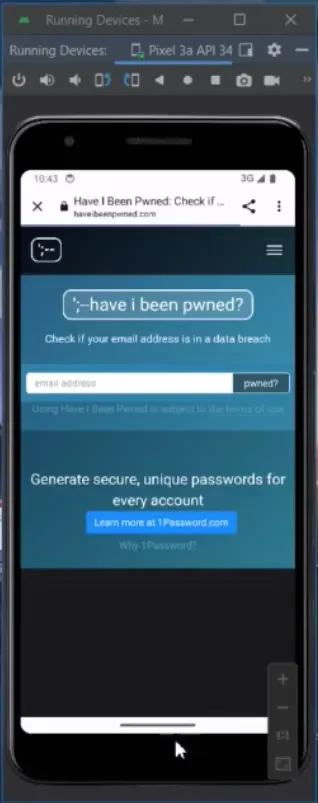
Step 2: start the exported activity with attacker-controlled data
Using ADB, the author started the exported activity and passed a URL as the intent data:
The activity accepts the data and processes it, and the author reports that the bug was successfully exploited.
Step 3: weaponise it from another app
To show that the same thing can be done from an installed app rather than from ADB, the author wrote a proof-of-concept APK. Its onCreate method builds an explicit intent for the exported activity and starts it:
protected void onCreate(Bundle savedInstanceState) {
 super.onCreate(savedInstanceState);

Intent intent= new Intent();
 intent.setAction("android.intent.action.VIEW");
 intent.setData(Uri.parse("https://haveibeenpwned.com"));
 ComponentName cn = new ComponentName("com.xyz.android","com.xyz.activity.DeepLinkRouterActivity");
 intent.setComponent(cn);
 startActivity(intent);
 }.
The intent sets the VIEW action and the data URI, then targets the component explicitly with ComponentName.
Step 4: repeat across the scope
The author found the same bug in the other eight APKs in scope and reported them. Four were triaged and the others were still pending program review.
Root cause
The exported deep link activity accepts intent data from any caller and processes it without adequate validation. The incoming data is parsed and then used to build a new URI, which is set back as the intent data. The shown code processes the incoming data without adequate validation, so a caller can supply a URL and have the app use it. The android:exported="true" attribute is what makes the activity reachable from other apps and from ADB in the first place; the missing validation on the data is what turns that reachability into an open redirect.
Impact
An attacker with an app installed on the same device, or with ADB access, can cause the vulnerable app to redirect the user to an arbitrary website. The author classifies the issue as an open redirect. The report does not describe any further impact such as token theft or account takeover.
Fix
The report does not describe a fix or a retest.
Variants to test
- Enumerate exported activities in
AndroidManifest.xmland check which ones declareVIEWwithDEFAULTandBROWSABLE. A positive result is an exported activity that accepts data from an external caller. - Trace what the handler does with
getIntent().getData(). If the value is parsed and used to construct a new URI or to set intent data again, test whether an arbitrary host survives the round trip. - Start the activity directly with ADB using
am start -n <package>/<activity> -d <url> -a android.intent.action.VIEW. A positive result is the app opening or forwarding to the supplied URL. - Build a small app that targets the component explicitly with
ComponentNameandstartActivity. A positive result is the same redirect without ADB, which shows the issue is reachable by any installed app. - Repeat the manifest and code review across every app in scope. The author found the same bug in all nine apps, so repeating the review across the scope is worthwhile.
What happened, in plain words
A security researcher looked at nine Android apps that all belonged to the same public bug bounty program. A bug bounty program is a scheme where a company invites outside people to test its products and report security problems. The researcher found the same mistake in the apps: an exported feature that lets other apps or links open a specific screen inside it, and that feature accepted a web address from anyone without checking it. Because of that, the app could be made to send the user to any website the attacker chose. The researcher reported all nine, four were triaged (a triage is the point where the program confirms the report is valid and worth investigating), and the rest were still waiting for review when the write-up was published.
This article walks through the same story from the beginning, explaining every term as it appears. You only need to be able to use a computer and a browser to follow it.
Background: what deep linking is
A deep link is a link that opens a specific page or piece of content inside an app, rather than just opening the app's home screen. Think of a normal web link: https://example.com/orders/42 takes your browser straight to order number 42. A deep link does the same thing for an app: it tells the app "open this particular screen". A deep link can be triggered from another app, from a website, or even from a notification.
Deep linking misconfiguration happens when developers implement deep linking improperly and, without meaning to, expose sensitive functionality or data. The result can be a security vulnerability that an attacker may exploit. For background on the Android platform APIs involved, the author points to the OWASP MASTG page on testing platform interaction and deep links.
This write-up describes one such misconfiguration that the author found in the same form in nine Android apps belonging to a single public bug bounty program. The program had nine Android applications in scope. The author reports that four of the submissions were triaged and the rest were still pending program review at the time of writing.
Setup: how the testing started
The work started by looking for public bug bounty programs that list Android applications in scope. The chosen program had nine Android applications in scope.
Testing began with static analysis. Static analysis means examining the app's files without running it, the way you might read the source code of a web page by choosing "View source" in your browser. The author downloaded the first APK and opened it in JADX. An APK is the file format Android uses to install an app, roughly like a .zip archive that contains the app's code and resources. JADX is a free tool that takes an APK apart and shows its code in a readable form.
The application was also installed on an emulator, and ADB was used for the dynamic part. An emulator is a program that pretends to be a phone on your computer, so you can run Android apps without owning the device. ADB, the Android Debug Bridge, is a command-line tool that lets a computer talk to an Android device or emulator: you type commands and the device carries them out. The "dynamic part" means testing the app while it runs, as opposed to reading its files.
Finding it: the exported activity
After some minutes of static analysis, the author found the following in AndroidManifest.xml:
<activity android:theme="@style/DeeplinkRouterTheme" android:name="com.<program_name>.activity.DeepLinkRouterActivity" android:exported="true" android:launchMode="singleTask"> <intent-filter android:autoVerify="true"> <action android:name="android.intent.action.VIEW"/> <category android:name="android.intent.category.DEFAULT"/> <category android:name="android.intent.category.BROWSABLE"/> </intent-filter>
AndroidManifest.xml is a file inside every Android app that describes the app to the operating system: which screens it has, which permissions it asks for, and which of its parts other apps are allowed to reach. Reading it is like reading the table of contents and the house rules of the app at the same time.
Line by line:
<activity ...>starts the description of one screen, called an activity in Android. An activity is a single screen or window of an app, such as a login page or a settings page.android:theme="@style/DeeplinkRouterTheme"gives this screen a particular visual style, defined elsewhere in the app.android:name="com.<program_name>.activity.DeepLinkRouterActivity"is the screen's internal name. The<program_name>part has been replaced in the write-up so the program is not named.android:exported="true"is the key point. Exported means other apps on the phone are allowed to start this screen. If it werefalse, only the app itself could open it. This single attribute is what makes the screen reachable from outside.android:launchMode="singleTask"tells Android how to handle repeated launches of this screen; it keeps a single instance rather than creating a new one each time.<intent-filter ...>describes the kinds of requests this screen is willing to answer. An intent is Android's message asking something to happen, for example "open this link". The filter is like a shop sign listing which customers it serves.android:autoVerify="true"asks Android to verify that the app really owns the web addresses it claims.<action android:name="android.intent.action.VIEW"/>says the screen handles the VIEW action, which is the action used when something should be displayed, such as a link being opened.<category android:name="android.intent.category.DEFAULT"/>is a standard category that lets the screen be started by an implicit intent, meaning a request that does not name the exact screen but describes what it wants.<category android:name="android.intent.category.BROWSABLE"/>says the screen may be opened from a browser, that is, from a link a user clicks.
The key point is that the activity is exported. Any app on the device, or an ADB command, can therefore start it and supply the intent data. Intent data is the extra information carried with the request, in this case a web address.
Looking inside the handler
The author then looked inside the code of this deep link handler. Three parts of the code are shown:
public void onNewIntent(Intent intent) {
 super.onNewIntent(intent);
 setIntent(intent);
 startProcess(true);
}
This is the method that runs when a new intent arrives at a screen that is already open. Line by line:
public void onNewIntent(Intent intent) {declares the method and receives the incoming intent as a parameter calledintent.super.onNewIntent(intent);passes the intent to the standard Android behaviour first, so the normal handling still happens.setIntent(intent);stores the new intent as the screen's current intent, so later code reads the new data rather than the old data.startProcess(true);starts the app's processing routine, withtrueas an argument.
The important part is that the incoming intent, including whatever data an outside caller put in it, is accepted and passed on to processing.
HttpUrl parse = HttpUrl.Companion.parse(iVar.h(String.valueOf(getIntent().getData()), Constants.HTTPS_PREFIX));
This line takes the data out of the intent and parses it. Parsing means reading a piece of text and breaking it into its parts, the way you might split a postal address into street, city and postcode. Line by line:
getIntent().getData()fetches the data attached to the current intent, which is the web address supplied by whoever started the screen.String.valueOf(...)turns that data into text.iVar.h(..., Constants.HTTPS_PREFIX)passes the text and an HTTPS prefix into a helper method. The prefix is thehttps://part at the start of a web address.HttpUrl.Companion.parse(...)turns the result into anHttpUrlobject, a structured representation of a web address.
The point is that the address comes straight from the caller and is processed without adequate validation. Validation means checking that a value is what it is supposed to be, for example that it belongs to the company's own domain.
Uri parse2 = Uri.parse(Ui.getApplication(getApplicationContext()).appComponent().endpointProvider().getVrboBaseUrl() + "trips/" + valueOf + "/details/" + valueOf2);
kotlin.[redacted].t.i(parse2, "parse(this)");
getIntent().setData(parse2);
This block builds a new address and puts it back into the intent. Line by line:
Uri.parse(...)creates a new URI. A URI is a general form of address; a URL is a URI that points at something on the web. Think of a URI as any kind of address, and a URL as a web address specifically.- Inside the brackets, several pieces of text are joined with
+. The first piece isgetVrboBaseUrl(), the app's base web address, fetched through a chain of calls:Ui.getApplication(getApplicationContext())gets the application object,.appComponent()gets the app's main component,.endpointProvider()gets the object that supplies web addresses, and.getVrboBaseUrl()returns the base address. "trips/",valueOf,"/details/"andvalueOf2are then appended, so the result looks like a trips details page address.kotlin.[redacted].t.i(parse2, "parse(this)");is a Kotlin runtime check that the parsed value is not null, with a message used if it is.getIntent().setData(parse2);replaces the intent's data with the newly built URI.
Taken together, the app directly accepts and processes incoming intent data without adequate validation. That data is parsed and used to construct a new URI, which is then set as the intent data. Because the attacker controls the incoming data and the app does not validate it properly, the handler can be used to redirect the user to any malicious website. In the author's words, this gives an open redirect vulnerability. An open redirect is a flaw where a trusted site or app will send the user on to any address it is given, so the destination inherits the trust of the original.
Exploitation: proving it works
Step 1: install the app
The application was already installed on the emulator. This step is needed because the rest of the test talks to a running app; without it there is nothing to send the malicious request to.
Step 2: start the exported activity with attacker-controlled data
Using ADB, the author started the exported activity and passed a URL as the intent data:
This is a command typed into a terminal on the computer, which sends an instruction to the emulator. Line by line:
adbis the Android Debug Bridge program.shelltells ADB to run the rest of the command inside the device's own command shell.amis the activity manager, the part of Android that starts screens.startis the instruction to start something.-n com.xyz.milla.android/com.xyz.activity.DeepLinkRouterActivitynames the target component: the packagecom.xyz.milla.androidand the activitycom.xyz.activity.DeepLinkRouterActivity. A package is the unique name of an app on the device.-d "https://haveibeenpwned.com"supplies the data URI, herehttps://haveibeenpwned.com. This is the address the attacker wants the app to use.-a "android.intent.action.VIEW"sets the action toandroid.intent.action.VIEW, matching the action declared in the intent filter.
The activity accepts the data and processes it, and the author reports that the bug was successfully exploited.
Step 3: weaponise it from another app
To show that the same thing can be done from an installed app rather than from ADB, the author wrote a proof-of-concept APK. A proof of concept is a small demonstration that the problem is real, not just theoretical. Its onCreate method builds an explicit intent for the exported activity and starts it:
protected void onCreate(Bundle savedInstanceState) {
 super.onCreate(savedInstanceState);

Intent intent= new Intent();
 intent.setAction("android.intent.action.VIEW");
 intent.setData(Uri.parse("https://haveibeenpwned.com"));
 ComponentName cn = new ComponentName("com.xyz.android","com.xyz.activity.DeepLinkRouterActivity");
 intent.setComponent(cn);
 startActivity(intent);
 }.
This is the code that runs when the attacker's app first opens. Line by line:
protected void onCreate(Bundle savedInstanceState) {is the method Android calls when a screen is created.super.onCreate(savedInstanceState);runs the standard setup first.Intent intent= new Intent();creates an empty intent, the message that will ask the other app to do something.intent.setAction("android.intent.action.VIEW");sets the action to VIEW, the same action the target screen listens for.intent.setData(Uri.parse("https://haveibeenpwned.com"));attaches the web address as the intent's data.ComponentName cn = new ComponentName("com.xyz.android","com.xyz.activity.DeepLinkRouterActivity");names the exact target: the package and the activity. Naming the target explicitly is what makes this an explicit intent.intent.setComponent(cn);attaches that target to the intent.startActivity(intent);sends the request.
In other words, the attacker's app does not need any special rights; the target app has already opened the door by declaring the screen exported.
Step 4: repeat across the scope
The author found the same bug in the other eight APKs in scope and reported them. Four were triaged and the others were still pending program review.
Root cause
The exported deep link activity accepts intent data from any caller and processes it without adequate validation. The incoming data is parsed and then used to build a new URI, which is set back as the intent data. The shown code processes the incoming data without adequate validation, so a caller can supply a URL and have the app use it. A host is the part of a web address that names the server, such as example.com; a scheme is the part before the colon, such as https. The android:exported="true" attribute is what makes the activity reachable from other apps and from ADB in the first place; the missing validation on the data is what turns that reachability into an open redirect.
Impact
An attacker with an app installed on the same device, or with ADB access, can cause the vulnerable app to redirect the user to an arbitrary website. The author classifies the issue as an open redirect. The report does not describe any further impact such as token theft or account takeover.
Fix
The report does not describe a fix or a retest. An allowlist is a list of values that are explicitly permitted, with everything else rejected.
Variants to test
If you want to look for the same pattern yourself, here is the same sequence of checks in plain terms:
- Enumerate exported activities in
AndroidManifest.xmland check which ones declareVIEWwithDEFAULTandBROWSABLE. A positive result is an exported activity that accepts data from an external caller. - Trace what the handler does with
getIntent().getData(). If the value is parsed and used to construct a new URI or to set intent data again, test whether an arbitrary host survives the round trip. - Start the activity directly with ADB using
am start -n <package>/<activity> -d <url> -a android.intent.action.VIEW. A positive result is the app opening or forwarding to the supplied URL. - Build a small app that targets the component explicitly with
ComponentNameandstartActivity. A positive result is the same redirect without ADB, which shows the issue is reachable by any installed app. - Repeat the manifest and code review across every app in scope. The author found the same bug in all nine apps, so repeating the review across the scope is worthwhile. An SDK is a set of code provided by someone else that many apps include, so a bug in an SDK can appear in every app that uses it.
Glossary
- Activity: a single screen or window of an Android app, such as a login page or a settings page.
- ADB (Android Debug Bridge): a command-line tool that lets a computer send commands to an Android device or emulator.
- Allowlist: a list of values that are explicitly permitted, with everything else rejected.
- APK: the file format Android uses to install an app; it contains the app's code and resources.
- Bug bounty program: a scheme where a company invites outside people to test its products and rewards valid security reports.
- Category (intent category): a label on an intent filter that describes the circumstances in which a screen may be started, such as from a browser.
- ComponentName: an Android class that names an exact package and activity, used to target a specific screen.
- Deep link: a link that opens a specific page or piece of content inside an app rather than just the app's home screen.
- Emulator: a program that pretends to be a phone on a computer, so Android apps can run without a physical device.
- Exported: an attribute of an Android component meaning other apps on the device are allowed to start it.
- Host: the part of a web address that names the server, such as
example.com. - Intent: Android's message asking something to happen, for example "open this link"; it can carry data such as a web address.
- Intent filter: the part of an app's manifest that declares which kinds of intents a screen is willing to answer.
- JADX: a free tool that takes an APK apart and shows its code in a readable form.
- Open redirect: a flaw where a trusted site or app will send the user on to any address it is given, so the destination inherits the trust of the original.
- Package: the unique name of an app on an Android device.
- Parsing: reading a piece of text and breaking it into its parts, such as splitting an address into street, city and postcode.
- Proof of concept: a small demonstration that a problem is real, not just theoretical.
- Scheme: the part of a web address before the colon, such as
https. - SDK: a set of code provided by someone else that many apps include, so a bug in an SDK can appear in every app that uses it.
- Static analysis: examining an app's files without running it.
- Triage: the point where a bug bounty program confirms a report is valid and worth investigating.
- URI: a general form of address; a URL is a URI that points at something on the web.
- URL: a web address.
- Validation: checking that a value is what it is supposed to be, for example that it belongs to the company's own domain.




