How I Bypassed an Adaptive SQL Injection Filter
A SQL injection filter on a web application could be bypassed by double-encoding certain special characters and by mixing the casing of SQL function names. An attacker could then run database queries to enumerate the current database name, the database user, table names and column counts.

medium.com
Published on medium.com
Sql Injection
The full write-up lives on its author's site
It belongs to its author, so we link to it rather than copy it. The other two tabs are our own rewrites, checked against it.
Context
This is an account of a manual SQL injection filter bypass on a web application. The report does not name the target, the program or the affected feature; it only describes the behaviour of the filter and the request pipeline. What the feature normally does is therefore not described either. The relevant facts are that the application sits behind some kind of filter or WAF, accepts requests in multipart/form-data format, and returns a database error page when a query is malformed.
Setup
The researcher worked without any special access: no accounts, roles or credentials are mentioned. The tools involved were:
- A manual HTTP client for replaying and editing the request by hand.
- An AI assistant, asked to propose bypasses for the WAF/filter.
- SQLMap, tested against the same request.
No versions are given for any of these. The only precondition that matters is that the researcher could capture the original request and resend it with modified parameters.
Finding it
The starting point was a basic SQL injection payload that the filter blocked outright. The researcher spent days on this: different payloads, an AI-assisted attempt, and SQLMap all failed.
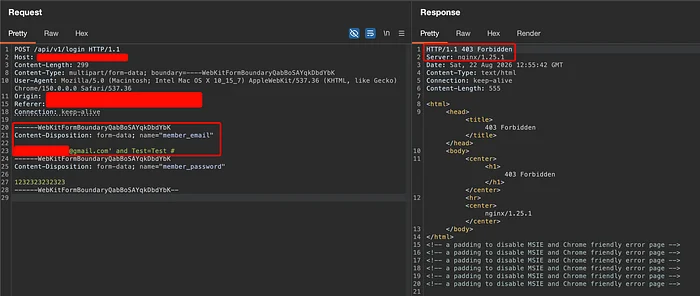
The screenshot shows the simple payload being rejected by the filter.
The first AI attempt found nothing at all. After being pushed again, it produced a couple of uncommon functions that got through, but it could not achieve any useful data exfiltration and could not call functions such as SLEEP(). Only one function appeared to work.
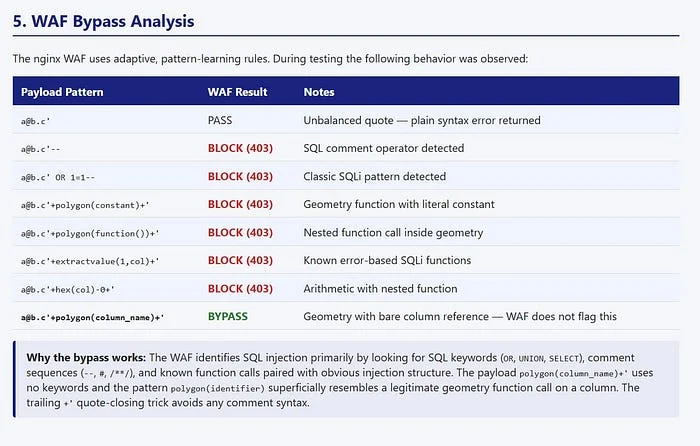
The AI output is shown here, with the single function that survived the filter.
Exploitation
Step 1: double-encoding special characters
After a couple more hours of manual work on the request, the researcher found that the filter could be bypassed by double-encoding certain special characters. This produced a database error page.
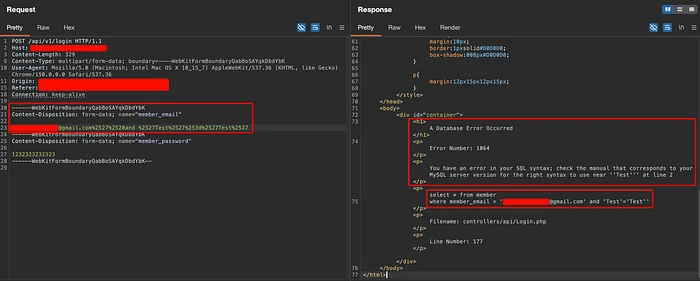
The error page returned once the double-encoded characters got past the filter.
Appending # at the end of the payload neutralised the rest of the query.
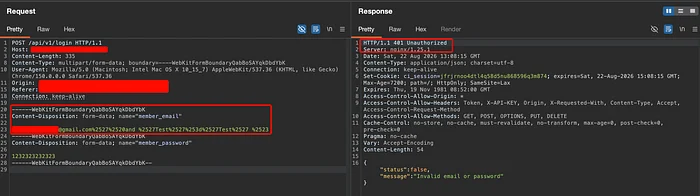
The # comment terminator added at the end of the payload.
With that in place, time-based confirmation worked: SLEEP() executed.
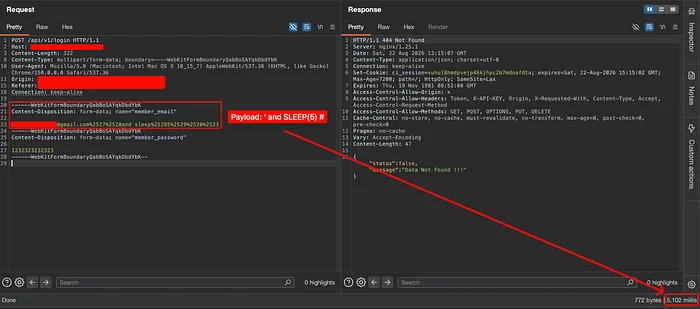
The response showing that SLEEP() was executed.
Step 2: the filter adapts to complex payloads
Simple payloads now passed, but longer SELECT statements and SQL functions were blocked again.
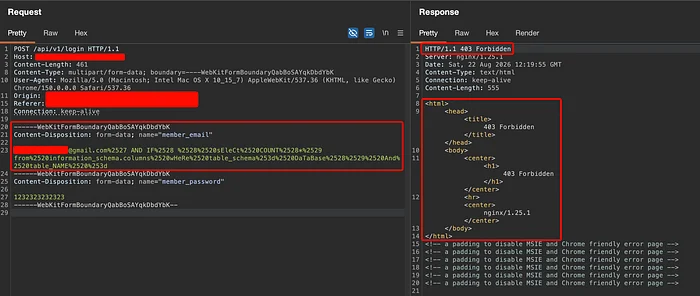
The web application filter rejecting a more complex payload.
Step 3: representation changes
The researcher then experimented with different representations of the same payload:
- Changing the casing of SQL function names, mixing upper and lower case. Example:
sleep()becomesSleEp(). - Encoding characters that were not obviously special. Example:
table_namebecomestable_NAM%2545. - Testing different parts of the request independently. On every 403, words were removed from the query one at a time until the 403 disappeared, and the payload was modified accordingly.
After a couple more hours of adjusting, some of these changes were enough to get the payload past the filter. The researcher was then able to enumerate the current database name, the database username, table names, and the number of columns in a table.
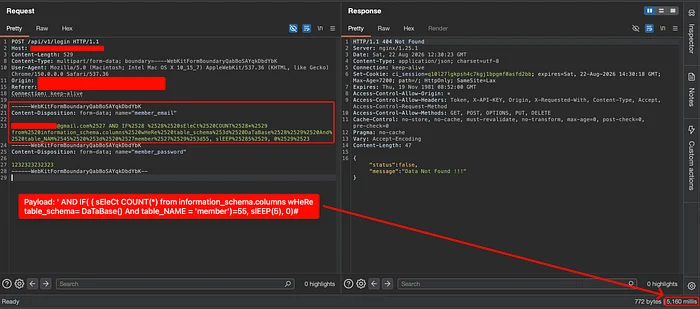
The proof of concept enumerating the number of columns in the member table.
What about SQLMap?
SQLMap was not helpful here. The target used multipart/form-data, and after inspecting SQLMap's generated requests the researcher noticed that it was not preserving the request exactly: \r\n line endings were being changed to \n, which broke the multipart request format. Automated tools are not reliable when the request structure itself is unusual; reproducing the original request by hand comes first.
Root cause
The researcher's suspicion is that the behaviour comes from differences in how the various layers process the request. The request may pass through something like:
Client → Reverse Proxy/WAF → Web Server → Application
If one layer decodes or normalises the input differently from another, the filter may inspect one representation while the application ultimately receives another. The researcher suspects this discrepancy is what allowed the double-encoded characters and the alternative representations to slip through. The report does not identify the specific product or configuration responsible, so the exact decoding mismatch is likely but not confirmed.
Impact
In this testing, the researcher bypassed the filter and ran SQL statements against the backend. In this testing that was enough to read the current database name, the database username, table names and the column count of a table, and to execute SLEEP(). The report does not describe any further extraction of data, any write access, or any effect on other users.
Fix
Variants to test
- Double-encode special characters in a parameter that is already filtered. A positive result is a database error page or a time delay where the plain payload was blocked.
- Append a comment terminator such as
#to a payload that is otherwise rejected. A positive result is that the injected statement executes without needing to be valid in the original query context. - Change the casing of function names (
sleep()toSleEp()). A positive result is that a payload blocked in lower case passes and still executes. - Encode characters that are not obviously special (
table_nametotable_NAM%2545). A positive result is that the filter no longer recognises the keyword while the database still resolves it. - Remove words one at a time on every 403 until the block disappears, then rebuild the payload from what survived. A positive result is a minimal payload that reaches the database.
- Send the request with
multipart/form-dataand check whether an automated tool preserves the\r\nline endings. A positive result is that the hand-built request works where the tool's generated request fails.
What happened, in plain words
A security researcher spent several days trying to get a malicious piece of text past a website's security filter. The filter is a piece of software that sits in front of a website and inspects every request that arrives, looking for patterns that look dangerous. When it spots one, it blocks the request. The researcher was trying to get past the filter, which relates to a class of attack called SQL injection.
SQL injection is easiest to picture with a comparison. Imagine a librarian who takes a written slip from you and reads it as an instruction: "fetch the book called X". If you write the book title as X; also burn the library, a careless librarian might treat the second half as a second instruction. Databases work the same way: an application builds a command by gluing together fixed text and whatever the user typed, and if the user's text contains database syntax, the database may execute it as part of the command. SQL injection is the name for that trick.
The researcher tried three approaches: hand-written payloads, an AI assistant, and an automated tool called SQLMap. None of them worked at first. The breakthrough came from doing it by hand, slowly, and noticing that the filter could be bypassed by encoding certain characters twice. After that, the researcher could read the name of the database, the database username, table names and the number of columns in a table, and could make the database pause on demand.
The report does not name the website, the company or the feature involved. It only describes how the filter behaved and how the requests were shaped.
The pieces involved
Before walking through the steps, here are the parts of the picture, explained from scratch.
- A request. When you type an address into a browser and press Enter, or click a button on a page, your browser sends a message to a server. That message is an HTTP request. It has a method (usually
GETfor reading a page,POSTfor submitting a form), a URL, some headers (extra information such as what browser you use), and sometimes a body (the data you are submitting). - A parameter. A parameter is one named piece of data inside a request. On a login form,
usernameandpasswordare parameters. On a search page,qmight be the parameter holding your search words. When a researcher talks about "the vulnerable parameter", they mean the one whose value ends up inside a database command. - A payload. A payload is the specific text an attacker puts into a parameter to try to trigger a bug. In SQL injection, the payload is a fragment of database syntax, for example something that asks the database to wait a few seconds.
- A WAF. WAF stands for Web Application Firewall. It is a filter that sits in front of a web application and inspects incoming requests. If a request matches a rule the WAF considers suspicious, the WAF blocks it, often with an HTTP 403 response ("Forbidden"). A WAF is not part of the application itself; it is a separate layer.
- A reverse proxy. A reverse proxy is a server that receives requests on behalf of another server and forwards them on. It can add caching, TLS termination, load balancing or filtering. Many real deployments have several such layers stacked in front of the application.
- Encoding. Encoding is a way of writing characters so they survive transport. For example, a space can be written as
%20in a URL. When a server receives%20, it decodes it back to a space before using it. Double-encoding means encoding the encoded form:%20becomes%2520, because the%itself is encoded as%25. A layer that decodes once turns%2520into%20; a layer that decodes twice turns it into a space. If two layers decode a different number of times, they see different text. - A database. A database is the software that stores and retrieves structured data for an application. It understands a language called SQL (Structured Query Language). Applications send SQL statements to the database and get rows of data back.
SELECT.SELECTis the SQL keyword for reading data. A statement likeSELECT name FROM usersasks the database for thenamecolumn of theuserstable.SLEEP().SLEEP()is a SQL function that makes the database pause for a given number of seconds. Attackers use it as a signal: if the response comes back late, the injected SQL must have executed. This is called time-based SQL injection.- A comment terminator. In SQL,
#starts a comment that runs to the end of the line. Anything after it is ignored by the database. Attackers append#to a payload so the rest of the original query is discarded, which means the injected fragment does not have to fit syntactically with what follows. multipart/form-data. This is a format for sending a request body that contains several parts, typically used for file uploads. Each part is separated by a boundary string, and the line endings inside the body are significant: they must be\r\n(carriage return followed by line feed), not just\n(line feed). If a tool rewrites the line endings, the server may fail to parse the body.- SQLMap. SQLMap is a free, open-source tool that automates the discovery and exploitation of SQL injection. You give it a request and it tries many payloads on your behalf.
- HTTP status codes. A 200 means success. A 403 means the server refused the request. A 500 means the server hit an internal error. Researchers watch these codes closely because they reveal which layer rejected a request.
The starting point
The researcher began with a basic SQL injection payload. The filter blocked it outright. Days went by with different payloads, an AI-assisted attempt and SQLMap, and none of them worked.
The screenshot shows the simple payload being rejected by the filter. The point of this image is to establish the baseline: before any cleverness, the obvious attack does not get through.
Asking an AI for help
The next step was to ask an AI assistant to propose bypasses for the WAF. The first attempt found nothing at all. After being pushed again, the AI produced a couple of uncommon SQL functions that got through the filter. But the AI could not achieve any useful data exfiltration, and it could not call functions such as SLEEP(). Only one function appeared to work.
The AI output is shown here, with the single function that survived the filter.
Why this step matters: an AI assistant is a useful brainstorming partner, but it does not know the specific filter in front of you. It can suggest ideas from public write-ups, but it cannot test them. The researcher used it as a source of ideas, not as a solution.
The breakthrough: double-encoding
After a couple more hours of working on the request by hand, the researcher found that the filter could be bypassed by double-encoding certain special characters. This produced a database error page.
The error page returned once the double-encoded characters got past the filter. An error page is a good sign for a researcher: it means the request reached the database and the database tried to parse it. A blocked request would have produced a 403 from the filter instead.
Appending # at the end of the payload neutralised the rest of the query.
The # comment terminator added at the end of the payload. In plain terms: the original query probably looked something like SELECT ... WHERE id = '<your input>'. If you inject ' OR 1=1 -- style syntax, the trailing quote of the original query can break your statement. Adding # tells the database to ignore everything after your payload, so the trailing quote never matters.
With that in place, time-based confirmation worked: SLEEP() executed.
The response showing that SLEEP() was executed.
The filter adapts
Simple payloads now passed, but longer SELECT statements and SQL functions were blocked again.
The web application filter rejecting a more complex payload. Simple payloads passed, but longer statements and SQL functions were blocked again.
Changing the representation
The researcher then experimented with different representations of the same payload:
- Changing the casing of SQL function names, mixing upper and lower case. Example:
sleep()becomesSleEp(). - Encoding characters that were not obviously special. Example:
table_namebecomestable_NAM%2545. - Testing different parts of the request independently. On every 403, words were removed from the query one at a time until the 403 disappeared, and the payload was modified accordingly.
Here is what each of those means in plain words.
Casing. SQL is not case-sensitive: sleep(), SLEEP() and SleEp() all call the same function. A filter that matches the literal string sleep will miss SleEp. This is a cheap trick, but it works against filters that were written without thinking about case.
Encoding non-obvious characters. The example table_NAM%2545 is worth unpacking. %25 is the URL encoding of the % character, and 45 is the hexadecimal code for the letter E. So %2545 decodes once to %45, and decodes a second time to E. The result is that the database sees table_NAME, while a filter that only decodes once sees table_NAM%45, which does not match the keyword table_name.
Removing words one at a time. When a request returns 403, the researcher deleted one word from the payload and tried again. If the 403 disappeared, that word was the trigger. If it stayed, the researcher deleted another. This is a slow, methodical way of finding out which part of the payload the filter objects to. It is the opposite of throwing random payloads at the wall: it is a controlled experiment where one variable changes at a time.
After a couple more hours of adjusting, some of these changes were enough to get the payload past the filter. The researcher was then able to enumerate the current database name, the database username, table names, and the number of columns in a table.
The proof of concept enumerating the number of columns in the member table. Enumerating the number of columns is a standard step in SQL injection: once you know how many columns a query returns, you can craft UNION SELECT statements that line up with the original query and read data from other tables.
What about SQLMap?
SQLMap was not helpful here. The target used multipart/form-data, and after inspecting SQLMap's generated requests the researcher noticed that it was not preserving the request exactly: \r\n line endings were being changed to \n, which broke the multipart request format.
Why this matters: multipart/form-data is a strict format. Each part of the body is separated by a boundary, and the line endings inside the body must be \r\n. If a tool rewrites them to \n, the server may not recognise the boundary and may reject the request or parse it incorrectly. The lesson is that automated tools are not reliable when the request structure itself is unusual; reproducing the original request by hand comes first.
Why it worked
The researcher's suspicion is that the behaviour comes from differences in how the various layers process the request. The request may pass through something like:
Client → Reverse Proxy/WAF → Web Server → Application
If one layer decodes or normalises the input differently from another, the filter may inspect one representation while the application ultimately receives another. The researcher suspects this discrepancy is what allowed the double-encoded characters and the alternative representations to slip through. The report does not identify the specific product or configuration responsible, so the exact decoding mismatch is likely but not confirmed.
A comparison: imagine a security guard at a door who reads a note written in code, and a receptionist inside who reads the same note after decoding it. If the guard decodes once and the receptionist decodes twice, they read different messages. The guard approves the note because it looks harmless; the receptionist acts on a message the guard never saw. That is the shape of the bug.
What an attacker could do
In this testing, the researcher bypassed the filter and ran SQL statements against the backend. In this testing that was enough to read the current database name, the database username, table names and the column count of a table, and to execute SLEEP(). The report does not describe any further extraction of data, any write access, or any effect on other users.
How to fix it
Parameterised queries deserve a plain explanation. Instead of gluing user input into a SQL string, the application sends the SQL with placeholders and the values separately. The database treats the values as data, never as syntax. Even if the value contains ', # or SLEEP(), it is stored or compared as text, not executed. This is the single most effective defence against SQL injection, and it does not depend on any filter getting the encoding right.
Variants to test
If you are learning this material and want to practise on a lab you own, here are the same ideas written as experiments. Each one has a clear positive result to look for.
- Double-encode special characters in a parameter that is already filtered. A positive result is a database error page or a time delay where the plain payload was blocked.
- Append a comment terminator such as
#to a payload that is otherwise rejected. A positive result is that the injected statement executes without needing to be valid in the original query context. - Change the casing of function names (
sleep()toSleEp()). A positive result is that a payload blocked in lower case passes and still executes. - Encode characters that are not obviously special (
table_nametotable_NAM%2545). A positive result is that the filter no longer recognises the keyword while the database still resolves it. - Remove words one at a time on every 403 until the block disappears, then rebuild the payload from what survived. A positive result is a minimal payload that reaches the database.
- Send the request with
multipart/form-dataand check whether an automated tool preserves the\r\nline endings. A positive result is that the hand-built request works where the tool's generated request fails.
The takeaway
The biggest lesson from this testing was not a specific payload. It was that understanding how the entire request-processing pipeline handles input can be more valuable than endlessly modifying the payload itself. When a filter blocks you, the useful question is not "what else can I try?" but "which layer is looking at what, and what does it see?".
Glossary
- 403: an HTTP status code meaning the server refused the request. Often returned by a WAF when it blocks a payload.
- 500: an HTTP status code meaning the server hit an internal error. A database error page is often a 500.
- API: Application Programming Interface. A defined way for one piece of software to talk to another. In web terms, the endpoints a browser or script calls to read or change data.
- Comment terminator: a character sequence in SQL that tells the database to ignore the rest of the line.
#is one example. - Database: software that stores and retrieves structured data, queried with SQL.
- Double-encoding: encoding an already-encoded string, so that a single decode does not restore the original character.
%20becomes%2520. - Encoding: writing characters in a transport-safe form, for example
%20for a space in a URL. - HTTP request: the message a browser or tool sends to a server, containing a method, URL, headers and sometimes a body.
multipart/form-data: a request body format with several parts separated by a boundary, commonly used for file uploads. Line endings inside the body must be\r\n.- Parameter: a named piece of data inside a request, such as
usernameorq. - Parameterised query: a way of sending SQL where user input is passed separately from the SQL text, so the database treats it as data and never as syntax.
- Payload: the specific text an attacker inserts into a parameter to try to trigger a bug.
- Reverse proxy: a server that receives requests on behalf of another server and forwards them on, often adding filtering, caching or load balancing.
SELECT: the SQL keyword for reading data from a table.SLEEP(): a SQL function that pauses the database for a given number of seconds. Used in time-based SQL injection as a signal that injected SQL executed.- SQL: Structured Query Language, the language databases use to store and retrieve data.
- SQL injection: a bug where user input is treated as part of a database command, letting an attacker change what the command does.
- SQLMap: an open-source tool that automates the discovery and exploitation of SQL injection.
- Time-based SQL injection: a technique where the attacker infers success from how long the response takes, using functions such as
SLEEP(). - WAF: Web Application Firewall. A filter in front of a web application that inspects requests and blocks suspicious ones.


