How I Bypassed an SSRF Filter Using an IPv6 Address
A URL-fetching scan endpoint blocked obvious SSRF targets such as loopback and cloud metadata addresses, but accepted the same loopback address written as an IPv4-mapped IPv6 address. An unauthenticated attacker could then reach internal services and infer open ports from differing error messages.

medium.com
Published on medium.com
Ssrf
The full write-up lives on its author's site
It belongs to its author, so we link to it rather than copy it. The other two tabs are our own rewrites, checked against it.
Context
The target was a "Security Scan" tool on a program the author calls doomscan.io, explicitly described as not a real target. The feature takes a URL, scans it and returns information about it. That behaviour means the server fetches a URL supplied by the user, which is the classic precondition for server-side request forgery (SSRF).
The endpoint returns the response headers it fetched, never a response body. It requires no authentication and no CAPTCHA.
Setup
The only tool mentioned is Burp, used to send and replay requests. No accounts, roles or versions are given. The precondition is simply access to the scan feature, which is unauthenticated.
Finding it
The author's reasoning was direct: a server-side URL fetch is an SSRF candidate, so he opened Burp and started poking at the endpoint.
Exploitation
Step 1: the endpoint
The request as shown in the report:
POST /api/scan/fetch HTTP/2Host: scan.doomscan.ioContent-Type: application/json; charset=UTF-8"https://example.com"
The endpoint accepts a JSON string containing a URL and returns the headers of the fetched response. There is no auth and no CAPTCHA, so anyone who can reach the host can drive the fetch.
Step 2: obvious payloads, all blocked
"http://[redacted]" → "URL host is not allowed"
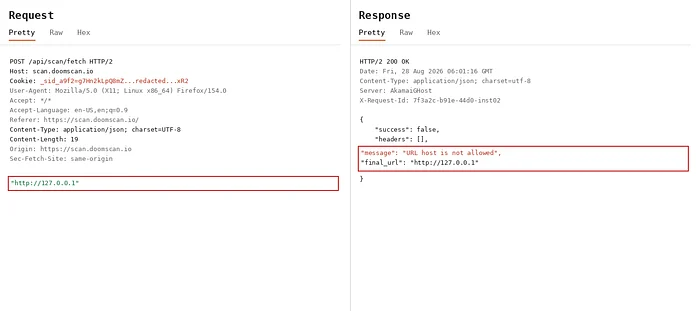
The screenshot shows the rejection of [redacted]. The same rejection applied to [redacted], to RFC1918 ranges, to decimal-encoded IPs, and to any redirect, which returned "Test blocked by server". The filter therefore covered the decimal trick, private ranges and redirects, so pivoting through an open redirect was not possible either.
Step 3: IPv4-mapped IPv6
Re-reading SSRF bypass notes, the author settled on IPv4-mapped IPv6 addresses. IPv6 reserves the block ::ffff:0:0/96, which lets an IPv4 address be written inside an IPv6 address. [redacted] can therefore also be written ::ffff:[redacted]: the same destination with a different spelling, and a legitimate part of the specification rather than an obscure trick.
The reasoning is that most SSRF blocklists are string comparisons against a list such as [redacted] and [redacted]. Such a check does not recognise ::ffff:[redacted] as the same address, so it lets the value through, and the HTTP client then unwraps it back to [redacted] and connects.
Step 4: the bypass
"http://[::ffff:[redacted]]" → success: true
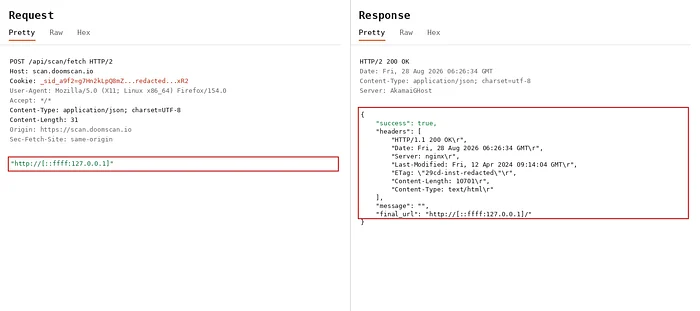
The screenshot shows the bypass reaching an internal nginx host. The address that had been blocked minutes earlier, written differently, was accepted.
Step 5: mapping the loopback interface
A success: true on loopback alone is not enough to get paid, so the author walked ports on the loopback interface. Because the endpoint returns only headers and never a body, he read the shape of each failure instead:
:22 → "Received HTTP/0.9 when not allowed" → OPEN (SSH banner confused curl's HTTP parser)
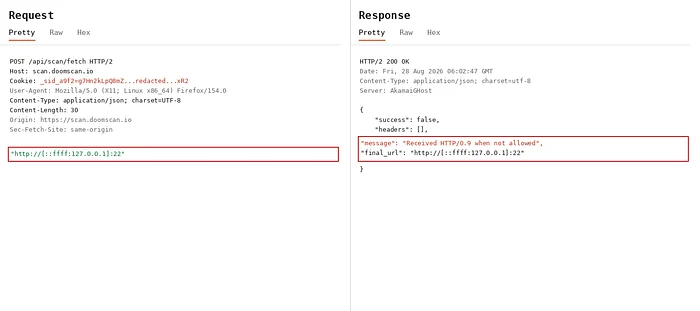
:3306 → "Failed to connect... Couldn't connect" → CLOSED:6379 → "Empty reply from server" → OPEN, non-HTTP service
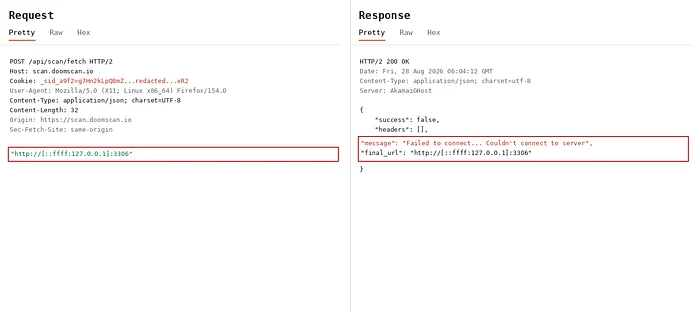
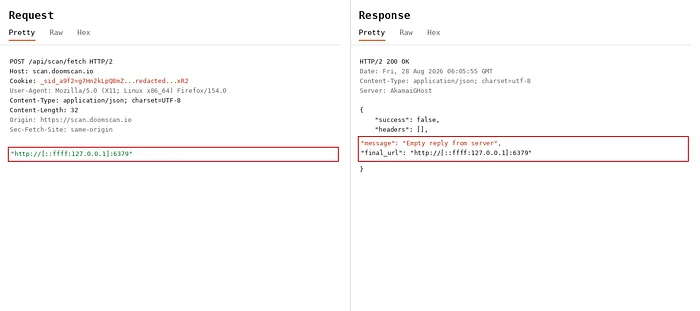
Three distinct error strings yielded three distinct facts about the internal network without a single byte of response body. Port 22 was open, with the SSH banner tripping curl's HTTP parser. Port 3306 was closed, with a connection refused style failure. Port 6379 was open and accepted the connection but replied with nothing.
Root cause
The filter and the component performing the connection did not interpret the address the same way. The filter compared the host string against a blocklist, while the HTTP client resolved the IPv4-mapped IPv6 form to the underlying IPv4 address and connected to it. The gap between what the filter checks and what the network layer actually connects to is the bug. The report states this as the cause, based on the observed behaviour.
Impact
An unauthenticated attacker could use the endpoint to reach loopback and internal services and to map the internal network methodically, using differences in error messages as an oracle. The report frames this as the reconnaissance an internal attacker performs after a breach, except that no breach is required. The endpoint returns headers only, so the technique reveals reachability and service behaviour rather than response bodies.
Fix
The report does not describe a fix or a change made by the program.
Variants to test
- Send
http://[::ffff:[redacted]]and look for a successful fetch where the plain IPv4 form was rejected. - Walk loopback ports and compare error strings: an HTTP parser error, an empty reply or a connection refused each indicates a different state, and a positive result is a distinct message per port.
What happened, in plain words
A security researcher found a website feature that takes a web address (a URL) from you, visits it on the server's behalf, and tells you something about what it found. Features like that are a classic way for attackers to make a server visit places it should not, such as the server's own internal network. This class of bug is called server-side request forgery, or SSRF.
The site had a filter that blocked the obvious attempts: the local address [redacted], the cloud metadata address [redacted], private network ranges, and redirects. The researcher then wrote the very same local address in a different but equally valid way, using a form called an IPv4-mapped IPv6 address, and the filter let it through. The server connected to its own loopback interface, and by trying different ports and reading the error messages, the researcher could tell which internal services were running.
Nothing here is a new invention. It is a well-documented trick that still works because filters often compare text, while the networking software underneath compares actual addresses.
The target and the feature
The target is a "Security Scan" tool on a program the author calls doomscan.io. He says plainly that this is not a real target, just a name he uses for the write-up.
The feature works like this: you paste in a URL, press scan, and get information back about that URL. To do that, the server has to fetch the URL itself. That is the important part. Whenever a website offers to fetch a URL for you, the server is making a request to an address that a user chose. If the server does not carefully check that address, a user can point it at things the user could never reach directly, such as the server's own internal services.
That is the definition of SSRF in one sentence: the server is tricked into making a request on the attacker's behalf, to a destination the attacker should not be able to reach.
A useful everyday comparison: imagine a hotel concierge who will go and knock on any door in the building for a guest. Normally that is a helpful service. But if a guest can say "knock on the door of room 12 and tell me whether anyone answers, and what they say", the concierge becomes a way to probe parts of the building the guest is not allowed to visit. The guest never enters those rooms; the concierge does it for them.
Two more details about the feature matter later:
- It returns the response headers it fetched, never the response body. Headers are the small block of metadata that comes with every web response, things like the content type and the server software. The body is the actual page or data. So the tool tells you a little about what answered, not what it said.
- It requires no login and no CAPTCHA. Anyone who can reach the site can use it.
The tool used
The only tool mentioned is Burp. Burp is a program that sits between your browser and a website and lets you see, edit and resend the requests your browser makes. Think of it as a pause button and an edit box for web traffic. The researcher used it to send requests to the scan endpoint and to change the URL inside them.
No accounts, roles or software versions are given, because none were needed: the feature was open to anyone.
Why he started looking
The reasoning was short. A server-side URL fetch is an SSRF candidate, so he opened Burp and started poking at the endpoint. That is the whole of the discovery step: recognise the shape of the feature, then test it.
Step 1: the endpoint
An endpoint is simply a specific address on a website that accepts a particular kind of request, like a service window in a building. This one is where the scan feature sends its work.
The request as shown in the report:
POST /api/scan/fetch HTTP/2Host: scan.doomscan.ioContent-Type: application/json; charset=UTF-8"https://example.com"
Line by line, in plain words:
POST /api/scan/fetch HTTP/2is the request line.POSTmeans "I am sending data to you", as opposed toGET, which means "give me a page"./api/scan/fetchis the path of the endpoint, the service window.HTTP/2is the version of the web protocol being used. An API, by the way, is just a way for one piece of software to talk to another, rather than a page meant for a human to look at.Host: scan.doomscan.iotells the server which site name the request is for. One server can host many names, so this line says which one is wanted.Content-Type: application/json; charset=UTF-8says what format the data being sent is in. JSON is a simple text format for structured data, made of names and values in curly braces and quotes.charset=UTF-8says the text is encoded in UTF-8, the standard way of representing characters."https://example.com"is the data itself: a JSON string containing a URL. This is the address the server will go and fetch.
So the whole request says: "here is a URL, please fetch it and tell me about the response". The endpoint accepts a JSON string containing a URL and returns the headers of the fetched response. There is no login and no CAPTCHA, so anyone who can reach the host can drive the fetch.
Step 2: the obvious attempts, all blocked
Before trying anything clever, you try the standard things. The first standard thing in SSRF is the loopback address.
[redacted] is a special address that always means "this same machine". Every computer has it. When a server fetches http://[redacted], it is talking to itself, not to the internet. That is why it is the first thing to try: if you can make a server fetch its own loopback address, you may be able to reach internal services that are only listening locally and were never meant to be exposed.
The attempt and its result:
"http://[redacted]" → "URL host is not allowed"
The screenshot shows the rejection of [redacted]: the request came back with the message "URL host is not allowed". The host is the part of a URL that names the machine, here [redacted].
The same rejection applied to several other attempts:
[redacted], an address used by cloud providers to expose metadata about the running server. If reachable, it can sometimes hand out credentials, which is why it is a favourite SSRF target.- RFC1918 ranges, which are the blocks of addresses reserved for private networks, the ones used inside homes and companies and not routable on the public internet.
- Decimal-encoded IPs, which are another way of writing the same address as a single large number.
- Any redirect, which returned "Test blocked by server". A redirect is when one address answers "not here, go to this other address instead". Attackers use redirects to slip past filters: the filter approves the first address, and the server then follows the redirect to a forbidden one.
The filter therefore covered the decimal trick, private ranges and redirects, so pivoting through an open redirect was not possible either. An open redirect is a redirect on some website that will send visitors to any address a link specifies. Whoever wrote this filter had clearly read the standard SSRF checklists.
Step 3: the overlooked trick, IPv4-mapped IPv6
Re-reading SSRF bypass notes, the researcher settled on IPv4-mapped IPv6 addresses. This needs a little background.
There are two versions of the internet addressing system. IPv4 addresses look like [redacted]: four numbers separated by dots. IPv6 addresses are longer and written with colons, because the world ran out of IPv4 addresses and a bigger system was needed. During the long changeover, the designers included a reserved block in IPv6, ::ffff:0:0/96, whose purpose is to let an IPv4 address be written inside an IPv6 address. The /96 describes how much of the IPv6 address space that block covers; you do not need the arithmetic, only the idea that this is a defined, official range.
Because of that block, [redacted] can also be written ::ffff:[redacted]. It is the same destination with a different spelling, and a legitimate part of the specification rather than an obscure trick. The networking software understands both spellings as the same machine.
The reasoning behind the bypass is about how filters are usually written. Most SSRF blocklists are string comparisons against a list of forbidden values, something like: if the host text is [redacted] or [redacted] or one of the others, reject it. A string comparison looks at characters, not at meaning. It does not recognise ::ffff:[redacted] as the same address, because the characters are different. So it lets the value through, and then the HTTP client, the piece of software that actually makes the connection, unwraps the IPv6 form back to [redacted] and connects.
An everyday comparison: a bouncer with a list of banned names checks the name on your ID. If your ID says "Robert" and the list says "Bob", the bouncer waves you in, even though you are the same person. The list checks spelling; the door checks the person.
Step 4: the bypass
The test and its result:
"http://[::ffff:[redacted]]" → success: true
Line by line:
http://is the scheme, meaning this is a web address to be fetched over HTTP.[and]are square brackets. In a URL, an IPv6 address must be wrapped in square brackets, because IPv6 addresses contain colons and colons already have a meaning in URLs (they separate the host from the port). The brackets tell the parser "everything inside here is the host".::ffff:[redacted]is the IPv4-mapped IPv6 form of the loopback address.success: trueis the answer from the scan endpoint: it fetched the address and reported success.
The screenshot shows the bypass reaching an internal nginx host. nginx is a common web server program. The address that had been blocked minutes earlier, written differently, was accepted.
Step 5: mapping the internal network
A success: true on loopback alone is not enough to get paid, as the author puts it. Proving you can reach the server itself is a start, but the interesting question is what else is listening on that machine. So he walked ports on the loopback interface.
A port is a numbered channel on a machine. One machine can run many services at once, and each listens on its own port number, the way one building can have many numbered doors. Common examples: port 22 is usually SSH, the remote login service; port 3306 is usually MySQL, a database; port 6379 is usually Redis, an in-memory data store. Walking ports means trying them one by one to see which answer.
Because the endpoint returns only headers and never a body, he could not read what any service said. Instead he read the shape of each failure. Different kinds of failure mean different things: a service that speaks a different protocol produces a parsing error, a service that accepts the connection but says nothing produces an empty reply, and a closed port produces a connection refused style message. Each distinct message is a fact about the internal network.
The first result:
:22 → "Received HTTP/0.9 when not allowed" → OPEN (SSH banner confused curl's HTTP parser)
Line by line:
:22means port 22 on the loopback address."Received HTTP/0.9 when not allowed"is the error the scan endpoint returned. curl is the software the server uses to make the fetch. curl expects to speak HTTP, the web protocol. SSH, the login service on port 22, greets every connection with a short text banner identifying itself. curl read that banner, could not make sense of it as HTTP, and complained. The complaint itself is the evidence: something answered on port 22, and it was not a web server.OPENis the conclusion: the port is open and a service is listening.
The screenshot shows the SSH banner tripping curl's HTTP parser.
The second result:
:3306 → "Failed to connect... Couldn't connect" → CLOSED:6379 → "Empty reply from server" → OPEN, non-HTTP service
Line by line:
:3306means port 3306, the usual MySQL port. The message"Failed to connect... Couldn't connect"means nothing accepted the connection, so the port is closed.:6379means port 6379, the usual Redis port. The message"Empty reply from server"means the connection was accepted but the service sent nothing back that curl could use. That is an open port running a service that does not speak HTTP.
The screenshots show the closed port 3306 with a connection refused style failure, and port 6379 accepting the connection and replying with nothing.
Three distinct error strings yielded three distinct facts about the internal network without a single byte of response body. Port 22 was open, with the SSH banner tripping curl's HTTP parser. Port 3306 was closed. Port 6379 was open and accepted the connection but replied with nothing.
Why this matters
An unauthenticated attacker, meaning someone with no account and no special access, could use the endpoint to reach loopback and internal services and to map the internal network methodically, using differences in error messages as an oracle. An oracle here means any signal that answers a yes or no question: the error message tells you whether a port is open without ever showing you the service.
The report frames this as the reconnaissance an internal attacker performs after a breach, except that no breach is required. Reconnaissance just means looking around to see what exists before doing anything else. Normally you have to get inside a network first to map it. Here the scan feature does the looking for you, from the outside.
One limit is worth repeating: the endpoint returns headers only, so the technique reveals reachability and service behaviour rather than response bodies. You learn which doors exist and whether someone is behind them, not what they would say.
The root cause
The filter and the component performing the connection did not interpret the address the same way. The filter compared the host string against a blocklist, while the HTTP client resolved the IPv4-mapped IPv6 form to the underlying IPv4 address and connected to it. The gap between what the filter checks and what the network layer actually connects to is the bug. The report states this as the cause, based on the observed behaviour.
The fix
The report does not describe a fix or a change made by the program. In plain words: do not check the spelling, check the destination. Work out which machine the address really points to, then decide whether that machine is allowed.
Variants to test
If you want to try this kind of testing yourself, these are the variations the report points to:
- Send
http://[::ffff:[redacted]]and look for a successful fetch where the plain IPv4 form was rejected. - Walk loopback ports and compare error strings: an HTTP parser error, an empty reply or a connection refused each indicates a different state, and a positive result is a distinct message per port.
Glossary
- API: a way for one piece of software to talk to another, usually returning structured data rather than a page for a human.
- Blocklist: a list of values that are forbidden, checked against each request.
- Body (of a response): the actual content of a web response, such as the page or the data, as opposed to the headers.
- Burp: a tool that sits between a browser and a website so you can see, edit and resend requests.
- CAPTCHA: a test meant to prove a human is making the request rather than an automated script.
- Connection refused: the error when nothing is listening on the port you tried, so the connection is rejected.
- Content-Type: a header that says what format the data being sent or returned is in.
- curl: a command-line program, also used inside servers, that fetches URLs.
- Decimal-encoded IP: another way of writing an IPv4 address as a single large number.
- Endpoint: a specific address on a website that accepts a particular kind of request.
- Headers: the small block of metadata sent with every web response, such as content type and server software.
- Host: the part of a URL that names the machine, for example
[redacted]orscan.doomscan.io. - HTTP: the protocol browsers and servers use to exchange web requests and responses.
- HTTP/2: a version of HTTP.
- IPv4: the older internet addressing system, written as four numbers separated by dots, like
[redacted]. - IPv6: the newer, larger internet addressing system, written with colons.
- IPv4-mapped IPv6 address: an IPv6 address in the reserved block
::ffff:0:0/96that carries an IPv4 address inside it, so[redacted]can also be written::ffff:[redacted]. - JSON: a simple text format for structured data, made of names and values in braces and quotes.
- Loopback: the special address
[redacted], which always means the same machine, so a server fetching it talks to itself. - Metadata address:
[redacted], an address some cloud providers use to expose information about the running server. - nginx: a common web server program.
- Open redirect: a redirect on a website that will send visitors to any address a link specifies.
- Oracle: any signal that answers a yes or no question, such as an error message revealing whether a port is open.
- Port: a numbered channel on a machine, so one machine can run many services at once.
- POST: an HTTP method meaning "I am sending data to you", as opposed to GET, which asks for a page.
- Private network ranges (RFC1918): blocks of addresses reserved for internal networks and not routable on the public internet.
- Protocol: an agreed way of exchanging data, such as HTTP for the web or SSH for remote login.
- Reconnaissance: looking around to see what exists before doing anything else.
- Redirect: when one address answers "not here, go to this other address instead".
- Redis: an in-memory data store, usually on port 6379.
- Resolve: turning an address into the actual machine it points to.
- Scheme: the first part of a URL, such as
http://, saying how to fetch it. - SSH: the remote login service, usually on port 22, which greets connections with a text banner.
- SSRF (server-side request forgery): tricking a server into making a request on your behalf to a destination you should not be able to reach.
- String comparison: checking whether text matches exactly, character by character, without understanding its meaning.
- UTF-8: the standard way of encoding characters as bytes.
- Walking ports: trying port numbers one by one to see which answer.



