How I bypassed Reflected XSS in well-known platform
 Published on moustadif.medium.com
Cross-site scripting (XSS) is a web application vulnerability that permits an attacker to inject code, (typically HTML or JavaScript), into the contents of an outside website. When a victim views an infected page on the website, the injected code executes in the victim’s browser.
The full write-up lives on its author's site
It belongs to its author, so we link to it rather than copy it. The other two tabs are our own rewrites, checked against it.
Context
Cross-site scripting (XSS) is a web application vulnerability that lets an attacker inject code, typically HTML or JavaScript, into the contents of an outside website. When a victim views an infected page, the injected code executes in the victim's browser. The attacker has then bypassed the browser's same origin policy and can steal private information from a victim associated with the website.
Reflected XSS, also called non-persistent XSS, occurs when a malicious script is reflected off a web application to the victim's browser. The script is activated through a link that sends a request to a website with a vulnerability enabling execution of malicious scripts. The vulnerability is typically a result of incoming requests not being sufficiently sanitised, which allows manipulation of a web application's functions and activation of malicious scripts.
To distribute the malicious link, a perpetrator typically embeds it into an email or a third party website, for example in a comment section or on social media. The link is embedded inside an anchor text that provokes the user to click on it, which initiates the XSS request to the exploited website, reflecting the attack back to the user.
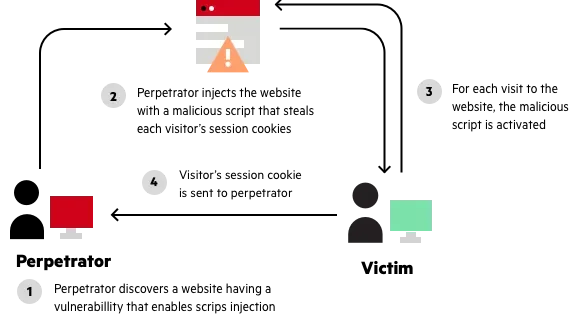
The target is a well-known platform, referred to throughout as www.redacted.com. The feature of interest is a path that takes a t parameter, reached through a redirect endpoint.
Setup
The write-up does not describe any accounts, roles, tools or versions. The only precondition shown is access to the public site and the ability to send crafted URLs to it. The researcher notes that little time was spent on enumeration and discovery because the bug existed on the main domain.
Finding it
Enumeration started with a Google dork aimed at redirect paths carrying parameters:
site:www.redacted.com inurl:redirect
This surfaced a path with the parameter redirect?t=. The researcher tested it for open redirection, which did not work. Checking the source code of the response showed that the supplied value was reflected inside a <script> </script> tag.
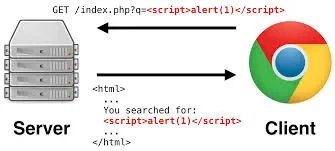
That reflection inside a script context is what made the parameter interesting: a value placed inside a script block is not ordinary HTML text, and escaping out of it is a different problem from escaping out of an HTML attribute or body.
Exploitation
Reflected XSS bugs can be exploited to steal cookies, capture passwords and perform CSRF.
Step 1: first payload
The first attempt tried to close the existing script element and open a malicious one:
</script> alert('1') <script></script>
This was intended to terminate the surrounding script and start a new one containing the attacker's code. A filter was in place that broke all of the researcher's script and tags, including <script>, <img> and similar.

Step 2: finding a bypass
It took about two days to work out the payload that bypassed the filter:
</</script>script> <</svg>svg/onload=alert`xss`>//
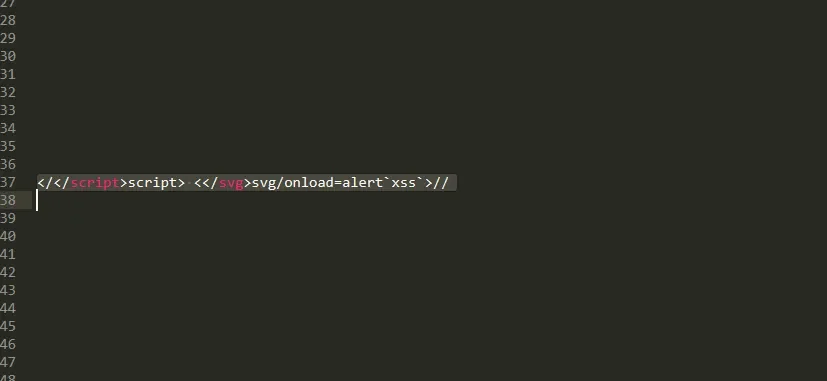
xss payload to bypass
The payload is built from two parts. The first, </</script>script>, is a deliberately malformed closing tag. The report does not explain how the filter handled it. The second part, <</svg>svg/onload=alertxss>, is an SVG element with an onload handler that runs alert with a backtick-quoted string. The trailing // comments out whatever follows in the page source.
Step 3: final URL
The final URL used as proof of concept was:
The t parameter carries the payload URL-encoded: %3C is <, %3E is >, and %20 is a space. The result was a reflected XSS: the payload executed in the browser.
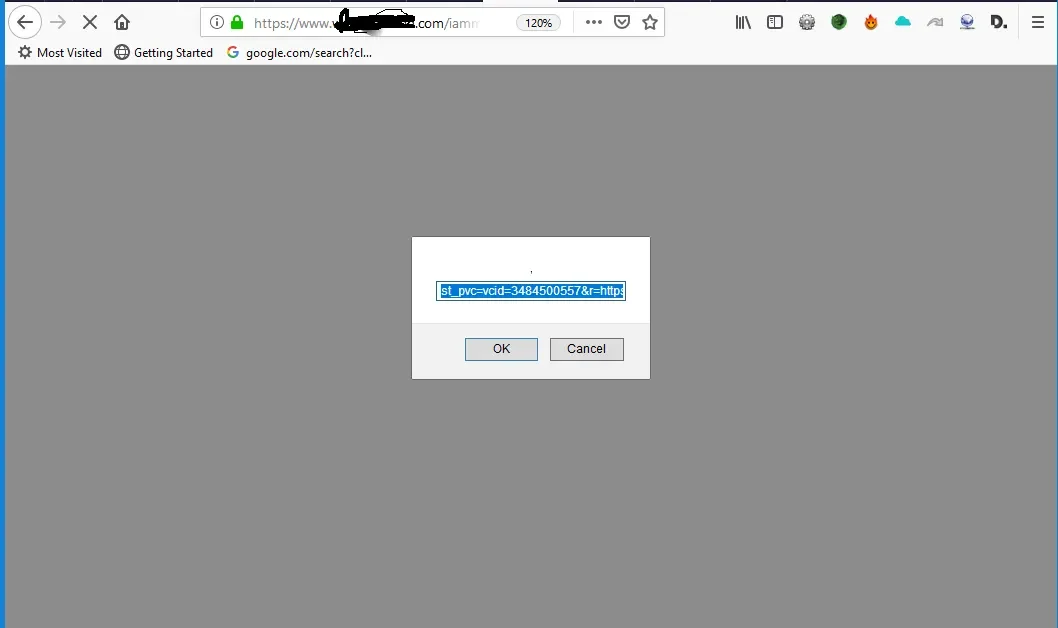
xss poopup
The report was sent to the team. In about one week the vulnerability was fixed and the researcher was rewarded.
Root cause
The parameter value was reflected into the page inside a <script> block without sufficient sanitisation, which is the classic condition for reflected XSS described at the top of the report. The filter that was present did not stop the attack: it broke straightforward tags such as <script> and <img>, but it did not account for malformed or split tag sequences that a browser still parses as real tags.
Impact
As the report puts it, reflected XSS bugs can be exploited to steal cookies, capture passwords and perform CSRF. The attack requires a victim to follow a crafted link, for example one embedded in an email, a comment section or social media, with anchor text that provokes a click. The injected code then executes in the victim's browser in the context of the affected site, bypassing the same origin policy.
Fix
The report states only that the vulnerability was fixed by the team in about one week. A robust fix would be to stop reflecting the parameter into a script context at all, or to encode it for that context, and to replace the string-matching filter with output encoding applied at the point of reflection, since a filter that only blocks literal tag strings can be bypassed by splitting them.
Variants to test
- Dork for redirect-style endpoints carrying parameters, as in
site:target inurl:redirect, then check the response source for the value landing inside<script>, an attribute or an event handler. A positive result is your marker string appearing unencoded in a context where it can break out. - Send a benign marker such as
test123and inspect where it is reflected. If it sits inside a script block, try closing the block with a split sequence like</</script>script>and see whether the browser parses a new element. - Probe the filter with malformed variants of blocked tags, for example
<</svg>svg/onload=...>or<</script>script>, and watch whether the response still contains a construct the browser will parse as an element with an event handler. A positive result is an alert firing from the crafted URL. - Test whether the filter is case-sensitive or whitespace-sensitive by varying the tag name and inserting spaces or newlines inside it, and check whether the reflected output still forms a working tag.
- Try the same splitting technique on other blocked tags (
<img,<iframe,<body) to see whether the filter's blocklist is bypassable in more than one place. - Check whether the parameter is reflected in more than one context on the same endpoint, for example in a redirect target as well as in the page body, since a fix applied to one context may leave another open.
What happened, in plain words
A security researcher found a bug on the main website of a well-known platform. The bug let an attacker put their own small program into a page that the site sends to a visitor. When the visitor opens a specially crafted link, that little program runs inside the visitor's own browser, as if the website itself had written it. This kind of bug is called cross-site scripting, usually shortened to XSS.
The researcher found it while testing the link for a different bug. They were looking for a different bug, an open redirect, on a link that takes a value in its address and sends the visitor somewhere. That redirect did not work, but when they looked at the page's underlying code they saw that the value they had typed into the link was copied into the page inside a script block. That is the dangerous part: a script block is where the browser expects to find instructions to run, not plain text to display. If you can get your own text into that block, the browser may run it.
A filter was in place to stop this, and it blocked the obvious attempts. After about two days of trying, the researcher found a way to write the tags so that the filter did not recognise them but the browser still did. The crafted link then made the browser show an alert box. The researcher reported it, and the team fixed it in about a week and paid a reward.
Background: what XSS is
Every page you see in a browser is built from instructions. Some of those instructions are plain text and layout, written in a language called HTML. Some are small programs written in a language called JavaScript, and the browser runs them. A script block is simply a section of the page marked as JavaScript, written between an opening <script> tag and a closing </script> tag. Everything between those two tags is treated as code, not as text to show on screen.
Cross-site scripting is a bug where a website lets an attacker's own HTML or JavaScript end up in a page that other people load. When a victim views the infected page, the injected code runs in the victim's browser. The browser has no easy way to tell that the code came from an attacker rather than from the site, so it trusts it.
Browsers have a rule called the same origin policy. In simple terms, it keeps one website from reading data that belongs to another website. If code from www.redacted.com is running in a page served by www.redacted.com, the browser treats it as belonging to that site and lets it do what that site is allowed to do. That is why injected code is dangerous: it has bypassed the same origin policy, because the browser believes the code is part of the site. From there, the attacker can read private information belonging to a victim who is logged in to that site.
Background: what reflected XSS is
Reflected XSS, also called non-persistent XSS, is the version where the malicious script is not stored on the server. Instead it is reflected: it travels in the request, the server copies it straight back into the response, and the browser runs it. Nothing is saved. The attack only works when a victim follows a link that contains the payload.
The reason it happens is that the website does not clean up, or sanitise, what comes in. When a request arrives with a value in it, the site should treat that value as untrusted text. If it instead drops the value into the page as-is, the value can change how the page behaves.
To get a victim to click, the attacker usually hides the link inside an email or a third party website, for example in a comment section or on social media. The link is placed behind anchor text, which is the clickable words you see, chosen to make the victim want to click. When the victim does, the request goes to the vulnerable site, and the attack is reflected back to the victim's browser.
The target
The target is a well-known platform. Throughout the report it is written as www.redacted.com, with the real name removed. The feature of interest is a path that accepts a value called t, reached through something called redirect. A parameter is simply a named value attached to the end of a web address, after a question mark. Here the address ends in redirect?t=, and whatever you put after the = is the value of t. A redirect endpoint is a link whose job is to send the visitor on to another address.
Setup
The report does not describe any accounts, roles, tools or software versions. The only thing needed was access to the public website and the ability to send it crafted web addresses. The researcher notes that little time was spent on enumeration, meaning the systematic search for pages and features worth testing, because the bug was on the main domain itself.
Finding it
Enumeration started with a Google dork. A dork is a search query built with special operators to make a search engine list pages that match a pattern, which is a quick way to find candidate pages without crawling a site by hand. The query used was:
site:www.redacted.com inurl:redirect
Line by line: site:www.redacted.com tells the search engine to return only results from that domain. inurl:redirect tells it to return only pages whose address contains the word redirect. Together they list pages on the target domain whose addresses include redirect, which is exactly the kind of page that often takes a destination as a parameter.
This surfaced a path with the parameter redirect?t=. The researcher tested it for open redirection, a different bug where a site will send a visitor to any address an attacker chooses. That did not work. Then they checked the source code of the response, which is the raw HTML the server sends, viewable in any browser. They saw that the value they had supplied was sitting inside a <script> </script> tag.
That reflection inside a script context is what made the parameter interesting. A value placed inside a script block is not ordinary page text. Getting out of a script block is a different problem from getting out of a normal paragraph or a link attribute, because the browser is already in code mode and is looking for the exact sequence that ends the block.
Exploitation
As the report puts it, reflected XSS bugs can be exploited to steal cookies, capture passwords and perform CSRF. A cookie is a small piece of data a site stores in your browser so it can recognise you on the next request, and a session cookie is what keeps you logged in. If an attacker's code runs in the site's page, it can read those cookies. CSRF, cross-site request forgery, is a related trick where a victim's browser is made to send a request the victim did not intend.
Step 1: first payload
The first attempt tried to close the existing script element and open a new one:
</script> alert('1') <script></script>
Line by line: </script> is the closing tag for a script block, so the browser would stop treating what follows as code. alert('1') is a tiny JavaScript instruction that makes the browser show a pop-up box containing the text 1, which is the harmless way to prove code ran. <script> opens a new script block, and </script> closes it immediately. The idea was to end the site's own script, run the attacker's instruction, and leave the page in a valid state.
A filter was in place that broke all of the researcher's script and tags, including <script>, <img> and similar. A filter is a piece of code on the server that inspects incoming values and removes or alters anything it considers dangerous. This one recognised the obvious tag names and neutralised them.
Step 2: finding a bypass
It took about two days to work out the payload that bypassed the filter:
</</script>script> <</svg>svg/onload=alert`xss`>//
xss payload to bypass
The payload is built from two parts. The first, </</script>script>, is a deliberately malformed closing tag. The report does not explain how the filter handled it. Think of it like a word filter that deletes the word "bad": if you write "ba</bad>d", the filter removes its target and what is left still reads "bad" to a human. The browser does the same kind of reconstruction here.
The second part, <</svg>svg/onload=alertxss>, is an SVG element with an onload handler that runs alert with a backtick-quoted string. SVG is a format for drawing shapes on a web page, and onload is an event handler, meaning a piece of code the browser runs when the element has finished loading. The backticks around xss are just another way of writing a text string in JavaScript. The trailing // comments out whatever follows in the page source, so leftover characters from the site's own code do not cause an error.
Step 3: final URL
The final URL used as proof of concept was:
The t parameter carries the payload URL-encoded. URL encoding is how a web address carries characters that would otherwise be ambiguous or illegal in an address: each one is replaced by a percent sign and a code. %3C is <, %3E is >, and %20 is a space. The browser decodes these back to the original characters before the server sees them, so the server receives the same payload as in the previous step. The result was a reflected XSS: the payload executed in the browser.
xss poopup
The report was sent to the team. In about one week the vulnerability was fixed and the researcher was rewarded.
Root cause
The parameter value was reflected into the page inside a <script> block without sufficient sanitisation, which is the classic condition for reflected XSS described at the top of the report. The filter that was present did not stop the attack. It broke straightforward tags such as <script> and <img>, but it did not account for malformed or split tag sequences that a browser still parses as real tags.
Impact
The attack requires a victim to follow a crafted link, for example one embedded in an email, a comment section or social media, with anchor text that provokes a click. The injected code then executes in the victim's browser in the context of the affected site, bypassing the same origin policy.
Fix
The report states only that the vulnerability was fixed by the team in about one week. A robust fix would be to stop reflecting the parameter into a script context at all, or to encode it for that context, and to replace the string-matching filter with output encoding applied at the point of reflection, since a filter that only blocks literal tag strings can be bypassed by splitting them. Output encoding means converting characters that have special meaning in a given context into a safe form, so the browser displays them as text instead of acting on them.
Variants to test
- Dork for redirect-style endpoints carrying parameters, as in
site:target inurl:redirect, then check the response source for the value landing inside<script>, an attribute or an event handler. A positive result is your marker string appearing unencoded in a context where it can break out. - Send a benign marker such as
test123and inspect where it is reflected. If it sits inside a script block, try closing the block with a split sequence like</</script>script>and see whether the browser parses a new element. - Probe the filter with malformed variants of blocked tags, for example
<</svg>svg/onload=...>or<</script>script>, and watch whether the response still contains a construct the browser will parse as an element with an event handler. A positive result is an alert firing from the crafted URL. - Test whether the filter is case-sensitive or whitespace-sensitive by varying the tag name and inserting spaces or newlines inside it, and check whether the reflected output still forms a working tag.
- Try the same splitting technique on other blocked tags (
<img,<iframe,<body) to see whether the filter's blocklist is bypassable in more than one place. - Check whether the parameter is reflected in more than one context on the same endpoint, for example in a redirect target as well as in the page body, since a fix applied to one context may leave another open.
Glossary
- XSS (cross-site scripting): a bug where a website lets an attacker's code end up in a page other people load, so it runs in their browsers.
- Reflected XSS: XSS where the payload travels in the request and is copied straight back into the response, rather than being stored on the server.
- Non-persistent XSS: another name for reflected XSS, because nothing is saved on the site.
- HTML: the language used to describe the structure and text of a web page.
- JavaScript: the programming language browsers run to make pages interactive.
- Script block: a section of a page between
<script>and</script>that the browser treats as code. - Tag: a marker in HTML such as
<script>or<img>that tells the browser what an element is. - Element: a piece of a page built from a tag, such as a script block or an image.
- Event handler: code attached to an element that runs when something happens, such as
onloadwhen the element finishes loading. - Same origin policy: a browser rule that stops one website from reading another website's data.
- Sanitise: to clean up untrusted input so it cannot change how a page behaves.
- Output encoding: converting special characters into a safe form for the place they are inserted, so the browser shows them as text.
- Filter: server-side code that inspects input and removes or alters what it considers dangerous.
- Bypass: a way of getting past a protection such as a filter.
- Parameter: a named value attached to a web address after a question mark, such as
tinredirect?t=. - Endpoint: a specific address on a server that performs a particular function.
- Redirect: sending a visitor from one address to another.
- Open redirect: a bug where a site will send a visitor to any address an attacker chooses.
- Enumeration: the systematic search for pages and features worth testing.
- Google dork: a search query using special operators to make a search engine list pages matching a pattern.
- Source code (of a response): the raw HTML the server sends, which you can view in any browser.
- Reflection: when a value from the request is copied back into the response.
- Context: the place in the page where a value lands, such as inside a script block or an attribute, which decides what characters are dangerous.
- Payload: the piece of code an attacker tries to get executed.
- URL encoding: writing characters in a web address as a percent sign plus a code, such as
%3Cfor<. - Cookie: a small piece of data a site stores in your browser so it can recognise you on later requests.
- Session cookie: the cookie that keeps you logged in to a site.
- CSRF (cross-site request forgery): a trick where a victim's browser is made to send a request the victim did not intend.
- SVG: a format for drawing shapes on a web page.
- Comment out: to mark part of code so the browser ignores it, in JavaScript with
//. - Proof of concept (POC): a crafted request or link that demonstrates a bug really works.
- Alert: a browser pop-up box, used here as a harmless sign that code ran.



