How I Discovered SSRF on Hackerone Program
A GraphQL endpoint accepted a user-supplied URL and made a server-side request to it, causing a blind SSRF. The attacker could use DNS rebinding to bypass restrictions and probe internal network ports, though only port 80 was reachable.

Hi guys, I am Kerstan. Today, I will share you how I discoverd SSRF on hackerone Program.
The full write-up lives on its author's site
It belongs to its author, so we link to it rather than copy it. The other two tabs are our own rewrites, checked against it.
Context
This is a write-up of a blind SSRF that I found in a HackerOne program. The report does not name the program or the product, and the host in the captured request is shown as xxxxx. What the report does say is that the target exposes a GraphQL endpoint under /agw/graphql, and that one operation on that endpoint, UrlReachableVerifierQuery, takes a URL and verifies whether it is reachable. That operation takes a URL and verifies whether it is reachable, which is the shape of an SSRF.
Setup
The work was done against the program's scope on HackerOne, after gathering business information from that scope. The tools used were Burp Suite (its HTTP history and its Collaborator client) and Ceye for DNS rebinding. The captured request shows a Firefox 110.0 user agent on macOS, but that is just the client that produced the traffic, not a requirement. The captured request carries a Cookie and an Authorization header, both redacted in the write-up.
Finding it
I started with ordinary testing: web bugs and IDOR. Nothing came of it. The filters and authentication mechanisms were robust, and users were authenticated using a uuid as a parameter, so I could not turn the uuid into an IDOR.
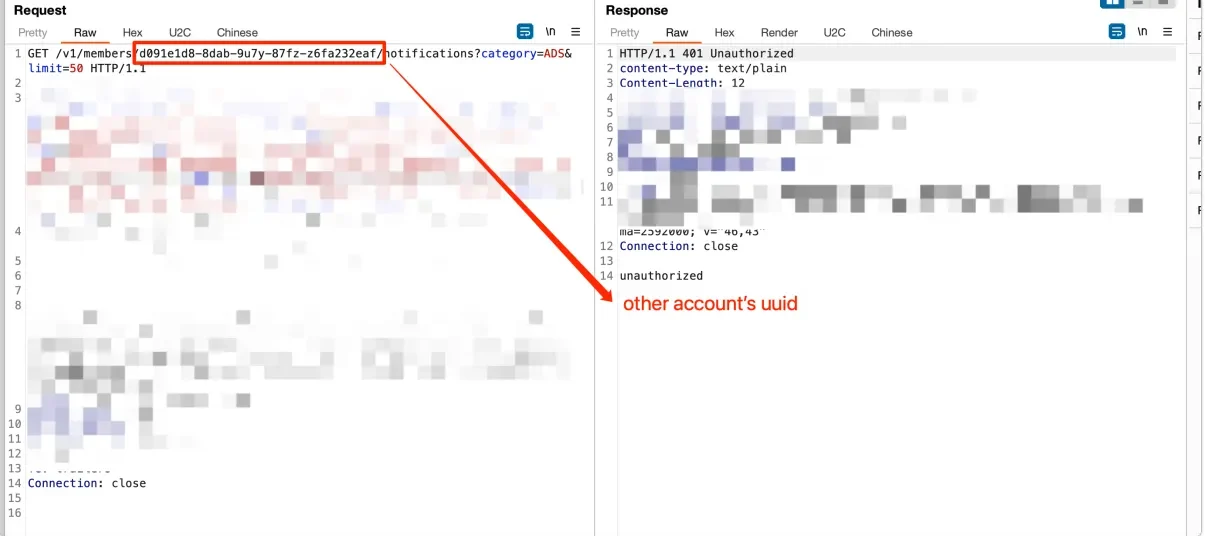
The next morning I still had no bug, so I took a break and then went back through Burp's HTTP history looking for sensitive requests I might have missed. There I came across a GraphQL request that stood out.

POST /agw/graphql?op=UrlReachableVerifierQuery&client_trace_id=09bee58d-8358-4f00-acc0-8d26d0018d32,rst:1678201703792 HTTP/1.1Host: xxxxxCookie: xxxxUser-Agent: Mozilla/5.0 (Macintosh; Intel Mac OS X 10.15; rv:109.0) Gecko/20100101Firefox/110.0Accept: */*Accept-Language: zh-CN,zh;q=0.8,zh-TW;q=0.7,zh-HK;q=0.5,en-US;q=0.3,en;q=0.2Accept-Encoding: gzip, deflateContent-Type: application/jsonAuthorization: xxxxxContent-Length: 386Origin: https://xxxxxSec-Fetch-Dest: emptySec-Fetch-Mode: corsSec-Fetch-Site: same-siteTe: trailersConnection: close{"operationName":"UrlReachableVerifierQuery","variables":{"url":"http://xxxx.com/"},"query":"query UrlReachableVerifierQuery($url: String!) {\nverifyUrlReachable(url: $url) {\n... on UrlReachableResult {\n__typename\n }\n ... on GenericError {\n__typename\n }\n __typename\n
The important parts are the op query parameter, set to UrlReachableVerifierQuery, and the JSON body, which passes a url variable into a verifyUrlReachable field. The query selects only __typename on the UrlReachableResult and GenericError types. A user-supplied URL going into a server-side reachability check is exactly the shape of an SSRF, so that is what I tested next.
Exploitation
Step 1: confirm server-side requests with Collaborator
Because the URL was passed as a parameter in JSON, I tried SSRF straight away and used Burp's Collaborator to look for a DNS log.
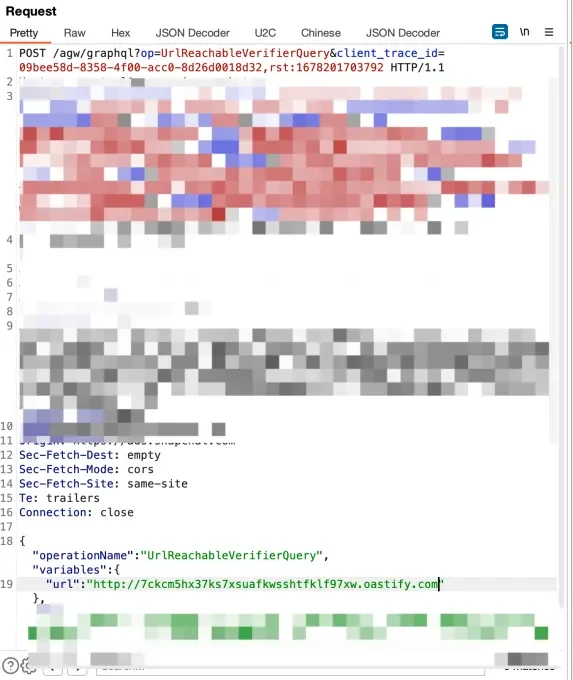
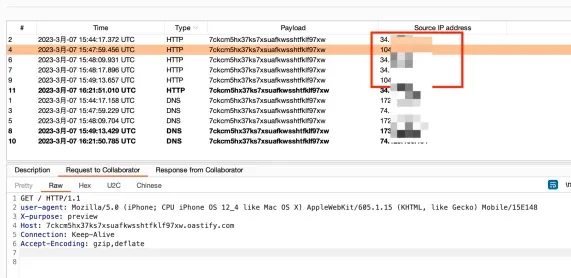
I received HTTP requests from two different IP addresses. That confirmed a blind SSRF: the server fetches the URL, but the response body is not returned to me. Only two keys from the JSON response were echoed back, url and __typename.
Step 2: check whether cloud metadata is directly reachable
The IP that made the requests belonged to Google Cloud. Google Cloud metadata requests require a specific header, as in this example from the report:
request example:curl "http://metadata.[redacted]/computeMetadata/v1/instance/image" -H "Metadata-Flavor: Google"
Since I could not control headers on the outbound request, direct exploitation of the metadata service was not possible here.

Step 3: enumerate the GraphQL surface
The endpoint is GraphQL, so the query's column (parameter) can be customised. If a column exists, the endpoint returns valid results for that parameter, so I started fuzzing.
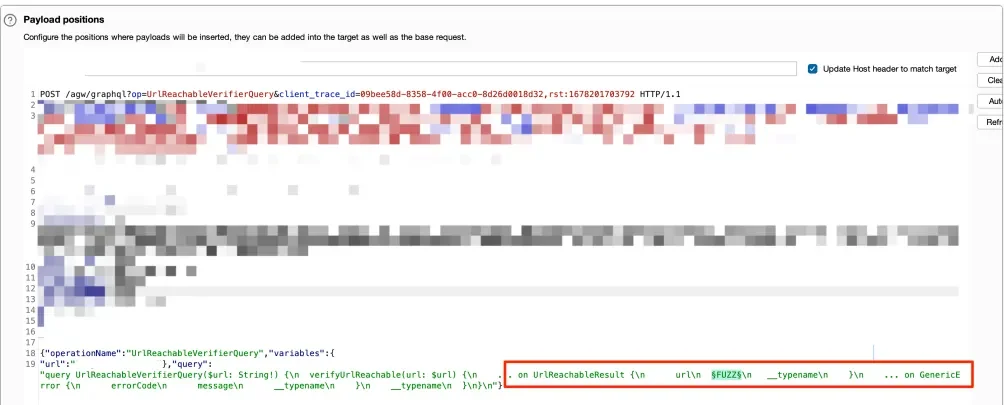
No exploitable parameters turned up. Before giving up I looked again at the request URL and noticed the op parameter in the GraphQL request, which gave me an idea.
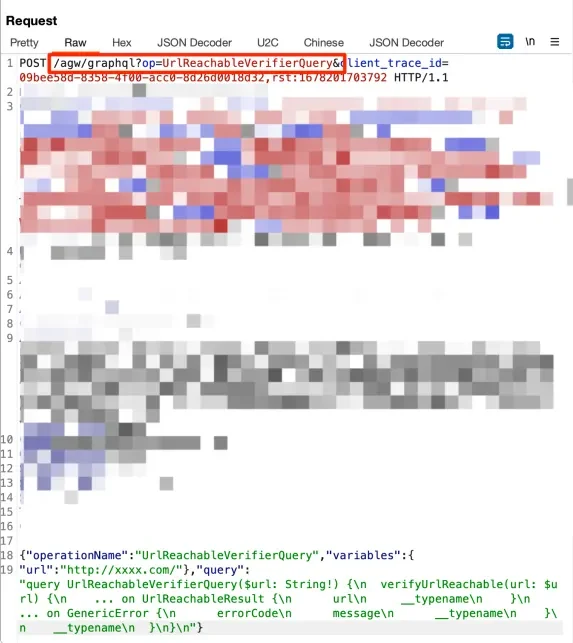
The op field is set to UrlReachableVerifierQuery. Why not try using it as a column in the query? When I tested with the UrlReachable field, I got a valid echo of Reachable in the response.
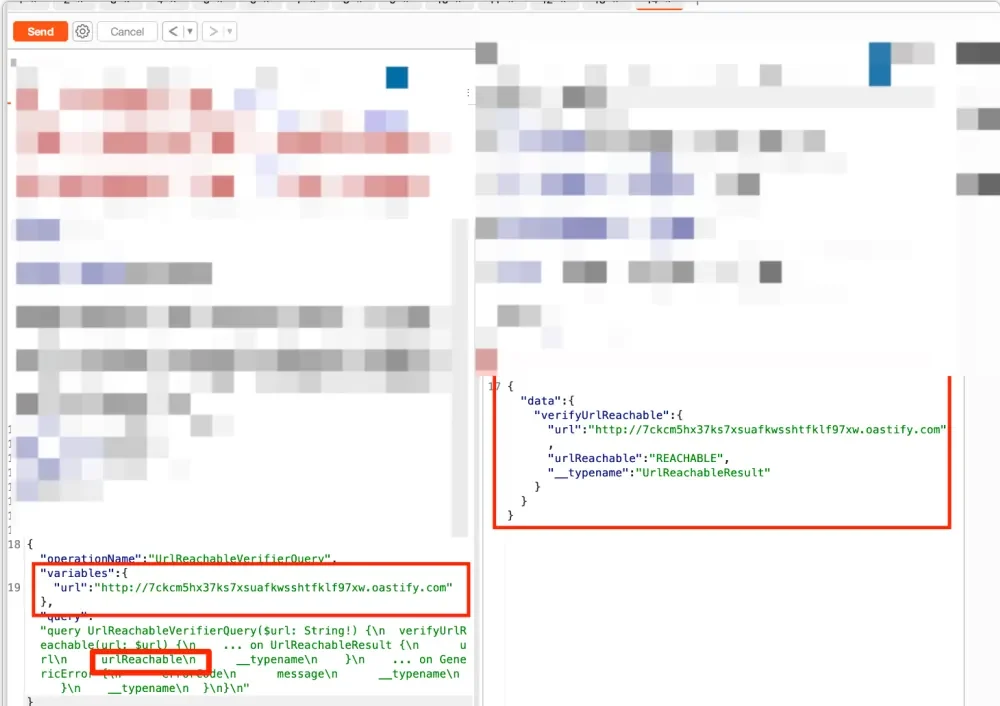
That gave me an API to probe the availability of internal network ports. I pointed it directly at the Google Cloud metadata address to check port connectivity, but it simply answered Not_Reachable.
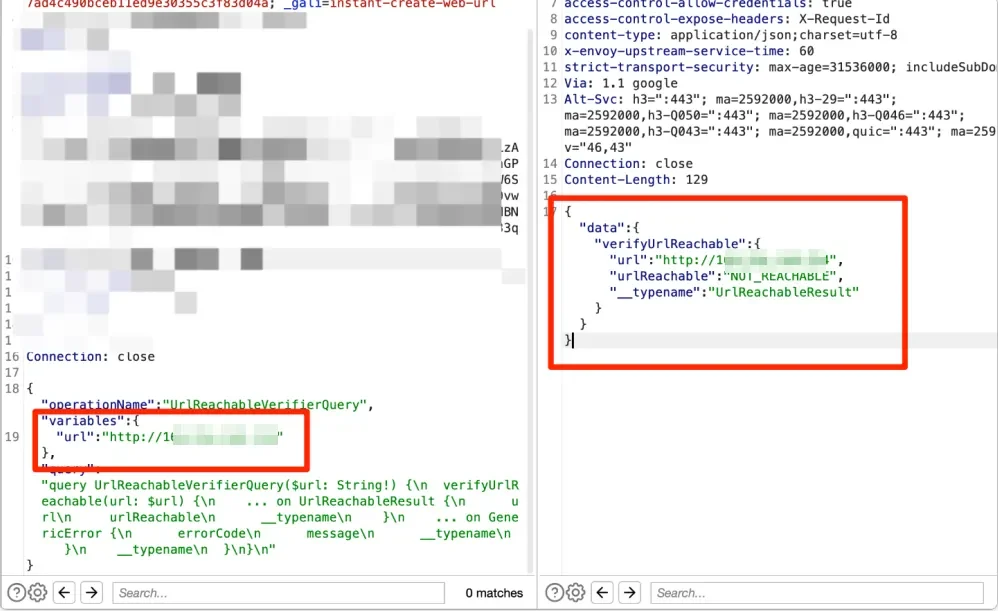

Step 4: bypass the restriction with DNS rebinding
I tried 302 redirection and short links, and neither worked. So I used DNS rebinding: I configured a DNS rebinding IP address on Ceye, using the IP address from the Google Cloud metadata, shown in the report as 1xx.xxx.xxx.xxx, to verify internal network connectivity.
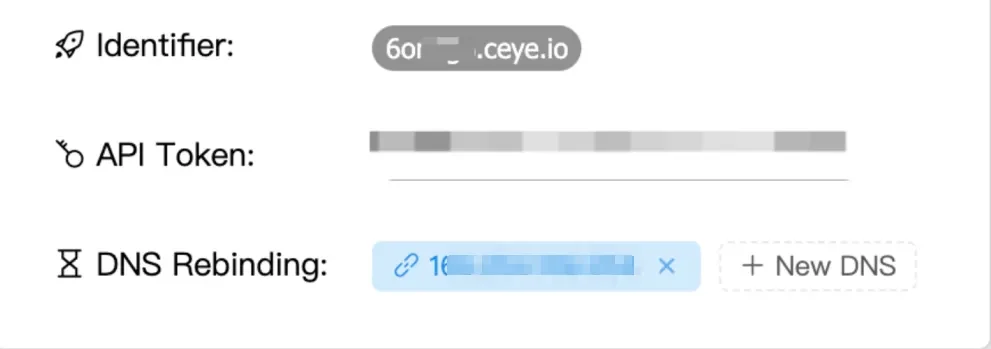
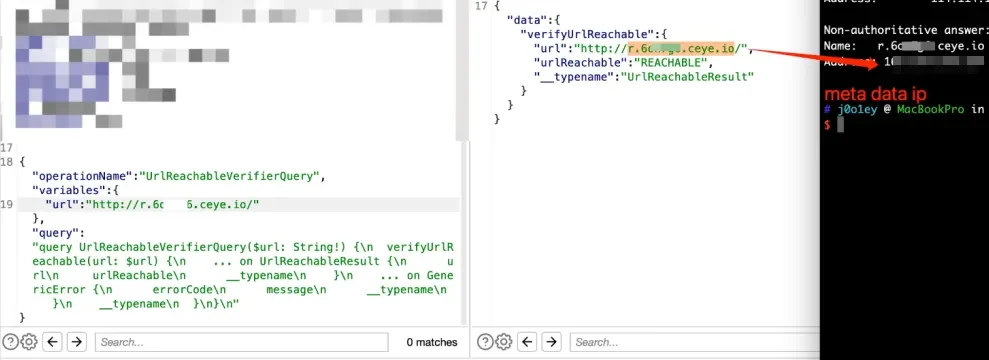
DNS rebinding bypassed the SSRF restriction and I got the Reachable result. The next step was to probe port connectivity.
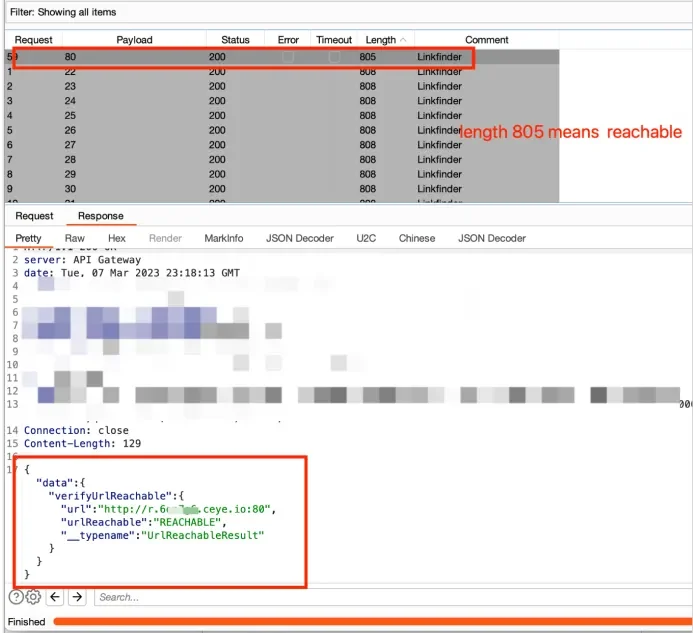
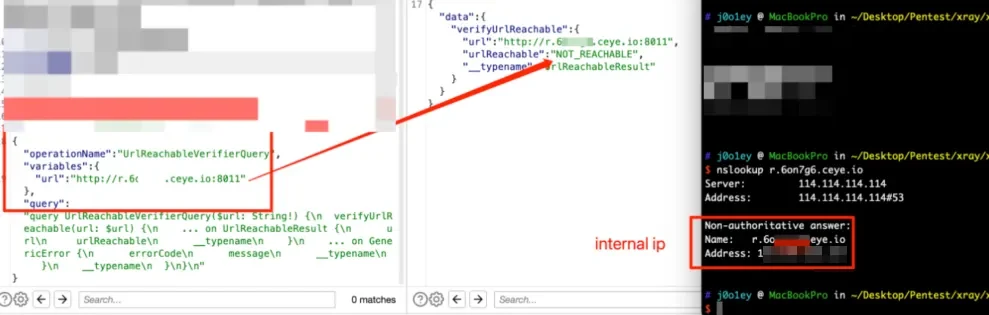
Port 80 was reachable and the other ports were not. That proves SSRF can be used to probe the internal network in this case.
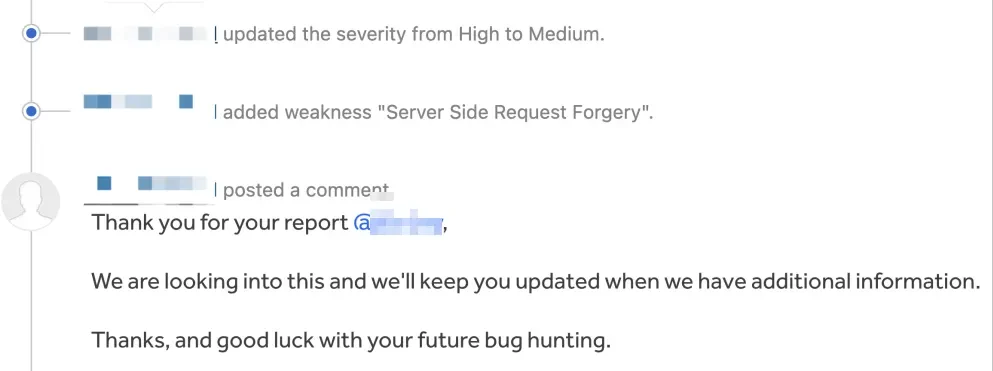
After submitting, the vulnerability was triaged and is awaiting review.
Root cause
The verifyUrlReachable resolver takes a user-supplied URL and makes a server-side request to it, and the result of that request (reachable or not) is returned to the caller. The endpoint is authenticated, but authentication does not stop a logged-in user from pointing the server at internal addresses. The report does not describe the filtering logic, so the exact check that DNS rebinding defeated is not stated; The report does not describe the filtering logic, so the exact check that DNS rebinding defeated is not stated. The metadata service itself stayed out of reach because it needs the Metadata-Flavor: Google header, which the attacker cannot set.
Impact
An authenticated user could make the server issue requests to arbitrary hosts and learn, from the Reachable / Not_Reachable answer, whether an internal host and port respond. In this case that was enough to confirm internal network connectivity and to distinguish port 80 from other ports. Reading metadata contents was not possible because of the required header, and the response body was never returned to the attacker.
Fix
A possible fix would be to resolve the hostname once, validate the resolved address against a deny list of internal ranges, and connect to that same validated address. Blocking redirects and refusing non-standard schemes would close the 302 and short-link routes as well.
Variants to test
- Look for GraphQL operations whose names suggest outbound requests (
UrlReachable,Verify,Fetch,Preview,Webhook) and try the operation name as a field in the query, as I did withUrlReachable. - Send a Collaborator or Ceye hostname as the
urlvariable and watch for DNS and HTTP hits. A hit from an unexpected IP is a positive result. - If direct internal addresses return a negative answer, try DNS rebinding with a short TTL and check whether the answer flips to
Reachable. - Try 302 redirects and short links to internal addresses; a positive result is the endpoint following the redirect and reporting reachability.
- Probe a range of ports on an internal host and compare answers; a mix of reachable and unreachable ports shows the check leaks internal state.
What happened, in plain words
A security researcher was testing a bug bounty program on HackerOne. A bug bounty program is a scheme where a company invites outside people to look for security problems in its systems and report them, often for a reward. The researcher found a feature on the company's website that takes a web address (a URL) from the user and asks the server to check whether that address can be reached. Because the server did the checking on the researcher's behalf, the researcher could make the server visit addresses that an outside person should not be able to reach, such as machines inside the company's private network. This kind of flaw is called SSRF, short for Server-Side Request Forgery. The researcher could not read the contents of the metadata service, but could tell whether a host and port answered. The report does not name the company or the product.
Background: the ideas you need
Before the steps, a few everyday comparisons for the terms that come up.
- Server and client. Your browser is the client; the computer that stores the website and answers your requests is the server. Think of a restaurant: you (the client) order, the kitchen (the server) cooks. Normally the kitchen only cooks for customers in the dining room.
- URL. The address of something on the web, like
http://example.com/page. It has a scheme (http), a host (example.com) and often a path (/page). - API. A way for one piece of software to ask another piece of software to do something, without a human clicking. Think of a drive-through window: you say what you want in a fixed format and get an answer back. A web API is the same idea over the network.
- GraphQL. A style of API where the client sends a query describing exactly which pieces of data it wants, and the server returns just those pieces. Think of a form where you tick the boxes for the fields you want, instead of receiving a whole printed report.
- Endpoint. A specific address on a server that accepts a particular kind of request, for example
/agw/graphql. Think of it as one specific counter in a large building. - Parameter. A named value you send along with a request, such as
urlorop. Think of the blanks on a form: each blank has a label and you fill in a value. - Cookie and Authorization header. A cookie is a small piece of data your browser stores for a site and sends back with each request, usually to prove who you are. An
Authorizationheader is a line in the request that carries a credential, such as a token, for the same purpose. Think of a wristband at an event: it shows you are allowed in, but it does not change what the event staff will do for you. - UUID. A long, random-looking identifier, like
09bee58d-8358-4f00-acc0-8d26d0018d32. It is used so that identifiers are hard to guess. - IDOR. Insecure Direct Object Reference: a flaw where changing an identifier in a request lets you see someone else's data. If your account page is
/account?id=123and you change it to124and see another person's account, that is an IDOR. - SSRF. Server-Side Request Forgery: a flaw where you can make the server send a request to an address of your choosing. The server is the one making the request, so it can reach places you cannot, such as internal machines.
- Blind SSRF. An SSRF where you do not see the response body from the fetched address. You only learn that the request happened, for example because your own test server receives a visit.
- DNS. The system that turns a name like
example.cominto an IP address, the numeric address of a machine. Think of a phone book. - DNS rebinding. A trick where a name resolves to one address the first time it is looked up and to a different address later. It is used to get past a check that only looks at the first answer.
- Cloud metadata service. A special internal address that cloud providers make available to their own machines, holding information about the machine and its credentials. It is meant to be reachable only from inside.
- Burp Suite, HTTP history, Collaborator. Burp Suite is a tool that sits between your browser and the website and records every request and response. Its HTTP history is the list of those recorded requests. Collaborator is a feature that gives you a unique hostname you can put into a request; if the server visits it, Burp records the visit, which proves the server made the request.
- Ceye. A service used in the report for DNS rebinding tests.
- Fuzzing. Trying many variations of a request automatically to see which ones produce a different or interesting answer.
1. A sensitive endpoint turns up

The researcher first read the program's scope on HackerOne, which is the description of what is in bounds to test, and gathered business information from it. Then came ordinary testing: web bugs and IDOR. Nothing worked. The filters and the authentication mechanisms were robust, and users were authenticated using a uuid as a parameter, so the uuid could not be turned into an IDOR.
The next morning there was still no bug, so the researcher took a break for coffee.

Back at the desk, the researcher went through Burp's HTTP history again, looking for sensitive requests that might have been missed. There was a GraphQL request that stood out.
POST /agw/graphql?op=UrlReachableVerifierQuery&client_trace_id=09bee58d-8358-4f00-acc0-8d26d0018d32,rst:1678201703792 HTTP/1.1Host: xxxxxCookie: xxxxUser-Agent: Mozilla/5.0 (Macintosh; Intel Mac OS X 10.15; rv:109.0) Gecko/20100101Firefox/110.0Accept: */*Accept-Language: zh-CN,zh;q=0.8,zh-TW;q=0.7,zh-HK;q=0.5,en-US;q=0.3,en;q=0.2Accept-Encoding: gzip, deflateContent-Type: application/jsonAuthorization: xxxxxContent-Length: 386Origin: https://xxxxxSec-Fetch-Dest: emptySec-Fetch-Mode: corsSec-Fetch-Site: same-siteTe: trailersConnection: close{"operationName":"UrlReachableVerifierQuery","variables":{"url":"http://xxxx.com/"},"query":"query UrlReachableVerifierQuery($url: String!) {\nverifyUrlReachable(url: $url) {\n... on UrlReachableResult {\n__typename\n }\n ... on GenericError {\n__typename\n }\n __typename\n
Line by line, in plain words:
POST /agw/graphql?op=UrlReachableVerifierQuery&...is the first line of the request.POSTis the method, meaning data is being sent./agw/graphqlis the endpoint. After the?come parameters, includingop, set toUrlReachableVerifierQuery, and aclient_trace_id, which looks like a tracking identifier.Host: xxxxxnames the site being contacted. The report hides it.Cookie: xxxxcarries the login credential. It is redacted.User-Agentsays which browser produced the request: Firefox 110.0 on macOS. This is just the client that made the traffic, not a requirement.Accept,Accept-Language,Accept-Encodingsay which formats and languages the client will accept back. They are ordinary browser lines.Content-Type: application/jsonsays the body is JSON, a text format for structured data.Authorization: xxxxxis a second credential line, also redacted.Content-Length: 386says how long the body is in bytes.Origin,Sec-Fetch-*,Te,Connectionare browser bookkeeping lines about where the request came from and how the connection should behave.- The body is JSON.
operationNameisUrlReachableVerifierQuery.variablescontainsurl, set tohttp://xxxx.com/.queryis the GraphQL query text: it declares a variable$urlof typeString!(a required piece of text) and callsverifyUrlReachable(url: $url). On the result it asks only for__typename, a built-in field that says which type of result came back, eitherUrlReachableResultorGenericError.
The key observation is that a URL supplied by the user goes into a server-side reachability check. That is exactly the shape of an SSRF, so that is what was tested next.
2. Confirming a blind SSRF
Because the URL was passed as a parameter in JSON, the researcher tried SSRF straight away and used Burp's Collaborator to look for a DNS log. The idea: put a Collaborator hostname in the url value. If the server really fetches that URL, the Collaborator service sees the lookup and the visit, and Burp shows it.
HTTP requests arrived from two different IP addresses. That confirmed a blind SSRF: the server fetches the URL, but the response body is not returned to the researcher. Only two keys from the JSON response were echoed back, url and __typename.
3. Checking whether cloud metadata is directly reachable
The IP that made the requests belonged to Google Cloud. Google Cloud metadata requests require a specific header, as in this example from the report:
request example:curl "http://metadata.[redacted]/computeMetadata/v1/instance/image" -H "Metadata-Flavor: Google"
Line by line:
curlis a command-line tool for sending web requests. The line is labelled as a request example."http://metadata.[redacted]/computeMetadata/v1/instance/image"is the address of the cloud metadata service, on the internal namemetadata.[redacted], asking for the machine's image information.-H "Metadata-Flavor: Google"adds a header namedMetadata-Flavorwith the valueGoogle. The metadata service refuses requests that do not carry it.
Since the researcher could not control headers on the outbound request, direct exploitation of the metadata service was not possible here.
4. Exploring new attack surfaces using GraphQL

The endpoint is GraphQL, so the query's column (parameter) can be customised. If a column exists, the endpoint returns valid results for that parameter, so the researcher started fuzzing: sending many variations and watching for answers that differ from the error.
No exploitable parameters turned up. Before giving up, the researcher looked again at the request URL and noticed the op parameter in the GraphQL request, which gave an idea.
The op field is set to UrlReachableVerifierQuery. Why not try using it as a column in the query? When tested with the UrlReachable field, the response contained a valid echo of Reachable.
That gave an API to probe the availability of internal network ports. The researcher pointed it directly at the Google Cloud metadata address to check port connectivity, but it simply answered Not_Reachable.
5. Bypassing the restriction with DNS rebinding
302 redirection and short links were tried, and neither worked. A 302 is a server answer that tells the client to go to a different address; a short link is a short URL that redirects to a longer one. So the researcher used DNS rebinding: a DNS rebinding IP address was configured on Ceye, using the IP address from the Google Cloud metadata, shown in the report as 1xx.xxx.xxx.xxx, to verify internal network connectivity.
DNS rebinding bypassed the SSRF restriction and the Reachable result came back. The next step was to probe port connectivity.
Port 80 was reachable and the other ports were not. That proves SSRF can be used to probe the internal network in this case.
After submitting, the vulnerability was triaged and is awaiting review. Triaged means the program accepted the report as valid and passed it on for further handling.
Why it worked
The verifyUrlReachable resolver takes a URL supplied by the user and makes a server-side request to it, then returns whether the request succeeded. The endpoint is authenticated, but being logged in does not stop a user from pointing the server at internal addresses. The report does not describe the filtering logic, so the exact check that DNS rebinding defeated is not stated. The metadata service itself stayed out of reach because it needs the Metadata-Flavor: Google header, which the attacker cannot set.
What an attacker could do with it
A logged-in user could make the server issue requests to arbitrary hosts and learn, from the Reachable or Not_Reachable answer, whether an internal host and port respond. In this case that was enough to confirm internal network connectivity and to tell port 80 apart from other ports. Reading metadata contents was not possible because of the required header, and the response body was never returned to the attacker.
How to fix it
A possible fix would be to resolve the hostname once, validate the resolved address against a deny list of internal ranges, and connect to that same validated address. Blocking redirects and refusing non-standard schemes would close the 302 and short-link routes as well.
Variants to test
- Look for GraphQL operations whose names suggest outbound requests (
UrlReachable,Verify,Fetch,Preview,Webhook) and try the operation name as a field in the query, as was done withUrlReachable. - Send a Collaborator or Ceye hostname as the
urlvariable and watch for DNS and HTTP hits. A hit from an unexpected IP is a positive result. - If direct internal addresses return a negative answer, try DNS rebinding with a short TTL and check whether the answer flips to
Reachable. TTL is how long a DNS answer may be cached before it is looked up again. - Try 302 redirects and short links to internal addresses; a positive result is the endpoint following the redirect and reporting reachability.
- Probe a range of ports on an internal host and compare answers; a mix of reachable and unreachable ports shows the check leaks internal state.
Glossary
- 302 redirection: a server answer telling the client to fetch a different address instead.
- API: a way for software to ask another piece of software to do something, in a fixed format.
- Authentication: proving who you are, usually with a cookie or token.
- Authorization header: a request line carrying a credential such as a token.
- Blind SSRF: an SSRF where the response body from the fetched address is not returned to the attacker.
- Bug bounty program: a scheme where a company invites outside people to report security problems, often for a reward.
- Burp Suite: a tool that sits between browser and website and records requests and responses.
- Client: the software making a request, usually the browser.
- Cloud metadata service: an internal address on cloud machines holding information about the machine and its credentials.
- Collaborator: a Burp feature giving a unique hostname that records visits, used to prove the server made a request.
- Cookie: a small piece of data the browser stores for a site and sends back, usually to prove who you are.
- DNS: the system that turns a name into an IP address.
- DNS rebinding: a trick where a name resolves to one address first and a different address later.
- Endpoint: a specific address on a server that accepts a particular kind of request.
- Fuzzing: trying many variations of a request automatically to see which produce a different answer.
- GraphQL: an API style where the client sends a query naming exactly the fields it wants.
- Header: an extra line of information sent with a web request or response.
- HTTP history: Burp's list of recorded requests and responses.
- IDOR: a flaw where changing an identifier in a request lets you see someone else's data.
- IP address: the numeric address of a machine on a network.
- JSON: a text format for structured data, made of names and values.
- Parameter: a named value sent with a request, such as
urlorop. - Port: a numbered channel on a machine; port 80 is the usual one for plain web traffic.
- Resolver: the part of a server that handles a particular GraphQL field.
- Scope: the description of what is in bounds to test in a bug bounty program.
- Server: the computer that stores a website and answers requests.
- Short link: a short URL that redirects to a longer one.
- SSRF: a flaw where you can make the server send a request to an address of your choosing.
- Token: a piece of data used as a credential, like a wristband proving you are allowed in.
- Triaged: accepted as valid and passed on for further handling.
- TTL: how long a DNS answer may be cached before it is looked up again.
- URL: the address of something on the web.
- UUID: a long, random-looking identifier that is hard to guess.




