RFI LFI Writeup
The file parameter accepted arbitrary URLs, allowing remote file inclusion and SSRF, and later a local file read was achieved by abusing a logging endpoint that stored fetched files. An attacker could add products from an external CSV, perform CSRF, cause denial of service, and read local files such as /etc/passwd.
 Published on hassankhanyusufzai.com
Hello World, today I am going to share one of my recent interesting finding that is RFI to LFI vulnerability. It was a private program, So let’s call it private.com
The full write-up lives on its author's site
It belongs to its author, so we link to it rather than copy it. The other two tabs are our own rewrites, checked against it.
Context
The target was a private bug bounty program, which the researcher refers to throughout as private.com. The feature of interest was an endpoint that took the URL of a CSV file hosted in a bucket and included the CSV data into the site. The file parameter is used to fetch the records from the CSV file; after reading the data, the application puts it into the database and the data is printed or added to the products. In the researcher's words, it fetches the data using a jQuery fetch() network request, inserts the data into the database and adds the products to private.com.
The endpoint looked like this:
private.com/redacted/redacted/redacted?file=https://redacted-dev.s3.amazonaws.com/file.csv
Setup
The report does not describe any accounts, roles or tool versions. The researcher used an ngrok host to serve a CSV file and an intruder-style attack against a wordlist of Linux files. The endpoint was found during research on the private program, and the log-fetching endpoint described later was found by reading the server's JavaScript files.
Finding it
The endpoint stood out because it accepted a full URL in the file parameter and pulled the CSV from it. If the URL could be changed to a server the researcher controlled, the application would read data from that server's CSV file and include it into the site. That is remote file inclusion, since the files are hosted on external domains.
Exploitation
Step 1: Limited RFI
There was no restriction in the file parameter, so any external site could be used. The parameter sends a request to the attacker's server and products are added to the account without any verification.
Step 2: CSRF to add products to the panel
There was no CSRF token in the request, so CSV data could be added to private.com through CSRF. The researcher's proof of concept was this page:
Step 3: Denial of service
The idea to turn the bug into a denial of service came from @CreedHackers. Because the endpoint loads files from the server side, any file on the server can be loaded. Opening /dev/random means the server takes a buffer into memory before reading it, which is huge, and that produces an application-level DoS.
The researcher describes /dev/random as the Linux file that contains the environmental variables and the resources from the system, and notes that it is not a regular file: it contains many special characters that are eventually fetched by the server. With ?file=/dev/random, the response was delayed to 67,000 millis. The researcher then created a wordlist of all of the Linux files and launched an intruder attack, which the researcher says should not have been done. The server went down and returned a 503 response.
Step 4: Blind local file enumeration
The server can also be enumerated for local files. If the file is available, the server responds as shown below.
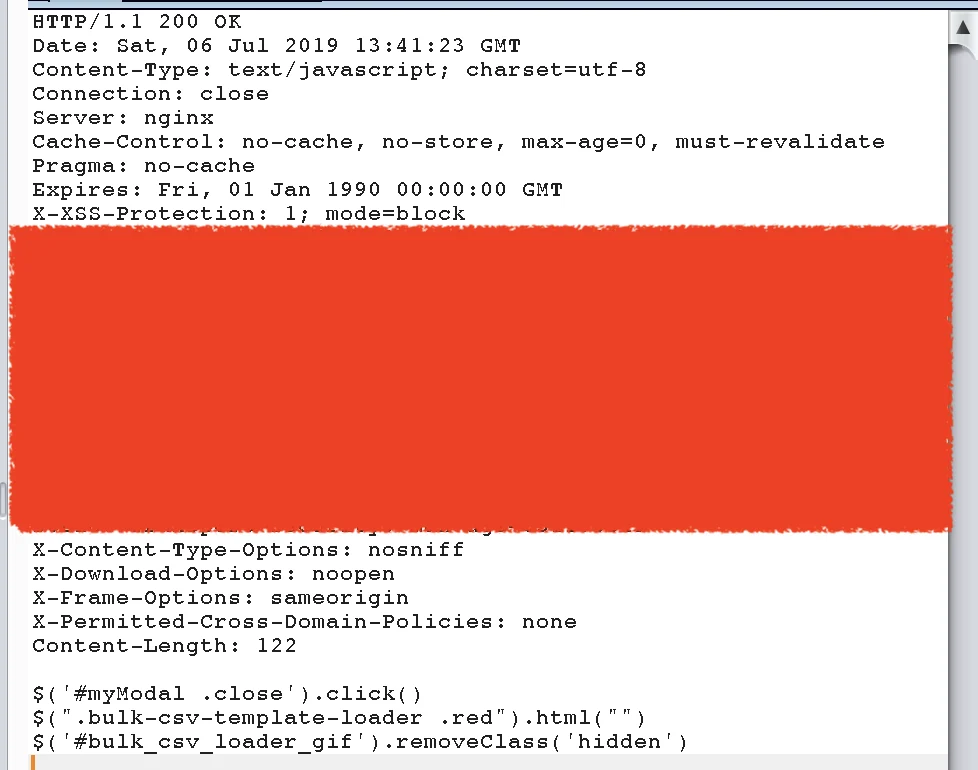
Otherwise the response is a 404.html page. This is of limited use: no file can be read from the server, only enumerated blindly.
Step 5: SSRF
Since external URLs can be included, the researcher tried other schemes: dict://, sftp://, tftp://, file://, ldap:// and Gopher://, plus tricks such as gopher http and gopher http back connect. Nothing worked except https://. Only a port scan was possible. The researcher points readers who want more on SSRF to Payloads All The Things SSRF and moves on, since the SSRF was limited.
Step 6: Local file read
After weeks on the program the researcher still could not escalate to a local file, despite the endpoint being vulnerable to RFI, SSRF and other issues. A week later, research resumed and a strange pattern appeared: every file upload functionality had a matching endpoint. For example, a profile picture upload had an endpoint with a GET request to fetch the uploaded image from the server, and there were other upload sections such as pdf and CSV. Whenever a file is uploaded there is always an endpoint to fetch it with a POST request. The researcher also used Wayback to find that endpoint.
The endpoint in hand had no upload functionality, but the reasoning was that if the file parameter reads the CSV file and adds the items to private.com, it should save that data somewhere. Going through the server's JavaScript files, the researcher came across an endpoint that fetches the logs from the server. These logs contain the files that are uploaded to the server, and the endpoint simply fetches them.
To summarise: the file parameter takes a CSV file and adds the data from it to the site. If the request sends file=/etc/passwd, the backend creates a file named passwd and assigns an id to it. The endpoint found in the JS file then opens that file.
The output was not a complete /etc/passwd file, but it was enough for P1 severity.
Root cause
The developers treat every file as CSV using a csvread function, then save that file, log it and assign it an ID, and it is fetched from another endpoint. There is no restriction in the file parameter, and the request carries no CSRF token. The log-fetching endpoint, found in the JavaScript, exposes the saved files by ID. The report does not show the server-side code, so the exact implementation is not stated.
Impact
An attacker can make the application fetch a CSV from any external site and add products to an account without verification, and can do so cross-site because there is no CSRF token. Loading /dev/random delays the response to 67,000 millis, and a wordlist attack against Linux files took the server down with a 503 response. Local files can be enumerated blindly, and a port scan is possible over https://. With the log endpoint, local files such as /etc/passwd can be read, though the output was not complete. The researcher rated this enough for P1 severity.
Fix
Based on the described behaviour, the file parameter should be restricted to expected hosts and paths, the request should carry and check a CSRF token, and the log-fetching endpoint should not expose saved files by ID without authorisation.
Variants to test
- Supply an external URL in a file-fetching parameter and host a CSV on your own server. A positive result is that the application reads your file and adds its contents to the site.
- Submit the same request as a cross-site form with no token. A positive result is that the action succeeds without a CSRF token.
- Request
/dev/randomthrough the parameter and time the response. A positive result is a very long delay, as with the 67,000 millis seen here. - Request a known local file and a missing one. A positive result is a different response for the existing file versus a
404.htmlpage. - Try schemes such as
dict://,sftp://,tftp://,file://,ldap://andGopher://. A positive result is any scheme other thanhttps://being accepted. - Look for a log or fetch endpoint in the JavaScript that returns uploaded files by ID, and request a local file through the original parameter. A positive result is the contents of that local file coming back from the second endpoint.
What happened, in plain words
A security researcher was testing a website as part of a private bug bounty program. A bug bounty program is an arrangement where a company invites people to look for security problems in its systems and report them, often for a reward. The researcher does not name the company, so throughout the write-up it is called private.com.
The researcher found an endpoint on the site that took a web address (a URL) pointing to a CSV file and pulled the contents of that file into the site. A CSV file is a simple text file where data is stored in rows separated by commas, a bit like a spreadsheet saved as plain text. The site used this to import product records.
The problem was that the site trusted whatever address it was given. If you gave it an address on your own computer instead of the company's storage, it would happily go and fetch your file and use it. That is the first bug, called remote file inclusion (RFI). From there the researcher found several more problems, and eventually managed to make the site read a file that lives on its own server, such as /etc/passwd, which is the local file inclusion (LFI) in the title.
This article walks through each step in the order the researcher took them, explaining the ideas from scratch as they come up.
The feature that was being tested
A web application is a program that runs on a server (a computer somewhere in a data centre) and that you use through your browser. When you click a button or load a page, your browser sends a request over the internet to that server, and the server sends back a response, usually a web page or some data.
Many web applications have an API, which is short for application programming interface. An API is a set of addresses (called endpoints) that a program can talk to in order to get or send data, without a human clicking around. Think of it like a restaurant: the menu is the list of endpoints, and the kitchen is the server. You ask for a specific dish by name, and the kitchen makes it. An endpoint is just one of those addresses, for example private.com/some/path.
The feature the researcher was looking at imported product data from a CSV file. The CSV file was stored in a bucket. A bucket is a storage container in a cloud service (here, Amazon S3, which is Amazon's file storage service). You put files in a bucket and they get a web address you can download them from.
The endpoint looked like this:
private.com/redacted/redacted/redacted?file=https://redacted-dev.s3.amazonaws.com/file.csv
Let's break that down:
private.comis the site./redacted/redacted/redactedis the path to the specific page. The researcher blanked out the real path with the wordredactedso as not to reveal the company's internal structure.?file=starts what is called a query string. Everything after the?is extra information sent along with the request. Here the parameter is calledfile, and its value is everything after the=.https://redacted-dev.s3.amazonaws.com/file.csvis the value: a full web address pointing to a CSV file in an Amazon S3 bucket.
A parameter is simply a named piece of information you send with a request. Think of a form at a doctor's office: the form has fields like "name" and "date of birth". Each field is a parameter, and the value is what you write in it. Here the field is called file and the value is a web address.
Summary of how the feature worked
The file parameter is used to fetch the records from the CSV file. After reading data from the CSV file, the application puts the data into a database and the data is printed or added to the products. A database is an organised store of information, like a very large, very fast set of tables. In the researcher's words, the site fetches the data using a jQuery fetch() network request, inserts the data into the database and adds the products to private.com.
jQuery is a popular JavaScript library. JavaScript is the programming language that runs inside web pages in your browser. A library is a collection of ready-made code that developers reuse instead of writing everything themselves. fetch() is a function that asks the browser to go and get something from a web address. So the page was asking the browser to download the CSV and then send its contents on to the server to be saved.
The key observation: the site was taking a web address from the user and going to fetch it. If the researcher could change that address to one they controlled, the site would read data from the researcher's server instead. That is the whole idea behind remote file inclusion.
Exploit case 1: Limited RFI
RFI stands for remote file inclusion. It means the application can be made to include a file that lives on a different server, one the attacker controls. A simple comparison: imagine a photocopier that has a setting for "which document tray to copy from". Normally it copies from the tray inside the machine. If you can tell it to copy from a tray outside the building, you control what gets copied.
There was no restriction in the file parameter, so any external site could be used. The parameter sends a request to the attacker's server, and products are added to the account without any verification.
Line by line:
private.com/redacted/redacted/redactedis the same endpoint as before.?file=is the same parameter.https://a48e7786.ngrok.io/file.csvis now an address on the researcher's own machine, made reachable over the internet using a tool called ngrok. ngrok is a service that gives your local computer a public web address, so other computers on the internet can reach it. The random-looking parta48e7786is the subdomain ngrok assigned.
The researcher calls this "limited" RFI. Still, the site was pulling data from an arbitrary external domain, which is the definition of remote file inclusion.
Exploit case 2: CSRF to add products to the panel
CSRF stands for cross-site request forgery. It is a trick where an attacker makes your browser send a request to a site you are already logged into, without you meaning to. The classic comparison: you are logged into your bank in one tab. You open a malicious page in another tab. That page contains a hidden form that submits a transfer to the bank. Because your browser automatically sends your login cookie with every request to the bank, the bank thinks the request came from you.
A cookie is a small piece of data a website stores in your browser so it can recognise you on later requests. A CSRF token is a secret, random value that the site puts into each form and checks when the form is submitted. If the value is missing or wrong, the site refuses the request. The token is what stops the malicious page from forging a request, because the attacker cannot guess the secret value.
Here there was no CSRF token in the request, so CSV data could be added to private.com through CSRF. The researcher's proof of concept was this page:
Line by line:
<html>and</html>mark the start and end of a web page.<body>and</body>mark the visible part of the page.<form action="...">starts a form. Theactionattribute is the address the form will submit to. Here it is the vulnerable endpoint, with thefileparameter pointing at the researcher's ngrok server.<input type="submit" value="Submit request" />is a button labelled "Submit request".- The closing tags end the form, the body and the page.
The idea is that if a logged-in user visited a page containing this form and clicked the button, their browser would send the request to private.com with their existing login. Because there was no CSRF token to check, the site would accept it and add the products from the researcher's CSV. The attacker does not need to know the user's password; they just need the user to click.
Exploit case 3: Denial of service
The idea to turn the bug into a denial of service came from @CreedHackers. A denial of service, or DoS, is an attack that makes a service unavailable to its real users, for example by making it so busy it cannot respond. Think of a shop with one till: if someone stands at the till asking for thousands of tiny items one at a time, real customers cannot get served.
Because the endpoint loads files from the server side, any file on the server can be loaded. Opening /dev/random means the server takes a buffer into memory before reading it, which is huge, and that produces an application-level DoS.
Line by line:
https://redacted.redacted.com/redacted/redacted/redactedis the endpoint, with the host and path redacted.?file=is the same parameter./dev/randomis a special file on Linux systems. Linux is the operating system that most web servers run. In Linux, many things are represented as files, including devices and sources of randomness./dev/randomproduces an endless stream of random bytes. It is not a normal file with a fixed size, so reading it never finishes on its own.
A buffer is a temporary holding area in memory where a program puts data it is about to process. If the program tries to read /dev/random into a buffer, it keeps pulling in data and the buffer keeps growing, which eats memory and time. That is why the request hung.
The researcher describes /dev/random as the Linux file that contains the environmental variables and the resources from the system, and notes that it is not a regular file: it contains many special characters that are eventually fetched by the server. With ?file=/dev/random, the response was delayed to 67,000 millis. A millisecond is one thousandth of a second, so 67,000 millis is 67 seconds.
The researcher then created a wordlist of all of the Linux files and launched an intruder attack, which the researcher says should not have been done. A wordlist is a long list of candidate names, here the names of files that commonly exist on Linux servers. An intruder attack means sending a request for each entry in the list, one after another, to see which ones work. The server went down and returned a 503 response. A 503 is an HTTP status code meaning "service unavailable". HTTP status codes are three-digit numbers a server sends back to tell you how the request went: 200 means OK, 404 means not found, 503 means the server cannot handle the request right now.
Exploit case 4: Blind local file enumeration
The server can also be enumerated for local files. Enumeration means systematically trying names to discover what exists, without necessarily being able to read the contents. It is "blind" because you only learn whether a file is there, not what is inside it. A comparison: knocking on doors in a corridor to see which ones are occupied, without being able to look inside.
If the file is available, the server responds as shown below.
Otherwise the response is a 404.html page. A 404 page is the standard "page not found" page. So the difference between the two responses tells you whether a file exists. This is of limited use: no file can be read from the server, only enumerated blindly.
Exploit case 5: SSRF
SSRF stands for server-side request forgery. It is when an attacker can make the server send a request to an address of the attacker's choosing. It is similar to RFI, but the focus is on where the server can reach, including internal systems that are not exposed to the internet. A comparison: you cannot get into a building, but you can persuade the receptionist to make phone calls on your behalf to any extension inside.
Since external URLs can be included, the researcher tried other schemes. A scheme is the first part of a web address before the ://, which tells the software how to talk to the destination. https:// is the normal web scheme. The researcher tried dict://, sftp://, tftp://, file://, ldap:// and Gopher://, plus tricks such as gopher http and gopher http back connect. Nothing worked except https://. Only a port scan was possible. A port scan means trying to connect to different numbered doors (ports) on a server to see which ones are open. Ports are how a single server distinguishes different services, like different extension numbers on one phone line.
The researcher points readers who want more on SSRF to Payloads All The Things SSRF and moves on, since the SSRF was limited.
Exploit case 6: Local file read
After weeks on the program the researcher still could not escalate to a local file, despite the endpoint being vulnerable to RFI, SSRF and other issues. To escalate means to turn a smaller bug into a bigger one. A week later, research resumed and a strange pattern appeared: every file upload functionality had a matching endpoint. For example, a profile picture upload had an endpoint with a GET request to fetch the uploaded image from the server, and there were other upload sections such as pdf and CSV. Whenever a file is uploaded there is always an endpoint to fetch it with a POST request.
GET and POST are two kinds of HTTP request. GET is normally used to ask for something, like loading a page. POST is normally used to send something, like submitting a form.
The researcher also used Wayback to find that endpoint. The Wayback Machine is an internet archive that keeps old copies of web pages, so you can see what a site looked like in the past. It is useful for finding pages that have since been removed or changed.
The endpoint in hand had no upload functionality, but the reasoning was that if the file parameter reads the CSV file and adds the items to private.com, it should save that data somewhere. Going through the server's JavaScript files, the researcher came across an endpoint that fetches the logs from the server. These logs contain the files that are uploaded to the server, and the endpoint simply fetches them. A log is a record that a program keeps of what it has done, like a diary of events.
To summarise: the file parameter takes a CSV file and adds the data from it to the site. If the request sends file=/etc/passwd, the backend creates a file named passwd and assigns an id to it. The endpoint found in the JS file then opens that file. /etc/passwd is a standard Linux file that lists user accounts. It does not normally contain passwords in modern systems, but it is a classic target because it proves you can read files on the server.
The output was not a complete /etc/passwd file, but it was enough for P1 severity. Severity is a rating of how serious a bug is. P1 is the highest priority level in many bug bounty programs, meaning it should be fixed urgently.
Why it worked
The developers treat every file as CSV using a csvread function, then save that file, log it and assign it an ID, and it is fetched from another endpoint. A function is a named block of code that does a specific job; csvread here is the function that reads a CSV file. There is no restriction in the file parameter, and the request carries no CSRF token. The log-fetching endpoint, found in the JavaScript, exposes the saved files by ID. The report does not show the server-side code, so the exact implementation is not stated.
What an attacker could do
An attacker can make the application fetch a CSV from any external site and add products to an account without verification, and can do so cross-site because there is no CSRF token. Loading /dev/random delays the response to 67,000 millis, and a wordlist attack against Linux files took the server down with a 503 response. Local files can be enumerated blindly, and a port scan is possible over https://. With the log endpoint, local files such as /etc/passwd can be read, though the output was not complete. The researcher rated this enough for P1 severity.
How it should be fixed
Based on the described behaviour, the file parameter should be restricted to expected hosts and paths, the request should carry and check a CSRF token, and the log-fetching endpoint should not expose saved files by ID without authorisation. Authorisation means checking that the person making the request is allowed to do so.
Things to try if you are learning
- Supply an external URL in a file-fetching parameter and host a CSV on your own server. A positive result is that the application reads your file and adds its contents to the site.
- Submit the same request as a cross-site form with no token. A positive result is that the action succeeds without a CSRF token.
- Request
/dev/randomthrough the parameter and time the response. A positive result is a very long delay, as with the 67,000 millis seen here. - Request a known local file and a missing one. A positive result is a different response for the existing file versus a
404.htmlpage. - Try schemes such as
dict://,sftp://,tftp://,file://,ldap://andGopher://. A positive result is any scheme other thanhttps://being accepted. - Look for a log or fetch endpoint in the JavaScript that returns uploaded files by ID, and request a local file through the original parameter. A positive result is the contents of that local file coming back from the second endpoint.
Glossary
- API: a set of addresses a program can talk to in order to get or send data.
- Application-level DoS: a denial of service caused by the application itself being overloaded, rather than the network or hardware.
- Authorisation: checking that a person is allowed to perform an action.
- Buffer: a temporary holding area in memory for data being processed.
- Bug bounty program: an arrangement where a company invites people to find and report security problems, often for a reward.
- Cookie: a small piece of data a website stores in your browser to recognise you later.
- CSRF: cross-site request forgery, tricking a logged-in user's browser into sending a request they did not intend.
- CSRF token: a secret random value in a form that the site checks to block forged requests.
- CSV: a plain text file storing data in rows separated by commas.
- Database: an organised store of information, like a large set of tables.
- Denial of service (DoS): an attack that makes a service unavailable to its real users.
- Endpoint: one specific address in an API or web application.
- Enumeration: systematically trying names to discover what exists.
- Escalate: to turn a smaller bug into a bigger one.
fetch(): a JavaScript function that asks the browser to get something from a web address.- GET: an HTTP request type normally used to ask for something.
- HTTP status code: a three-digit number a server sends to say how a request went (200 OK, 404 not found, 503 unavailable).
- Intruder attack: sending a request for each entry in a list, one after another, to see which work.
- JavaScript: the programming language that runs inside web pages in your browser.
- jQuery: a popular JavaScript library of ready-made code.
- Library: a collection of ready-made code developers reuse.
- LFI: local file inclusion, making an application read a file that lives on its own server.
- Linux: the operating system most web servers run.
- Log: a record a program keeps of what it has done.
- Millisecond: one thousandth of a second.
- ngrok: a service that gives your local computer a public web address.
- P1: the highest priority severity level in many bug bounty programs.
- Parameter: a named piece of information sent with a request.
- Port: a numbered door on a server that distinguishes different services.
- Port scan: trying to connect to different ports to see which are open.
- Query string: the part of a URL after the
?, carrying parameters. - RFI: remote file inclusion, making an application include a file from a server the attacker controls.
- Scheme: the first part of a web address before
://, telling software how to talk to the destination. - Severity: a rating of how serious a bug is.
- SSRF: server-side request forgery, making the server send a request to an address of the attacker's choosing.
- URL: a web address.
- Wayback Machine: an internet archive of old copies of web pages.
- Web application: a program that runs on a server and is used through a browser.
- Wordlist: a long list of candidate names to try.




