How I Found a DOM XSS Through a JWT alg:none — and Earned a $400 Bounty
A KYC verification page accepted an unsigned JWT (alg:none) and trusted a url claim inside it to load external content into an iframe, with no domain allowlist. An attacker could craft a token pointing to their own page and have it rendered inside the legitimate KYC interface, enabling a phishing scenario.

Cybersecurity
The full write-up lives on its author's site
It belongs to its author, so we link to it rather than copy it. The other two tabs are our own rewrites, checked against it.
Context
During a bug bounty program I was testing a KYC (Know Your Customer) verification flow. The application exposed a verification page that accepted a JWT through a GET parameter named token, and the page used the data inside that token to configure the KYC verification SDK. The relevant functionality lived at:
/assets/kyc/kyc_verification.html
Normally the SDK loads an external resource into an iframe, driven by a url claim inside the token. The token is passed directly through the URL, which makes the parameter a natural place to look at how user-controlled input is processed. The report I submitted identified the token parameter as the vulnerable input and classified the issue as DOM XSS (CWE-79).

The KYC verification endpoint accepting a JWT through the token parameter.
Setup
There is no special account, role or tooling described. The work was done against the live KYC verification page during a bug bounty program, using a browser and a server I controlled to host the proof-of-concept content. The only precondition that mattered was that the page accepted a JWT through the token GET parameter and processed it client-side.
Finding it
At first the endpoint looked unremarkable: it was simply part of the KYC verification process. What made me look closer was the token itself. After decoding the JWT, the header contained:
{ "alg": "none"}
The alg field specifies the algorithm used to protect the token. A normal implementation uses a signing algorithm such as HS256 or RS256 and verifies the signature before trusting the contents. Here the token used alg:none, so there was no cryptographic signature to verify, and the application was still accepting and processing the token.
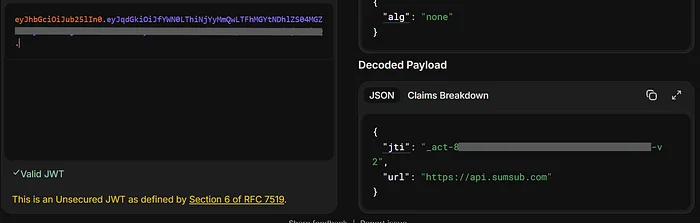
The JWT header showing alg: none.
An unsigned JWT on its own is not proof of a vulnerability, so I moved on to the payload to see what the application actually trusted. One field stood out:
{ "jti": "_act-xxxxxxxx", "url": "https://api.example.com"}
The url claim was not merely informational. Based on the behaviour I observed, the KYC verification SDK used that value to dynamically load an external resource into an iframe. The report describes the same behaviour: the url claim was processed by the embedded SDK, and there was no validation or domain allowlist restricting the value to trusted domains.
That raised the obvious question: if I could modify the JWT, could I also control the URL the application loaded?
Exploitation
Step 1: Host a page under my control
I created a simple HTML page on a server I controlled, so that I had a destination to point the url claim at.
Step 2: Modify the url claim and re-encode the token
The modified payload looked roughly like this:
{ "jti": "_act-xxxxxxxx", "url": "https://attacker.example/poc.html#"}
Because the token used alg:none, there was no valid signature I needed to reproduce after changing the payload. I could change the value, re-encode the token, and send it back through the same token parameter.
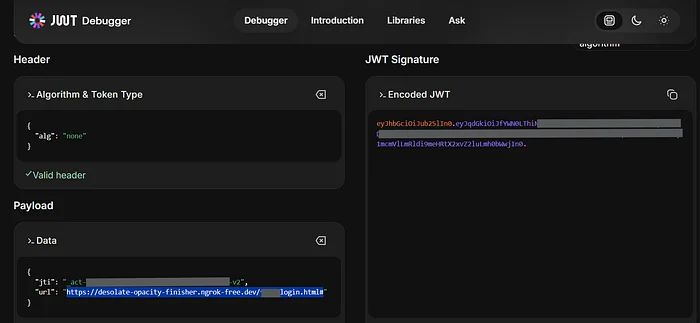
The url claim modified to point to an attacker-controlled resource.
Step 3: Work around the SDK appending its own path
The first test failed. The SDK automatically appended its own path to the supplied URL, so the request ended up at a location that did not exist and returned a 404. After looking at how the URL was processed, I found that adding a fragment at the end of the URL prevented the additional path from breaking the request. That is why the payload above ends in #. With the fragment in place, the external resource loaded successfully.
Step 4: Load the crafted URL
I generated the modified JWT, placed it back into the token parameter, and opened the crafted URL in the browser. My external page was rendered inside an iframe on the legitimate KYC verification page. The browser's address bar continued to display the legitimate target domain while the content inside the page was controlled by me.
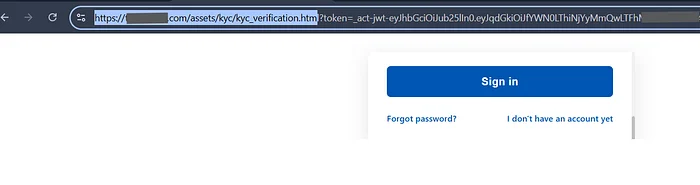
An attacker-controlled page rendered inside the legitimate KYC page.
Step 5: Build a phishing proof of concept
To show practical impact, I created a simple login page hosted on my own server. The intention was not to collect real credentials, but to demonstrate what a phishing scenario could look like if a victim opened a specially crafted link. Because the page rendered inside the trusted KYC interface, it could be designed to look like part of the legitimate application. I configured the form to send submitted test values to an attacker-controlled webhook. When I entered test credentials into the form, the values appeared in the webhook as expected.
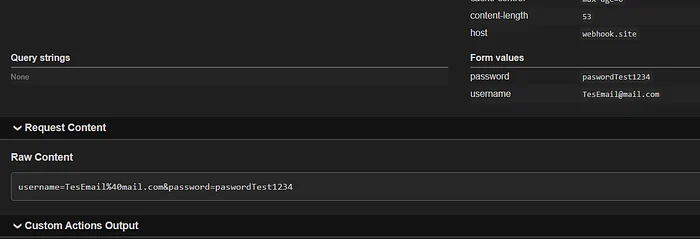
Test data received by the attacker-controlled webhook.
Root cause
The issue was not a single mistake but several behaviours combining:
- The application accepted a JWT using
alg:none, so the token contents could be changed and re-encoded without any signature to reproduce. - The
urlclaim inside that token was trusted and used as part of the KYC SDK configuration. - There was no strict allowlist restricting that value to trusted domains.
Because the resulting resource was rendered inside the legitimate KYC page, those behaviours together let arbitrary external content appear within the trusted interface. The token was processed despite being unsigned, and the SDK configuration was taken from user-controlled input without domain validation.
Impact
The main concern was that an attacker could create a convincing phishing page and present it through a trusted KYC verification flow. A victim could receive a crafted link through email, social media or another social-engineering channel and see attacker-controlled content while the legitimate domain remained in the address bar. That is why the initial report described potential risks such as credential phishing, account takeover and financial fraud.
During triage the program drew an important distinction. The attacker-controlled content was rendered inside a separate-origin iframe, so under the browser's same-origin model the injected page could not directly access the target application's cookies, storage, tokens or DOM. The credentials captured in my proof of concept were not extracted from the application; they were test values I manually entered into the attacker's own page. The vulnerability therefore enabled arbitrary content injection and could facilitate phishing, but it did not give direct access to sensitive data belonging to the target application.
The report was initially assessed at CVSS 8.2 (High) and later changed to 4.3 (Medium). The final vector was:
CVSS:3.1/AV:N/AC:L/PR:N/UI:R/S:U/C:N/I:L/A:N
The change was based largely on the injected content remaining in a separate origin and being unable to access sensitive data from the target's origin. I received a $400 bounty for the report.
Fix
The recommended remediation was:
- Reject JWTs that use
alg:none. - Validate the
urlvalue against a strict allowlist. - Avoid user-controlled SDK configuration.
- Implement an appropriate Content Security Policy.
- Review the SDK integration.
Variants to test
- Unsigned tokens elsewhere. Decode tokens used by client-side flows and look for
"alg": "none". A positive result is a token whose payload you can change and re-encode while the application still processes it. - Claims that drive resource loading. Look for claims such as
url,redirect,callbackor similar that the client uses to load an iframe, script or document. A positive result is your own page rendering inside the legitimate origin's page. - Missing domain allowlists. Point the claim at a host you control. A positive result is the external resource loading without any rejection.
- Path-appending SDKs. If the SDK appends its own path and you get a 404, try a fragment at the end of the URL, as I did, and see whether the external resource then loads.
- Same-origin rendering. Check whether injected content ends up in a separate-origin iframe or in the target's own origin. Content in the target's origin, able to read cookies, storage or the DOM, is a far more serious finding than a separate-origin iframe.
What happened, in plain words
A security researcher was taking part in a bug bounty programme, which is a scheme where companies pay people for finding and reporting security problems in their websites before criminals do. While testing a KYC verification flow, the researcher found a way to make the company's own verification page display content from a server the researcher controlled. The trick relied on a login token that the page accepted without checking whether it had been tampered with, and on a web address stored inside that token which the page then loaded without checking where it pointed.
The researcher reported the issue, the company accepted it, and the researcher was paid a $400 bounty. The report was first assessed as High severity (8.2) and later lowered to Medium (4.3), largely because the injected content sat in a separate browser origin and could not read the real application's data. That rating change is one of the most useful lessons in the story.
This article walks through the whole thing from zero: what KYC is, what a token is, what a JWT is, what alg:none means, what an iframe is, what DOM XSS means, and why each step was taken.
Background concepts you need first
Before the walkthrough, a handful of ideas. Each one is explained as it first becomes relevant below, but here is the short version so the story reads smoothly.
- KYC (Know Your Customer) is the identity-checking step that banks, payment apps and crypto exchanges are legally required to run before letting someone open an account. You upload an ID document, sometimes take a selfie, and the company verifies you are who you say you are. In this story, the company had a web page that handled part of that check.
- A web page is just files. When you open a page, your browser downloads an HTML file (the structure), plus CSS (the styling) and JavaScript (the behaviour). JavaScript is code that runs inside your browser, on your own computer, not on the company's server. That distinction matters a lot later.
- A URL parameter is the part of a web address after a question mark, like
?name=alice. It is a way of passing a value to a page through the address bar. Anyone can edit it before pressing Enter. - A token is a small piece of text that a website gives you to prove who you are or what you are allowed to do, a bit like a cloakroom ticket: you hand it back and the staff trust that it belongs to you. A JWT (JSON Web Token) is one common format for such a token. It is three chunks of text joined by dots, and each chunk is base64url-encoded, which is a way of writing data using only safe characters so it can travel in a URL.
- A signature is a cryptographic stamp that lets the receiver check the token was issued by the right party and has not been altered. Without a valid signature, a token is just text that anyone could have written.
- An iframe (inline frame) is a way to embed one web page inside another. Think of a picture frame hanging on a wall: the wall is the outer page, the picture inside the frame is a different page loaded from somewhere else. The browser keeps the two pages separate for security reasons, which is called the same-origin policy.
- An origin is the combination of protocol, hostname and port, for example
https://example.com. Two pages with different origins are not allowed to read each other's cookies, storage or page content. This is the browser's main defence against one site stealing data from another. - DOM XSS (Document Object Model Cross-Site Scripting) is a class of bug where JavaScript on a page takes input the user can control and inserts it into the page in a way that lets the attacker influence what is displayed or executed. The DOM is the browser's in-memory model of the page. In this case, the input was the
tokenparameter, and the effect was that an attacker-chosen URL got loaded into an iframe. - A webhook is a URL that one system sends data to automatically when something happens. In this story, the researcher set up a webhook to receive whatever was typed into a fake login form, as a way of showing the data left the page.
Finding the interesting endpoint
During testing, the researcher came across a KYC verification page that accepted a JWT through a GET parameter named token. A GET parameter is simply a value passed in the URL, as opposed to a POST parameter which is sent in the body of a form submission. The relevant functionality was located at:
/assets/kyc/kyc_verification.html
Line by line: this is a path on the company's website. /assets/ is a folder for static files, kyc/ is a subfolder, and kyc_verification.html is the page itself. It is an HTML file, and the report classifies the issue as DOM XSS, meaning the token handling happens in the visitor's browser.
The token was passed directly through the URL, which made it an interesting place to start looking at how the application processed user-controlled input. Anything in a URL can be changed by anyone before they press Enter, so a page that reads a value from the URL and acts on it is always worth a closer look. The report identified the token parameter as the vulnerable input and classified the vulnerability as DOM XSS (CWE-79). CWE-79 is the standard catalogue number for cross-site scripting bugs.
The screenshot shows the KYC verification endpoint accepting a JWT through the token parameter. In other words, the page is being opened with a token in the address bar, and the page is using it.
Why this step mattered: the researcher wanted to understand what was actually inside the token, so the next move was to decode it and look at both the header and the payload.
Something looked wrong with the JWT
The first thing that stood out was the JWT header:
{ "alg": "none"}
Line by line: this is a small JSON object, which is a way of writing structured data with names and values. "alg" is the name of a field, short for algorithm. "none" is its value. So the token is declaring that no signing algorithm was used.
For anyone who has worked with JWTs, the alg field specifies the algorithm used to protect the token. In a normal implementation, the application would use a signing algorithm such as HS256 or RS256 and verify the signature before trusting the contents of the token. HS256 and RS256 are two standard ways of signing a token so that the receiver can check it has not been changed. Think of a wax seal on an envelope: if the seal is intact, the letter has not been opened.
Here, however, the token was using alg:none, meaning there was no cryptographic signature that needed to be verified. More importantly, the application was still accepting and processing the token. That is the key point: the page did not reject an unsigned token. It treated it as valid.
The screenshot shows the JWT header with alg: none, confirming the token was unsigned.
Finding an unsigned JWT was interesting, but the researcher did not want to assume it automatically meant a vulnerability. An unsigned token on its own is just a token nobody signed; the real question is what the application does with the data inside it. So the next step was to look at the payload.
Looking at the JWT payload
The payload contained several fields, but one of them immediately stood out:
{ "jti": "_act-xxxxxxxx", "url": "https://api.example.com"}
Line by line: jti stands for JWT ID, a unique identifier for the token, here shown as _act-xxxxxxxx. The url field holds a web address, https://api.example.com. The url field was particularly interesting because it was not simply informational. Based on the behaviour observed, this value was used by the KYC verification SDK to dynamically load an external resource into an iframe.
An SDK (Software Development Kit) is a bundle of code a company includes in its own page to add a feature, in this case the identity-verification widget. The SDK reads the token, takes the url value, and loads whatever is at that address into an iframe on the page. The report describes the same behaviour: the url claim was processed by the embedded SDK, and there was no validation or domain allowlist restricting the value to trusted domains. An allowlist is a list of things that are explicitly permitted; without one, anything goes.
That raised a simple question: if the token could be modified, could the URL the application loaded also be controlled? At this point there was a much more interesting attack surface than the JWT itself. If the application trusted the url value, then changing that value could potentially change what was loaded by the KYC page. That was the next thing to test.
Modifying the url claim
Step 1: Host a page under the researcher's control
The researcher created a simple HTML page on a server they controlled, so there was a destination to point the url claim at. This is a standard part of any proof of concept: you need somewhere for the victim page to load from that you can watch.
Step 2: Change the value and re-encode the token
The modified payload looked roughly like this:
{ "jti": "_act-xxxxxxxx", "url": "https://attacker.example/poc.html#"}
Line by line: jti is unchanged. The url now points at https://attacker.example/poc.html, a page on the researcher's own server. The trailing # is a fragment marker, explained in the next step.
Because the token used alg:none, there was no valid signature to reproduce after changing the payload. The researcher could change the value, re-encode the token, and send it back through the same token parameter. Re-encoding here means turning the edited JSON back into the base64url text that a JWT is made of, so the page will accept it as a token again.
The screenshot shows the url claim modified to point to an attacker-controlled resource.
Step 3: Work around the SDK appending its own path
The first test failed. The SDK automatically appended its own path to the supplied URL, so the request ended up at a location that did not exist and returned a 404. A 404 is the standard web response for "not found".
After looking at how the URL was processed, the researcher found that adding a fragment at the end of the URL prevented the additional path from breaking the request. That is why the payload above ends in #. A fragment is the part of a URL after a #, normally used to jump to a section of a page. A fragment is the part of a URL after a #, which browsers do not send to the server; adding one stopped the SDK's appended path from breaking the request. With the fragment in place, the external resource loaded successfully.
That small detail turned out to be important for getting the proof of concept to work. It is a good example of why a failed first attempt is not the end of a test: understanding why it failed often reveals the way through.
Step 4: Load the crafted URL
The researcher generated the modified JWT, placed it back into the token parameter, and opened the crafted URL in the browser. This time, the external page was successfully rendered inside an iframe on the legitimate KYC verification page. What made the result particularly interesting was that the browser's address bar continued to display the legitimate target domain while the content being displayed inside the page was controlled by the researcher.
The screenshot shows an attacker-controlled page rendered inside the legitimate KYC page. The address bar still shows the real company's domain, which is exactly what makes this convincing to a victim.
At this point, the researcher had confirmed control over the external content being loaded by the KYC flow. The next question was no longer whether the behaviour existed, but what an attacker could realistically do with it.
Step 5: Build a phishing proof of concept
To demonstrate practical impact, the researcher created a simple login page hosted on their own server. The intention was not to collect anyone's real credentials, but to show what a phishing scenario could look like if a victim opened a specially crafted link. Phishing is the trick of presenting a fake page that looks like a trusted one, so the victim types their password into it.
Because the page was rendered inside the trusted KYC interface, it could be designed to look like part of the legitimate application. For the proof of concept, the researcher created a basic login form and configured it to send submitted test values to an attacker-controlled webhook. When test credentials were entered into the form, the values appeared in the webhook as expected. This demonstrated how the arbitrary content injection could potentially be used as part of a phishing attack.
The screenshot shows test data received by the attacker-controlled webhook, confirming the form submitted to the researcher's server.
At first glance, this looked like it could have a significant impact. However, there was an important technical limitation that became clear during the later triage process. Triage is the stage where the company's security team reviews a report, checks whether it is valid, and decides how serious it is.
Understanding the actual impact
The main concern was that an attacker could create a convincing phishing page and present it through a trusted KYC verification flow. A victim could receive a crafted link through email, social media or another social-engineering channel and see attacker-controlled content while still seeing the legitimate domain in the browser. That is why the initial report described potential risks such as credential phishing, account takeover and financial fraud.
However, during triage, the programme pointed out an important distinction. The attacker-controlled content was being rendered inside a separate-origin iframe. Because of the browser's same-origin security model, the injected page could not directly access the target application's cookies, storage, tokens or DOM. Cookies are small pieces of data a site stores in your browser, often used to keep you logged in. Storage means the browser's local storage areas for a site. DOM is the browser's live model of the page. None of these were reachable from the injected page, because the browser keeps different origins apart.
The credentials captured in the proof of concept were also not credentials extracted from the application. They were test values manually entered into the attacker's own page. This meant the vulnerability enabled arbitrary content injection and could facilitate a phishing scenario, but it did not provide direct access to sensitive data belonging to the target application. That distinction ended up having a significant effect on the final severity.
The severity was changed during triage
The report was initially assessed with a CVSS score of 8.2 (High). CVSS is a standard scoring system for security bugs, where a higher number means more serious. After further review, the programme changed the score to 4.3 (Medium). The final vector was:
CVSS:3.1/AV:N/AC:L/PR:N/UI:R/S:U/C:N/I:L/A:N
Line by line, each part of the vector is a shorthand for one property of the bug:
CVSS:3.1is the version of the scoring system.AV:Nmeans attack vector is network, so the attacker can reach the target over the internet.AC:Lmeans attack complexity is low, so no special conditions are needed.PR:Nmeans no privileges are required, so the attacker does not need an account.UI:Rmeans user interaction is required, so the victim has to click a link.S:Umeans scope is unchanged, so the impact stays within the vulnerable component rather than spreading to other components.C:Nmeans confidentiality impact is none, so no data is exposed.I:Lmeans integrity impact is low, so content can be altered but not in a way that gives control.A:Nmeans availability impact is none, so the service is not disrupted.
The change was based largely on the fact that the injected content remained in a separate origin and could not directly access sensitive data from the target application's origin. For the researcher, this was one of the most useful parts of the whole report. It was a good reminder that demonstrating a realistic attack scenario and demonstrating direct technical impact are not necessarily the same thing. A vulnerability might make a phishing attack more convincing, for example, without giving the attacker direct access to the application's cookies or internal data. Understanding that distinction is important when assessing severity.
What actually caused the vulnerability?
Looking back at the entire flow, the vulnerability was not caused by a single issue in isolation. Several behaviours came together to create the problem:
- The application accepted a JWT using
alg:none, so the token contents could be changed and re-encoded without any signature to reproduce. - The
urlclaim inside that token was trusted and used as part of the KYC SDK configuration. - There was no strict allowlist restricting that value to trusted domains.
Because the resulting resource was rendered inside the legitimate KYC page, those behaviours together let arbitrary external content appear within the trusted interface. The existing defences did not stop it: the token was processed despite being unsigned, and the SDK configuration was taken from user-controlled input without domain validation.
The recommended remediation included rejecting JWTs using alg:none, validating the url value against a strict allowlist, avoiding user-controlled SDK configuration, implementing an appropriate Content Security Policy, and reviewing the SDK integration. A Content Security Policy is a set of rules a site sends to the browser saying which sources of content are allowed, so even if an attacker injects a URL, the browser refuses to load it.
What the researcher learned
One of the biggest takeaways was that finding a suspicious configuration is often just the beginning. When the researcher first saw alg:none, they could have stopped there and written a report about an unsigned JWT. Instead, they wanted to understand what the application was actually doing with the token. That led to the url claim, and following that value through the application's behaviour eventually revealed the actual vulnerability.
It also reminded the researcher how important it is to follow the entire data flow rather than focusing on one component. In this case, the interesting chain was essentially:
JWT ↓alg:none ↓url claim ↓KYC SDK ↓External resource ↓iframe ↓Attacker-controlled content
Line by line: the token is read, its alg:none header means no signature check happens, the url claim is taken from the payload, the KYC SDK uses it to load an external resource, that resource is placed in an iframe, and the result is attacker-controlled content inside the trusted page. Each individual step might not look particularly impressive on its own, but combined they created a security issue worth investigating.
The severity adjustment was another valuable lesson. Initially, the researcher focused heavily on the potential phishing scenario, but the final assessment took the browser's same-origin protections into account. Understanding those limitations gave a better perspective on how vulnerability impact should be evaluated.
Variants to test
- Unsigned tokens elsewhere. Decode tokens used by client-side flows and look for
"alg": "none". A positive result is a token whose payload you can change and re-encode while the application still processes it. In other words, if the site accepts a token you wrote yourself, that is worth reporting. - Claims that drive resource loading. Look for claims such as
url,redirect,callbackor similar that the client uses to load an iframe, script or document. A positive result is your own page rendering inside the legitimate origin's page. - Missing domain allowlists. Point the claim at a host you control. A positive result is the external resource loading without any rejection.
- Path-appending SDKs. If the SDK appends its own path and you get a 404, try a fragment at the end of the URL, as the researcher did, and see whether the external resource then loads.
- Same-origin rendering. Check whether injected content ends up in a separate-origin iframe or in the target's own origin. Content in the target's origin, able to read cookies, storage or the DOM, is a far more serious finding than a separate-origin iframe.
Glossary
- Allowlist: a list of things that are explicitly permitted, such as a list of domains a page is allowed to load content from.
- API: an interface that lets one piece of software talk to another, like a service counter where you ask for something and get a defined response.
- Base64url: a way of writing data using only safe characters so it can travel in a URL or a token.
- Bug bounty programme: a scheme where a company pays people for finding and reporting security problems in its systems.
- Content Security Policy (CSP): a set of rules a site sends to the browser saying which sources of content are allowed to load.
- Cookie: a small piece of data a website stores in your browser, often used to keep you logged in.
- Credential phishing: a phishing attack aimed at stealing usernames and passwords.
- CVSS: a standard scoring system for security bugs, where a higher number means more serious.
- CWE-79: the standard catalogue number for cross-site scripting bugs.
- DOM (Document Object Model): the browser's live, in-memory model of a web page, which JavaScript can read and change.
- DOM XSS: a cross-site scripting bug where JavaScript on a page takes user-controllable input and inserts it into the page in a way that lets an attacker influence what is displayed or executed.
- Fragment: the part of a URL after a
#, normally used to jump to a section of a page; browsers treat it as belonging to the page, not the server. - GET parameter: a value passed in a URL after a question mark, which anyone can edit before pressing Enter.
- HS256 / RS256: two standard ways of signing a JWT so the receiver can check it has not been changed.
- HTML: the language that describes the structure of a web page.
- Iframe (inline frame): a way to embed one web page inside another.
- JavaScript: code that runs inside your browser, on your own computer, rather than on the company's server.
- JWT (JSON Web Token): a common token format made of three base64url-encoded chunks joined by dots.
- JSON: a way of writing structured data with names and values.
- KYC (Know Your Customer): the identity-checking step banks and payment services must run before letting someone open an account.
- Origin: the combination of protocol, hostname and port, for example
https://example.com; pages with different origins cannot read each other's data. - Phishing: presenting a fake page that looks like a trusted one so the victim types their password into it.
- Proof of concept (PoC): a small demonstration that a vulnerability really works, without causing real harm.
- Re-encoding: turning edited JSON back into the base64url text that a JWT is made of.
- Same-origin policy: the browser rule that pages from different origins cannot read each other's cookies, storage or page content.
- SDK (Software Development Kit): a bundle of code a company includes in its own page to add a feature, such as an identity-verification widget.
- Separate-origin iframe: an iframe whose content comes from a different origin than the page around it, so the browser keeps the two apart.
- Signature: a cryptographic stamp that lets the receiver check a token was issued by the right party and has not been altered.
- Storage: the browser's local storage areas for a site, separate from cookies.
- Token: a small piece of text a website gives you to prove who you are or what you are allowed to do, like a cloakroom ticket.
- Triage: the stage where a company's security team reviews a report, checks whether it is valid, and decides how serious it is.
- 404: the standard web response for "not found".
- URL parameter: the part of a web address after a question mark, used to pass a value to a page.
- Webhook: a URL that one system sends data to automatically when something happens.



