I Found a CSRF Vulnerability by Analyzing Cookies: When Remember Me Authentication Became the Weak…
The application accepted a persistent authentication cookie (REMEMBERME) on cross-origin POST requests without a CSRF token, allowing an attacker to delete a user's collection. The author demonstrated this by hosting a form on a local server and confirming the deletion succeeded.

Cybersecurity
The full write-up lives on its author's site
It belongs to its author, so we link to it rather than copy it. The other two tabs are our own rewrites, checked against it.
Context
The target was a web application with an authenticated area that includes a collection-management feature. In the application's own terminology the collection is a classeur, and the feature supports at least two operations: renaming a collection and deleting one. The PoC form posted to a path under /espace-personnel/classeur/remove/ followed by the collection identifier.
Authentication in the application used two cookies: a session cookie named PHPSESSID and a separate persistent-authentication cookie named REMEMBERME. The question the investigation turned on was whether REMEMBERME could carry an authenticated context on its own, without PHPSESSID being present in the request.
Setup
- A single account under the researcher's control, used to create a disposable collection for testing.
- An authenticated browser session against the target application.
- A local development server serving the proof of concept from
http://[redacted]:5500. - Burp Suite to capture and inspect the resulting traffic.
The PoC form was submitted manually rather than automatically, so the request and its result could be inspected during testing.
Finding it
The starting point was cookie inspection in the authenticated browser session. The session cookie PHPSESSID was configured with SameSite=Lax. A second cookie, REMEMBERME, handled persistent authentication.
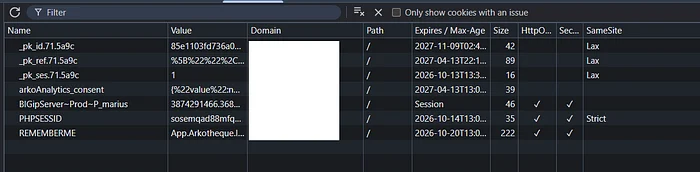
The screenshot shows PHPSESSID configured with SameSite=Lax, while REMEMBERME has no explicit SameSite attribute.
That raised a specific question: could REMEMBERME maintain authentication on its own, even when PHPSESSID was not sent with a request?
The cookie settings alone could not answer this. A cookie explicitly configured with SameSite=Lax is generally withheld from cross-site POST requests, which can prevent CSRF when the application relies on that cookie to authenticate the request. A cookie without an explicit SameSite attribute is not necessarily sent with every cross-site request either: modern browsers may apply a default Lax policy depending on the circumstances. So the REMEMBERME configuration by itself proved nothing, and the next step was to observe how the application actually handled a cross-origin request.
Exploitation
Step 1: Test whether REMEMBERME authenticates without PHPSESSID
The researcher tested whether REMEMBERME could maintain an authenticated context without PHPSESSID. In testing, the application still processed the request when REMEMBERME was present and the regular session ID cookie was absent. That behaviour suggested the persistent cookie might be usable to trigger sensitive actions through a cross-origin request.
Step 2: Survey the available actions
Several available operations were tested, including changing a collection's name and deleting a collection. The application's functionality was fairly limited. After trying the available actions, deleting a collection was the only one where the CSRF behaviour could be successfully reproduced.
Step 3: Build the proof of concept
A disposable collection was created on the controlled account, and a simple HTML page was served from the local development server at http://[redacted]:5500. The page contains a form that submits a POST request to the collection deletion endpoint, with manual submission so the request and result could be inspected.
<!doctype html><html lang="en"> <head> <meta charset="UTF-8" /> <meta name="viewport" content="width=device-width, initial-scale=1" /> <title>CSRF PoC - Remove Classeur (Authorized BBP Test)</title> </head> <body> <h2>CSRF Test — Remove Classeur</h2> <p> <strong>Authorized security testing only.</strong> Click the button below to submit a cross-origin POST request to the classeur removal endpoint using the current browser session, subject to the browser's cookie security policies. </p> <form id="csrfForm" action="https://sub.target.com/espace-personnel/classeur/remove/2469" method="POST" enctype="application/x-www-form-urlencoded" target="_blank" autocomplete="off" > <input type="hidden" name="_method" value="POST" /> <button type="submit">Submit CSRF Test Request</button> </form> <script> // Automatic submission is disabled. // Uncomment the following code only if automatic submission // is necessary for an authorized test using a disposable test collection. // window.addEventListener('DOMContentLoaded', () => { // document.getElementById('csrfForm').submit(); // }); </script> </body></html>
The form posts to https://sub.target.com/espace-personnel/classeur/remove/2469. It uses method="POST" with enctype="application/x-www-form-urlencoded", and carries a hidden field _method set to POST. The submission targets a new tab (target="_blank"). The script block contains an automatic-submission snippet that is commented out, so the request only fires when the button is clicked.
Step 4: Trigger the request and capture it
The PoC was opened in the same browser where the researcher was authenticated to the target application, and the request was triggered. The resulting traffic was then checked in Burp Suite.
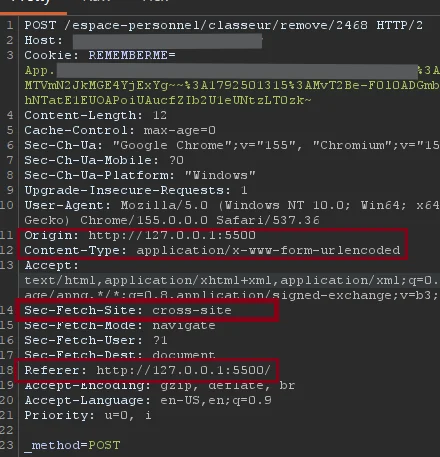
The captured request shows a cross-origin POST containing REMEMBERME but no PHPSESSID.
The captured request showed several details:
- The request used POST to reach the collection deletion endpoint.
- The
Originheader identified the source ashttp://[redacted]:5500. - The
Sec-Fetch-Siteheader was set tocross-site. - The cookie header contained
REMEMBERME, but notPHPSESSID.
The last detail matched the behaviour suspected during the initial cookie analysis.
Step 5: Confirm the effect
After submitting the request, the application was checked: the disposable test collection had been deleted. The captured request showed REMEMBERME present and PHPSESSID absent, and the deletion succeeded under those testing conditions. This demonstrated that the cross-origin request could trigger the state-changing action.
Root cause
The behaviour suggested that the persistent authentication mechanism played a role, although the exact server-side authentication flow would need to be confirmed by the application owner. The endpoint did not appear to implement CSRF token validation. Combined with the browser sending the REMEMBERME cookie in the cross-origin request, this allowed the application to process the deletion action without an effective CSRF protection mechanism.
One distinction matters: the missing SameSite=Lax attribute on REMEMBERME could not be concluded to be definitively the root cause. What could be established was the observed behaviour of the browser request and the successful deletion.
Impact
Under the tested conditions, a cross-origin request from a page on another origin could delete a collection on the authenticated account, because the application processed the request with REMEMBERME present and no CSRF token validation was apparent. The researcher's own account and a disposable collection were used to demonstrate this. The report does not discuss how many users or which roles were affected.
Fix
The report was submitted to the bug bounty program on YesWeHack with reproduction steps, the captured request, cookie observations and impact. It was eventually marked Duplicate because another hunter had discovered and reported the same vulnerability first. The report does not state which remediation, if any, the application owner applied.
Exploring another angle: clickjacking
The cookie investigation also prompted an attempt at clickjacking: whether an authenticated page could be loaded inside an iframe hosted on another website. Clickjacking embeds a legitimate page and attempts to trick users into interacting with its controls without realising what they are clicking; unlike CSRF, it relies on manipulating the user's visual interaction with an embedded page.
The target application was tried inside an iframe, but the page would not load. No working clickjacking scenario could be demonstrated. Possible explanations include framing restrictions such as X-Frame-Options or the Content Security Policy directive frame-ancestors, although which mechanism prevented the embedding was not confirmed. The attempt produced no additional vulnerability, so the finding stayed focused on the reproduced CSRF behaviour.
Variants to test
- Persistent-auth cookies on other targets. Look for a
REMEMBERME-style cookie alongside a session cookie. A positive result is a request that still reaches an authenticated action with the session cookie absent and the persistent cookie present. - State-changing endpoints without tokens. Enumerate rename, delete, move and share operations. A positive result is a cross-origin POST that changes state and returns a success response rather than a token error.
_methodoverride fields. The PoC carried a hidden_methodfield set toPOST. Try the same override on other endpoints to see whether method-based CSRF protections can be bypassed. A positive result is a state change through a request the defence was expected to reject.- Origin and
Sec-Fetch-Sitehandling. Send cross-site requests and check whether the server rejects them based onOriginorSec-Fetch-Site. A positive result is a request withSec-Fetch-Site: cross-siteand a foreignOriginthat is still processed. - Framing protections. Attempt to embed authenticated pages in an iframe. A positive result is a page that loads and exposes interactive controls, which would open a clickjacking path alongside the CSRF one.
What happened, in plain words
A security researcher was looking at a website that lets logged-in users manage their personal collections. In the site's own language, a collection is called a classeur. The site let people rename a collection or delete one. The researcher noticed something odd about the two small files the site stored in the browser to remember who you are, and followed that clue until they could make a logged-in user's collection disappear by getting them to open a page on a completely different website. They reported it to a bug bounty programme, and it was marked as a duplicate because someone else had found the same thing first.
This article walks through the whole investigation from zero. You only need to know how to use a browser. Every technical word is explained the first time it appears, and there is a glossary at the end.
The setting: what the site was
The target was a web application with a logged-in area. Think of a web application as a program that runs on someone else's computer and that you talk to through your browser. The part behind a login is the authenticated area: you only get in after proving who you are.
Inside that area there was a collection-management feature. A collection (a classeur) is simply a named container that belongs to you, a bit like a folder or a playlist. The feature supported at least two actions: renaming a collection and deleting one. The PoC form posted to a web address (a path) that looked like this:
/espace-personnel/classeur/remove/
followed by the number that identifies the particular collection. espace-personnel is French for personal space, and remove is the action. The number at the end is the collection's identifier, the same way a customer number identifies a customer.
To know who you are, the site used two cookies. A cookie is a small piece of text that a website asks your browser to store and to send back with every later request to that site. It is like a cloakroom ticket: the site hands you a ticket, and each time you come back you show it so the site knows which coat is yours. The two cookies were:
PHPSESSID, the session cookie. A session is one continuous visit; the session cookie is the ticket for the current visit.REMEMBERME, a persistent-authentication cookie. Persistent means it survives after you close the browser, so the site can log you back in automatically. It is the "remember me" tick box turned into a cookie.
The whole investigation turned on one question: could REMEMBERME prove who you are all by itself, without PHPSESSID being sent along with it?
The setup: what tools were used
Before touching the site, the researcher prepared a small, safe laboratory:
- One account under the researcher's own control, so nothing belonging to a real user was at risk.
- A disposable collection created on that account, so there was something harmless to delete.
- A logged-in browser session against the target site.
- A local development server serving a test page from
http://[redacted]:5500. A local development server is a tiny web server running on your own computer.[redacted]is the address your computer uses to refer to itself, and5500is the port, the numbered door on that address. Serving a page locally means the test page lives on a different site from the target, which is exactly the situation an attacker would create. - Burp Suite, a program that sits between your browser and the internet and records every request and response so you can read them. Think of it as a security camera for network traffic.
The test page was set up so the form had to be submitted by clicking a button, not automatically. That was deliberate: the researcher wanted to look at the request and the result before anything happened.
Finding it: the cookie inspection
The starting point was simply opening the browser's developer tools and reading the cookies of the logged-in session. The session cookie PHPSESSID was configured with SameSite=Lax. A second cookie, REMEMBERME, handled persistent authentication.
The screenshot shows PHPSESSID configured with SameSite=Lax, while REMEMBERME has no explicit SameSite attribute.
To understand why that mattered, you need to know what SameSite does. When you are on site A and something on the page makes your browser send a request to site B, that is a cross-site request. SameSite is an instruction attached to a cookie that tells the browser when it is allowed to include that cookie in cross-site requests. It is like a rule on a cloakroom ticket saying "only valid inside this building".
SameSite=Laxmeans the cookie is generally not attached to cross-site POST requests. A POST request is the kind a form uses to send data and change something on the server, as opposed to a GET request, which just asks to see a page.SameSite=Strictis even tighter: the cookie is not sent on cross-site requests at all.- No
SameSiteattribute at all means the browser has to fall back on its own default, which in modern browsers is often Lax, but not always and not in every circumstance.
That raised a specific question: could REMEMBERME maintain authentication on its own, even when PHPSESSID was not sent with a request? If the application accepted the cookie independently, a cross-origin request might still be able to trigger an authenticated action. A cross-origin request is one whose source and destination have different scheme, hostname or port, for example a page on [redacted]:5500 sending a form to sub.target.com.
The cookie settings alone could not answer this. A cookie explicitly configured with SameSite=Lax is generally withheld from cross-site POST requests, which can prevent CSRF when the application relies on that cookie to authenticate the request. CSRF, or Cross-Site Request Forgery, is the attack this whole article is about: it means tricking a logged-in user's browser into sending a request the user never intended, using the login the user already has. A cookie without an explicit SameSite attribute is not necessarily sent with every cross-site request either: modern browsers may apply a default Lax policy depending on the circumstances. So the REMEMBERME configuration by itself proved nothing, and the next step was to observe how the application actually handled a cross-origin request.
Exploitation
Step 1: Test whether REMEMBERME authenticates without PHPSESSID
The researcher tested whether REMEMBERME could maintain an authenticated context without PHPSESSID. In testing, the application still processed the request when REMEMBERME was present and the regular session ID cookie was absent. That behaviour suggested the persistent cookie might be usable to trigger sensitive actions through a cross-origin request.
Why this step? Because the whole idea only works if the site treats the remember-me cookie as a valid proof of identity on its own. If the site had demanded both cookies, the attack would have been much harder, since the session cookie is the one protected by SameSite=Lax.
Step 2: Survey the available actions
Several available operations were tested, including changing a collection's name and deleting a collection. The application's functionality was fairly limited. After trying the available actions, deleting a collection was the only one where the CSRF behaviour could be successfully reproduced.
Why this step? Because a CSRF problem is only interesting if it can cause a real change. Renaming a collection is a change too, but in this case the CSRF behaviour could only be reproduced on deletion, so the researcher kept testing until they found one action that worked.
Step 3: Build the proof of concept
A disposable collection was created on the controlled account, and a simple HTML page was served from the local development server at http://[redacted]:5500. The page contains a form that submits a POST request to the collection deletion endpoint, with manual submission so the request and result could be inspected.
A proof of concept (PoC) is a small, harmless demonstration that a problem is real, rather than just theoretical. HTML is the language web pages are written in, and a form is the part of a page that collects data and sends it to a server when you press a button.
<!doctype html><html lang="en"> <head> <meta charset="UTF-8" /> <meta name="viewport" content="width=device-width, initial-scale=1" /> <title>CSRF PoC - Remove Classeur (Authorized BBP Test)</title> </head> <body> <h2>CSRF Test — Remove Classeur</h2> <p> <strong>Authorized security testing only.</strong> Click the button below to submit a cross-origin POST request to the classeur removal endpoint using the current browser session, subject to the browser's cookie security policies. </p> <form id="csrfForm" action="https://sub.target.com/espace-personnel/classeur/remove/2469" method="POST" enctype="application/x-www-form-urlencoded" target="_blank" autocomplete="off" > <input type="hidden" name="_method" value="POST" /> <button type="submit">Submit CSRF Test Request</button> </form> <script> // Automatic submission is disabled. // Uncomment the following code only if automatic submission // is necessary for an authorized test using a disposable test collection. // window.addEventListener('DOMContentLoaded', () => { // document.getElementById('csrfForm').submit(); // }); </script> </body></html>
Line by line, in plain words:
<!doctype html>tells the browser this is a modern HTML page.<html lang="en">opens the page and says its language is English.<head>is the invisible part of the page that holds information about it.<meta charset="UTF-8" />says which character encoding to use, so accented letters display correctly.<meta name="viewport" ... />tells phones and small screens how to scale the page.<title>CSRF PoC - Remove Classeur (Authorized BBP Test)</title>is the text shown in the browser tab. BBP stands for bug bounty programme, the scheme through which the researcher was allowed to test.<body>starts the visible part of the page.<h2>CSRF Test — Remove Classeur</h2>is a heading.- The
<p>paragraph explains that this is authorised testing only, and that clicking the button sends a cross-origin POST request using the current browser session, subject to the browser's cookie security policies. <form ...>opens the form. Its attributes are the important part:id="csrfForm"gives the form a name so the script can find it.action="https://sub.target.com/espace-personnel/classeur/remove/2469"is the address the form will send its data to.method="POST"says the request is a POST, the kind used to change something.enctype="application/x-www-form-urlencoded"is the standard way of packing form fields into the request body.target="_blank"opens the result in a new tab, so the test page stays visible.autocomplete="off"stops the browser from filling in remembered values.
<input type="hidden" name="_method" value="POST" />is a field the user never sees. It sends the name_methodwith the valuePOST. Some frameworks use this trick so that a form, which can only really send GET or POST, can ask the server to treat the request as a particular method.<button type="submit">Submit CSRF Test Request</button>is the button that sends the form.- The
<script>block contains JavaScript, the language that makes pages interactive. Here every line is commented out with//, so none of it runs. The commented code would submit the form automatically as soon as the page loaded. It is left disabled on purpose, so the request only fires when the button is clicked and can be watched.
Step 4: Trigger the request and capture it
The PoC was opened in the same browser where the researcher was authenticated to the target application, and the request was triggered. The resulting traffic was then checked in Burp Suite.
Why the same browser? Because the attack depends entirely on the browser still holding the victim's cookies. Opening the page in a different browser, or while logged out, would prove nothing.
The captured request shows a cross-origin POST containing REMEMBERME but no PHPSESSID.
The captured request showed several details:
- The request used POST to reach the collection deletion endpoint.
- The
Originheader identified the source ashttp://[redacted]:5500. - The
Sec-Fetch-Siteheader was set tocross-site. - The cookie header contained
REMEMBERME, but notPHPSESSID.
A header is a labelled line of extra information that travels with every request and response, like the address and handling notes on an envelope. Origin is the header that says where the request came from. Sec-Fetch-Site is a newer header in which the browser itself states the relationship between the page and the destination; cross-site means they are different sites. The cookie header is the line where the browser lists the cookies it is sending.
The last detail matched the behaviour suspected during the initial cookie analysis: the remember-me cookie went along, the session cookie did not, and the request still reached the delete action.
Step 5: Confirm the effect
After submitting the request, the application was checked: the disposable test collection had been deleted. The captured request showed REMEMBERME present and PHPSESSID absent, and the deletion succeeded under those testing conditions. This demonstrated that the cross-origin request could trigger the state-changing action.
A state-changing action is anything that permanently alters data on the server, as opposed to just reading a page. Deleting a collection is state-changing; viewing it is not. Confirming the effect is what separates a real vulnerability from a suspicious-looking request.
Root cause
The behaviour suggested that the persistent authentication mechanism played a role, although the exact server-side authentication flow would need to be confirmed by the application owner. The endpoint did not appear to implement CSRF token validation. A CSRF token is a secret, random value that a well-built site puts inside each form and checks when the form comes back. An attacker's page on another site cannot know that value, so the request is rejected. It is like a numbered seal on a parcel: if the number does not match, the parcel is refused. Combined with the browser sending the REMEMBERME cookie in the cross-origin request, this allowed the application to process the deletion action without an effective CSRF protection mechanism.
One distinction matters: the missing SameSite=Lax attribute on REMEMBERME could not be concluded to be definitively the root cause. What could be established was the observed behaviour of the browser request and the successful deletion.
Impact
Impact means what an attacker could actually do with the problem. Under the tested conditions, a cross-origin request from a page on another origin could delete a collection on the authenticated account, because the application processed the request with REMEMBERME present and no CSRF token validation was apparent. The researcher's own account and a disposable collection were used to demonstrate this. The report does not discuss how many users or which roles were affected.
Fix
The report was submitted to the bug bounty program on YesWeHack with reproduction steps, the captured request, cookie observations and impact. A bug bounty programme is a scheme in which an organisation invites outside researchers to test its systems and report problems, usually with a reward. Remediation means the repair. It was eventually marked Duplicate because another hunter had discovered and reported the same vulnerability first. The report does not state which remediation, if any, the application owner applied.
Exploring another angle: clickjacking
The cookie investigation also prompted an attempt at clickjacking: whether an authenticated page could be loaded inside an iframe hosted on another website. An iframe is a window inside a web page that displays another page. Clickjacking embeds a legitimate page and attempts to trick users into interacting with its controls without realising what they are clicking; unlike CSRF, it relies on manipulating the user's visual interaction with an embedded page. A simple comparison: CSRF makes the browser send a request the user never saw, while clickjacking makes the user click a button they think belongs to something else.
The target application was tried inside an iframe, but the page would not load. No working clickjacking scenario could be demonstrated. Possible explanations include framing restrictions such as X-Frame-Options or the Content Security Policy directive frame-ancestors, although which mechanism prevented the embedding was not confirmed. X-Frame-Options is a response header that tells the browser whether a page may be shown inside an iframe. Content Security Policy is a broader set of rules a site sends to the browser, and frame-ancestors is the part of it that says which sites are allowed to frame the page. The attempt produced no additional vulnerability, so the finding stayed focused on the reproduced CSRF behaviour.
Variants to test
If you want to look for similar problems yourself, these are the directions the researcher lists. Each one describes what to look for and what a positive result looks like.
- Persistent-auth cookies on other targets. Look for a
REMEMBERME-style cookie alongside a session cookie. A positive result is a request that still reaches an authenticated action with the session cookie absent and the persistent cookie present. - State-changing endpoints without tokens. Enumerate rename, delete, move and share operations. A positive result is a cross-origin POST that changes state and returns a success response rather than a token error.
_methodoverride fields. The PoC carried a hidden_methodfield set toPOST. Try the same override on other endpoints to see whether method-based CSRF protections can be bypassed. A positive result is a state change through a request the defence was expected to reject.- Origin and
Sec-Fetch-Sitehandling. Send cross-site requests and check whether the server rejects them based onOriginorSec-Fetch-Site. A positive result is a request withSec-Fetch-Site: cross-siteand a foreignOriginthat is still processed. - Framing protections. Attempt to embed authenticated pages in an iframe. A positive result is a page that loads and exposes interactive controls, which would open a clickjacking path alongside the CSRF one.
Glossary
- Authenticated area: the part of a website you can only reach after logging in.
- Authentication: the process of proving who you are, usually with a username and password.
- Bug bounty programme (BBP): a scheme where an organisation invites outside researchers to test its systems and report problems, often for a reward.
- Burp Suite: a tool that sits between your browser and the internet and records requests and responses so you can inspect them.
- Classeur: the application's own word for a collection, a named container that belongs to a user.
- Clickjacking: tricking a user into clicking controls on a legitimate page that has been hidden inside another page.
- Cookie: a small piece of text a website asks your browser to store and send back with later requests, so the site can recognise you.
- Cookie header: the line in a request where the browser lists the cookies it is sending.
- Cross-origin / cross-site: a request whose source and destination differ in scheme, hostname or port.
- CSRF (Cross-Site Request Forgery): tricking a logged-in user's browser into sending a request the user never intended, using the login the user already has.
- CSRF token: a secret random value placed in a form and checked by the server, which an attacker's page cannot know.
- Content Security Policy (CSP): a set of rules a site sends to the browser about what it may load and embed.
enctype: the form attribute that says how form fields are packed into the request body.- Form: the part of a web page that collects data and sends it to a server when a button is pressed.
frame-ancestors: the CSP directive that says which sites are allowed to display the page inside an iframe.- GET: a request that asks to see something, without changing data.
- Header: a labelled line of extra information sent with a request or response.
- HTML: the language web pages are written in.
- Identifier: the number or code that picks out one particular item, such as one collection.
- Iframe: a window inside a web page that displays another page.
- Impact: what an attacker could actually do with a vulnerability.
- JavaScript: the language that makes web pages interactive.
- Local development server: a small web server running on your own computer.
_method: a hidden form field some frameworks use to tell the server which method to treat the request as.- Origin: the header that states where a request came from.
- Path: the part of a web address after the hostname that points to a particular feature.
- Persistent-authentication cookie: a cookie that survives closing the browser and logs you back in automatically, the "remember me" option.
- Port: the numbered door on a network address, such as
5500. - POST: a request that sends data and can change something on the server.
- Proof of concept (PoC): a small, harmless demonstration that a problem is real.
- Remediation: the repair of a vulnerability.
- Request / response: the message your browser sends to a server, and the message the server sends back.
SameSite: a cookie instruction that controls whether the cookie is sent with cross-site requests; values includeLaxandStrict.Sec-Fetch-Site: a header in which the browser states the relationship between the page and the destination, such ascross-site.- Session: one continuous visit to a website.
- Session cookie: the cookie that identifies your current visit.
- State-changing action: anything that permanently alters data on the server, such as deleting or renaming.
target="_blank": the form attribute that opens the result in a new tab.X-Frame-Options: a response header that tells the browser whether a page may be shown inside an iframe.- YesWeHack: the bug bounty platform where the report was submitted.

