How I Found an SSRF Vulnerability in Istio and Got Credited in the Official Release Notes
The Wasm HTTP fetcher in Istio built HTTP clients without any destination IP filtering, unlike other components. An attacker with permission to create or update WasmPlugin resources could make istiod send requests to internal endpoints such as cloud metadata or the Kubernetes API.

Bug Bounty
The full write-up lives on its author's site
It belongs to its author, so we link to it rather than copy it. The other two tabs are our own rewrites, checked against it.
Context
Istio is an open-source service mesh that provides a uniform way to secure, connect and observe microservices. Its architecture has two main components: the data plane, made of Envoy proxies deployed as sidecars alongside each service, and the control plane, istiod, which manages configuration, issues certificates and distributes policies.
The feature at the centre of this finding is the WasmPlugin resource, which lets users extend Envoy proxy functionality by loading WebAssembly (Wasm) modules. Those modules can be fetched from remote URLs or OCI registries. When a WasmPlugin is created or updated, istiod processes the resource and fetches the module from the URL given in the spec. That fetch is an outbound HTTP request made by the control plane itself, which is exactly the kind of request that must not be allowed to reach arbitrary destinations.
Setup
The researcher performed a security review of the Istio codebase, focusing on how the WasmPlugin controller fetches remote Wasm modules. To prove exploitability, a local Kind cluster was set up with Istio 1.20.0 installed. The proof of concept uses kubectl against that cluster and inspects istiod logs.
The precondition for an attack is stated plainly: an attacker only needs create or update permissions on WasmPlugin resources, a permission commonly granted to developers, CI/CD pipelines and namespace administrators in many Kubernetes clusters.
Finding it
While reviewing the code, the researcher noticed something suspicious in pkg/wasm/httpfetcher.go. The NewHTTPFetcher function builds its HTTP clients as plain http.Client objects, with no DialContext at all:
func NewHTTPFetcher(requestTimeout time.Duration, requestMaxRetry int) *HTTPFetcher { if requestTimeout == 0 { requestTimeout = 5 * time.Second } transport := http.DefaultTransport.(*http.Transport).Clone() transport.TLSClientConfig = &tls.Config{InsecureSkipVerify: true} return &HTTPFetcher{ client: &http.Client{ Timeout: requestTimeout, }, insecureClient: &http.Client{ Timeout: requestTimeout, Transport: transport, }, initialBackoff: time.Millisecond * 500, requestMaxRetry: requestMaxRetry, }}
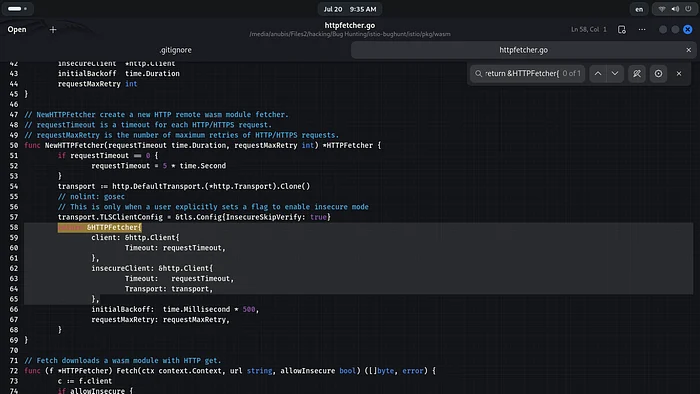
The vulnerable HTTP client in pkg/wasm/httpfetcher.go.
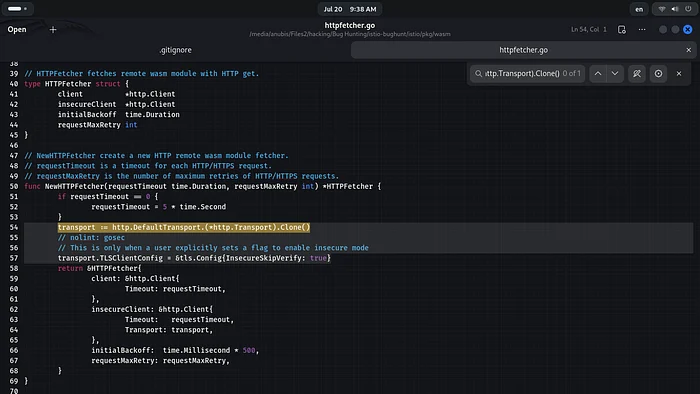
The transport is created without a DialContext.
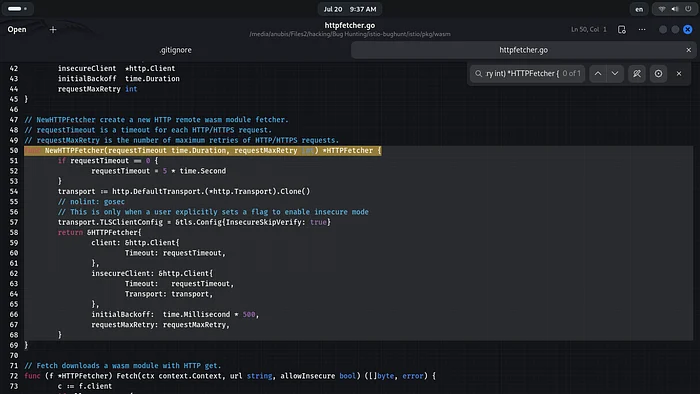
The complete NewHTTPFetcher function.
The key observation is that both the client and insecureClient fields are instantiated as plain http.Client objects, without any DialContext. There was no IP filtering, no CIDR blocking and no validation of the destination address.
To confirm this was not intentional, the researcher compared it with how other Istio components handle outbound HTTP requests. The JWKS resolver in pkg/model/jwks_resolver.go does it correctly:
tpClient: &http.Client{ Transport: &http.Transport{ Proxy: http.ProxyFromEnvironment, DisableKeepAlives: true, DialContext: blockedCIDRDialContext, },}
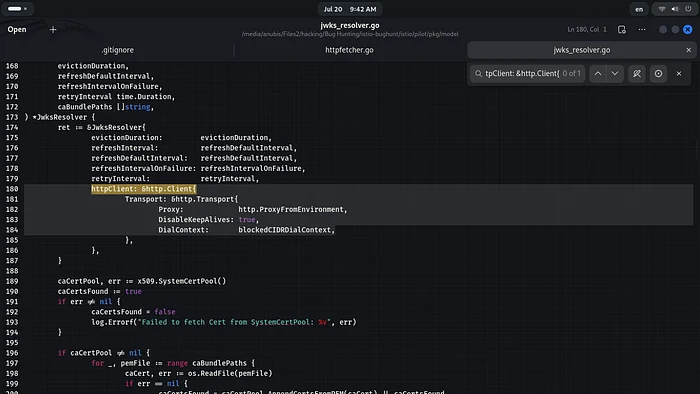
The secure implementation in the JWKS resolver.
The blockedCIDRDialContext function filters out internal IPs, localhost and link-local addresses. That protection was completely missing from the Wasm HTTP fetcher.
A simple grep confirmed the gap. First, a search for plain http.Client construction outside tests:
$ grep -r “http\.Client{“ pkg/ | grep -v “_test.go”pkg/wasm/httpfetcher.go: client: &http.Client{pkg/wasm/httpfetcher.go: insecureClient: &http.Client{
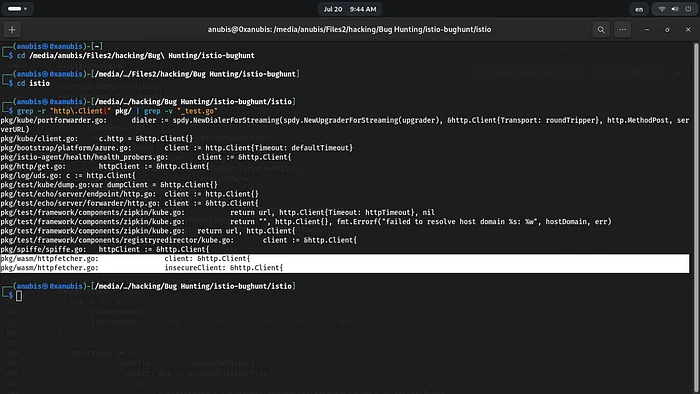
The grep output showing that the Wasm fetcher uses a plain http.Client.
Then a search for the filtering function itself:
$ grep -r “blockedCIDRDialContext” pkg/
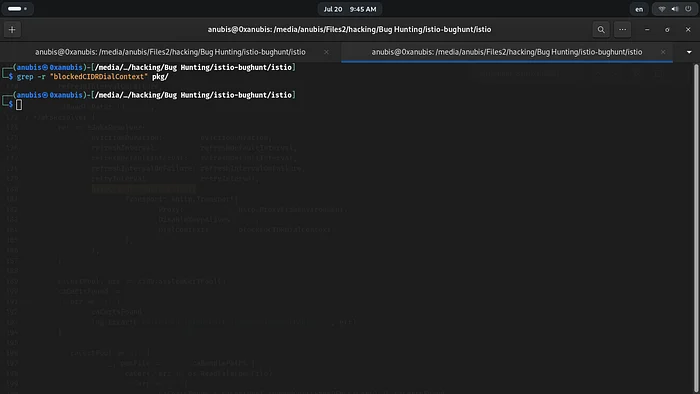
The grep showing that blockedCIDRDialContext is not used in the Wasm fetcher.
The IP filtering mechanism that protects other Istio components was completely absent from the Wasm HTTP fetcher.
Exploitation
Step 1: create a malicious WasmPlugin
The attacker creates a WasmPlugin whose spec.url points at an internal endpoint:
apiVersion: extensions.istio.io/v1alpha1kind: WasmPluginmetadata: name: ssrf-exploit namespace: defaultspec: url: “http://[redacted]/latest/meta-data/iam/security-credentials/"
Here the URL targets the AWS instance metadata service, specifically the IAM security credentials path. Because the resource accepts an arbitrary URL, nothing in the manifest itself restricts the destination.
Step 2: istiod processes the resource
istiod processes the resource and attempts to fetch the URL using the vulnerable HTTP client.
Step 3: the request reaches the internal endpoint
Since there is no IP filtering, istiod makes an HTTP GET request to the internal endpoint, in this example the AWS metadata service.
Step 4: exfiltrate the response
The attacker can exfiltrate the response via logs, error messages or a crafted Wasm module.
The researcher lists the prime targets for this request:
| Target | Example URL | Risk |
|---|---|---|
| Cloud Metadata | http://[redacted]/ |
IAM credentials |
| Kubernetes API | https://kubernetes.default.svc/api/v1/ |
Secrets, configmaps |
| Kubelet API | http://localhost:10250/pods |
Pod specs, env variables |
| Internal Services | http://database.svc.[redacted]/ |
Database credentials |
Step 5: dry-run shows the API accepts internal URLs
On the Kind cluster with Istio 1.20.0, a dry-run was used to show that the API accepts internal URLs without validation:
$ kubectl create -f wasmplugin-test.yaml — dry-run=client -o yamlapiVersion: extensions.istio.io/v1alpha1kind: WasmPluginmetadata: name: test-ssrf namespace: defaultspec: imagePullPolicy: IfNotPresent url: http://kubernetes.default.svc/api/v1/namespaces/default/secrets
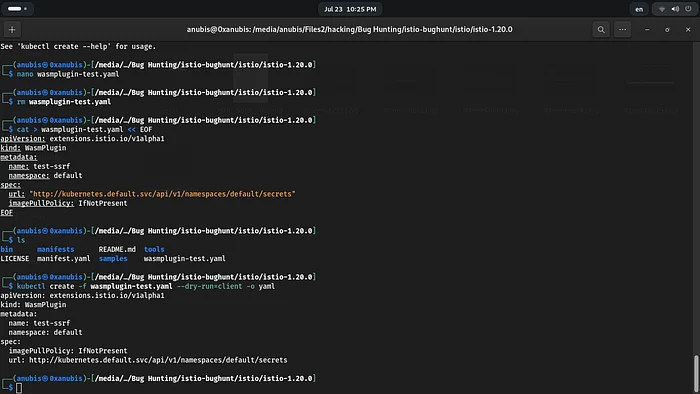
The dry-run output, showing the API accepting an internal URL.
This manifest points spec.url at the Kubernetes API path for the default namespace's secrets, an address that only makes sense from inside the cluster.
Step 6: create the resource
The resource is successfully created:
$ kubectl apply -f wasmplugin-test.yamlwasmplugin.extensions.istio.io/test-ssrf created
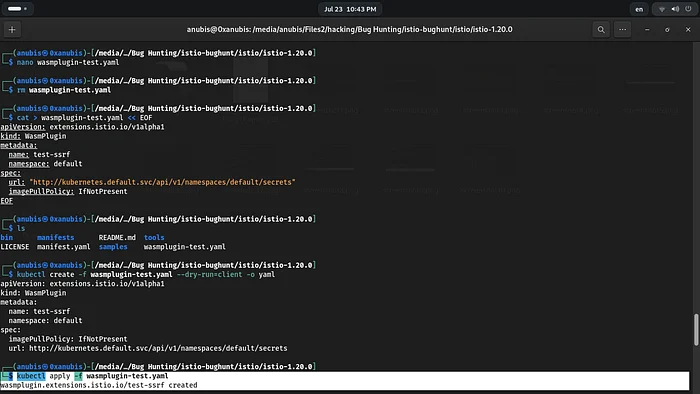
Confirmation that the resource was created.
Step 7: confirm istiod processed it
The istiod logs confirm the resource was processed:
2026–07–23T19:28:38.886556Z info ads Push debounce stable[6] 1 for config WasmPlugin/default/test-ssrf
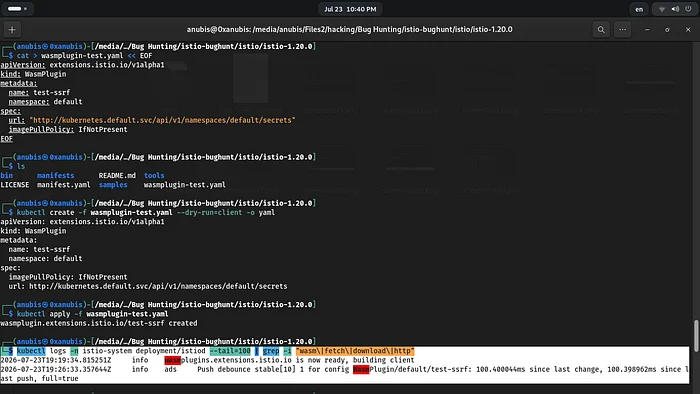
istiod logs processing the resource.
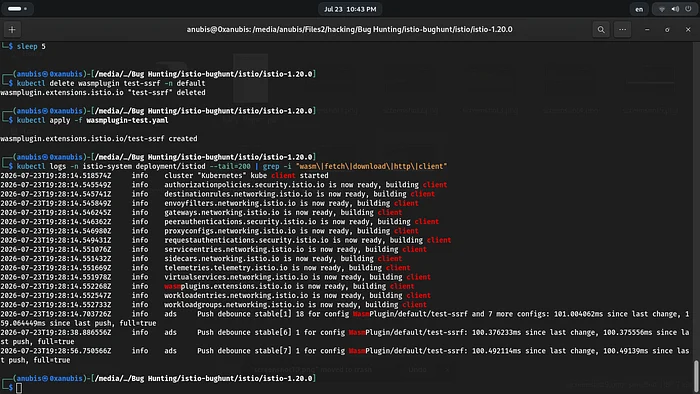
Additional log evidence.
Why this was a new vulnerability
Istio had previously patched SSRF vulnerabilities in pkg/wasm/imagefetcher.go, the OCI image fetcher. There was also a known 0-day bypass discovered by researcher xylove21. This finding, however, was in pkg/wasm/httpfetcher.go, a completely different code path that had not been addressed, making it a new, unpatched vulnerability.
| Issue | Component | Status |
|---|---|---|
| ISTIO-SECURITY-2026-001 | pkg/wasm/imagefetcher.go |
Patched in 1.27.8, 1.28.5 |
| 0-day bypass (xylove21) | pkg/wasm/imagefetcher.go |
Unpatched, affects 1.29.1-1.30.2 |
| CVE-2026-41413 | pkg/model/jwks_resolver.go |
Patched in 1.28.6, 1.29.2 |
| THIS REPORT | pkg/wasm/httpfetcher.go |
UNPATCHED, NEW |
Root cause
The mistake is in NewHTTPFetcher: both HTTP clients are built without a DialContext, so no destination restriction is applied to the connection. Other Istio components, such as the JWKS resolver, route their outbound connections through blockedCIDRDialContext, which filters internal IPs, localhost and link-local addresses. The Wasm HTTP fetcher simply never used that mechanism, so the existing defence did not apply to this code path. The insecureClient additionally sets InsecureSkipVerify: true in its TLS configuration, as shown in the function above.
Impact
An attacker with create or update permissions on WasmPlugin resources can make istiod issue HTTP requests to addresses of their choosing, including cloud metadata endpoints, the Kubernetes API, the kubelet and internal services. The report's target table frames the consequences as IAM credentials, secrets and configmaps, pod specs and environment variables, and database credentials. Exfiltration of the response is described as possible via logs, error messages or a crafted Wasm module. The researcher's own CVSS estimate is 7.5 (High), AV:N/AC:L/PR:L/UI:N/S:U/C:H/I:N/A:N, based on a network attack vector, low complexity and low privileges required.
Fix
The Istio team merged PR #61112, which fixed the vulnerability by adding IP filtering to the Wasm HTTP fetcher. The PR description states:
Fixes two SSRF vulnerabilities in the Wasm module fetch path:
- pkg/wasm/httpfetcher.go: NewHTTPFetcher built both HTTP clients with no destination restriction at all, no DialContext, no IP filtering. A WasmPlugin.spec.url could point directly at a cloud metadata endpoint, the Kubernetes API, or the kubelet, and it would work with no resistance.
, psbarr99, PR #61112
The researcher submitted a detailed report to [redacted] containing code analysis showing the missing IP filtering, grep evidence confirming the protection was absent, and a live proof of concept with screenshots. The Istio security team replied within days: "Thank you for sharing this. We'll take a look and get back to you shortly." (Prabhijot Singh, Istio Security Team). Credit was added to the release notes:
Credit The unrestricted HTTP fetcher was reported by Aser Ahmed.
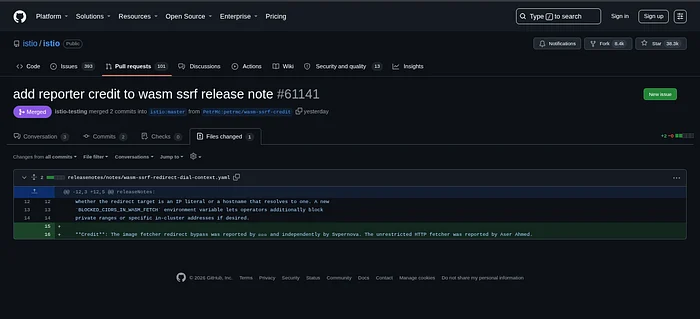
The credit in the Istio release notes.
Variants to test
- Other fetchers in the same project. Search for every place a client is constructed without a
DialContext, for example withgrep -r "http\.Client{" pkg/ | grep -v "_test.go". A positive result is a client whose transport has no filtering hook, especially one reachable from a user-controlled URL field. - Other components that do use the filter. Compare against a known-good implementation such as the JWKS resolver and check whether every outbound path in the same package uses
blockedCIDRDialContext. A positive result is a code path that bypasses the shared filter. - URL fields in custom resources. For any controller that fetches a URL from a CRD spec, submit a manifest pointing at
http://[redacted]/orhttp://kubernetes.default.svc/and watch the controller logs. A positive result is a log line showing the resource was processed and a request attempted to the internal address. - Dry-run validation. Use
kubectl create -f <manifest> --dry-run=client -o yamlwith an internal URL. A positive result is the API accepting the manifest unchanged, showing no admission-time validation of the destination. - Redirect behaviour. If the fetcher follows redirects, point it at an external URL that redirects to an internal one. A positive result is the internal address being reached after the redirect, which would defeat a filter applied only to the initial URL.
- TLS verification settings. Look for
InsecureSkipVerify: truealongside missing dial filtering. A positive result is a client that both skips certificate verification and accepts arbitrary destinations, widening what internal endpoints can be reached.
What happened, in plain words
A security researcher named Aser Ahmed was reading the source code of a large open-source project called Istio. Source code is the set of text files that programmers write to build a piece of software; anyone can download and read it. While reading, he noticed that one small part of Istio was missing a safety check that other parts of the same project had. Because of that missing check, a person with a certain kind of access to a cluster could trick Istio into making web requests to places it should never be allowed to reach, such as a cloud provider's secret-credentials service or the cluster's own internal management interface.
This kind of bug is called Server-Side Request Forgery, or SSRF. The name describes it well: the server (the machine running the software) is tricked into making a request (a web call, like when your browser loads a page) to a destination the attacker chose, and the attacker forges that request through the software rather than making it themselves. The attacker never needs direct access to the internal destination; the trusted server makes the call on their behalf.
A useful everyday comparison: imagine a receptionist who will fetch any document you name from any office in the building. Normally that is fine, because visitors only ask for public brochures. But if a visitor can ask for the file in the manager's locked drawer, the receptionist's helpfulness becomes the security hole. The receptionist is the server, the visitor is the attacker, and the locked drawer is the internal service.
The researcher proved the bug on a test cluster he built himself, reported it to the Istio security team, and the team fixed it. His name was then added to the official release notes, the public document that lists what changed in a new version of the software.
What Istio is, and why it matters here
Istio is an open-source service mesh. A service mesh is a layer of software that sits between the many small programs (called microservices) that make up a modern application, and handles the boring but critical jobs for them: encrypting traffic between them, controlling who can talk to whom, and collecting measurements about what is happening. Large companies run thousands of microservices, so a tool that manages all that traffic is used very widely.
Istio has two main parts:
- The data plane: a set of Envoy proxies. A proxy is a program that sits in the middle of a connection and forwards traffic. In Istio, one proxy runs next to each service, like a personal assistant that handles all of that service's incoming and outgoing calls. These side-by-side proxies are called sidecars, by analogy with a motorcycle sidecar attached to the main bike.
- The control plane, whose main program is called
istiod: the brain of the system. It stores the configuration, hands out security certificates (digital identity documents that let two programs prove who they are to each other), and tells all the proxies what rules to follow.
The feature at the centre of this story is a resource called WasmPlugin. A resource, in this context, is simply a configuration object: a small text file you hand to the cluster describing something you want. WasmPlugin lets users extend what the Envoy proxies can do by loading extra code written in WebAssembly (usually shortened to Wasm). WebAssembly is a compact, portable format for running code; think of it as a universal plugin format that many different programs can load. These Wasm modules can be fetched from a remote web address (a URL) or from an OCI registry, which is an online store for packaged software components, similar in spirit to an app store.
When someone creates or updates a WasmPlugin, istiod reads the resource and fetches the module from the URL written in its spec (the section of the configuration that describes what you want). That fetch is an outbound HTTP request: istiod itself reaches out over the network to download something. HTTP is the protocol your browser uses to talk to websites; an outbound request is one the program makes, as opposed to one it receives. This is exactly the kind of request that must never be allowed to reach arbitrary destinations, because the destination is chosen by whoever wrote the configuration.
The setup
The researcher did a security review of the Istio codebase: he read the source code looking for mistakes, the way a proofreader reads a manuscript looking for typos. He focused on how the WasmPlugin controller fetches remote Wasm modules. A controller is the part of a program that watches for changes to configuration objects and acts on them.
To prove the bug was actually exploitable, and not just a theoretical worry, he built a local Kind cluster with Istio 1.20.0 installed. A cluster is a group of machines (or, here, simulated machines on one computer) that run containerised software together. Kubernetes is the most common system for managing such clusters. Kind is a tool that runs a whole Kubernetes cluster inside containers on a single machine, which makes it perfect for safe experiments. He used kubectl, the standard command-line tool for talking to a Kubernetes cluster, and he read the logs of istiod. A log is the running diary a program writes as it works.
The precondition for the attack is stated plainly: an attacker only needs permission to create or update WasmPlugin resources. That permission is commonly granted to developers, to CI/CD pipelines (automated systems that build and deploy software), and to namespace administrators. A namespace is a way of dividing a cluster into separate areas, like folders on a shared drive. In other words, the attacker does not need to be a cluster administrator; an ordinary developer account may be enough.
Finding it
While reading the code, the researcher noticed something suspicious in a file called pkg/wasm/httpfetcher.go. The name tells you what it is: pkg is short for package (a folder of related code), wasm is the feature area, and httpfetcher.go is the piece that fetches things over HTTP. The .go extension means it is written in the Go programming language, which Istio is built in.
The function NewHTTPFetcher builds the HTTP clients that will make the outbound requests. A function is a named block of code that does one job; NewHTTPFetcher is the block that creates a new fetcher. An HTTP client is the part of a program that makes web requests, the equivalent of your browser when it loads a page.
func NewHTTPFetcher(requestTimeout time.Duration, requestMaxRetry int) *HTTPFetcher { if requestTimeout == 0 { requestTimeout = 5 * time.Second } transport := http.DefaultTransport.(*http.Transport).Clone() transport.TLSClientConfig = &tls.Config{InsecureSkipVerify: true} return &HTTPFetcher{ client: &http.Client{ Timeout: requestTimeout, }, insecureClient: &http.Client{ Timeout: requestTimeout, Transport: transport, }, initialBackoff: time.Millisecond * 500, requestMaxRetry: requestMaxRetry, }}
The vulnerable HTTP client in pkg/wasm/httpfetcher.go.
Line by line, in plain words:
func NewHTTPFetcher(requestTimeout time.Duration, requestMaxRetry int) *HTTPFetcherdeclares the function. It takes two inputs: how long to wait before giving up (requestTimeout) and how many times to retry (requestMaxRetry). It hands back a new fetcher object.if requestTimeout == 0 { requestTimeout = 5 * time.Second }says: if the caller did not specify a timeout, use five seconds. A timeout is the maximum time a program will wait for an answer before abandoning the attempt.transport := http.DefaultTransport.(*http.Transport).Clone()makes a copy of Go's default transport. The transport is the lower-level machinery that actually opens the network connection; the client is the friendly layer on top that speaks HTTP. Cloning the default means starting from the standard settings.transport.TLSClientConfig = &tls.Config{InsecureSkipVerify: true}is a red flag. TLS is the encryption layer behind the padlock in your browser (the S in HTTPS).InsecureSkipVerify: truetells the client to skip checking the server's certificate, meaning it will accept an encrypted connection from anyone, even an impostor. This is like accepting a passport without looking at it.return &HTTPFetcher{ ... }builds and returns the fetcher object, filling in its fields.client: &http.Client{ Timeout: requestTimeout, }creates the ordinary client, with only a timeout set.insecureClient: &http.Client{ Timeout: requestTimeout, Transport: transport, }creates a second client that uses the transport configured above, the one that skips certificate checks.initialBackoff: time.Millisecond * 500sets how long to wait before the first retry: half a second.requestMaxRetry: requestMaxRetrystores the retry limit.
The transport is created without a DialContext.
The complete NewHTTPFetcher function.
The key observation is that both the client and insecureClient fields are built as plain http.Client objects, with no DialContext. A DialContext is a hook, a place where the programmer can plug in their own code that runs just before a connection is opened. It is the natural place to check the destination address and refuse to connect to forbidden ones. Without it, the client will happily connect to any address it is given. There was no IP filtering, no CIDR blocking and no validation of the destination address.
Two more terms in that sentence. An IP address is the numeric label of a machine on a network, like a postal address for computers; [redacted] is one you will meet shortly. CIDR is a compact way of writing a range of IP addresses, for example a whole block of internal addresses; CIDR blocking means refusing to connect to any address inside such a range.
To confirm this was not intentional, the researcher compared it with how other Istio components handle outbound HTTP requests. The JWKS resolver in pkg/model/jwks_resolver.go does it correctly. A JWKS resolver fetches JSON Web Key Sets, which are public key files used to verify the signatures on security tokens; it is another part of Istio that must reach out over the network.
tpClient: &http.Client{ Transport: &http.Transport{ Proxy: http.ProxyFromEnvironment, DisableKeepAlives: true, DialContext: blockedCIDRDialContext, },}
The secure implementation in the JWKS resolver.
Reading it line by line:
tpClient: &http.Client{starts building an HTTP client, the same kind of object as before.Transport: &http.Transport{gives it a custom transport, again the lower-level connection machinery.Proxy: http.ProxyFromEnvironmentsays to honour any proxy configured in the environment. A proxy here is an intermediary server that requests are routed through.DisableKeepAlives: trueturns off connection reuse, so each request gets a fresh connection. This is a small hardening measure.DialContext: blockedCIDRDialContext,is the important line. It plugs in a function calledblockedCIDRDialContextas the hook that runs before every connection. That function is where the destination check happens.
The blockedCIDRDialContext function filters out internal IPs, localhost and link-local addresses. Localhost is the machine talking to itself (the address [redacted]); link-local addresses are a special range used for local network housekeeping, and [redacted] sits in that range. That protection was completely missing from the Wasm HTTP fetcher.
A simple grep confirmed the gap. grep is a command-line tool that searches text for a pattern and prints every line that matches; it is one of the oldest and most useful tools in computing. First, a search for plain http.Client construction outside tests:
$ grep -r “http\.Client{“ pkg/ | grep -v “_test.go”pkg/wasm/httpfetcher.go: client: &http.Client{pkg/wasm/httpfetcher.go: insecureClient: &http.Client{
The grep output showing that the Wasm fetcher uses a plain http.Client.
What this command does, piece by piece:
grep -rsearches recursively, meaning it walks into every subfolder under the starting point.“http\.Client{“is the pattern being searched for. The backslash before the dot means "a literal dot", not "any character", which is what a bare dot would mean in this pattern language.pkg/is the folder to search in.|is a pipe: it takes the output of the first command and feeds it as input to the second.grep -v “_test.go”filters out lines containing_test.go, because test files are not part of the running product.- The two result lines show that
pkg/wasm/httpfetcher.gobuilds two plain clients,clientandinsecureClient.
Then a search for the filtering function itself:
$ grep -r “blockedCIDRDialContext” pkg/
The grep showing that blockedCIDRDialContext is not used in the Wasm fetcher.
This command searches the whole pkg/ folder for the name of the safety function. The point of running it is to see where the protection is used. The IP filtering mechanism that protects other Istio components was completely absent from the Wasm HTTP fetcher.
Exploitation
Step 1: create a malicious WasmPlugin
The attacker creates a WasmPlugin whose spec.url points at an internal endpoint:
apiVersion: extensions.istio.io/v1alpha1kind: WasmPluginmetadata: name: ssrf-exploit namespace: defaultspec: url: “http://[redacted]/latest/meta-data/iam/security-credentials/"
This is a manifest: a small text file describing a resource you want the cluster to hold. Reading it in plain words:
apiVersion: extensions.istio.io/v1alpha1says which version of the Istio configuration format this file uses.kind: WasmPluginsays what kind of object it is.metadata:holds identifying details;name: ssrf-exploitis the name the attacker chose, andnamespace: defaultputs it in the default area of the cluster.spec:is the part that describes the desired behaviour;url:is the address to fetch the Wasm module from.
Here the URL targets the AWS instance metadata service, specifically the IAM security credentials path. The instance metadata service is a small web service that every cloud virtual machine can reach at the special address [redacted]. It exists so the machine can learn things about itself, such as its own identity. IAM stands for Identity and Access Management: the cloud provider's system for deciding who may do what. The metadata service can hand out temporary credentials for the machine's cloud identity, which is why it is such a valuable target. Because the resource accepts an arbitrary URL, nothing in the manifest itself restricts the destination.
Step 2: istiod processes the resource
istiod processes the resource and attempts to fetch the URL using the vulnerable HTTP client. This is the moment the trap springs: the attacker's chosen address is handed to the part of the code that has no destination check.
Step 3: the request reaches the internal endpoint
Since there is no IP filtering, istiod makes an HTTP GET request to the internal endpoint, in this example the AWS metadata service. A GET request is the simplest kind of web request: "please give me the thing at this address". The attacker never touches the metadata service directly; istiod does it for them, from inside the trusted network.
Step 4: exfiltrate the response
The attacker can exfiltrate the response via logs, error messages or a crafted Wasm module. Exfiltration means getting stolen data out to a place the attacker can read. Logs are the program's diary, and error messages are what a program prints when something goes wrong; both can end up somewhere the attacker can see. A crafted Wasm module is a module the attacker wrote specifically to carry data back out.
The researcher lists the prime targets for this request:
| Target | Example URL | Risk |
|---|---|---|
| Cloud Metadata | http://[redacted]/ |
IAM credentials |
| Kubernetes API | https://kubernetes.default.svc/api/v1/ |
Secrets, configmaps |
| Kubelet API | http://localhost:10250/pods |
Pod specs, env variables |
| Internal Services | http://database.svc.[redacted]/ |
Database credentials |
A few words on that table. The Kubernetes API is the central control interface of the cluster; anything that can talk to it may be able to read or change the whole cluster's configuration. Secrets are Kubernetes objects that hold sensitive values such as passwords and tokens; configmaps hold ordinary configuration. The kubelet is the agent running on each machine in the cluster that starts and supervises pods (the smallest deployable unit, usually one or a few containers). Environment variables are named values passed into a running program, and they very often contain credentials. Credentials are the username-and-password equivalents that prove identity.
Step 5: dry-run shows the API accepts internal URLs
On the Kind cluster with Istio 1.20.0, a dry-run was used to show that the API accepts internal URLs without validation:
$ kubectl create -f wasmplugin-test.yaml — dry-run=client -o yamlapiVersion: extensions.istio.io/v1alpha1kind: WasmPluginmetadata: name: test-ssrf namespace: defaultspec: imagePullPolicy: IfNotPresent url: http://kubernetes.default.svc/api/v1/namespaces/default/secrets
The dry-run output, showing the API accepting an internal URL.
A dry run is a rehearsal: the tool checks and prints what it would do without actually doing it. Here is what each part means:
kubectl create -f wasmplugin-test.yamlaskskubectlto create the resource described in the filewasmplugin-test.yaml.— dry-run=client(the report writes it this way) tellskubectlto do the check on the client side only, without sending anything to the cluster.-o yamlasks for the result to be printed in YAML, the human-readable configuration format used throughout Kubernetes.- The printed manifest shows
url: http://kubernetes.default.svc/api/v1/namespaces/default/secrets, which pointsspec.urlat the Kubernetes API path for the default namespace's secrets, an address that only makes sense from inside the cluster.kubernetes.default.svcis the internal name the cluster gives its own API server.
The dry run shows the manifest is accepted with an internal address. If the system had a check that refused internal destinations, this rehearsal would have failed.
Step 6: create the resource
The resource is successfully created:
$ kubectl apply -f wasmplugin-test.yamlwasmplugin.extensions.istio.io/test-ssrf created
Confirmation that the resource was created.
kubectl apply -f wasmplugin-test.yaml sends the file to the cluster and asks it to make the described state real. The reply wasmplugin.extensions.istio.io/test-ssrf created is the cluster saying yes, the object now exists. This matters because it shows the attack does not need any trickery at submission time: the cluster accepts the malicious configuration as ordinary, valid input.
Step 7: confirm istiod processed it
The istiod logs confirm the resource was processed:
2026–07–23T19:28:38.886556Z info ads Push debounce stable[6] 1 for config WasmPlugin/default/test-ssrf
istiod logs processing the resource.
Additional log evidence.
Reading the log line: the timestamp comes first, then info, the severity level (informational, not an error), then a message from the ads subsystem saying it pushed a configuration update for WasmPlugin/default/test-ssrf. In plain terms, the log is istiod's own record that it noticed the attacker's object and acted on it. That is the evidence that istiod noticed the attacker's object and acted on it.
Why this was a new vulnerability
Istio had previously patched SSRF vulnerabilities in pkg/wasm/imagefetcher.go, the OCI image fetcher. Patched means fixed by a software update. There was also a known 0-day bypass discovered by researcher xylove21. A 0-day is a vulnerability the vendor does not yet know about or has not yet fixed; a bypass is a way around an existing protection. This finding, however, was in pkg/wasm/httpfetcher.go, a completely different code path that had not been addressed, making it a new, unpatched vulnerability. A code path is one particular route through the program's logic; fixing one route does not automatically fix another.
| Issue | Component | Status |
|---|---|---|
| ISTIO-SECURITY-2026-001 | pkg/wasm/imagefetcher.go |
Patched in 1.27.8, 1.28.5 |
| 0-day bypass (xylove21) | pkg/wasm/imagefetcher.go |
Unpatched, affects 1.29.1-1.30.2 |
| CVE-2026-41413 | pkg/model/jwks_resolver.go |
Patched in 1.28.6, 1.29.2 |
| THIS REPORT | pkg/wasm/httpfetcher.go |
UNPATCHED, NEW |
A CVE is a Common Vulnerabilities and Exposures identifier: a public catalogue number given to a known security flaw so everyone can refer to the same thing unambiguously. The version numbers in the Status column are Istio releases; a fix shipped in those versions.
Root cause
The mistake is in NewHTTPFetcher: both HTTP clients are built without a DialContext, so no destination restriction is applied to the connection. Other Istio components, such as the JWKS resolver, route their outbound connections through blockedCIDRDialContext, which filters internal IPs, localhost and link-local addresses. The Wasm HTTP fetcher simply never used that mechanism, so the existing defence did not apply to this code path. The insecureClient additionally sets InsecureSkipVerify: true in its TLS configuration, as shown in the function above.
In everyday terms: the building has a security guard at the front door, but this particular corridor was built without a door to the guard. The guard was never asked, because nobody routed traffic past him.
Impact
An attacker with create or update permissions on WasmPlugin resources can make istiod issue HTTP requests to addresses of their choosing, including cloud metadata endpoints, the Kubernetes API, the kubelet and internal services. The report's target table frames the consequences as IAM credentials, secrets and configmaps, pod specs and environment variables, and database credentials. Exfiltration of the response is described as possible via logs, error messages or a crafted Wasm module.
The researcher's own CVSS estimate is 7.5 (High), AV:N/AC:L/PR:L/UI:N/S:U/C:H/I:N/A:N. CVSS is the Common Vulnerability Scoring System, a standard way of turning a vulnerability's characteristics into a number from 0 to 10. The string after the score is the breakdown of how that number was reached:
AV:Nmeans the attack vector is Network: it can be carried out remotely over a network.AC:Lmeans attack complexity is Low: no special conditions are needed.PR:Lmeans privileges required are Low: the attacker needs some account, but not an administrator's.UI:Nmeans user interaction is None: no victim has to click anything.S:Umeans scope is Unchanged: the impact stays within the vulnerable component.C:Hmeans confidentiality impact is High: data can be read.I:Nmeans integrity impact is None: data cannot be changed.A:Nmeans availability impact is None: the service cannot be knocked offline.
Fix
The Istio team merged PR #61112, which fixed the vulnerability by adding IP filtering to the Wasm HTTP fetcher. A PR, or pull request, is a proposed change to a codebase that maintainers review before accepting it. The PR description states:
Fixes two SSRF vulnerabilities in the Wasm module fetch path:
- pkg/wasm/httpfetcher.go: NewHTTPFetcher built both HTTP clients with no destination restriction at all, no DialContext, no IP filtering. A WasmPlugin.spec.url could point directly at a cloud metadata endpoint, the Kubernetes API, or the kubelet, and it would work with no resistance.
, psbarr99, PR #61112
The researcher submitted a detailed report to [redacted] containing code analysis showing the missing IP filtering, grep evidence confirming the protection was absent, and a live proof of concept with screenshots. A proof of concept is a working demonstration that the bug is real, not just a theory. The Istio security team replied within days: "Thank you for sharing this. We'll take a look and get back to you shortly." (Prabhijot Singh, Istio Security Team). Credit was added to the release notes:
Credit The unrestricted HTTP fetcher was reported by Aser Ahmed.
The credit in the Istio release notes.
Variants to test
- Other fetchers in the same project. Search for every place a client is constructed without a
DialContext, for example withgrep -r "http\.Client{" pkg/ | grep -v "_test.go". A positive result is a client whose transport has no filtering hook, especially one reachable from a user-controlled URL field. - Other components that do use the filter. Compare against a known-good implementation such as the JWKS resolver and check whether every outbound path in the same package uses
blockedCIDRDialContext. A positive result is a code path that bypasses the shared filter. - URL fields in custom resources. For any controller that fetches a URL from a CRD spec, submit a manifest pointing at
http://[redacted]/orhttp://kubernetes.default.svc/and watch the controller logs. A CRD, or Custom Resource Definition, is a way of teaching Kubernetes a new kind of configuration object. A positive result is a log line showing the resource was processed and a request attempted to the internal address. - Dry-run validation. Use
kubectl create -f <manifest> --dry-run=client -o yamlwith an internal URL. A positive result is the API accepting the manifest unchanged, showing no admission-time validation of the destination. Admission-time validation is checking a configuration object at the moment it is submitted. - Redirect behaviour. If the fetcher follows redirects, point it at an external URL that redirects to an internal one. A redirect is a server telling the client "the thing you want is over there instead". A positive result is the internal address being reached after the redirect, which would defeat a filter applied only to the initial URL.
- TLS verification settings. Look for
InsecureSkipVerify: truealongside missing dial filtering. A positive result is a client that both skips certificate verification and accepts arbitrary destinations, widening what internal endpoints can be reached.
Glossary
- 0-day: a vulnerability for which no fix is available yet.
- Admission-time validation: checking a configuration object at the moment it is submitted to the cluster.
- API: Application Programming Interface; a defined way for one program to talk to another, often over the network.
- CIDR: a compact notation for a range of IP addresses; CIDR blocking means refusing to connect to any address in such a range.
- CI/CD pipeline: automated systems that build, test and deploy software.
- Cluster: a group of machines (or simulated machines) that run containerised software together.
- Code path: one particular route through a program's logic.
- Configmap: a Kubernetes object holding ordinary (non-secret) configuration.
- Container: a packaged, isolated running program with everything it needs to run.
- Controller: the part of a program that watches for changes to configuration objects and acts on them.
- Credential: a value that proves identity, such as a password, key or token.
- CRD (Custom Resource Definition): a way of teaching Kubernetes a new kind of configuration object.
- CVSS: Common Vulnerability Scoring System; a standard 0 to 10 score for a vulnerability's severity.
- CVE: Common Vulnerabilities and Exposures; a public catalogue number for a known security flaw.
- Data plane: the part of a service mesh that actually carries traffic, here the Envoy proxies.
- DialContext: a hook in Go's HTTP client that runs just before a connection is opened, the natural place to check the destination.
- Dry run: a rehearsal that checks and prints what a command would do without actually doing it.
- Envoy: the proxy software Istio uses in its data plane.
- Environment variable: a named value passed into a running program, often holding credentials.
- Exfiltration: getting stolen data out to a place the attacker can read.
- Function: a named block of code that does one job.
- GET request: the simplest kind of web request, asking a server to return the thing at a given address.
- Go: the programming language Istio is written in.
- grep: a command-line tool that searches text for a pattern and prints matching lines.
- HTTP: the protocol browsers and programs use to exchange data over the web.
- HTTP client: the part of a program that makes web requests.
- IAM: Identity and Access Management; a cloud provider's system for deciding who may do what.
- Instance metadata service: a small web service reachable at
[redacted]that lets a cloud machine learn about itself, including its credentials. - IP address: the numeric label of a machine on a network.
- Istio: an open-source service mesh for securing, connecting and observing microservices.
- istiod: Istio's control plane program, which manages configuration and certificates.
- JWKS resolver: the Istio component that fetches JSON Web Key Sets, public key files used to verify token signatures.
- Kind: a tool that runs a whole Kubernetes cluster inside containers on a single machine.
- Kubelet: the agent on each cluster machine that starts and supervises pods.
- Kubernetes: the most common system for managing clusters of containerised software.
- kubectl: the standard command-line tool for talking to a Kubernetes cluster.
- Link-local address: a special IP range used for local network housekeeping;
[redacted]is in it. - Localhost: the machine talking to itself, usually
[redacted]. - Log: the running diary a program writes as it works.
- Manifest: a small text file describing a resource you want the cluster to hold.
- Microservice: one small program in a larger application made of many such programs.
- Namespace: a way of dividing a cluster into separate areas, like folders on a shared drive.
- OCI registry: an online store for packaged software components.
- Outbound request: a network request a program makes, as opposed to one it receives.
- Patch: a software update that fixes a problem.
- Pipe (
|): a shell operator that feeds the output of one command into another. - Pod: the smallest deployable unit in Kubernetes, usually one or a few containers.
- Proof of concept: a working demonstration that a bug is real.
- Proxy: a program that sits in the middle of a connection and forwards traffic.
- PR (pull request): a proposed change to a codebase that maintainers review before accepting it.
- Redirect: a server telling the client that the thing it wants is at another address.
- Resource: a configuration object describing something you want the cluster to hold.
- Secret (Kubernetes): an object holding sensitive values such as passwords and tokens.
- Service mesh: a layer of software that handles traffic, security and measurement between microservices.
- Sidecar: a helper program that runs alongside a service and handles its traffic.
- Source code: the text files programmers write to build software.
- Spec: the section of a configuration object that describes what you want.
- SSRF (Server-Side Request Forgery): tricking a trusted server into making a web request to a destination the attacker chose.
- Timeout: the maximum time a program will wait for an answer before giving up.
- TLS: the encryption layer behind HTTPS and the padlock in your browser.
- Transport: the lower-level machinery that opens network connections beneath an HTTP client.
- URL: the address of something on the web.
- Wasm (WebAssembly): a compact, portable format for running code that many programs can load.
- WasmPlugin: the Istio resource that loads Wasm modules into Envoy proxies.
- YAML: a human-readable configuration format used throughout Kubernetes.



