How I found the most critical bug in live bug bounty event?
The password reset flow relied on a client-side response to confirm the security questions were answered correctly, so an attacker could tamper with the HTTP response to bypass the check. This allowed changing the password of any user without knowing the security answers, leading to full account takeover.

Recently I attended Bounty-Bash (live bug bounty event of 2 days) held in Kathmandu, Nepal.
The full write-up lives on its author's site
It belongs to its author, so we link to it rather than copy it. The other two tabs are our own rewrites, checked against it.
Context
Bounty-Bash was a two-day live bug bounty event held in Kathmandu, Nepal. Participants were given three web application targets. All three were single-scope targets with no subdomains at all, and all were testing environments rather than the main applications. The event manager provided the username and password for the target, and the create account functionality was disabled.
The feature under test was the password reset flow, reached through the "Having trouble signing in?" link on the login page. The flow asked for a username, then a set of security questions, then a choice of SMS or email delivery before the new password.
Setup
- A testing-environment web application handed out at the event, with a username and password supplied by the event manager.
- Account creation disabled, so the only way in was the provided credentials.
- An intercepting proxy capable of capturing and editing both requests and responses.
- No knowledge of the security question answers, which is the whole point of the exercise.
Finding it
The researcher first spent time on XSS, SQL injection and a few other OWASP Top 10 classes without finding anything interesting. Attention then moved to the password reset functionality behind "Having trouble signing in?".
After submitting the username, the flow presented a few security questions. Since the answers were unknown and the account had been created by the event manager, the researcher entered something random and captured the request produced by the "OK" button in the interceptor. To see what the server made of that, the response was intercepted as well.
Exploitation
Step 1: submit the username and reach the security questions
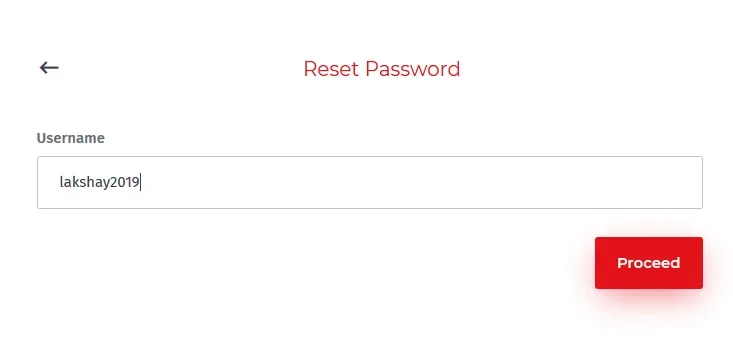
Clicking "Having trouble signing in?" redirects to the Reset Password page. Entering the username and clicking proceed leads to the security questions.
Step 2: answer the security questions with random values
With no idea of the correct answers, random input was submitted and the "OK" request was captured. The response to that request came back as:
HTTP/1.1 401 Unauthorized
with the body:
(“message”:”unsuccessful”,”statusCode”:403,”errorDescription”:”Unsuccessful”)
The status line says 401 while the body carries a 403 status code.
Step 3: rewrite the response to a success
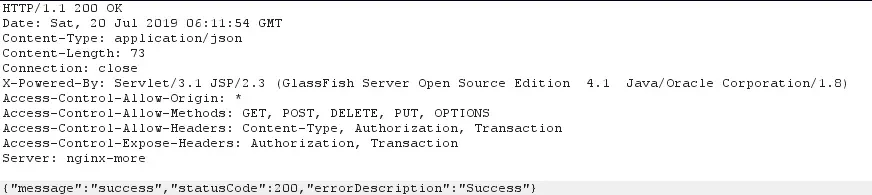
The response was edited in the interceptor to:
HTTP/1.1 200 OK
with the body:
(“message”:”success”,”statusCode”:200,”errorDescription”:”Success”)
The manipulated response was forwarded.
Step 4: observe the bypass in the browser
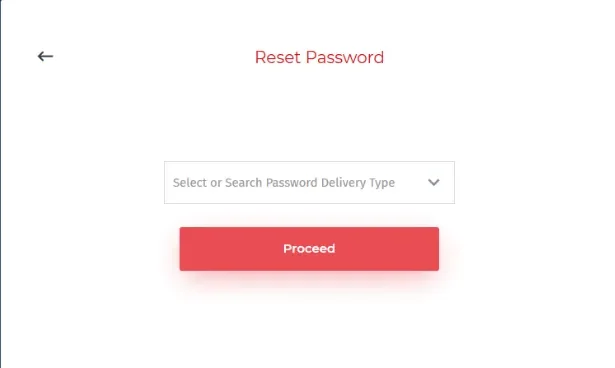
Back in the browser, the security question step had been passed and the application moved on to asking for the password delivery type.
SMS and email delivery were both selected, and the request was intercepted again while clicking proceed.
Step 5: capture the request that carries the new password
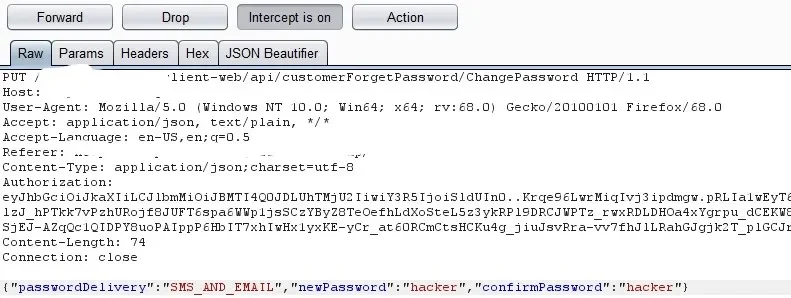
The intercepted request unexpectedly contained the new password and confirm password fields. The value hacker was entered in both fields.
The request was forwarded as usual and the browser was checked again.
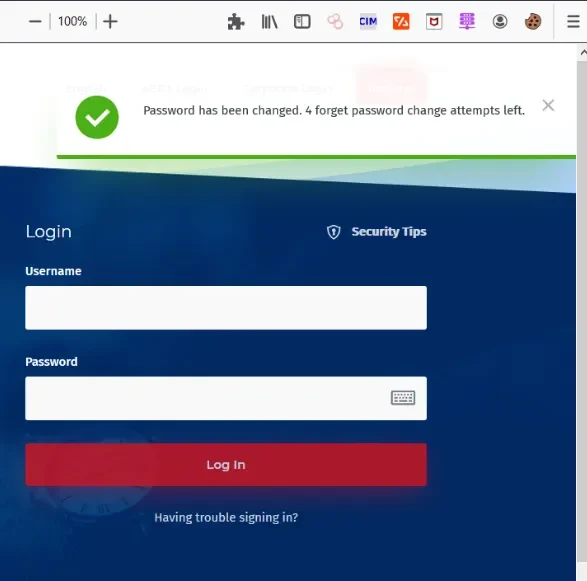
Step 6: confirm the password change
The password had been changed successfully.
Root cause
Editing the failure response into a success response was enough to advance past the security questions. The server returned a failure response, but the client trusted the response body to decide whether the answers were correct, so editing message, statusCode and errorDescription to success values was enough to advance the flow. The password change request was then accepted and the password was changed.
Impact
This leads to full account takeover of any user without knowing the security answers. The researcher notes that the report was filed late because of hunting for more vulnerabilities, and it was declared a duplicate: another participant had reported it first and won the most critical bug award. The company still awarded a bounty.
Fix
The report does not describe any fix that was applied. What should change is that the security question verification must be enforced server-side, and the password change endpoint must reject requests that do not carry server-side state proving the verification succeeded, rather than relying on a client-supplied response.
Variants to test
- Any multi-step flow where a step's outcome is decided by a response body field such as
message,statusCodeorerrorDescription: flip the values to success and see whether the next step becomes reachable. - Password reset flows that ask security questions: after forging the answer check, watch the next request for password fields and try submitting a new password.
- Flows where the HTTP status and the body status disagree, as with the 401 line and 403 body here: the client usually follows the body, so edit the body first.
- Delivery-type selection steps in reset flows: check whether the request that follows already contains the new password, which would mean the server accepts it without a verified reset state.
- Replay the password change request directly, skipping the earlier steps entirely, to see whether the server enforces the order of the flow at all.
What happened, in plain words
A security researcher went to a two-day live bug bounty event called Bounty-Bash in Kathmandu, Nepal. A bug bounty event is a gathering where companies hand out test versions of their websites and pay people for finding security mistakes in them. Participants were given three web application targets. All three were single-scope targets, meaning there were no subdomains at all to explore, and all three were testing environments rather than the real, live applications. The event manager gave everyone a username and password for the target, and the create account functionality was switched off, so nobody could make their own account.
The feature the researcher ended up attacking was the password reset flow. You reach it through the "Having trouble signing in?" link on the login page. A password reset flow is the sequence a website puts you through when you have forgotten your password: it has to work out who you are before it lets you pick a new one. The flow asked for a username, then a set of security questions, then a choice of SMS or email delivery before the new password.
The mistake was that editing the failure response into a success response was enough to move past the security questions. The server did send back a failure message, but the browser trusted the contents of that message to decide what to do next. By editing the failure message into a success message while it was in transit, the researcher moved the flow past the questions, and the password change request was then accepted. That is a full account takeover: anyone could change anyone else's password without knowing the security answers.
Background ideas you need first
Before walking through the steps, here are the few ideas the whole story rests on.
Client and server. When you use a website, two computers are involved. Your computer runs the client: the browser, the page, the buttons. The company's computer runs the server: the machine that stores accounts and makes the real decisions. A useful comparison is a bank. The browser is the counter clerk you talk to; the server is the vault room at the back. Anything the clerk decides on their own, without checking the vault, can be talked around.
Request and response. Every time you click something on a website, your browser sends a request to the server ("here is my username, please continue") and the server sends back a response ("no, those answers were wrong"). These are just text messages travelling over the network.
HTTP status codes. The first line of every response carries a three-digit number called the HTTP status code. 200 means success, 401 means "you are not authorised", 403 means "forbidden". It is a quick summary of how the request went.
Response body. Below that first line comes the body: the actual content. On modern websites the body is often a small piece of structured text (JSON) with named fields, like message, statusCode and errorDescription. The browser reads those fields to decide what to show you.
Intercepting proxy. A proxy is a program that sits between your browser and the server, like a postal worker who opens every letter, reads it, and can rewrite it before passing it on. A security tester uses an intercepting proxy to pause each request on its way out and each response on its way back, look at the text, and change it. This is the single tool that makes the whole attack possible.
API. An API is the set of message formats a website's browser code uses to talk to its server. Instead of full web pages, the browser and server exchange small structured messages. When the researcher "intercepts a request", they are looking at one of these API messages.
Session and token. A website needs to remember who you are between clicks. It does this with a session: after you log in, the server gives your browser a small piece of identifying text (a token or session cookie), and the browser sends it back with every later request so the server knows it is still you. If a step in a flow is supposed to be remembered, the server should record it in the session. If it does not, the browser can simply claim the step happened.
The vulnerability class. This bug is a client-side trust problem, a close cousin of what people call broken access control and authentication bypass. The server had a check, but the check's result was only enforced in the browser. Since the browser belongs to the attacker, the attacker controls the result. The everyday comparison: a nightclub bouncer who asks you "did you pay?" and lets you in when you say yes, instead of checking the list at the door.
Setup
- A testing-environment web application handed out at the event, with a username and password supplied by the event manager.
- Account creation disabled, so the only way in was the provided credentials.
- An intercepting proxy capable of capturing and editing both requests and responses.
- No knowledge of the security question answers, which is the whole point of the exercise.
Finding it
The researcher first spent time on XSS, SQL injection and a few other OWASP Top 10 classes without finding anything interesting. XSS (cross-site scripting) is when a site lets an attacker slip their own code into a page other people view. SQL injection is when a site lets attacker text leak into the database commands it runs. The OWASP Top 10 is a well-known list of the ten most common categories of web security mistake. None of these paid off here.
Attention then moved to the password reset functionality behind "Having trouble signing in?". This is a sensible pivot: password reset is one of the few features that has to let a stranger in without a password, so it is a natural place for a mistake.
After submitting the username, the flow presented a few security questions. Since the answers were unknown and the account had been created by the event manager, the researcher entered something random and captured the request produced by the "OK" button in the interceptor. To see what the server made of that, the response was intercepted as well. Intercepting the response is the key move: most people only watch what they send, but here the interesting part is what comes back.
Exploitation
Step 1: submit the username and reach the security questions
Clicking "Having trouble signing in?" redirects to the Reset Password page. Entering the username and clicking proceed leads to the security questions.
The screenshot shows the reset password page after the username has been entered and proceed clicked, with the security questions now on screen. This step is just about getting the flow to the point where the interesting check happens.
Step 2: answer the security questions with random values
With no idea of the correct answers, random input was submitted and the "OK" request was captured. The response to that request came back as:
HTTP/1.1 401 Unauthorized
Line by line: HTTP/1.1 is the version of the web protocol being used. 401 is the status code meaning the request was not authorised. Unauthorized is the human-readable label for that code. This is the server saying, in effect, "those answers were not accepted".
with the body:
(“message”:”unsuccessful”,”statusCode”:403,”errorDescription”:”Unsuccessful”)
Line by line: this is a small structured message with three named fields. message is set to unsuccessful, statusCode is set to 403 (forbidden), and errorDescription is set to Unsuccessful. In other words, the body repeats the failure in three different ways. The status line says 401 while the body carries a 403 status code. That mismatch is the clue. If the browser were reading the status line, it would see 401; if it is reading the body, it sees 403. Either way it is a failure, but the fact that the two disagree tells you the browser is probably looking at the body, and the body is something you can edit.
Step 3: rewrite the response to a success
The response was edited in the interceptor to:
HTTP/1.1 200 OK
Line by line: 200 is the status code for success, and OK is its label. The researcher changed the first line so the response now claims everything went fine.
with the body:
(“message”:”success”,”statusCode”:200,”errorDescription”:”Success”)
Line by line: the same three fields, now all flipped to success. message is success, statusCode is 200, and errorDescription is Success. The idea is simple: if the browser decides what to do next by reading these fields, then feeding it success values should make it behave as if the security questions had been answered correctly.
The screenshot shows the edited response in the interceptor, with the success values in place, ready to be forwarded. The manipulated response was forwarded, meaning it was released from the proxy and sent on to the browser as if it had come from the server.
Step 4: observe the bypass in the browser
Back in the browser, the security question step had been passed and the application moved on to asking for the password delivery type.
The screenshot shows the browser now asking how the new password should be delivered. This is the proof that the trick worked: the browser believed the questions were answered, so it advanced to the next stage. Only the message the browser received was changed.
SMS and email delivery were both selected, and the request was intercepted again while clicking proceed. Intercepting again matters because the next request is where the actual password change is likely to be sent, and the researcher wanted to see exactly what it contained.
Step 5: capture the request that carries the new password
The intercepted request unexpectedly contained the new password and confirm password fields. The value hacker was entered in both fields.
The screenshot shows the request with the new password and confirm password fields filled in with hacker. The surprise here is that the request already carried the password fields at this stage. The request already carried the password fields at this stage.
The request was forwarded as usual and the browser was checked again.
Step 6: confirm the password change
The password had been changed successfully.
The screenshot shows the browser confirming that the password has been changed. At this point the account's password is whatever the researcher typed, and the real owner no longer knows it. That is the account takeover.
Root cause
Editing the failure response into a success response was enough to advance past the security questions. The server returned a failure response, but the client trusted the response body to decide whether the answers were correct, so editing message, statusCode and errorDescription to success values was enough to advance the flow. The password change request was then accepted and the password was changed.
In plain terms: the server did its job and said no. But the browser was the one deciding whether to move on, and the browser can be lied to. The server should have kept its own note (in the session) saying "this person passed the questions", and refused the password change unless that note was present.
Impact
This leads to full account takeover of any user without knowing the security answers. The researcher notes that the report was filed late because of hunting for more vulnerabilities, and it was declared a duplicate: another participant had reported it first and won the most critical bug award. The company still awarded a bounty. A duplicate in a bug bounty programme means someone else reported the same issue first, so the later report does not earn the top prize, though the company may still pay something for a serious finding.
Fix
The report does not describe any fix that was applied. What should change is that the security question verification must be enforced server-side, and the password change endpoint must reject requests that do not carry server-side state proving the verification succeeded, rather than relying on a client-supplied response. In everyday terms: the bouncer should check the list at the door, not ask you whether you paid.
Variants to test
If you want to look for similar bugs yourself, these are the patterns worth trying. They are all variations on the same idea: find a step whose outcome is decided by something the browser can edit.
- Any multi-step flow where a step's outcome is decided by a response body field such as
message,statusCodeorerrorDescription: flip the values to success and see whether the next step becomes reachable. - Password reset flows that ask security questions: after forging the answer check, watch the next request for password fields and try submitting a new password.
- Flows where the HTTP status and the body status disagree, as with the 401 line and 403 body here: the client usually follows the body, so edit the body first.
- Delivery-type selection steps in reset flows: check whether the request that follows already contains the new password, which would mean the server accepts it without a verified reset state.
- Replay the password change request directly, skipping the earlier steps entirely, to see whether the server enforces the order of the flow at all. Replaying means sending the same captured request again on its own, without going through the earlier screens.
Glossary
- API: the set of message formats a website's browser code uses to talk to its server, exchanging small structured messages rather than full pages.
- Account takeover: a situation where an attacker gains control of someone else's account, for example by changing their password.
- Authentication bypass: getting past a login or identity check without supplying the correct credentials.
- Body (response body): the content of a response below the status line, often structured text with named fields.
- Broken access control: a class of bug where the server fails to enforce who is allowed to do what.
- Bug bounty event: a gathering where companies hand out test versions of their websites and pay people for finding security mistakes.
- Client: the software on your own computer, usually the browser, that sends requests and displays results.
- Client-side trust: a bug where the server's decision is effectively made by the browser, which the attacker controls.
- Duplicate: a bug report that describes an issue someone else already reported first.
- HTTP status code: the three-digit number at the start of a response summarising the outcome, such as 200 (success), 401 (unauthorised) or 403 (forbidden).
- Intercepting proxy: a tool that sits between browser and server, pausing requests and responses so they can be read and edited.
- JSON: a simple text format for structured data, made of named fields and values.
- OWASP Top 10: a well-known list of the ten most common categories of web security mistake.
- Password reset flow: the sequence a website puts you through when you have forgotten your password, to prove who you are before letting you set a new one.
- Request: the message your browser sends to the server when you do something on a website.
- Response: the message the server sends back.
- Replay: sending a previously captured request again, on its own, to see whether the server still accepts it.
- Security questions: personal questions whose answers only the real account owner should know, used as an extra identity check.
- Server: the company's computer that stores accounts and makes the real decisions.
- Session: the server's way of remembering who you are between clicks, usually via a token or cookie sent back with each request.
- Single-scope target: a target with no subdomains at all, so there is only one address to explore.
- SQL injection: a bug where attacker text leaks into the database commands a site runs.
- Testing environment: a copy of an application used for testing rather than the real, live service.
- Token / session cookie: a small piece of identifying text the server gives your browser after login, sent back with later requests so the server knows it is still you.
- XSS (cross-site scripting): a bug where a site lets an attacker slip their own code into a page other people view.



