How I get 1000$ bounty for Discovering Account Takeover in Android Application
The OTP for login was generated locally within the Android app rather than by the server, and a method returned the OTP code itself. An attacker could extract the OTP via runtime instrumentation and take over any account without access to the victim's phone number.
 Published on medium.com
In this blog post, I will share my experience of discovering a critical account takeover vulnerability in an Android application which has 100Mn+ downloads on Play Store. Through a combination of reverse engineering, runtime analysis, and the use of powerful tools like Frida, Objection, Burp Suite, and Brida, I…
The full write-up lives on its author's site
It belongs to its author, so we link to it rather than copy it. The other two tabs are our own rewrites, checked against it.
Context
The target was an Android application distributed on the Play Store with more than 100 million downloads. The feature under examination was phone number login: the user enters a phone number, the application requests an OTP, and the OTP is then used to complete the login. The researcher's interest was triggered when, while trying to log in with a temporary phone number, the OTP was never delivered to that number. That failure was the entry point for an investigation that ended in an account takeover finding and a $1000 bounty.
Setup
The work combined traffic interception, static inspection and runtime instrumentation:
- Burp Suite, used as the intercepting proxy and for its Decoder tab.
- jadx, to convert the APK into readable Java code.
- Frida, for runtime analysis of the running application.
- Objection, built on Frida, to enumerate the current activity and loaded class methods.
- Brida, a Burp Suite extension that acts as a bridge between Burp Suite and Frida, used here in its Graphical Analysis mode.
The researcher tried to log in with a temporary phone number, and the OTP was not delivered to it.
Finding it
With Burp capturing traffic, the researcher came across an encrypted message in a network request tied to the login flow. Decrypting it revealed login session details, but no OTP that could be used to log in.
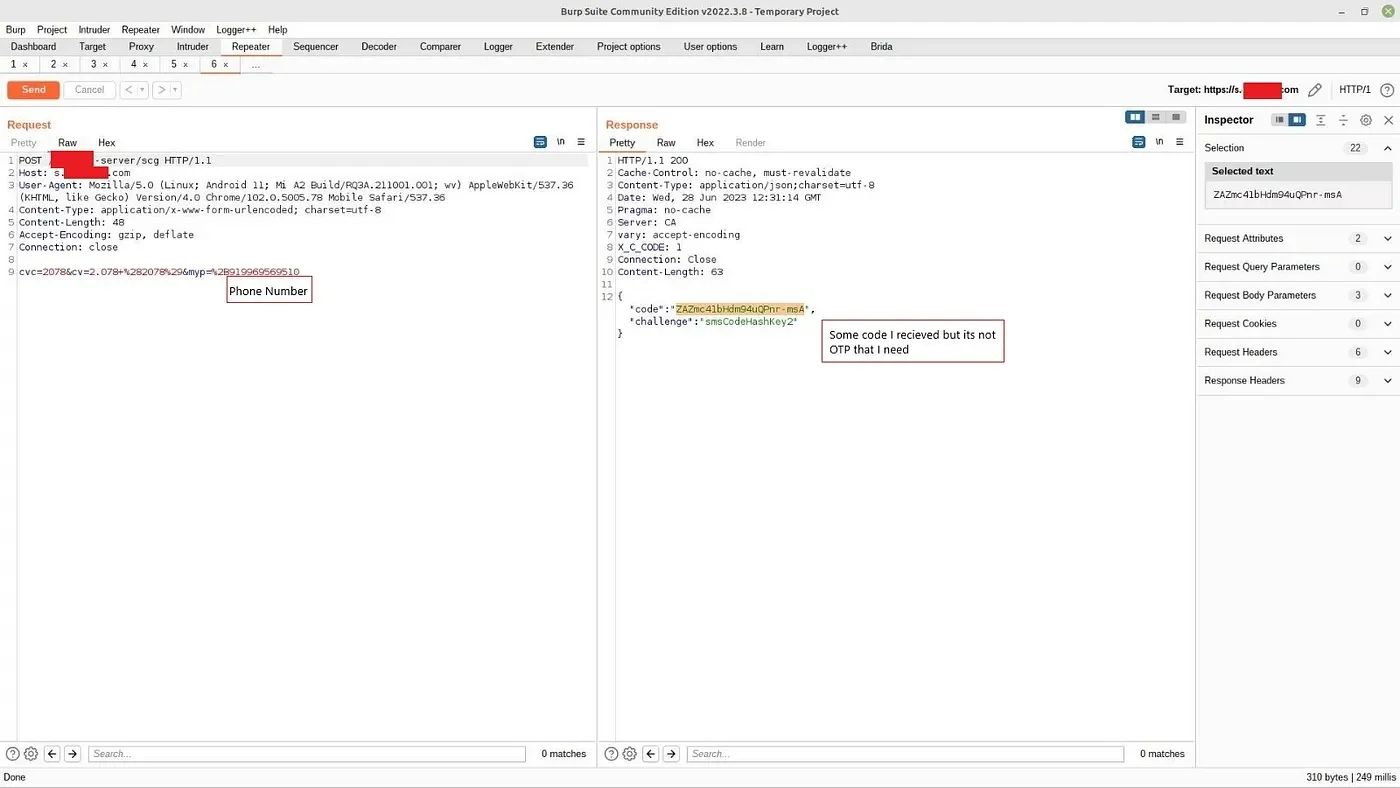
The message was moved to Burp's Decoder tab and decrypted there. The request contained session material for the login but did not yield an OTP. Response manipulation was attempted as well and did not work. Further time in Burp produced nothing useful.
The next step was static analysis: the APK was converted with jadx into Java. The output was long, hard to navigate and obfuscated, as expected, so the researcher switched to runtime analysis with Frida. Attaching Frida to the application gave visibility into its runtime behaviour, and with Frida and Objection the activity handling login was identified quickly, providing a starting point.
Exploitation
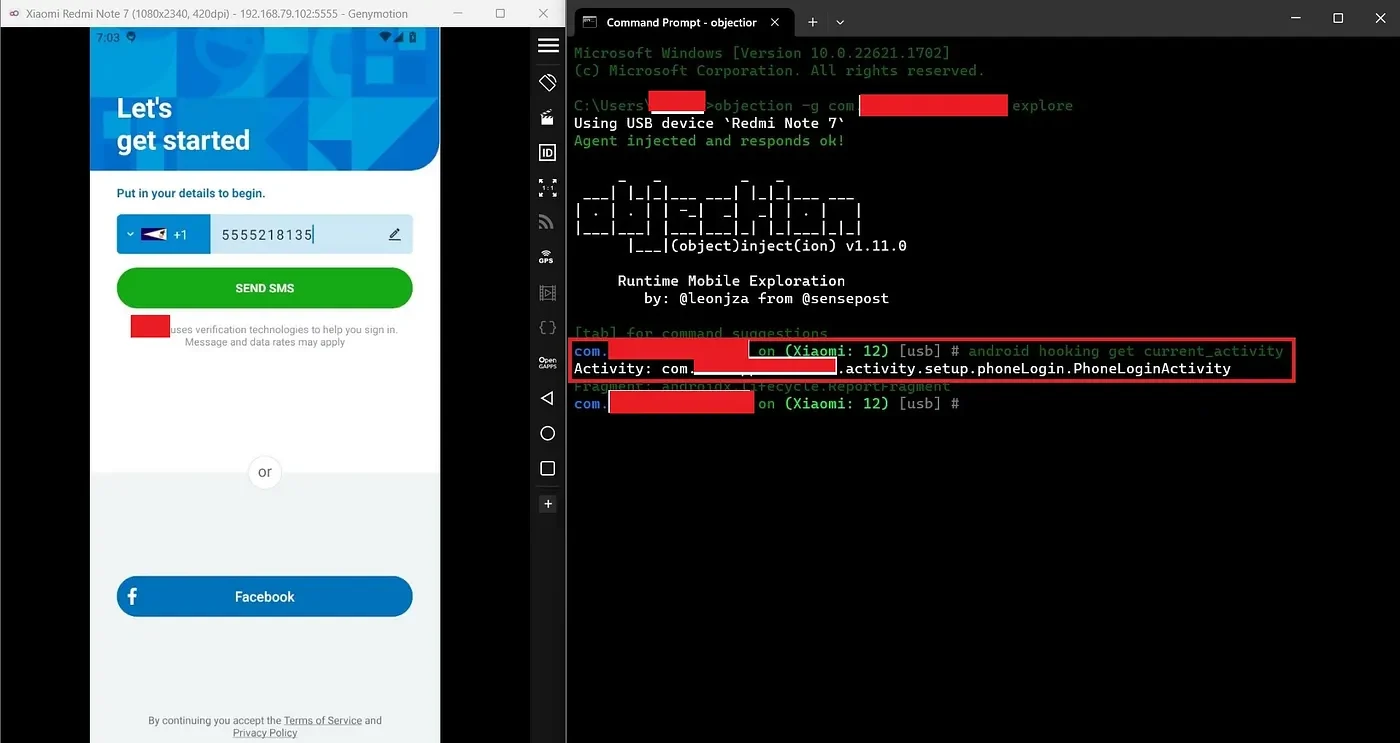
Step 1: identify the current activity
Objection was started against the application and the current activity was queried:
# objection -g com.appname.test explore# android hooking get current activityActivity: com.testapp.activity.setup.phoneLogin.PhoneLoginActivity
The output names com.testapp.activity.setup.phoneLogin.PhoneLoginActivity as the current activity.
Step 2: list the methods loaded in that activity
With the activity known, all class methods loaded during it were listed:
android hooking list class_methods com.appname.test.testActivity
The command returned all loaded class methods. Among them the researcher looked for methods connected to OTP handling, either sending the OTP or validating the OTP that had been entered. Hooking each candidate one by one was slow and required a manual script per method, so the approach changed.
Step 3: bridge Burp Suite and Frida with Brida
Brida was integrated into Burp Suite to trace the OTP generation process and to get more visibility into network traffic during testing.
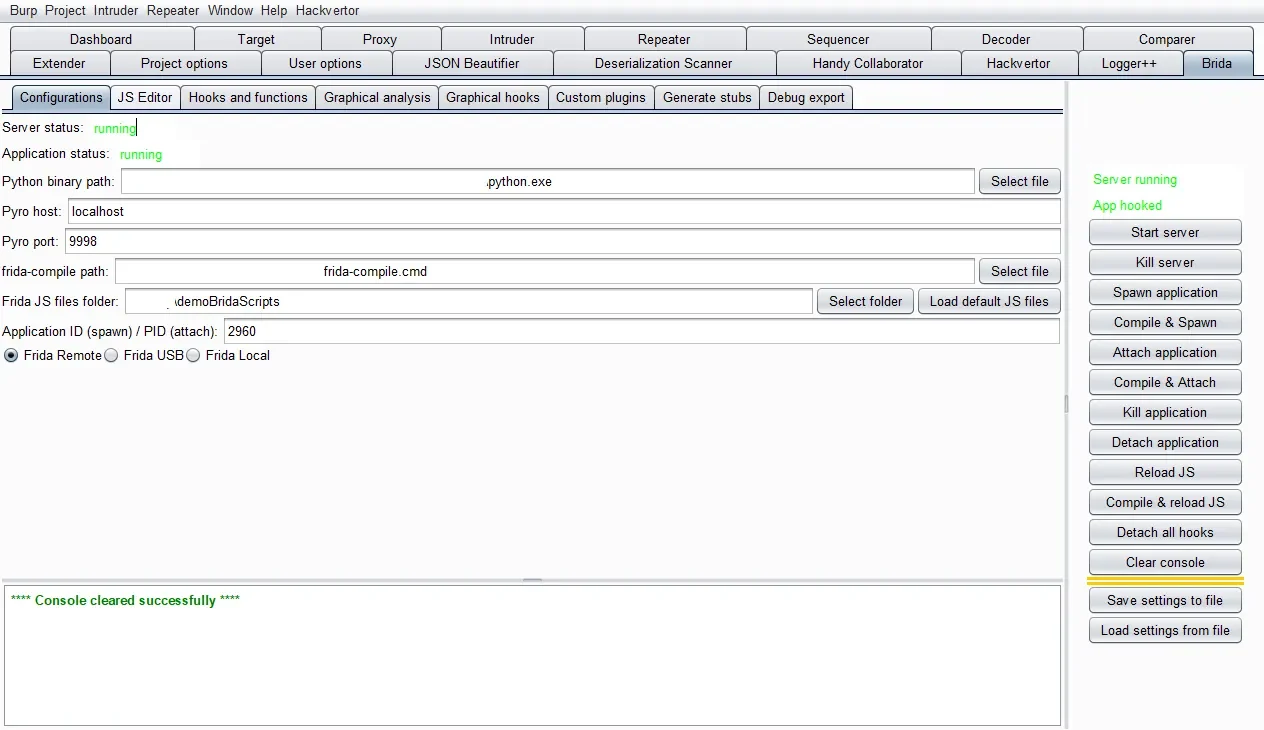
This is how Brida looks like
The application was spawned with Brida, and this time the Graphical Analysis option was used. That mode allows loading all methods from a specific class and inspecting a method together with its backtrace. Several interesting methods were inspected at once and checked for return values.
Step 4: read the OTP from a method return value
One of the inspected methods returned the OTP code itself.
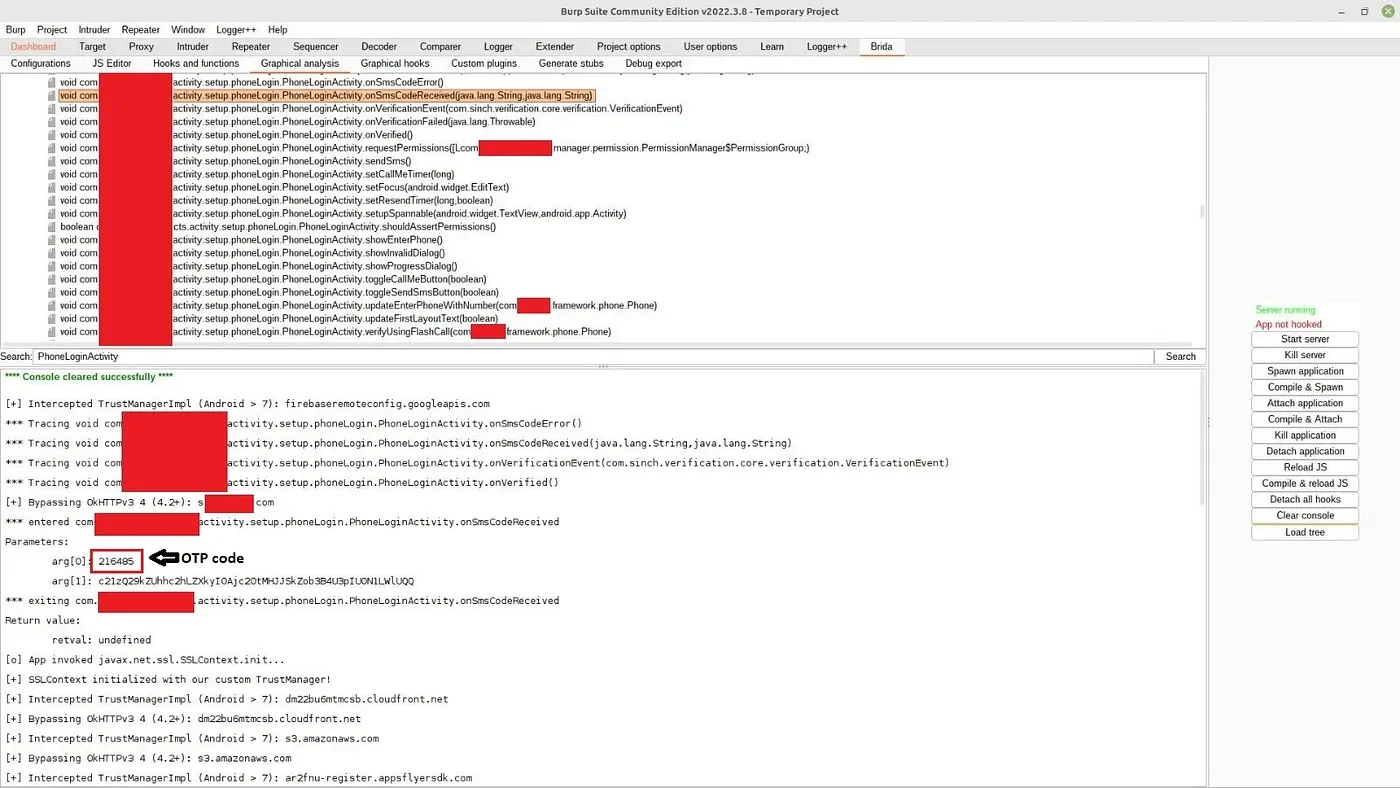
At that point the OTP could be obtained simply by inspecting class methods, since it was generated at the application level.
Root cause
The OTP was generated at the application level itself, without relying on the user's phone number. Because the OTP was generated at the application level, inspecting class methods was enough to obtain the OTP code. The OTP was generated at the application level itself, without relying on the user's phone number, so the client produced the secret. The report does not describe any additional defence, such as binding the OTP to the device or session, that would have stopped this.
Impact
Because the OTP did not depend on the user's phone number, an attacker with the ability to instrument the application could obtain the OTP and take over an account without access to the phone number. The researcher describes this as a severe risk to user security and privacy, enabling account takeover without access to the phone number. The report does not state which accounts, or how many, could be reached in practice.
Fix
The vulnerability was reported to the developers, who acknowledged the issue and addressed it swiftly.
Variants to test
- OTP returned by a client method. On any Android app with phone login, attach Frida or Objection, list the methods of the login activity and inspect return values. A positive result is a method that returns the OTP code itself.
- OTP generated without the phone number. Request an OTP for a number you do not control and observe whether the flow still produces a usable code. A positive result is a login completed for a number whose SMS was never received.
- Encrypted login payloads. Where the login request body is encrypted, decrypt it in Burp's Decoder tab and inspect the fields. A positive result is session material that reveals how the login flow works.
- Response manipulation on the OTP check. Modify the verification response in Burp and see whether the client accepts it. A positive result is the app treating a failed verification as success; in this report this attempt did not work, but it is cheap to retry elsewhere.
- Brida Graphical Analysis on candidate classes. Load all methods of the class handling OTPs and inspect them with backtraces. A positive result is a method whose return value matches the code the user is asked to enter.
What happened, in plain words
A security researcher found a serious flaw in a very popular Android app, one with more than 100 million downloads on the Play Store. The flaw was in the phone number login: the app was creating the OTP itself, on the phone, without any connection to the real phone number. Instead, the researcher discovered that the app was creating the OTP itself, on the phone, without any connection to the real phone number. Anyone who could look inside the running app could simply read the code and log in as someone else. This is called an account takeover. The researcher reported it responsibly, the developers acknowledged and addressed the issue, and they paid a $1000 bug bounty.
This article walks through the whole investigation from the beginning, assuming you have never done security testing before. You only need to be comfortable using a computer and a browser to follow the ideas. The tools are explained as they appear.
The target and the feature
The target was an Android application available on the Play Store with more than 100 million downloads. The feature under examination was phone number login. Here is how that normally works:
- You open the app and type your phone number.
- The app asks the server to send you a one-time password (OTP). An OTP is a short code, usually a few digits, that is valid only once and only for a short time. It is a second proof that you really own the phone number.
- The server sends the code by SMS to that number.
- You type the code into the app.
- The app sends the code to the server, the server checks it, and if it matches you are logged in.
The app on your phone should only pass messages between you and the server. If the app itself creates the code, then anyone who can look inside the app can see it.
How the investigation started
The researcher tried to log in using a temporary phone number, a number they controlled for testing. The OTP was never delivered to that number. That failure was the entry point: if the code never arrived, how could the login ever succeed? That question led to an investigation that ended in an account takeover finding and a $1000 bounty.
The tools used
The work combined four kinds of tools. Each one is explained here because you will see them throughout the article.
- Burp Suite: a program that sits between your browser or app and the internet, like a mail intercepting service that opens every letter, reads it, and passes it on. It lets you see and change every request and response. A request is the message your app sends to a server (for example, "please send me an OTP for this number"), and a response is the server's reply. Burp also has a Decoder tab, a built-in tool for converting encoded or encrypted-looking text back into readable text.
- jadx: a tool that takes an Android app package (an APK, the file you download from the Play Store) and converts it back into readable Java source code. It is like taking apart a machine to see its parts.
- Frida: a tool that attaches to a running app and lets you watch and change what it does while it runs. Think of it as a tiny camera and remote control placed inside the app while it is working.
- Objection: a tool built on top of Frida that gives you ready-made commands, so you do not have to write scripts yourself. It can, for example, tell you which screen (activity) is currently open and list the methods (functions) loaded in the app.
- Brida: a Burp Suite extension that acts as a bridge between Burp Suite and Frida. It lets you drive Frida from inside Burp, so you can inspect the app's internal methods while you watch its network traffic in the same window.
The researcher tried to log in with a temporary phone number, and the OTP was not delivered to it.
Finding it: the encrypted login request
With Burp capturing traffic, the researcher came across an encrypted message in a network request tied to the login flow. Encrypted means the content has been scrambled so it cannot be read directly, like a letter written in a secret code. Decrypting it revealed login session details, but no OTP that could be used to log in.
The message was moved to Burp's Decoder tab and decrypted there. The request contained session material for the login but did not yield an OTP. Session material is information the server uses to remember that you are partway through logging in, similar to a claim ticket you get at a cloakroom: it identifies your visit but is not the same as the item you came to collect. Response manipulation was attempted as well: that means changing the server's reply in Burp before the app sees it, to see whether the app can be tricked into accepting a failed check as a success. It did not work. Further time in Burp produced nothing useful.
Switching to static analysis
The next step was static analysis: examining the app's code without running it, as opposed to watching it while it runs. The APK was converted with jadx into Java. The output was long, hard to navigate and obfuscated, as expected. Obfuscated means the code has been deliberately renamed and reshaped to be hard for humans to read, for example by replacing meaningful names with short meaningless ones. Because of that, the researcher switched to runtime analysis with Frida: watching the app while it runs instead of reading its code on paper.
Attaching Frida to the application gave visibility into its runtime behaviour, and with Frida and Objection the activity handling login was identified quickly, providing a starting point. An activity, in Android terms, is a single screen of the app, such as the login screen or the settings screen.
Exploitation
Step 1: identify the current activity
Objection was started against the application and the current activity was queried:
# objection -g com.appname.test explore# android hooking get current activityActivity: com.testapp.activity.setup.phoneLogin.PhoneLoginActivity
Line by line, in plain words:
# objection -g com.appname.test explorestarts Objection and attaches it to the app whose package name iscom.appname.test. The package name is the app's unique identifier on the phone, like a surname that no other app shares.exploremeans "open an interactive session where I can type commands".# android hooking get current activityis the command typed inside that session. Hooking means placing a small observation point inside the running app so you can watch a function when it is called. Here the command simply asks: which screen is open right now?Activity: com.testapp.activity.setup.phoneLogin.PhoneLoginActivityis the answer. It namescom.testapp.activity.setup.phoneLogin.PhoneLoginActivityas the activity in charge of the phone login screen, which is where the OTP logic would live.
Why this step: before you can inspect the code that handles OTPs, you need to know which screen is responsible for the login. The answer gives you a name to search for in the next step.
Step 2: list the methods loaded in that activity
With the activity known, all class methods loaded during it were listed:
android hooking list class_methods com.appname.test.testActivity
Line by line:
android hooking list class_methodsasks Objection to list the methods of a class. A method is a named block of code that does one job, like a recipe with a name. A class is a bundle of related methods and data, like a chapter in a cookbook.com.appname.test.testActivityis the class to inspect. The command returned all loaded class methods.
Among them the researcher looked for methods connected to OTP handling, either sending the OTP or validating the OTP that had been entered. Hooking each candidate one by one was slow and required a manual script per method, so the approach changed. Why this step: listing methods narrows the search from the whole app down to a handful of candidates, the way a table of contents narrows a search through a book.
Step 3: bridge Burp Suite and Frida with Brida
Brida was integrated into Burp Suite to trace the OTP generation process and to get more visibility into network traffic during testing.
This is how Brida looks like
The screenshot shows how Brida looks.
The application was spawned with Brida, and this time the Graphical Analysis option was used. Spawned means started fresh under Brida's control, so the tool is attached from the very first moment the app runs. Graphical Analysis is a mode that allows loading all methods from a specific class and inspecting a method together with its backtrace. A backtrace is the list of steps that led to the current point, like the list of hands a parcel passed through before reaching you. Several interesting methods were inspected at once and checked for return values. A return value is what a method hands back when it finishes, like the change you get after paying.
Why this step: instead of writing a separate script for every candidate method, Brida lets you inspect many methods at once and see what each one returns, which is much faster.
Step 4: read the OTP from a method return value
One of the inspected methods returned the OTP code itself.
At that point the OTP could be obtained simply by inspecting class methods, since it was generated at the application level. Why this matters: the code that was supposed to arrive by SMS was being produced inside the app, so watching the app was enough to read it.
Root cause
The OTP was generated at the application level itself, without relying on the user's phone number. Because the OTP was generated at the application level, inspecting class methods was enough to obtain the OTP code. The OTP was generated at the application level itself, without relying on the user's phone number, so the client produced the secret. The report does not describe any additional defence, such as binding the OTP to the device or session, that would have stopped this.
In everyday terms: the app was like a club that lets you in if you show a ticket, but the ticket machine is in the lobby and anyone can print one. The check should happen at the door, with tickets issued by the club itself.
Impact
Because the OTP did not depend on the user's phone number, an attacker with the ability to instrument the application could obtain the OTP and take over an account without access to the phone number. The researcher describes this as a severe risk to user security and privacy, enabling account takeover without access to the phone number. The report does not state which accounts, or how many, could be reached in practice.
Fix
The vulnerability was reported to the developers, who acknowledged the issue and addressed it swiftly.
Variants to test
These are the same ideas applied to other apps, written so a beginner can try them.
- OTP returned by a client method. On any Android app with phone login, attach Frida or Objection, list the methods of the login activity and inspect return values. A positive result is a method that returns the OTP code itself.
- OTP generated without the phone number. Request an OTP for a number you do not control and observe whether the flow still produces a usable code. A positive result is a login completed for a number whose SMS was never received.
- Encrypted login payloads. Where the login request body is encrypted, decrypt it in Burp's Decoder tab and inspect the fields. A positive result is session material that reveals how the login flow works.
- Response manipulation on the OTP check. Modify the verification response in Burp and see whether the client accepts it. A positive result is the app treating a failed verification as success; in this report this attempt did not work, but it is cheap to retry elsewhere.
- Brida Graphical Analysis on candidate classes. Load all methods of the class handling OTPs and inspect them with backtraces. A positive result is a method whose return value matches the code the user is asked to enter.
Glossary
- Account takeover: a situation where an attacker gains control of someone else's account, for example by logging in as them.
- Activity: a single screen of an Android app, such as the login screen.
- APK: the file format of an Android app, the thing you download from the Play Store.
- Backtrace: the list of steps that led to the current point in a running program.
- Bounty: a reward paid by a company to someone who reports a security problem responsibly.
- Burp Suite: a tool that sits between your app or browser and the internet so you can see and change requests and responses.
- Class: a bundle of related methods and data in a program.
- Client: the app or program running on your own device, as opposed to the server.
- Decoder tab: a built-in Burp Suite tool for converting encoded or encrypted-looking text back into readable text.
- Encrypted: scrambled so it cannot be read directly without the key.
- Frida: a tool that attaches to a running app and lets you watch and change what it does.
- Hook: a small observation point placed inside a running app so you can watch a function when it is called.
- jadx: a tool that converts an Android APK back into readable Java source code.
- Method: a named block of code that does one job.
- Objection: a tool built on Frida that gives you ready-made commands for inspecting a running app.
- Obfuscated: deliberately renamed and reshaped code that is hard for humans to read.
- OTP: one-time password, a short code valid once and for a short time, used as extra proof of identity.
- Package name: the unique identifier of an Android app on the phone.
- Request: a message your app sends to a server.
- Response: the server's reply to a request.
- Response manipulation: changing the server's reply before the app sees it, to test whether the app can be tricked.
- Return value: what a method hands back when it finishes.
- Runtime analysis: watching an app while it runs, as opposed to reading its code without running it.
- Server: the company's computer that the app talks to over the internet.
- Session: the server's memory of your visit, identified by session material such as a ticket or token.
- Spawned: started fresh under a tool's control so the tool is attached from the first moment.
- Static analysis: examining an app's code without running it.
- Token: a piece of data that identifies you or your session, like a claim ticket.



