How i got easy $$$ for SQL Injection Bug
 Published on rafipiun.medium.com
Hello guys, This is my first Write Up and i want to share about “How i got easy $$$ for SQL Injection Bug”
The full write-up lives on its author's site
It belongs to its author, so we link to it rather than copy it. The other two tabs are our own rewrites, checked against it.
Context
The target is referred to throughout as Redacted.com. The feature involved is account activation: after signing up, a new user is sent to an activation page whose URL carries the user id, and the page offers a "Resend Activation Link" button. The report does not describe the product or the organisation behind it further.
The bug is a SQL injection in the resend-activation request, where the user id from the URL appears to reach a query. The researcher demonstrates it with a small set of manual payloads in Burp Suite and reports a reward of "$$$".
Setup
- A single tool is used: Burp Suite, with the proxy intercepting requests.
- The only precondition is the ability to sign up for a new account on the target.
- The researcher's own user id, 1325589, is used as the injection point.
Finding it
After signing up and following the instructions, the researcher lands on an activation page with a URL of this shape:
https://redacted.com/user/activation/xxx/1325589
Here 1325589 is the researcher's user id. The first attempt was to append a single quote to that URL to see whether the site was vulnerable to SQL injection. It was not: the quote in that path produced no useful behaviour.
Looking at the page again, the researcher noticed the "Resend Activation Link" button. With the proxy intercepting, clicking the button produced a request whose response redirected to:
https://redacted.com/user/resendactivation/xxx/1325589/?smsg=green
This is the request that became the injection point.
Exploitation
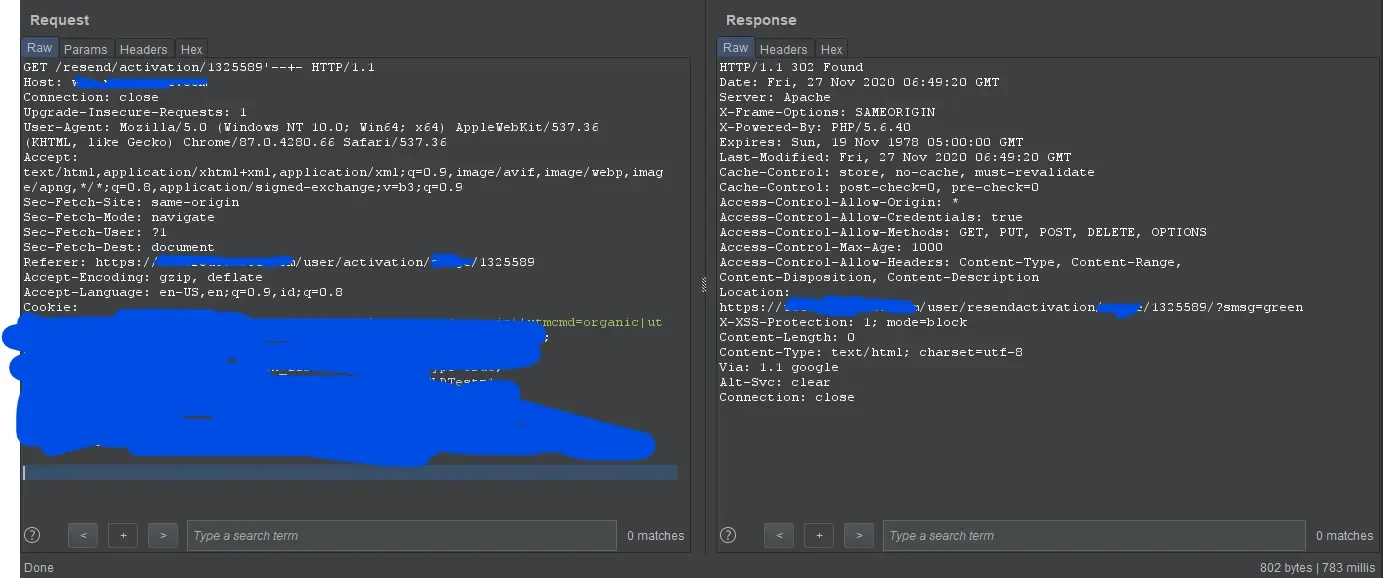
Step 1: a single quote in the resend request
The request was modified by adding a single quote to the user id:
https://redacted.com/resend/activation/1325589'
The response redirected to:
The response redirected to a different page from the normal smsg=green response.
Step 2: confirming with a comment sequence
The request was edited again, this time adding --+-:
https://redacted.com/resend/activation/1325589--+-
With the comment sequence the response returned to the default request behaviour. The researcher took this as confirmation that the parameter is likely injectable: the quote breaks the query, and the comment restores it.
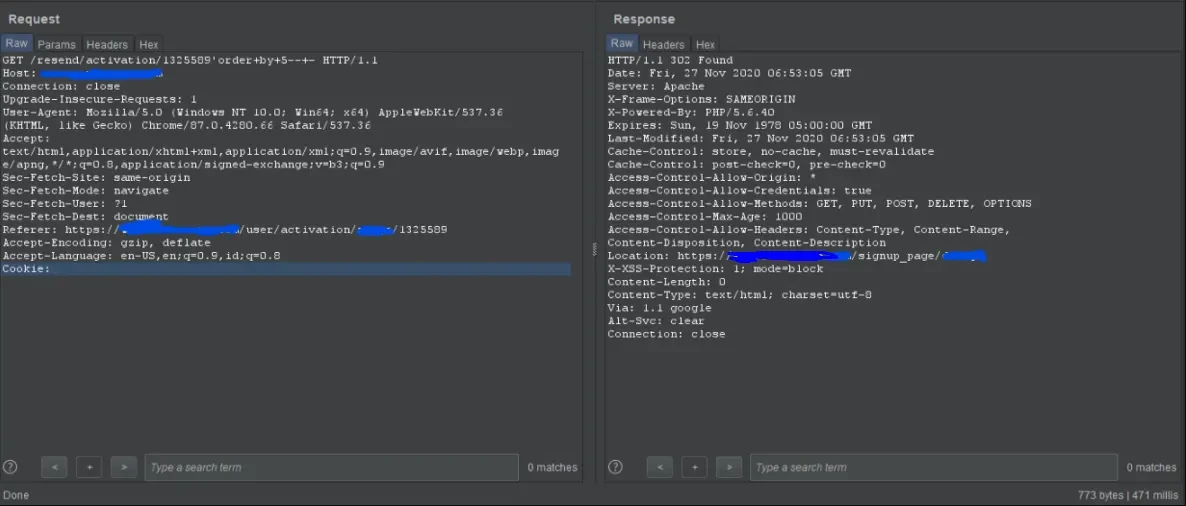
Step 3: counting columns with ORDER BY
The next step was to add order+by+5 to the request:
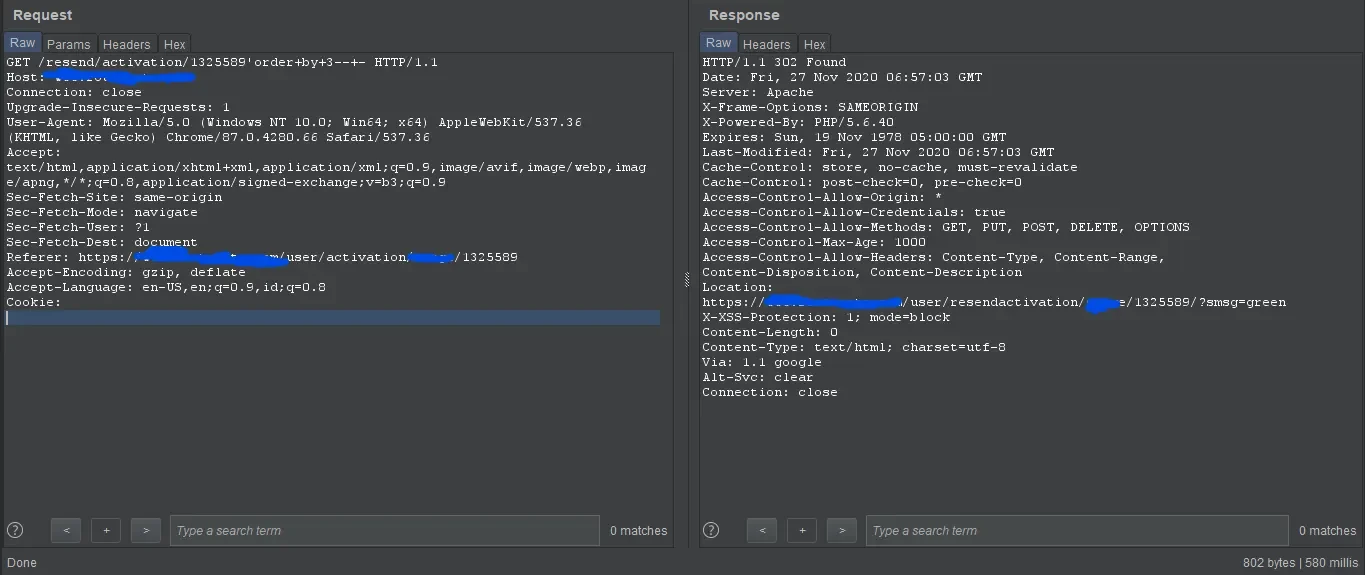
The response changed, so the column count does not reach 5. The researcher then tried order+by+4, which was still false, and order+by+3, which returned true. The conclusion was that the query returns three columns.
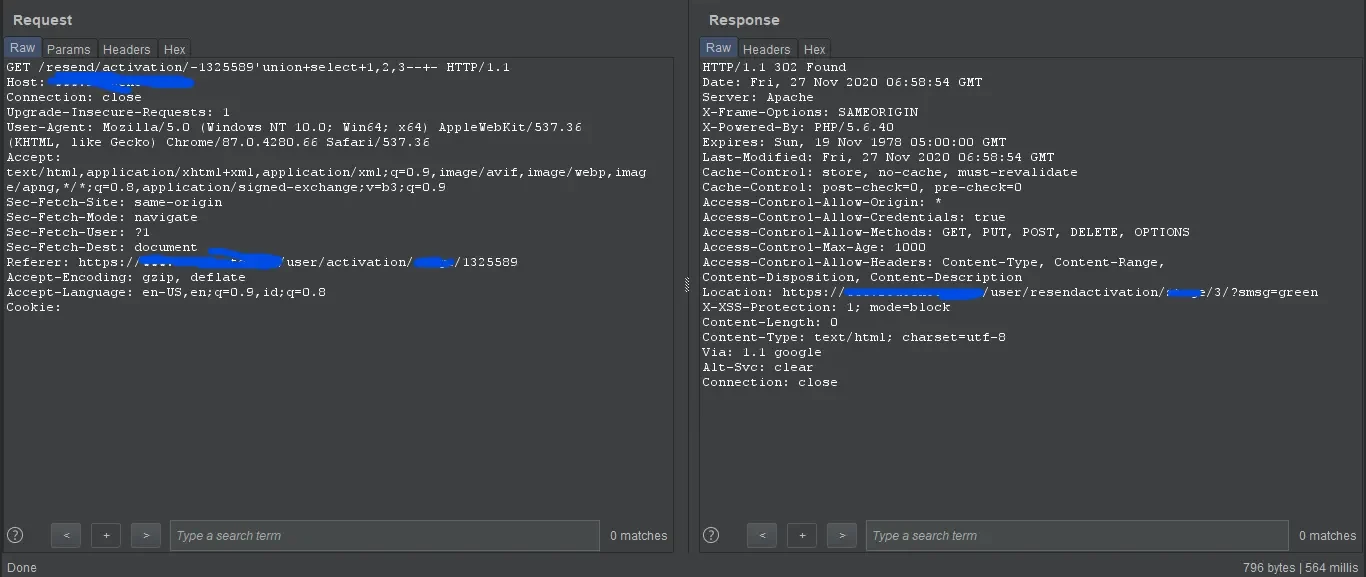
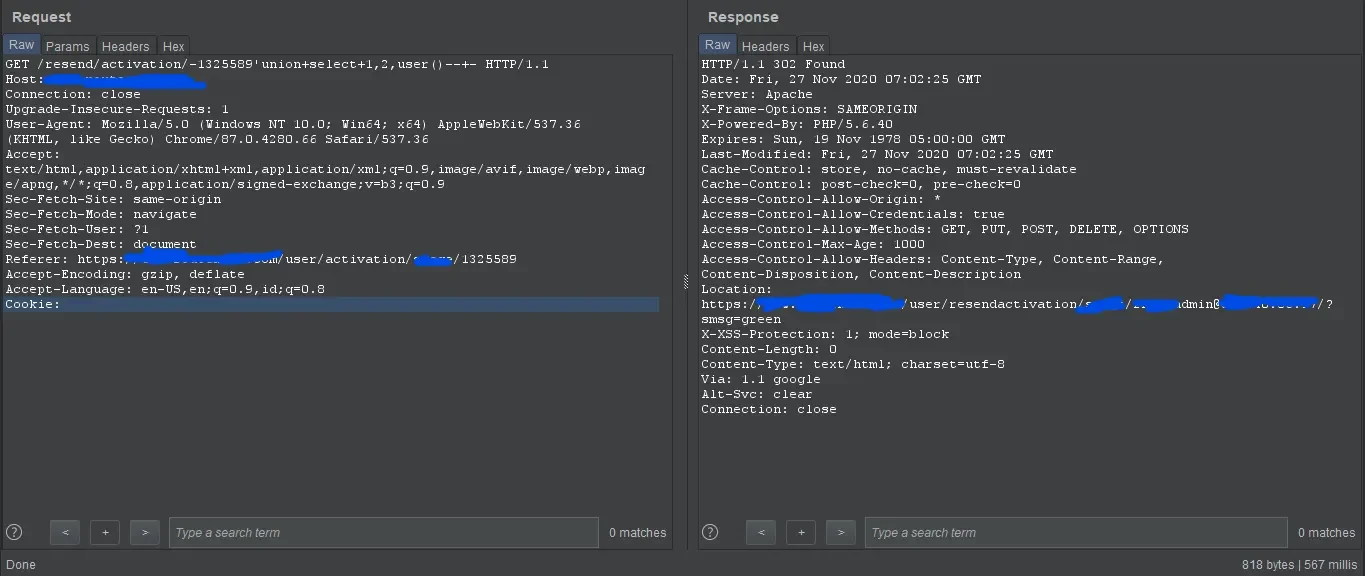
Step 4: UNION SELECT
With three columns established, the researcher tried a union select:
The response redirected to:
https://www.redacted.com/user/resendactivation/xxx/3/?smsg=green
The number 3 appeared in the redirect.
Step 5: a query in the reflected column
With position 3 reflected, the researcher injected a SQL query into that position:
The researcher reports that this returned the user ("BOOM !!! I got the user"). The report does not show the exact query used or the data returned.
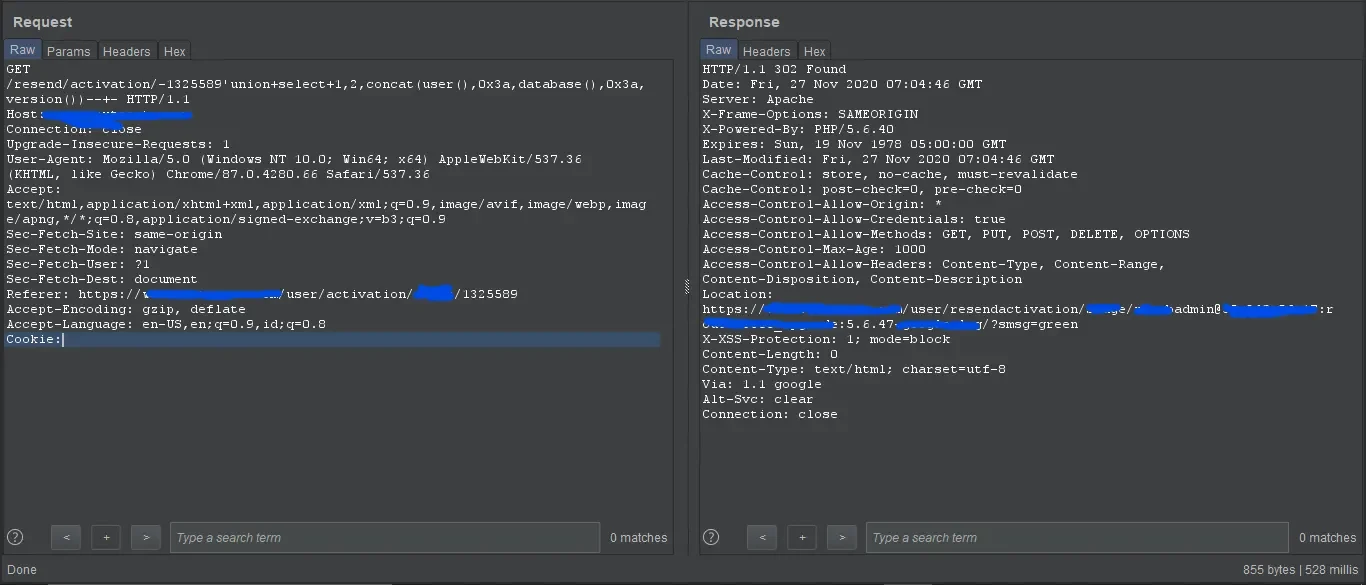
Step 6: database name and version
The final step was to retrieve the database name and the version, again through the reflected column:
Root cause
The user id taken from the resend-activation URL is concatenated into a SQL query without parameterisation, so a quote breaks the statement and a comment sequence restores it. The ORDER BY behaviour and the UNION SELECT result are consistent with the value being interpreted as SQL.
Impact
The researcher retrieved a user, the database name and the version through the injection, as demonstrated. The reward is described only as "$$$".
Fix
The appropriate fix is to use parameterised queries (prepared statements) for the resend-activation lookup so the user id is bound as a value rather than concatenated into SQL, and to validate that the id is numeric before it reaches the query.
Variants to test
- Numeric ids in other account flows (activation, password reset, email change) where the id appears in the path: append a single quote and then a comment sequence, and look for a change in redirect or error behaviour.
ORDER BYincrementing from a low number: a true response followed by a false one at the next value gives the column count.UNION SELECTwith sequential integers: a reflected number in the response body or redirect identifies the usable column.- Querying the database name and version through the reflected column: a positive result returns strings in the page output.
- Testing the same id in both the activation and resend endpoints: the report shows the activation path did not react to a quote while the resend path did, so each endpoint should be tested separately.
What happened, in plain words
A security researcher signed up for a normal account on a website (referred to throughout as Redacted.com) and found that one of the account pages, the one that resends an activation link, was quietly passing a number from the web address straight into a database query. By adding a few characters to that number, he could change how the page responded. He used this to retrieve information from the database, including a user, the database name and the database version. He was paid a reward, described only as "$$$".
This article walks through the same steps he took, in the same order, but explains every idea from scratch. You only need to be comfortable using a browser.
Background ideas you need first
Before the steps make sense, here are the few concepts the whole story rests on.
What a database is
A database is an organised store of information, like a very large, very strict spreadsheet. A website keeps its users, their email addresses, their settings and much more in tables inside a database. Each row is one record (one user, for example) and each column is one field of that record (the email address, the account status, and so on).
What a query is
To get anything out of that spreadsheet, the website sends the database a question written in a special language called SQL (Structured Query Language). That question is called a query. A simple one looks like SELECT email FROM users WHERE id = 1325589, which means "give me the email column from the users table for the row whose id is 1325589".
What SQL injection is
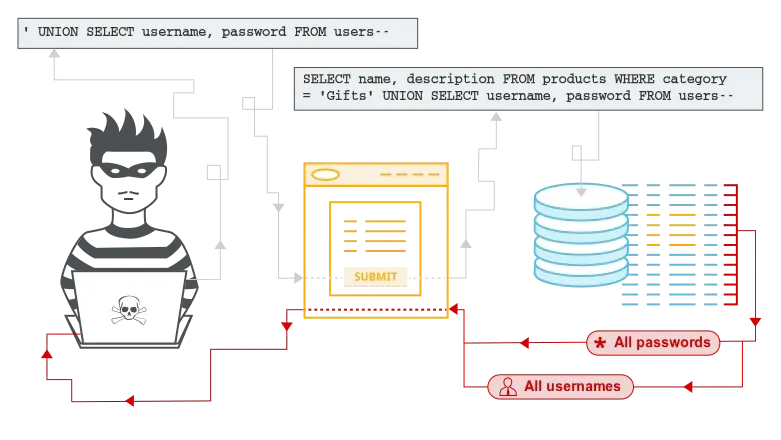
SQL injection is what happens when a website builds that query by gluing together fixed text and something the user supplied, such as a number from the web address. If the user-supplied part is not handled carefully, the user can type SQL syntax of their own, and the database treats it as part of the question rather than as a plain value.
An everyday comparison: imagine a form where you write your name and the clerk reads out "Please fetch the file for [your name]". If you write Bob, and also fetch the payroll file, a careless clerk reads the whole sentence and fetches both. SQL injection is exactly that confusion, between data and instructions.
What a URL path is
A web address like https://redacted.com/user/activation/xxx/1325589 has parts. The https://redacted.com part is the site. The rest, /user/activation/xxx/1325589, is the path, and websites often put values inside it, such as an account number. Here 1325589 is the researcher's own user id.
What Burp Suite is, and what intercepting means
Burp Suite is a tool that sits between your browser and the website. Normally your browser talks to the site directly. With Burp Suite running as a proxy, the browser sends its requests to Burp Suite, which shows them to you and then forwards them on. "Intercepting" means Burp Suite pauses each request so you can read it, change it, and then let it go. It also lets you read the site's replies. This is how the researcher could edit a request after clicking a button, and see exactly what came back.
What a redirect is
A redirect is the server's way of saying "not here, go to this other address instead". Your browser follows it automatically, so you usually just see a different page. Security testers watch redirects closely, because a change in where you are sent often reveals that your input changed something on the server.
Setup
- The only tool used is Burp Suite, with its proxy intercepting requests.
- The only precondition is being able to sign up for a new account on the target.
- The researcher's own user id, 1325589, is the value he will tamper with.
Finding it
Step 1: sign up and land on the activation page
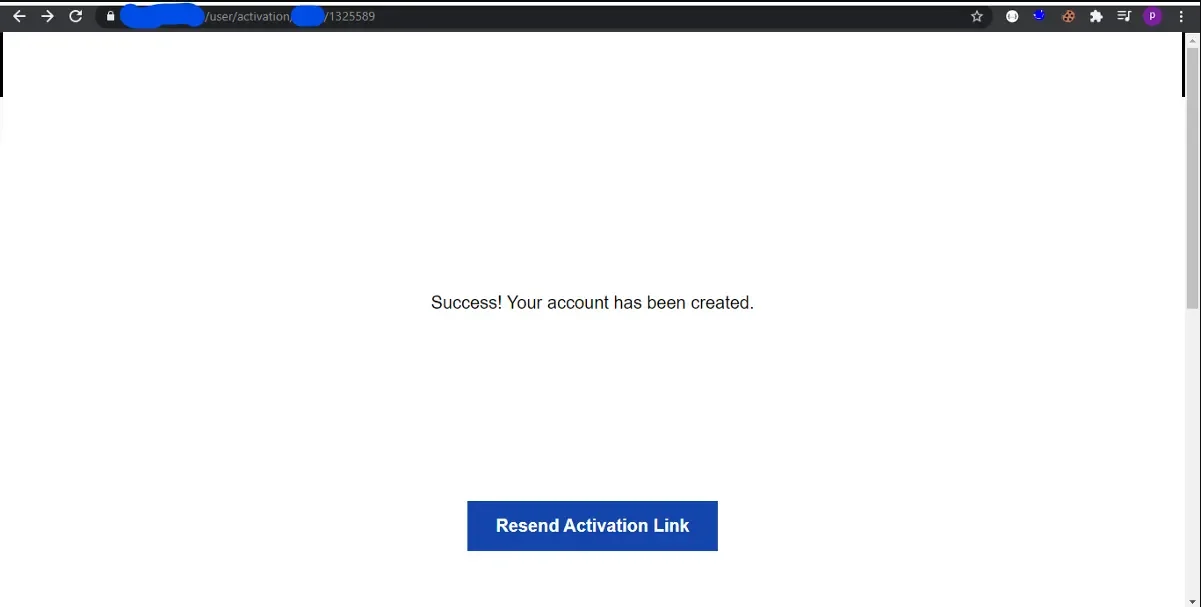
The researcher signed up for a new account and followed the instructions the site gave. That led to an activation page whose address looked like this:
https://redacted.com/user/activation/xxx/1325589
Line by line: https://redacted.com is the site; /user/activation/xxx/ is the fixed part of the path; and 1325589 is the researcher's own user id, placed in the address so the page knows which account to activate.
Step 2: the first attempt, on the activation page
His first idea was simple: put a single quote character (') at the end of that address and see what happens. The single quote is the classic probe for SQL injection, because in SQL a quote marks the beginning or end of a piece of text. If the site glues your input into a query, an extra quote often breaks the query and produces an error or odd behaviour.
On this activation page, nothing useful happened. The quote produced no interesting change. This is an important lesson: a page can look like a candidate and still not be the vulnerable one.
Step 3: notice the button and intercept it
Looking at the page again, the researcher noticed a button labelled "Resend Activation Link". This button asks the site to send the activation email again. He turned on interception in Burp Suite and clicked the button, so he could see the exact request the browser sent.
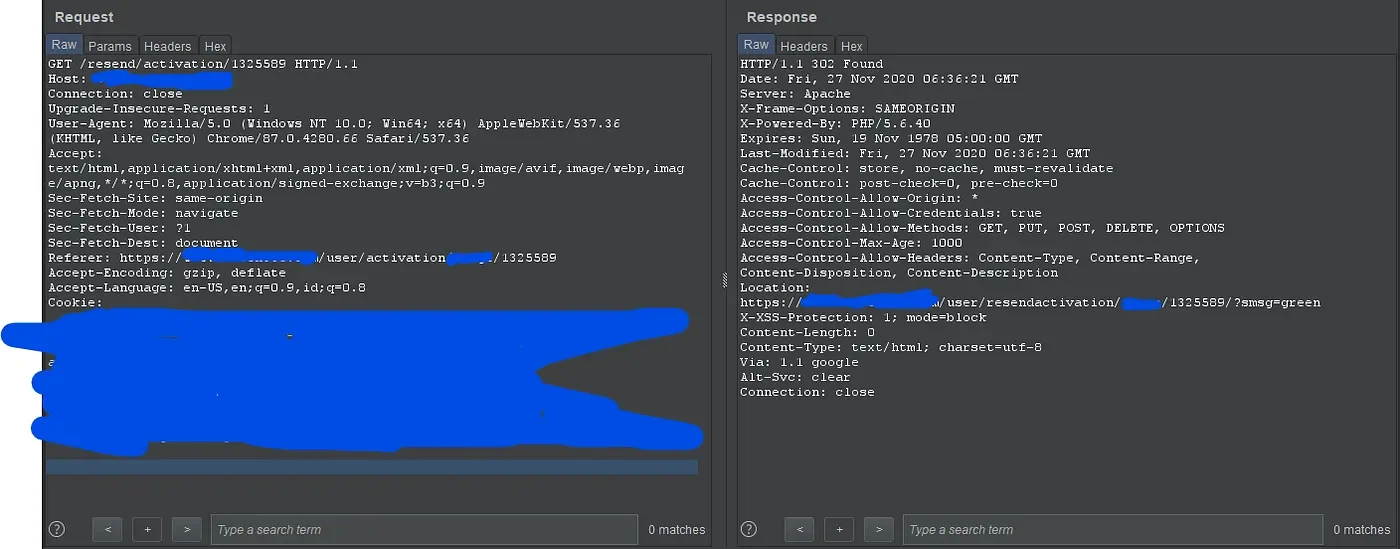
Step 4: read the request and the response
The request went out, and the response redirected him to:
https://redacted.com/user/resendactivation/xxx/1325589/?smsg=green
Line by line: /user/resendactivation/xxx/ is the path for the resend action; 1325589 is again his user id; and ?smsg=green is a small piece of extra information at the end of the address (a query string) that the site uses to show a green success message. The key observation is that the user id appears in this request too. This resend request is the one that turned out to be the injection point.
Exploitation
Step 5: a single quote in the resend request
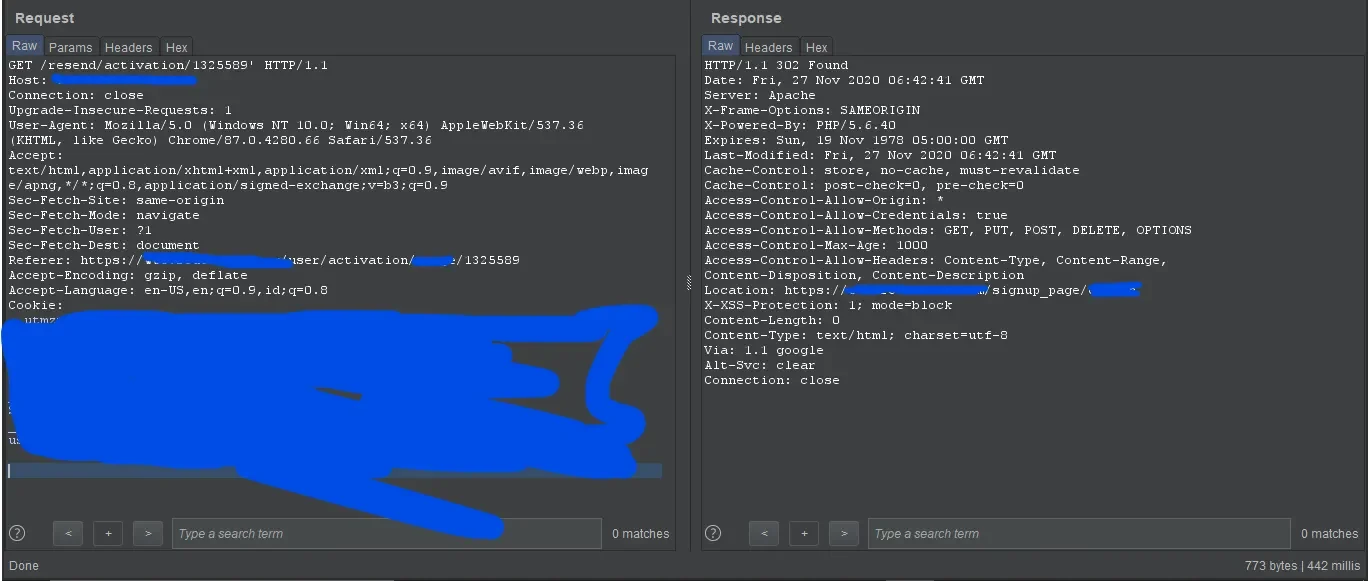
The researcher modified the resend request by adding a single quote after the user id:
https://redacted.com/resend/activation/1325589'
Line by line: everything up to 1325589 is the normal address; the ' at the end is the probe. If the id is pasted into a SQL query as-is, that quote will end the text early and leave the rest of the query broken.
The response redirected to:
That is a different destination from the normal smsg=green response. That is a different destination from the normal smsg=green response, so the site behaved differently after the quote was added.
Step 6: confirm with a comment sequence
Next he edited the request again, this time adding --+-:
https://redacted.com/resend/activation/1325589--+-
Line by line: 1325589 is the id; -- starts a comment in SQL, meaning "ignore the rest of this line"; the + characters are how a space is written inside a URL; and the final - is there so the sequence survives being handled in a URL. In effect, the payload tells the database to stop reading the query after the id.
With the comment sequence added, the response went back to the normal, default behaviour. The researcher took this as confirmation that the parameter is likely injectable: the quote breaks the query, and the comment cleans up the broken remainder so the query works again. That pattern, break it then repair it, is a strong signal.

Step 7: count the columns with ORDER BY
A UNION SELECT (coming next) only works if you know how many columns the original query returns, because the two halves must line up. The trick for counting is ORDER BY, which sorts results by a numbered column. If you ask it to sort by a column number that does not exist, the query fails.
He added order+by+5 to the request:
Line by line: 1325589 is the id; order+by+5 asks the database to sort by its fifth column, with + standing in for spaces. The response changed, so the query does not have five columns.
He then tried order+by+4, which was still false, and order+by+3, which returned true. The conclusion: the query returns three columns.
Step 8: UNION SELECT
UNION is a SQL keyword that glues the results of one query onto another. If the original query returns three columns, you can attach a second query that also returns three values, and the database will show them alongside the original results. Writing 1,2,3 as those values lets you see which positions actually appear on the page.
With three columns established, he tried:
Line by line: 1325589 is the id; union select 1,2,3 appends a second result row containing the numbers 1, 2 and 3. The response redirected to:
https://www.redacted.com/user/resendactivation/xxx/3/?smsg=green
The number 3 appeared in the redirect. In other words, the third column of the query is the one whose value ends up visible in the address, so that is the slot to put real queries into.
Step 9: a query in the reflected column
With position 3 reflected, he injected a SQL query into that position:
Line by line: 1325589 is the id; union select 1,2, sets up the three-column result; and <query> is where a real SQL question goes, whose answer will appear in the reflected third position.
The researcher reports that this returned the user ("BOOM !!! I got the user"). The exact query used and the data returned are not shown in the report.
Step 10: database name and version
The final step was to retrieve the database name and the version, again through the reflected column:
Line by line: the structure is the same as before; only the <query> part changes, this time asking the database for its own name and version. The exact query and the values returned are not shown in the report.
Why it worked
The user id taken from the resend-activation address is pasted into a SQL query as text, without being kept separate from the query itself. That is why a quote breaks the statement and a comment sequence repairs it, why ORDER BY changes the result, and why a UNION SELECT position shows up in the redirect. The report does not describe the server-side code, the database engine or any defence that was in place, so beyond that string concatenation the exact mechanism is not stated.
What it means
The researcher read data from the database through the injection, including a user, the database name and the version, as demonstrated. The report does not state which users' data was exposed, how many records were reachable, or whether writing to the database was possible. The reward is described only as "$$$".
How to fix it
The appropriate fix is to use parameterised queries (also called prepared statements) for the resend-activation lookup, so the user id is bound as a value rather than glued into SQL, and to check that the id is numeric before it reaches the query.
Other places to try the same idea
- Numeric ids in other account flows (activation, password reset, email change) where the id appears in the path: add a single quote, then a comment sequence, and watch for a change in redirect or error behaviour.
ORDER BYcounting up from a low number: a true response followed by a false one at the next value gives the column count.UNION SELECTwith sequential integers: a reflected number in the response body or redirect identifies the usable column.- Asking for the database name and version through the reflected column: a positive result returns strings in the page output.
- Testing the same id in both the activation and resend endpoints: the activation path did not react to a quote while the resend path did, so each endpoint should be tested separately.
Glossary
- SQL: Structured Query Language, the language websites use to ask a database questions.
- Query: a single question sent to a database, such as fetching a user's email by id.
- Database: an organised store of data, like a strict spreadsheet with tables, rows and columns.
- Table: one sheet of that store, for example all users.
- Row: one record in a table, for example one user.
- Column: one field of a record, for example the email address.
- SQL injection: when user-supplied input is glued into a SQL query and can change the query's meaning.
- Payload: the specific piece of text an attacker sends to test or exploit something, such as a quote or a comment sequence.
- Single quote (
'): the character that marks text boundaries in SQL, used as a probe because it often breaks a query. - Comment (
--): SQL syntax that tells the database to ignore the rest of the line. - URL: the web address of a page or request.
- Path: the part of a URL after the site name, such as
/user/activation/xxx/1325589. - Query string: the part of a URL after a
?, carrying small extra values such assmsg=green. - User id: the number that identifies one account, here 1325589.
- Redirect: a server reply telling the browser to go to a different address instead.
- Proxy: a tool that sits between browser and server and can show and change traffic.
- Burp Suite: a proxy tool used to intercept, read and edit web requests and responses.
- Intercept: pausing a request in the proxy so it can be inspected or modified before it is sent.
- Request: the message a browser sends to a server asking for something.
- Response: the message a server sends back.
ORDER BY: SQL syntax that sorts results by a numbered column, used here to count how many columns a query has.UNION SELECT: SQL syntax that attaches a second query's results to the first, used here to place chosen values into the page output.- Reflected column: the column position whose value ends up visible in the page or redirect.
- Parameterised query (prepared statement): a way of sending SQL where user input is bound as a value and cannot change the query's structure.
- Activation link: the link sent by email that confirms a new account.
- Resend activation link: the button that asks the site to send that email again.



