How I Got Paid for Turning an Image Fetcher into an Arbitrary File Read
An image-fetching API accepted a file:// URL and returned the contents of local files as Base64, and a path filter blocking /etc/passwd could be bypassed with dot segments, extra slashes or URL encoding. An attacker could read files available to the application's operating-system user, such as configuration files.
 Published on medium.com
Cybersecurity
The full write-up lives on its author's site
It belongs to its author, so we link to it rather than copy it. The other two tabs are our own rewrites, checked against it.
Context
The target was a web application with a feature that accepts an image URL, fetches it server-side, and returns the fetched image as Base64 data. The affected endpoint was:
POST /api/v1/image-base-64
It took a single image parameter, for example:
image=https://example.com/image.png
The server fetched the supplied URL and returned the result as Base64 inside data.image. Base64 is an encoding format: anyone who receives the encoded value can decode it and recover the original content. The organisation and infrastructure are anonymised in this write-up and all examples use example.com. The vulnerability was fixed before publication.
Setup
The confirmed impact was an arbitrary local file read on a UAT application server. Requests were sent with curl, using credentials that are redacted here, and the -k flag to skip certificate verification. The application was built on CodeIgniter. No other tooling, versions or preconditions are described.
Finding it
While testing how the endpoint handled different URLs, I found that it accepted the file:// scheme. That meant the image URL could be replaced with a path to a local file on the server. The application read the file and returned its contents in the same response field normally used for images.
URLs begin with a scheme that tells an application how to access a resource. Web applications usually work with http:// and https://. The file:// scheme is different: it tells the application to open a file from its own filesystem. An image fetcher has no reason to accept it.
Exploitation
Step 1: confirm the server fetches URLs on the user's behalf
I started by checking whether the server fetched URLs on behalf of the user.
curl -sk \ -u '<REDACTED_USERNAME>:<REDACTED_PASSWORD>' \ -X POST \ --data-urlencode 'image=http://httpbin.org/ip' \ 'https://example.com/api/v1/image-base-64'
The request posts an image parameter pointing at http://httpbin.org/ip. After decoding the Base64 response, I received:
{ "origin": "<SERVER_EGRESS_IP>"}
The returned IP confirmed that the request came from the application server. This behaviour is known as server-side request forgery, or SSRF: it happens when an application makes a request to a destination controlled by the user.
Step 2: switch the scheme to file://
I replaced the HTTP URL with a local file path:
The server returned another Base64 value. After decoding it, I recovered the server's hostname.
I repeated the test with:
file:///etc/os-release
The decoded response contained operating-system information from the server. This confirmed that the API could read local files and return their contents to the caller.
Step 3: bypass the file-path filter
The application blocked some obvious paths. A direct request for /etc/passwd returned HTTP 403:
file:///etc/passwd
The filter could be bypassed by changing how the same path was written:
file:///etc/./passwdfile:///etc//passwdfile:///etc/pass%2577d
These variations returned HTTP 200. The first payload uses a dot segment, the second adds an extra slash, and the third uses URL encoding. The application eventually normalised them to the same file path. After decoding the response, I confirmed that it contained entries from /etc/passwd.
Step 4: reach application configuration
The application used CodeIgniter, which commonly stores database settings in:
application/config/database.php
I confirmed that this file existed and produced a non-empty response. I did not decode or extract its contents because it could contain database credentials. This proved that application configuration files were reachable. It did not prove that the file contained valid credentials or that a database could be accessed. No attempt was made to connect to a database or use any potentially exposed secrets.
The attack chain
The complete attack required only a few steps:
- The attacker submits a
file://URL through theimageparameter. - The API accepts the scheme and opens the requested local file.
- The server Base64-encodes the file contents.
- The encoded data is returned through
data.image. - The attacker decodes the response and recovers the original file.
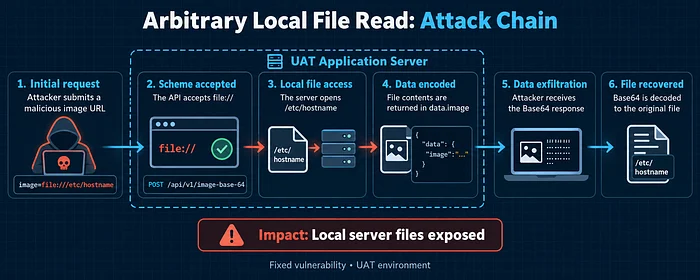
Root cause
The endpoint allowed the user to control the URL scheme. Since file:// was accepted, the server could be instructed to open local files.
The path filter relied on blocked keywords and exact string patterns. Encoding and normalisation created different strings that resolved to the same file, so the filter inspected the raw input for blocked words without accounting for the value the application would produce after decoding and path normalisation. The endpoint then returned the complete file content through its normal Base64 response.
Impact
The confirmed impact was an arbitrary local file read on the UAT server. An attacker could read files available to the application's operating-system user. Depending on the server configuration, this might expose:
- Source code and configuration files
- API keys or service credentials
- Database connection settings
- Internal host information
Further compromise would depend on what those files contained. I did not test those possibilities.
Fix
An image-fetching endpoint should only accept the protocols required by the feature, usually http:// and https://. Schemes such as file://, gopher://, and ftp:// should be rejected.
The application should normalise the URL before validating it. HTTP destinations should be checked against private, loopback, link-local, and cloud metadata addresses. The same checks should run again after every redirect. The endpoint should also confirm that the response is a valid image and enforce a reasonable size limit. A WAF can provide another layer of protection, but the application must decide which protocols and destinations the backend is allowed to access.
Variants to test
- Scheme substitution on any URL-accepting parameter. Submit
file:///etc/hostnamewherever a URL is expected (image fetchers, PDF generators, webhooks, avatar importers). A positive result is a Base64 or otherwise encoded body that decodes to the file's contents. - Egress confirmation with a reflection service. Point the parameter at a service that echoes the caller's IP, as above. A positive result is an IP that belongs to the server rather than to you.
- Filter bypass by path rewriting. If a direct path returns 403, try dot segments (
/etc/./passwd), doubled slashes (/etc//passwd) and percent-encoding (/etc/pass%2577d). A positive result is HTTP 200 with the file's contents after decoding. - Configuration file probing. Request framework-specific config paths such as
application/config/database.phpand check only whether the response is non-empty. A positive result shows the file is reachable without requiring you to extract secrets.
What happened, in plain words
A website had a small feature: you give it a link to a picture, and the website's own computer downloads that picture and sends it back to you in a text format. The researcher testing the site discovered that this feature would also accept a link pointing at a file on the website's own computer, not just a picture on the internet. By changing the link, he could make the server hand back the contents of files that were never meant to leave the machine.
This article walks through the same steps he took, in the same order, and explains every idea from scratch. You only need to know how to use a browser and a computer to follow it.
A note on names: the company and its systems are anonymised in the write-up, and every example uses example.com. The problem was fixed before the write-up was published.
The feature that was tested
Many websites offer a feature where you paste a link to an image and the site fetches it for you. Think of it like a restaurant: instead of bringing your own ingredients, you give the kitchen an address and it sends someone to collect the dish for you. The kitchen (the website's server) does the fetching; you just wait for the result.
In this case the feature was part of an API. An API (Application Programming Interface) is the set of doors a website opens so that other software, rather than a human clicking buttons, can ask it to do things. You send a request to a specific address, called an endpoint, and the server sends back an answer. The endpoint here was:
POST /api/v1/image-base-64
Line by line:
POSTis the type of request. It means "here is some data, please do something with it", as opposed toGET, which means "please show me something"./api/v1/image-base-64is the path, the address of this particular door on the server.apisays it is meant for software,v1is a version number, andimage-base-64describes what it does: turn an image into Base64.
The endpoint accepted one input, a parameter called image, for example:
image=https://example.com/image.png
A parameter is a named piece of information you hand to the server, like a field on a form. Here the field is called image and its value is a web address. https:// is the normal way to write the address of something on the internet, and example.com/image.png points at a picture file.
The server fetched whatever address was supplied and returned the result as Base64 inside a field called data.image. Base64 is a way of writing any data, including binary data such as a picture, using only ordinary text characters. It exists because some systems can only carry text, not raw bytes. Anyone who receives a Base64 value can turn it back into the original content, which is called decoding. A useful comparison: Base64 is like writing a phone number in words ("zero seven nine...") so it can be read aloud over a system that only handles letters. Nothing is hidden; it is just a different spelling of the same thing.
How the researcher found it
The researcher was testing how this endpoint behaved when given different kinds of addresses. Every address starts with a scheme, the part before :// that tells the software how to reach the resource. http:// and https:// mean "fetch this over the network". file:// means something completely different: "open this file from the computer's own disk".
He found that the endpoint accepted file://. That meant the image address could be swapped for a path to a file sitting on the server itself. The application read that file and returned its contents in the very same response field normally used for pictures. An image fetcher has no legitimate reason to open local files, so this was the opening.
Step 1: does the server really fetch addresses for us?
Before claiming anything, he wanted proof that the server, and not his own computer, was the one making the request. He sent this command:
curl -sk \ -u '<REDACTED_USERNAME>:<REDACTED_PASSWORD>' \ -X POST \ --data-urlencode 'image=http://httpbin.org/ip' \ 'https://example.com/api/v1/image-base-64'
Line by line:
curlis a command-line tool for sending web requests. It is the text equivalent of typing an address into a browser.-smeans silent: do not print progress noise.-kmeans skip certificate verification. Websites prove their identity with certificates;-ktells curl not to check that proof. It is common in testing against test servers.-u '<REDACTED_USERNAME>:<REDACTED_PASSWORD>'supplies a username and password for HTTP Basic authentication, a simple login method where the credentials are sent with each request. They are redacted here.-X POSTsays to use the POST request type.--data-urlencode 'image=http://httpbin.org/ip'sends theimageparameter with the valuehttp://httpbin.org/ip, encoding it properly for transport.'https://example.com/api/v1/image-base-64'is the endpoint being called.
The address http://httpbin.org/ip belongs to a public service that simply replies with the IP address of whoever contacted it. An IP address is the numeric address of a computer on a network, like a postal address for machines. If the reply shows the server's address rather than the researcher's, the server made the request.
After decoding the Base64 answer, he got:
{ "origin": "<SERVER_EGRESS_IP>"}
This is JSON, a common text format for structured data: curly braces hold named values, here a field called origin holding an IP address. The address shown was the server's own outbound address, not the researcher's. That proved the application was fetching addresses on the user's behalf.
This behaviour has a name: server-side request forgery, or SSRF. It happens when an application can be told to make a request to a destination chosen by the user. The everyday comparison: you ask a hotel concierge to call a number for you, and the concierge will dial anything you write down, including internal extensions you were never supposed to reach.
Step 2: switching from web addresses to local files
Now that he knew the server did the fetching, he replaced the web address with a path to a file on the server's own disk:
Most of this is identical to the previous command. The differences:
--data-rawsends the value exactly as written, without extra encoding. That matters because the value now contains characters such as/and:that must arrive unchanged.image=file:///etc/hostnameis the new value.file://is the scheme that means "open a local file", and/etc/hostnameis a standard file on Linux systems that contains the machine's name.
The server returned another Base64 value. Decoding it gave the server's hostname, the name the machine uses for itself on the network. That is a small but meaningful leak: it is information about the inside of the system, not about the picture that was supposedly requested.
He repeated the test with:
file:///etc/os-release
/etc/os-release is another standard Linux file that describes the operating system the machine runs. The decoded response contained exactly that information. This confirmed the API could read local files and hand their contents back to whoever asked.
Step 3: getting past the filter
The application did block some obvious paths. A direct request for /etc/passwd returned HTTP 403:
file:///etc/passwd
An HTTP status code is a number the server sends with every answer to say how it went. 200 means "here you go, success". 403 means "I understood you, but you are not allowed". /etc/passwd is a well-known Linux file listing user accounts, and it is the first thing many testers try, so it is a natural thing for a filter to block.
The filter could be bypassed by writing the same path in different ways:
file:///etc/./passwdfile:///etc//passwdfile:///etc/pass%2577d
These are three separate payloads, run one after another:
file:///etc/./passwduses a dot segment. In file paths,.means "the current folder", so/etc/./passwdand/etc/passwdpoint at the same file.file:///etc//passwdadds an extra slash. Two slashes in a row are treated the same as one.file:///etc/pass%2577duses URL encoding, where special characters are written as a percent sign and a code.%25decodes to%, so the value becomespass%77d, which is a further encoded spelling ofpasswd.
All three returned HTTP 200. The application eventually normalised them, meaning it tidied the path up into its standard form, and every version ended at the same file. After decoding the response, the researcher confirmed it contained entries from /etc/passwd.
The lesson is about how the filter was built. It appeared to look at the raw text for blocked words. It did not consider what the text would become after decoding and path tidying. A comparison: a guard checks the front of a parcel for the word "bomb", but the label is written in a code the guard does not read, and the sorting office decodes it after the guard has waved it through.
Step 4: reaching the application's configuration
The application was built with CodeIgniter, a framework: a ready-made set of building blocks that developers use to assemble a web application, so they do not write everything from scratch. CodeIgniter commonly stores its database settings in this file:
application/config/database.php
A .php file is a script written in PHP, a programming language widely used for websites. This particular one holds the settings the application uses to connect to its database, including, potentially, the username and password for that database.
He confirmed the file existed and produced a non-empty response. He deliberately did not decode or extract its contents, because it could contain database credentials. This proved that application configuration files were reachable. It did not prove that the file contained valid credentials or that a database could be accessed. No attempt was made to connect to a database or to use any potentially exposed secrets.
That restraint matters. The goal of a bug bounty is to demonstrate a problem safely, not to go rummaging through data. Showing that a door opens is enough; walking through it and taking things is a different matter.
The attack chain
The complete attack needed only a few steps:
- The attacker submits a
file://URL through theimageparameter. - The API accepts the scheme and opens the requested local file.
- The server Base64-encodes the file contents.
- The encoded data is returned through
data.image. - The attacker decodes the response and recovers the original file.
Why the protection failed
Two separate mistakes combined.
First, the endpoint let the user choose the scheme. Because file:// was accepted, the server could be told to open local files. The feature only ever needed http:// and https://, so anything else was unnecessary risk.
Second, the path filter relied on blocked keywords and exact string patterns. Encoding and normalisation produced different strings that resolved to the same file. The filter inspected the raw input for blocked words without accounting for the value the application would produce after decoding and path normalisation.
Finally, the endpoint returned the complete file content through its normal Base64 response. A feature designed to send back pictures was used to send back whatever file was named.
What the impact was
The confirmed impact was an arbitrary local file read on the UAT server. "Arbitrary" means the attacker could name any file the application's operating-system user was allowed to read, not just one specific file. UAT is a test environment, not the production system. It is not the production system, but it often holds realistic data and settings.
Depending on the server configuration, this might expose:
- Source code and configuration files
- API keys or service credentials
- Database connection settings
- Internal host information
An API key is a secret string that software uses to prove its identity to another service, much like a password for programs. If one leaks, someone else can act as that program.
Further compromise would depend on what those files contained. The researcher did not test those possibilities.
How to prevent this issue
An image-fetching endpoint should only accept the protocols required by the feature, usually http:// and https://. Schemes such as file://, gopher://, and ftp:// should be rejected. A protocol (or scheme) is the rule for how to reach something; if the feature only needs the web, only the web should be allowed.
The application should normalise the URL before validating it. In other words, tidy the address into its standard form first, then check it, so that clever spellings cannot slip past. HTTP destinations should be checked against private, loopback, link-local, and cloud metadata addresses. These are addresses that only make sense inside a network: loopback is the machine talking to itself, private addresses are the ones used inside an organisation, and cloud metadata addresses are special internal addresses that cloud servers use to hand out information about themselves. The same checks should run again after every redirect, because a redirect is the server saying "not here, go there instead", and the new destination must be checked too.
The endpoint should also confirm that the response is a valid image and enforce a reasonable size limit. If the feature promises pictures, it should refuse anything that is not a picture, and it should not hand back enormous files.
A WAF, or Web Application Firewall, is a filter that sits in front of a website and inspects incoming requests. It can provide another layer of protection, but the application itself must decide which protocols and destinations the backend is allowed to access. A WAF is a second lock, not a replacement for the first.
Other places to look for the same problem
- Scheme substitution on any URL-accepting parameter. Submit
file:///etc/hostnamewherever a URL is expected (image fetchers, PDF generators, webhooks, avatar importers). A positive result is a Base64 or otherwise encoded body that decodes to the file's contents. - Egress confirmation with a reflection service. Point the parameter at a service that echoes the caller's IP, as above. A positive result is an IP that belongs to the server rather than to you.
- Filter bypass by path rewriting. If a direct path returns 403, try dot segments (
/etc/./passwd), doubled slashes (/etc//passwd) and percent-encoding (/etc/pass%2577d). A positive result is HTTP 200 with the file's contents after decoding. - Configuration file probing. Request framework-specific config paths such as
application/config/database.phpand check only whether the response is non-empty. A positive result shows the file is reachable without requiring you to extract secrets.
Glossary
- API: the set of doors a website opens so other software can ask it to do things, rather than a human clicking buttons.
- API key: a secret string software uses to prove its identity to another service, like a password for programs.
- Arbitrary local file read: the ability to make a server open and return any file its operating-system user is allowed to read.
- Base64: a way of writing any data, including binary, using only ordinary text characters; anyone can decode it back to the original.
- CodeIgniter: a framework, a ready-made set of building blocks, for building web applications in PHP.
- curl: a command-line tool for sending web requests.
- Decoding: turning an encoded value, such as Base64 text, back into the original content.
- Dot segment: a
.in a file path meaning "the current folder", so/etc/./passwdis the same file as/etc/passwd. - Endpoint: the specific address on a server that a request is sent to.
- Framework: a ready-made set of building blocks developers use to assemble an application.
- Hostname: the name a machine uses for itself on a network.
- HTTP Basic authentication: a simple login method where a username and password are sent with each request.
- HTTP status code: a number sent with every web answer saying how it went, such as 200 for success and 403 for not allowed.
- IP address: the numeric address of a computer on a network.
- JSON: a common text format for structured data, using curly braces and named values.
- Loopback: an address that makes a machine talk to itself.
- Normalisation: tidying a path or address into its standard form so that different spellings become one.
- Parameter: a named piece of information handed to a server, like a field on a form.
- PHP: a programming language widely used for websites.
- Private address: an address used only inside an organisation's own network.
- Protocol (scheme): the part of an address before
://that says how to reach the resource, such ashttp://orfile://. - Redirect: a server answer saying "not here, go there instead".
- Server-side request forgery (SSRF): when an application can be told to make a request to a destination chosen by the user.
- UAT: User Acceptance Testing, a test environment that mirrors the real system and is used before changes go live.
- URL encoding: writing special characters as a percent sign plus a code, such as
%25for%. - WAF: Web Application Firewall, a filter in front of a website that inspects incoming requests.



