How I Turned Self-XSS into Reflected XSS (and Bypassed the WAF)
The search suggestion component rendered user input as HTML instead of plain text, allowing JavaScript execution. The author chained this with a CSRF request so an attacker could deliver the payload without the victim typing it, though the WAF blocked direct URL delivery.

medium.com
Published on medium.com
Xss Attack
The full write-up lives on its author's site
It belongs to its author, so we link to it rather than copy it. The other two tabs are our own rewrites, checked against it.
Context
The target was an e-commerce platform on a private Bugcrowd program, referred to throughout as [REDACTED]. The feature in question is the site search: a query string parameter q is reflected back to the user, and on certain layouts the application also renders a search suggestion preview box that displays content derived from that input.
On the desktop layout the search bar is shown directly. When the browser window is resized to a width smaller than 1280px, the desktop search bar is replaced by a magnifying glass icon; clicking that icon opens an interactive search interface with a preview box containing search suggestions. That responsive component is where the interesting behaviour lived.
Setup
The work was done during a bug bounty hunt on the private program. The tools used were a browser (for resizing the viewport and observing rendering) and Burp Suite, used to capture a normal search request and inspect how the application processed the q parameter. No accounts, roles or software versions are described in the report.
Finding it
The first probe was a plain HTML injection payload, <h1>test</h1>, typed into the search bar. The resulting URL was:
The input was reflected directly onto the page but rendered safely as raw plain text, which looked like standard output encoding.

The screenshot shows the result of that request: the payload appears on the page as literal text rather than as a heading.
What changed the picture was testing the same input across viewports. With the window resized below 1280px, the <h1>test</h1> payload was submitted again, and inside the search suggestion preview it was rendered as actual HTML rather than plain text. The same input, reaching a different rendering path, was no longer encoded.
Exploitation
Step 1: confirm HTML rendering in the suggestion component
Resize the browser window below 1280px, open the search interface via the magnifying glass icon, and submit <h1>test</h1>. The suggestion preview renders it as HTML. This confirms the sink but not yet script execution.
Step 2: find a payload that survives filtering
Common XSS payloads were blocked by the Web Application Firewall or filtered before reaching the vulnerable rendering point. The researcher experimented with different HTML syntax, casing and event-handler structures until one payload got through:
<Img Src=OnXSS onerror=alert(document.cookie)>
The payload was accepted and rendered by the search suggestion component, and the JavaScript executed.
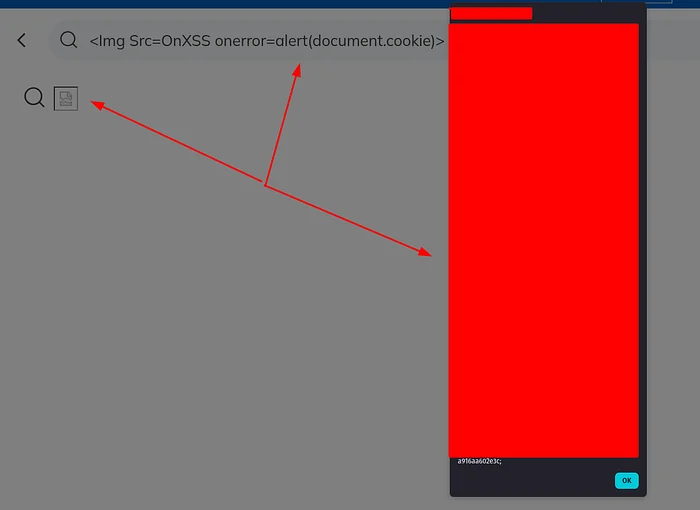
The screenshot shows the alert firing, confirming XSS.
Step 3: recognise the Self-XSS limitation
The researcher then asked who controls the payload, and the answer was: the researcher. The payload had to be typed into the search field manually, so a URL containing it could not simply be sent to a victim and expected to execute. The finding was closer to Self-XSS than to reflected XSS.
Step 4: try delivering the payload through the URL
The vulnerable value comes from the q parameter:
/search/?q=PAYLOAD
The working payload was placed directly into the URL:
This time the WAF detected and blocked the request, and the response was reduced to something like the following:
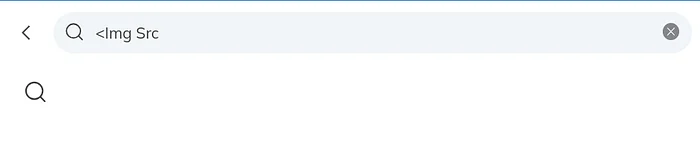
The screenshot shows the result of that URL: the payload did not arrive intact. The important conclusion is that the application could still render the payload; the filtering happened when the payload was delivered through the q parameter.
Step 5: change the delivery mechanism
Rather than trying to make the WAF accept the URL, the researcher asked whether the victim's browser could be made to send the request. Using Burp Suite, a normal search request was captured and the handling of the q parameter examined, and from there a simple CSRF proof of concept was generated. The report shows a small piece of the code:
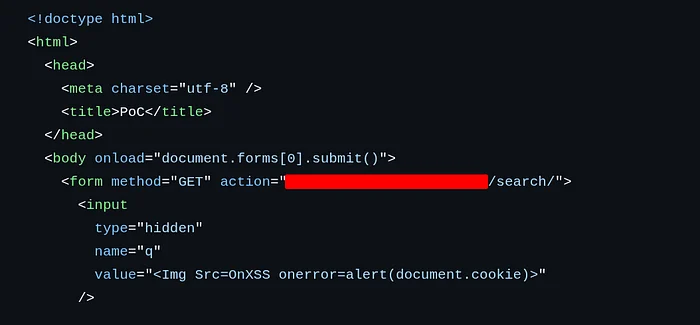
The screenshot shows the CSRF PoC page. The key difference is that the victim no longer types the payload: the attacker's page causes the victim's browser to request:
The vulnerable search functionality then receives the attacker-controlled value. The full chain is:
Attacker-controlled page -> CSRF request -> /search/?q=ATTACKER_PAYLOAD -> Search suggestion component -> JavaScript execution
One condition remains: the vulnerable rendering behaviour only appears in the responsive search interface, so the victim's browser must be in the affected UI state for the payload to reach the vulnerable rendering path. Once that condition is met, the payload executes without the victim entering anything.
The primitive therefore moved from:
Victim manually enters payload -> XSS executes
to:
Attacker-controlled request -> Victim's browser -> Vulnerable q parameter -> HTML-rendering search component -> JavaScript execution
Root cause
The search suggestion component renders user input as HTML instead of encoding it, while the same input appeared as plain text in the main results view. The two paths handle the same q value differently, which is why the payload was inert in one view and live in the other. The WAF blocked the payload when it was placed directly in the URL, while the application itself could still render the payload once it reached the suggestion component. The report does not describe the server-side code, so the exact filtering logic is not known; the split between the two rendering paths is the observable design flaw.
Impact
An attacker who can host a page and get a victim to load it can cause the victim's browser to issue the search request with an attacker-chosen q value, leading to JavaScript execution in the victim's session on the target origin. The report does not state what an attacker could do with that execution beyond running alert(document.cookie), and it does not quantify how many users browse in the affected responsive state. The victim must be in the responsive UI state (window width below 1280px) for the payload to reach the vulnerable rendering path.
Fix
The report recommends:
- Context-aware output encoding: all user input, especially inside search suggestions and dynamic UI components, must be strictly HTML-encoded.
- Robust CSRF defences: anti-CSRF tokens on state-changing and search-related parameters where applicable.
- Defence in depth: never rely solely on WAF filtering to block XSS, since alternate syntax and casing can bypass signature-based rules.
Variants to test
- Compare rendering paths across viewports. Submit a harmless HTML payload such as
<h1>test</h1>and resize the window through the responsive breakpoints. A positive result is the payload rendering as HTML in a suggestion box, popup or mobile layout while appearing as plain text elsewhere. - Probe casing and attribute variants when a WAF blocks the obvious payload. Try mixed-case tags and event handlers, as in
<Img Src=OnXSS onerror=alert(document.cookie)>. A positive result is the payload being accepted and the handler firing. - Test whether the search endpoint accepts cross-origin requests. Capture a normal search request and build a CSRF PoC that submits the same
qvalue from another origin. A positive result is the victim's browser issuing the request and the payload rendering without the victim typing anything. - Check whether the WAF treats the URL and the form submission differently. Send the same payload in the query string and in a cross-origin form post. A positive result is the payload reaching the vulnerable component without the victim typing anything.
Outcome
The full reproduction steps were documented, a PoC video recorded, and the report submitted to the Bugcrowd program team. It was marked as a duplicate of an existing submission.
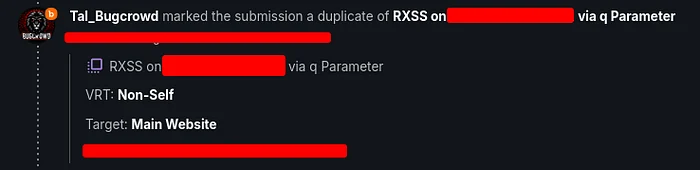
The screenshot shows the duplicate status on the report.
What happened, in plain words
A security researcher was hunting for bugs on a private bug bounty program at Bugcrowd. A bug bounty program is a deal between a company and independent testers: the company lets people try to break its systems, and pays for real problems that are reported responsibly. "Private" means only invited testers can take part. The target was an online shop, an e-commerce platform, which the report calls [REDACTED] to keep it anonymous.
The researcher found that the shop's search box behaved differently depending on how wide the browser window was. On a normal desktop-sized window, anything typed into the search box was shown back as harmless plain text. But when the window was made narrower, the search box turned into a small magnifying-glass icon, and clicking it opened a suggestion panel. In that panel, the same text was treated as real web page code. That difference is the seed of the whole story.
By trying different ways of writing a script-injection payload, the researcher got JavaScript to run in that suggestion panel. JavaScript is the programming language that web pages use to do things in your browser, and getting your own JavaScript to run on someone else's site is called cross-site scripting, or XSS. But there was a catch: the researcher had typed the payload in personally. A payload that only works when the victim types it themselves is called Self-XSS, and it is not very useful to an attacker, because why would a victim type an attack into a search box?
So the researcher worked out how to make the victim's browser send the search request instead, using a technique called CSRF (cross-site request forgery). That gave the Self-XSS an attacker-controlled delivery path, turning it into something closer to a real reflected XSS. Along the way, a Web Application Firewall (WAF, a filter that inspects incoming requests and blocks suspicious ones) blocked the payload when it arrived in a normal URL, so the researcher changed how the request was delivered.
The report was submitted with full reproduction steps and a proof-of-concept video, and it was marked as a duplicate: someone else had already reported the same bug. The report was a duplicate, but the write-up is a clear lesson in how a small rendering difference can become a real vulnerability.
The target and the feature
The target is an e-commerce platform on a private Bugcrowd program, referred to throughout as [REDACTED]. The feature in question is the site search. When you search on a website, your words usually travel in the address as a query string parameter: the part of the URL after the ?, made of name=value pairs. Here the parameter is called q, so a search for shoes looks roughly like /search/?q=shoes. The server takes the value of q and sends it back inside the results page, so you can see what you searched for.
On the desktop layout the search bar is shown directly. When the browser window is resized to a width smaller than 1280px, the desktop search bar is replaced by a magnifying glass icon; clicking that icon opens an interactive search interface with a preview box containing search suggestions. That responsive component, meaning a component that changes shape depending on screen size, is where the interesting behaviour lived.
Setup
The work was done during a bug bounty hunt on the private program. The tools were a browser, used to resize the viewport (the visible area of the page) and watch how things rendered, and Burp Suite, a tool that sits between your browser and the website so you can capture a request, look at it, and change it before it is sent. Burp was used to capture a normal search request and inspect how the application processed the q parameter. No accounts, roles or software versions are described in the report.
Finding it
The first probe was a plain HTML injection payload, <h1>test</h1>, typed into the search bar. HTML is the language web pages are written in; <h1> means "biggest heading". If a site lets your <h1> become a real heading, it is treating your input as code rather than as text. The resulting URL was:
Line by line: https://[REDACTED]/search/ is the search page on the target site. ? starts the query string. q= is the parameter name the site expects. %3Ch1%3Etest%3C%2Fh1%3E is the payload after the browser has encoded it: %3C is <, %3E is >, and %2F is /. Browsers do this automatically so that characters with special meaning in a URL do not break it. The site decodes it back to <h1>test</h1> when it processes the search.
The input was reflected directly onto the page but rendered safely as raw plain text, which looked like standard output encoding. Output encoding means converting special characters into harmless equivalents before putting them in the page, so < becomes < and the browser shows it as a character instead of starting a tag. Think of it as a museum putting a valuable letter behind glass: you can read it, but you cannot touch it.
The screenshot shows the result of that request: the payload appears on the page as literal text rather than as a heading.
What changed the picture was testing the same input across viewports. With the window resized below 1280px, the <h1>test</h1> payload was submitted again, and inside the search suggestion preview it was rendered as actual HTML rather than plain text. The same input, reaching a different rendering path, was no longer encoded. A rendering path is simply the piece of code that builds what you see; the desktop results page and the suggestion panel are two different builders, and only one of them put the letter behind glass.
Exploitation
Step 1: confirm HTML rendering in the suggestion component
Resize the browser window below 1280px, open the search interface via the magnifying glass icon, and submit <h1>test</h1>. The suggestion preview renders it as HTML. This confirms the sink but not yet script execution. A sink is the place in the code where data finally ends up, in this case the part of the page that inserts the suggestion text. Finding a sink that does not encode is the first half of an XSS; the second half is getting code, not just formatting, through it.
Step 2: find a payload that survives filtering
Common XSS payloads were blocked by the Web Application Firewall or filtered before reaching the vulnerable rendering point. A WAF is a filter in front of the site that looks at incoming requests and blocks ones matching known attack patterns, a bit like a bouncer with a list of banned faces. The researcher experimented with different HTML syntax, casing and event-handler structures until one payload got through:
<Img Src=OnXSS onerror=alert(document.cookie)>
Line by line: <Img starts an image tag, written with a capital I to differ from the lowercase form a signature might look for. Src=OnXSS sets the image source to the text OnXSS, which is not a real image address, so the browser will fail to load it. onerror=alert(document.cookie) is an event handler: code the browser runs when something goes wrong, here when the image fails. alert(document.cookie) opens a pop-up showing the site's cookies. A cookie is a small piece of data a site stores in your browser, often including a session identifier that proves you are logged in; if an attacker can read it, they may be able to act as you. The closing > ends the tag.
The payload was accepted and rendered by the search suggestion component, and the JavaScript executed. The mixed casing of the tag and the OnXSS value, which is not a valid image source, forces the error handler to fire and run alert(document.cookie).
The screenshot shows the alert firing, confirming XSS.
Step 3: recognise the Self-XSS limitation
The researcher then asked who controls the payload, and the answer was: the researcher. The payload had to be typed into the search field manually, so a URL containing it could not simply be sent to a victim and expected to execute. The finding was closer to Self-XSS than to reflected XSS. Reflected XSS means the malicious value travels in a link or request and is echoed back by the site into the victim's page, so the attacker only needs the victim to open the link. Self-XSS is the weaker cousin: the victim has to paste or type the attack themselves, which is like a burglar who needs you to unlock the door and hold it open.
Step 4: try delivering the payload through the URL
The vulnerable value comes from the q parameter:
/search/?q=PAYLOAD
Line by line: /search/ is the search page path, ? begins the query string, q= is the parameter name, and PAYLOAD is a placeholder for whatever value is supplied. This is the shape of every search request the site receives, whether typed by a person or sent by a script.
The working payload was placed directly into the URL:
Line by line: this is the same search URL, but the q value is now the full image payload, with the angle brackets and spaces left as they are rather than percent-encoded. The idea was to skip the search box entirely and hand the payload to the site through the address bar, which is what an attacker would need to do to send a link to someone else.
This time the WAF detected and blocked the request, and the response was reduced to something like the following:
The screenshot shows the result of that URL: the payload did not arrive intact. The important conclusion is that the application could still render the payload; the filtering happened when the payload was delivered through the q parameter. In other words, the site's own suggestion panel was still willing to turn the text into code, but the bouncer at the door refused to let the text in when it came in a URL.
Step 5: change the delivery mechanism
Rather than trying to make the WAF accept the URL, the researcher asked whether the victim's browser could be made to send the request. Using Burp Suite, a normal search request was captured and the handling of the q parameter examined, and from there a simple CSRF proof of concept was generated. CSRF, cross-site request forgery, is when an attacker's page makes the victim's browser send a request to another site, using the victim's existing browser context, without the victim intending it. A proof of concept (PoC) is a minimal demonstration that the attack works. The report shows a small piece of the code:
The screenshot shows the CSRF PoC page. The key difference is that the victim no longer types the payload: the attacker's page causes the victim's browser to request:
Line by line: this is the same search URL as before, with PAYLOAD standing in for the attacker-chosen value. The difference is not in the URL but in who sends it: the request now originates from a page the attacker controls, loaded in the victim's browser, so the victim never touches the search box.
The vulnerable search functionality then receives the attacker-controlled value. The full chain is:
Attacker-controlled page -> CSRF request -> /search/?q=ATTACKER_PAYLOAD -> Search suggestion component -> JavaScript execution
Read the chain left to right: the attacker hosts a page; that page makes the victim's browser send a search request; the request carries the attacker's payload in q; the site's suggestion component renders it as HTML; the browser runs the JavaScript. Each arrow is one hop, and the attack only works if every hop holds.
One condition remains: the vulnerable rendering behaviour only appears in the responsive search interface, so the victim's browser must be in the affected UI state for the payload to reach the vulnerable rendering path. In plain terms, the victim's window has to be narrower than 1280px, or the payload lands in the safe desktop path and does nothing. Once that condition is met, the payload executes without the victim entering anything.
The primitive therefore moved from:
Victim manually enters payload -> XSS executes
to:
Attacker-controlled request -> Victim's browser -> Vulnerable q parameter -> HTML-rendering search component -> JavaScript execution
A primitive, in security writing, is the basic building block of an attack: the smallest working piece, before it is turned into something practical. The first chain is a toy, because the victim does the work. The second chain is a real attack, because the attacker supplies the input and the victim only has to load a page.
Root cause
The search suggestion component renders user input as HTML instead of encoding it, while the same input appeared as plain text in the main results view. The two paths handle the same q value differently, which is why the payload was inert in one view and live in the other. The WAF blocked the payload when it was placed directly in the URL, while the application itself could still render the payload once it reached the suggestion component. The report does not describe the server-side code, so the exact filtering logic is not known; the split between the two rendering paths is the observable design flaw.
A useful comparison: two clerks in the same office receive the same letter. One reads it aloud as text; the other follows the instructions written inside it. The problem is not the letter, it is that one clerk was never told to treat letters as untrusted.
Impact
An attacker who can host a page and get a victim to load it can cause the victim's browser to issue the search request with an attacker-chosen q value, leading to JavaScript execution in the victim's session on the target origin. The origin is the combination of scheme, host and port that the browser uses to decide which site a page belongs to; code running on the target origin can read that site's data for the logged-in user. The report does not state what an attacker could do with that execution beyond running alert(document.cookie), and it does not quantify how many users browse in the affected responsive state. The victim must be in the responsive UI state (window width below 1280px) for the payload to reach the vulnerable rendering path.
Fix
The report recommends:
- Context-aware output encoding: all user input, especially inside search suggestions and dynamic UI components, must be strictly HTML-encoded. Context-aware means encoding suited to where the value lands: HTML text, an HTML attribute and a JavaScript string each need different treatment, the way a letter needs a different envelope depending on whether it goes by post, courier or email.
- Robust CSRF defences: anti-CSRF tokens on state-changing and search-related parameters where applicable. An anti-CSRF token is a random value the site gives your browser and expects back with a request, so a page from another site cannot forge that request because it does not know the value.
- Defence in depth: never rely solely on WAF filtering to block XSS, since alternate syntax and casing can bypass signature-based rules. Defence in depth means several independent layers, so that one failure does not open the door; a WAF is a lock on the front door, not a reason to leave the windows open.
Variants to test
- Compare rendering paths across viewports. Submit a harmless HTML payload such as
<h1>test</h1>and resize the window through the responsive breakpoints. A positive result is the payload rendering as HTML in a suggestion box, popup or mobile layout while appearing as plain text elsewhere. - Probe casing and attribute variants when a WAF blocks the obvious payload. Try mixed-case tags and event handlers, as in
<Img Src=OnXSS onerror=alert(document.cookie)>. A positive result is the payload being accepted and the handler firing. - Test whether the search endpoint accepts cross-origin requests. Capture a normal search request and build a CSRF PoC that submits the same
qvalue from another origin. A positive result is the victim's browser issuing the request and the payload rendering without the victim typing anything. - Check whether the WAF treats the URL and the form submission differently. Send the same payload in the query string and in a cross-origin form post. A positive result is the payload reaching the vulnerable component without the victim typing anything.
Outcome
The full reproduction steps were documented, a PoC video recorded, and the report submitted to the Bugcrowd program team. It was marked as a duplicate of an existing submission.
The screenshot shows the duplicate status on the report.
Glossary
- Bug bounty program: an arrangement where a company invites independent testers to look for security problems and pays for valid reports.
- Private program: a bug bounty program open only to invited testers.
- E-commerce platform: an online shop, the kind of website where products are listed and bought.
- Query string parameter: a name=value pair after the
?in a URL, used to pass data such as a search term to the site. qparameter: the specific parameter this site uses to carry the search term.- Viewport: the visible area of the browser window; resizing the window changes it.
- Responsive component: a part of a page that changes layout or behaviour depending on screen size.
- Rendering path: the piece of code that builds what you see; different views can use different paths for the same data.
- HTML: the language web pages are written in, made of tags such as
<h1>for a heading. - HTML injection: getting your own HTML tags into a page so they are treated as markup rather than text.
- Output encoding: converting special characters into harmless equivalents before placing them in a page.
- Sink: the place in code where data finally ends up, such as the part of a page that inserts text.
- JavaScript: the programming language browsers run to make pages interactive.
- XSS (cross-site scripting): getting attacker-supplied JavaScript to run in another user's browser on a site.
- Reflected XSS: XSS where the malicious value arrives in a request and is echoed straight back into the victim's page.
- Self-XSS: XSS that only works when the victim types or pastes the payload themselves, so it is not useful to an attacker on its own.
- Payload: the piece of input crafted to trigger a vulnerability.
- Event handler: code a browser runs in response to something happening, such as an image failing to load (
onerror). - Cookie: a small piece of data a site stores in your browser, often including a session identifier that proves you are logged in.
- Session: the logged-in state a site keeps for you across requests, usually tied to a cookie.
- WAF (Web Application Firewall): a filter in front of a site that inspects incoming requests and blocks ones matching known attack patterns.
- Signature-based rule: a WAF rule that matches known attack text or patterns, which can be evaded by changing syntax or casing.
- Burp Suite: a tool that sits between browser and website so requests can be captured, inspected and modified.
- CSRF (cross-site request forgery): an attack where an attacker's page makes the victim's browser send a request to another site without the victim intending it.
- Proof of concept (PoC): a minimal demonstration that an attack works.
- Primitive: the basic building block of an attack, the smallest working piece before it is turned into something practical.
- Origin: the combination of scheme, host and port that the browser uses to decide which site a page belongs to.
- Context-aware output encoding: encoding chosen to suit where a value lands (HTML text, attribute, JavaScript string), rather than one encoding for all cases.
- Anti-CSRF token: a random value a site gives your browser and expects back with a request, so another site cannot forge that request.
- Defence in depth: using several independent security layers so that one failure does not open the door.
- Duplicate: a report describing a bug that has already been reported, which usually earns no reward.




