How I was able to change password of any corporate user
A corporate login flow trusted a client-supplied flag to decide whether a password change was required, so an attacker could flip it and reach the new-password page for any known username. By also altering the response code, the attacker could complete the change and take over the account.

Hey guys before we start i want to give you all a little introduction about myself. My name is Chetan kashyap and I am a bug-bounty hunter from India.
The full write-up lives on its author's site
It belongs to its author, so we link to it rather than copy it. The other two tabs are our own rewrites, checked against it.
Context
The target was a web application in scope on a Yeswehack program, referred to here as redacted.com. The application was described as being like an e-commerce site where users could purchase or gift items. On the main application there was a small button labelled "corporate user login" which redirected to https://corporate.redacted.com/corporate/login. (the trailing dot is as written in the report). That corporate login page presented a username and password form. The report does not describe what the corporate login normally does beyond accepting credentials.
Setup
No special accounts or roles were created. The researcher used a custom recon script called subdig against a list of in-scope target URLs, and Burp Suite to intercept requests and responses. The only precondition was a valid corporate username in the form [redacted]. The report does not give tool versions or the exact program name.
Finding it
After testing the main application for OTP bypass, missing rate limiting on OTP and CSRF without success, the researcher noticed the corporate user login button and followed it to the corporate login page. The login form did not accept common usernames such as admin or test. To find a valid username, the researcher used a GitHub dork for redacted.com and, after looking at some code, obtained a username. From that, the researcher learned that usernames must be in the form [redacted].
Exploitation
Step 1: Capture the login request
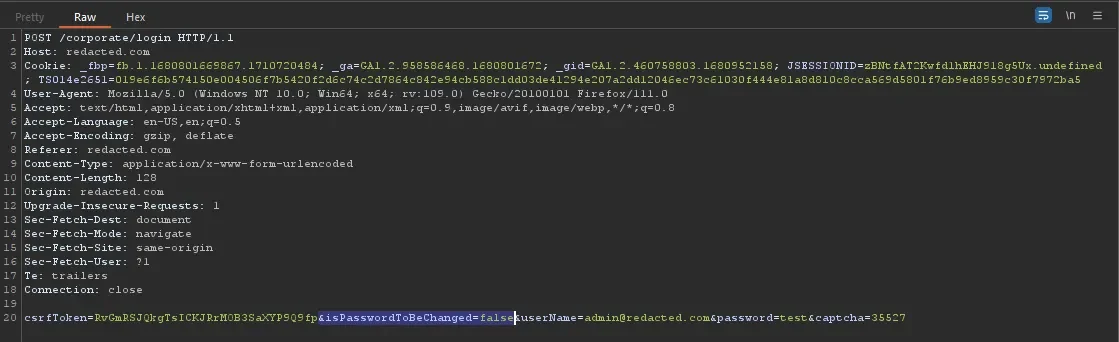
The researcher entered the discovered username and a random password such as userpassword, and intercepted the request in Burp. The report shows the intercepted request as an image rather than as text, so the exact request line, headers and body are not reproduced here.
Step 2: Flip the password-change flag
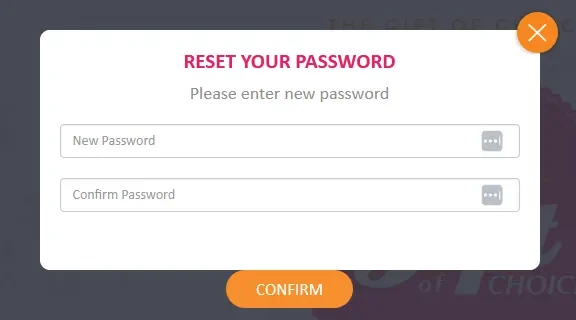
In the intercepted request the researcher changed the parameter &isPasswordToBeChanged=false to &isPasswordToBeChanged=true. After forwarding the modified request, the application responded with a page to enter and confirm a new password.
Step 3: Change the response to force success
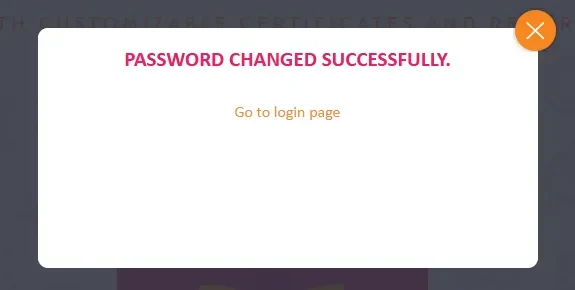
The researcher entered a new password and confirmed it, but the page returned an error saying that some error occurred and to contact the administrator. The researcher repeated the submission, this time intercepting the response in Burp, and changed a response key from 3 to 1. After that change the page said the password had been changed.
With those three steps the researcher could change the password of any corporate user, given only the username.
Root cause
The application presented the new-password form after the client-supplied parameter isPasswordToBeChanged was flipped, and the page reported success after a client-side response value was altered. The error on the first confirmation attempt came before the response was altered.
Impact
The researcher reported being able to take over any corporate user's account given only the username. The researcher describes this as an account takeover of any corporate user.
Fix
Based on the behaviour shown, the server should not rely on a client-supplied isPasswordToBeChanged parameter to decide whether to allow a password change, and it should not let the client's response determine whether the change succeeded. The password-change flow should be authorised server-side against the authenticated session, and the success response should reflect the actual result of the server-side operation.
Variants to test
- Look for boolean parameters such as
isPasswordToBeChanged,forceReset,skipVerificationorchangePasswordin login and reset requests, and try flipping them. A positive result is a new-password form appearing without prior verification. - Intercept responses to password-change or reset requests and alter status or result fields (for example numeric codes) to see whether the UI reports success. A positive result is a success message after a server-side error, which may indicate the client trusts the response.
- Try submitting a known username with a random password and observe whether the response differs from an unknown username. A positive result is a different error or flow for valid usernames, which can be used for enumeration.
- Search public code repositories for the target domain to find valid usernames or email formats, as the researcher did with a GitHub dork. A positive result is a username that the login form accepts.
What happened, in plain words
A security researcher was testing a company's website, one of several that a bug bounty program had invited people to test. A bug bounty program is an arrangement where a company says: if you find a security problem in our systems and report it responsibly, we may reward you. The researcher found a way to change the password of any employee account on a corporate login page, using nothing more than the employee's username. In security language this is called account takeover, often shortened to ATO: someone else gains control of your account, here by setting a new password so the real owner can no longer get in.
The trick did not involve guessing passwords or breaking encryption. It involved two small lies told to the web page: one in the request the browser sends to the server, and one in the response the server sends back. The page responded as if both changes had been accepted. This is a good first lesson in web security: a web page is not a single program, it is a conversation between your browser and a server, and anything your browser sends can be edited before it leaves your computer.
Below is the whole story, step by step, with every concept explained from scratch.
The setup
What the researcher was testing
The target was a web application in scope on a Yeswehack program, referred to here as redacted.com. Yeswehack is a platform where companies publish bug bounty programs. "In scope" means the company has explicitly said which websites and systems are fair game to test; testing anything outside that list is not allowed. The application was described as being like an e-commerce site where users could purchase or gift items. An e-commerce site is an online shop: you browse products, add them to a basket, pay, and sometimes send an item to someone else as a gift.
On the main application there was a small button labelled "corporate user login". Clicking it redirected to https://corporate.redacted.com/corporate/login. (the trailing dot is as written in the report). A redirect is when one web address automatically sends your browser to a different address, like a receptionist pointing you to the right office. The address corporate.redacted.com is a subdomain: a smaller section of the main redacted.com site, often used for a separate audience or a separate application. That corporate login page presented a username and password form. The report does not describe what the corporate login normally does beyond accepting credentials.
The tools
No special accounts or roles were created. The researcher used two things:
- A custom recon script called
subdig, run against a list of in-scope target URLs. Recon is short for reconnaissance: the information-gathering phase before attacking anything, like walking around a building to note the doors and windows. A script is a small program that automates a repetitive job. This one took a list of web addresses and checked which ones were alive and reachable. - Burp Suite, to intercept requests and responses. Burp Suite is a widely used security testing tool that sits between your browser and the website, like a postal worker who opens every letter going out and every letter coming back, and lets you rewrite them before delivery. A request is the message your browser sends to a server ("here is my username and password, please log me in"). A response is the message the server sends back ("wrong password" or "welcome"). Intercepting means catching that message mid-flight and pausing it so you can read and edit it.
The only precondition was a valid corporate username in the form [redacted]. The report does not give tool versions or the exact program name.
Finding it
Testing the main site first
After testing the main application for OTP bypass, missing rate limiting on OTP and CSRF without success, the researcher noticed the corporate user login button. Three terms to unpack:
- OTP stands for one-time password: the short code sent by text message or email that you type in as a second proof of identity. An OTP bypass is any way to get past that check without the real code.
- Rate limiting is a cap on how many times you can try something in a given period. Without it on an OTP, an attacker can try thousands of codes quickly until one works.
- CSRF stands for cross-site request forgery: tricking a logged-in user's browser into sending a request the user did not intend, for example by getting them to load a page that secretly submits a form on another site.
None of these worked, so the researcher followed the corporate login button to the corporate login page.
Finding a username
The login form did not accept common usernames such as admin or test. This is a sensible defence: if the login page says "no such user" for admin but "wrong password" for a real account, an attacker learns which accounts exist. That learning process is called username enumeration.
To find a valid username, the researcher used a GitHub dork for redacted.com and, after looking at some code, obtained a username. A dork is a search query crafted to surface information that was published but probably should not have been, such as code, configuration files or email addresses. GitHub is a public hosting site for source code, and people sometimes upload code that mentions their employer's domain, test accounts or internal email formats. From that, the researcher learned that usernames must be in the form [redacted]: the corporate login expects an email-style username, not a short nickname.
Exploitation
Exploitation means actually using the weakness to achieve something, as opposed to just suspecting it exists. It happened in three steps.
Step 1: Capture the login request
The researcher entered the discovered username and a random password such as userpassword, and intercepted the request in Burp. The point of this step is observation: before you can change anything, you need to see exactly what your browser sends. The report shows the intercepted request as an image rather than as text, so the exact request line, headers and body are not reproduced here.
The image shows the intercepted login request as it appeared in Burp, with the username and the random password in the request body. The text just before it in the report notes that the username must be in the form [redacted].
Step 2: Flip the password-change flag
In the intercepted request the researcher changed the parameter &isPasswordToBeChanged=false to &isPasswordToBeChanged=true. A parameter is a named piece of information sent along with a request, like a field on a paper form: the name is the label, the value is what you write in the box. Here the name is isPasswordToBeChanged and the value is either false or true. The leading & is just the separator that joins one parameter to the next in a URL or form body.
The name of this parameter reads like a question: "is the password to be changed?" The browser was answering "no". The researcher changed the answer to "yes". After forwarding the modified request, the application responded with a page to enter and confirm a new password.
The image shows the new-password form that appeared after the flag was flipped, with fields to enter and confirm a new password.
Why this matters: flipping the flag in the browser was enough to make the new-password form appear. A useful comparison is a hotel receptionist who asks the guest "are you allowed into room 402?" and lets them in when they say yes. The question should be answered by the hotel's records, not by the guest.
Step 3: Change the response to force success
The researcher entered a new password and confirmed it, but the page returned an error saying that some error occurred and to contact the administrator. The researcher repeated the submission, this time intercepting the response in Burp, and changed a response key from 3 to 1. After that change the page said the password had been changed.
The image shows the intercepted response with the numeric value changed from 3 to 1, after which the page displayed a success message.
Why this matters: the page's success message was driven by a number in the response, and the browser-side code treated one particular number as "success". By editing the response on its way back, the researcher made the page display success after an earlier error message. This is like a courier altering the delivery note so the shop thinks the parcel arrived, whether or not it did.
With those three steps the researcher could change the password of any corporate user, given only the username.
Root cause
Root cause means the underlying mistake, as opposed to the symptom you see. The application presented the new-password form after the client-supplied parameter isPasswordToBeChanged was flipped, and the page reported success after a client-side response value was altered. "Client-supplied" means it came from the browser, which the attacker controls. "Client-side" means the decision was made in the browser rather than on the server.
A session is the server's memory of "this browser is logged in as this user", usually kept alive by a cookie, which is a small piece of data the site stores in your browser and sends back with each request, like a wristband at an event. The error on the first confirmation attempt came before the response was altered.
Impact
Impact is what an attacker can actually do with the weakness. The researcher reported being able to take over any corporate user's account given only the username. The researcher describes this as an account takeover of any corporate user.
Fix
A fix is the change that closes the hole. Based on the behaviour shown, the server should not rely on a client-supplied isPasswordToBeChanged parameter to decide whether to allow a password change, and it should not let the client's response determine whether the change succeeded. The password-change flow should be authorised server-side against the authenticated session, and the success response should reflect the actual result of the server-side operation. In plain terms: the server, not the browser, should decide who may change a password and whether the change worked.
Variants to test
These are patterns worth trying on other sites, each with a sign that something may be wrong.
- Look for boolean parameters such as
isPasswordToBeChanged,forceReset,skipVerificationorchangePasswordin login and reset requests, and try flipping them. A boolean parameter is one that only takes true or false. A positive result is a new-password form appearing without prior verification. - Intercept responses to password-change or reset requests and alter status or result fields (for example numeric codes) to see whether the UI reports success. UI means user interface, the part you see and click. A positive result is a success message after a server-side error, which may indicate the client trusts the response.
- Try submitting a known username with a random password and observe whether the response differs from an unknown username. A positive result is a different error or flow for valid usernames, which can be used for enumeration.
- Search public code repositories for the target domain to find valid usernames or email formats, as the researcher did with a GitHub dork. A positive result is a username that the login form accepts.
Glossary
- Account takeover (ATO): gaining control of someone else's account, for example by changing their password so they can no longer log in.
- Authenticated session: the server's record that a particular browser is currently logged in as a particular user.
- Boolean parameter: a parameter that only accepts true or false.
- Bug bounty program: an arrangement where a company invites people to find and report security problems in its systems, sometimes for a reward.
- Burp Suite: a security testing tool that sits between browser and server and lets you read and edit requests and responses.
- Client-side: happening in the browser, on the user's machine, where the user can change things.
- Cookie: a small piece of data a site stores in your browser and receives back with later requests, often used to keep you logged in.
- CSRF (cross-site request forgery): tricking a logged-in user's browser into sending a request the user did not intend.
- Dork: a crafted search query designed to surface information that was published but probably should not have been.
- E-commerce site: an online shop where you browse, buy and sometimes gift items.
- Exploitation: actually using a weakness to achieve something, rather than just suspecting it exists.
- Fix: the change that closes a security hole.
- GitHub: a public hosting site for source code.
- Impact: what an attacker can actually do with a weakness.
- In scope: explicitly included in the list of systems a program allows to be tested.
- Intercept: catch a message between browser and server and pause it so it can be read and edited.
- OTP (one-time password): a short code sent by text or email as a second proof of identity.
- OTP bypass: any way to get past the one-time password check without the real code.
- Parameter: a named piece of information sent with a request, like a field on a form.
- Rate limiting: a cap on how many times something can be tried in a given period.
- Recon (reconnaissance): the information-gathering phase before testing, noting what exists and what is reachable.
- Redirect: when one web address automatically sends your browser to another.
- Request: the message your browser sends to a server.
- Response: the message a server sends back to your browser.
- Root cause: the underlying mistake that produces a visible symptom.
- Script: a small program that automates a repetitive job.
- Server-side: happening on the server, where the user cannot directly change things.
- Session: see authenticated session.
- Subdomain: a smaller section of a main domain, such as
corporate.redacted.comunderredacted.com. - UI (user interface): the part of a site you see and click.
- Username enumeration: learning which accounts exist by observing differences in responses.
- Yeswehack: a platform where companies publish bug bounty programs.



