How I was able to find 4 Cross-site scripting (XSS) on vulnerability disclosure program ?
Several login endpoints reflected user-supplied parameter values into the page without proper filtering, allowing script to run in the victim's browser. An attacker could craft a link that executes JavaScript in a victim's session, potentially reading cookies.

We got a large number of parameters , now in the final output we can see every reflected parameters and unfiltered values. And here comes the role of kxss tool
The full write-up lives on its author's site
It belongs to its author, so we link to it rather than copy it. The other two tabs are our own rewrites, checked against it.
Context
This is a write-up of four reflected cross-site scripting (XSS) findings on a vulnerability disclosure program. The researcher, Amr Mustafa (DrakenKun), refers to the target only as example.com, with one of the endpoints sitting on the subdomain cloud.example.com. The affected features are login pages: login.jsp on the main domain and login.html on the cloud subdomain. Both take a goto parameter. The report does not describe what the parameter normally does. The report does not describe what the parameter normally does beyond that, and it does not name the program or the organisation behind it.
The four findings are all reflected XSS. Three of them live in parameters named goto across three different endpoints, and the fourth is in a parameter named SPID discovered on one of those endpoints. All four were reported through Bugcrowd and, according to the author, were accepted as Unresolved.
Setup
The author lists four tools used during the process:
- ParamSpider, for collecting parameters from a domain.
- gau, for fetching known URLs for a domain from AlienVault's Open Threat Exchange, the Wayback Machine, Common Crawl and URLScan. The author notes it is inspired by Tomnomnom's waybackurls.
- kxss, for checking which reflected parameters come back unfiltered.
- Arjun, for discovering parameters on a single endpoint.
No versions are given for any of the tools. No account, role or authentication is mentioned: the testing appears to have been done against publicly reachable login pages. The only precondition the author states is that a parameter is interesting for XSS when its reflected value is unfiltered, meaning the characters [“ ‘ < > $ | ( ) : ; { } ]` survive into the response.
Finding it
The starting point was parameter discovery on the main domain with ParamSpider:
python3 paramaspider -d example.com -o parameters.txt
The output was a large list of parameters. The author then piped that list into kxss to see which of them were reflected and which of those reflections were unfiltered:
cat parameters.txt | kxss
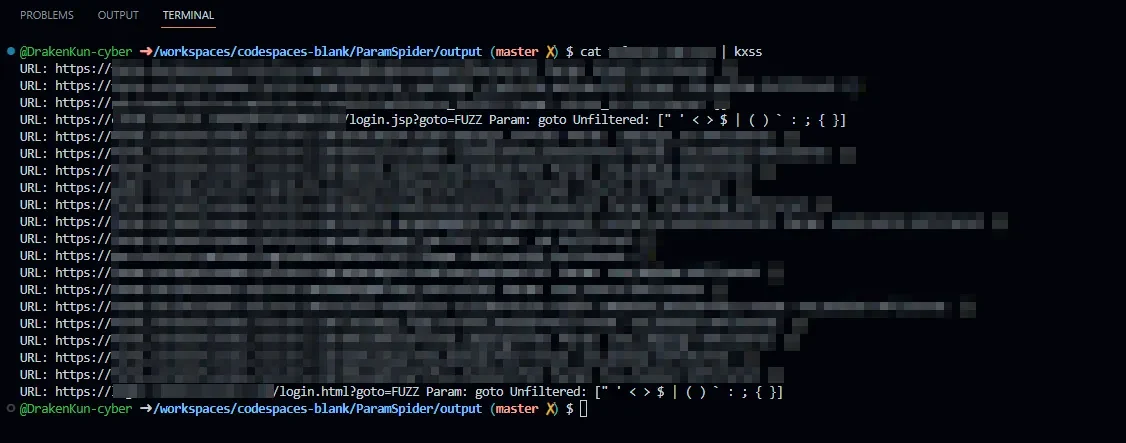
The screenshot shows the kxss output with some of the interesting parameters. From that output the author picked out two parameters both named goto, on two different endpoints:
example.com/login.jsp?goto=cloud.example.com/login.html?goto=
What made them stand out was that the reflected value kept the characters that matter for injecting markup and script, in line with the character set the author lists above. A reflection that escapes or strips those characters would not have been worth pursuing.
Exploitation
Step 1: the first two XSS in goto
The author visited the first URL and put a simple payload into the goto parameter:
"><img%20src=x%20onerror="alert(%27POC%20By%20DrakenKun%27)"
The payload closes the surrounding attribute with ">, then introduces an img element whose src is invalid, so the onerror handler fires and calls alert with the string POC By DrakenKun. The spaces are URL-encoded as %20 and the single quotes inside the alert as %27.
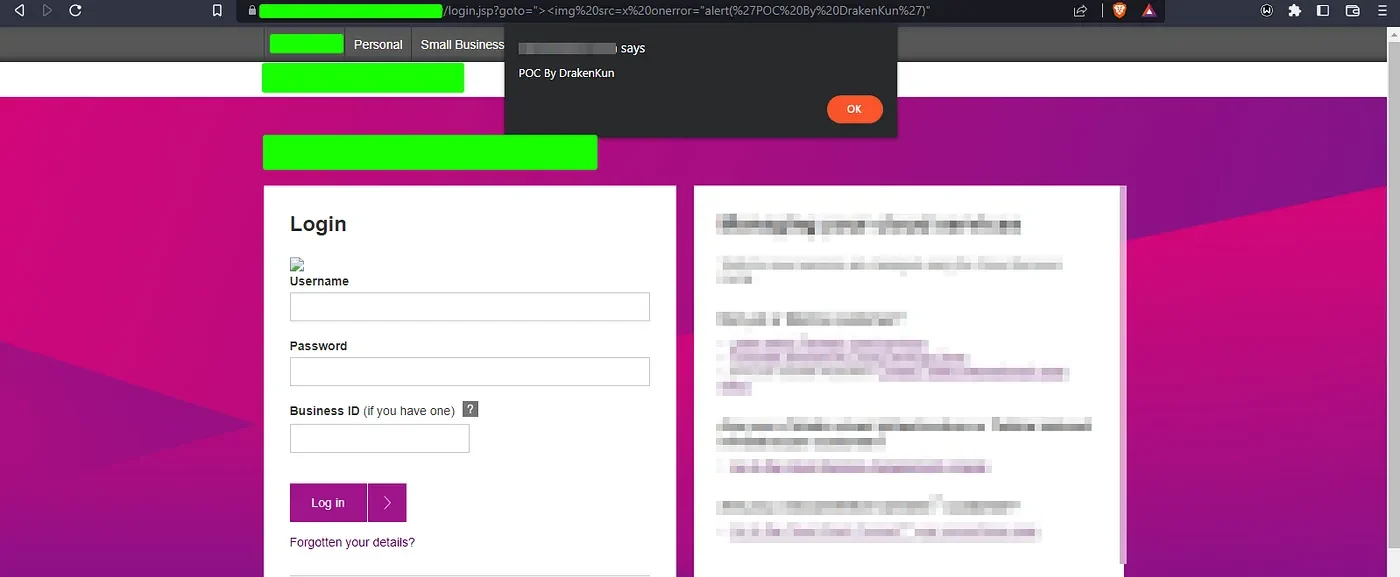
The screenshot shows the JavaScript alert firing, confirming execution in the browser. The same payload was then used on the second URL, cloud.example.com/login.html?goto=, and the author reports that it worked there too. Both were reported to Bugcrowd.
Step 2: hunting for more goto parameters with a Google dork
A day later the author reasoned that if two endpoints had a vulnerable parameter with the same name, there might be more. The first attempt was a Google dork:
site:"example.com" inurl:"?goto="
This returned some results, but none of them were vulnerable.
Step 3: the third XSS via gau
The next attempt used gau to pull known URLs for the domain and filter for the parameter name:
au example.com | grep "?goto="

The screenshot shows the new results from that pipeline. The author visited every result and injected JavaScript payloads. One of them executed, giving the third XSS. The payload used here was aimed at bypassing a WAF:
<%2FScriPt><sCripT+class%3DDrakenKun>document.write(document.cookie);<%2FsCriPt>
This payload mixes case in the tag names (ScriPt, sCripT) and uses %2F for the slashes and %3D for the equals sign, with + standing in for a space. The payload contains document.write(document.cookie), which would write the page's cookies into the page if it executed.


The second screenshot shows the source code of the page with the injected markup in place, which is the evidence that the payload landed unescaped in the HTML.
At this point there were three XSS findings, each on a different endpoint.
Step 4: the fourth XSS in SPID via Arjun
The author returned to the endpoints and looked for additional parameters to test, using Arjun against one of them:
arjun -u example.com/login.jsp
Arjun returned a set of parameters. The author injected into each one. One of them, named SPID, reflected both < and > into the source code, which suggested markup injection was possible. The same payload as in step 1 was used:
"><img%20src=x%20onerror="alert(%27POC%20By%20DrakenKun%27)"
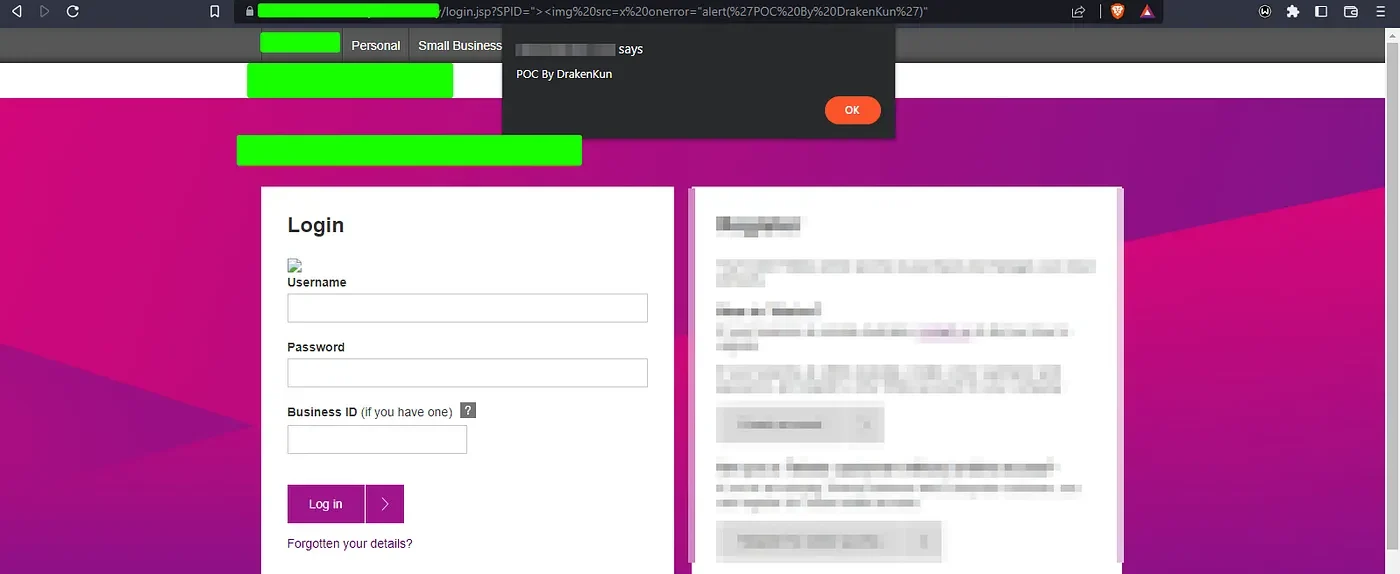
The screenshot shows the fourth XSS firing. The author tried the same approach on the other endpoints but found nothing there.
Step 5: reporting
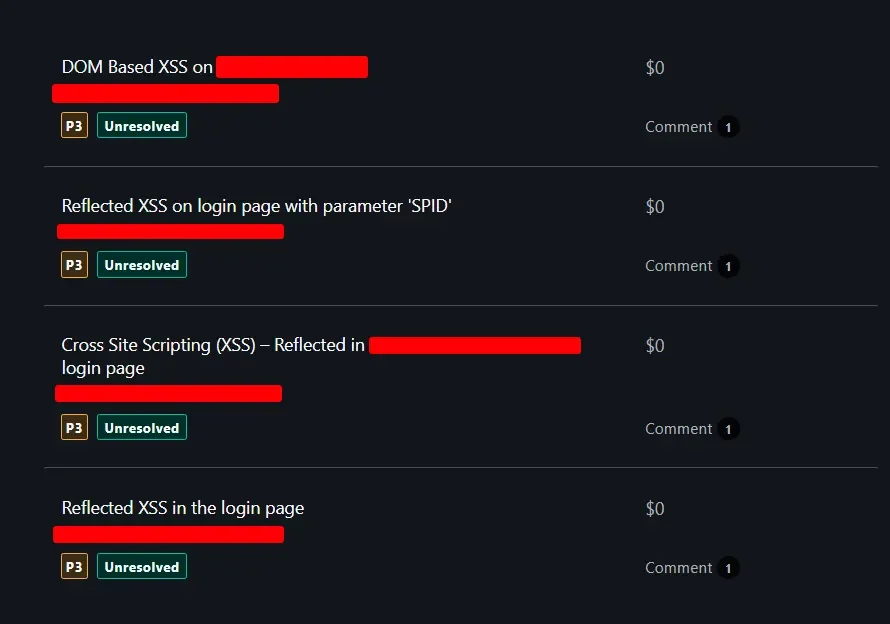
All four vulnerabilities were reported and, per the author, accepted as Unresolved.
Root cause
The report does not include any server-side code, so the exact mistake is not shown. What the evidence supports is that the goto parameter on the login pages, and the SPID parameter on login.jsp, are written into the HTML response without encoding the characters that let a value break out of its context. The "> at the start of the payload closing an attribute and the < and > reflected in the source for SPID both point to the value being placed inside an HTML attribute or element without output encoding. The author describes the third payload as a basic payload to bypass the WAF, using case variation and URL-encoded characters.
Impact
An attacker who can get a victim to open a crafted link to one of these login pages can run JavaScript in the victim's browser in the context of the affected domain. The third payload demonstrates reading document.cookie, so any cookie not protected by the HttpOnly flag would be exposed to the injected script. On a login page, that script could also be used to alter the page the victim sees, for example to capture credentials entered into the form. Exploitation depends on the victim following a link the attacker controls.
Fix
The appropriate fix is to apply context-aware output encoding to the goto and SPID values wherever they are written into the response, so that characters such as <, >, ", ' and & are rendered as text rather than parsed as markup. Where a value is only ever expected to be a URL, validating it against an allowlist of permitted destinations is an additional control. Relying on a WAF blocklist is not sufficient on its own, as the third payload shows.
Variants to test
- Run ParamSpider and kxss on other domains in scope and look for reflected parameters that keep the characters
[“ ‘ < > $ | ( ): ; { } ]`. A positive result is a parameter whose value comes back with those characters intact. - Take any parameter name that was vulnerable on one endpoint and search for the same name elsewhere with a dork such as
site:"example.com" inurl:"?goto=", then withgau example.com | grep "?goto=". A positive result is another endpoint where the same payload executes. - On endpoints that already reflect markup, run Arjun to enumerate hidden parameters and test each one for reflection of
<and>. A positive result is a parameter such asSPIDwhose value appears unescaped in the source. - Where a WAF blocks the obvious payload, try case variation in tag names and URL-encoded characters, as in the third payload above. A positive result is the script executing and, for example,
document.cookiebeing written into the page.
What happened, in plain words
A security researcher called Amr Mustafa, who goes by the name DrakenKun, found four bugs of the same kind on a website. The website is only ever called example.com in his write-up, and one of the pages sits on a subdomain, cloud.example.com. A subdomain is a smaller address that belongs to the main one, the way a named room belongs to a building.
The bugs are all cross-site scripting, usually shortened to XSS. To understand XSS, imagine a noticeboard where visitors can pin notes. If the board simply copies whatever a visitor writes onto the board, a visitor can write something that looks like an official instruction, and the next person will read it as if the site itself had written it. In a web page, the "note" is a value you put in the address bar, and the "official instruction" is JavaScript, the programming language that browsers run. When a site takes a value from the address and pastes it into the page without cleaning it, an attacker can paste JavaScript too, and the browser will run it as if the site had put it there. That is XSS.
The four bugs were on login pages: login.jsp on the main domain and login.html on the cloud subdomain. A login page is the form where you type your username and password. Both pages accepted a parameter called goto. A parameter is a named value you attach to the end of a web address, after a question mark, like ?colour=blue. The report does not say what the goto parameter normally does.
Three of the four bugs were in parameters named goto, on three different pages. The fourth was in a parameter named SPID, found on one of those same pages. All four were reported through Bugcrowd, a platform where researchers send bug reports to companies, and according to the author all four were accepted as Unresolved.
The tools he used
Before starting, the author lists four tools. A tool here is just a small program that automates a boring job.
- ParamSpider: collects parameter names from a domain. Think of it as a robot that walks around a website and writes down every "name=value" slot it sees.
- gau: fetches known URLs for a domain from AlienVault's Open Threat Exchange, the Wayback Machine, Common Crawl and URLScan. A URL is a web address. The Wayback Machine is an archive that keeps old copies of web pages, so it remembers addresses that may no longer be linked anywhere. The author notes that gau is inspired by Tomnomnom's waybackurls, another tool that does something similar.
- kxss: checks which parameters come back in the page unfiltered. "Reflected" means the value you sent appears again in the page the server sends back. "Unfiltered" means the server did not remove or change the dangerous characters.
- Arjun: discovers parameters on a single page. Many pages accept parameters that are never shown in any link, so Arjun tries common names to see which ones the page reacts to.
No versions are given for any of the tools. No account or login is mentioned, so the testing appears to have been done against login pages anyone can reach. The one rule the author states is that a parameter is interesting for XSS when its reflected value is unfiltered, meaning these characters survive into the response:
Why these characters? Because < and > are how HTML marks the start and end of a tag, and " and ' are how HTML marks the start and end of an attribute value. If those characters come back unchanged, a value can break out of where it was placed and become new markup. The other characters in the list are useful for building working JavaScript once you are inside a script context.
Step 1: finding parameters with ParamSpider
The starting point was parameter discovery on the main domain:
python3 paramaspider -d example.com -o parameters.txt
Line by line:
python3runs the Python interpreter, the program that executes Python code.paramaspideris the name of the script being run.-d example.comtells it which domain to look at.-o parameters.txttells it to write the results into a file calledparameters.txtinstead of only printing them on screen.
The output was a large list of parameter names. On its own, that list says nothing about whether any of them are dangerous, so the next step was to check each one.
Step 2: checking reflections with kxss
The author piped the list into kxss:
cat parameters.txt | kxss
Line by line:
cat parameters.txtprints the contents of the file to the screen.- The vertical bar
|is a pipe. It takes whatever the left command printed and hands it to the right command as input, like passing a note to the next person in a queue. kxssreads that list, sends each parameter to the site, and reports which ones come back reflected and unfiltered.
The screenshot shows the kxss output with some of the interesting parameters. From that output the author picked two parameters, both named goto, on two different pages:
example.com/login.jsp?goto=cloud.example.com/login.html?goto=
What made them stand out was that the reflected value kept the characters that matter for injecting markup and script, matching the character set above. A reflection that escapes or strips those characters would not have been worth pursuing.
Step 3: the first two XSS in goto
The author visited the first address and put a simple payload into the goto parameter:
"><img%20src=x%20onerror="alert(%27POC%20By%20DrakenKun%27)"
Line by line:
">closes the attribute the value was sitting inside. If the page had writtengoto="and then your value, this closes the quote and the tag, so whatever comes next is treated as new HTML rather than as part of the old value.<imgstarts an image element.src=xpoints the image at a file calledx, which does not exist. That is deliberate: the image is guaranteed to fail to load.onerror=attaches a handler that runs when the image fails to load.alert(...)is the browser's built-in pop-up box. It is the simplest proof that JavaScript is running.%20is the URL-encoded form of a space, and%27is the URL-encoded form of a single quote. Addresses cannot contain raw spaces, so they are written this way.
So the whole thing says: close the old attribute, add an image that will fail, and when it fails, pop up a box saying POC By DrakenKun. POC stands for proof of concept, meaning a small demonstration that the bug is real.
The screenshot shows the JavaScript alert firing, which confirms the code ran in the browser. The same payload was then used on the second address, cloud.example.com/login.html?goto=, and the author reports that it worked there too. Both were reported to Bugcrowd.
Step 4: hunting for more goto parameters with a Google dork
A day later the author reasoned: if two pages had a vulnerable parameter with the same name, there might be more. The first attempt was a Google dork, which is just a search query written with special operators to find specific things:
site:"example.com" inurl:"?goto="
Line by line:
site:"example.com"limits results to pages on that domain.inurl:"?goto="limits results to addresses that contain that exact text.
This returned some results, but none of them were vulnerable.
Step 5: the third XSS via gau
The next attempt used gau to pull known addresses for the domain and filter for the parameter name:
gau example.com | grep "?goto="
Line by line:
gau example.comasks gau for every known address it can find for that domain.- The pipe
|passes that list to the next command. grep "?goto="keeps only the lines that contain that text. grep is a search tool for text.
The screenshot shows the new results from that pipeline. The author visited every result and injected JavaScript payloads. One of them executed, giving the third XSS. The payload used here was aimed at getting past a WAF, a web application firewall. A WAF is a filter that sits in front of a website and blocks requests that look like attacks, a bit like a bouncer checking IDs at the door. Bouncers can be fooled by someone who looks slightly different from the description.
<%2FScriPt><sCripT+class%3DDrakenKun>document.write(document.cookie);<%2FsCriPt>
Line by line:
<%2FScriPt>is an opening tag written with mixed capitalisation (ScriPt) and%2Fin place of the slash.%2Fis the URL-encoded form of/. The mixed case and the encoding are there to slip past a filter that looks for the exact text</script>.<sCripT+class%3DDrakenKun>opens a script tag with a class attribute.+stands in for a space, and%3Dis the URL-encoded form of=. Again, the odd spelling is there to avoid matching a blocklist.document.write(document.cookie);is the actual JavaScript.document.cookieis the browser's way of reading the cookies for the current page. A cookie is a small piece of data a site stores in your browser, often used to remember that you are logged in.document.writeputs text into the page.<%2FsCriPt>closes the script tag, again with mixed case and an encoded slash.
The payload contains document.write(document.cookie), which would write the page's cookies into the page if it executed.
The second screenshot shows the source code of the page with the injected markup in place. "Source code" here means the raw HTML the browser received, before it drew anything on screen. Seeing the payload sitting there unescaped is the evidence that it landed as real markup.
At this point there were three XSS findings, each on a different page.
Step 6: the fourth XSS in SPID via Arjun
The author went back to the pages and looked for more parameters to test, using Arjun against one of them:
arjun -u example.com/login.jsp
Line by line:
arjunruns the tool.-u example.com/login.jsptells it which address to test.
Arjun returned a set of parameter names. The author injected into each one. One of them, named SPID, reflected both < and > into the source code, which suggested markup injection was possible. The same payload as in step 3 was used:
"><img%20src=x%20onerror="alert(%27POC%20By%20DrakenKun%27)"
The screenshot shows the fourth XSS firing. The author tried the same approach on the other pages but found nothing there.
Step 7: reporting
All four vulnerabilities were reported and, per the author, accepted as Unresolved.
Why the bugs exist
The report does not include any server-side code, so the exact mistake is not shown. What the evidence supports is that the goto parameter on the login pages, and the SPID parameter on login.jsp, are written into the HTML response without encoding the characters that let a value break out of its context. The "> at the start of the payload closing an attribute, and the < and > reflected in the source for SPID, both point to the value being placed inside an HTML attribute or element without output encoding. Output encoding means turning dangerous characters into harmless text before putting them in the page, so < becomes < and is displayed rather than parsed.
The author describes the third payload as a basic payload to bypass the WAF, using case variation and URL-encoded characters. That is consistent with a blocklist-style WAF rule, which blocks specific known strings, rather than proper contextual encoding, which handles every value safely regardless of what it contains. The report does not state which defence, if any, was present on the first two pages.
What an attacker could do
An attacker who can get a victim to open a crafted link to one of these login pages can run JavaScript in the victim's browser in the context of the affected domain. "In the context of the domain" means the browser treats the code as if the site itself had written it, so it can read what the site can read.
The third payload demonstrates reading document.cookie, so any cookie not protected by the HttpOnly flag would be exposed to the injected script. HttpOnly is a setting that tells the browser to hide a cookie from JavaScript, so even injected code cannot read it. On a login page, the script could also be used to alter the page the victim sees, for example to capture credentials typed into the form. Exploitation depends on the victim following a link the attacker controls.
How it should be fixed
The appropriate fix is to apply context-aware output encoding to the goto and SPID values wherever they are written into the response, so that characters such as <, >, ", ' and & are rendered as text rather than parsed as markup. "Context-aware" means the encoding matches where the value lands: inside an attribute, inside a script, or inside plain text each need different treatment. Where a value is only ever expected to be a URL, validating it against an allowlist of permitted destinations is an additional control. An allowlist is a list of things that are allowed, and everything else is refused, which is safer than a blocklist of things that are forbidden. Relying on a WAF blocklist is not sufficient on its own, as the third payload shows.
Things you could try yourself
- Run ParamSpider and kxss on other domains in scope and look for reflected parameters that keep the characters
[“ ‘ < > $ | ( ): ; { } ]`. A positive result is a parameter whose value comes back with those characters intact. - Take any parameter name that was vulnerable on one page and search for the same name elsewhere with a dork such as
site:"example.com" inurl:"?goto=", then withgau example.com | grep "?goto=". A positive result is another page where the same payload executes. - On pages that already reflect markup, run Arjun to enumerate hidden parameters and test each one for reflection of
<and>. A positive result is a parameter such asSPIDwhose value appears unescaped in the source. - Where a WAF blocks the obvious payload, try case variation in tag names and URL-encoded characters, as in the third payload above. A positive result is the script executing and, for example,
document.cookiebeing written into the page.
Glossary
- XSS (cross-site scripting): a bug where a site puts a value from the user into a page without cleaning it, so an attacker can make the browser run their JavaScript.
- Reflected: a value you sent comes back in the page the server returns.
- Unfiltered: the server did not remove or change the dangerous characters in that value.
- Parameter: a named value attached to a web address after a question mark, like
?colour=blue. - Subdomain: a smaller address that belongs to a main domain, such as
cloud.example.comunderexample.com. - URL: a web address.
- Domain: the main part of a web address, such as
example.com. - Endpoint: a specific page or address on a site that accepts requests.
- Payload: the piece of text an attacker sends to try to trigger a bug.
- JavaScript: the programming language that browsers run to make pages interactive.
- HTML: the language that describes the structure of a web page, using tags and attributes.
- Tag: a piece of HTML that marks an element, such as
<img>. - Attribute: a setting inside an HTML tag, such as
srcoronerror. alert(): the browser's built-in pop-up box, often used to prove JavaScript is running.onerror: an HTML attribute that runs code when an image fails to load.- URL encoding: writing characters in a safe form for addresses, such as
%20for a space and%27for a single quote. - Pipe (
|): a shell symbol that passes the output of one command to the next as input. - grep: a command-line tool that keeps only the lines of text matching a pattern.
- WAF (web application firewall): a filter in front of a website that blocks requests that look like attacks.
- Blocklist: a list of things that are forbidden; anything not on the list is allowed.
- Allowlist: a list of things that are allowed; everything else is refused.
- Cookie: a small piece of data a site stores in your browser, often used to remember that you are logged in.
document.cookie: the browser's way of reading the cookies for the current page from JavaScript.- HttpOnly: a cookie setting that hides the cookie from JavaScript.
- Output encoding: turning dangerous characters into harmless text before putting them in a page, so they are displayed rather than parsed.
- Context-aware encoding: output encoding that matches where the value lands, such as inside an attribute or inside a script.
- Source code: here, the raw HTML the browser received before drawing anything on screen.
- Proof of concept (POC): a small demonstration that a bug is real.
- Google dork: a search query written with special operators to find specific pages.
- Wayback Machine: an archive that keeps old copies of web pages.
- Bugcrowd: a platform where researchers send bug reports to companies.
- Unresolved: the status the author says the reports were given on the platform.




