How I was able to uniquely bypass authentication while web pentesting?
The login API accepted a client-supplied auth_type parameter, so changing it from email to Facebook tricked the server into treating the request as a successful social login. An attacker could then log in as any user, including the admin, by supplying that user's email address.

medium.com
Published on medium.com
This article is based on a new finding which I was able to discover while doing pentest for a private company. Since I am not allowed to disclose information about the company, let’s assume it as redacted.com.
The full write-up lives on its author's site
It belongs to its author, so we link to it rather than copy it. The other two tabs are our own rewrites, checked against it.
Context
This write-up describes an authentication bypass found during a penetration test for a private company, referred to here as redacted.com. The target was a web application that offered three login options: Facebook Login, Google Login, and Email and Password Login. The feature under test was the login flow itself, including the API endpoints that handled the different authentication types.
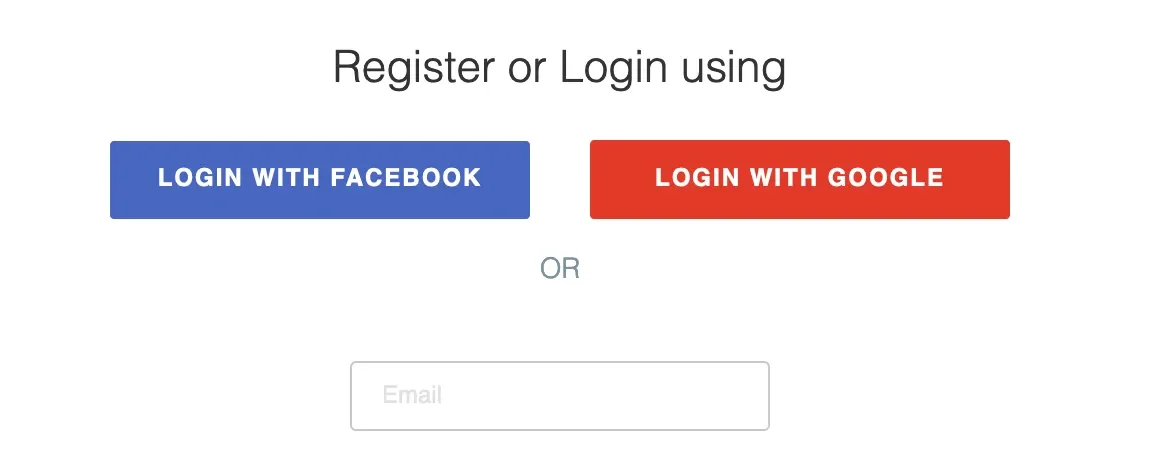
The image shows the login page with the three options.
Setup
The researcher was performing a penetration test for a private company and was not allowed to disclose its identity, so the domain is referred to as redacted.com. No specific tools, versions, or accounts are mentioned beyond the use of brute-forcing and the ability to send requests to the API. The researcher had access to the login page and later discovered an admin login page on a subdomain. The researcher also had the email address of the company owner, which was used in the final step.
Finding it
The researcher first attempted to steal OAuth tokens or brute-force account credentials on the Facebook, Google, and Email login options, but found them to be secured.
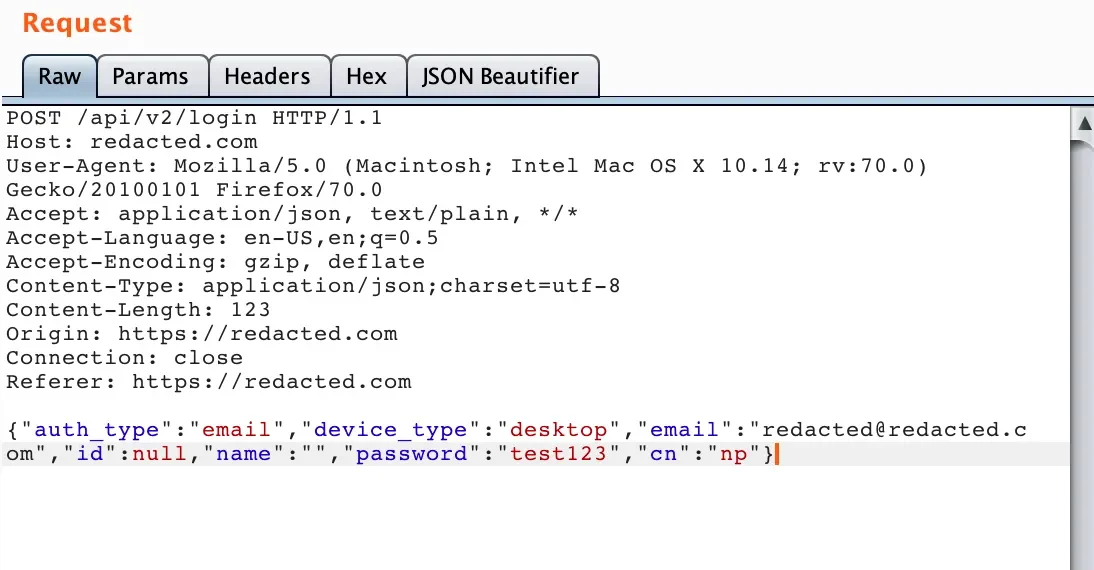
While brute-forcing, the researcher received an unusual response from the API, shown in the picture below.

The response suggested trying to log in via Facebook. This prompted the researcher to think about how to bypass the authentication. The key observation was that the API response indicated a different authentication method, which could be manipulated.
Exploitation
Step 1: Manipulating the auth_type parameter
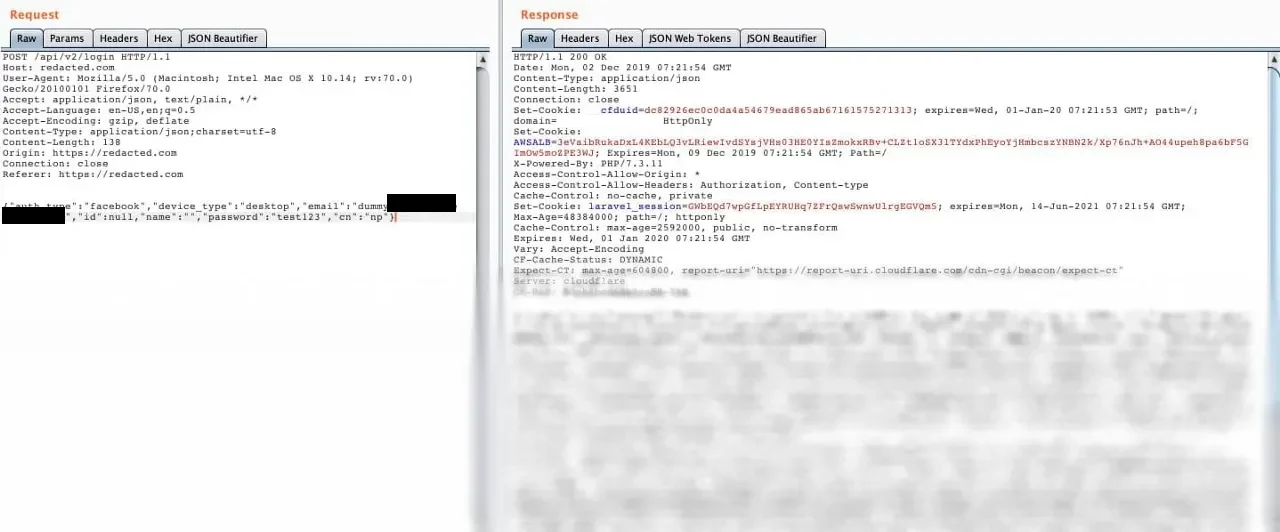
The researcher changed the auth_type parameter from email to facebook. The response had said “Try logging in via Facebook”, so the researcher changed auth_type to facebook to fool the server into thinking the login was via Facebook. The result was successful: the researcher was able to take over all user accounts from redacted.com.
Step 2: Discovering the admin login page
Looking further, the researcher found a subdomain where the admin login page was discovered. Since there was no login with email, only two options were available: Login with Facebook and Login with Google.
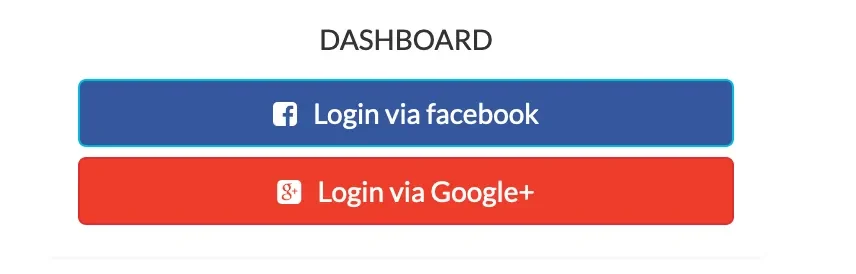
The image shows the admin login dashboard with the two options.
Step 3: Logging in via Google and observing the response
The researcher tried to log in via their Google account and received the following response:
{"status":true,"message":"Successful","redirect_url":"https:\/\/admin.Redacted.com\/dashboard\/days\/2","response":{"id":2052326,"email":"[redacted]","name":"testet test","slug":"testetst"}}
The message indicated success, but the researcher was not able to access the admin dashboard. After the success message, the researcher was redirected to the following URL:
https://admin.redacted.com/?admin=false&role=
This gave the following error:
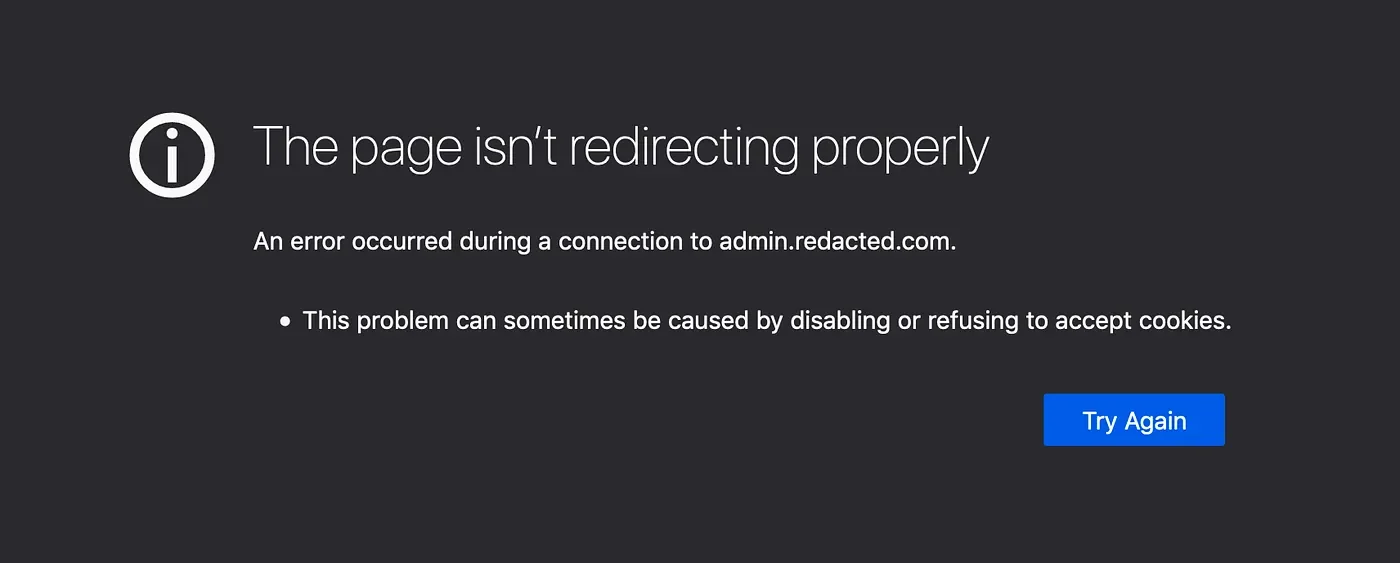
The researcher changed the URL parameter admin=false to true, but still could not bypass the admin panel.
Step 4: Analysing the admin login request
The admin login request appeared as shown in the picture below.
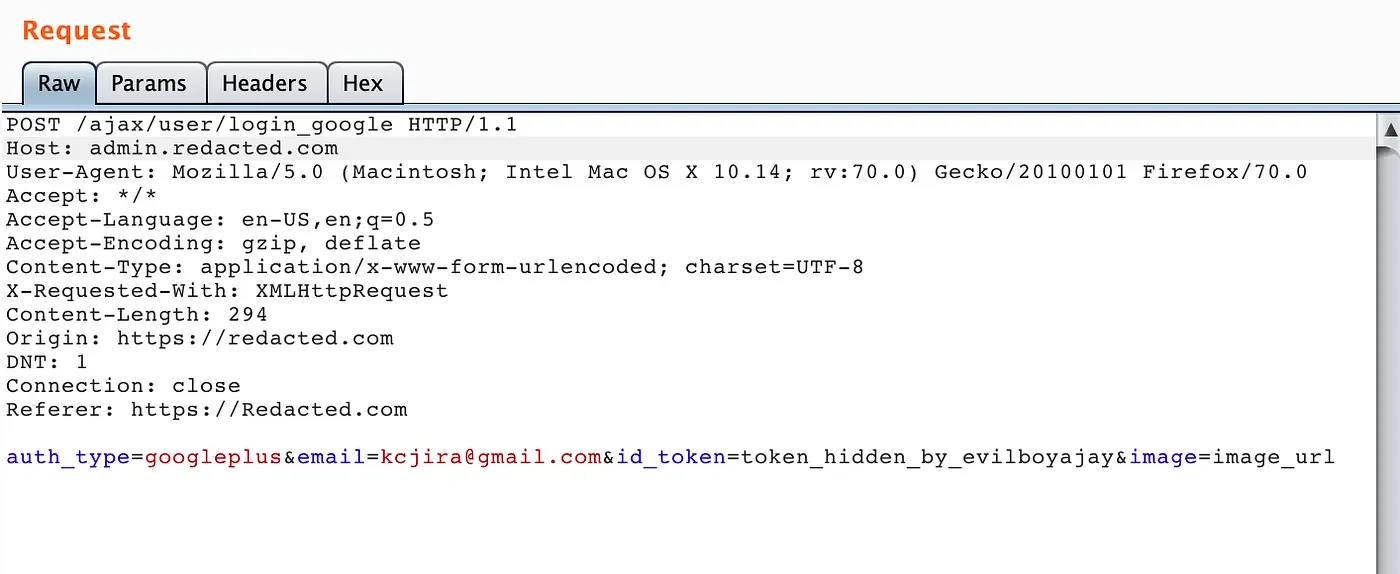
The image shows the login request, but the exact request is not included in the text.
Step 5: Changing the email to other emails
Every time the researcher changed the email to other emails to log in from Google, they got a success message and were able to get the name and slug of the user as above. Each time the researcher changed the email to another address, they got a success message and the name and slug of the user.
Step 6: Using the admin's email
The researcher then tried changing the email to the original email of the admin. Since the researcher already had the email of the owner of the company, they decided to check with that email. When they did that, they were surprised by the response: they got a success message and confirmed that the admin exists with that email. The researcher sent the AJAX request to /ajax/user/login_google with the admin's email only, followed the redirection, and was able to log in to the admin account successfully.
Root cause
The report does not state a root cause. The behaviour suggests the server trusted values supplied by the client. By changing auth_type from email to facebook, the researcher was able to bypass the authentication check. Similarly, the admin login endpoint /ajax/user/login_google accepted an email address and returned a success message and user details without verifying that the requester actually authenticated with Google as that email. The report does not describe how the server handled the OAuth token or session.
Impact
An attacker could take over any user account, including the admin account, by manipulating the auth_type parameter or by sending a request to the Google login endpoint with an arbitrary email address. This could lead to account takeover, including the admin account. The researcher demonstrated taking over all user accounts and logging in as the admin. The conditions required are that the attacker knows the victim's email address and that the vulnerable endpoints are accessible.
Fix
To prevent this, the server should properly validate the authentication type and ensure that the OAuth token or session is verified before issuing a session. The auth_type parameter should not be trusted from the client, and the server should verify the identity provider's response. Additionally, the Google login endpoint should validate the OAuth token and match it to the email address before returning user information or granting access.
Variants to test
- Test other authentication type parameters (e.g.
auth_type=google,auth_type=facebook) on similar login endpoints. A positive result is a successful login or account takeover without proper credentials. - Test the
/ajax/user/login_googleendpoint with different email addresses to see if user information is returned. A positive result is receiving a success message and user details for an email you do not control. - Try changing URL parameters like
admin=falsetoadmin=trueorrole=torole=adminto see if privilege escalation is possible. A positive result is access to admin functionality. - Test if the server accepts arbitrary email addresses in OAuth flows without validating the token. A positive result is being able to log in as any user by supplying their email.
What happened, in plain words
A security researcher was hired to test a private company's website. The company is called redacted.com here because the researcher was not allowed to name it. The website let people sign in in three ways: with Facebook, with Google, or with an email address and password.
The researcher tried the obvious attacks first, such as stealing the tokens that Facebook and Google hand out after a login, or guessing passwords over and over. Those routes were locked down. But while guessing passwords, the server sent back an odd reply that hinted at a different way in. By changing one small value in the request, the researcher could pretend to have logged in with Facebook and take over user accounts. Later the researcher found an admin login page on a subdomain and found that the Google login endpoint returned a success message and user details for any email address supplied to it, including the company owner's. That gave access to the admin account.
This article walks through the same steps slowly, explaining each idea as it appears.
The setup
The researcher was doing a penetration test. That is an authorised attack on a system, done with the owner's permission, to find weaknesses before criminals do. The company's name is hidden, so the site is called redacted.com throughout.
The feature being tested was the login flow: the pages and behind-the-scenes requests that decide who you are when you sign in. The login page offered three choices:
- Facebook Login
- Google Login
- Email and Password Login
The picture shows the login page with those three buttons.
A quick word on the pieces involved, because they come up constantly:
- API: the part of a website that answers requests from the page with data rather than pretty HTML. Think of a restaurant: the page you see is the dining room, the API is the kitchen door where orders go in and plates come out. When you click a login button, your browser sends a request to the API and gets a short answer back, often in a format called JSON (plain text structured with curly brackets and quotes).
- Endpoint: one specific address inside that API, like a particular counter in the kitchen.
/ajax/user/login_googleis an endpoint. - Token: a short string of characters that proves you logged in, a bit like the wristband you get at a festival. You show it instead of your password on every later request. An OAuth token is the wristband that Facebook or Google gives the website after you approve the login there, so the website never sees your Facebook or Google password.
- Brute-forcing: trying many passwords or values in a row, automatically, hoping one works. Like trying every key on a big keyring.
- Subdomain: a smaller address under the main one, such as
admin.redacted.comunderredacted.com. Like a named department inside the same building.
Finding it
The researcher first tried to steal OAuth tokens or brute-force the account credentials on the Facebook, Google and email logins. All three held up.
While brute-forcing, the researcher got a very unusual response from the API, shown in the picture below.
The reply told the researcher to try logging in via Facebook. That is a strange thing for a server to say when you are attacking the email login. The reply hinted that the login method was chosen by a value in the request.
That value is a parameter: a named field in a request, like a box on a form. If the server trusts the box without checking who filled it in, you can write anything you like in it.
Exploitation
Step 1: Changing the auth_type parameter
The researcher changed auth_type from email to facebook. The reply had said “Try logging in via Facebook”, so the researcher set auth_type to facebook to fool the server into thinking the login came through Facebook. It worked: the researcher was able to take over all user accounts on redacted.com.
The report does not explain why changing auth_type worked. Since the value comes from the browser, the attacker simply picks the easy path. It is like a form that asks “did a doctor sign this?” and accepts the answer “yes” written by the patient.
Step 2: Finding the admin login page
Looking further, the researcher found a subdomain with an admin login page. There was no email login there, only two options:
- Login with Facebook
- Login with Google
The picture shows the admin login dashboard with those two buttons. An admin account is the one that runs the site, so getting into it is the biggest prize.
Step 3: Logging in with Google and reading the reply
The researcher tried to log in with their own Google account and got this reply:
{"status":true,"message":"Successful","redirect_url":"https:\/\/admin.Redacted.com\/dashboard\/days\/2","response":{"id":2052326,"email":"[redacted]","name":"testet test","slug":"testetst"}}
Line by line:
- The whole thing is one JSON object, a set of labelled values in curly brackets.
"status":truesays the operation succeeded."message":"Successful"repeats that in words."redirect_url":"https:\/\/admin.Redacted.com\/dashboard\/days\/2"is where the browser is told to go next. The backslashes are just escaping the forward slashes; the real address ishttps://admin.Redacted.com/dashboard/days/2."response":{...}holds details about the user: anidnumber, anemail, anameand aslug(a short text identifier for the user).
The message said success, but the researcher still could not open the admin dashboard. After the success message the browser was sent to this address:
https://admin.redacted.com/?admin=false&role=
This is a URL with two parameters after the question mark. admin=false says “this person is not an admin”. role= is empty, so no role is given. The URL contained two parameters after the question mark.
That produced the following error:
The researcher changed admin=false to true in the URL, but still could not get into the admin panel. So the URL values alone were not enough; something else was deciding access.
Step 4: Looking at the admin login request
The admin login request looked like this:
The picture shows the request as it was sent. A request is what your browser sends to the server: an address, a method (such as GET to fetch or POST to submit), some headers (extra labels, including cookies) and sometimes a body with data. The researcher was inspecting these requests to see exactly what the page sent when the Google button was used.
Step 5: Trying other email addresses
Each time the researcher changed the email to a different address for the Google login, the reply was a success message with that user's name and slug. Each time the researcher changed the email, the reply was a success message with that user's name and slug.
Step 6: Using the admin's email
The researcher then tried the admin's real email address. The researcher already had the email of the company owner, so they checked with that one. The reply was a success message, confirming that an admin account existed with that email. The researcher sent the AJAX request to /ajax/user/login_google with the admin's email only, followed the redirect, and was logged in to the admin account.
AJAX simply means a request sent by the page in the background, without reloading the whole page. The endpoint /ajax/user/login_google is the Google login handler. The researcher sent the AJAX request to /ajax/user/login_google with the admin's email only and was logged in to the admin account. A session is the server's memory of “this browser is logged in as this user”, usually kept alive by a cookie, a small piece of text the browser stores and sends back on every request. Getting a session for someone else's account is called account takeover.
Why it worked
The report does not explain why the bypass worked. The admin endpoint /ajax/user/login_google accepted an email address and returned success and user details without verifying that the requester had really authenticated with Google as that address.
A useful comparison: a bouncer who lets you in if you say a name, without checking your ID, is not checking anything at all. The name is just a claim.
What an attacker could do
Someone could take over any user account, including the admin account, by changing the auth_type parameter or by sending a request to the Google login endpoint with any email address. That means account takeover, including the admin account. The researcher demonstrated taking over all user accounts and logging in as the admin. The only conditions are knowing the victim's email address and being able to reach the vulnerable endpoints.
How to fix it
In general, the server should not trust auth_type from the browser; it should verify the identity provider's response itself. The Google login endpoint should validate the OAuth token and match it to the email address before returning user information or granting access.
Other things to test
- Try other values for the authentication type parameter, such as
auth_type=googleorauth_type=facebook, on similar login endpoints. A positive result is a successful login or account takeover without proper credentials. - Try the
/ajax/user/login_googleendpoint with different email addresses to see whether user information comes back. A positive result is a success message and user details for an email you do not control. - Try changing URL parameters such as
admin=falsetoadmin=true, orrole=torole=admin, to see whether privilege escalation is possible. A positive result is access to admin functionality. - Test whether the server accepts arbitrary email addresses in OAuth flows without validating the token. A positive result is being able to log in as any user by supplying their email.
Glossary
- API: the part of a website that answers requests with data rather than pages.
- Endpoint: one specific address inside an API that handles one kind of request.
- Parameter: a named value sent in a request, such as
auth_typeoradmin. - JSON: a plain-text format for structured data, using curly brackets, quotes and colons.
- Token: a string that proves a login, shown instead of a password on later requests.
- OAuth token: a token issued by a provider such as Facebook or Google after you approve a login there.
- Cookie: a small piece of text a browser stores and sends back with requests, often used to keep you logged in.
- Session: the server's record that a particular browser is logged in as a particular user.
- Brute-forcing: trying many passwords or values automatically until one works.
- Penetration test: an authorised attack on a system, done with permission, to find weaknesses.
- Subdomain: a smaller address under a main domain, such as
admin.redacted.com. - AJAX: a request sent by a page in the background, without reloading the whole page.
- Account takeover: gaining control of someone else's account.
- Privilege escalation: gaining more rights than you should have, such as normal user to admin.
- Authentication bypass: getting past a login check without the correct credentials.



