How signing up for an account with an @company.com email can have unexpected results
The site allowed users to sign up with an email address at any domain without verifying ownership. By changing the account email to a controlled address before submitting a join request, then changing it back to the organisation's domain before clicking the verification link, an attacker could join any organisation.

Something so simple can have unexpected results. It was a late evening and I was fed up of looking at Burp so I decided to just try some things manually on random programs.
The full write-up lives on its author's site
It belongs to its author, so we link to it rather than copy it. The other two tabs are our own rewrites, checked against it.
Context
The target was a site that worked much like an appstore. Users could sign up, claim membership of an organisation, or create their own organisation. Creating an organisation required a valid phone number, and whoever created it first became the root owner. When a new user tried to join an organisation, a unique code was sent to the organisation's phone number, and that code was then used as the 2FA code. In other words, the root owner had the final say on who could join. The researcher describes this as pretty straightforward.
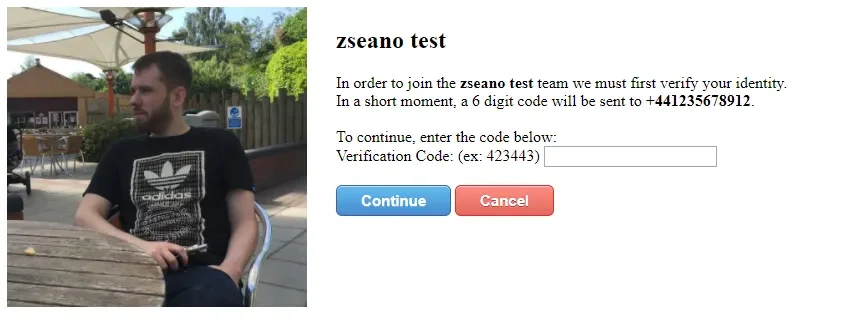
The screenshot above shows the normal join flow, where the code goes to the organisation's phone number. The researcher's note under it is that they did not fancy social engineering a phone company to take over that mobile number, with the tip: don't rely on 2FA via SMS.
Setup
The work was done manually rather than through Burp. The researcher was tired of looking at Burp one late evening and decided to try things by hand on random programs. No specific tooling, versions or special accounts are described beyond a normal user account on the site.
The precondition that matters is that the site did not require users to verify their account or email address at signup. That single design choice is what the whole attack rests on.
Finding it
The idea came from a random thought: since the site does not require us to verify our account or email, what would happen if the account email is *@organisation.com? That is, register with an email address on the target organisation's own domain, which the attacker does not own and cannot read.
Exploitation
Step 1: sign up with an organisation-domain email
The researcher created an account using an address of the form [redacted], then clicked "Claim" on the organisation. Instead of the usual phone-code flow, a different screen appeared.
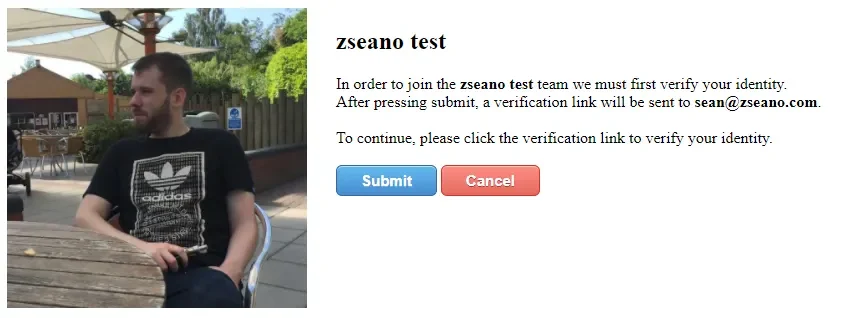
This screen asked the user to press "submit", check their email, and then verify ownership of that email, presumably by clicking a link. The problem is obvious: the researcher does not own [redacted], so they cannot click the link that would arrive there.

Step 2: change the account email before submitting
Staring at the screen, the researcher wondered what would happen if the account email were changed to one they control before pressing the submit button. They did exactly that: changed the email in account settings, left the "Submit" button waiting, and pressed it.

Step 3: receive and follow the verification email
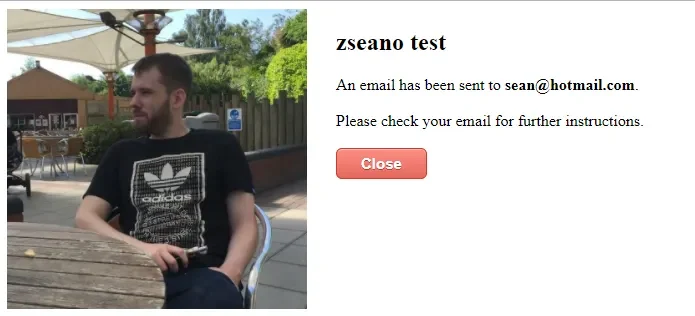
The phone lit up with an email: "Please verify your identity and confirm your membership of zseano test by clicking the following link". So the verification message went to the address the researcher controlled, even though the claim was for the organisation.
Clicking the link did not work straight away. It returned an error: "Sorry, this email cannot signup with this organisation!".
Step 4: change the email back, then click the link
The realisation was that the account email had to be changed back to [redacted] before clicking the link. With the email restored, the link worked.
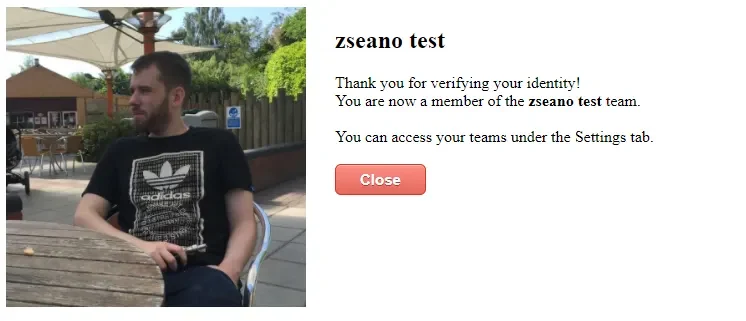
We're in. At that point the researcher notes the process could be automated to join any organisation they wished. There is no screenshot of what is visible once inside, because there was too much private information to hide and not much else to show.
The whole sequence, as the researcher summarised it:
- Signup using
*@organisation.comemail. - Click "Claim" on organisation.
- Change email to one we control and press submit.
- Change email back to
*@organisation.comand click link. - We're in.
Root cause
The claim flow ties the verification to the account's current email address at two different moments, and those moments are not bound together. When the claim is submitted, the verification email is sent to whatever address the account holds at that instant, which the attacker can set to a mailbox they own. When the link is clicked, the server checks the account's email again, this time expecting it to match the organisation domain, which the attacker can restore. Because the account email was never verified at signup, nothing prevents an attacker from holding an address on a domain they do not control.
The report does not explain the server-side mechanism behind the behaviour. The phone-based 2FA that normally gates joining did not apply on this path.
Impact
An attacker can join any organisation on the platform without the root owner's approval and without access to the organisation's phone number. The researcher states the process can be automated to join any organisation they wish. What is visible after joining is not shown, but the researcher describes it as containing too much private information to screenshot. The attack relied on signup not verifying email addresses.
Fix
The report does not describe any fix that was applied. What should change: verify the account email at signup, bind the verification token to the exact address it was issued for, and re-check that binding at click time rather than trusting the account's current email.
Variants to test
- Change the account email between requesting a password reset and using the token. A positive result is a reset link delivered to the new address that still resets the original account.
- Change the account email between requesting an invitation or membership verification and accepting it. A positive result is acceptance while the account email differs from the one the token was sent to.
- Register with an address on a domain you do not own, then trigger any domain-restricted feature. A positive result is the feature accepting the unverified domain address.
- Look for flows that fall back from SMS or phone verification to email verification when the account email matches a domain. A positive result is reaching the same privileged state without the phone code.
The researcher also points to a similar method found by @securinti, which allowed access to internal communications on some companies via their helpdesk. The same question applies: when did you last sign up with an @company.com email and start poking?
What happened, in plain words
A website let people sign up and then claim they belonged to an organisation, much like an app store where you register an account and then join a team or a company page. Normally, joining an organisation was protected: a code was sent by text message to the organisation's phone number, and you had to type that code in. Only the person who created the organisation (the "root owner") held that phone, so only they could approve new members.
The researcher found a way around that phone check entirely. The trick relied on one small weakness in how signup worked: the site never asked you to prove that the email address you registered with was really yours. You could type any address, including one ending in the organisation's own domain (the part after the @, like @organisation.com), even though you could not read mail sent to it.
By combining that with the order in which the site checked things, the researcher could join an organisation without the owner's approval and without touching the owner's phone. The whole thing was done by hand in a browser, not with automated tools.
The target and its normal join flow
The site worked like an app store. Users could sign up, claim membership of an organisation, or create their own organisation. Creating one required a valid phone number, and whoever created it first became the root owner.
When a new user tried to join an organisation, the site sent a unique code to the organisation's phone number. That code was then used as the two-factor authentication (2FA) code. 2FA means a second proof of identity beyond a password, here a code delivered by SMS. Because the code went to the owner's phone, the root owner had the final say on who could join. The researcher calls this pretty straightforward.
The screenshot shows the normal join flow, where the code goes to the organisation's phone number. The researcher's note under it says they did not fancy social engineering a phone company to take over that mobile number, with the tip: don't rely on 2FA via SMS. Social engineering means talking a person into doing something for you, for example convincing a phone company's support staff to hand over control of someone else's number.
How the testing was done
The work was manual rather than through Burp. Burp is a tool that sits between your browser and a website so you can inspect and change the traffic; the researcher was tired of looking at it one late evening and decided to try things by hand on random programs. No specific tooling, versions or special accounts are described beyond a normal user account on the site.
The precondition that matters is that the site did not require users to verify their account or email address at signup. That single design choice is what the whole attack rests on. Email verification normally means the site sends a link to the address you typed and only activates the account once you click it, which proves you can read mail there.
Finding the idea
The idea came from a random thought: since the site does not require us to verify our account or email, what would happen if the account email is *@organisation.com? That is, register with an email address on the target organisation's own domain, which the attacker does not own and cannot read. The * is a wildcard standing for any name in front of the @, so [redacted] is one example.
Exploitation
Step 1: sign up with an organisation-domain email
The researcher created an account using an address of the form [redacted], then clicked "Claim" on the organisation. Instead of the usual phone-code flow, a different screen appeared.
This screen asked the user to press "submit", check their email, and then verify ownership of that email, presumably by clicking a link. The problem is obvious: the researcher does not own [redacted], so they cannot click the link that would arrive there.
Step 2: change the account email before submitting
Staring at the screen, the researcher wondered what would happen if the account email were changed to one they control before pressing the submit button. They did exactly that: changed the email in account settings, left the "Submit" button waiting, and pressed it.
Step 3: receive and follow the verification email
The phone lit up with an email: "Please verify your identity and confirm your membership of zseano test by clicking the following link". So the verification message went to the address the researcher controlled, even though the claim was for the organisation.
Clicking the link did not work straight away. It returned an error: "Sorry, this email cannot signup with this organisation!".
Step 4: change the email back, then click the link
The realisation was that the account email had to be changed back to [redacted] before clicking the link. With the email restored, the link worked.
We're in. At that point the researcher notes the process could be automated to join any organisation they wished. There is no screenshot of what is visible once inside, because there was too much private information to hide and not much else to show.
The whole sequence, as the researcher summarised it:
- Signup using
*@organisation.comemail. - Click "Claim" on organisation.
- Change email to one we control and press submit.
- Change email back to
*@organisation.comand click link. - We're in.
Why it worked
The claim flow ties the verification to the account's current email address at two different moments, and those moments are not bound together. When the claim is submitted, the verification email is sent to whatever address the account holds at that instant, which the attacker can set to a mailbox they own. When the link is clicked, the server checks the account's email again, this time expecting it to match the organisation domain, which the attacker can restore. Because the account email was never verified at signup, nothing prevents an attacker from holding an address on a domain they do not control.
The report does not explain the server-side mechanism behind the behaviour. A token here is a long random value inside the link that identifies the pending verification; binding it to an address means the server remembers which address the token was issued for and refuses to use it for any other. The phone-based 2FA that normally gates joining did not apply on this path.
What an attacker gains
An attacker can join any organisation on the platform without the root owner's approval and without access to the organisation's phone number. The researcher states the process can be automated to join any organisation they wish. What is visible after joining is not shown, but the researcher describes it as containing too much private information to screenshot. The attack relied on signup not verifying email addresses.
What should change
The report does not describe any fix that was applied. What should change: verify the account email at signup, bind the verification token to the exact address it was issued for, and re-check that binding at click time rather than trusting the account's current email.
Similar things to try
- Change the account email between requesting a password reset and using the token. A positive result is a reset link delivered to the new address that still resets the original account.
- Change the account email between requesting an invitation or membership verification and accepting it. A positive result is acceptance while the account email differs from the one the token was sent to.
- Register with an address on a domain you do not own, then trigger any domain-restricted feature. A positive result is the feature accepting the unverified domain address.
- Look for flows that fall back from SMS or phone verification to email verification when the account email matches a domain. A positive result is reaching the same privileged state without the phone code.
The researcher also points to a similar method found by @securinti, which allowed access to internal communications on some companies via their helpdesk. The same question applies: when did you last sign up with an @company.com email and start poking?
Glossary
- 2FA (two-factor authentication): a second proof of identity on top of a password, such as a code sent by text message.
- SMS: text messages sent to a phone number; here used to deliver the 2FA code.
- Social engineering: manipulating a person into doing something for you, such as giving up control of a phone number.
- Burp: a tool that sits between your browser and a website so you can inspect and modify the traffic.
- Domain: the part of an email address or web address after the @ or the dots, such as
organisation.com. - Wildcard (
*): a placeholder standing for any text, so*@organisation.commeans any name at that domain. - Email verification: sending a link to an address and requiring a click to prove you can read mail there.
- Token: a long random value in a link that identifies a pending action, such as a verification.
- Binding a token: recording which address or account a token was issued for and refusing to use it for anything else.
- Root owner: the person who first created an organisation and holds its phone number, and so controls who joins.
- Logic flaw: a weakness in the order or rules of a process rather than in the code's memory handling; the steps can be combined in a way the designer did not expect.
- Bypass: getting past a check without satisfying it.
- Automate: repeat a manual sequence with a script so it can be done at scale.





