How the use of hidden form fields lead to Email verification bypass
 Published on yashswarup12.medium.com
Hello everyone, I hope you are doing well. Today I’m gonna explain one of my findings, by which I was able to bypass the email verification feature of a web application by using hidden form fields.
The full write-up lives on its author's site
It belongs to its author, so we link to it rather than copy it. The other two tabs are our own rewrites, checked against it.
Context
The target was a private bug bounty program, so the author refers to it throughout as example.com. The scope contained a single subdomain, https://example.com. The feature under test is the account profile page and its email handling: sign-up, primary email, secondary emails and the verification flow that gates access to the account.
Hidden HTML form fields are the mechanism at the centre of the finding. As the author puts it, quoting the Web application hacker's handbook, hidden fields are a common way of transmitting data through the client in a superficially unmodifiable way: the field is not displayed on-screen, but its name and value live inside the form and are sent back to the application when the form is submitted. The author's point is that the field is not displayed, yet its name and value are still sent back with the form.
Setup
The only tool needed was Burp Suite, used as an intercepting proxy. Burp has a built-in response modification feature that rewrites HTML on the fly: it can unhide hidden form fields, remove input field limits and remove JavaScript form validation.
To enable it, go to the Proxy Options tab and find the Response Modification section, then tick the checkbox next to Unhide hidden form fields. A sub-option prominently highlights the unhidden fields on-screen so they are easy to spot.
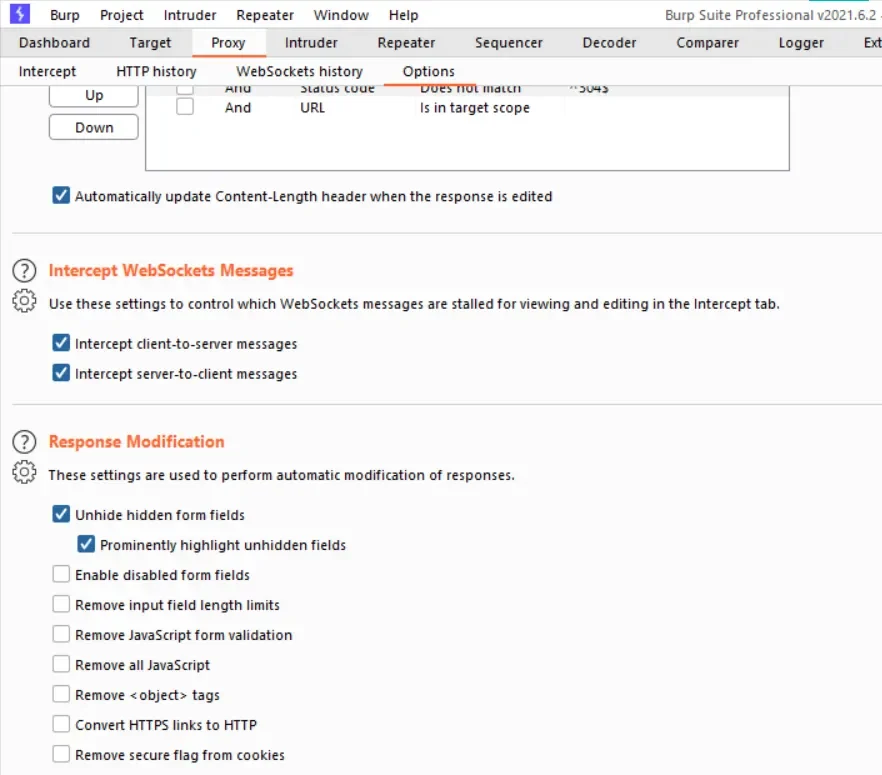
The screenshot shows the Burp Proxy options with the response modification rule for unhiding hidden form fields, including the highlight sub-option.
No special role was required beyond a normal account on the application.
Finding it
With the proxy running and the unhide rule active, the author explored the application's features in the browser. Four behaviours stood out:
- The account is accessible only after verifying the email address by clicking the verification link sent after sign-up.
- The primary email is the one used at sign-up, and the web application does not allow it to be edited. It is permanent.
- Secondary emails can be added to the account and removed at any time, and they also have to be verified.
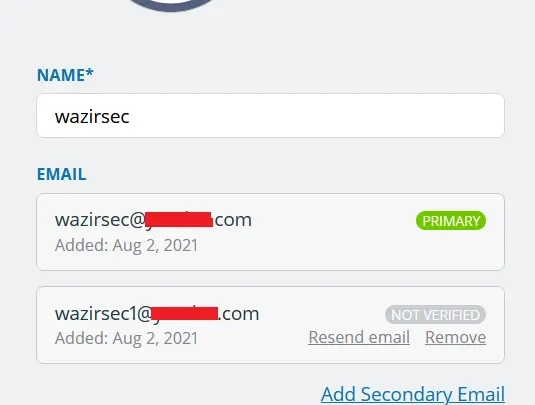
This image shows the profile with the primary email presented as non-editable alongside the option to add secondary emails.
- Once a secondary email is verified, it gets full access to the account.
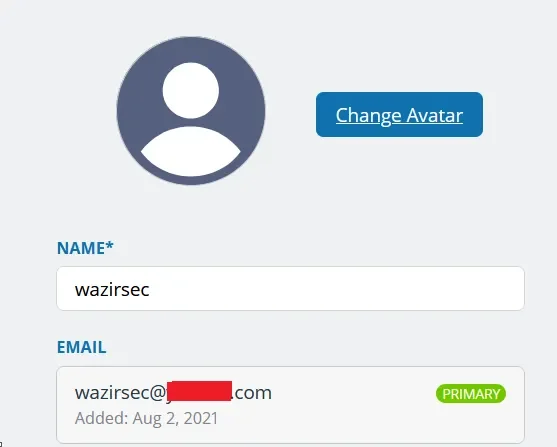
Here the profile shows a verified secondary email with the same access as the primary one.
Visiting the profile page with the unhide rule enabled revealed two hidden form fields:
example_user_profile[email]
example_user_profile[_token]
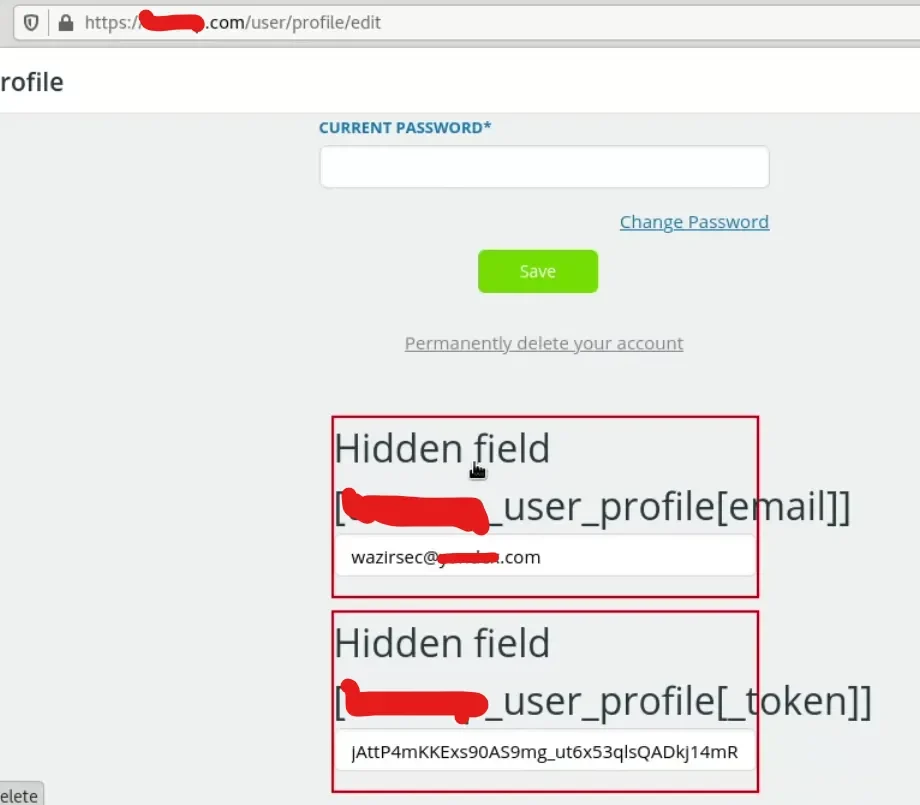
The profile page rendered with the two previously hidden fields visible in the form.
The example_user_profile[email] parameter held the same value as the primary email. That is what made it interesting: the interface says the primary email is permanent, yet the address is round-tripped through the client in a field the user can edit.
Exploitation
Step 1: Change the hidden email value
The author changed the value of the email field to [redacted] and clicked update.
The profile form with the hidden email field edited to the new address before submitting.
Step 2: Observe the state change
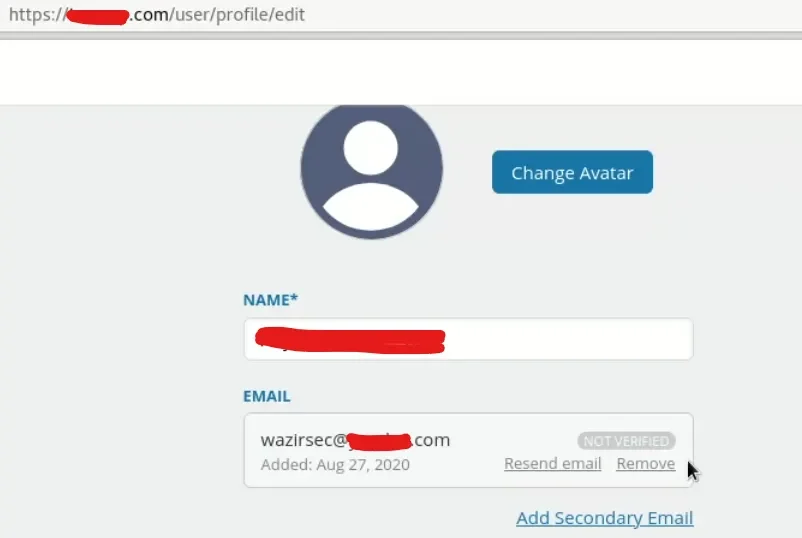
After the update, the email field reported that the address was not verified, and the interface now offered the option to remove it. The primary email had become removable, which it was not before.
The profile after the update, showing the new address marked as not verified and a remove option next to it.
Step 3: Remove the original primary email
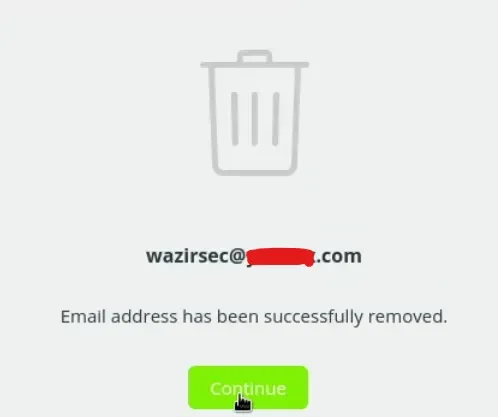
The author tried to remove the primary email and succeeded. The profile then looked like this:
The profile after removing the original primary address.
Step 4: Reload and confirm
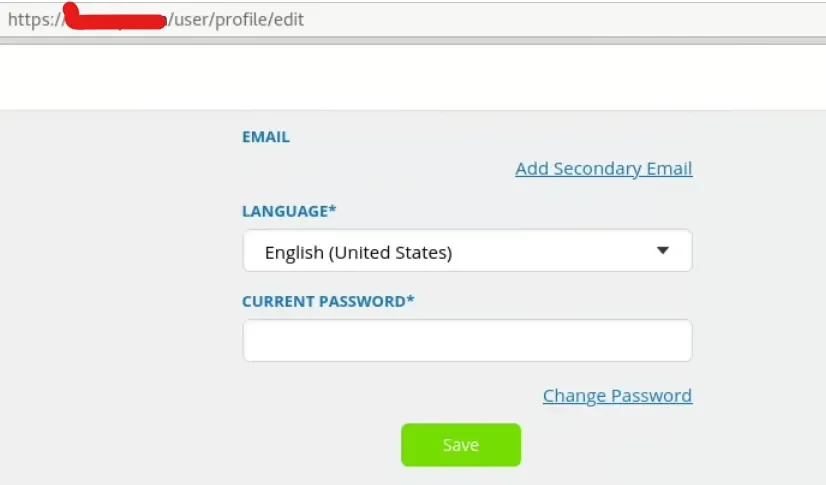
On reloading the profile page, the primary email address was [redacted], the value supplied earlier in the hidden email field. The change had persisted, and the new address was shown as not verified.
Root cause
The email address submitted in the hidden field ended up as the account's primary email. The application's rule that the primary email is permanent was enforced only in the interface: the field was hidden and presumably not editable in the normal page, but the value was still submitted with the form and the server trusted it. The _token field was present alongside the email field.
The new address was shown as not verified after the update. The application did mark the address as not verified afterwards, but by then the primary email had already been replaced and the original address could be removed.
Impact
With this vulnerability the author would have been able to change the account's email address to any address without any verification. In the author's own framing, the email verification feature of the application was bypassed. The author's stated impact is that he could change the account's email address to any address without any verification. The report does not go further into how the attacker would obtain the victim's session or credentials to reach the profile page in the first place, so the attack as described assumes the attacker is already operating on the account whose email is being changed.
Fix
The author's mitigation advice is not to put important data in plain view, and specifically not to rely on hidden fields. Just because a field is hidden does not mean it cannot be found: it is only hidden while the page runs, and the field and its data are easily read in the page source. Such data should be stored in a backend database rather than round-tripped through a hidden field.
Applied to this case, the server should not accept the primary email from the client at all. The address should be held server-side and any change should go through the normal verification flow, with the new address confirmed before it replaces the old one. The report does not say whether the program applied a fix.
Variants to test
- Profile and settings forms with hidden identity fields. Enable Burp's unhide rule and walk every form that carries an email, username or account identifier in a hidden input. A positive result is a field whose value matches your current account attribute and whose edit is accepted on submit.
- Fields the UI marks as read-only or permanent. Look for values the interface refuses to edit but which still appear in the submitted form. A positive result is a state change after you alter the value, such as the attribute becoming removable or unverified.
- Verification state after a forced change. After tampering, reload the page and check whether the new value persisted and whether the old value can still be removed. A positive result is a persisted change to the new value.
- Secondary email flows. Where secondary addresses can be added and verified, try submitting a secondary address through the primary email field.
- Other hidden parameters on the same form. The
_tokenfield shows the form carries more than the email. Change one hidden parameter at a time and watch for differences in the response,
What happened, in plain words
A security researcher was testing a website (a private bug bounty program, so he calls it example.com throughout). The website let people create an account with an email address. That email address was meant to be permanent: once you signed up with it, the site would not let you change it. You could add extra email addresses, but the main one stayed fixed.
The researcher found that the page where you edit your profile contained a hidden form field holding your email address. Hidden fields are invisible on the page but still get sent to the server when you press a button. By making that hidden field visible with a tool called Burp Suite, he could type a different email address into it. When he pressed update, the server accepted the new address as his primary email, and it was shown as not verified. The rule that the primary email is permanent did not hold once the hidden field was edited.
That is the whole finding: a rule enforced only in the browser can be bypassed by anyone who edits what the browser sends.
Background: the pieces you need to know
Before walking through the steps, here are the ideas involved, explained from scratch.
What a form is
When you sign up or edit your profile, you fill in boxes and press a button. Those boxes are part of an HTML form. When you press the button, the browser collects the name and value of every box in the form and sends them to the server. The server reads them and saves the changes.
What a hidden form field is
A hidden field is a box in a form that the browser does not draw on the page. You cannot see it or type in it normally. But it is still part of the form, so its name and value are still sent to the server when you submit. Websites use hidden fields to carry information the page needs to send back, such as an identifier or a security token.
The researcher quotes the Web application hacker's handbook: hidden fields are a common way of transmitting data through the client in a superficially unmodifiable way. In plain words: they look unchangeable because you cannot see them, but they are not actually protected. Anyone who can look at the page's source, or use a tool, can see and change them.
What a proxy is, and what Burp Suite does
A proxy sits between your browser and the website. Your browser sends its request to the proxy, the proxy forwards it to the site, and the reply comes back through the proxy. This lets you look at, and change, everything going in both directions.
Burp Suite is a popular proxy tool for security testing. One of its features rewrites the pages the server sends back before your browser sees them. It can:
- unhide hidden form fields,
- remove limits on how much you can type in a box,
- remove JavaScript checks that run in the browser.
This matters because anything the browser does can be undone by the person using the browser. The only checks that count are the ones the server does.
What email verification is
When you sign up, the site sends a link to your email address. You click it, and the site marks the address as verified. Until then, you may not be able to use the account. Verification proves you actually control that email address.
What a token is
A token is a long random value the server gives your browser and expects back with each form submission. It is used to confirm the request came from a page the server itself produced, not from a malicious page pretending to be the site. The report lists a _token field alongside the email field but does not explain its purpose.
What the vulnerability class means
The weakness here is called client-side enforcement of server-side security. It means the website enforces a rule in the browser (hiding a field, disabling a button, running a check in JavaScript) but does not enforce the same rule on the server. Since the browser belongs to the user, the user can always get around it. The server must check again.
Setting up Burp
The only tool needed was Burp Suite, used as an intercepting proxy. To turn on the feature that reveals hidden fields:
- Open Burp Suite and go to the Proxy tab, then the Options tab.
- Find the Response Modification section.
- Tick the checkbox next to Unhide hidden form fields.
There is also a sub-option that highlights the unhidden fields on-screen, so they are easy to spot.
The screenshot shows the Burp Proxy options with the response modification rule for unhiding hidden form fields, including the highlight sub-option.
No special role was needed beyond a normal account.
Exploring the site
With the proxy running and the unhide rule active, the researcher browsed the application and noted four behaviours:
- The account is accessible only after verifying the email address by clicking the link sent after sign-up.
- The primary email is the one used at sign-up, and the web application does not allow it to be edited. It is permanent.
- Secondary emails can be added to the account and removed at any time, and they also have to be verified.
This image shows the profile with the primary email presented as non-editable alongside the option to add secondary emails.
- Once a secondary email is verified, it gets full access to the account.
Here the profile shows a verified secondary email with the same access as the primary one.
These four points are the rules the site claims to follow. The rest of the report is about testing whether the server actually follows them.
Finding the hidden fields
Visiting the profile page with the unhide rule enabled revealed two hidden form fields:
example_user_profile[email]
example_user_profile[_token]
The profile page rendered with the two previously hidden fields visible in the form.
Line by line:
example_user_profile[email]is the name of the field that carries the email address. The square brackets are a naming convention: the server reads this as a property calledemailinside a group calledexample_user_profile.example_user_profile[_token]is the second hidden field the report lists.
The email field held the same value as the primary email. That is what made it interesting: the interface says the primary email is permanent, yet the address is sent through the browser in a field the user can edit.
Exploitation
Step 1: Change the hidden email value
The researcher changed the value of the email field to [redacted] and clicked update.
The profile form with the hidden email field edited to the new address before submitting.
Why this step: the page says the primary email cannot be changed, but the address is still being sent from the browser. If the server trusts that value, changing it in the browser should change it on the server.
Step 2: Observe the state change
After the update, the email field reported that the address was not verified, and the interface now offered the option to remove it. The primary email had become removable, which it was not before.
The profile after the update, showing the new address marked as not verified and a remove option next to it.
This is the first sign the server accepted the change. The address is now treated as a normal, unverified address rather than the fixed primary one.
Step 3: Remove the original primary email
The researcher tried to remove the primary email and succeeded. The profile then looked like this:
The profile after removing the original primary address.
Why this matters: the original address was supposed to be permanent. Being able to remove it confirms the server no longer treats it as the fixed primary email.
Step 4: Reload and confirm
On reloading the profile page, the primary email address was [redacted], the value supplied earlier in the hidden email field. The change had been saved on the server without any verification of the new address.
Reloading is important because it shows the change was not just a temporary display in the browser. The server stored it.
Why it worked
The email address submitted in the hidden field ended up as the account's primary email. The rule that the primary email is permanent was enforced only in the interface: the field was hidden and presumably not editable in the normal page, but the value was still submitted with the form, and the server trusted it.
The _token field was present alongside the email field.
The new address was shown as not verified after the update. The application did mark the address as not verified afterwards, but by then the primary email had already been replaced and the original address could be removed.
What an attacker could do with it
With this vulnerability the researcher would have been able to change the account's email address to any address without any verification. In his own framing, the email verification feature of the application was bypassed.
The author's stated impact is that he could change the account's email address to any address without any verification. The report does not go further into how the attacker would obtain the victim's session or credentials to reach the profile page in the first place, so the attack as described assumes the attacker is already operating on the account whose email is being changed.
How to fix it
The author's advice is not to put important data in plain view, and specifically not to rely on hidden fields. Just because a field is hidden does not mean it cannot be found: it is only hidden while the page runs, and the field and its data are easily read in the page source. Such data should be stored in a backend database rather than sent back and forth through a hidden field.
Applied to this case, the server should not accept the primary email from the client at all. The address should be held server-side, and any change should go through the normal verification flow, with the new address confirmed before it replaces the old one. The report does not say whether the program applied a fix.
Things to try on other sites
- Profile and settings forms with hidden identity fields. Enable Burp's unhide rule and walk every form that carries an email, username or account identifier in a hidden input. A positive result is a field whose value matches your current account attribute and whose edit is accepted on submit.
- Fields the UI marks as read-only or permanent. Look for values the interface refuses to edit but which still appear in the submitted form. A positive result is a state change after you alter the value, such as the attribute becoming removable or unverified.
- Verification state after a forced change. After tampering, reload the page and check whether the new value persisted and whether the old value can still be removed. A positive result is a persisted change to the new value.
- Secondary email flows. Where secondary addresses can be added and verified, try submitting a secondary address through the primary email field.
- Other hidden parameters on the same form. The
_tokenfield shows the form carries more than the email. Change one hidden parameter at a time and watch for differences in the response,
Glossary
- Bug bounty program: a scheme where a company pays or thanks researchers for reporting security problems in its systems.
- Private program: a bug bounty program that is not open to the public; only invited researchers can take part.
- Scope: the list of websites or systems a researcher is allowed to test.
- Subdomain: a part of a website address that sits in front of the main domain, such as
shop.example.com. - HTML form: the part of a web page with boxes and a button that sends what you typed to the server.
- Hidden form field: a box in a form that is not drawn on the page but whose value is still sent to the server.
- Client: your browser and the page running in it, as opposed to the server.
- Server: the computer that stores the data and decides what to accept.
- Client-side enforcement: a rule checked only in the browser, which the user can always get around.
- Server-side enforcement: a rule checked on the server, which the user cannot get around.
- Proxy: a tool that sits between your browser and a website so you can inspect and change the traffic.
- Burp Suite: a proxy tool used for security testing, with features for rewriting pages and requests.
- Response modification: a Burp feature that changes the pages the server sends back before your browser sees them.
- Intercepting proxy: a proxy that lets you pause and edit traffic as it passes through.
- JavaScript form validation: checks written in JavaScript that run in the browser before a form is sent; they can be removed.
- Token: a long random value the server gives your browser and expects back, used to confirm a request came from the site's own page.
- Anti-CSRF token: a token used to stop another website from silently submitting forms on your behalf.
- CSRF: cross-site request forgery, an attack where another site makes your browser send a request you did not intend.
- Endpoint: the specific address on the server that handles a particular action, such as saving a profile.
- Parameter: a named value sent to the server, such as
emailor_token. - Primary email: the main email address on an account, used at sign-up.
- Secondary email: an extra email address added to an account later.
- Email verification: the step where you click a link sent to an address to prove you control it.
- Email verification bypass: getting past that step without completing it.
- Account takeover: gaining control of someone else's account.
- Persistence: whether a change is actually saved on the server and survives a page reload.
- Root cause: the underlying reason a vulnerability exists.
- Mitigation: a change that removes or reduces the vulnerability.
- Backend database: the storage on the server where the site keeps its data.



