How to bypass 2FA with a HTTP header
The 2FA verification endpoint applied its rate limit based on the client IP taken from the X-Forwarded-For header, which the user controls. An attacker could rotate that header value to avoid the lockout and brute-force the short verification code.

Today, I would like to talk about a vulnerability I found on some programs that allowed me to bypass their 2FA protections. On a side note, due to the fact that the programs are private, all the informations about the websites will be redacted.
The full write-up lives on its author's site
It belongs to its author, so we link to it rather than copy it. The other two tabs are our own rewrites, checked against it.
Context
This write-up covers a 2FA bypass found on several private bug bounty programs. Because the programs are private, every detail about the websites is redacted: no hostnames, endpoints, parameter names or response bodies appear in the report. What remains is the mechanism, and the mechanism is the interesting part.
The affected feature is the standard two-factor authentication flow. The author quotes Wikipedia's definition:
Two-factor authentication (2FA) is a way to add additional security to your account. The first "factor" is your usual password that is standard for any account. The second "factor" is a verification code retrieved from an app on a mobile device or computer. (Wikipedia)
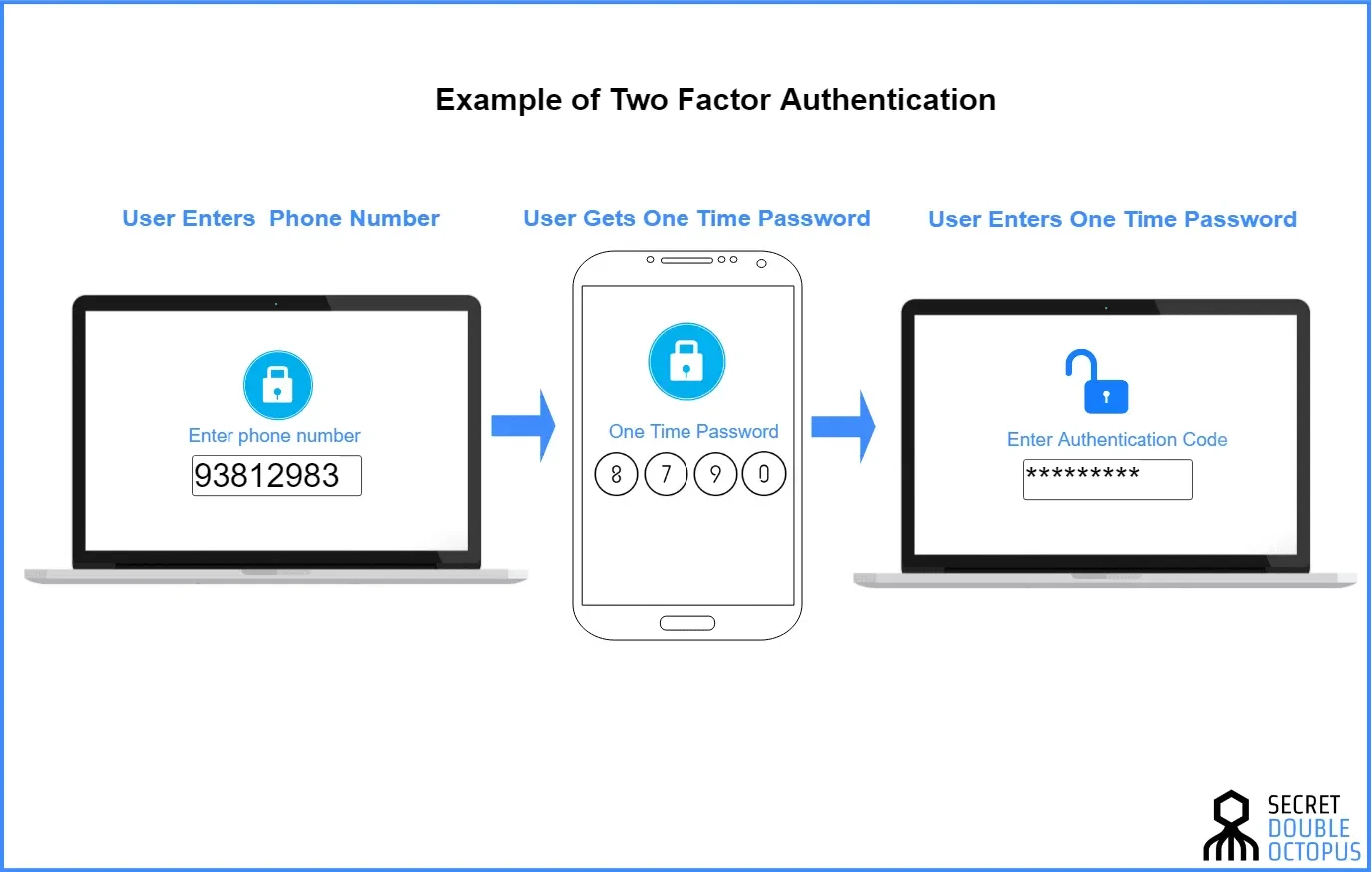
Illustration by DoubleOctopus
The verification code is normally an integer of 4 to 6 digits, which gives a small keyspace:
- 4 digits: 10⁴ → 10.000 combinations
- 6 digits: 10⁶ → 1.000.000 combinations
Because the keyspace is small, a 2FA code can be brute-forced, especially when it is only 4 digits. A 2FA implementation therefore needs a strong rate limit to be meaningful. The applications tested here did have a rate limit in place to stop brute-force attacks against the 2FA feature. The finding is that this rate limit could be bypassed.
Setup
The report does not describe any tooling, accounts or roles beyond the following. The author began research on each new program by using the application as a normal user, to understand how it works and to spot features worth testing. The applications had a 2FA feature; the author enabled it on their own account and then tested it. No versions, frameworks or infrastructure details are given.
Finding it
The starting point was the rate limit itself. A rate limit is only useful if it is implemented well, so the author tried to work out which value the limit was keyed on. Two candidates were tested:
- User email address
- Session cookies
Neither had any impact on the rate limit. That ruled out the obvious per-user and per-session counters as the thing to manipulate.
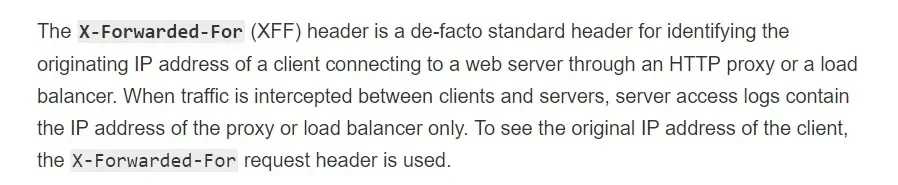
The author then recalled a HackerOne report by corb3nik, who bypassed a rate limit on the Dashlane bug bounty program with the help of the X-Forwarded-For HTTP header. The report links to MDN Web Docs for the header's definition:
Exploitation
Step 1: add X-Forwarded-For to the blocked request
The author retried the rate-limited request with an X-Forwarded-For header added to the HTTP request. The applications accepted the request. In other words, once the rate limit blocked a request, supplying the header let the request through again.
The report does not include the raw request or the header value used, so the exact payload cannot be reproduced from the text. The mechanism is the one described by MDN: X-Forwarded-For is a request header that carries the originating client address through proxies, and it is client-supplied unless a trusted proxy overwrites it.
Step 2: brute-force the code
With the header in place, an attacker could brute-force the two-factor authentication code, using X-Forwarded-For whenever a request would otherwise be blocked. The report does not show a script, a request count or a successful code submission; it states the consequence of the bypass.
Root cause
The rate limit was keyed on a value that the client can set in the HTTP request. The author's conclusion is explicit: for a 2FA feature, the rate limit should not be based on information that could be manipulated by the user via the HTTP request. The limit was not tied to the email address or the session cookie, and adding X-Forwarded-For made blocked requests succeed.
Impact
On the tested applications, an attacker could brute-force the 2FA code by rotating the X-Forwarded-For header whenever a request was blocked. The practical severity depends on the code length: 4 digits means 10.000 combinations, 6 digits means 1.000.000.
Fix
The recommendation it gives is that a rate limit must be well implemented, and that for a 2FA feature it should not be based on information the user can manipulate through the HTTP request. In practice that means not basing the limit on information the user can manipulate through the HTTP request.
Variants to test
- Other forwarding headers. Try the same trick with headers a proxy or framework may trust in place of X-Forwarded-For, such as Forwarded, X-Real-IP or X-Client-IP. A positive result is a blocked request succeeding once the header is added.
- Header value rotation. If the limit is keyed on the header, changing its value between attempts should keep the counter from ever being reached. A positive result is a long run of guesses with no lockout.
- Other rate-limited flows. Apply the same test to password reset codes, login attempts and any endpoint that issues or verifies short numeric codes. A positive result is the same reset of the limit when the header changes.
- Keying checks on other fields. Repeat the author's first experiment on other targets: vary the email address and the session cookie and see whether either resets the counter. A positive result shows which value the limit actually trusts, and whether that value is client-controlled.
What happened, in plain words
A security researcher found that several websites had a flaw in the protection they use to stop people guessing the six-digit (or four-digit) code that many sites ask for after you type your password. That second code is called two-factor authentication, or 2FA. The websites did have a limit on how many times you could try the code, which is meant to stop someone from simply guessing until they get it right. But the researcher discovered that the limit could be sidestepped by adding one extra line to the request your browser sends to the website. That line is called an HTTP header, and the particular one is named X-Forwarded-For. Once that header was added, requests that should have been blocked went through again. That meant someone could keep guessing the code far beyond the intended limit.
The websites in question were private bug bounty programs, so the report hides every detail about them: no web addresses, no page names, no field names, no replies from the server. What is left is the idea behind the attack, and that idea is the useful part.
The feature that was attacked
The feature is the ordinary two-factor authentication flow. The author quotes Wikipedia's definition:
Two-factor authentication (2FA) is a way to add additional security to your account. The first "factor" is your usual password that is standard for any account. The second "factor" is a verification code retrieved from an app on a mobile device or computer. (Wikipedia)
Illustration by DoubleOctopus
In everyday terms: the first factor is something you know (your password). The second factor is something you have (a phone or an app that produces a fresh code). Even if someone steals your password, they still need that second code, which changes constantly. That is why 2FA is worth having.
The verification code is normally an integer of 4 to 6 digits, which gives a small keyspace:
- 4 digits: 10⁴ → 10.000 combinations
- 6 digits: 10⁶ → 1.000.000 combinations
"Keyspace" just means the total number of possible values. A four-digit code has ten thousand possibilities (0000 through 9999). A six-digit code has one million. Those numbers sound large, but a computer can try thousands of guesses per second, so a million guesses is not much of an obstacle. That is why a 2FA implementation needs a strong rate limit to be meaningful: a rate limit is a rule that says "you may only try this a few times per minute", so that even a fast computer cannot run through the possibilities.
The applications tested here did have a rate limit in place to stop brute-force attacks against the 2FA feature. "Brute force" means trying every possibility in turn until one works, like working through every combination on a padlock. The finding is that this rate limit could be bypassed.
How the researcher got started
The report does not describe any tooling, accounts or roles beyond the following. The author began research on each new program by using the application as a normal user, to understand how it works and to spot features worth testing. This is the same as opening a new website and clicking around: signing up, logging in, turning settings on and off, and noticing what the site lets you do. The applications had a 2FA feature; the author enabled it on their own account and then tested it. No versions, frameworks or infrastructure details are given.
Why start this way? Because you cannot attack a feature you do not understand. Using the site normally shows you where the interesting doors are, and 2FA is one of the most interesting, since it is the last line of defence for an account.
Finding the weakness
The starting point was the rate limit itself. A rate limit is only useful if it is implemented well, so the author tried to work out which value the limit was keyed on. "Keyed on" means: what piece of information does the server count against? If the server counts attempts per email address, then switching email addresses resets the counter. If it counts per session, then starting a new session resets it. Two candidates were tested:
- User email address
- Session cookies
A session cookie is a small piece of text your browser stores after you log in, and sends back with every request so the server knows who you are. Think of it as a wristband you get at an event: the staff check the wristband instead of asking for your ID every time. If the rate limit were keyed on the cookie, then getting a new wristband (a new session) would reset the counter.
Neither had any impact on the rate limit. That ruled out the obvious per-user and per-session counters as the thing to manipulate. In other words, the server was not counting against your email or your session, so the researcher had to look elsewhere.
The author then recalled a HackerOne report by corb3nik, who bypassed a rate limit on the Dashlane bug bounty program with the help of the X-Forwarded-For HTTP header. The report links to MDN Web Docs for the header's definition:
An HTTP header is an extra line of information that travels alongside every request your browser makes. Some headers are set by the browser automatically (such as which language you prefer), and some can be added by hand. X-Forwarded-For is a header that carries the address of the original client through proxies. A proxy is a middle computer that passes requests along, like a receptionist forwarding calls. When a request goes through a proxy, the server at the end only sees the proxy's address, so the proxy adds X-Forwarded-For to say "this really came from over there". The catch is that, unless a trusted proxy overwrites it, anyone can type that header themselves and claim to be anyone.
Exploitation
Step 1: add X-Forwarded-For to the blocked request
The author retried the rate-limited request with an X-Forwarded-For header added to the HTTP request. The applications accepted the request. In other words, once the rate limit blocked a request, supplying the header let the request through again.
The report does not include the raw request or the header value used, so the exact payload cannot be reproduced from the text. The mechanism is the one described by MDN: X-Forwarded-For is a request header that carries the originating client address through proxies, and it is client-supplied unless a trusted proxy overwrites it.
The server was not counting attempts against the email address or the session cookie. When the counter for one address ran out, the researcher simply claimed to be a different address, and the server started counting from zero again. It is like a bouncer who bans you by the name on your fake ID: change the ID, and you are back in.
Step 2: brute-force the code
With the header in place, an attacker could brute-force the two-factor authentication code, using X-Forwarded-For whenever a request would otherwise be blocked. The report does not show a script, a request count or a successful code submission; it states the consequence of the bypass.
In plain terms: the attacker keeps guessing the code. When the site says "too many attempts", the attacker changes the X-Forwarded-For value and carries on. With a four-digit code there are only ten thousand possibilities, so this is very practical; with six digits it takes longer but is still feasible.
Why it happened
The rate limit was keyed on a value that the client can set in the HTTP request. The author's conclusion is explicit: for a 2FA feature, the rate limit should not be based on information that could be manipulated by the user via the HTTP request. The limit was not tied to the email address or the session cookie, and adding X-Forwarded-For made blocked requests succeed.
A useful comparison: a shop that limits one free sample per customer should count customers by something the shop controls (a loyalty card, a face), not by whatever name the customer writes on a form. Here the website was trusting a form the visitor fills in themselves.
What damage it could do
On the tested applications, an attacker could brute-force the 2FA code by rotating the X-Forwarded-For header whenever a request was blocked. The practical severity depends on the code length: 4 digits means 10.000 combinations, 6 digits means 1.000.000.
How to fix it
The recommendation it gives is that a rate limit must be well implemented, and that for a 2FA feature it should not be based on information the user can manipulate through the HTTP request. In practice that means not basing the limit on information the user can manipulate through the HTTP request.
In everyday words: count attempts against the account itself, which the server knows for certain, and ignore any address the visitor claims to have. If a proxy is genuinely in front of the site, let the proxy write the header and throw away whatever the visitor sent.
Other things worth testing
- Other forwarding headers. Try the same trick with headers a proxy or framework may trust in place of X-Forwarded-For, such as Forwarded, X-Real-IP or X-Client-IP. A positive result is a blocked request succeeding once the header is added.
- Header value rotation. If the limit is keyed on the header, changing its value between attempts should keep the counter from ever being reached. A positive result is a long run of guesses with no lockout.
- Other rate-limited flows. Apply the same test to password reset codes, login attempts and any endpoint that issues or verifies short numeric codes. A positive result is the same reset of the limit when the header changes.
- Keying checks on other fields. Repeat the author's first experiment on other targets: vary the email address and the session cookie and see whether either resets the counter. A positive result shows which value the limit actually trusts, and whether that value is client-controlled.
Glossary
- 2FA (two-factor authentication): a login protection that asks for two things: your password plus a second code from a device or app.
- Brute force: trying every possible value in turn until one works.
- Bug bounty program: a scheme where a company pays researchers for reporting security flaws in its systems.
- Client: the program on your side, usually your browser, that sends requests to a server.
- Cookie: a small piece of text a website stores in your browser and reads back on later visits, often used to remember that you are logged in.
- Endpoint: a specific address on a server that accepts a particular kind of request.
- Header (HTTP header): an extra line of information sent with a web request or response, such as the browser's language or the address a request came from.
- HTTP: the language browsers and servers use to exchange requests and replies.
- Keyspace: the total number of possible values for something, such as all four-digit codes.
- Payload: the part of a request that carries the data you are sending.
- Private program: a bug bounty program that only invited researchers can see and test.
- Proxy: a middle computer that passes requests between a client and a server.
- Rate limit: a rule that allows only a certain number of attempts in a period of time.
- Redacted: hidden or removed from a document, usually to protect private information.
- Request: the message your browser sends to a server asking for a page or an action.
- Response body: the content a server sends back, such as a web page or a message.
- Session: a period during which a server remembers who you are, usually identified by a cookie.
- Severity: how serious a security flaw is judged to be.
- X-Forwarded-For: an HTTP header that carries the original client's address through proxies; it can be set by the client unless a trusted proxy overwrites it.
- X-Real-IP, X-Client-IP, Forwarded: other headers that some proxies or frameworks use to carry a client's address.