I Almost Didn’t Report This XSS. The Maintainer Fixed More Than I Asked.
The OpenAPI documentation page generated by @elysiajs/openapi inserted the API title and description into HTML without escaping, so an attacker who could influence those values could inject and execute JavaScript. The author demonstrated this in a real browser and the issue was fixed in version 1.4.17.
 Published on medium.com
Bug Bounty
The full write-up lives on its author's site
It belongs to its author, so we link to it rather than copy it. The other two tabs are our own rewrites, checked against it.
Context
The target is the API documentation page generated by @elysiajs/openapi, the OpenAPI plugin for the Bun framework Elysia. When you mount the plugin, it serves a docs page (Swagger UI by default in the example here) built from the OpenAPI document you configure, including info.title and info.description.
The bug is a cross-site scripting issue in that generated page: values taken from the OpenAPI document were written into the HTML without escaping, so a crafted title or description could break out of its context and inject markup and script. It is fixed in 1.4.17 and covered by advisory GHSA-7p63-qhhv-4m99.
Setup
The researcher did not start from an audit of Elysia. The starting point was someone else's advisory: CVE-2026-33331, an XSS in oRPC's API docs page, whose root cause is that values from the OpenAPI document were dropped into an HTML page without escaping.
The working method was variant hunting: assume other projects copied the same pattern and search for it. The method used npm pack, tar and grep to search the shipped tarballs, curl to check the response, and a real Chromium browser for confirmation. The version examined was @elysiajs/openapi 1.4.16, read from the npm tarball rather than from GitHub, on the reasoning that the tarball is what actually runs in people's apps.
The precondition for exploitation is that attacker-influenced data reaches info.title or info.description (or, as the fix later showed, provider configuration). No Elysia app is vulnerable by default.
Finding it
The dangerous code shape was defined first, as any of these template patterns:
`<title>${something}</title>` `<meta content="${something}">` `<script>init(${JSON.stringify(something)})`
The third pattern is the one that misleads people. JSON.stringify produces valid JSON, but it does not escape < or >, and the browser's HTML parser reads the page before JavaScript runs. A </script> inside the string ends the script element in the middle of the string.
A list of Swagger UI and OpenAPI docs packages across JavaScript frameworks was assembled: the Hono one, the Elysia ones, NestJS, Fastify, Express, hapi and more, plus standalone renderers such as Redoc, RapiDoc and Scalar. The tarballs were downloaded and searched:
npm pack @elysiajs/[redacted] -xzf elysiajs-openapi-1.4.16.tgzgrep -rn 'content="${\|<title>${\|JSON.stringify' package/dist/
Most packages were safe, and the reasons are instructive:
- NestJS puts the spec in a separate JavaScript file rather than inside the HTML page, so there is no HTML parser to trick.
- Fastify and swagger-ui-express load the spec by URL instead of pasting it into the page.
- Redoc, RapiDoc and Scalar's standalone components pass data through properties, not strings.
A few were not safe. @hono/swagger-ui had the same problem (fixed in 0.6.2, covered separately). One more is still in disclosure and was left out. Elysia had the most sinks of all.
The relevant part of the HTML that @elysiajs/openapi 1.4.16 generated for its Swagger UI page, simplified:
return `<!DOCTYPE html><html><head> <title>${info.title}</title> <meta name="description" content="${info.description}" /> <meta name="og:description" content="${info.description}" /> ...`
There is no escaping at all. info.title goes straight into <title>. info.description goes straight into a double-quoted attribute, and it does so twice. A " in the description ends the attribute, a > closes the <meta> tag, and everything after that is new HTML that the browser will parse and run.
Exploitation
Step 1: a realistic app
A small Elysia app was built in which the docs description comes from somewhere other than the developer's keyboard, for example a multi-tenant API portal where each customer writes their own API description, or a value read from a database:
const untrusted = process.env.DESC ?? 'Development documentation'
new Elysia() .use(openapi({ provider: 'swagger-ui', documentation: { info: { title: 'Acme API', version: '1.0.0', description: untrusted } } })) .listen(8811)
Step 2: does the payload come back unescaped?
The description was set to this payload:
"><script></script>
and the server was queried with curl:
$ curl -s http://[redacted]:8811/openapi | grep -n 'content='9: content=""><script>addEventListener("DOMContentLoaded",function(){...})</script>"13: content=""><script>addEventListener("DOMContentLoaded",function(){...})</script>"
The payload appears raw in both meta tags. A reflected payload is not proof, though: browsers are strange and many XSS reports fail at this point.

Step 3: does a real browser execute it?
The page was loaded in a real Chromium browser and a screenshot taken:
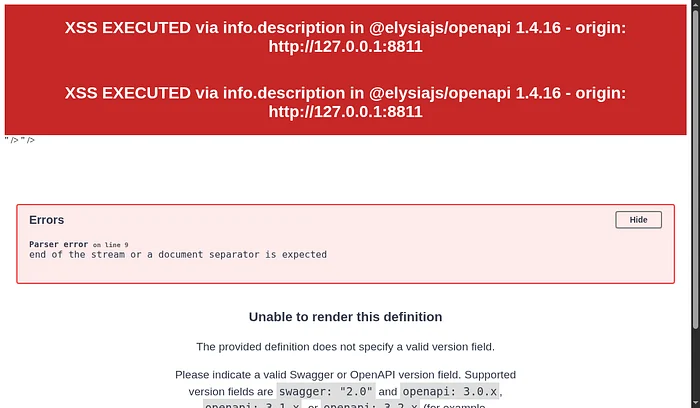
Two banners appeared, one per sink: each <meta> tag ran the script once. Swagger UI complains underneath because the test spec was junk, which is irrelevant. The red boxes were drawn by injected JavaScript running in the docs page's origin.
The control
A boring control was run as well: the same app with a normal description renders a normal page. That shows the payload causes the damage, not something odd in the setup.
Root cause
The page builder interpolates OpenAPI document values into an HTML template string with no escaping. info.title lands inside <title> and info.description lands inside a double-quoted attribute, twice. Because the browser's HTML parser processes the markup before any JavaScript runs, a quote and a > in the description terminate the attribute and the tag, and the remainder is parsed as new HTML, including <script>.
There is no escapeHtml() on these values. Elysia's SECURITY.md says no Elysia app is vulnerable by default, because the developer has to place untrusted data into the title or description.
Impact
An attacker who can influence the OpenAPI document's title or description, for example a tenant writing their own API description or a value read from a database or an upstream spec the developer does not control, can run JavaScript in the origin of the docs page. In the PoC this produced two script executions, one per meta tag sink.
Apps whose docs title, description and provider configuration are static strings written by the developer were not exposed. Apps where any of that comes from users, tenants, a database or an upstream spec were exposed. The researcher notes that the preconditions matter and should not be oversold.
Fix
Version 1.4.17, released on November 4, 2026, fixes more than was reported:
- the Swagger UI title and description sinks that were found
- the matching sinks in the Scalar provider, which had not been tested
- provider configuration crossing script, attribute and style contexts
- regression tests for all of it
The advisory GHSA-7p63-qhhv-4m99 credits the researcher and covers three packages: @elysia/openapi, @elysiajs/openapi and the legacy @elysiajs/swagger. The legacy @elysiajs/swagger package will not get a fix, so users should move to @elysiajs/openapi.
Re-running the same payload against 1.4.17 returns:
content=""><script>addEventListener("DOMContentLoaded" ...
Every dangerous character is now an HTML entity, so the browser sees text rather than tags and no banners appear.
Upgrade to @elysiajs/openapi 1.4.17 or later.
Variants to test
- Other docs renderers with template-string HTML. Search shipped tarballs for
<title>${,content="${andJSON.stringifyinside HTML builders. A positive result is a value from the spec appearing unescaped in the served page. - The
JSON.stringifypattern. Put</script>inside a value that is stringified into an inline script. A positive result is the parser ending the script early and the remainder being treated as markup. - Attribute contexts. Try a
"in any spec value placed in a double-quoted attribute, followed by>. A positive result is the attribute closing and new tags appearing in the response. - Provider configuration. The fix covered provider configuration crossing script, attribute and style contexts, so test configuration values, not just title and description, in each context.
- Second sinks. The same value interpolated more than once (here, two meta tags) executes more than once. Check every place a value is reused.
- Browser confirmation with a control. Always load the page in a real browser and run the same app with a benign value. A positive result is script execution in the docs origin with the control rendering normally.

Disclosure timeline: reported privately on October 27, 2026; confirmed and fixed, 1.4.17 released, and GHSA-7p63-qhhv-4m99 published on November 4, 2026. A CVE was requested; the advisory had no CVE ID at the time of writing.
What happened, in plain words
A developer found a security hole in a plugin that other developers use. The hole let an attacker slip a piece of JavaScript (a small program that runs inside a web page) into a documentation page, so that the program would run in the browser of anyone who opened that page. He reported it privately, the maintainer confirmed it and fixed more than was reported, and the fix was published. This article walks through the whole thing slowly, assuming you have never read a security report before.
A few words you will meet constantly, explained now so the rest makes sense:
- API: a way for two computer programs to talk to each other. Think of a restaurant menu: you do not walk into the kitchen, you order from a list of dishes the kitchen offers. An API is that menu, written for programs instead of people.
- API documentation page: a web page that lists what an API can do, so that other developers know how to use it. It is generated from a description file.
- OpenAPI document: that description file. It is a structured text file that says the API's name, a description, its addresses and so on. Tools read it and build the documentation page from it.
- Plugin: an add-on. The main software (here, a web framework called Elysia) does the core job; a plugin adds an extra feature, in this case the documentation page.
- Cross-site scripting (XSS): a class of bug where an attacker manages to get their own JavaScript into a page that other people trust. The browser treats the attacker's script as part of the page, so it runs with that page's origin. A comparison: someone slips a fake page into your company's official noticeboard. Visitors trust the board, so they trust the fake page too.
- Escaping: converting characters that have a special meaning in a format into a harmless written-out form, so they are treated as plain text. If a page shows the literal characters
<instead of a real<, the browser displays a less-than sign but does not treat it as the start of a tag. It is like putting quotation marks around a word in a sentence so the reader knows you are talking about the word, not using it. - HTML: the language web pages are written in. Text is wrapped in tags such as
<title>and</title>, and the browser reads the tags to decide what is a heading, what is a link, what is a script. - Tag: a marker in HTML.
<title>starts a title,</title>ends it. Some tags, like<meta>, stand alone. - Attribute: extra information inside a tag, written as
name="value". For example<meta name="description" content="some text">has two attributes,nameandcontent. - HTML parser: the part of the browser that reads the raw HTML text and turns it into the page you see. It works strictly by the rules of the language, character by character, and it does this before any JavaScript runs.
- JavaScript: the programming language browsers run. It is what makes pages interactive.
- Template string: a way of building text in JavaScript where you can drop values into a fixed frame. In the code below, the backtick-quoted text is the frame and
${...}marks a hole where a value is inserted. Think of a fill-in-the-blanks letter. JSON.stringify: a JavaScript function that turns a value into JSON, a text format for data. It produces valid JSON, but it does not make the text safe to place inside an HTML page.- Sink: a place in the code where data ends up in the final output. If data reaches a sink without being cleaned, that is where trouble happens. The word comes from the idea of data flowing through the code and draining into an outlet.
- Variant hunting: taking a known bug and looking for the same mistake in other software. If one team copied a pattern, others probably did too.
- npm: the main public library of JavaScript packages. Developers download packages from it.
- Tarball: a single archive file (like a zip) containing a package's files.
npm packdownloads one. grep: a command-line tool that searches text for a pattern and prints matching lines.curl: a command-line tool that fetches a web address and prints the response.- Origin: the combination of scheme, host and port that a browser uses to decide which pages may talk to which. Scripts running in one origin are treated as belonging to that site.
- PoC (proof of concept): a small, working demonstration that a bug is real.
- Advisory: a public notice describing a security problem and its fix.
- CVE ID: a unique public identifier for a known security vulnerability, so people can refer to it unambiguously.
- Regression test: an automated test that checks a fixed bug stays fixed.
Now the story, step by step.
Step 1: the bug was not found from scratch, it was copied from someone else's report
The author did not sit down one day to inspect Elysia. He had read an earlier public advisory, CVE-2026-33331, about an XSS in the API documentation page of a different project, oRPC. The cause there was simple to state: values from the OpenAPI document were placed into an HTML page without escaping.
When most people read an advisory they think "good, it is fixed". The author asks a different question: who else wrote the same code? Developers copy patterns from each other, so if one documentation page builder pastes values into an HTML template, several others probably do the same. Searching for copies of a known bug is called variant hunting, and the author calls it the laziest and most effective trick he knows.
Step 2: turning one bug into a search pattern
Before searching, he wrote down what the bug looks like in code, so he would recognise it anywhere. The dangerous shapes are these three:
`<title>${something}</title>` `<meta content="${something}">` `<script>init(${JSON.stringify(something)})`
Line by line, in plain words:
- The first pattern builds a page title by dropping a value (
something) between<title>and</title>. If the value contains HTML characters, they become part of the page's structure instead of being shown as text. - The second pattern drops a value inside a double-quoted
contentattribute of a<meta>tag. If the value contains a double quote, it ends the attribute early, and whatever follows is read as new HTML. - The third pattern drops a value into a
<script>tag after passing it throughJSON.stringify. This is the one that fools people, including the author in the past.JSON.stringifyproduces valid JSON, so it feels safe, but it does not escape<or>. The browser's HTML parser reads the page before JavaScript runs, so if the value contains</script>, the parser decides the script has ended, right in the middle of the string, and treats the rest as page markup.
So the search list was short: template strings that build HTML, with a value that might come from the OpenAPI document dropped inside.
Step 3: make a list, then read what is actually shipped
Next he listed every Swagger UI or OpenAPI documentation package he could think of across JavaScript frameworks: the Hono one, the Elysia ones, NestJS, Fastify, Express, hapi and more, plus standalone renderers such as Redoc, RapiDoc and Scalar.
Then an important detail: he did not read the source code on GitHub. He read the npm tarballs. GitHub shows what the authors meant to publish; npm holds what is actually installed and running in people's apps. Sometimes the two differ, so the tarball is the honest answer.
npm pack @elysiajs/[redacted] -xzf elysiajs-openapi-1.4.16.tgzgrep -rn 'content="${\|<title>${\|JSON.stringify' package/dist/
Line by line:
npm pack @elysiajs/[redacted]downloads the published package, at version 1.4.16, as an archive file. A version number like 1.4.16 identifies one exact release, so results can be reproduced later.tar -xzf elysiajs-openapi-1.4.16.tgzunpacks that archive into a folder, so its files can be read.grep -rn 'content="${\|<title>${\|JSON.stringify' package/dist/searches the unpacked files for the three dangerous patterns. The-rmeans search recursively through folders,-nprints the line number of each match, and the\|separates alternative patterns, so any one of them counts as a hit.package/dist/is the folder holding the code that actually ships.
Step 4: most packages were fine, and that is useful too
This is the part people leave out of blog posts: most packages were safe. That is normal, and still useful, because understanding why something is safe makes you better at spotting when something is not.
- NestJS puts the description file in a separate JavaScript file instead of inside the HTML page, so there is no HTML parser to trick.
- Fastify and swagger-ui-express load the description file by URL instead of pasting it into the page, so the values never become part of the page's markup.
- Redoc, RapiDoc and Scalar's standalone components pass data through properties, not strings. A property is a value handed to a program directly, rather than text pasted into a page, so there is no parsing step to abuse.
Then a few lit up. @hono/swagger-ui had the same problem, fixed in 0.6.2, which is a separate story. One more is still going through disclosure, so it is left out here. And Elysia had the most sinks of all, meaning the most places where data lands in the output.
Step 5: the bug itself
Here is the relevant part of the HTML that @elysiajs/openapi 1.4.16 generated for its Swagger UI page, simplified:
return `<!DOCTYPE html><html><head> <title>${info.title}</title> <meta name="description" content="${info.description}" /> <meta name="og:description" content="${info.description}" /> ...`
Line by line:
returnfollowed by a backtick-quoted string means the function hands back this whole block of HTML as text. The backticks mark a template string, the fill-in-the-blanks kind.<!DOCTYPE html><html><head>is the standard opening of an HTML page. Nothing dynamic here.<title>${info.title}</title>puts the API's title from the description file straight between the title tags. No escaping at all.<meta name="description" content="${info.description}" />puts the API's description inside a double-quoted attribute. Again, no escaping.<meta name="og:description" content="${info.description}" />does the same thing a second time, for a different meta tag. So the description is inserted twice, and each insertion is a separate sink.
Because nothing is escaped, a " inside the description ends the attribute early, and a > closes the <meta> tag. Everything after that is brand-new HTML, and the browser will happily run any <script> it finds there.
Step 6: testing it for real
Reading code gives you a theory. The author wanted proof, in three steps.
Test 1: a realistic app
He built a tiny Elysia app in which the documentation description comes from somewhere other than the developer's keyboard. Think of a multi-tenant API portal, where each customer writes their own API description, or a value read from a database. In both cases the text is not written by the person who runs the server.
const untrusted = process.env.DESC ?? 'Development documentation'
Line by line:
const untrusted =creates a named value calleduntrusted, which will hold text the developer does not control.process.env.DESCreads an environment variable calledDESC. Environment variables are settings passed to a program from outside, often by whoever deploys it, so they are a stand-in for data coming from elsewhere.?? 'Development documentation'means: if that setting is missing, use this harmless default instead. The The??operator picks the right-hand value only when the left-hand one is null or undefined.
new Elysia() .use(openapi({ provider: 'swagger-ui', documentation: { info: { title: 'Acme API', version: '1.0.0', description: untrusted } } })) .listen(8811)
Line by line:
new Elysia()creates the web application..use(openapi({...}))attaches the documentation plugin, configured with the settings inside the braces.provider: 'swagger-ui'chooses Swagger UI as the style of documentation page to generate.documentation: { info: { ... } }is the OpenAPI description itself: the title, version and description of the API.title: 'Acme API'andversion: '1.0.0'are fixed, harmless values.description: untrustedis the important one: the description is the value read from outside, the one an attacker could influence..listen(8811)starts the server on port 8811, so it can be reached athttp://[redacted]:8811.[redacted]means "this same computer".
Test 2: does the payload come back unescaped?
He set the description to this payload:
"><script></script>
This is not a complete attack yet; it is a probe. The " is meant to close the attribute, the > to close the tag, and the <script></script> to prove that new markup appears in the page. If the page shows these characters as text, escaping works. If they become real structure, it does not.
Then he asked the server with curl:
$ curl -s http://[redacted]:8811/openapi | grep -n 'content='9: content=""><script>addEventListener("DOMContentLoaded",function(){...})</script>"13: content=""><script>addEventListener("DOMContentLoaded",function(){...})</script>"
Line by line:
curl -s http://[redacted]:8811/openapifetches the documentation page from the local server. The-smeans silent, so curl does not print progress noise.| grep -n 'content='passes the response into grep, which prints only the lines containingcontent=, with their line numbers. This narrows the output to the places where the description is inserted.- The two result lines, numbered 9 and 13, show the payload raw inside both meta tags. The
addEventListener("DOMContentLoaded", ...)part is a script that waits until the page has finished loading and then runs.
The payload is there, unescaped, in both meta tags. But the author has learned the hard way that seeing a payload in a response is not proof. Browsers are strange, and plenty of XSS reports die right at this point, because the page may never actually run the script.
Test 3: does a real browser execute it?
He loaded the page in a real Chromium browser and took a screenshot:
Two banners appeared, one per sink, because each <meta> tag ran the script once. Swagger UI is complaining underneath because the test description was junk, which does not matter. The red boxes were drawn by the injected JavaScript, running in the origin of the documentation page.
The control
He always runs one boring test as well: the same app with a normal description renders a normal page. That proves the payload is doing the damage, not something odd in the setup. In everyday terms, if you think a new medicine works, you compare it with a dummy pill given to a second group.
Step 7: the part where he almost did not send it
Here is the honest bit. After building all of that, he finally read Elysia's SECURITY.md, the file where a project explains how to report problems and what counts as a problem. Yes, after.
In short, that file says plugins should be reported to their own repository (this one had no private reporting channel), and that problems which need the developer to pass in their own schemas are generally out of scope unless end-user input crosses a trust boundary.
That described his bug almost perfectly. No Elysia app is vulnerable by default. You have to put untrusted data into info.title or info.description yourself.
He seriously considered not sending it. Many maintainers would reply "then do not do that", and they would have a point.
But he kept coming back to one idea: a library that writes HTML should escape what it writes. "Do not pass untrusted data" is a fine rule, but the page builder is exactly the place where one missing escapeHtml() protects everyone who breaks that rule by accident.
So he sent a short, polite email to the maintainer and framed it as hardening, not "your framework is broken". He included the proof of concept, said clearly that it needs attacker-influenced documentation metadata, and said he would understand if it was called out of scope.
Step 8: what happened next
The maintainer, SaltyAom, replied, confirmed it, and then fixed more than was reported:
- the Swagger UI title and description sinks that had been found
- the matching sinks in the Scalar provider, which had not even been tested
- provider configuration crossing script, attribute and style contexts
- regression tests for all of it
Version 1.4.17 shipped on November 4, 2026, and he published GHSA-7p63-qhhv-4m99 with credit to the author.
Of course he re-ran the exact same payload against 1.4.17:
content=""><script>addEventListener("DOMContentLoaded" ...
Line by line:
"is the HTML entity for a double quote. The browser displays a quote but does not treat it as the end of an attribute.>is the entity for>, and<is the entity for<. They display as greater-than and less-than signs but are not read as tag boundaries.<script>therefore shows the word script as text, not as a real script tag."DOMContentLoaded"shows the quotes around the event name as text too.
Every dangerous character is now an HTML entity. The browser sees text, not tags. No banners.
Should you care?
Be honest with yourself here, the way the advisory is:
- You were fine if your documentation title, description and provider configuration are static strings you wrote yourself. That is most apps.
- You were exposed if any of it comes from users, tenants, a database, or an upstream description file you do not control.
- Either way, upgrade to
@elysiajs/openapi1.4.17 or later. - Still on
@elysiajs/swagger? It will not get a fix. Move to@elysiajs/openapi.
What the author took away
- Read other people's advisories. The best bug-hunting question is "who else wrote this?"
- Read what is shipped. The npm tarball is the truth, not the README.
- "Safe" results teach you things. Knowing why NestJS was fine helped him see why Elysia was not.
- Prove it in a real browser. A reflected payload is a hint. A running script is proof. Run a control too.
- Read SECURITY.md first. He knew this and still did it in the wrong order.
- Be honest about preconditions. Do not oversell, do not hide the caveat, and let a good maintainer make the call.
- Say thank you. Fast, thorough fixes from volunteer maintainers are not guaranteed. Thank you, SaltyAom.
There is no CVE ID on the advisory yet. He has requested one, so for now his CVE collection is still waiting patiently.
Disclosure timeline: reported privately on October 27, 2026. Confirmed and fixed, 1.4.17 released, and GHSA-7p63-qhhv-4m99 published on November 4, 2026. CVE requested.
Glossary
- API: a way for two programs to talk to each other, like a menu written for programs instead of people.
- API documentation page: a web page listing what an API can do, usually generated from a description file.
- Attribute: extra information inside an HTML tag, written as
name="value". - Control: a comparison test with a harmless input, to show the payload is what causes the effect.
- Cross-site scripting (XSS): a bug where an attacker gets their own JavaScript into a page other people trust, so it runs with that site's permissions.
- CVE ID: a unique public identifier for a known security vulnerability.
- Environment variable: a setting passed to a program from outside, often by whoever deploys it.
- Escaping: converting characters with special meaning into a harmless written-out form, so they are treated as plain text.
- HTML: the language web pages are written in, using tags to mark structure.
- HTML parser: the part of the browser that reads raw HTML and turns it into the page, before any JavaScript runs.
- JavaScript: the programming language browsers run to make pages interactive.
JSON.stringify: a JavaScript function that turns a value into JSON text; it does not make the text safe for HTML.- OpenAPI document: a structured text file describing an API, used to generate documentation pages.
- Plugin: an add-on that gives the main software an extra feature.
- Schema: a description of the shape of data an API expects.
- Sink: a place in code where data ends up in the final output.
- Tag: a marker in HTML such as
<title>or<meta>. - Tarball: a single archive file containing a package's files.
- Template string: a way of building text in JavaScript where values are dropped into a fixed frame marked by
${...}. - Trust boundary: the line between data you control and data you do not.




