I received a Bank offer in my mailbox and discovered an IDOR vulnerability - $5,000 bounty - @bxmbn
The bank's offer application used an encoded ridNumber parameter that the server also accepted in decoded numeric form, allowing an attacker to change the number and access other users' offers. This exposed personally identifiable information such as names, addresses, emails, phone numbers, and dates of birth.

In October 2023, I opened a bank account with the hope of uncovering any vulnerabilities. I had tested this bank program before, however I had no luck; it is a very well-known Bank, so it was very hard to find something unless I really put the hours.
The full write-up lives on its author's site
It belongs to its author, so we link to it rather than copy it. The other two tabs are our own rewrites, checked against it.
Context
In October 2023 I opened a bank account with the hope of uncovering vulnerabilities. I had tested this bank program before without luck: it is a very well-known bank, one of the biggest in America, so finding something required real hours of work. I was being invited to other programs at the time, so I eventually halted my efforts and focused on those new opportunities.
The feature involved here is a pre-approved account offer that the bank sends to customers by post. Banks usually send these offers to their customers to open new accounts, and they tend to offer benefits such as "no annual fee and/or 0% intro APR". The customer enters a reservation code and an access code on the bank's application site to view the offer and the personal information stored against it.
Setup
There was no special tooling involved. The precondition was simply being a customer who had received one of these offers in the post, plus a browser and the ability to inspect the responses the application site returned. The offer I used was one I received myself, so I could compare the values in my own URL and responses against what the server accepted.
Finding it
After my running routine on November 17th, I returned home and, as usual, checked my mailbox. There I discovered an offer from a bank, and it dawned on me quickly that this was an offer from the same bank I had tested the previous month.
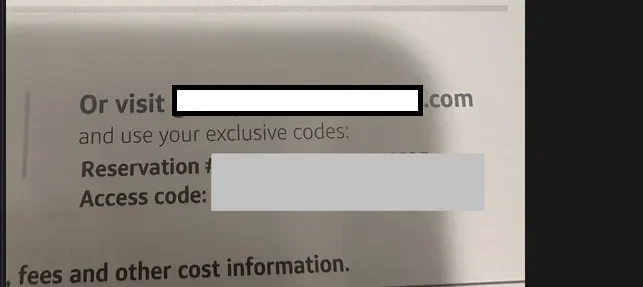
After taking a shower following that long run, I sat down at my PC to access the offer. I entered both the reservation code and the access code:
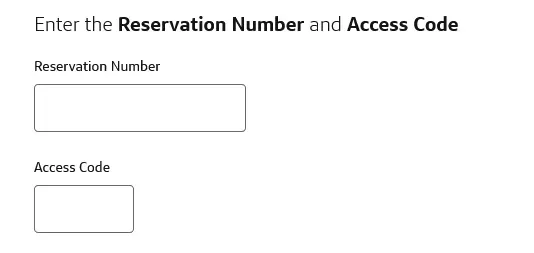
The server then redirected me with an access-encoded key, something like:
https://apply.bxmbnbank.com/?ridNumber=U2fsdGXkX1%2FD2t6FFmuvS7zVam%[redacted]
The ridNumber parameter in the URL is the access-encoded key the server redirected me with. I accessed my offer and all my personal information was stored there, so I was curious whether I could somehow decode the ridNumber to try to access another user's offer. I quickly looked into the response and found a parameter called ridNumber too, the same as the one I had in the URL, but this one had a numeric value and was not encoded.
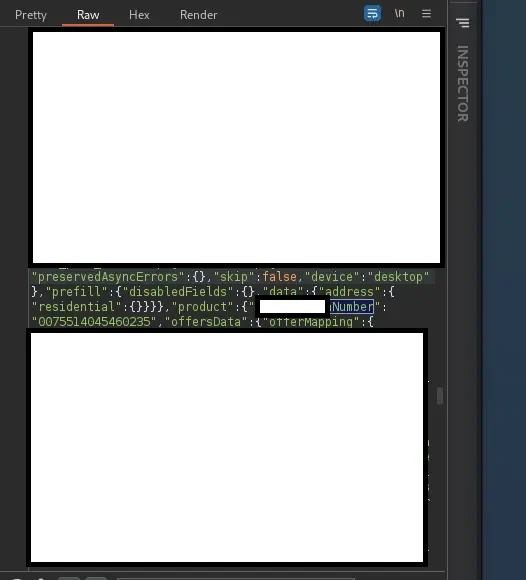
I thought, this may be the decoded version, will it work?
Exploitation
Step 1: Replace the encoded key with the numeric value
I took the numeric ridNumber from the response and put it into the URL in place of the encoded value:
https://apply.bxmbnbank.com/?ridNumber=0075514045460235
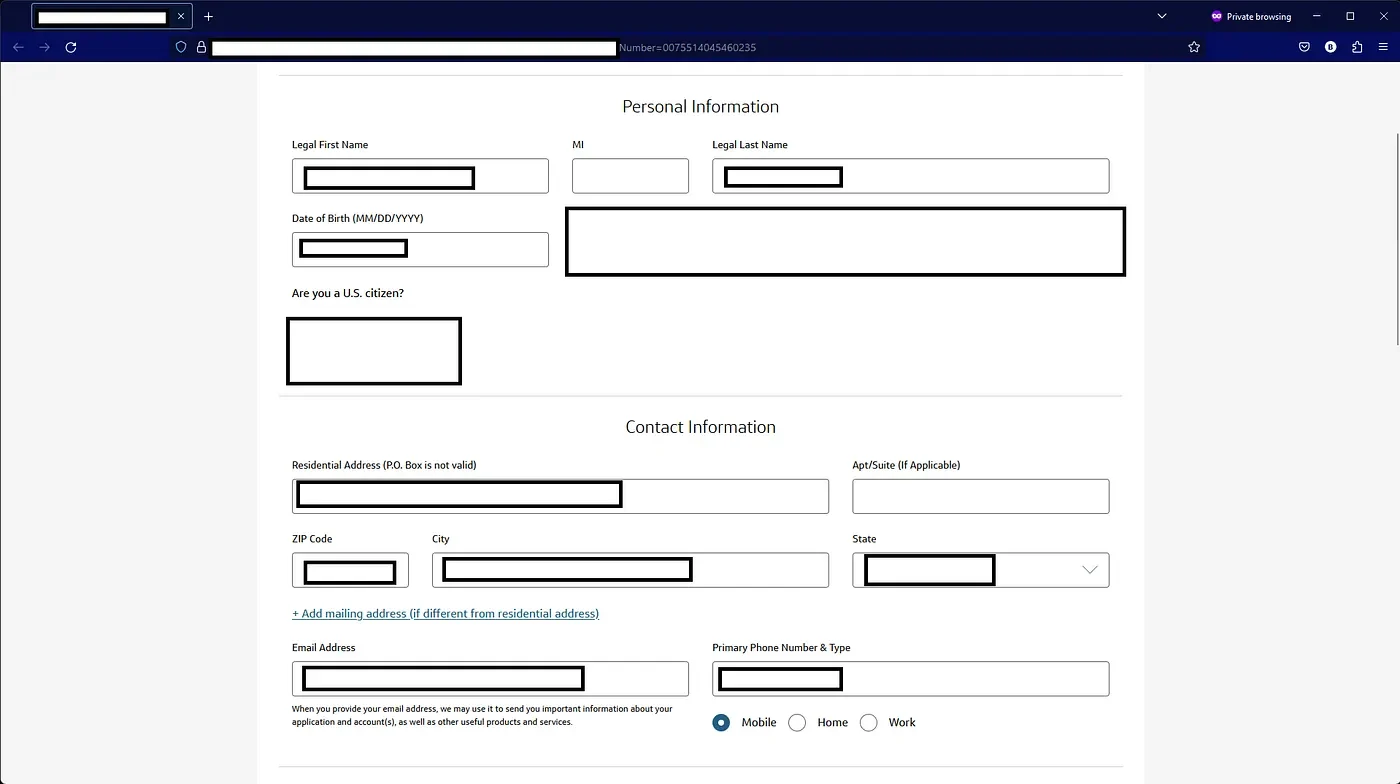
It worked. Surprisingly, the server accepted the decoded version of the key and returned the offer.
Step 2: Change the identifier
Since the server accepted a plain numeric identifier, I began to wonder whether it was vulnerable to IDOR. I modified the last two numbers of my own value and gained access to offer 0075514045460243, which belonged to a completely different user.
Step 3: Confirm it was not a one-off
Just to make sure, I then tried 0075514045460241 and 0075514045460255, revealing the PII of those users as well. I stopped there and reported it.
Root cause
The application put an encoded ridNumber in the URL. However, the same identifier was also present in the response body in plain numeric form, and the server accepted that numeric form directly in the URL. The access check therefore rested on knowing the identifier rather than on proving that the requester was the customer the offer belonged to. Changing the last digits was enough to reach other customers' offers. The report does not describe any server-side ownership check that would have stopped this.
Impact
This vulnerability could have allowed an attacker to access other users' offers, revealing sensitive personally identifiable information such as complete names, residential addresses, emails, phone numbers, and dates of birth. The attacker needed a valid numeric identifier, but the plain form was disclosed in the response to the attacker's own request. The report does not state how many offers were exposed in total.
Fix
What should be done is to stop treating the identifier as the credential: the server should verify that the authenticated or otherwise verified customer is the owner of the requested offer before returning it, and it should not accept the plain numeric form of the identifier in place of the encoded one.
Timeline
| Event | Date |
|---|---|
| Reported | November 17th, 2023 |
| Triaged | November 19th, 2023 |
| Bounty awarded | November 21st, 2023 |
Variants to test
- Look for a second representation of any opaque identifier. If a URL carries an encoded or hashed value, inspect the response body for the same field in plain form and try substituting it. A positive result is the server accepting the plain value and returning the same record.
- Change the last digits of a numeric identifier. A positive result is a response containing another customer's data rather than an error or a redirect.
- Test whether the identifier alone is sufficient, without the session that originally obtained it. A positive result is the record being returned from a fresh session or an unauthenticated request.
- Check whether the encoded value is actually validated. If the server accepts any well-formed string in the encoded parameter, or accepts the numeric form alongside it, the encoding is decorative rather than a security control.
- Apply the same substitution to any other endpoint that takes the identifier, such as document downloads or offer acceptance, and see whether ownership is checked there too.
I was surprised this issue had not been reported before, considering this bank has a very active bounty program. It highlights the importance of inspecting every value in the response and applying common sense whenever it is needed.
What happened, in plain words
A security researcher found a way to read other people's bank offers by changing a few digits in a web address. The bank sent paper letters to customers offering them a new account. The customer typed a reservation code and an access code into the bank's website to see the offer. After the codes were accepted, the website sent the customer to a page whose address contained a long scrambled-looking value. That value identified which offer was being shown.
When the researcher looked at what the website sent back, they noticed the same identifier also appeared in plain numbers, not scrambled. They put those plain numbers into the address instead of the scrambled value, and the website accepted it. Then they changed the last two digits, and the website showed them a completely different customer's offer, including that person's personal details. They tried two more nearby numbers, saw the same thing, stopped, and reported it. The bank awarded a bounty.
This kind of bug is called an IDOR. The name sounds technical, but the idea is simple: the website uses an identifier to decide which record to show, and it never checks that the person asking actually owns that record. It is like a hotel giving you a room key with the room number printed on it, and the door opening for any room number you type, as long as the number exists.
Background: the bank, the offer, and the codes
In October 2023 the researcher opened an account with this bank with the aim of finding security problems. They had tested the bank's bug bounty program before without success. The bank is very well known, one of the biggest in America, so finding something took real hours of work. Other programs invited the researcher at the time, so they paused this one and focused on the new opportunities.
A bug bounty program is a scheme where a company invites outside researchers to look for security problems in its systems and pays for good reports. The company sets the rules, and the researcher works within them.
The feature at the centre of this report is a pre-approved account offer that the bank sends to customers by post. Banks send these letters to encourage people to open new accounts, and the offers tend to include benefits such as "no annual fee and/or 0% intro APR". Each letter carries two codes: a reservation code and an access code. The customer types both into the bank's application site. If they are correct, the site shows the offer and the personal information stored against it.
Think of the two codes as a username and a password printed on paper: they prove you received the letter. What happens after that is where the problem was.
What the researcher needed to start
There was no special tooling. The only precondition was being a customer who had received one of these letters, plus a browser and the ability to look at what the website sends back. The offer used was one the researcher had received themselves, so they could compare the values in their own address and responses with what the server would accept.
"Looking at what the website sends back" means using the browser's developer tools, which every modern browser has. You press a key or open a menu, and a panel shows the requests your browser made and the responses it received. Nothing is installed and nothing is attacked; you are just reading the conversation between your browser and the bank's server.
Finding it
After a run on November 17th, the researcher came home and checked the mailbox as usual. There was an offer from a bank, and it quickly became clear it was from the same bank tested the previous month.
After a shower, the researcher sat at the PC to access the offer and entered both the reservation code and the access code:
The server then redirected the browser to an address containing an access-encoded key, something like:
https://apply.bxmbnbank.com/?ridNumber=U2fsdGXkX1%2FD2t6FFmuvS7zVam%[redacted]
Line by line:
https://is the scheme: the browser will speak to the server over an encrypted connection.apply.bxmbnbank.comis the host, the bank's application site. The name is written here as it appears in the report./?marks the start of the query string, the part of an address that carries values rather than a page path.ridNumber=is the name of the parameter. A parameter is a labelled slot in the address; the server reads the label and the value after the equals sign.U2fsdGXkX1%2FD2t6FFmuvS7zVam%[redacted]is the value. It looks random, and the%2Fand%2Binside it are percent-encodings: a way of writing characters such as/and+that would otherwise confuse the address. The server decodes them back before use.
So the address says, in effect: "show me the offer whose ridNumber is this long scrambled string". The scrambled string is what the server handed out after the two codes were accepted.
The researcher viewed their own offer, and all their personal information was stored there. That raised a question: could the ridNumber be decoded, so that another customer's offer could be reached? They looked into the response and found a parameter called ridNumber there too, the same name as in the address, but this one had a numeric value and was not encoded.
A response is what the server sends back after a request: the page itself, plus data the page uses. Here the response contained the same identifier in a second form, plain digits. The researcher thought this might be the decoded version and asked: will it work?
Exploitation
Step 1: Replace the encoded key with the numeric value
The researcher took the numeric ridNumber from the response and put it into the address in place of the encoded value:
https://apply.bxmbnbank.com/?ridNumber=0075514045460235
Line by line:
- The scheme and host are unchanged: same bank site, same encrypted connection.
ridNumber=is the same parameter name as before.0075514045460235is the plain numeric value taken from the response, with no scrambling and no percent-encoding.
It worked. Surprisingly, the server accepted the decoded version of the key and returned the offer. That is the first sign of trouble: if the scrambled form was meant to protect the identifier, accepting the plain form removes that protection entirely.
Step 2: Change the identifier
Since the server accepted a plain numeric identifier, the researcher wondered whether the site was vulnerable to IDOR. They modified the last two numbers of their own value and gained access to offer 0075514045460243, which belonged to a completely different user.
An IDOR, short for Insecure Direct Object Reference, is when a website lets you name a record directly (here, by its number) and does not check that the record belongs to you. The number is the "direct object reference"; the bug is that the check is missing or insecure. The everyday comparison: a cloakroom that hands you a ticket with a number, and then gives out any coat whose number you say, without checking the ticket against the coat.
Changing the last two digits is the whole attack: the modified value returned another customer's offer. No guessing of long random strings was needed.
Step 3: Confirm it was not a one-off
Just to make sure, the researcher then tried 0075514045460241 and 0075514045460255, revealing the PII of those users as well. They stopped there and reported it.
PII stands for personally identifiable information: data that identifies a specific person, such as a full name, a home address, an email address, a phone number or a date of birth. Trying two more numbers rules out the possibility that the first result was a fluke, for example a cached page or a coincidence. Stopping at that point is the responsible move: enough evidence to prove the problem, without collecting more people's data than necessary.
Why it worked
The application issued an encoded ridNumber in the address, which suggests the identifier was meant to be opaque to the client. "Opaque" means you can carry it around but are not supposed to understand or alter it, like a sealed envelope. However, the same identifier was also present in the response body in plain numeric form, and the server accepted that numeric form directly in the address.
The access check therefore rested on knowing the identifier rather than on proving that the requester was the customer the offer belonged to. Knowing a number is not the same as being entitled to the record behind it. Because the numeric identifiers are sequential, changing the last digits was enough to reach other customers' offers. The report does not describe any server-side ownership check that would have stopped this.
Impact
This vulnerability could have allowed an attacker to access other users' offers, revealing sensitive personally identifiable information such as complete names, residential addresses, emails, phone numbers, and dates of birth.
The attacker needed a valid numeric identifier, but the plain form was disclosed in the response to the attacker's own request. "Enumerating" means walking through a series of values one after another, the way you might try every house number on a street. The report does not state how many offers were exposed in total.
Fix
What should be done is to stop treating the identifier as the credential: the server should verify that the authenticated or otherwise verified customer is the owner of the requested offer before returning it, and it should not accept the plain numeric form of the identifier in place of the encoded one.
In plain terms: the number can stay in the address, but the server must also check who is asking. If the logged-in or code-verified customer is not the owner of that offer, the server should refuse, even when the number is correct.
Timeline
| Event | Date |
|---|---|
| Reported | November 17th, 2023 |
| Triaged | November 19th, 2023 |
| Bounty awarded | November 21st, 2023 |
"Triaged" means the program's team reviewed the report and confirmed it was a real issue worth working on.
Variants to test
These are the same ideas applied more widely, useful when you are learning to look for this class of bug:
- Look for a second representation of any opaque identifier. If an address carries an encoded or hashed value, inspect the response body for the same field in plain form and try substituting it. A positive result is the server accepting the plain value and returning the same record.
- Change the last digits of a numeric identifier. A positive result is a response containing another customer's data rather than an error or a redirect.
- Test whether the identifier alone is sufficient, without the session that originally obtained it. A positive result is the record being returned from a fresh session or an unauthenticated request.
- Check whether the encoded value is actually validated. If the server accepts any well-formed string in the encoded parameter, or accepts the numeric form alongside it, the encoding is decorative rather than a security control.
- Apply the same substitution to any other endpoint that takes the identifier, such as document downloads or offer acceptance, and see whether ownership is checked there too.
The researcher was surprised the issue had not been reported before, considering this bank has a very active bounty program. It highlights the importance of inspecting every value in the response and applying common sense whenever it is needed.
Glossary
- Bug bounty program: a scheme where a company invites outside researchers to look for security problems and pays for good reports.
- Bounty: the money a program pays for a valid report.
- Triaged: reviewed and confirmed by the program's team as a real issue.
- Parameter: a labelled slot in a web address, such as
ridNumber=..., whose value the server reads. - Query string: the part of an address after the
?, carrying parameters and their values. - Percent-encoding: a way of writing characters such as
/or+in an address as%2For%2Bso they do not confuse the parser. - Request: what your browser sends to a server, for example "give me this page".
- Response: what the server sends back: the page plus any data it uses.
- Developer tools: a panel built into browsers that shows requests, responses and page data.
- Opaque identifier: a value you can carry around but are not meant to understand or change, like a sealed envelope.
- Encoded key: a value scrambled or transformed so it is not readable as plain data; here, the long
ridNumberin the address. - IDOR (Insecure Direct Object Reference): a bug where a site lets you name a record directly by its identifier and does not check that the record belongs to you.
- Sequential identifier: numbers that follow one another, so neighbouring values are easy to guess or walk through.
- Enumeration: trying a series of values one after another to find valid ones.
- PII (personally identifiable information): data that identifies a specific person, such as name, address, email, phone number or date of birth.
- Ownership check: a server-side test that the person asking for a record is the one it belongs to.
- Session: the state a site keeps about you after you prove who you are, so it does not ask again on every page.
- Endpoint: a specific address on a server that performs a particular action, such as showing an offer or downloading a document.
- Root cause: the underlying reason a bug exists, as opposed to its visible symptom.



