How I Made $16,500 Hacking CDN Caching Servers — Part 1
The Referer header was reflected into a cached HTML page without sanitisation, allowing an attacker to inject JavaScript. By poisoning the cache, the attacker could serve the malicious script to other users, leading to stored XSS.

Bug Bounty
The full write-up lives on its author's site
It belongs to its author, so we link to it rather than copy it. The other two tabs are our own rewrites, checked against it.
Context
This is a write-up of a cache poisoning bug that ended in stored XSS, reported on November 7, 2021, triaged on November 11, 2021, and awarded on November 17, 2021. The bounty for this issue was $6,300, part of a total of $16,500 across the series. The target is described only as a CDN caching setup in front of a web application; the hostname, path and product are redacted in the report, so the specific application is not identified.
The feature involved is the CDN's caching of responses. A cache server stores a response for a URL and serves that stored copy to later visitors of the same URL. The report shows that the cached response reflected a value taken from the Referer request header into the HTML body, and that this reflected value was stored and replayed from cache.
Setup
The researcher used XSSHunter to host and receive callbacks from injected JavaScript. The payload in the request below loads a script from an XSSHunter domain, so the XSSHunter subdomain is where the firing notifications arrive. No accounts, roles or software versions are given in the report.
The precondition for the attack, as the researcher describes it, is a URL that is cached directly without any file extension. The researcher found such a URL through Google Dorking. The other precondition is that the attacker can influence the Referer header of the request that populates the cache, which in practice means the victim (or the attacker) has to reach the poisoned URL through a link whose URL the attacker controls.
Finding it
The researcher initially reported the issue as a cache deception problem, because that was the only caching exploit they knew at the time. The report was triaged and awarded as a cache poisoning to stored XSS instead. According to the researcher, the triager pointed out that looking for a self-XSS would let the issue be triaged as High or Critical.
The core observation was that JavaScript could be injected through the Referer header. On its own this was limited: an attacker still needed to send the poisoned URL to the victim, because the URL had to be modified by the attacker for the cache server to save the poisoned response. The researcher then used Google Dorking to find a URL that was cached directly without any extensions, and updated the report.
Exploitation
Step 1: Confirm the injection point
The researcher established that the Referer header value is reflected into the cached HTML response. Because the response is cached, the reflected value persists for other visitors of the same URL.
Step 2: Find a cacheable URL without an extension
Through Google Dorking the researcher found a URL that the cache server stored directly, with no extension in the path. This is what made the poisoning practical: the poisoned response could be served from cache to anyone requesting that URL.
Step 3: Poison the cache with an XSSHunter payload
The researcher saved the XSSHunter payload without any cache busters such as ?param=123, timed the cache server until it refreshed, and sent the request. The request as shown in the report is:
GET /xxxx/xxxx/xxx HTTP/2Host: RedactedReferer: ?</script><svg/onload=eval/**/(atob/**/(this.id)) id=[redacted]=>...
The path is redacted. The Referer value starts with ? and then closes an existing </script> context, injects an <svg> element whose onload handler runs eval(atob(this.id)), and sets the element's id to a base64 string. The base64 decodes to JavaScript that creates a script element, sets its src to the XSSHunter host, and appends it to the document body.
Step 4: Read the poisoned response from cache
The response returned for the request is:
HTTP/2 200 Ok...Content-Type: text/html; charset=utf-8X-Cache: HIT...<html>...<script>..."Referer":"?</script><svg/onload=eval/**/(atob/**/(this.id)) id=[redacted]=>...
The X-Cache: HIT header confirms the response came from the cache, and the body shows the injected payload stored inside the HTML, in a context where the Referer value is written into a script block. Any visitor who requests the same URL receives this cached response and runs the injected JavaScript.
Step 5: Observe the callbacks
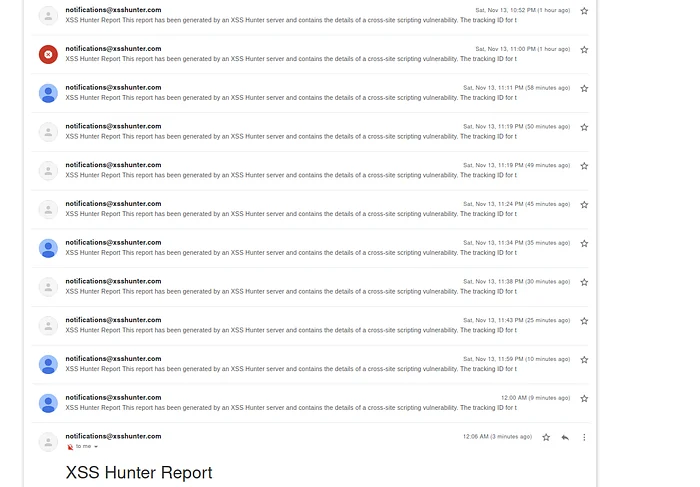
The next day the researcher had 35 notifications from XSSHunter. Four of them fired on a different subdomain, which shows the poisoned payload executed in a context beyond the single host that was poisoned.
Root cause
The application reflects the Referer request header into the HTML response, and the CDN caches that response for the URL. One request with a malicious Referer stores a response that is then served to later visitors of the same URL. The report does not describe the server-side code, so the exact reflection and caching configuration are not shown; the mechanism above is what the request and response demonstrate.
Impact
An attacker who can get a victim to request the poisoned URL causes the victim's browser to execute the attacker's JavaScript in the origin of the affected site. Because the payload is stored in the cache, the attacker does not need to keep sending the malicious request. The researcher notes that four XSSHunter notifications fired on a different subdomain. The report does not state which users or data were exposed, or what the XSSHunter callbacks contained.
Fix
The measures that address this class of issue are to stop reflecting the Referer header into responses, or to encode it correctly for the context it is written into, and to make sure the cache key accounts for any request header that influences the response body, or to avoid caching responses that vary on such headers.
Variants to test
- Other reflected headers. Send unusual values in headers such as
Referer,User-Agent,X-Forwarded-HostandOriginto cacheable endpoints and check whether the values appear unencoded in the response. A positive result is the value appearing verbatim in the HTML body of a response that carries a cacheHIT. - Extensionless cacheable paths. Use Google Dorking or crawling to find URLs that the CDN caches without a file extension, then repeat the poisoning request against them. A positive result is a stored response that replays the injected value to a fresh request.
- Cache refresh timing. Time requests to land just after the cache entry expires, as the researcher did, and send the payload without cache busters. A positive result is the poisoned response being stored and served with
X-Cache: HIT. - Cross-subdomain reach. After poisoning one host, check whether the payload fires on sibling subdomains. A positive result is the payload firing on a host other than the one that was poisoned, as the XSSHunter notifications showed here.
What happened, in plain words
A security researcher found a way to make a website's caching server store a small piece of malicious JavaScript, and then hand that stored copy to anyone who visited a particular page. The trick was to hide the JavaScript inside a request header called Referer, which the site copied into its own page without cleaning it up. Because the caching server kept that page and served it to later visitors, the script ran in the browsers of people who never sent the malicious request themselves. The researcher reported it on November 7, 2021, it was triaged on November 11, 2021, and a bounty of $6,300 was awarded on November 17, 2021. That $6,300 is one part of a total of $16,500 across the series of reports this article belongs to.
The report does not name the site, the hostname or the path involved; those details are redacted. What it does describe is the mechanism, and that is what this article walks through, step by step, for someone who has never looked at a security report before.
The pieces you need to know first
Before the steps make sense, here are the moving parts, explained from scratch.
What a request and a response are
When you type an address into your browser and press Enter, your browser sends a request to a server: a short message asking for a page. The server sends back a response: the page itself, plus some extra information about it. Every conversation on the web is made of these two things.
What a header is
A request is not just "give me this page". It carries small labelled notes alongside it, called headers. Think of them as the lines on the outside of an envelope: the address, the return address, a note saying "fragile". The browser adds many of them automatically, and you never see them. Two matter here:
Host: which website on the server you are asking for. One server can host many sites, so this header says which one you mean.Referer: the address of the page you were on when you clicked the link that brought you here. If you are reading a blog post and click a link to a shop, the shop's server receives aRefererheader containing the blog post's address. (The name is a historical misspelling of "referrer".)
What a CDN and a cache are
A CDN (content delivery network) is a network of servers placed around the world that sit in front of a website. Their job is to answer visitors faster and take load off the main server. One of the main ways they do this is caching.
A cache is a stored copy. Think of a café that brews a large pot of coffee in the morning and pours from it all day instead of brewing a fresh cup for every customer. The first customer's order causes the pot to be brewed; everyone after that gets coffee from the pot until it runs out and a new one is made. A caching server works the same way: the first request for a page goes to the real server, the response is stored, and later requests for the same page get the stored copy. When the stored copy is served, the response usually carries a header such as X-Cache: HIT, meaning "this came from the stored copy". When it is not stored and the real server answers, you may see MISS instead.
What "reflecting" a value means
If a server takes something you sent (a header, a URL parameter, a form field) and writes it back into the page it returns, that value has been reflected. Normally this is harmless: the page shows your search term back to you. It becomes dangerous when the value is written into the page without being encoded, meaning special characters are not converted into safe equivalents. If the value lands inside the page's HTML in a place where the browser will treat it as code, the browser will run it.
What JavaScript and XSS are
JavaScript is the programming language that runs inside your browser. It is what makes pages interactive: buttons that respond, menus that open, content that loads without a page refresh. It is also what lets a page read and change what is on screen.
XSS, short for cross-site scripting, is when an attacker gets their own JavaScript to run inside someone else's browser, in the context of a website the victim trusts. The attacker's script then behaves as if the website itself had written it. That is why XSS matters: the browser cannot tell the difference between the site's own code and the injected code.
What stored XSS is
There are a few flavours of XSS. Stored XSS is the worst kind: the malicious script is saved somewhere (a database, a comment field, or, as here, a cache) and served to every visitor afterwards, without the attacker needing to do anything further. The script is not just reflected back to the person who sent it; it waits for other people.
What cache poisoning is
Cache poisoning is the act of getting a cache to store something the attacker chose, so that later visitors receive the attacker's version instead of the real one. The café comparison again: if you could swap the pot of coffee for one you brewed yourself, every customer after you would be served your coffee. In web terms, the attacker sends one carefully crafted request, the cache stores the response to it, and everyone who asks for that page afterwards gets the attacker's stored response.
What cache deception is
Cache deception is a related but different idea: tricking a cache into storing a page that contains a user's private information, so the attacker can later fetch that stored copy. The researcher initially reported the issue as cache deception because, as they put it, that was all they knew about caching exploits at the time. It was later triaged and awarded as cache poisoning leading to stored XSS.
What a cache buster is
A cache buster is a small, meaningless addition to a URL, such as ?param=123, whose only purpose is to make the URL look different to the cache. Because the cache stores responses per URL, a new URL means a fresh response from the real server rather than the stored copy. Attackers use cache busters while testing so they do not accidentally poison the cache before they are ready. In the final attack, the researcher deliberately did not use one, because the whole point was to have the poisoned response stored under the real URL.
What XSSHunter is
XSSHunter is a service that helps researchers prove that an XSS actually fires. You put a special payload in your attack; if the payload runs in someone's browser, that browser contacts the XSSHunter service and reports back. The researcher receives a notification each time this happens. It is like leaving a marked banknote in a wallet and being told when and where the wallet turns up.
What Google Dorking is
Google Dorking means using advanced search operators in Google to find pages that match very specific patterns, rather than searching for ordinary words. Researchers use it to discover pages that are exposed, unusual, or, as in this case, cached in a particular way. It is simply a clever use of a search engine, not a hacking tool.
Finding it
The researcher's first observation was that JavaScript could be injected through the Referer header. That is, the site took the value of that header and wrote it into the page it returned, without cleaning it up.
On its own, this was limited. The attacker still had to send the poisoned URL to the victim, because the URL had to be modified by the attacker for the cache server to save the poisoned response. In other words, the attacker could not just poison a page that people visit normally; they had to get each victim to follow a link the attacker controlled.
Then the researcher used Google Dorking to find a URL that was being cached directly, without any file extension. This was the missing piece. With an extensionless URL that the cache stored, the researcher had what was needed to update the report. The researcher updated the report with this finding.
According to the researcher, the triager also pointed out that looking for a self-XSS would let the issue be triaged as High or Critical. Self-XSS is a weaker form where the script only runs for the person who injects it; the triager's suggestion was to look for a way to make the injected script run for other people, which is what the cache does.
Exploitation
Step 1: Confirm the injection point
The researcher established that the Referer header value is reflected into the cached HTML response. Because the response is cached, the reflected value persists for other visitors of the same URL. This is the foundation: without a reflection, there is nothing to poison.
Step 2: Find a cacheable URL without an extension
Through Google Dorking the researcher found a URL that the cache server stored directly, with no extension in the path. This is what made the poisoning practical: the poisoned response could be served from cache to anyone requesting that URL, rather than only to someone who followed a crafted link.
Step 3: Poison the cache with an XSSHunter payload
The researcher saved the XSSHunter payload without any cache busters such as ?param=123, timed the cache server until it refreshed, and sent the request. The timing matters because the cache holds a stored copy until it expires; sending the request just after expiry means the real server answers, and the cache stores that answer. The request as shown in the report is:
GET /xxxx/xxxx/xxx HTTP/2Host: RedactedReferer: ?</script><svg/onload=eval/**/(atob/**/(this.id)) id=[redacted]=>...
Line by line:
GET /xxxx/xxxx/xxx HTTP/2is the request line.GETmeans "give me this page". The path is redacted in the report, shown asxxxxplaceholders.HTTP/2is the version of the web protocol being used.Host: Redactedsays which website is being asked for. The actual hostname is redacted.Referer: ?</script><svg/onload=eval/**/(atob/**/(this.id)) id=dmFyY...is the attacker-controlled value. It starts with?, then closes an existing</script>context in the page, injects an<svg>element whoseonloadhandler runseval(atob(this.id)), and sets the element'sidto a base64 string. The base64 decodes to JavaScript that creates a script element, sets itssrcto the XSSHunter host, and appends it to the document body.
In plain words: the page already contains a <script> block, and the Referer value is written inside it. The </script> in the payload ends that block early, so everything after it is treated as fresh HTML rather than as part of the script. The <svg> element is then created, and its onload attribute tells the browser to run a piece of code as soon as the element loads. That code is eval(atob(this.id)): atob decodes the base64 string in the element's id, and eval runs the result. The decoded result builds a new script tag pointing at the XSSHunter host and adds it to the page, which is what causes the callback.
Step 4: Read the poisoned response from cache
The response returned for the request is:
Line by line:
HTTP/2 200 Okis the status line: the request succeeded.Content-Type: text/html; charset=utf-8says the response is an HTML page, encoded in UTF-8.X-Cache: HITis the important one: it confirms the response came from the cache, not from the real server. The stored copy is being served.- The body shows the injected payload stored inside the HTML, in a context where the
Referervalue is written into a script block. Any visitor who requests the same URL receives this cached response and runs the injected JavaScript.
Step 5: Observe the callbacks
The next day the researcher had 35 notifications from XSSHunter. Four of them fired on a different subdomain, which shows the poisoned payload executed in a context beyond the single host that was poisoned.
Why it worked
The application reflects the Referer request header into the HTML response, and the CDN caches that response for the URL. One request with a malicious Referer stores a response that is then served to later visitors of the same URL. The report does not describe the server-side code, so the exact reflection and caching configuration are not shown; the mechanism above is what the request and response demonstrate.
So the cache treats a response built from a malicious Referer as if it were the normal page for that URL, and hands it out to everyone.
What the impact was
An attacker who can get a victim to request the poisoned URL causes the victim's browser to execute the attacker's JavaScript in the origin of the affected site. Because the payload is stored in the cache, the attacker does not need to keep sending the malicious request. The researcher notes that four XSSHunter notifications fired on a different subdomain.
How to fix it
The measures that address this class of issue are to stop reflecting the Referer header into responses, or to encode it correctly for the context it is written into, and to make sure the cache key accounts for any request header that influences the response body, or to avoid caching responses that vary on such headers.
In everyday terms: either stop copying the Referer value into the page, or clean it up so it cannot be read as code, and make sure the cache knows that this page's content depends on more than just the URL.
Things worth testing elsewhere
- Other reflected headers. Send unusual values in headers such as
Referer,User-Agent,X-Forwarded-HostandOriginto cacheable endpoints and check whether the values appear unencoded in the response. A positive result is the value appearing verbatim in the HTML body of a response that carries a cacheHIT. - Extensionless cacheable paths. Use Google Dorking or crawling to find URLs that the CDN caches without a file extension, then repeat the poisoning request against them. A positive result is a stored response that replays the injected value to a fresh request.
- Cache refresh timing. Time requests to land just after the cache entry expires, as the researcher did, and send the payload without cache busters. A positive result is the poisoned response being stored and served with
X-Cache: HIT. - Cross-subdomain reach. After poisoning one host, check whether the payload fires on sibling subdomains. A positive result is the payload firing on a host other than the one that was poisoned, as the XSSHunter notifications showed here.
Glossary
- API: a defined way for one piece of software to talk to another, like a service counter with a fixed menu of requests you can make.
- Base64: a way of writing arbitrary data using only letters, digits and a few symbols, so it can travel safely through systems that expect text. It is encoding, not encryption; anyone can decode it.
- Cache: a stored copy of a response, served to later visitors instead of asking the real server again.
- Cache buster: a meaningless addition to a URL, such as
?param=123, used to make the cache treat it as a new URL and fetch a fresh response. - Cache deception: tricking a cache into storing a page that contains a user's private information, so the attacker can later fetch that stored copy.
- Cache key: the information a cache uses to decide which stored copy matches a request. If it is only the URL, two requests with different headers get the same stored copy.
- Cache poisoning: getting a cache to store a response the attacker chose, so later visitors receive the attacker's version.
- CDN (content delivery network): a network of servers placed in front of a website to answer visitors faster and take load off the main server, often by caching.
- Cookie: a small piece of data a website stores in your browser so it can recognise you on later requests, for example to keep you logged in.
- Cross-site scripting (XSS): getting an attacker's JavaScript to run inside someone else's browser, in the context of a website the victim trusts.
- Encoding: converting special characters into safe equivalents so they are displayed as text rather than interpreted as code.
eval: a JavaScript function that runs a string as code.- Google Dorking: using advanced search operators in Google to find pages matching very specific patterns.
- Header: a small labelled note sent alongside a request or response, such as
HostorReferer. Host: the header that says which website on a server the request is for.- HTML: the language that describes the structure of a web page.
- HTTP/2: a version of the protocol browsers and servers use to exchange requests and responses.
- JavaScript: the programming language that runs inside your browser and makes pages interactive.
onload: an HTML attribute whose value runs when an element finishes loading.Referer: the header carrying the address of the page you came from when you followed a link.- Reflection: when a server writes a value you sent back into the page it returns.
- Request: the message your browser sends to a server asking for a page.
- Response: the message a server sends back, containing the page and information about it.
- Self-XSS: a weaker form of XSS where the script only runs for the person who injects it, not for other visitors.
- Stored XSS: XSS where the malicious script is saved somewhere and served to every later visitor, without the attacker doing anything further.
- Subdomain: a subdivision of a domain name, such as
shop.example.comversuswww.example.com. - Token: a piece of data used to identify or authorise a user or session, often stored in a cookie.
- Triaged: the stage where a bug bounty programme reviews a report and decides whether it is valid and how serious it is.
- UTF-8: a common way of encoding text so computers can store and transmit it.
X-Cache: a response header, used by many caching setups, that says whether the response came from the cache (HIT) or not (MISS).- XSSHunter: a service that reports back when an injected payload runs in a browser, so researchers can prove an XSS fires.



