I Tested Password Reset Flows on 5 Bug Bounty Programs. Here’s What I Found.
Two of five tested password reset flows had issues: one token did not expire after use, and another reset link remained valid after the password was changed. An attacker who intercepted such a link could reuse it to reset the password again.

Cybersecurity
The full write-up lives on its author's site
It belongs to its author, so we link to it rather than copy it. The other two tabs are our own rewrites, checked against it.
Context
This is a field note about testing password reset flows across five bug bounty programs, written by Bugitrix and published on Medium on 28 September 2026. The programs are not named because of disclosure rules, so there is no target, product or version detail to work with. The feature under test is the standard "Forgot password?" flow that every application with local accounts exposes: a request to initiate the reset, a generated token, an email containing a link, a click on that link, and a new password being set.
The author's starting position is worth stating plainly because it frames everything else: before this session they had never tested a password reset flow. They had tested IDOR, poked at authorization checks and looked for XSS in search fields, but had always assumed reset flows were handled by the framework, secured by default and not worth the time.
Setup
The tooling was deliberately minimal: Burp Suite Community Edition and a browser. No VPS and no custom scripts. The testing was done in a single Saturday session, and the author reports finding something in less than four hours of testing.
Five programs were tested. No account types, roles, framework names or versions are given. The only precondition that matters is that each program had a password reset flow reachable from a "Forgot password?" link, which the author treats as a given for any application with local accounts.
Finding it
The author's argument for why this feature is worth testing rests on how common and how linear the flow is. Every application has a reset flow, so there is no need to hunt for exotic features or understand complex business logic. The attack surface is explicit and linear: a request to initiate the reset, a token being generated, an email being sent, a link being clicked, a new password being set. Each of those steps is a potential failure point. The impact also explains itself, because a bug in a reset flow maps directly onto account takeover, which a triager does not need convincing about.
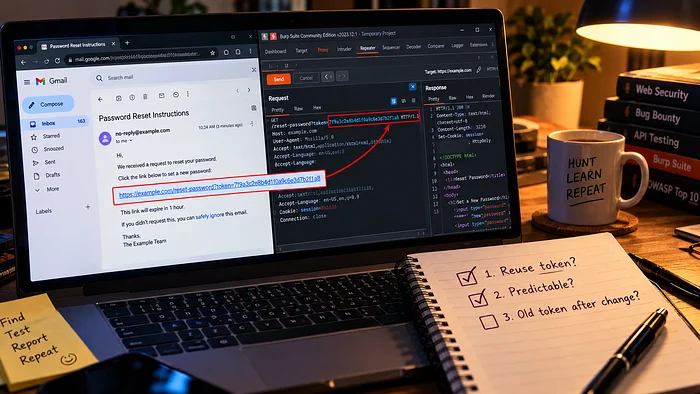
The image sits under the line calling password resets the softest part of every application and the one nobody bothers to test properly. It is a framing illustration for that claim, not a screenshot of a request or response.
Exploitation
The author describes three checks, applied in order before anything else. No raw HTTP requests, parameters, headers or responses appear in the write-up, so the steps below are the tests as described rather than captured traffic.
Step 1: Does the token expire after one use?
Request a reset, use the link, change the password, then try the same link again. If the link still works, that is a finding. A reusable reset link means anyone who intercepts it, whether through email compromise, browser history or a shared device, can reset the password again even after the legitimate user has already done so.
Step 2: Does the token have a predictable pattern?
Request multiple resets for the same account and compare the tokens. The questions asked of each token are whether they increment, whether they are base64-encoded versions of the user ID, and whether they are generated from a timestamp. If the next token can be predicted, someone else's password can be reset without ever seeing their email.
Step 3: Does the old token still work after a new password is set?
Request a reset but do not use the link immediately. Change the password through the normal "change password" flow instead. Then try the old reset link. If it still works, the application is not invalidating tokens when credentials change, which the author classifies as a session management failure with real security impact.
Results across the five programs
Two of the five had some kind of issue in the reset flow. Neither was a critical account takeover:
| Program | Issue found |
|---|---|
| One | Token did not expire after use |
| Another | Reset link remained valid after the password had been changed |
The other three programs had solid reset flows: tokens expired, patterns were random, and old links died after password changes. The author calls this the median experience. Both findings were reported and acknowledged, and both were waiting for triage at the time of writing.
Root cause
The write-up does not examine any application's code, so the cause is inferred from behaviour. A token that survives its first use means the server is not marking the token as consumed when the reset is completed. A reset link that survives a password change means the server is not invalidating outstanding reset tokens when credentials are updated. In both cases the token remains a valid credential for longer than its purpose requires. The author's original assumption that the framework handled this turned out to be wrong.
Impact
The author is careful about severity. Neither finding was a critical account takeover. The impact is conditional on an attacker obtaining the link: through email compromise, browser history or a shared device. Under those conditions, a token that does not expire after use lets the attacker reset the password again after the legitimate user has already done so, and a link that stays valid after a password change lets an attacker who holds an old link set a new password even though the user has since changed it. The author's broader point is that a valid finding of this kind matters most to a beginner with no confirmed bugs yet.
Fix
The write-up does not say what any program changed, because both reports were still awaiting triage. The fixes implied by the two findings are to invalidate a reset token as soon as it is used, and to invalidate all outstanding reset tokens whenever the account password changes.
Variants to test
The author's stated next steps are the concrete variants: the email change flow, the account deletion flow and the two-factor disable flow. The general principle given is that anywhere the application asks "are you sure?", that is where the bug lives. The author's next steps are the email change flow, the account deletion flow and the two-factor disable flow.
- Session tokens and OAuth: the author frames authentication as a starting point rather than a finishing line, moving from reset flows to session tokens, then two-factor flows, then OAuth, with each building on the last.
What happened, in plain words
A security researcher who writes under the name Bugitrix spent one Saturday testing the "Forgot password?" feature on five different bug bounty programs. A bug bounty program is an arrangement where a company invites outside people to look for security problems in its systems and report them, usually in exchange for a reward and recognition. The programs are not named, because the rules of those programs do not allow it.
Before that Saturday, the author had never tested a password reset flow. They had tested other kinds of bugs, but had always assumed that password resets were handled safely by the software framework the application was built on. A framework is a ready-made set of building blocks that developers use so they do not have to write everything from scratch. The assumption was that the framework takes care of security by default, so there was nothing worth checking.
That assumption turned out to be wrong. Out of five programs, two had a problem in the reset flow. Neither problem was a full account takeover, meaning a situation where an attacker can completely take control of someone else's account. One was a reset link that kept working after it had already been used. The other was a reset link that kept working after the account's password had been changed. Both were reported to the programs, both were acknowledged, and both were still waiting to be looked at in detail (a stage called triage) when the author wrote the article.
The whole session took less than four hours of testing. The tools were a browser and Burp Suite Community Edition, a free program that lets you watch and change the traffic between your browser and a website. No server of their own, no custom scripts.
Why this feature is worth testing
The author's argument rests on how common and how linear the flow is.
- Every application has one. Any site where you can log in with an email address and a password needs a way to recover that password. You do not have to hunt for an unusual feature or understand complicated business rules. You just look for the "Forgot password?" link.
- The steps are clear and in a fixed order. You ask for a reset, the server creates a token, an email is sent, you click the link, and you set a new password. A token here is a long random-looking string that acts as a temporary proof that you are allowed to do something, a bit like a cloakroom ticket: whoever holds the ticket gets the coat, no questions asked. Each of those steps can fail.
- The impact explains itself. If a reset flow is broken, the consequence is usually that someone can take over an account. Anyone reading the report, including the person who decides whether it is a real bug, understands immediately why that matters. You do not need a long paragraph to convince them.
- The tools are free. A browser and Burp Suite Community Edition are enough.
The picture
The image sits right under the line that calls password resets the softest part of every application and the one nobody bothers to test properly. It illustrates that claim; it is not a screenshot of a request or a response.
The three checks, in order
These are the first three things the author now checks on any reset flow. The write-up contains no captured requests, parameters, headers or responses, so what follows is the tests as described, not recorded traffic.
Check 1: does the token stop working after one use?
- Ask the application to reset your password.
- Open the link from the email and set a new password.
- Try the same link a second time.
If the link still works, that is a finding. A reset link that can be reused means that anyone who gets hold of it can reset the password again, even after the real owner has already done so. There are several ordinary ways to get hold of it: taking over the email account, looking at the browser history on a shared computer, or simply using a device that several people share.
Check 2: can the token be guessed?
- Ask for several resets on the same account.
- Compare the tokens you receive.
The questions to ask of each token are: do they go up by one each time (increment)? Are they just the user ID, a number that identifies your account, converted into base64? Base64 is a way of writing data using only letters, digits and a couple of symbols, so it looks scrambled but is not encryption and anyone can decode it. Are they built from a timestamp, meaning the date and time the request was made?
If you can work out what the next token will be, you can reset someone else's password without ever seeing their email. This is the same idea as a hotel safe whose code is simply the room number: it looks like a secret, but anyone can work it out.
Check 3: does an old token still work after the password has been changed?
- Ask for a reset, but do not use the link straight away.
- Change your password through the normal "change password" screen instead.
- Try the old reset link.
If it still works, the application is not cancelling tokens when the password changes. The author calls this a session management failure with real security impact. Session management is the part of an application that decides who is currently logged in and for how long; cancelling old proofs of identity when credentials change is part of doing that properly.
What the five programs showed
Two of the five had some kind of issue in the reset flow. Neither was a critical account takeover.
| Program | Issue found |
|---|---|
| One | Token did not expire after use |
| Another | Reset link remained valid after the password had been changed |
The other three had solid reset flows: tokens expired, the patterns were random, and old links stopped working after a password change. The author calls this the median experience, meaning the middle of the range, the ordinary result you should expect.
Both findings were reported and acknowledged, and both were waiting for triage at the time of writing.
Why it happens
The write-up does not look at any application's code, so the cause is worked out from behaviour. A token that survives its first use means the server is not marking the token as used up when the reset is completed. A reset link that survives a password change means the server is not cancelling outstanding reset tokens when the password is updated. In both cases the token stays a valid key for longer than its job requires.
The author's original assumption, that the framework handled this, turned out to be wrong.
How serious it is
The author is careful about severity. Neither finding was a critical account takeover. The impact depends on an attacker getting hold of the link, through email compromise, browser history or a shared device. If they do, a token that does not expire after use lets them reset the password again after the real owner has already done so, and a link that stays valid after a password change lets someone holding an old link set a new password even though the user has since changed it.
The author's wider point is that a valid finding of this kind matters most to a beginner who has not yet had a single bug confirmed.
The fix
The write-up does not say what any program changed, because both reports were still waiting for triage. The fixes implied by the two findings are to cancel a reset token as soon as it is used, and to cancel all outstanding reset tokens whenever the account password changes.
What to test next
The author's stated next steps are concrete variants of the same idea: the email change flow, the account deletion flow and the two-factor disable flow. Two-factor authentication, often shortened to 2FA, is a second proof of identity on top of the password, such as a code from a phone. The general principle given is that anywhere the application asks "are you sure?", that is where the bug lives.
The author's next steps are the email change flow, the account deletion flow and the two-factor disable flow.
- Session tokens and OAuth: the author treats authentication as a starting point rather than a finishing line, moving from reset flows to session tokens, then two-factor flows, then OAuth, with each building on the last. OAuth is a system that lets you sign in to one site using an account from another, such as "Sign in with Google".
Glossary
- Bug bounty program: an arrangement where a company invites outside people to find and report security problems in its systems, usually with a reward and recognition.
- Password reset flow: the sequence of steps a site uses when you click "Forgot password?": you request a reset, a token is created, an email is sent, you click the link, and you set a new password.
- Framework: a ready-made set of building blocks developers use to build an application, so they do not write everything from scratch.
- Token: a long random-looking string that acts as temporary proof that you are allowed to do something, like a cloakroom ticket.
- Account takeover: a situation where an attacker gains full control of someone else's account.
- Triage: the stage where a reported bug is reviewed and its validity and priority are decided.
- Burp Suite Community Edition: a free program that lets you watch and change the traffic between your browser and a website.
- VPS: a virtual private server, a rented machine in a data centre that you control remotely.
- IDOR: a bug where an application lets you access someone else's data by changing an identifier in a request, such as a number in a URL.
- Authorization check: the part of an application that decides whether you are allowed to do a particular action.
- XSS: cross-site scripting, a bug where an attacker gets their own code to run in another user's browser through a website.
- Base64: a way of writing data using only letters, digits and a couple of symbols; it looks scrambled but is not encryption and anyone can decode it.
- User ID: a number or string that identifies a particular account.
- Timestamp: the date and time at which something happened.
- Session management: the part of an application that decides who is currently logged in and for how long.
- Session token: the value a site stores, often in a cookie, to remember that you are logged in.
- Cookie: a small piece of data a website asks your browser to store and send back with later requests, often used to remember who you are.
- Two-factor authentication (2FA): a second proof of identity on top of the password, such as a code from a phone.
- OAuth: a system that lets you sign in to one site using an account from another, such as "Sign in with Google".
- Replay: using the same token or link again after it has already served its purpose.
- RCE: remote code execution, a severe bug where an attacker can run their own commands on a server.
- SSRF: server-side request forgery, a bug where an attacker makes a server send requests to places it should not reach.
- Business logic bug: a flaw in the rules of how a feature is meant to work, rather than in the code's technical defences.



