I Used My Own Identity Provider to Take Over Another Tenant
The application failed to bind an identity provider to the tenant that initiated the login, so an attacker could use their own SSO configuration to authenticate as an administrator in another tenant by matching the email address. This allowed cross-tenant account takeover without knowing the victim's password.

medium.com
Published on medium.com
Bug Bounty
The full write-up lives on its author's site
It belongs to its author, so we link to it rather than copy it. The other two tabs are our own rewrites, checked against it.
Context
The target was a multi-tenant SaaS application. Several organizations (tenants) shared the same application while their users, roles, data and configurations stayed logically separated. Each tenant could hold several users with different permission levels, including administrators. New users could register for a trial, and a trial user received a separate tenant plus administrative access to that tenant.
The feature at the centre of the finding is SSO. A tenant administrator could configure the tenant's authentication settings and connect it to an external identity provider. The application also returned SSO-related fields during authentication discovery, apparently telling the client whether SSO was enabled and where the authentication process should be directed. Depending on configuration, those fields could contain an authentication type, SAML-related information, or other identity-provider routing data.
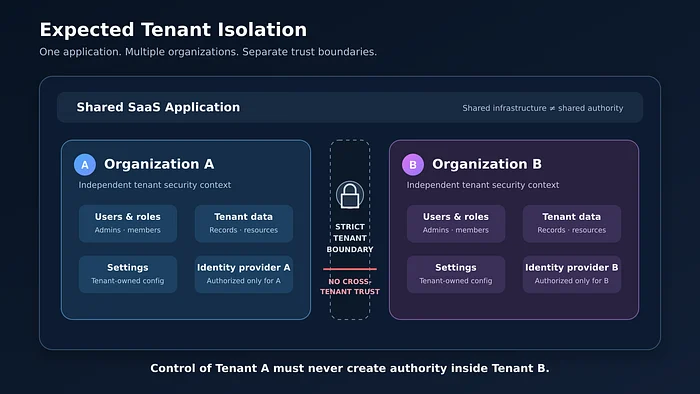
The security boundary should have been straightforward: control over one organization must never provide authority over users in another. The SSO implementation did not consistently preserve that boundary.
Setup
The researcher created an ordinary trial organization and configured it to use an identity provider under their control. The report calls the attacker-controlled organization Organization A and the target organization Organization B. The assessment was authorized, and the report was filed as Cross-Tenant SSO Authentication Confusion Leading to Organization Account Takeover.
Because the trial tenant came with administrative access, the researcher could legitimately:
- Create their own organization
- Become its administrator
- Add users to it
- Configure its authentication settings
- Connect it to an external identity provider
No credentials for Organization B were available. The only piece of information needed about the target was the administrator's email address. The testing was black-box; there was no source-code review, so the internal implementation described below is inferred from observed behaviour.
Finding it
While examining the login process, the researcher noticed that the application returned several SSO-related fields during authentication discovery. These fields appeared to tell the client whether SSO was enabled and where the authentication process should be directed.
The researcher first initiated a normal login flow for a user in Organization A. Because Organization A and its SSO configuration were under the researcher's control, the application returned values associated with the attacker's identity provider. Those values were saved and their influence on the next stage of authentication was analysed.
A login attempt was then started for an administrator belonging to Organization B. In that flow, the application's response was intercepted and the absent or different SSO-related values were replaced with the values previously returned for Organization A. The browser was then directed to the identity provider controlled by the researcher.
That was the critical moment: the application had allowed SSO configuration associated with one tenant to influence the authentication flow of a user in another tenant. Redirecting the browser to the attacker's IdP was only part of the issue, though. The remaining question was how the application would map the authenticated identity after receiving a valid response.
Exploitation
Step 1: Create a tenant and attach a controlled IdP
The researcher registered a trial organization (Organization A), became its administrator, and configured it to use an identity provider under their control. This established the attacker-controlled side of the trust relationship and produced a set of SSO-related values that the application associated with Organization A.
Step 2: Capture Organization A's SSO routing values
A normal login flow was initiated for a user in Organization A. The application returned values associated with the attacker's identity provider. These were saved for reuse.
Step 3: Start a login for the Organization B administrator
A login attempt was initiated for an administrator belonging to Organization B.
Step 4: Swap the SSO values in the response
The application's response to the Organization B login was intercepted, and the absent or different SSO-related values were replaced with the values previously returned for Organization A.

Step 5: Create a duplicate identity in the attacker's IdP
Inside the attacker's identity provider, a user was created whose email address matched the email address of the administrator in Organization B. This did not give the researcher control over the real administrator's mailbox or password; it only meant that the attacker's IdP contained a separate identity with the same email string.
That distinction is essential. An identity provider controlled by Organization A should not be able to make authoritative identity claims for Organization B merely because it returns a familiar email address. Email addresses are identifiers, not proof that an identity provider is trusted by every organization in which that address may appear.
Step 6: Authenticate through the attacker's IdP
The modified login flow was continued and the researcher authenticated through their own identity provider using the duplicate identity. The IdP generated a legitimate authentication response. From the protocol's perspective the response was valid: the identity provider had genuinely authenticated a user and issued an assertion containing that user's information.
Step 7: The application issues an Organization B administrator session
The application accepted the response, located the matching administrator account in Organization B, and created an authenticated session for it. The researcher was now logged in as the administrator of another organization without knowing that administrator's password.
The complete attack path, as summarised in the report:
Attacker creates Organization A
            ↓
Attacker configures an identity provider
            ↓
Attacker creates an identity matching
the target administrator’s email address
            ↓
Attacker captures valid SSO routing information
for Organization A
            ↓
Attacker starts the target user’s login flow
for Organization B
            ↓
SSO information is replaced with values
associated with Organization A
            ↓
Browser authenticates through the attacker’s IdP
            ↓
Attacker-controlled IdP returns a valid assertion
            ↓
Application maps the email address to the
administrator in Organization B
            ↓
Administrator session for Organization B is issued
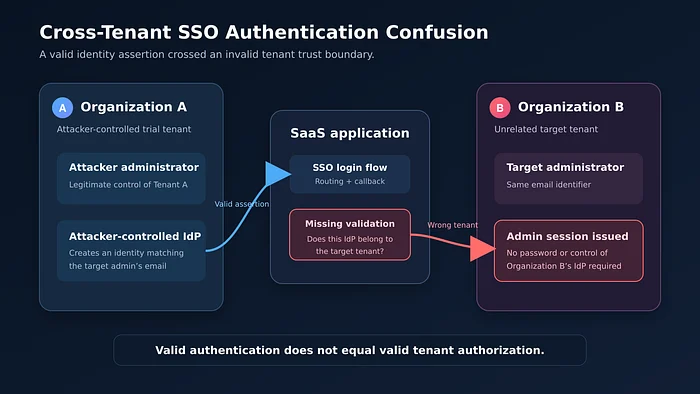
In one sentence: the application trusted a valid identity assertion without confirming that the identity provider was authorized for the tenant receiving the session.
What the attack did not require
The attack did not necessarily require breaking the underlying SSO protocol. The researcher did not need to forge a signature, steal an assertion from the target organization, compromise the target's identity provider, or have the victim administrator authenticate on the victim's behalf. The attacker's IdP issued a valid response for an identity that existed inside the attacker's own authentication domain. The failure occurred when the application decided what that identity was allowed to access.
Root cause
The application proved that the attacker's IdP had authenticated the identity. It failed to prove that the IdP was authorized to authenticate identities for Organization B.
Because the conclusion is based on black-box testing rather than source-code review, the exact internal implementation may have differed. The observed behaviour suggested that the application did not securely bind several important objects together:
| Security object | Required relationship |
|---|---|
| SSO configuration | Must belong to the authenticating tenant |
| Login transaction | Must be bound to the intended tenant |
| Identity provider | Must match the tenant's configured IdP |
| Authentication response | Must match the original server-side transaction |
| Returned identity | Must be resolved within the expected tenant |
| Issued session | Must remain within that same tenant |
The primary failure was that the application did not bind the identity provider to the tenant initiating the login. Because that binding was missing, Organization A's IdP could be inserted into Organization B's authentication flow at all.
A secondary factor made this directly exploitable: the application resolved the returned identity by email address rather than within the tenant already attached to the transaction. As a result, an assertion issued by Organization A's IdP was accepted and mapped to a privileged user in Organization B.
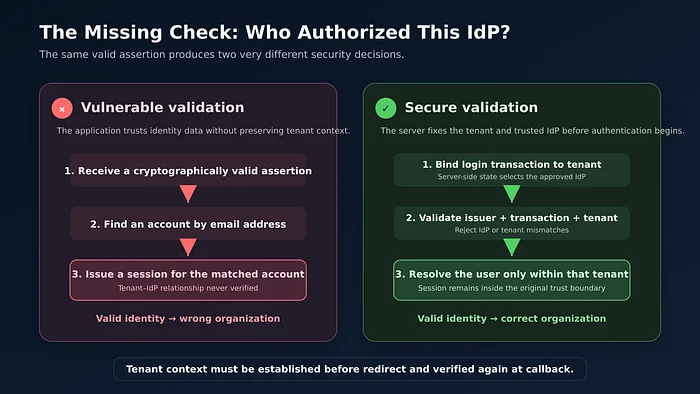
Neither the IdP-to-tenant binding nor the tenant-scoped user lookup was enforced, and that combination should never have produced a valid session. The report frames the distinction as two separate security questions: Did this identity provider authenticate the user? and Is this identity provider authorized to authenticate users for this tenant? Cryptographic validation can answer the first. It cannot answer the second unless the application correctly binds the identity provider, login transaction, user and tenant together.
Conceptually, a successful authentication decision should resemble:
Authenticated identity
+ expected tenant
+ tenant-owned SSO configuration
+ validated login transaction
= authorized tenant session
In the vulnerable flow, the decision appeared closer to:
Valid SSO response
+ matching email address
= authenticated session
That missing tenant relationship made all the difference.
Impact
The compromised account held administrative privileges in the target organization. In a multi-tenant SaaS platform, access to a tenant administrator is generally not limited to reading one user's profile. Depending on the features available to administrators, it may expose:
- Organization users and roles
- Tenant-specific business data
- Administrative settings
- Connected integrations
- API credentials or tokens
- Billing and subscription information
- User-management functionality
- The ability to create additional privileged accounts
- Options for establishing persistent access
The exact impact depends on the application, and the report distinguishes between verified actions and potential consequences. What is certain is that once an attacker can authenticate as another tenant's administrator, the primary tenant-isolation boundary has already failed: the issue becomes an organization-level compromise rather than an isolated account-access problem.
The attacker also needed very little initial access. The ability to create a trial tenant and configure its SSO settings was enough to establish the attacker-controlled side of the trust relationship. The only knowledge required about the victim was the administrator's email address.
Fix
The most important remediation is to make the tenant context immutable throughout the authentication process.
Before redirecting a user to an identity provider, the server should determine the intended tenant and retrieve that tenant's SSO configuration from trusted server-side storage. The browser should not be able to decide which SSO configuration applies by modifying returned fields or resubmitting configuration data.
The application should also bind the authentication transaction to:
- The intended tenant
- The approved SSO configuration
- The expected identity provider
- The initiating browser session
- A single-use state or transaction value
- The expected callback and protocol parameters
When the authentication response returns, the server should retrieve this original context and verify that the responding identity provider is the same provider selected at the start of the flow. The returned identity must then be resolved only within the tenant already attached to that transaction.
As defence in depth, the application should never resolve an account by searching globally for an email address; the returned identity must be looked up only within the tenant already fixed by the transaction. The more fundamental fix is the binding above, because even a tenant-scoped lookup fails if the wrong IdP was allowed into the flow in the first place.
The design rule the report draws from this:
Never let the authentication response decide which tenant receives the session. The tenant must already be fixed through trusted server-side state.
Security logging should also detect situations where the tenant, issuer, SSO configuration, or resolved account does not match the original authentication transaction.
Variants to test
The report lists the following test cases for multi-tenant authentication assessments.
- Create identical email addresses in unrelated identity providers. A positive result is that an assertion from the attacker's IdP is accepted for a user in another tenant.
- Attempt to reuse SSO configuration values between tenants. A positive result is that tenant A's values cause the flow for tenant B to be redirected to tenant A's IdP.
- Modify authentication-discovery responses. A positive result is that changing the returned SSO fields changes where the authentication process is directed.
- Replace null SSO fields with values from another organization.
- Test whether tenant identifiers survive the complete redirect flow. A positive result is that the tenant context is lost or replaced somewhere between initiation and callback.
- Confirm that the callback is bound to the initiating tenant. A positive result is that a callback from a different tenant's IdP is accepted.
- Check whether users are resolved globally or within a tenant. A positive result is that an email address is matched to an account outside the transaction's tenant.
- Attempt authentication using a valid assertion from an unauthorized IdP. A positive result is that a cryptographically valid assertion from an IdP not configured for the tenant yields a session.
- Test privileged and non-privileged accounts separately. A positive result is that the same confusion reaches an administrator account, not just an ordinary user.
- Verify that state values cannot be replayed across organizations.
Testing only whether SSO works for the correct tenant is not enough. Security testing must determine whether a valid authentication flow can be transplanted into an incorrect tenant context.
Final thoughts
The most dangerous authentication vulnerabilities are not always caused by stolen passwords, broken signatures, bypassed MFA, or compromised identity providers. Sometimes every authentication component works exactly as designed, but the application connects those components to the wrong security context.
In this case, the attacker's identity provider correctly authenticated an identity. The application correctly received a valid response. The failure occurred when the application treated that authentication as sufficient authority over an account in another organization. The identity was valid. The identity provider was valid. The resulting tenant access was not.
In multi-tenant applications, authentication cannot be evaluated independently from tenant ownership. The user, identity provider, SSO configuration, login transaction and resulting session must all remain bound to the same trust boundary. Identity alone is never enough.
What happened, in plain words
Imagine a large office building where several separate companies rent their own floors. Everyone uses the same lifts, the same front door and the same reception desk, but each company's floor is meant to be private. That is what a multi-tenant SaaS application is: one piece of software on the internet, shared by many organisations, with each organisation's users, data and settings kept apart. Each organisation is called a tenant.
This article is about a security researcher who found a way to walk into another company's floor using nothing but their own front-door key. They did not steal a password. They did not break any encryption. They did not need the victim to do anything. They only needed to know one thing: the email address of an administrator at the other company.
The feature at the centre of the story is SSO, short for Single Sign-On. In plain terms, SSO lets a company say: "our staff log in through our own company login system, and you (the SaaS application) should trust that system to tell you who they are." The company's own login system is called an identity provider, or IdP. Think of it as a passport office: it issues a document (a passport, in this analogy) that says "this person is who they claim to be". The SaaS application is the border guard who reads the passport.
The bug was that the border guard checked the passport was genuine, but never checked whether the passport office was allowed to issue passports for the country the traveller was entering. The researcher set up their own passport office, printed a passport with someone else's name on it, and was let into another company's floor as an administrator.
The researcher reported it as:
Cross-Tenant SSO Authentication Confusion Leading to Organization Account Takeover
In plain words: "logging in through one organisation's login system gave me an administrator session in a different organisation".
Understanding the application
The application followed a common multi-tenant SaaS model. Several organisations shared the same software, while their users, roles, data and configurations stayed logically separated. Each tenant could contain several users with different permission levels, including administrators.
New users could register for a trial. A trial user received a separate tenant and administrative access to that tenant. This is a normal sales tactic: sign up, get your own little workspace, invite colleagues, try the product. It is also what made the attack possible, because it gave the researcher a legitimate tenant of their own to experiment with.
Because the trial tenant came with administrative access, the researcher could legitimately:
- Create their own organisation
- Become its administrator
- Add users to it
- Configure its authentication settings
- Connect it to an external identity provider
For testing, the researcher configured an identity provider under their control. Throughout the report, the attacker-controlled organisation is called Organization A and the target organisation is called Organization B.
The security boundary should have been straightforward: control over Organization A must never provide authority over users in Organization B. However, the application's SSO implementation did not consistently preserve that boundary.
That image sits right after the sentence about the boundary not being preserved.
What secure SSO should establish
When people talk about SSO vulnerabilities, attention naturally goes toward signature validation, assertion expiration, issuers, audiences, callback URLs and other protocol-level controls. Let us unpack those terms, because they come up again later.
- A signature is a cryptographic stamp on a message. It proves the message came from the holder of a particular secret key and was not altered on the way. Like a wax seal on an envelope: if the seal is intact, the letter was not tampered with.
- An assertion is the actual message the identity provider sends to the application: "I, the IdP, hereby state that this user, with this email address, has just logged in successfully." It is the passport.
- Expiration means the assertion has a "valid until" time, so an old one cannot be replayed later.
- The issuer is the name of the identity provider that created the assertion. It is the passport office's name printed on the passport.
- The audience is who the assertion is meant for. A passport issued for travel to France should not be accepted at the border of Brazil.
- The callback URL is the web address the identity provider sends the user back to after login. If the application accepts a callback to anywhere, an attacker can redirect the user somewhere else.
Those checks are important, but multi-tenant SSO requires an additional layer of validation. The application must establish all of the following:
- Which tenant initiated the authentication
- Which SSO configuration belongs to that tenant
- Which identity provider is authorised to authenticate users for that tenant
- Whether the authentication response belongs to the original login transaction
- Whether the returned identity maps to a user inside that same tenant
A successful authentication decision should conceptually resemble:
Authenticated identity
+ expected tenant
+ tenant-owned SSO configuration
+ validated login transaction
= authorized tenant session
Line by line, in plain words:
- Authenticated identity: we know who the person is (the IdP said so, and the signature checks out).
- expected tenant: we know which organisation this login was started for.
- tenant-owned SSO configuration: we know which IdP settings belong to that organisation.
- validated login transaction: we know this response matches the login attempt that was started a moment ago, not some other one.
- authorized tenant session: only when all four are true do we hand out a logged-in session for that organisation.
In the vulnerable flow, the application's decision appeared closer to:
Valid SSO response
+ matching email address
= authenticated session
Line by line:
- Valid SSO response: the IdP's message was genuine and correctly signed.
- matching email address: the email in the message matched an account somewhere in the system.
- authenticated session: the user was logged in.
Notice what is missing: the tenant. The application never asked "which organisation was this login for?" It just looked up the email address and logged the person in. That missing tenant relationship made all the difference.
Discovering the trust-boundary failure
While examining the login process, the researcher noticed that the application returned several SSO-related fields during authentication discovery. Authentication discovery is the first step of a login: the browser asks the server "how should this person log in?" and the server replies with instructions, such as "show a password box" or "send them to this identity provider".
These fields appeared to tell the client whether SSO was enabled and where the authentication process should be directed. Depending on the configuration, they could contain an authentication type, SAML-related information, or other identity-provider routing data.
A quick word on SAML: it is one of the standard languages identity providers and applications use to exchange those assertions. You do not need to know its details to follow this story; just think of it as the format of the passport.
The researcher first initiated a normal login flow for a user in Organization A. Because they controlled Organization A and its SSO configuration, the application returned values associated with their identity provider. They saved those values and continued analysing how they influenced the next stage of authentication.
Why save them? Because those values are the application's own instructions for "send this person to my IdP". If the application later trusts those same instructions when they arrive in a different context, the researcher can reuse them.
They then initiated a login attempt for an administrator belonging to Organization B. In this flow, they intercepted the application's response and replaced the absent or different SSO-related values with the values previously returned for Organization A. The browser was then directed to the identity provider controlled by the researcher.
Intercepting here means using a tool that sits between the browser and the server, like a proxy, so you can read and edit the traffic in both directions. It is the equivalent of opening the envelope, swapping the letter inside, and sealing it again.
This was the critical moment.
That image is captioned OHHH YEEEEAAAH, the researcher's reaction to the moment the browser was redirected to their own identity provider during a login that was supposed to belong to Organization B.
The application had allowed SSO configuration associated with one tenant to influence the authentication flow of a user in another tenant. But redirecting the browser to the attacker's IdP was only part of the issue. The researcher still needed to determine how the application would map the authenticated identity after receiving a valid response.
In other words: getting the browser to the attacker's passport office was step one. Step two was whether the border guard would accept the passport it issued.
One email address across two trust domains
Inside the attacker's identity provider, the researcher created a user whose email address matched the email address of the administrator in Organization B. This did not give them control over the real administrator's mailbox or password. It only meant that the attacker's IdP contained a separate identity with the same email string.
That distinction is essential. An identity provider controlled by Organization A should not be able to make authoritative identity claims for Organization B merely because it returns a familiar email address.
Email addresses are identifiers. They are not, by themselves, proof that an identity provider is trusted by every organisation in which that address may appear. Think of it this way: anyone can print a business card that says "Jane Smith, Acme Corp". The card is real, the name is real, but the card does not prove Jane works at Acme. Only Acme's HR department can confirm that.
The researcher proceeded with the modified login flow and authenticated through their own identity provider using the duplicate identity. The IdP generated a legitimate authentication response. From the protocol's perspective, the response was valid: the identity provider had genuinely authenticated a user and issued an assertion containing that user's information.
The application accepted the response, located the matching administrator account in Organization B, and created an authenticated session for it. The researcher was now logged in as the administrator of another organisation without knowing that administrator's password.
The authentication was valid
One of the most interesting aspects of this finding was that the attack did not necessarily require breaking the underlying SSO protocol.
The researcher did not need to forge a signature. They did not need to steal an assertion from the target organisation. They did not need to compromise the target's identity provider. They did not need the victim administrator to authenticate on their behalf.
The attacker's IdP issued a valid response for an identity that existed inside the attacker's own authentication domain. The application's failure occurred when it decided what that identity was allowed to access.
The application proved that the attacker's IdP had authenticated the identity. It failed to prove that the IdP was authorised to authenticate identities for Organization B.
This highlights an important difference between authentication and authorisation. Authentication answers "who are you?". Authorisation answers "what are you allowed to do?". Here the application got the first question right and the second question wrong.
"Did this identity provider authenticate the user?" and "Is this identity provider authorized to authenticate users for this tenant?" are two separate security questions.
Cryptographic validation can answer the first question. It cannot answer the second unless the application correctly binds the identity provider, login transaction, user and tenant together.
Visualising the attack
The complete attack path can be summarised as follows:
Attacker creates Organization A
            ↓
Attacker configures an identity provider
            ↓
Attacker creates an identity matching
the target administrator’s email address
            ↓
Attacker captures valid SSO routing information
for Organization A
            ↓
Attacker starts the target user’s login flow
for Organization B
            ↓
SSO information is replaced with values
associated with Organization A
            ↓
Browser authenticates through the attacker’s IdP
            ↓
Attacker-controlled IdP returns a valid assertion
            ↓
Application maps the email address to the
administrator in Organization B
            ↓
Administrator session for Organization B is issued
Line by line, in plain words:
- Attacker creates Organization A: the researcher signs up for a free trial and gets their own tenant.
- Attacker configures an identity provider: they connect their own login system to that tenant.
- Attacker creates an identity matching the target administrator's email address: inside their own IdP, they make a user account whose email is the same string as the victim's.
- Attacker captures valid SSO routing information for Organization A: they log in normally to their own tenant and save the instructions the application gives the browser.
- Attacker starts the target user's login flow for Organization B: they begin a login for the victim's email address.
- SSO information is replaced with values associated with Organization A: using an intercepting proxy, they swap the instructions in the server's response for the ones they saved.
- Browser authenticates through the attacker's IdP: the browser follows the swapped instructions and lands on the researcher's login system.
- Attacker-controlled IdP returns a valid assertion: the researcher's IdP signs a genuine message saying "this user logged in".
- Application maps the email address to the administrator in Organization B: the application looks up the email globally and finds the victim's account.
- Administrator session for Organization B is issued: the researcher is now logged in as the victim.
The entire vulnerability can be described in one sentence:
The application trusted a valid identity assertion without confirming that the identity provider was authorized for the tenant receiving the session.
Why the impact extended beyond one account
The compromised account held administrative privileges in the target organisation. In a multi-tenant SaaS platform, obtaining access to a tenant administrator is generally not limited to reading one user's profile. Depending on the features available to administrators, it may expose:
- Organisation users and roles
- Tenant-specific business data
- Administrative settings
- Connected integrations
- API credentials or tokens
- Billing and subscription information
- User-management functionality
- The ability to create additional privileged accounts
- Options for establishing persistent access
A few of those terms deserve a plain explanation:
- An API is the machine-to-machine interface of a service: the way one program talks to another without a human clicking buttons. API credentials or tokens are the secret keys programs use to prove who they are, like a password for software.
- Integrations are connections to other services, for example a company's chat tool or file storage. If an attacker reaches those, they can often reach the connected services too.
- Persistent access means the attacker can come back later, for example by creating a new administrator account for themselves.
The exact impact depends on the application, and security reports should distinguish between verified actions and potential consequences. What is certain is that once an attacker can authenticate as another tenant's administrator, the primary tenant-isolation boundary has already failed. The issue becomes an organisation-level compromise rather than an isolated account-access problem.
The attacker also needed very little initial access. The ability to create a trial tenant and configure its SSO settings was enough to establish the attacker-controlled side of the trust relationship. The only knowledge required about the victim was the administrator's email address.
What appeared to be the root cause
Because this conclusion was based on black-box testing rather than source-code review, the exact internal implementation may have differed. Black-box testing means probing the application from the outside, like a visitor trying doors, without seeing the code that runs it. The observed behaviour suggested that the application did not securely bind several important objects together:
| Security object | Required relationship |
|---|---|
| SSO configuration | Must belong to the authenticating tenant |
| Login transaction | Must be bound to the intended tenant |
| Identity provider | Must match the tenant's configured IdP |
| Authentication response | Must match the original server-side transaction |
| Returned identity | Must be resolved within the expected tenant |
| Issued session | Must remain within that same tenant |
In plain words, each row says: this piece of information must be tied to the organisation that started the login. The SSO settings must be that organisation's settings. The login attempt must be that organisation's login attempt. The identity provider must be the one that organisation configured. The response must match the login attempt that was started. The user account must be found inside that organisation. The session must stay inside that organisation.
The primary failure was that the application did not bind the identity provider to the tenant initiating the login. Because that binding was missing, Organization A's IdP could be inserted into Organization B's authentication flow at all.
A secondary factor made this directly exploitable: the application resolved the returned identity by email address rather than within the tenant already attached to the transaction. As a result, an assertion issued by Organization A's IdP was accepted and mapped to a privileged user in Organization B.
Neither the IdP-to-tenant binding nor the tenant-scoped user lookup was enforced, and that combination should never have produced a valid session.
A session is what the application remembers about you after you log in. Technically it is usually a cookie, a small piece of data the browser stores and sends back with every request, or a token, a string that proves you are logged in. If an attacker gets a session for the victim's account, the application treats them as the victim until the session ends.
How the application should prevent it
The most important remediation is to make the tenant context immutable throughout the authentication process. Immutable means it cannot be changed once set, like a booking reference printed on a ticket: you can carry the ticket around, but you cannot edit the reference.
Before redirecting a user to an identity provider, the server should determine the intended tenant and retrieve that tenant's SSO configuration from trusted server-side storage. The browser should not be able to decide which SSO configuration applies by modifying returned fields or resubmitting configuration data.
That last sentence is the heart of the fix. In the vulnerable application, the browser was effectively told "here are the SSO settings, use them", and the browser could be edited to say something else. The fix is to keep those settings on the server, where the user cannot reach them.
The application should also bind the authentication transaction to:
- The intended tenant
- The approved SSO configuration
- The expected identity provider
- The initiating browser session
- A single-use state or transaction value
- The expected callback and protocol parameters
A state value is a random string the application generates at the start of a login and checks again at the end. It works like a cloakroom ticket: you get a number when you hand in your coat, and the same number must come back to collect it. If someone else's number is presented, the coat is not released. "Single-use" means the number cannot be reused for a second login.
When the authentication response returns, the server should retrieve this original context and verify that the responding identity provider is the same provider selected at the start of the flow. The returned identity must then be resolved only within the tenant already attached to that transaction.
As defence in depth, the application should also never resolve an account by searching globally for an email address; the returned identity must be looked up only within the tenant already fixed by the transaction. Defence in depth means adding a second lock even though you already have one, so that a single mistake does not open the door. But the more fundamental fix is the binding above. Even a tenant-scoped lookup fails if the wrong IdP was allowed into the flow in the first place.
A useful design rule is:
Never let the authentication response decide which tenant receives the session. The tenant must already be fixed through trusted server-side state.
Security logging should also detect situations where the tenant, issuer, SSO configuration, or resolved account does not match the original authentication transaction.
Testing multi-tenant SSO implementations
This finding reinforced several test cases that should be included when assessing multi-tenant authentication:
- Create identical email addresses in unrelated identity providers
- Attempt to reuse SSO configuration values between tenants
- Modify authentication-discovery responses
- Replace null SSO fields with values from another organisation
- Test whether tenant identifiers survive the complete redirect flow
- Confirm that the callback is bound to the initiating tenant
- Check whether users are resolved globally or within a tenant
- Attempt authentication using a valid assertion from an unauthorised IdP
- Test privileged and non-privileged accounts separately
- Verify that state values cannot be replayed across organisations
A null field is simply an empty one. A null field is simply an empty one. The fourth test is about replacing empty SSO fields with values from another organisation.
Testing only whether SSO "works" for the correct tenant is not enough. Security testing must determine whether a valid authentication flow can be transplanted into an incorrect tenant context. In everyday terms: it is not enough to check that your own key opens your own door. You have to check that it does not open anyone else's.
Final thoughts
The most dangerous authentication vulnerabilities are not always caused by stolen passwords, broken signatures, bypassed MFA, or compromised identity providers. MFA, multi-factor authentication, is the "something you have as well as something you know" step, such as a code from a phone. Sometimes every authentication component works exactly as designed, but the application connects those components to the wrong security context.
In this case, the attacker's identity provider correctly authenticated an identity. The application correctly received a valid response. The failure occurred when the application treated that authentication as sufficient authority over an account in another organisation.
The identity was valid. The identity provider was valid. The resulting tenant access was not.
In multi-tenant applications, authentication cannot be evaluated independently from tenant ownership. The user, identity provider, SSO configuration, login transaction and resulting session must all remain bound to the same trust boundary. Identity alone is never enough.
Glossary
- API: the machine-to-machine interface of a service, used by programs rather than people.
- Assertion: the signed message an identity provider sends to an application stating who just logged in.
- Audience: the intended recipient of an assertion; a passport issued for one country should not be accepted by another.
- Authentication: proving who you are.
- Authentication discovery: the first step of a login, where the browser asks the server how the user should log in.
- Authorisation: deciding what an authenticated user is allowed to do.
- Black-box testing: testing an application from the outside without seeing its source code.
- Callback URL: the web address an identity provider sends the user back to after login.
- Cookie: a small piece of data a browser stores and sends back to a site, often used to remember a session.
- Defence in depth: adding extra independent protections so one mistake does not open the door.
- Expiration: a "valid until" time on an assertion, so old ones cannot be replayed.
- Identity provider (IdP): a system that authenticates users and vouches for their identity to other applications.
- Immutable: cannot be changed once set.
- Integration: a connection between the application and another service.
- Intercepting: using a proxy tool to read and edit traffic between a browser and a server.
- Issuer: the identity provider that created an assertion.
- MFA (multi-factor authentication): logging in with more than one kind of proof, such as a password plus a phone code.
- Multi-tenant SaaS application: one online service shared by many organisations, with each organisation's data kept separate.
- Null: empty; a field with no value.
- Persistent access: a way for an attacker to return later, for example by creating their own administrator account.
- Remediation: the fix for a vulnerability.
- SAML: a standard format for exchanging authentication assertions between identity providers and applications.
- Session: what an application remembers about you after login, usually held in a cookie or token.
- Signature: a cryptographic stamp proving a message came from a particular key holder and was not altered.
- Single-use state value: a random string generated at the start of a login and checked once at the end, so a login cannot be reused or swapped.
- SSO (Single Sign-On): letting users log in through their organisation's own login system instead of a separate password for each application.
- Tenant: one organisation's separate space inside a shared application.
- Token: a string that proves you are logged in or authorised, often used by programs.
- Trust boundary: the line between parties that trust each other and parties that do not.
- Trial tenant: a free, temporary organisation created when someone signs up to try the product.



