Improper Authorization Allows Account Takeover via Unlinked Phone Number and Email Change Without Old Email Verification
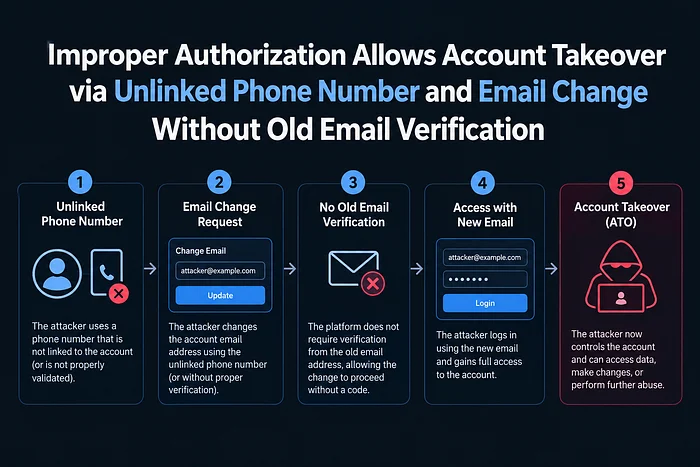
The email-change feature accepted a verification code sent to a phone number that was not linked to the account, so an attacker could change the account's email address without proving ownership of the original email or a linked phone. This could lead to account takeover if the attacker can then authenticate or use recovery flows with the new email.

Bug Bounty
The full write-up lives on its author's site
It belongs to its author, so we link to it rather than copy it. The other two tabs are our own rewrites, checked against it.
Context
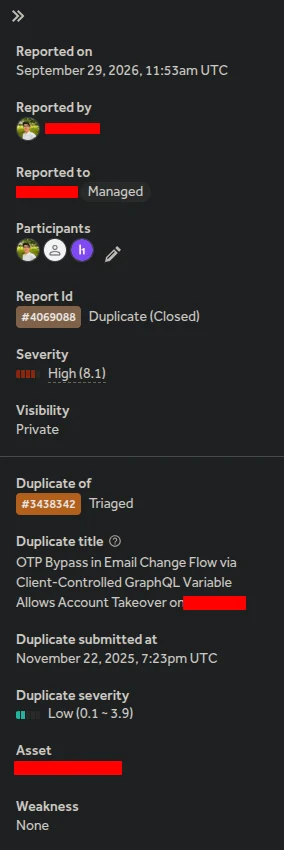
The target was an application tested within an authorised bug bounty program on HackerOne. The researcher, Osama Mohamed (@0xmorv), focused on the account settings functionality, specifically the feature that lets a user change the email address associated with their account.
The application supported two verification methods for an email change:
- Verification through the account's existing email address.
- Verification through a previously linked and verified phone number.
The feature is implemented with GraphQL, and the whole finding lives in the backend logic behind two GraphQL operations rather than in the visible interface.
Setup
The testing was carried out inside an authorised bug bounty context, and the target's identity and sensitive details are omitted from the write-up. The only tool named in the report is Burp Suite, used to intercept the GraphQL requests. No versions, accounts or roles beyond the authenticated user performing an email change are described.
The precondition for the attack is an authenticated session on the account whose email address is to be changed, plus a phone number that is not linked to that account and to which the attacker can receive a verification code.
Finding it
Before testing, the researcher mapped the intended workflow:
- The user initiates an email change by providing a new email address.
- The application sends a verification code to the account's existing email address or its previously linked and verified phone number.
- The user submits the verification code.
- The backend validates the code and updates the email address.
The security assumption behind that flow is that the verification method must belong to the account being modified. Without that requirement, an attacker could supply an arbitrary identifier and bypass the ownership check.
Intercepting the traffic revealed two GraphQL operations in the workflow:
SendVerificationCode, which initiates the verification process.UpdateUserEmailWithVerificationCode, which submits the code and requests the email change.
That gave two separate points to examine: how the code is issued, and how the backend validates the identifier when the change is processed.
Exploitation
Step 1: Request a verification code for an unlinked phone number
The first request carries the identifier, its type and the purpose of the verification request. The relevant parameters look like this:
{ "operationName": "SendVerificationCode", "variables": { "identifier": "<phone_number>", "identifier_type": "phoneNumber", "requestType": "updateEmailRequestInitiated" }}
The researcher changed identifier to a phone number that was not linked to the account. The question was whether the backend would enforce the relationship between the authenticated account and the supplied number. The researcher then supplied that unlinked number and its code in the second request.
Step 2: Submit the email change with the unlinked number and its code
The second request updates the email address. Its relevant parameters look like this:
{ "operationName": "UpdateUserEmailWithVerificationCode", "variables": { "email": "[redacted]", "confirmEmail": "[redacted]", "verificationCode": "<verification_code>", "identifier": "<unlinked_phone_number>", "identifierType": "phoneNumber" }}
Instead of the account's existing email address or a previously linked phone number, the request supplied the unlinked phone number and the code that had been sent to it. The application accepted the request and changed the account's email address.
That confirmed the backend did not enforce the requirement that the phone number used for verification be linked to the account.
Root cause
The issue is an authorisation failure in a sensitive account-management operation. A valid verification code proves control of the identifier it was sent to, but it does not by itself prove that the identifier belongs to the authenticated account. The backend accepted an unlinked phone number during the email-change process, so the intended boundary
Authenticated account → Previously verified identifier → Valid verification code → Authorised email change
was not enforced: the supplied identifier was used without adequately checking that relationship. The report describes this as improper authorisation and broken verification logic, noting that the exact classification depends on the implementation and the complete attack path.
Impact
An unauthorised email change is the confirmed behaviour. Its consequences depend on how the application handles authentication, sessions and account recovery:
- Account takeover: if the attacker can subsequently authenticate with the new email address or abuse the recovery flow.
- Account lockout: the legitimate user may lose access to the original email-based recovery mechanism.
- Unauthorised account modifications: an attacker in control of the account can perform actions available to the owner.
- Exposure of sensitive information: if takeover is achieved, private account data may be reachable.
Full account takeover should be claimed only when demonstrated or supported by a concrete, reproducible attack path.
Fix
The report recommends server-side controls:
- Validate identifier ownership. Ensure the phone number is already linked to and verified for the authenticated account before accepting it as authorisation for an email change.
- Bind verification codes to the transaction. Associate each code with the relevant account, verified identifier, intended new email address and specific operation.
- Validate authorisation independently. Do not trust a client-supplied phone number simply because a valid code exists for it.
- Require stronger verification for sensitive changes. Where appropriate, require re-authentication or another trusted verification step.
- Invalidate completed or superseded codes. Prevent codes from being reused or applied to a different email-change transaction.
All ownership and authorisation checks must be performed by the backend, regardless of what the frontend displays or allows.
- Other identifier types in the same operation. Swap
identifier_typeto email or another supported type and supply an identifier not tied to the account. A positive result is a code issued and accepted for an identifier the account does not own. - Other
requestTypevalues. Reuse the same unlinked identifier with different purposes, such as password reset or login verification. A positive result is a code accepted for an operation it should not authorise. - Code reuse across transactions. Request a code for one new email address and submit it with a different
emailandconfirmEmail. A positive result is the change succeeding with a code issued for another transaction. - Code reuse after completion. Replay a previously used code on a second email change. A positive result is the second change being accepted.
- Mismatch between
identifierandidentifierType. Send a phone number with an email type or vice versa. A positive result is the backend accepting the pair without validating the relationship. - Cross-account identifier binding. On account A, request a code for an identifier linked to account B, then submit it on account A. A positive result is the change succeeding, showing the code is not bound to the account.
What happened, in plain words
Imagine you have an account on a website, and that account is tied to an email address. The website lets you change that email address, which is a sensitive thing to do: whoever controls the email address on an account can often reset the password and take the account over. So the website asks you to prove you are allowed to make the change, by sending a short code to something you already own, either the email address currently on the account or a phone number you previously linked to the account.
A security researcher, Osama Mohamed (@0xmorv), was testing this feature on an application inside an authorised bug bounty program on HackerOne. A bug bounty program is a scheme where a company invites outside people to look for security problems in its systems and report them, usually for a reward, instead of the researcher being treated as an intruder. The researcher found that the website's hidden machinery, the part that does the actual work behind the screens, did not check that the phone number used to receive the code really belonged to the account being changed. By sending a phone number that was never linked to the account, and the code that arrived on that number, the researcher was able to change the account's email address. The visible screens looked safe; the problem was in the logic underneath.
The report calls this an authorisation problem. Authorisation means deciding whether a person is allowed to do a particular thing. The website knew the researcher was logged in (that is authentication, proving who you are), but it failed to check whether the thing being used, the phone number, was allowed to act for this account (that is authorisation). The report also describes it as broken verification logic, because the code was checked but the identity behind the code was not.
The product and the feature
The target is an application that has user accounts, each with an email address and optionally a phone number. The feature in question is the one in account settings that lets a logged-in user change the email address on their account. The report does not name the application, its owner, or any version numbers; the target's identity and sensitive details are deliberately left out.
The application offers two ways to prove you should be allowed to change the email address:
- A code sent to the account's existing email address.
- A code sent to a phone number that was previously linked to the account and verified.
Both sound reasonable. The point of either method is to show that the person asking for the change controls something that already belongs to the account. If you control the old email or the linked phone, you are probably the account owner.
The feature is built with GraphQL. GraphQL is a way for a website's front end (the part you see in the browser) to talk to the back end (the servers that store data and make decisions). Instead of many separate web addresses for different actions, GraphQL uses a single address and the front end sends a structured request saying which operation it wants and what values to use. Each such request has an operation name, like a function name, and a set of variables, like the arguments you pass to that function. The whole finding lives in the back-end logic behind two of these operations, not in anything visible on screen.
The tool and the setup
The only tool named in the report is Burp Suite. Burp Suite is a program that sits between your browser and the website and lets you watch, pause and edit the requests your browser sends and the responses it gets back. Think of it as a transparent envelope you can open, read and rewrite before it reaches the recipient. The researcher used it to intercept the GraphQL requests, meaning to catch them in flight and look at exactly what the browser was sending.
To reproduce the behaviour, two things are needed:
- A logged-in session on the account whose email address is to be changed. A session is the website's way of remembering that you logged in; it is usually kept in a cookie or a token, which is a small piece of data your browser stores and sends with each request so the server recognises you. The report does not describe the cookie or token used.
- A phone number that is not linked to that account, and to which the attacker can receive a verification code. In other words, a number the attacker controls but the account has never seen.
No versions, accounts or roles beyond the ordinary logged-in user are described.
Understanding the intended workflow
Before touching anything, the researcher worked out how the email change is supposed to happen. This is a habit worth copying: know what normal looks like before you look for abnormal. The expected flow has four steps:
- The user initiates an email change by providing a new email address.
- The application sends a verification code to the account's existing email address or its previously linked and verified phone number.
- The user submits the verification code.
- The backend validates the code and updates the email address.
The critical security assumption is that the verification method must belong to the account being modified. Without that requirement, an attacker could supply an arbitrary identifier and bypass the intended ownership verification. An identifier here just means the thing the code is sent to: an email address or a phone number.
Investigating the GraphQL requests
With Burp Suite in place, the researcher intercepted the traffic and found two GraphQL operations involved in the workflow:
SendVerificationCode, which starts the verification process.UpdateUserEmailWithVerificationCode, which submits the code and asks for the email change.
That gave two separate points to examine: how the verification code is issued, and how the backend validates the identifier when the email change is processed. Splitting a feature into its individual requests like this is how you find where a check is missing: each request is a door, and you test each door separately.
Step 1: Requesting a verification code for an unlinked phone number
The first request carries the identifier, its type and the purpose of the verification request. The relevant parameters look like this:
{ "operationName": "SendVerificationCode", "variables": { "identifier": "<phone_number>", "identifier_type": "phoneNumber", "requestType": "updateEmailRequestInitiated" }}
Line by line, in plain words:
- The outer braces
{and}wrap one JSON object. JSON is a simple text format for structured data, made of names and values in pairs, a bit like a very strict shopping list. "operationName": "SendVerificationCode"tells the server which operation to run. Here it is the one that sends a verification code."variables": { ... }is the bundle of values that operation needs, the arguments."identifier": "<phone_number>"is the thing the code will be sent to. In the report the placeholder<phone_number>stands in for an actual number."identifier_type": "phoneNumber"says what kind of thing the identifier is, so the server knows to treat it as a phone number rather than an email address."requestType": "updateEmailRequestInitiated"says why the code is being requested: an email change has been started.
The researcher changed identifier to a phone number that was not linked to the account. The question was whether the backend would enforce the relationship between the authenticated account and the supplied number. In everyday terms: the website knows who is asking, but does it check that the phone number being used is actually attached to that person's account? The researcher then supplied that unlinked number and its code in the second request.
Step 2: Submitting the email change with the unlinked number and its code
The second request updates the email address. Its relevant parameters look like this:
{ "operationName": "UpdateUserEmailWithVerificationCode", "variables": { "email": "[redacted]", "confirmEmail": "[redacted]", "verificationCode": "<verification_code>", "identifier": "<unlinked_phone_number>", "identifierType": "phoneNumber" }}
Line by line:
"operationName": "UpdateUserEmailWithVerificationCode"selects the operation that actually changes the email address, using a verification code."email": "[redacted]"is the new email address to put on the account.[redacted]is a placeholder address used in the report."confirmEmail": "[redacted]"repeats the new address, the same way a form asks you to type a new password twice to catch typos."verificationCode": "<verification_code>"is the code that arrived on the phone number, with the actual digits replaced by a placeholder in the report."identifier": "<unlinked_phone_number>"is the phone number the code was sent to, the one not linked to the account."identifierType": "phoneNumber"again says the identifier is a phone number.
Instead of the account's existing email address or a previously linked phone number, the request supplied the unlinked phone number and the code that had been sent to it. The application accepted the request and changed the account's email address. That confirmed the backend did not enforce the requirement that the phone number used for verification be linked to the account.
Why does this matter so much? Because the code proved only that the researcher could read messages sent to that phone number. It did not prove that the phone number had anything to do with the account. The website treated a valid code as if it were permission, when permission should have come from the account itself.
Root cause
The issue is an authorisation failure in a sensitive account-management operation. A valid verification code proves control of the identifier it was sent to, but it does not by itself prove that the identifier belongs to the authenticated account. The backend accepted an unlinked phone number during the email-change process, so the intended boundary
Authenticated account → Previously verified identifier → Valid verification code → Authorised email change
was not enforced: the supplied identifier was used without adequately checking that relationship. Read the chain left to right: first the account must be logged in, then the identifier must already be verified and attached to that account, then the code must be valid, and only then should the change go through. The application effectively skipped the second link.
The report describes this as improper authorisation and broken verification logic, noting that the exact classification depends on the implementation and the complete attack path. Binding here means tying a piece of data to something else so it cannot be used anywhere else, like a cloakroom ticket that only works for the coat it was issued for.
Impact
An unauthorised email change is the confirmed behaviour. Its consequences depend on how the application handles authentication, sessions and account recovery:
- Account takeover: if the attacker can subsequently authenticate with the new email address or abuse the recovery flow. Account takeover means someone else ends up in control of your account.
- Account lockout: the legitimate user may lose access to the original email-based recovery mechanism, because the account no longer points at their email address.
- Unauthorised account modifications: an attacker in control of the account can perform actions available to the owner.
- Exposure of sensitive information: if takeover is achieved, private account data may be reachable.
Full account takeover should be claimed only when demonstrated or supported by a concrete, reproducible attack path. That is a fair point about reporting: say what you saw, and do not inflate it into what you imagine might follow.
Fix
The report recommends server-side controls. Server side means the checks happen on the servers that hold the data, not in the browser, because anything the browser does can be changed by the person using it.
- Validate identifier ownership. Ensure the phone number is already linked to and verified for the authenticated account before accepting it as authorisation for an email change.
- Bind verification codes to the transaction. Associate each code with the relevant account, verified identifier, intended new email address and specific operation.
- Validate authorisation independently. Do not trust a client-supplied phone number simply because a valid code exists for it. Client supplied means it came from the browser, and the browser is under the user's control.
- Require stronger verification for sensitive changes. Where appropriate, require re-authentication or another trusted verification step, such as asking for the password again.
- Invalidate completed or superseded codes. Prevent codes from being reused or applied to a different email-change transaction.
All ownership and authorisation checks must be performed by the backend, regardless of what the frontend displays or allows. The front end can hide a button, but hiding a button is not security; the server must refuse the request even if someone sends it directly.
Once you understand the shape of the bug, the same idea can be tried in neighbouring places. The report lists these variants:
- Other identifier types in the same operation. Swap
identifier_typeto email or another supported type and supply an identifier not tied to the account. A positive result is a code issued and accepted for an identifier the account does not own. - Other
requestTypevalues. Reuse the same unlinked identifier with different purposes, such as password reset or login verification. A positive result is a code accepted for an operation it should not authorise. - Code reuse across transactions. Request a code for one new email address and submit it with a different
emailandconfirmEmail. A positive result is the change succeeding with a code issued for another transaction. - Code reuse after completion. Replay a previously used code on a second email change. A positive result is the second change being accepted.
- Mismatch between
identifierandidentifierType. Send a phone number with an email type or vice versa. A positive result is the backend accepting the pair without validating the relationship. - Cross-account identifier binding. On account A, request a code for an identifier linked to account B, then submit it on account A. A positive result is the change succeeding, showing the code is not bound to the account.
Glossary
- Account takeover: a situation where someone other than the owner gains control of an account, for example by changing its email address and then resetting the password.
- Authentication: proving who you are, typically by logging in.
- Authorisation: deciding whether an identified person is allowed to perform a particular action.
- Backend: the servers and logic that store data and make decisions, as opposed to the front end you see.
- Binding: tying a piece of data, such as a verification code, to a specific account or operation so it cannot be used elsewhere.
- Bug bounty program: a scheme where a company invites outside researchers to find and report security problems, usually within agreed rules and often for a reward.
- Burp Suite: a tool that sits between your browser and a website so you can watch, pause and edit requests and responses.
- Client supplied: data that comes from the browser, and therefore can be changed by the user.
- Cookie: a small piece of data a website stores in your browser and receives back on later requests, often used to remember your session.
- Email change: the account settings feature that replaces the email address associated with an account.
- Front end: the part of a website you see and interact with in the browser.
- GraphQL: a way for a front end to send structured requests to a back end, naming an operation and passing variables.
- Identifier: the thing a verification code is sent to, such as an email address or a phone number.
- Improper authorisation: a flaw where the system fails to check that a person or identifier is allowed to perform an action.
- JSON: a simple text format for structured data, made of name and value pairs.
- Operation name: the name in a GraphQL request that says which action the server should run.
- Re-authentication: asking a logged-in user to prove their identity again, for example by re-entering their password.
- Recovery flow: the process a website offers to regain access to an account, often by sending a link or code to the account's email address.
- Request: a message your browser sends to a server asking it to do something.
- Response: the message a server sends back.
- Server side: checks and logic that run on the server, which the user cannot alter.
- Session: the website's record that you are logged in, usually kept via a cookie or token.
- Token: a piece of data, similar to a cookie, that your browser sends so the server recognises you.
- Transaction: one complete attempt at an action, here one specific email-change request with its own code.
- Variables: the values passed to a GraphQL operation, like arguments to a function.
- Verification code: a short code sent to an email address or phone number to prove control of it.
- Verification logic: the rules the application uses to decide whether a code and the identifier it was sent to are acceptable.



