Insecure Authorization on *** Android — mobile application
An exported Android activity that handles OAuth and SSO redirects never checked that the incoming state, code or token belonged to a flow the app itself had started. An attacker could therefore feed it a crafted redirect URI and have it treated as a completed login flow.

medium.com
Published on medium.com
Pentest Mobile
The full write-up lives on its author's site
It belongs to its author, so we link to it rather than copy it. The other two tabs are our own rewrites, checked against it.
Context
The target is an Android application identified in the report only as ***. The component in question is an activity named com.***.browserflow.feature.CustomTabFlowActivity, which the app registers as the redirect target for several browser-based OAuth and SSO flows. In normal use, the app opens a Custom Tab, the user authenticates with a third party, and the browser redirects back to this activity with the result of the flow. The activity then hands the incoming URI to the rest of the app so that the business logic waiting on the flow can continue.
The report lists the following intent filters on the activity (abridged here):
Setup
The researcher decompiled the application and traced the native code path that handles an incoming redirect. No accounts, roles, tool versions or other preconditions are described in the report beyond having the APK available for decompilation.
Finding it
The activity is exported (android:exported="true") and is registered as the redirect target for several sensitive browser-based OAuth and SSO flows, including:
com.***.editor://oauth, used by third-party Marketplace app connections such as Google Drivecom.***.editor://external-app-config***editor://ssohttps://www.***.com/oauth/transfer,/login/sso/transfer,/apps/oauth/authorized/appand/apps/configured/app, registered as App Links withautoVerify="true"
Because the activity is exported, any app on the device can send it an intent. The question the researcher pursued was whether the activity checks that an incoming redirect actually belongs to a flow the same app instance started.
Exploitation
The report does not give a step-by-step exploitation sequence with adb commands or crafted intents. What it documents is the code path followed after decompilation:
CustomTabFlowActivity -> CustomTabFlowViewModel.f(Uri) -> BrowserFlowResultManager.a(Uri)
At no point in this path is there a check that the incoming URI's state, code or token parameters correspond to a flow that this same app instance initiated. Specifically, the report notes the absence of:
- a nonce or
statecomparison against a value stored when the flow was started; - a PKCE verifier check;
- a caller-identity check.
The method simply republishes whatever Uri it receives as "flow completed" to whatever business logic is currently listening. In other words, an intent delivered to the exported activity is treated as a genuine result of the flow, regardless of who sent it or whether the app ever started that flow.
Root cause
The mistake is a missing binding between the redirect and the flow that produced it. The activity accepts a URI from any caller and forwards it to the result manager without comparing the state parameter to a value generated and stored locally, without verifying a PKCE code verifier, and without checking the identity of the caller. Because the activity is exported and is the declared redirect target for OAuth and SSO flows, the trust boundary that should exist between the browser redirect and the app's internal flow state is absent. The report does not describe any defence that was present and bypassed; the checks it lists are simply not in the path.
Impact
The report frames the issue as insecure authorisation on the Android application and identifies the affected flows as sensitive: third-party Marketplace connections such as Google Drive, external app configuration, SSO, and the App Links used for OAuth transfer and app authorisation. Because the activity republishes any received URI as a completed flow, a caller able to reach the exported activity can drive the listening business logic with a URI of their choosing. The report does not quantify the impact further, does not state which accounts or data could be reached, and does not describe a demonstrated end-to-end attack.
Fix
Based on the missing checks it identifies, the fix would be to bind each incoming redirect to a flow the app instance started: generate and store a state/nonce when the flow begins and reject any redirect whose state does not match, verify the PKCE code verifier, and validate the caller identity before treating the URI as a flow result. Whether the activity also needs to stop being exported, or whether the App Links and custom scheme filters need narrowing, is not discussed in the report.
Variants to test
- Exported OAuth redirect activities. Look for activities with
android:exported="true"that carry intent filters for custom schemes or App Links ending inoauth,sso,callbackortransfer. A positive result is an activity that accepts an intent from another app and forwards the URI to business logic without astatecomparison. - Missing
statevalidation. Start a flow, capture the redirect URI, then replay it with a modified or absentstateparameter. A positive result is the app treating the modified redirect as a completed flow. - Missing PKCE verifier check. Send a redirect containing an authorisation
codethat was not produced with the app's code verifier. A positive result is the app exchanging or accepting the code without verifying the verifier. - Caller identity. Invoke the redirect activity from a separate app on the device. A positive result is the activity processing the intent without checking which package sent it.
- App Links coverage. Check whether the
autoVerify="true"host paths listed in the report (/oauth/transfer,/login/sso/transfer,/apps/oauth/authorized/app,/apps/configured/app) are handled by the same unvalidated path. A positive result is any of these paths reachingBrowserFlowResultManagerwithout a state check.
What happened, in plain words
An Android app (the report hides its name, showing it only as ***) lets people sign in to other services through the phone's browser. When you tap "connect Google Drive" or "sign in with SSO", the app opens a browser tab, you log in there, and the browser sends you back to the app with a result. The part of the app that receives that result is a screen (in Android terms, an activity) called com.***.browserflow.feature.CustomTabFlowActivity.
The researcher took the app apart (decompiled it, meaning turned the installed program back into readable code) and followed what happens to that returning message. The screen accepts the message from anyone, does not check that the message belongs to a login the app itself started, and passes it straight on to the rest of the app as if the login had genuinely succeeded. The report calls this insecure authorisation: the app does not check who is allowed to hand it a result.
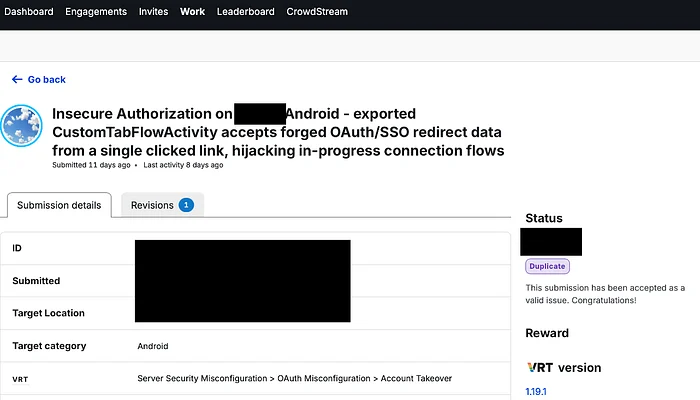
The image is the article's header, showing the title "Insecure Authorization on *** Android, mobile application" and the author's name, Joko Purwanto, with the date Sep 22, 2026.
The pieces involved
Before the details, a few everyday ideas:
- Android app: a program installed on a phone. Apps are packaged as an APK file, which is a bit like a zip archive containing the program and its settings.
- Activity: one screen of an Android app. Every screen is a separate component with a name, and Android can start a screen by name.
- Intent: a message that asks Android to do something, such as "open this screen and give it this piece of data". Any app on the phone can send an intent to another app, if that app allows it.
- Exported: a setting that says "other apps are allowed to send me intents". If a screen is not exported, only its own app can open it.
- Intent filter: a rule in the app's settings that says which kinds of links or messages this screen wants to receive. It is like a mail forwarding rule: "anything addressed to this pattern comes to me".
- Custom Tab: a browser window opened from inside an app, so you can log in on a website without leaving the app.
- OAuth: the standard way apps let you sign in with another company's account ("Sign in with Google") without giving the app your password. The website you log in on sends you back to the app with a short-lived pass, called a code or token.
- SSO (single sign-on): one login that works across several services, often run by a company for its staff.
- URI: a web address or a link-like string.
https://...is one kind; apps can also invent their own schemes, such ascom.***.editor://oauth. - App Links: ordinary
https://links that a website and an app have agreed on, so tapping the link opens the app instead of the browser.autoVerify="true"means Android checks with the website that the app really is allowed to claim those links. - Parameter: a named value attached to a link, after a
?or&, such asstate=abc. state: a random value an app makes up when it starts a login and expects to get back. If the value that comes back does not match the one it made, the reply is not from the login it started.- Nonce: the same idea under another name: a value used once, so a reply can be tied to a request.
- PKCE: a protection for OAuth in which the app keeps a secret (the code verifier) and proves it holds that secret when it redeems the login code. It stops someone who steals the code from using it.
- Decompiling: turning a compiled app back into source-like code so a person can read it.
Context: what the app does and which screen is involved
The target is an Android application identified in the report only as ***. The component in question is an activity named com.***.browserflow.feature.CustomTabFlowActivity, which the app registers as the redirect target for several browser-based OAuth and SSO flows. In normal use, the app opens a Custom Tab, the user authenticates with a third party, and the browser redirects back to this activity with the result of the flow. The activity then hands the incoming URI to the rest of the app so that the business logic waiting on the flow can continue.
In plain words: you tap a button, a browser tab opens, you log in, the browser sends you back to this one screen, and that screen tells the rest of the app "the login finished, here is the result". The screen is the doorway between the outside world (the browser, and in principle any other app) and the app's internal logic.
The report lists the following intent filters on the activity (abridged here):
Line by line:
com.***.editor/com.***.browserflow.feature.CustomTabFlowActivitynames the app package and the screen inside it. The slash separates "which app" from "which screen".intent-filters:introduces the list of link patterns this screen has signed up to receive.com.***.editor://oauthis a custom scheme: a link that only makes sense to this app, used for OAuth returns.***editor://ssois another custom scheme, used for single sign-on returns.https://www.***.com/oauth/transferand/login/sso/transferare ordinary web addresses on the company's site, which the app claims so that opening them lands in the app rather than the browser.
Setup: how the researcher looked
The researcher decompiled the application and traced the native code path that handles an incoming redirect. No accounts, roles, tool versions or other preconditions are described in the report beyond having the APK available for decompilation.
Why this step: the question is not what the app looks like on screen but what its code does with a message that arrives from outside. Reading the decompiled code is the only way to see whether a check exists. The report does not name the decompiler or any other tool.
Finding it: the screen is open to other apps
The activity is exported (android:exported="true") and is registered as the redirect target for several sensitive browser-based OAuth and SSO flows, including:
com.***.editor://oauth, used by third-party Marketplace app connections such as Google Drivecom.***.editor://external-app-config***editor://ssohttps://www.***.com/oauth/transfer,/login/sso/transfer,/apps/oauth/authorized/appand/apps/configured/app, registered as App Links withautoVerify="true"
Because the activity is exported, any app on the device can send it an intent. The question the researcher pursued was whether the activity checks that an incoming redirect actually belongs to a flow the same app instance started.
Think of it as a reception desk with an open door. The desk is supposed to receive delivery confirmations for parcels the company itself sent out. The question is whether the clerk at the desk checks that the confirmation matches a parcel the company actually sent, or simply stamps "delivered" on whatever envelope is handed over.
The list matters because these are not trivial links. They are the return paths for connecting third-party services such as Google Drive, for external app configuration, for SSO, and for the App Links used to transfer an OAuth result and to authorise an app. A message accepted on any of these paths is treated by the app as the outcome of one of those sensitive operations.
Exploitation: what the code path does
The report does not give a step-by-step exploitation sequence with adb commands or crafted intents. What it documents is the code path followed after decompilation:
CustomTabFlowActivity -> CustomTabFlowViewModel.f(Uri) -> BrowserFlowResultManager.a(Uri)
Line by line:
CustomTabFlowActivityis the screen that receives the incoming link.-> CustomTabFlowViewModel.f(Uri)means the screen passes the link (aUri, Android's type for a link or address) to a helper object, a ViewModel, whose job is to hold the logic for this screen.fis the name of the method that takes the link.-> BrowserFlowResultManager.a(Uri)means that helper then passes the same link to a manager whose name literally says what it does: it manages the result of a browser flow.ais the method that receives it.
At no point in this path is there a check that the incoming URI's state, code or token parameters correspond to a flow that this same app instance initiated. Specifically, the report notes the absence of:
- a nonce or
statecomparison against a value stored when the flow was started; - a PKCE verifier check;
- a caller-identity check.
What each missing check would have done:
state/nonce comparison. When the app starts a login it could invent a random value, keep it, and demand it back. If the returned value differs, the reply is not for this login. Without this, any reply looks valid.- PKCE verifier check. The app could keep a secret and require whoever redeems the login code to prove they hold it. Without this, a code can be redeemed by someone who merely saw it.
- Caller-identity check. The screen could ask Android which app sent the intent and refuse unknown senders. Without this, any app on the phone can knock on the door.
The method simply republishes whatever Uri it receives as "flow completed" to whatever business logic is currently listening. In other words, an intent delivered to the exported activity is treated as a genuine result of the flow, regardless of who sent it or whether the app ever started that flow.
Root cause: the reply is not tied to the request
The mistake is a missing binding between the redirect and the flow that produced it. The activity accepts a URI from any caller and forwards it to the result manager without comparing the state parameter to a value generated and stored locally, without verifying a PKCE code verifier, and without checking the identity of the caller. Because the activity is exported and is the declared redirect target for OAuth and SSO flows, the trust boundary that should exist between the browser redirect and the app's internal flow state is absent.
A trust boundary is the line where one side stops being trusted automatically. Here the line should sit between "a link arrived from outside" and "the app's internal state says a login is in progress". The code crosses that line without looking. It is not that a lock was picked; there was no lock on this particular door.
Impact: what it means in practice
The report frames the issue as insecure authorisation on the Android application and identifies the affected flows as sensitive: third-party Marketplace connections such as Google Drive, external app configuration, SSO, and the App Links used for OAuth transfer and app authorisation. Because the activity republishes any received URI as a completed flow, a caller able to reach the exported activity can drive the listening business logic with a URI of their choosing. The report does not quantify the impact further, does not state which accounts or data could be reached, and does not describe a demonstrated end-to-end attack.
In everyday terms: if the clerk stamps "delivered" on any envelope, then anyone who can reach the desk can make the company believe a delivery happened that never did, or that a parcel arrived from a sender of their choosing. What that is worth to an attacker depends on what the app does after a "completed" flow, and the report does not spell that out.
Fix: what would close the gap
Based on the missing checks it identifies, the fix would be to bind each incoming redirect to a flow the app instance started: generate and store a state/nonce when the flow begins and reject any redirect whose state does not match, verify the PKCE code verifier, and validate the caller identity before treating the URI as a flow result. Whether the activity also needs to stop being exported, or whether the App Links and custom scheme filters need narrowing, is not discussed in the report.
In the reception-desk comparison: write down a reference number for every parcel you send, and only accept a confirmation that quotes the right number, from the right courier, with the right proof. Anything else goes back.
Variants to test: where else to look
These are follow-up checks in the same spirit, useful if you are learning to hunt for the same class of bug:
- Exported OAuth redirect activities. Look for activities with
android:exported="true"that carry intent filters for custom schemes or App Links ending inoauth,sso,callbackortransfer. A positive result is an activity that accepts an intent from another app and forwards the URI to business logic without astatecomparison. - Missing
statevalidation. Start a flow, capture the redirect URI, then replay it with a modified or absentstateparameter. A positive result is the app treating the modified redirect as a completed flow. - Missing PKCE verifier check. Send a redirect containing an authorisation
codethat was not produced with the app's code verifier. A positive result is the app exchanging or accepting the code without verifying the verifier. - Caller identity. Invoke the redirect activity from a separate app on the device. A positive result is the activity processing the intent without checking which package sent it.
- App Links coverage. Check whether the
autoVerify="true"host paths listed in the report (/oauth/transfer,/login/sso/transfer,/apps/oauth/authorized/app,/apps/configured/app) are handled by the same unvalidated path. A positive result is any of these paths reachingBrowserFlowResultManagerwithout a state check.
Glossary
- Activity: a single screen or component of an Android app, which Android can start by name.
- APK: the installable package file of an Android app, containing its code and settings.
- App Links:
https://links that a website and an app have agreed on, so the link opens the app. autoVerify: an App Links setting that makes Android check with the website that the app may claim those links.- Business logic: the part of an app that decides what to do with data, as opposed to the screens that display it.
- Caller identity: which app sent a message; Android can report this, and an app can choose to check it.
- Code (authorisation code): a short-lived value a login service hands back, which the app redeems for access.
- Custom scheme: an app-specific link prefix such as
com.***.editor://, which only that app handles. - Custom Tab: a browser window opened from inside an app for logins and web pages.
- Decompiling: turning a compiled app back into readable, source-like code.
- Exported: an Android setting allowing other apps to send intents to a component.
- Intent: an Android message asking the system to start a component, optionally with data attached.
- Intent filter: a rule declaring which links or messages a component wants to receive.
- Nonce: a value used once, so a reply can be matched to a request.
- OAuth: the standard for signing in to an app using another service's account, returning a code or token instead of a password.
- Parameter: a named value attached to a link, such as
state=abc. - PKCE: an OAuth protection where the app keeps a secret (the code verifier) and proves it holds it when redeeming the code.
- Root cause: the underlying mistake that makes a vulnerability possible.
- SSO (single sign-on): one login shared across several services.
state: a random value an app creates when starting a login and expects back, to confirm the reply belongs to that login.- Token: a value representing access, handed out after a successful login.
- Trust boundary: the line between what is trusted automatically and what must be checked.
- URI: a link or address, either
https://or an app-specific scheme. - ViewModel: an Android helper object that holds the logic for a screen.