Java applet + serialization in 2024! What could go wrong?
The article describes a red team engagement where a legacy Java applet was reverse-engineered and its serialized Java object traffic was tampered with. This led to the discovery of authentication and authorization flaws, dangerous exposed functionalities, and SQL injection vulnerabilities.
 Published on security.humanativaspa.it
Recently, during a red team engagement with my colleague Maurizio, we came across a website that seemed very outdated. Quickly analyzing the HTML, we noticed something that brought a smile to our faces: a Java Applet.
The full write-up lives on its author's site
It belongs to its author, so we link to it rather than copy it. The other two tabs are our own rewrites, checked against it.
Context
During a red team engagement with my colleague Maurizio, we came across a website that looked very outdated. A quick look at the HTML brought a smile to our faces: the site still used a Java Applet.
My first thought was that the backend would certainly no longer work. But it might, and that was worth checking. The target is referred to in the article as www.target.com, and the asset involved is security.humanativaspa.it. The weakness class is insecure deserialisation, and the write-up was disclosed on 8 February 2024.
Setup
To run the applet we chose not to spin up an old browser in a VM, which we kept as a last resort. Instead we installed a version of OpenJDK 8 and used the appletviewer binary to run the applet. We preferred a not-very-recent OpenJDK to minimise compatibility issues with the old Java version probably used to compile the applet; as far as I recall, the appletviewer binary is no longer available in the latest Java versions.
Getting it to work and routing its traffic through Burp Proxy took time and required fixing issues related to signatures, certificates, TLS ciphers and proxies. The steps below are the summary of how we made it work in our scenario.
Finding it
The applet was our way in: a legacy client that talked to a live backend. Once we could run it and inspect its traffic, we found exactly what we had hoped for: serialised Java objects in the body of HTTP requests and responses, compressed with GZIP.
Serialised Java objects often provide an easy win, and in my opinion they usually offer more than one. The first thing we tried was remote code execution, and after several attempts we found no exploitable serialisation issues. We then switched to the other easy wins this feature usually offers.
Exploitation
Step 1: disable the security manager
We created the following Java policy to disable the security manager in the applet, saved in the file java.policy:
grant {
  permission java.security.AllPermission;
};
This policy disables the security manager in the applet.
Step 2: run the applet
We ran the applet with the URL of the page that starts it:
$ /usr/lib/jvm/java-8-openjdk/bin/appletviewer -J-Djava.security.manager -J-Djava.security.policy=java.policy https://<TARGET>/<PAGE>.htm
The -J-Djava.security.manager and -J-Djava.security.policy=java.policy options pass the security manager and our policy file to the JVM that appletviewer starts.
Step 3: turn on debug output
One command-line option that helped a lot was -J-Djavax.net.debug=all, which prints useful debug information:
$ /usr/lib/jvm/java-8-openjdk/bin/appletviewer -J-Djava.security.manager -J-Djava.security.policy=java.policy -J-Djavax.net.debug=all https://<TARGET>/<PAGE>.htm
With this the applet started, but redirecting its traffic through Burp Proxy needed more work. appletviewer supports an HTTP proxy, set either in the utility's options or through Java environment variables, but in our specific scenario that did not work correctly. We therefore set up Burp Proxy as an invisible proxy, transparently redirecting the applet traffic to the HTTP port Burp Proxy was listening on.
Step 4: point the target hostname at localhost
We edited /etc/hosts (C:\Windows\System32\drivers\etc\hosts on Windows) to resolve the target to [redacted], assuming www.target.com as the target:
[redacted] www.target.com
Step 5: configure the invisible proxy in Burp Suite
We then set up an invisible proxy in the Proxy settings of Burp Suite. You may have to run Burp Suite as root to bind on port 443.
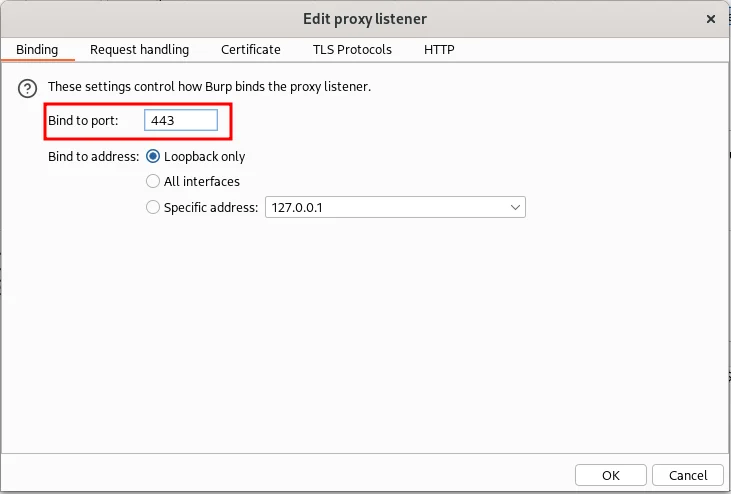
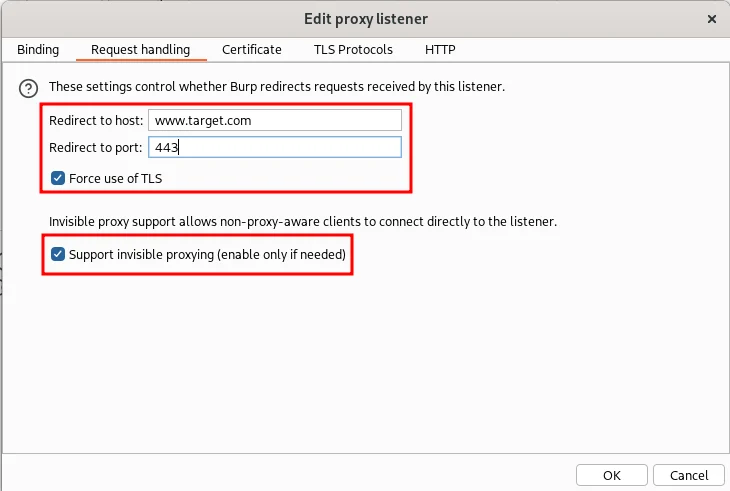
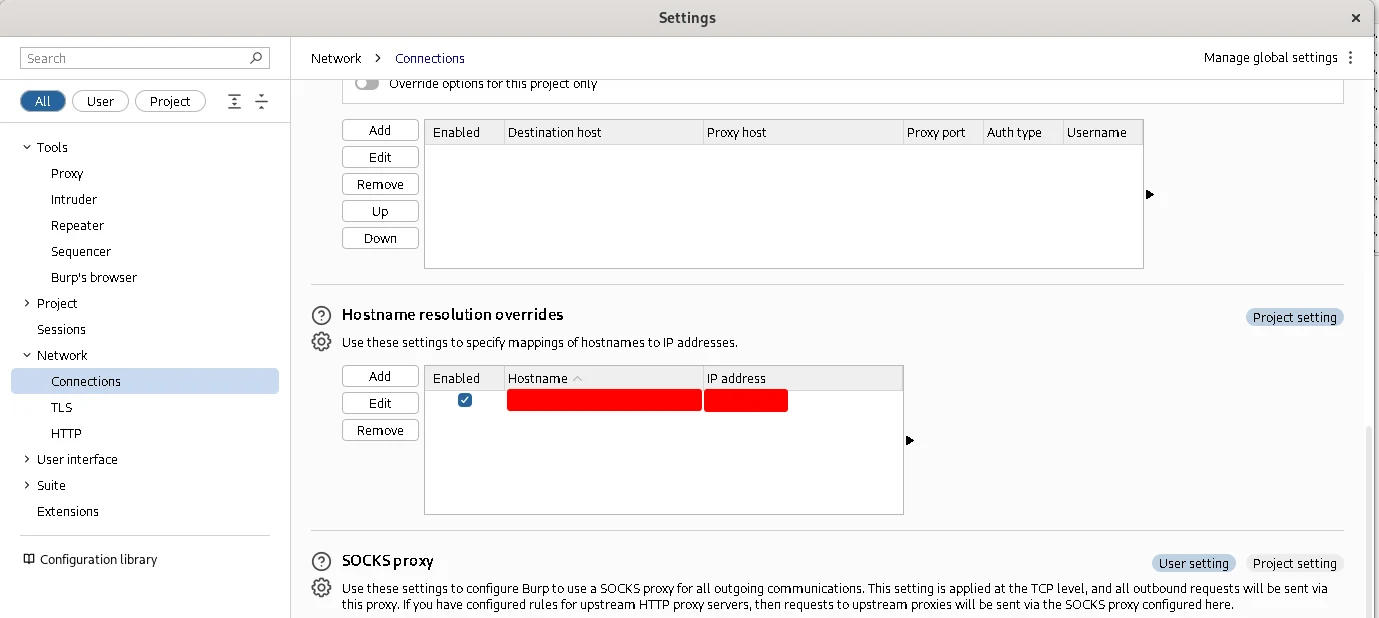
In the second screenshot I used the hostname of the target instead of its IP address in the "Redirect to host" field because the target had SNI enabled. To use the hostname we need to add the correct DNS resolution of the hostname inside Burp Suite; otherwise it resolves again to [redacted] because of the rule in /etc/hosts. If the target does not have SNI enabled, you can simply put the IP address instead of the hostname in the proxy listener configuration. If it does have SNI enabled, add a custom DNS resolution in Burp Suite in the network settings:
Step 6: trust the Burp CA in the Java keystore
The applet's HTTP traffic reached Burp Proxy, but the applet threw a certificate exception because Burp Suite's certificate was self-signed and therefore not valid for the applet. We fixed this by installing the Burp Suite CA in the Java keystore used for CA certificates. The Burp Suite CA certificate can be exported from the Proxy Listener configuration tab in DER format and converted to PEM format with OpenSSL:
$ /usr/lib/jvm/java-8-openjdk/bin/keytool -import -alias example -keystore /usr/lib/jvm/java-8-openjdk/jre/lib/security/cacerts -file <PATH>/certCABurp.pem
Step 7: allow old TLS protocols and ciphers
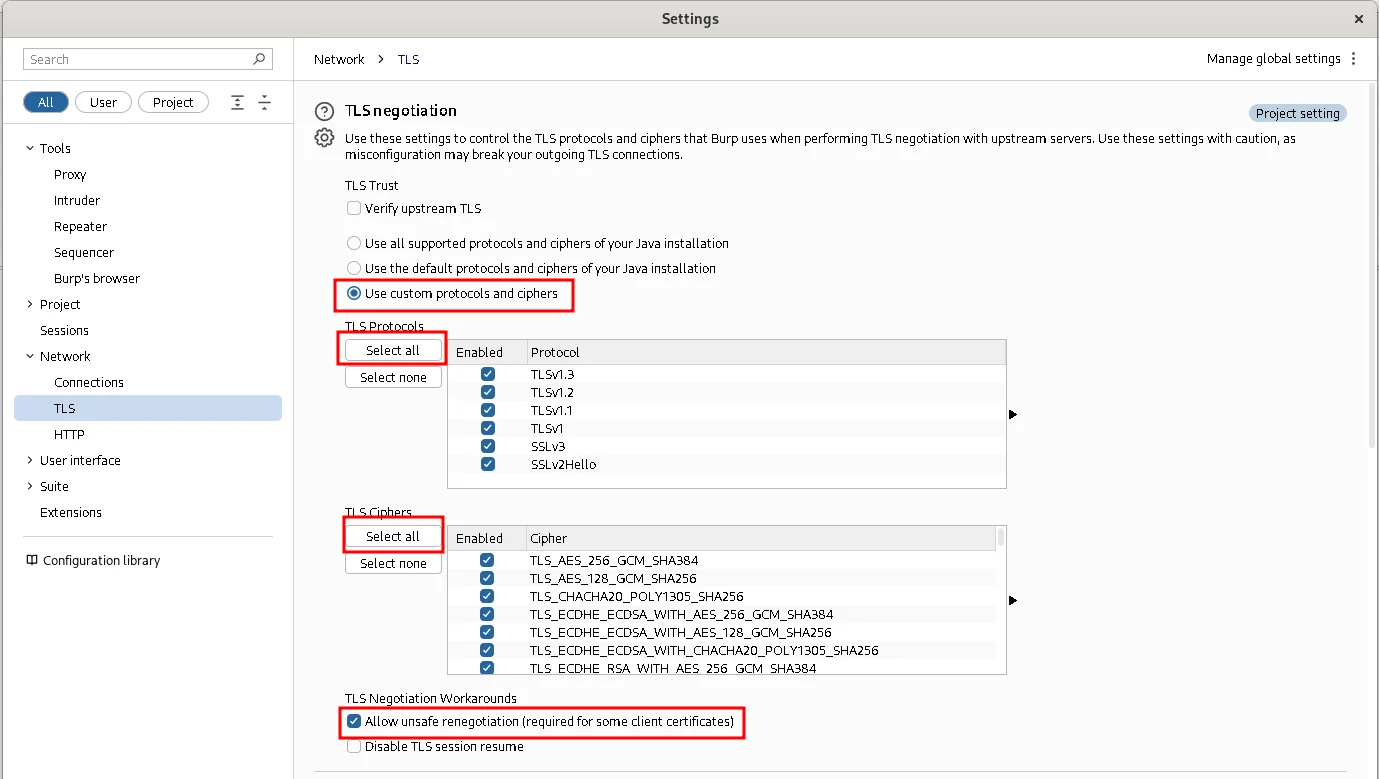
To prevent any further TLS issues we enabled all TLS protocols and ciphers in Burp Suite, including old and unsafe ones:
After all these configurations the applet worked correctly and its HTTP traffic could be inspected in Burp Suite. The first great thing was that the backend was working correctly. That was not a given, since probably nobody was still using that legacy applet.
Step 8: read the traffic without breaking the applet
Analysing the traffic, we found serialised Java objects in the body of HTTP requests and responses, compressed with GZIP. One Burp Suite tip matters here: when you analyse an applet, or more generally an application that is not a web application running in the browser (such as a client-server or mobile application), remember that Burp Suite by default decompresses HTTP responses it receives from the backend to simplify analysis. Browsers do not complain if the content they receive from Burp Suite is not compressed, but applets and other applications may break, and usually do. You can disable automatic decompression and other default operations on HTTP requests and responses in the Proxy -> Miscellaneous configuration tab.
Step 9: try RCE with ysoserial
Almost everyone knows that serialised Java objects often provide an easy win. Thanks to the work of Chris Frohoff and the many researchers who contributed to his project, there are many serialised objects to try against the backend to achieve RCE. You can generate such payloads with the ysoserial tool or with my fork, which adds some detection techniques and encodings. Before digging manually with ysoserial, you can try my Java Deserialisation Scanner, which works quite well using specific payloads I created for detection. It sometimes has issues with the HTTP/2 protocol, I suspect because of the old legacy API, so I am rewriting the extension with the Montoya API to solve incompatibilities with the protocol.
After several attempts, I was quite surprised not to have encountered any exploitable serialisation issues. There are many ways to prevent exploitation of such issues, but I did not expect them to be present in such an outdated application. Not so bad.
Step 10: tamper with the serialised objects
We switched to the other easy wins that this feature usually offers. The applet sends all data back and forth in serialised Java objects. Such objects are binary, not easy to tamper with without first converting them to a more convenient format. Modifying data in binary structures without understanding it and reconstructing it correctly usually creates invalid objects, which the backend discards. That causes trouble, but it also means that not everyone who faced this application in the past managed to handle the problem correctly, potentially leaving exploitable issues unaddressed. In simple terms: if we can solve the format issue here, we will probably uncover some juicy vulnerabilities.
Many years ago (nine) I released a Burp Suite extension to handle such objects, named BurpJDSer-ng-edited. It was based on two other extensions, BurpJDSer-ng by omercnet and BurpJDSer by khai-tran, with changes, fixes and improvements. The extension uses the XStream library to convert serialised Java objects to XML for easy analysis and tampering, and converts the XML back to serialised Java objects before they are sent to the backend. It requires running Burp Suite with additional Java JAR archives in the classpath: the XStream JAR plus all the JAR archives of the applet, so the extension can deserialise the Java objects and convert them to XML with XStream. I did not think the extension would work unmodified in new versions of Burp Suite, but it did, using the last available version of XStream. I only had to modify the code a little because my applet used serialised Java objects compressed with GZIP in requests, while the extension only supported compressed responses. In half an hour it worked like a charm. The updated extension is here.
Step 11: load the extension with the right classpath
With old versions of Burp Suite we could run it with java -jar and add the classpath on the command line. With newer versions it is better to go to the folder where Burp Suite is installed (in my environment, the BurpSuitePro folder in my home directory) and edit the BurpSuitePro.vmoptions file, adding the following line at the end:
-classpath ".:<HOME>/BurpSuitePro/burpsuite_pro.jar:<XSTREAM_FOLDER>/xstream-1.4.20.jar:<APPLET_JAR_FOLDER>/appletJar1.jar:<APPLET_JAR_FOLDER>/appletJar2.jar"
The classpath should contain the current folder, the Burp Suite JAR, the XStream JAR and all the JARs of the target applet (in my example, appletJar1.jar and appletJar2.jar). On Windows use ; as the separator instead of :.
Then start Burp as usual, load the extension, and pentest the application:
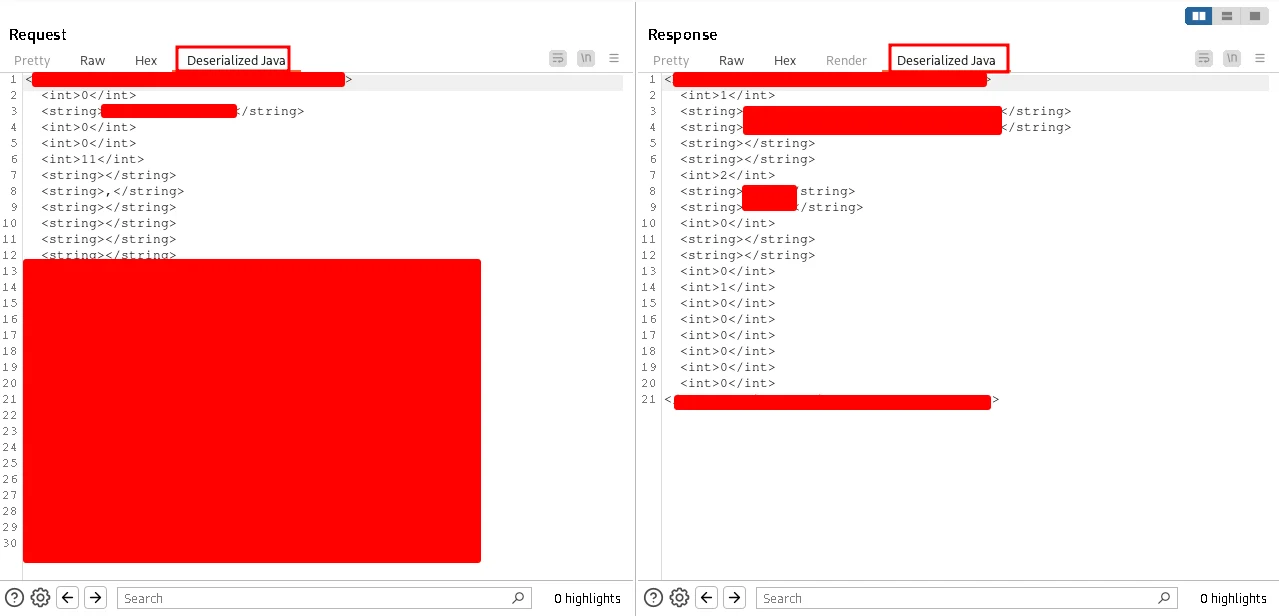
Step 12: the encryption layer and the rest of the engagement
After dealing with serialisation, I still had to address an encryption layer, which was easily manageable with a bit of reverse engineering on the decompiled applet code. Then bingo: tons of issues with authentication and authorization, a lot of dangerous functionalities exposed by the applet, and some immortal SQL injections.
One juicy thing: having a decompilable applet as a client often comes with significant advantages. We can analyse the application code and often find functionalities not accessible from the graphical or administrative interface, often without any authorization check, which we can call and exploit directly. There are two ways to do this: analyse the serialisation mechanisms and the objects used and reconstruct them in the XStream XML format, or create a small Java project, import the applet JARs as dependencies, and directly instantiate and serialise the objects defined by the applet, either in binary format or in XML with XStream.
Using serialised objects as a transport mechanism is also a bad idea for another reason. If the deserialisation mechanisms are not carefully implemented, it is often possible to create serialised objects in unexpected and unreachable states compared to the methods defined in the code. For example, a constructor may check the input data while the deserialisation procedure does not, trusting that what it deserializes was created by a legitimate and previously checked object. This further increases the attack surface, making it easier to bypass security measures and reach unwanted or insecure states.
Root cause
The design mistake is using serialised Java objects as the transport format between the applet and the backend. Binary serialisation is hard to tamper with by hand, so previous testers may have left issues unaddressed. No exploitable serialisation issues were found here, but the data could still be tampered with once converted to XML and back. The report does not describe the server-side validation code, so the exact checks that were missing are not stated; the implication is that the backend trusted the state of deserialised objects, including states a constructor would never produce.
Impact
After dealing with serialisation and an encryption layer, we found tons of authentication and authorization issues, dangerous functionalities exposed by the applet, and SQL injections. The conditions are that the applet still runs and talks to a live backend, and that the tester can convert the serialised objects to a workable format. The RCE attempt itself did not succeed here, so the impact described is the one we actually reached, not a theoretical gadget chain.
Fix
The report does not say what the target changed. The measures it points to are on the testing side: disable Burp Suite's automatic decompression when working with non-web clients, and use the classpath and extension setup above to inspect and tamper with serialised objects. On the defensive side, the report's own reasoning implies that deserialisation must apply the same validation as object construction, and that functionalities reachable only through the applet still need authorization checks.
Variants to test
- Legacy applet still served. Look for pages that still load a Java applet. A positive result is an applet that still starts under appletviewer and reaches a live backend.
- Serialised objects in request bodies. Inspect traffic from any non-browser client. A positive result is a binary body that BurpJDSer-ng-edited converts to readable XML.
- GZIP-compressed requests. If the extension only handles compressed responses, patch it for compressed requests as described. A positive result is XML appearing for requests, not just responses.
- Gadget chains. Run ysoserial and the Java Deserialisation Scanner against the deserialisation points. A positive result is a callback or a scanner detection; here we found no exploitable serialisation issues.
- Object state tampering. Edit fields in the XML and resend. A positive result is the backend accepting a state the UI could not produce, such as one a constructor would have rejected.
- Hidden functionalities. Decompile the applet JARs and look for methods not exposed in the interface. A positive result is a callable function with no authorization check.
- Encryption layer. Reverse the decompiled applet code for the encryption routine. A positive result is the ability to craft and encrypt arbitrary requests.
What happened, in plain words
During a red team engagement (a security test where you are allowed to attack a company's systems as an authorised outsider, often without the defenders knowing the details in advance) with my colleague Maurizio, we came across a website that looked very outdated. A quick look at the HTML brought a smile to our faces: the site still used a Java Applet.
A Java Applet is a small program written in the Java language that a web page could once download and run inside the browser. Think of it like a tiny helper application embedded in the page, a bit like a calculator widget or a game you could play without installing anything. Browsers stopped supporting applets years ago because they were a security risk, so finding one in 2024 means the site has not been touched in a very long time.
My first thought was that the backend (the server-side part of the application, the part you never see, which stores data and does the real work) would certainly no longer work. But it might, and that was worth checking. The target is referred to in the article as www.target.com, and the asset involved is security.humanativaspa.it. The weakness class is insecure deserialisation, and the write-up was disclosed on 8 February 2024.
Insecure deserialisation is a mouthful, so let us unpack it. When two programs talk to each other, they need to agree on a format. One common format in Java is called serialisation: the program takes a live object in memory (say, a "user" with a name and a role) and turns it into a stream of bytes that can be sent over the network or saved to disk. The reverse, turning those bytes back into a live object, is deserialisation. The danger is that if the receiving side trusts those bytes blindly, an attacker who can edit them can create objects the original program never intended to create, sometimes with dangerous side effects. It is like receiving a sealed envelope, opening it, and finding instructions that say "ignore the rules and give the bearer all the money". If you follow the instructions without checking who wrote them, you are in trouble.
Setup
To run the applet we chose not to spin up an old browser in a virtual machine (a VM, which is a whole computer simulated inside your computer, useful for running old software safely). We kept that as a last resort. Instead we installed a version of OpenJDK 8 and used the appletviewer binary to run the applet.
OpenJDK is a free implementation of Java, the runtime that executes Java programs. Version 8 is old, from around 2014. The appletviewer is a small tool that ships with Java and can run an applet outside a browser, which is exactly what we needed because modern browsers refuse to run applets at all.
We preferred a not-very-recent OpenJDK to minimise compatibility issues with the old Java version probably used to compile the applet; as far as I recall, the appletviewer binary is no longer available in the latest Java versions. Think of it like needing an old version of a word processor to open a document saved in a format that modern versions no longer read.
Getting it to work and routing its traffic through Burp Proxy took time and required fixing issues related to signatures, certificates, TLS ciphers and proxies. Burp Proxy is a tool that sits between your browser (or in this case, the applet) and the server, letting you see and edit every request and response. It is like a postal worker who opens every letter, reads it, and can rewrite it before delivering it. TLS is the encryption that protects traffic between a client and a server, the little padlock in your browser. Ciphers are the mathematical recipes used for that encryption. The steps below are the summary of how we made it work in our scenario.
Finding it
The applet was our way in: a legacy client that talked to a live backend. Once we could run it and inspect its traffic, we found exactly what we had hoped for: serialised Java objects in the body of HTTP requests and responses, compressed with GZIP.
HTTP is the language browsers and servers use to exchange pages and data. A request is what the client sends ("give me this page"), a response is what the server sends back. The body is the payload part of that message, the actual content, as opposed to the headers, which are the labels and metadata at the top. GZIP is a compression method, like zipping a file to make it smaller.
Serialised Java objects often provide an easy win, and in my opinion they usually offer more than one. The first thing we tried was remote code execution, and after several attempts we found no exploitable serialisation issues. Remote code execution, usually shortened to RCE, means getting the server to run code of your choosing. It is the jackpot of security testing: instead of just reading data, you make the server do things. The second class of problems, tampering with the serialised data, is what we turned to next. Tampering means changing the data in transit to see whether the server notices or cares.
Exploitation
Step 1: disable the security manager
We created the following Java policy to disable the security manager in the applet, saved in the file java.policy:
grant {
  permission java.security.AllPermission;
};
Line by line: grant { opens a block that says "give the following permissions to the code". permission java.security.AllPermission; grants every permission Java knows about, effectively saying "do not restrict this code at all". The closing }; ends the block.
Why did we do this? Java has a built-in guard called the security manager that can stop code from reading files, opening network connections, and so on. When we run the applet ourselves with appletviewer, we do not want the guard getting in the way of our testing, so we tell Java to grant everything. It is like removing the child lock from a cupboard because you, the adult, need to reach the top shelf.
Step 2: run the applet
We ran the applet with the URL of the page that starts it:
$ /usr/lib/jvm/java-8-openjdk/bin/appletviewer -J-Djava.security.manager -J-Djava.security.policy=java.policy https://<TARGET>/<PAGE>.htm
Line by line: the $ is just the shell prompt, not something you type. /usr/lib/jvm/java-8-openjdk/bin/appletviewer is the full path to the appletviewer program we installed. -J-Djava.security.manager tells appletviewer to pass the option -Djava.security.manager to the Java runtime it starts; that option switches the security manager on. -J-Djava.security.policy=java.policy passes -Djava.security.policy=java.policy, which tells Java to use our policy file. https://<TARGET>/<PAGE>.htm is the address of the web page that contains the applet; the angle brackets are placeholders for the real host and page name.
Why did we do this? Because the applet needs to be started from the page that embeds it, just as a browser would, and we need to tell Java which rules to apply. The -J prefix is simply how appletviewer forwards options to the underlying Java runtime.
Step 3: turn on debug output
One command-line option that helped a lot was -J-Djavax.net.debug=all, which prints useful debug information:
$ /usr/lib/jvm/java-8-openjdk/bin/appletviewer -J-Djava.security.manager -J-Djava.security.policy=java.policy -J-Djavax.net.debug=all https://<TARGET>/<PAGE>.htm
Line by line: this is the same command as before, with one addition. -J-Djavax.net.debug=all passes -Djavax.net.debug=all to Java, which turns on verbose logging for everything network-related: TLS handshakes, certificates, ciphers, and so on. The rest is unchanged.
Why did we do this? Because when something fails, the error message you see is often just "connection failed". The debug log tells you exactly which certificate was rejected, which cipher was refused, which hostname did not match. It is the difference between "the car will not start" and a mechanic's diagnostic readout telling you the battery is flat.
With this the applet started, but redirecting its traffic through Burp Proxy needed more work. appletviewer supports an HTTP proxy, set either in the utility's options or through Java environment variables, but in our specific scenario that did not work correctly. We therefore set up Burp Proxy as an invisible proxy, transparently redirecting the applet traffic to the HTTP port Burp Proxy was listening on.
An invisible proxy, also called a transparent proxy, is one the client does not know about. Normally you tell a program "send your traffic to this proxy address". With an invisible proxy, you instead trick the program into thinking the server is somewhere else, and the proxy sits at that somewhere else. It is like redirecting someone's mail by changing their address book rather than asking them to use a forwarding service.
Step 4: point the target hostname at localhost
We edited /etc/hosts (C:\Windows\System32\drivers\etc\hosts on Windows) to resolve the target to [redacted], assuming www.target.com as the target:
[redacted] www.target.com
Line by line: [redacted] is the special address that always means "this computer", also called localhost. www.target.com is the hostname we want to redirect. The line says: whenever any program on this machine asks for www.target.com, send it to this machine instead.
The hosts file is a small text file that acts as a local phone book for names. Before your computer asks a DNS server (the internet's global phone book) where a name lives, it checks this file. By putting our entry there, we make the applet connect to our own machine, where Burp is waiting, instead of the real server. Why? Because that is the simplest way to force traffic through a proxy without the applet cooperating.
Step 5: configure the invisible proxy in Burp Suite
We then set up an invisible proxy in the Proxy settings of Burp Suite. You may have to run Burp Suite as root to bind on port 443.
Port 443 is the standard port for HTTPS traffic. On most systems, only the administrator (root on Linux and macOS) is allowed to listen on ports below 1024, which is why running Burp as root may be necessary.
These two screenshots show the Burp Suite proxy listener configuration for the invisible proxy, including the redirect settings that send the applet's traffic on to the real target.
In the second screenshot I used the hostname of the target instead of its IP address in the "Redirect to host" field because the target had SNI enabled. SNI, Server Name Indication, is a feature of TLS where the client tells the server which website name it is trying to reach before the encrypted connection is set up. This matters because one server can host many websites on the same address, and the server needs to know which certificate to present. It is like a large office building: you have to tell the receptionist which company you are visiting before they can direct you.
To use the hostname we need to add the correct DNS resolution of the hostname inside Burp Suite; otherwise it resolves again to [redacted] because of the rule in /etc/hosts. If the target does not have SNI enabled, you can simply put the IP address instead of the hostname in the proxy listener configuration. If it does have SNI enabled, add a custom DNS resolution in Burp Suite in the network settings:
This screenshot shows the custom DNS resolution added inside Burp Suite, so that when Burp forwards traffic to the real hostname it does not fall back to the [redacted] entry in the hosts file.
Step 6: trust the Burp CA in the Java keystore
The applet's HTTP traffic reached Burp Proxy, but the applet threw a certificate exception because Burp Suite's certificate was self-signed and therefore not valid for the applet. We fixed this by installing the Burp Suite CA in the Java keystore used for CA certificates. The Burp Suite CA certificate can be exported from the Proxy Listener configuration tab in DER format and converted to PEM format with OpenSSL:
$ /usr/lib/jvm/java-8-openjdk/bin/keytool -import -alias example -keystore /usr/lib/jvm/java-8-openjdk/jre/lib/security/cacerts -file <PATH>/certCABurp.pem
Line by line: /usr/lib/jvm/java-8-openjdk/bin/keytool is the Java tool for managing certificates. -import says we want to add a certificate. -alias example gives the entry a name, here example, so we can find or remove it later. -keystore /usr/lib/jvm/java-8-openjdk/jre/lib/security/cacerts points at the file where Java keeps its list of trusted certificate authorities. -file <PATH>/certCABurp.pem is the certificate file we want to add, with <PATH> standing for wherever we saved it.
Why did we do this? A certificate is like a passport for a website: it proves the site is who it claims to be. Your browser and Java come with a list of trusted passport issuers, called certificate authorities or CAs. Burp creates its own certificate on the fly so it can read encrypted traffic, but that certificate is signed by Burp itself, not by a trusted authority, so Java rejects it. By adding Burp's CA to Java's trusted list, we tell Java "it is fine, I know this issuer". It is like adding a new friend to the list of people whose signature your bank will accept.
DER and PEM are two ways of storing a certificate in a file. DER is binary, PEM is text with a header and footer. OpenSSL is a common command-line tool for working with certificates and encryption.
Step 7: allow old TLS protocols and ciphers
To prevent any further TLS issues we enabled all TLS protocols and ciphers in Burp Suite, including old and unsafe ones:
This screenshot shows the Burp Suite TLS settings with all protocols and ciphers enabled, including the old ones.
Why did we do this? Old applets were written when only old versions of TLS existed. Modern Burp, by default, refuses to speak those old versions because they are insecure. But we are not protecting real user data here; we are trying to talk to an old program. Enabling everything is like keeping an old rotary phone line active because the person you need to call only has a rotary phone.
After all these configurations the applet worked correctly and its HTTP traffic could be inspected in Burp Suite. The first great thing was that the backend was working correctly. That was not a given, since probably nobody was still using that legacy applet.
Step 8: read the traffic without breaking the applet
Analysing the traffic, we found serialised Java objects in the body of HTTP requests and responses, compressed with GZIP. One Burp Suite tip matters here: when you analyse an applet, or more generally an application that is not a web application running in the browser (such as a client-server or mobile application), remember that Burp Suite by default decompresses HTTP responses it receives from the backend to simplify analysis. Browsers do not complain if the content they receive from Burp Suite is not compressed, but applets and other applications may break, and usually do. You can disable automatic decompression and other default operations on HTTP requests and responses in the Proxy -> Miscellaneous configuration tab.
Why does this matter? Imagine Burp receives a zipped parcel, opens it for you to read, and then hands you the loose contents. A browser is relaxed and will accept loose contents. An applet expects a zipped parcel and gets confused when it receives loose contents, so it crashes. Turning off automatic decompression means Burp passes the parcel through untouched, and the applet stays happy.
Step 9: try RCE with ysoserial
Almost everyone knows that serialised Java objects often provide an easy win. Thanks to the work of Chris Frohoff and the many researchers who contributed to his project, there are many serialised objects to try against the backend to achieve RCE. You can generate such payloads with the ysoserial tool or with my fork, which adds some detection techniques and encodings. Before digging manually with ysoserial, you can try my Java Deserialisation Scanner, which works quite well using specific payloads I created for detection. It sometimes has issues with the HTTP/2 protocol, I suspect because of the old legacy API, so I am rewriting the extension with the Montoya API to solve incompatibilities with the protocol.
A payload is the actual malicious input you send to a target. A gadget chain is a sequence of existing classes in the target application that, when deserialised in the right order, end up doing something harmful, like running a command. ysoserial is a well-known tool that builds these chains for you. HTTP/2 is a newer version of the HTTP protocol, faster and more efficient than the original HTTP/1.1. An API, in this context, is the set of functions a program exposes so that other programs can talk to it; the Montoya API is Burp's newer way for extensions to interact with it.
After several attempts, I was quite surprised not to have encountered any exploitable serialisation issues. There are many ways to prevent exploitation of such issues, but I did not expect them to be present in such an outdated application. Not so bad.
Step 10: tamper with the serialised objects
We switched to the other easy wins that this feature usually offers. The applet sends all data back and forth in serialised Java objects. Such objects are binary, not easy to tamper with without first converting them to a more convenient format. Modifying data in binary structures without understanding it and reconstructing it correctly usually creates invalid objects, which the backend discards. That causes trouble, but it also means that not everyone who faced this application in the past managed to handle the problem correctly, potentially leaving exploitable issues unaddressed. In simple terms: if we can solve the format issue here, we will probably uncover some juicy vulnerabilities.
Binary means the data is stored as raw bytes, not as readable text. If you open a binary file in a text editor you see gibberish. Editing it by hand is like trying to change one word in a book written in a language you do not speak, without breaking the grammar. The backend is strict: if the grammar is broken, it throws the object away.
Many years ago (nine) I released a Burp Suite extension to handle such objects, named BurpJDSer-ng-edited. It was based on two other extensions, BurpJDSer-ng by omercnet and BurpJDSer by khai-tran, with changes, fixes and improvements. The extension uses the XStream library to convert serialised Java objects to XML for easy analysis and tampering, and converts the XML back to serialised Java objects before they are sent to the backend. It requires running Burp Suite with additional Java JAR archives in the classpath: the XStream JAR plus all the JAR archives of the applet, so the extension can deserialise the Java objects and convert them to XML with XStream. I did not think the extension would work unmodified in new versions of Burp Suite, but it did, using the last available version of XStream. I only had to modify the code a little because my applet used serialised Java objects compressed with GZIP in requests, while the extension only supported compressed responses. In half an hour it worked like a charm. The updated extension is here.
An extension is an add-on that gives Burp extra abilities. XML is a text format that uses tags like <name>Alice</name>, easy for humans to read and edit. A JAR is a packaged Java library, a single file containing many compiled classes. The classpath is the list of places Java looks when it needs to load a class; if a class is not on the classpath, Java cannot find it. XStream is a library that translates between Java objects and XML.
Why does the extension need the applet's JARs? Because to turn bytes back into an object, Java needs to know the class definition, the blueprint of that object. The blueprint lives in the applet's JARs. Without them, the extension sees bytes it cannot interpret.
Step 11: load the extension with the right classpath
With old versions of Burp Suite we could run it with java -jar and add the classpath on the command line. With newer versions it is better to go to the folder where Burp Suite is installed (in my environment, the BurpSuitePro folder in my home directory) and edit the BurpSuitePro.vmoptions file, adding the following line at the end:
-classpath ".:<HOME>/BurpSuitePro/burpsuite_pro.jar:<XSTREAM_FOLDER>/xstream-1.4.20.jar:<APPLET_JAR_FOLDER>/appletJar1.jar:<APPLET_JAR_FOLDER>/appletJar2.jar"
Line by line: -classpath tells Java where to look for classes. The value is a list separated by colons. . means the current folder. <HOME>/BurpSuitePro/burpsuite_pro.jar is Burp itself. <XSTREAM_FOLDER>/xstream-1.4.20.jar is the XStream library. <APPLET_JAR_FOLDER>/appletJar1.jar and <APPLET_JAR_FOLDER>/appletJar2.jar are the applet's own libraries. The angle brackets are placeholders for real paths.
The classpath should contain the current folder, the Burp Suite JAR, the XStream JAR and all the JARs of the target applet (in my example, appletJar1.jar and appletJar2.jar). On Windows use ; as the separator instead of :.
A .vmoptions file is a small configuration file that tells Java how to start Burp, with which memory settings and which extra options. Editing it is like changing the startup settings of a program without touching the program itself.
Then start Burp as usual, load the extension, and pentest the application:
This screenshot shows Burp Suite running with the extension loaded, ready to inspect and tamper with the serialised objects.
Step 12: the encryption layer and the rest of the engagement
After dealing with serialisation, I still had to address an encryption layer, which was easily manageable with a bit of reverse engineering on the decompiled applet code. Then bingo: tons of issues with authentication and authorization, a lot of dangerous functionalities exposed by the applet, and some immortal SQL injections.
Reverse engineering means taking something apart to understand how it works. Decompiling is the specific case of turning compiled code (the machine-friendly version) back into readable source code. Authentication is proving who you are, like showing your ID at the door. Authorization is what you are allowed to do once inside, like which rooms your badge opens. SQL injection is a classic flaw where user input is pasted into a database query without proper handling, letting an attacker change the query itself. It is like writing your name on a form and adding "and also give me everyone else's file".
One juicy thing: having a decompilable applet as a client often comes with significant advantages. We can analyse the application code and often find functionalities not accessible from the graphical or administrative interface, often without any authorization check, which we can call and exploit directly. There are two ways to do this: analyse the serialisation mechanisms and the objects used and reconstruct them in the XStream XML format, or create a small Java project, import the applet JARs as dependencies, and directly instantiate and serialise the objects defined by the applet, either in binary format or in XML with XStream.
Why is this powerful? Because the applet is a complete copy of the client logic sitting on your disk. It is like being given the full instruction manual for a building, including the service doors the public never sees. If a function exists in the code but is not shown in the interface, it may still be callable, and it may not check whether you are allowed to call it.
Using serialised objects as a transport mechanism is also a bad idea for another reason. If the deserialisation mechanisms are not carefully implemented, it is often possible to create serialised objects in unexpected and unreachable states compared to the methods defined in the code. For example, a constructor may check the input data while the deserialisation procedure does not, trusting that what it deserializes was created by a legitimate and previously checked object. This further increases the attack surface, making it easier to bypass security measures and reach unwanted or insecure states.
A constructor is the piece of code that runs when an object is first created, often used to validate input. Deserialisation can bypass the constructor entirely, creating an object directly from bytes. It is like a nightclub with a bouncer at the front door, but a side entrance that nobody guards. Attack surface is the total set of ways an attacker can interact with a system; the more entrances, the harder it is to guard them all.
Root cause
The design mistake is using serialised Java objects as the transport format between the applet and the backend. Binary serialisation is hard to tamper with by hand, so previous testers may have left issues unaddressed. No exploitable serialisation issues were found here, but the data could still be tampered with once converted to XML and back. The report does not describe the server-side validation code, so the exact checks that were missing are not stated; the implication is that the backend trusted the state of deserialised objects, including states a constructor would never produce.
An object graph is simply the collection of objects linked to each other, like a family tree of data. If the backend trusts the whole tree without checking each branch, an attacker can graft on branches that should not exist.
Impact
After dealing with serialisation and an encryption layer, we found tons of authentication and authorization issues, dangerous functionalities exposed by the applet, and SQL injections. The conditions are that the applet still runs and talks to a live backend, and that the tester can convert the serialised objects to a workable format. The RCE attempt itself did not succeed here, so the impact described is the one we actually reached, not a theoretical gadget chain.
Fix
The report does not say what the target changed. The measures it points to are on the testing side: disable Burp Suite's automatic decompression when working with non-web clients, and use the classpath and extension setup above to inspect and tamper with serialised objects. On the defensive side, the report's own reasoning implies that deserialisation must apply the same validation as object construction, and that functionalities reachable only through the applet still need authorization checks.
Variants to test
- Legacy applet still served. Look for pages that still load a Java applet. A positive result is an applet that still starts under appletviewer and reaches a live backend.
- Serialised objects in request bodies. Inspect traffic from any non-browser client. A positive result is a binary body that BurpJDSer-ng-edited converts to readable XML.
- GZIP-compressed requests. If the extension only handles compressed responses, patch it for compressed requests as described. A positive result is XML appearing for requests, not just responses.
- Gadget chains. Run ysoserial and the Java Deserialisation Scanner against the deserialisation points. A positive result is a callback or a scanner detection; here we found no exploitable serialisation issues.
- Object state tampering. Edit fields in the XML and resend. A positive result is the backend accepting a state the UI could not produce, such as one a constructor would have rejected.
- Hidden functionalities. Decompile the applet JARs and look for methods not exposed in the interface. A positive result is a callable function with no authorization check.
- Encryption layer. Reverse the decompiled applet code for the encryption routine. A positive result is the ability to craft and encrypt arbitrary requests.
Glossary
- Red team engagement: an authorised security test where the testers act like real attackers, often without the defenders knowing the details in advance.
- Java Applet: a small Java program that a web page could once download and run inside the browser; modern browsers no longer support them.
- Backend: the server-side part of an application that stores data and does the real work, invisible to the user.
- Insecure deserialisation: a flaw where a program turns attacker-controlled bytes back into objects without proper checks, allowing tampering or code execution.
- Serialisation: converting a live object in memory into a stream of bytes so it can be sent or stored.
- Deserialisation: the reverse of serialisation, turning bytes back into a live object.
- OpenJDK: a free implementation of the Java runtime that executes Java programs.
- appletviewer: a tool shipped with Java that runs an applet outside a browser.
- Burp Proxy: a tool that sits between a client and a server, letting you see and edit every request and response.
- TLS: the encryption that protects traffic between a client and a server, shown as the padlock in a browser.
- Cipher: a mathematical recipe used for encryption.
- HTTP: the language browsers and servers use to exchange pages and data.
- Request: a message a client sends to a server, such as asking for a page.
- Response: a message a server sends back to a client.
- Body: the payload part of an HTTP message, as opposed to the headers.
- Headers: the labels and metadata at the top of an HTTP message.
- GZIP: a compression method that makes data smaller.
- Remote code execution (RCE): getting a server to run code of your choosing.
- Tampering: changing data in transit to see whether the server notices or cares.
- Security manager: a Java guard that can stop code from reading files, opening connections, and so on.
- Policy file: a file that tells Java which permissions to grant to code.
- Sandbox: a restricted environment that limits what code can do.
- Invisible proxy: a proxy the client does not know about, achieved by redirecting traffic without the client's cooperation.
- Transparent proxy: another name for an invisible proxy.
- localhost / [redacted]: the special address that always means "this computer".
- Hosts file: a local text file that maps hostnames to addresses before DNS is consulted.
- DNS: the internet's global phone book, translating names into addresses.
- Port: a numbered channel on a computer that a service listens on; 443 is the standard HTTPS port.
- root: the administrator account on Linux and macOS, allowed to do anything, including binding low ports.
- SNI (Server Name Indication): a TLS feature where the client tells the server which website name it wants before the encrypted connection is set up.
- Certificate: a digital passport that proves a website is who it claims to be.
- Self-signed certificate: a certificate signed by its own creator rather than a trusted authority.
- Certificate authority (CA): a trusted issuer of certificates.
- Keystore: a file where Java keeps its list of trusted certificates.
- DER: a binary format for storing certificates.
- PEM: a text format for storing certificates, with a header and footer.
- OpenSSL: a common command-line tool for working with certificates and encryption.
- Payload: the actual malicious input you send to a target.
- Gadget chain: a sequence of existing classes in a target that, when deserialised in the right order, does something harmful.
- ysoserial: a tool that builds gadget-chain payloads for Java deserialisation.
- HTTP/2: a newer, faster version of the HTTP protocol.
- API: the set of functions a program exposes so other programs can talk to it.
- Montoya API: Burp Suite's newer way for extensions to interact with it.
- Binary: data stored as raw bytes, not readable text.
- Extension: an add-on that gives Burp extra abilities.
- XML: a text format that uses tags, easy for humans to read and edit.
- JAR: a packaged Java library, a single file containing many compiled classes.
- Classpath: the list of places Java looks when it needs to load a class.
- XStream: a library that translates between Java objects and XML.
- .vmoptions file: a configuration file that tells Java how to start Burp.
- Reverse engineering: taking something apart to understand how it works.
- Decompiling: turning compiled code back into readable source code.
- Authentication: proving who you are.
- Authorization: what you are allowed to do once you are identified.
- SQL injection: a flaw where user input is pasted into a database query without proper handling, letting an attacker change the query.
- Constructor: the piece of code that runs when an object is first created, often used to validate input.
- Attack surface: the total set of ways an attacker can interact with a system.
- Object graph: the collection of objects linked to each other in memory.




