Leaked Database and SMTP credentials through .env file
A Laravel .env file was accessible on the Azure CNAME host even though the main domain returned a 403, exposing database and SMTP credentials. An attacker could read these secrets and potentially access the database or send email, though the report did not escalate.

Let me share with you the background of this bug bounty program. This bug bounty program is hosted independently and is built around the concept of offering self-driving cars as a service, along with providing marketing and digital solutions for drivers.
The full write-up lives on its author's site
It belongs to its author, so we link to it rather than copy it. The other two tabs are our own rewrites, checked against it.
Context
The target was an independently hosted bug bounty program built around self-driving cars offered as a service, together with marketing and digital solutions for drivers. The asset in scope for this write-up was a subdomain of the main site, and the backend framework on that subdomain was meant to be Laravel. Laravel applications keep their configuration, including database and mail (SMTP) credentials, in a .env file at the application root, so a reachable .env is a direct route to those secrets.
Setup
The write-up does not describe any accounts, roles or special tooling beyond a shell and a content discovery tool. The two tools named are ffuf, used for content discovery on the subdomain, and dig, used to inspect DNS records. The command prompt in the output shows the path /mnt/c/Users/nithi.
Finding it
Reconnaissance on the target turned up a subdomain whose backend was meant to be Laravel. Content discovery against that subdomain with ffuf found that the .env file was disclosed.
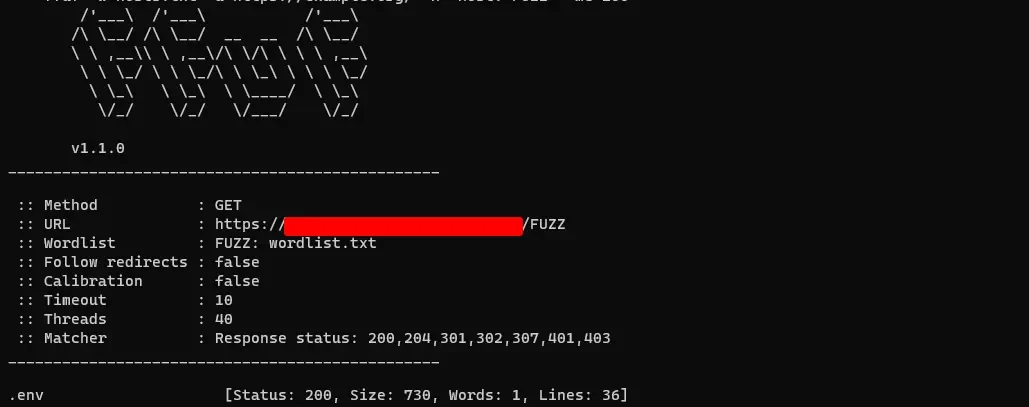
The screenshot shows the .env file as it appeared in the discovery output.
Opening the .env path in the browser, however, returned a forbidden status.
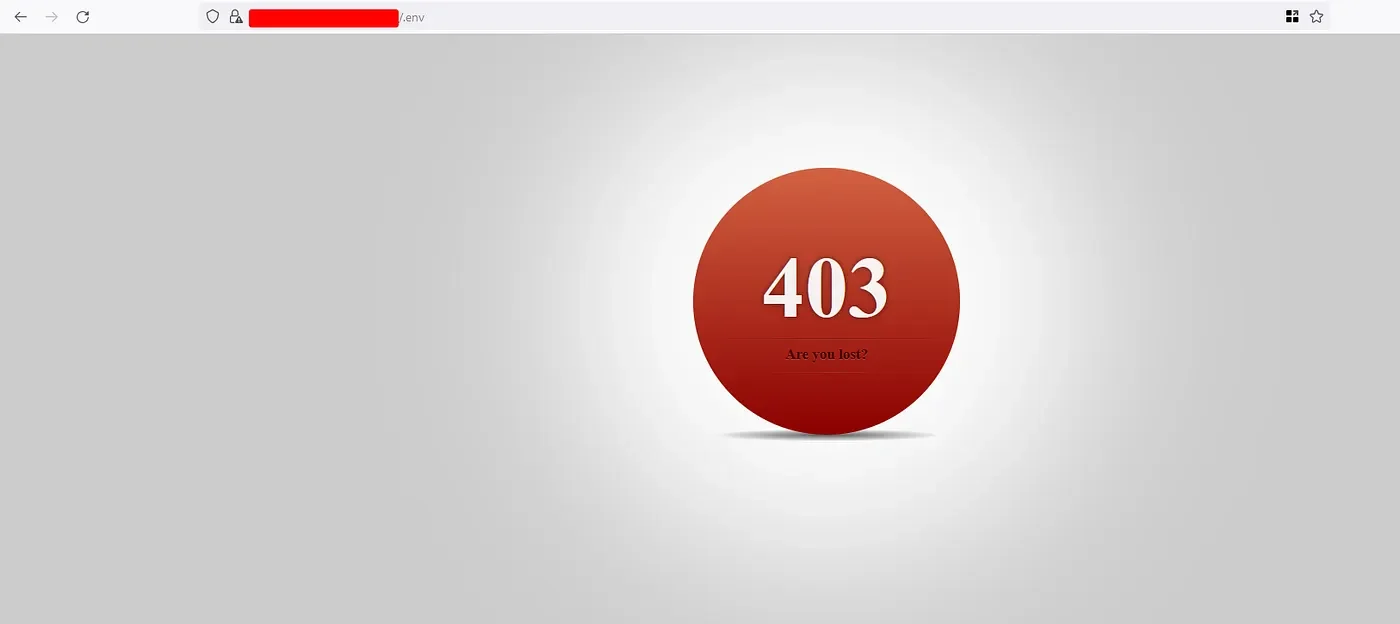
The screenshot shows that forbidden response for the .env path on the subdomain.
So the file existed and was discoverable, but the normal hostname refused to serve it. That is the point where the interesting question starts: the restriction was applied at the domain level, but the same application was also reachable through other names.
Exploitation
Step 1: look past the domain at the CNAME
The reasoning in the report is that restrictions may be placed on something like *.example.com, but not on the CNAMEs or on the hosting services behind them, such as AWS or Azure. The researcher refers back to an earlier blog of theirs where customer data was disclosed through a server hosted on EC2 instances, and says the same pattern applied here: the CNAME record pointed at an Azure App Service host.
Step 2: resolve the CNAME
The DNS lookup was run with dig:
root@DESKTOP-4SC48HP:/mnt/c/Users/nithi# dig example.com; <<>> DiG 9.18.12-0ubuntu0.22.04.2-Ubuntu <<>> example.com;; global options: +cmd;; Got answer:;; ->>HEADER<<- opcode: QUERY, status: NOERROR, id: 63749;; flags: qr rd ad; QUERY: 1, ANSWER: 1, AUTHORITY: 0, ADDITIONAL: 0;; WARNING: recursion requested but not available;; QUESTION SECTION:;example.com. IN CNAME exampleapp.azurewebsites.net;; ANSWER SECTION:example.com. 0 IN A [redacted];; Query time: 60 msec;; SERVER: [redacted]#53([redacted]) (UDP);; WHEN: Fri Sep 08 04:14:48 PDT 2023;; MSG SIZE rcvd: 56
The question section asks for the CNAME of example.com, and the answer section returns an A record for [redacted]. The important part is the CNAME target, given in the report as something like exampleapp.azurewebsites.net: that hostname is a second way to reach the same application, outside the domain-level restriction.
Step 3: request the .env through the Azure hostname
Visiting exampleapp.azurewebsites.net in the browser returned the same response as the main website, effectively a mirrored site. Opening the .env file there had no restriction at all, and all the environment variables were visible.
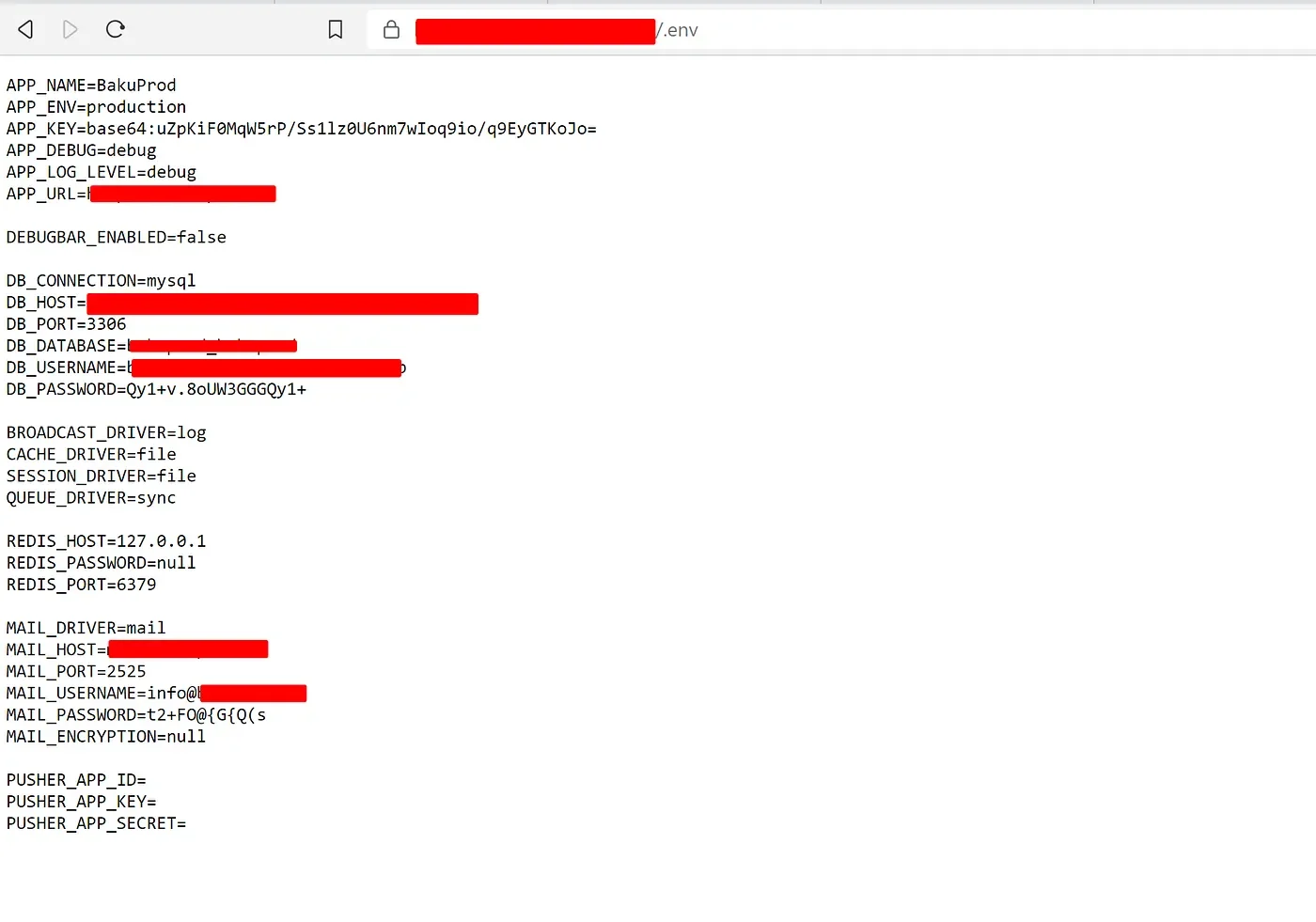
The screenshot shows the environment variables returned from the .env file through the Azure hostname.
Root cause
The access control on the .env path was enforced at the domain level, on the hostname the researcher first used, and not on the application itself. The same Laravel application was also served directly by its Azure App Service hostname, which sat outside that restriction, so the identical path returned the file in full. The restriction applied to the domain the researcher first used, while the CNAME target served the same path without it.
Impact
The disclosed .env exposed the application's environment variables, which in a Laravel deployment include the database and SMTP credentials. The researcher notes that exploitation could have gone further against both the database and SMTP with those credentials, but the program had limitations in place for the proof of concept. After discussion, the program manager confirmed the finding as valid and asked that it not be escalated further. The report does not describe the contents of the variables or any access obtained with them.
Fix
Variants to test
- Resolve every in-scope hostname with
digand collect the CNAME targets. A positive result is a hosting provider hostname (for example an*.azurewebsites.netor*.amazonaws.comname) that serves the same application. - Request the sensitive path on the CNAME target after it is blocked on the main domain. A positive result is a 200 with the file contents where the main hostname returned 403.
- Run content discovery against the CNAME target itself, not only the original subdomain, looking for
.env, backup files and configuration files. A positive result is any file that the main hostname refuses to serve. - Compare responses from the main hostname and the hosting provider hostname for the same paths. A positive result is a mirrored site where the two differ only in access control.
- Check other hosting services referenced in DNS, such as AWS, for the same gap, since the report's earlier case involved an EC2-hosted server.
What happened, in plain words
A security researcher was looking at a bug bounty program. A bug bounty program is a scheme where a company invites outside people to try to find security problems in its systems and report them, usually for a reward. This particular program was built around self-driving cars offered as a service, plus marketing and digital solutions for drivers.
The researcher found a subdomain of the main website. A subdomain is a smaller address that belongs to the same organisation, for example shop.example.com when the main site is example.com. The software running on that subdomain was meant to be Laravel. Laravel is a toolkit for building websites in the PHP programming language, and like many such toolkits it keeps its settings in a plain text file called .env that sits in the top folder of the application. That file is not supposed to be readable from the internet, because it holds secrets: the username and password for the database, and the login details for the mail server (SMTP) used to send email.
The researcher used a tool to guess file and folder names on the subdomain, and the tool found that the .env file was there. But when the researcher opened the .env address in a normal browser, the server said "forbidden": the file existed, but this particular address was not allowed to hand it over.
Here is the clever part. The restriction was applied to the domain name, the address people type. But the same application was also reachable through a second name: the hosting provider's own address, in this case an Azure App Service hostname. The domain name was a kind of signpost pointing at that Azure address. When the researcher visited the Azure address directly, the site looked exactly the same, and the .env file was served without any restriction at all. All the environment variables, including the database and SMTP credentials, were visible.
The researcher reported it. The program manager confirmed it was a valid finding and asked that it not be taken any further. The report does not describe what was changed afterwards.
Background: the pieces involved
Before walking through the steps, here are the ideas you need. Each one is explained from zero.
What a subdomain is
A domain name is the address of a website, like example.com. A subdomain adds a word in front, like blog.example.com or app.example.com. Organisations use subdomains to run separate services: a shop, a support portal, a marketing site. Each subdomain can be hosted on different hardware and configured differently, which is exactly why they are interesting to someone testing security: a rule that protects the main site may not protect a subdomain.
What Laravel and the .env file are
Laravel is a framework, meaning a collection of ready-made code that developers use to build a web application faster. Applications need settings: which database to talk to, what password to use, which mail server to send email through. Laravel reads these from a file named .env in the application's root folder. The leading dot makes it a hidden file on Unix-like systems, but hidden only means the file listing does not show it by default; it does not stop a web server from serving it if asked.
A .env file typically contains lines like DB_PASSWORD=... and MAIL_PASSWORD=.... If an outsider can read it, they have the keys to the database and the mail account. That is why the report calls a reachable .env a direct route to those secrets.
What content discovery is
Websites are made of many files and folders that are not linked from the visible pages: admin panels, backup files, configuration files. Content discovery means asking the server for a long list of common names and seeing which ones exist. The tool used here is ffuf, a command-line program that sends many requests quickly and reports which ones came back with a meaningful answer. Think of it as trying every key on a big bunch in a lock, one after another, and noting which ones turn.
What a 403 is
When your browser asks a web server for something, the server replies with a three-digit status code. 200 means "here it is". 404 means "I do not have that". 403 means "I have it, but you are not allowed to see it". A 403 is a refusal, not an absence, and that distinction matters: it tells you the file is there and something is deliberately blocking it.
What DNS and a CNAME are
DNS, the Domain Name System, is the internet's address book. It translates names people type into the numeric addresses computers use. A CNAME record is a particular kind of DNS entry that says "this name is another name for that name". If example.com has a CNAME pointing at exampleapp.azurewebsites.net, then asking for example.com is, in effect, asking for the Azure host. The domain name is a label stuck on the front of the hosting provider's address.
This is the heart of the finding. A rule can be attached to the label, but the underlying address still exists and can often be reached directly.
What Azure App Service is
Azure is Microsoft's cloud platform. App Service is its service for running web applications. When you deploy an application there, Azure gives it a hostname ending in azurewebsites.net. That hostname is a real, public address for your application, independent of any custom domain you later point at it. So the same application answers on two names: your own domain, and the Azure one.
What SMTP is
SMTP, the Simple Mail Transfer Protocol, is how one computer hands an email to another for delivery. Applications use an SMTP server, with a username and password, to send things like password reset emails. If those credentials leak, an outsider can potentially send email as the organisation.
Finding it
The researcher did reconnaissance on the target. Reconnaissance, or recon, is the information-gathering phase: looking at what exists before trying anything. It turned up a subdomain whose backend was meant to be Laravel.
Content discovery against that subdomain with ffuf found that the .env file was disclosed. In other words, the tool's list of names included .env, and the server answered in a way that showed the file was present.
The screenshot shows the .env file as it appeared in the discovery output.
Opening the .env path in the browser, however, returned a forbidden status.
The screenshot shows that forbidden response for the .env path on the subdomain.
So the file existed and was discoverable, but the normal hostname refused to serve it. That is the point where the interesting question starts: the restriction was applied at the domain level, but the same application was also reachable through other names.
Why does this matter? Because a refusal tells you where to look next. If the file did not exist, there would be nothing to chase. A 403 says: the file is there, and someone has put a guard in front of it. The natural next question is whether the guard is in front of every door, or only the front one.
Exploitation
Step 1: look past the domain at the CNAME
The reasoning in the report is that restrictions may be placed on something like *.example.com, but not on the CNAMEs or on the hosting services behind them, such as AWS or Azure. The researcher refers back to an earlier blog of theirs where customer data was disclosed through a server hosted on EC2 instances, and says the same pattern applied here: the CNAME record pointed at an Azure App Service host.
In everyday terms: imagine a building with a main entrance where a guard checks everyone. The building also has a service entrance round the back, with the same rooms inside, and nobody stationed there. The guard at the front is the domain-level rule. The service entrance is the hosting provider's hostname.
Step 2: resolve the CNAME
To find the second name, the researcher looked up the DNS records with dig, a command-line tool for asking DNS questions.
root@DESKTOP-4SC48HP:/mnt/c/Users/nithi# dig example.com; <<>> DiG 9.18.12-0ubuntu0.22.04.2-Ubuntu <<>> example.com;; global options: +cmd;; Got answer:;; ->>HEADER<<- opcode: QUERY, status: NOERROR, id: 63749;; flags: qr rd ad; QUERY: 1, ANSWER: 1, AUTHORITY: 0, ADDITIONAL: 0;; WARNING: recursion requested but not available;; QUESTION SECTION:;example.com. IN CNAME exampleapp.azurewebsites.net;; ANSWER SECTION:example.com. 0 IN A [redacted];; Query time: 60 msec;; SERVER: [redacted]#53([redacted]) (UDP);; WHEN: Fri Sep 08 04:14:48 PDT 2023;; MSG SIZE rcvd: 56
Line by line, in plain words:
root@DESKTOP-4SC48HP:/mnt/c/Users/nithi#is the command prompt. It shows the user isroot, the machine is calledDESKTOP-4SC48HP, and the current folder is/mnt/c/Users/nithi. That path is the current folder shown in the prompt. The#marks the start of the command.dig example.comis the command itself: ask DNS about the nameexample.com.<<>> DiG 9.18.12-0ubuntu0.22.04.2-Ubuntu <<>> example.comis the tool announcing its version and the name being queried.;; global options: +cmdsays the output will include the command that was run.;; Got answer:means the server replied.;; ->>HEADER<<- opcode: QUERY, status: NOERROR, id: 63749is the reply header.status: NOERRORmeans the lookup succeeded.id: 63749is a number used to match the reply to the question.;; flags: qr rd adare flags.qrmeans this is a response,rdmeans recursion was desired,admeans the data is marked as authentic.;; QUERY: 1, ANSWER: 1, AUTHORITY: 0, ADDITIONAL: 0counts the records in each section: one query, one answer, no authority or additional records.;; WARNING: recursion requested but not availableis a note that the server did not perform recursive lookups for this query.;; QUESTION SECTION:begins the part that repeats what was asked.;example.com. IN CNAME exampleapp.azurewebsites.netis the question: what is the CNAME record forexample.comin the internet (IN) class?;; ANSWER SECTION:begins the part with the reply.example.com. 0 IN A [redacted]is the answer:example.comresolves to the numeric address[redacted]. The0is a time-to-live value, andAmeans an address record.;; Query time: 60 msecsays the lookup took 60 milliseconds.;; SERVER: [redacted]#53([redacted]) (UDP)says which DNS server answered, on port 53, over UDP.;; WHEN: Fri Sep 08 04:14:48 PDT 2023is the date and time of the query.;; MSG SIZE rcvd: 56says the reply was 56 bytes.
The question section asks for the CNAME of example.com, and the answer section returns an A record for [redacted]. The important part is the CNAME target, given in the report as something like exampleapp.azurewebsites.net: that hostname is a second way to reach the same application, outside the domain-level restriction.
Why take this step? Because the browser was blocked on the first name. If the application is really hosted somewhere else, that somewhere else has its own name, and that name may not have the same guard. dig is how you find out what the first name points at.
Step 3: request the .env through the Azure hostname
Visiting exampleapp.azurewebsites.net in the browser returned the same response as the main website, effectively a mirrored site. Opening the .env file there had no restriction at all, and all the environment variables were visible.
The screenshot shows the environment variables returned from the .env file through the Azure hostname.
Why does this work? Because the guard was attached to the domain name, not to the application. The application itself, running on Azure, had no rule against serving .env. The same file, the same server, the same content: only the name used to reach it was different, and the rule only knew about one of the names.
Root cause
The access control on the .env path was enforced at the domain level, on the hostname the researcher first used, and not on the application itself. The same Laravel application was also served directly by its Azure App Service hostname, which sat outside that restriction, so the identical path returned the file in full. The restriction applied to the domain the researcher first used, while the CNAME target served the same path without it.
In everyday terms: the rule was painted on the front door, not built into the room. Anyone who came in another way saw the room as it really was.
Impact
The disclosed .env exposed the application's environment variables, which in a Laravel deployment include the database and SMTP credentials. The researcher notes that exploitation could have gone further against both the database and SMTP with those credentials, but the program had limitations in place for the proof of concept. After discussion, the program manager confirmed the finding as valid and asked that it not be escalated further. The report does not describe the contents of the variables or any access obtained with them.
A proof of concept, or PoC, is the smallest demonstration that a problem is real: enough to show it exists, without going further than necessary. Here, showing the file contents was enough. Logging into the database or sending mail through the SMTP account would have gone beyond what the program allowed.
Fix
Why these three? Blocking dotfiles at the server stops the file being served no matter which name is used. Keeping .env out of the web root means the file is not in the folder the web server publishes at all, so there is nothing to serve. Making the CNAME target enforce the same rules closes the second door, so the guard is not only at the front.
Variants to test
These are the same checks, phrased as things you could try on a target you are authorised to test.
- Resolve every in-scope hostname with
digand collect the CNAME targets. A positive result is a hosting provider hostname (for example an*.azurewebsites.netor*.amazonaws.comname) that serves the same application. - Request the sensitive path on the CNAME target after it is blocked on the main domain. A positive result is a 200 with the file contents where the main hostname returned 403.
- Run content discovery against the CNAME target itself, not only the original subdomain, looking for
.env, backup files and configuration files. A positive result is any file that the main hostname refuses to serve. - Compare responses from the main hostname and the hosting provider hostname for the same paths. A positive result is a mirrored site where the two differ only in access control.
- Check other hosting services referenced in DNS, such as AWS, for the same gap, since the report's earlier case involved an EC2-hosted server.
Glossary
- Bug bounty program: a scheme where an organisation invites outside researchers to find and report security problems, usually with a reward.
- Subdomain: a name that sits under a main domain, such as
app.example.comunderexample.com. - Laravel: a framework for building web applications in PHP.
.envfile: a plain text file at the root of many applications holding configuration and secrets such as database and mail passwords.- Environment variables: named settings an application reads at startup, often stored in the
.envfile. - Content discovery: systematically requesting many common file and folder names to find ones that exist but are not linked.
ffuf: a command-line tool for content discovery that sends many requests and reports meaningful responses.dig: a command-line tool for querying DNS records.- DNS: the Domain Name System, the internet's address book, translating names to numeric addresses.
- CNAME record: a DNS entry saying one name is another name for a target name.
- A record: a DNS entry mapping a name to a numeric IP address.
- 403 Forbidden: an HTTP status meaning the server has the resource but refuses to give it to you.
- 200 OK: an HTTP status meaning the request succeeded and the content is being returned.
- HTTP status code: a three-digit number a web server returns to describe the outcome of a request.
- Azure App Service: Microsoft's cloud service for running web applications, which gives each app a hostname ending in
azurewebsites.net. - Hostname: the name part of a web address, such as
exampleapp.azurewebsites.net. - SMTP: the protocol used to send email between servers.
- Credentials: a username and password, or similar pair, used to prove identity to a system.
- Reconnaissance (recon): the information-gathering phase before testing, finding out what exists.
- Proof of concept (PoC): the smallest demonstration that a problem is real, without going further than necessary.
- Access control: the rules that decide who or what is allowed to reach a resource.
- Web root: the folder on a server whose contents are published to the web.
- WSL: Windows Subsystem for Linux, which lets Linux tools run on a Windows computer.
- EC2: Amazon's cloud service for running virtual servers.





