Mass assignment led to ATO
A profile update form accepted an email parameter that was not shown in the interface, letting a user change the account email without any verification. By setting the email to a victim's address, the attacker could log in with the victim's email and their own password and view the victim's account data.

medium.com
Published on medium.com
Bug Bounty
The full write-up lives on its author's site
It belongs to its author, so we link to it rather than copy it. The other two tabs are our own rewrites, checked against it.
Context
The target was an account settings page with two separate forms: one to change the email address, which required verification, and another to update the user's profile information. The email field was not available in the second form. The write-up does not name the product or the programme.
Setup
The researcher used two accounts:
- An attacker account.
- A victim account.
The only tool mentioned is an intercepting proxy, used to capture and modify the profile update request.
Finding it
While testing the account settings page, the researcher noticed that the email field was missing from the profile information form. The email field was missing from the profile information form, while a separate form for changing the email address required verification. Intercepting the profile update request showed why the field was absent from the UI but not from the request:
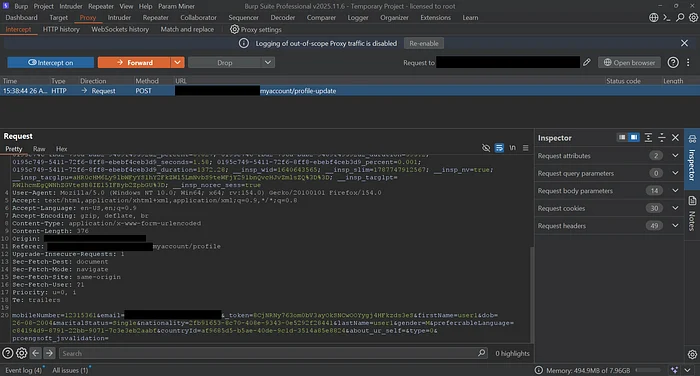
An email parameter was being sent in the request body even though there was no email field in the interface. A parameter that the UI does not expose but the backend still accepts is a candidate for mass assignment: the server appears to bind request body fields to the user object without restricting which fields a client may set.
Exploitation
Step 1: capture the profile update request
The researcher took the profile update request from the attacker account. The report does not reproduce the raw request, only the observation that it carried an email parameter in the body.
Step 2: change the email to the victim's address
The email parameter in that request was modified to the victim's email address, and the request was sent.
Step 3: observe that no verification happened
The change succeeded. There was no email verification, no confirmation, nothing. At this point only the attacker account's email had been changed to the victim's email, and it was unclear how the application would handle two accounts sharing an address.
Step 4: test the login combinations
The researcher logged out and tried the combinations:
- Victim's email + victim's password: invalid credentials.
- Victim's email + attacker's password: this worked.
Step 5: confirm access to the victim's data
After logging in with the victim's email and the attacker's password, the researcher could see the victim's data in the account settings.

Root cause
The profile update endpoint accepted and applied an email field that the UI never exposed, so the backend bound client-supplied fields to the user record without an allowlist. The email change flow that the application intended users to use required verification; this path bypassed it entirely. Because the account is looked up by email at login, the attacker's account, now carrying the victim's address, was matched when the victim's email was supplied with the attacker's password. The report does not describe the server-side code, so the exact binding mechanism is likely a mass assignment flaw rather than a confirmed one.
Impact
An attacker with a registered account can take over another user's account if they know the victim's email address. The attacker changes their own account's email to the victim's, then logs in with the victim's email and their own password, and sees the victim's data in the account settings. The victim's email combined with the victim's password returned invalid credentials.
Fix
The fix should be to restrict the profile update endpoint to an explicit allowlist of fields, removing email from anything the client can set, and to route all email changes through the verification flow.
Variants to test
- Add fields the UI does not expose to profile and settings update requests:
email,role,is_admin,verified,password. A positive result is the value being applied and reflected after a reload. - Change the email through a non-email form and then log in with the new address and the old password. A positive result is a successful login without any verification step.
- Send the same parameter in JSON and in form encoding, and in nested objects such as
user[email]. A positive result is the backend accepting the field in a format the UI never uses. - Repeat the email swap in both directions between two test accounts to see how duplicate addresses are handled at login. A positive result is either account being reachable with the other's address.
What happened, in plain words
A security researcher was looking at a website's account settings page. This is the page where you change your own details: your name, your profile picture, your email address, and so on. The researcher noticed that the page had two separate forms. One form was for changing your email address, and it asked you to verify the new address before the change took effect. The other form was for updating your profile information, and it did not show an email field at all.
That gap turned out to be the whole bug. The profile form did not show an email field, but the request the browser sent to the server still contained an email value. The server accepted it and changed the account's email address without any verification. The researcher then used that to log in as another user.
Before going further, a few words on the pieces involved, because the rest of the article depends on them.
What a form is. A form is the part of a web page with boxes you type into and a button you press to submit. When you press the button, your browser packages up what you typed and sends it to the website's server.
What a request is. Every time your browser does anything on a website, it sends a message to a server and gets a message back. Loading a page is a request. Pressing a button is a request. The message your browser sends has a few parts: the address it is going to (the URL), a method (usually GET for "give me this page" and POST for "here is some data, please act on it"), some headers (extra information about the message), and sometimes a body (the actual data, such as what you typed into a form).
What an API is. Think of a restaurant. The menu is the website you see, and the kitchen is the server where the real work happens. The waiter who carries your order to the kitchen and brings the food back is the API. It is the set of rules for how the page talks to the server: which addresses accept which data, and what comes back. You never see the waiter, but everything you do on a page goes through them.
What a parameter is. A parameter is one named piece of data inside a request. If a request body is a form with lines like name=Alex and city=London, then name and city are parameters, and Alex and London are their values. Parameters are the individual facts you are handing to the server.
What an intercepting proxy is. Normally your browser talks straight to the website. A proxy is a program that sits in the middle, like a postal worker who opens every letter, reads it, and can rewrite it before passing it on. Security testers use an intercepting proxy to pause a request after the browser has built it but before it leaves the computer. That lets them read exactly what the browser is sending, and change it before it goes out. The report mentions this as the tool used, and nothing more about it.
What mass assignment means. Imagine a hotel check-in form where the clerk is supposed to fill in only your room number and your breakfast choice. But the form has a hidden line for "room rate", and the clerk copies whatever is written there without checking whether you were allowed to write it. Mass assignment is the same idea in software: the server takes every field the client sends and copies it straight onto the user's record, instead of accepting only the fields the user is supposed to be able to set. The name comes from the server "assigning" a whole mass of incoming fields at once. When one of those fields is something sensitive, such as an email address or an admin flag, the client can set things it was never meant to touch.
What account takeover (ATO) means. Account takeover means one person gains control of another person's account: reading their data, acting as them. It is the worst ordinary outcome of a web bug, because everything the real owner could do, the attacker can now do too.
The setup
The researcher used two accounts:
- An attacker account, which the researcher controls and uses to launch the attack.
- A victim account, which stands in for an innocent user.
Having both is standard practice. You need one account to do the attacking and a second, separate account to see what the attack does to somebody else. If you only had one account, you could not tell whether you had changed your own data or somebody else's.
The write-up does not name the product or the bug bounty programme it was reported through.
Finding it
While testing the account settings page, the researcher noticed that the email field was missing from the profile information form. That looked wrong. The application clearly had a way to change your email, because there was a separate form for it, and that form required verification. So why would the profile form have no email field at all?
The reason to care is this: a field missing from the page does not mean the server has stopped accepting it. The page is only what your browser draws. The server is a separate program with its own rules, and if those rules are loose, someone can send data the page would never send. The researcher intercepted the profile update request to see what was really inside it. The result:
The screenshot shows the intercepted profile update request, with an email parameter in the request body even though the interface has no email field.
Reading that in plain words:
- The request is the message the browser was about to send when the profile form was submitted.
- The body is the part of the message carrying the data, the equivalent of the contents of an envelope rather than the address on the front.
emailis the name of a parameter inside that body. It was present even though no box on the page asked for an email address.- The value next to it is the email address the request carried.
A parameter the page does not show but the server still accepts is exactly the kind of thing mass assignment lives in. The server appears to take the fields in the request body and copy them onto the user's record without checking which fields a client is allowed to set. The page hides the field; the server does not.
Exploitation
Step 1: capture the profile update request
The researcher took the profile update request from the attacker account. The report does not reproduce the raw request, only the observation that it carried an email parameter in the body. The reason for starting from the attacker's own account is simple: you are changing your own data first, so if something goes wrong you have only affected yourself.
Step 2: change the email to the victim's address
The email parameter in that request was changed to the victim's email address, and the request was sent. This is the actual attack. The page would never let you type another person's address into the profile form, because there is no field for it. But the proxy lets you edit the request after the browser has built it, so the server receives a value the interface would never produce.
Step 3: observe that no verification happened
The change succeeded. There was no email verification, no confirmation, nothing. This matters because the application's own email change form did require verification. Verification exists for a reason: it proves the person asking for the change actually controls the new address. Skipping it means anyone who can send this request can point an account at an address they do not own.
At this point only the attacker account's email had been changed to the victim's email. The researcher was not sure how the application would handle two accounts sharing one address. That is a fair question, because most systems assume every email address belongs to exactly one account.
Step 4: test the login combinations
The researcher logged out and tried the combinations:
- Victim's email + victim's password: invalid credentials.
- Victim's email + attacker's password: this worked.
The screenshot shows the login attempt with the victim's email address and the attacker's password succeeding.
Why try these two combinations? Because logging in normally means giving an email address and a password. The application has to look up an account by the email, then check the password against that account. If the attacker's account now carries the victim's email, then the victim's email points at the attacker's account. The victim's own password no longer matches, which is why the first attempt failed. The attacker's password does match, which is why the second attempt worked. The first result shows the victim's email no longer matched the victim's password.
Step 5: confirm access to the victim's data
After logging in with the victim's email and the attacker's password, the researcher could see the victim's data in the account settings.
The screenshot shows the victim's data visible in the account settings after that login.
That is the takeover. The researcher is now inside the victim's account, seeing what the victim sees, using nothing but the victim's email address and a password the researcher created themselves.
Why it worked
The profile update endpoint accepted and applied an email field that the interface never exposed. In other words, the server copied client-supplied fields onto the user record without an allowlist. An allowlist is a list of things that are permitted, and everything not on the list is refused. The opposite, a denylist, lists what is forbidden and allows the rest, which fails as soon as someone finds a field nobody thought of. Here there was effectively no list at all.
The email change flow the application intended users to use required verification. This path bypassed it entirely, because it was a different endpoint that never asked.
Because the account is looked up by email at login, the attacker's account, now carrying the victim's address, was matched when the victim's email was supplied with the attacker's password.
Impact
An attacker with a registered account can take over another user's account if they know the victim's email address. The attack requires knowing the victim's email address.
The sequence is: change your own account's email to the victim's, log in with the victim's email and your own password, and see the victim's data in the account settings. The victim's email combined with the victim's password returned invalid credentials.
Fix
The fix should be to restrict the profile update endpoint to an explicit allowlist of fields, removing email from anything the client can set, and to route all email changes through the verification flow. In everyday terms: the server should accept only the fields the page actually offers, and any change to an email address should go through the door that asks for proof.
Variants to test
If you want to look for the same class of bug yourself, these are the variations worth trying. Each one starts from the same idea: send the server a field the page does not offer, and see whether it is applied.
- Add fields the UI does not expose to profile and settings update requests:
email,role,is_admin,verified,password. A positive result is the value being applied and reflected after a reload. Reloading matters because a value echoed back in the response might not have been saved; a reload asks the server fresh. - Change the email through a non-email form and then log in with the new address and the old password. A positive result is a successful login without any verification step.
- Send the same parameter in JSON and in form encoding, and in nested objects such as
user[email]. A positive result is the backend accepting the field in a format the UI never uses. JSON and form encoding are two ways of writing the same data into a request body; nested objects group fields under a parent name, like a folder inside a folder. - Repeat the email swap in both directions between two test accounts to see how duplicate addresses are handled at login. A positive result is either account being reachable with the other's address.
Glossary
- Account takeover (ATO): one person gaining control of another person's account, able to read their data and act as them.
- Allowlist: a list of things that are permitted, with everything else refused.
- API: the set of rules and addresses through which a web page talks to the server, like a waiter carrying orders between the dining room and the kitchen.
- Attacker account: the account the tester controls and uses to launch the attack.
- Body: the part of a request that carries data, such as what was typed into a form.
- Bug bounty programme: a scheme where an organisation pays researchers for reporting security bugs to it.
- Credentials: the pair of an email address (or username) and a password used to log in.
- Denylist: a list of things that are forbidden, with everything else allowed; it fails when something not on the list is found.
- Email verification: a step that proves the person asking to use an email address actually controls it, usually by sending a message to that address.
- Endpoint: a specific address on a server that accepts a particular kind of request, such as the one that handles profile updates.
- Form: the part of a web page with boxes to type into and a button to submit, which sends what you typed to the server.
- Form encoding: one way of writing data into a request body, as a list of name and value pairs.
- Header: extra information attached to a request or response, separate from the body.
- Intercepting proxy: a program that sits between the browser and the server, letting the tester read and change requests before they are sent.
- JSON: a common way of writing data as named fields and values, often used in request bodies.
- Mass assignment: a server flaw where every field the client sends is copied onto a record, instead of only the fields the client is allowed to set.
- Method: the word at the start of a request saying what kind of action it is, such as
GETto fetch orPOSTto submit data. - Nested object: a group of fields placed inside another named group, such as
user[email]. - Parameter: one named piece of data in a request, such as
emailwith a value next to it. - Request: the message a browser sends to a server, made of an address, a method, headers and sometimes a body.
- Response: the message the server sends back.
- Root cause: the underlying reason a bug exists, as opposed to its visible symptom.
- UI (user interface): what you see and interact with on a page.
- URL: the address of a resource on the web.
- Victim account: the second account, standing in for an innocent user, used to see what the attack does to somebody else.



