Misconfiguration in Change-password Functionality Leads to Account Takeover
The change-password function did not properly validate the current password or the X_auth_credentials header, allowing an attacker to change the email to a victim's email and set a new password. This enabled full account takeover without victim interaction.
 Published on 0x2m.medium.com
We are Mahmoud Radwan and Mahmoud Samaha (0x2m) and this is our first Write-Up ever.
The full write-up lives on its author's site
It belongs to its author, so we link to it rather than copy it. The other two tabs are our own rewrites, checked against it.
Context
This is a write-up by Mahmoud Radwan (@0x___2m) and Mahmoud Samaha (@0x__2m), published as their first write-up. It describes how misconfigurations in a change-password function allowed them to take over any account on a site. The target was a private program, so the authors refer to it as site.com throughout.
The feature under test is the ordinary change-password function: a logged-in user supplies their current password and a new password, and the server replaces the stored password. The testing was done against the sandbox environment used for testing purposes, sandbox.site.com.
Setup
The researchers worked against the sandbox environment of the private program. They used Burp Suite to intercept and replay requests, and they created two accounts:
- An attacker account, referred to in the reproduction steps as
test1, with email[redacted]and passwordattackerpass@1234. - A victim account, referred to as
test2, with email[redacted]and passwordvictimpass@1234.
In the narrative section the second account is described as one they created themselves and called [redacted], with the credentials they set for it (test@1234). The company lowered the risk from P1 to P2 because the attacker would need to know the victim's email address.
Finding it
While going through the sandbox environment, the researchers noticed the change-password function. They opened Burp Suite, intercepted the request and started analysing it.
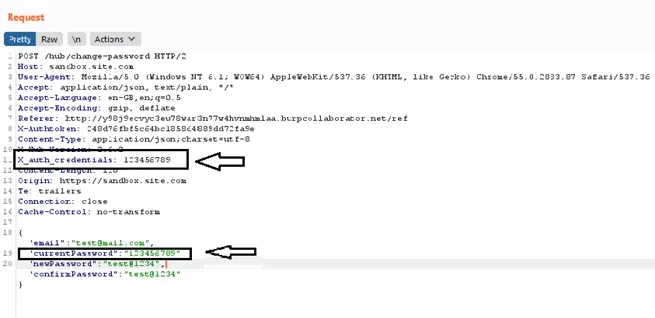
The intercepted request contained a header, X_auth_credentials, whose value was the same as the currentPassword parameter in the request body. That correspondence suggested the intended design: to change your current password you must first enter your current password, then enter the new password.
That raised a set of questions for the researchers:
- What about this header?
- Does the server validate it?
- What happens if we remove it?
- What if we change our email to someone else's email, does it change their password?
Exploitation
Step 1: Remove the header and the current-password parameter
The first experiment was to remove both the X_auth_credentials header and the currentPassword parameter from the request and send it to the server. The server returned a 200 OK response without any error, which showed that the server does not validate the header. From that point the researchers knew they did not need the header or the currentPassword parameter in the request.
Step 2: Swap the email for the victim's email
The next question was how to turn this into an account takeover. They created another account, [redacted], then changed their own email in the request to the victim's email, kept the same credentials of their own account, and sent the request to the server.
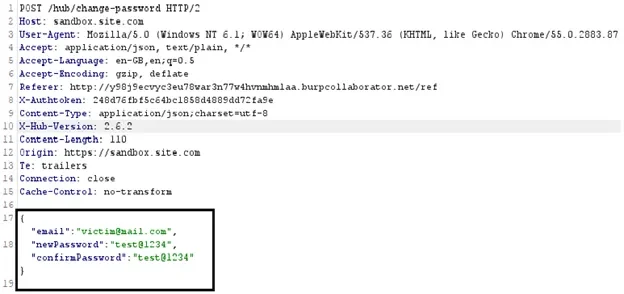
The server answered 200 OK, and the response said the change-password function had completed. The open question was: for whom?
Step 3: Log in as the victim
They went to the login page, entered the victim's email together with the credentials they had set for that account (test@1234), and successfully accessed the victim account.
Attack workflow
The report summarises the attack as follows:
- Change the email to the victim email.
- Remove the header
X_auth_credentialsand the parametercurrentPassword. - Put any new password you want.
- Send the request and you get 200 OK as a response.
- Log in to the victim account with the new password and you have successfully accessed it.
Steps to reproduce (from the main report)
- Log in to the attacker account,
test1:
Email = [redacted]
pass  = attackerpass@1234
- Log in to the victim account,
test2:
Email = [redacted]
pass  = victimpass@1234
- Go to the change-password function in the attacker window.
- Intercept the request and send it to Repeater.
- Remove the current password parameter and the
Xauthcredentialsheader from the request. - Change the attacker email to the victim email in the request body.
- Enter the new password you want,
newpass@1234. - Log out from the victim account and try to log in with the new password.
- You now have full account takeover of the victim.
Root cause
The server did not validate the X_auth_credentials header: removing it, together with the currentPassword body parameter, still produced a 200 OK with no error. The change-password request named the victim's email in the body and the victim's password was replaced, while the request was sent from the attacker's session. The report does not describe the server-side code, so the exact implementation is not shown; the behaviour above is what the requests and responses demonstrate.
Impact
Full account takeover of any account, without any interaction from the victim. The only condition the report gives is that the attacker must know the victim's email address. When the vulnerability was reported, the company reduced the risk from P1 to P2 for exactly that reason: knowledge of the victim's email would be required.
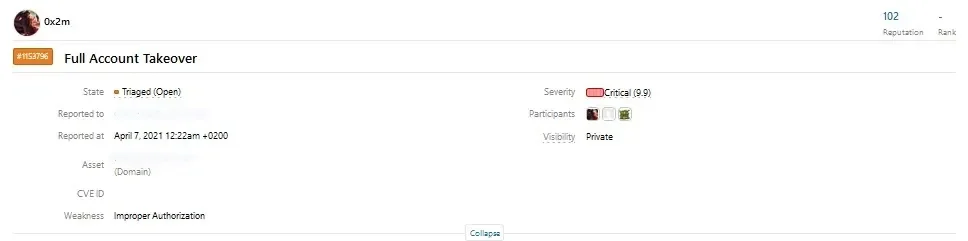
The report was submitted on April 7, 2021 at 12:22am, triaged on April 8th, and a bounty was paid on April 15th.
Fix
The report does not state what fix was applied. Based on the behaviour described, the change-password handler should derive the account being modified from the authenticated session rather than from an email field in the request body, and it should require and validate the current password (and any credential header it relies on) before accepting a new one.
Variants to test
- Email field in the body of a password change. Submit a change-password request with another user's email in the body while authenticated as yourself. A positive result is a 200 OK and the other account's password being replaced.
- Removing the current-password parameter. Drop
currentPasswordfrom the body and resend. A positive result is a 200 OK with no validation error. - Removing the credential header. Drop a header such as
X_auth_credentialsthat mirrors the current password. A positive result is the request still succeeding. - Removing both at once. Combine the two removals above; if the request still succeeds, the server is not enforcing the re-authentication step at all.
- Other identity fields. Try the same swap on any other field that names the account (username, user ID, account number) in password change, email change or profile update requests. A positive result is the change being applied to the other account.
What happened, in plain words
Two researchers, Mahmoud Radwan (@0x___2m) and Mahmoud Samaha (@0x__2m), were testing a private bug bounty program. A bug bounty program is a scheme where a company invites outside people to look for security weaknesses in its systems and pays them for reporting what they find. The company did not want its real name published, so the authors call it site.com throughout. This was their first write-up ever.
They found a flaw in the ordinary "change my password" feature that every website with user accounts has. Normally that feature is safe: you are already logged in, you type your old password, you type a new one, and the site replaces the password on your account. Here, the request named the victim's email in the body, and the victim's password was replaced. That meant an attacker could set a new password on somebody else's account and then log in as that person. Security people call this an account takeover: you end up in control of an account that is not yours.
To understand the rest of this article you only need a browser and a little patience. Everything below is explained from zero.
Background concepts, from zero
Before the story, a few words that will come up constantly.
- Request and response. When you click a button on a website, your browser sends a message to a computer somewhere (the server) asking it to do something. That message is a request. The server sends back a response, which is usually a status code plus some data. The most famous status code is 200 OK, which simply means "done, no problem". A 4xx code (like 403 or 400) means the server refused or the request was wrong. So when you see "we got 200 OK", read it as "the server accepted it without complaint".
- API. Think of a restaurant. The menu and the waiter are the API: a fixed way for you to ask the kitchen for something without walking into the kitchen yourself. On the web, an API is the set of addresses and message formats a website's own pages use to talk to its server. When you fill in a form, your browser is really calling the API behind the scenes.
- HTTP request anatomy. A request has a few parts. The URL says which address you are calling. Headers are small labelled lines of extra information, like the label on a parcel ("fragile", "this side up"). The body carries the actual data, for example the form fields you filled in. A parameter is one named value inside that data, such as
currentPassword=.... - Session and cookie. After you log in, the server needs to recognise you on the next request. It gives your browser a small piece of data, usually stored in a cookie, which your browser sends back on every request. That is your proof of identity, like a wristband at a festival: the staff check the wristband, not your face. If the server ignores the wristband and instead believes whatever name you write on a form, that is a serious problem, and it is exactly what happened here.
- Token / credential header. Sometimes the proof of identity, or a piece of sensitive data, travels in a header instead of a cookie. Here the site used a header called
X_auth_credentials. - Burp Suite. A tool used by security testers. It sits between your browser and the server like a postman who opens every letter, so you can read a request, change it, and send it again. Intercept means pausing a request so you can look at it before it goes out. Repeater is the part of Burp that lets you resend a modified request over and over.
- Sandbox. A test copy of a website, separate from the real one, where you can break things without harming real users. Here it was
sandbox.site.com. - IDOR (Insecure Direct Object Reference). When a website lets you name an object (an account, an order, a file) directly in a request and does not check that the object belongs to you. If you can change
account=42toaccount=43and see someone else's data, that is an IDOR. The flaw in this report is closely related: the request names an account by email, and the server trusts it. - Logic flaw. A bug not in the code's syntax but in its reasoning. The code runs fine; it just makes a wrong decision, like a bouncer who checks your ticket but not whether it is for this concert.
- Password reset / change. Two related features. Reset is for when you forgot your password; change is for when you know it and want a new one. This report is about change.
- P1 and P2. Bug bounty programs rank severity. P1 is the most serious, P2 is one step below. The company later moved this report from P1 to P2.
The setup
The researchers worked against the sandbox environment of the private program, sandbox.site.com. They used Burp Suite to intercept and replay requests, and they made two accounts:
- An attacker account, called
test1in the reproduction steps, with email[redacted]and passwordattackerpass@1234. - A victim account, called
test2, with email[redacted]and passwordvictimpass@1234.
In the narrative part of the report the second account is described as one they created themselves and named [redacted], with the credentials they chose for it (test@1234). The company lowered the risk from P1 to P2 because the attacker would need to know the victim's email address.
Finding it
While going through the sandbox environment, the researchers noticed the change-password function. They opened Burp Suite, intercepted the request and started analysing it.
The screenshot shows the intercepted change-password request. Two things in it matched: a header called X_auth_credentials, and a parameter called currentPassword in the body. Their values were the same. That told the researchers what the design was supposed to be: to change your password you must first type your current password.
That raised a list of questions for them:
- What about this header?
- Does the server validate it?
- What happens if we remove it?
- What if we change our email to someone else's email, does it change their password?
Each question is a small experiment. "Does the server validate it" means: does the server actually check the header, or does it just accept whatever arrives? The last question is the important one, because if the server picks the account from the email field in the body, then whoever controls that field controls whose password gets changed.
Exploitation
Step 1: Remove the header and the current-password parameter
The first experiment was to remove both the X_auth_credentials header and the currentPassword parameter from the request, then send it. The server returned a 200 OK with no error. In plain terms: the server did not check the header at all, and it did not insist on the current password either. From that moment the researchers knew neither piece was needed.
Why does this matter? The current-password step exists so that someone who borrows your unlocked laptop, or steals your session cookie, still cannot silently change your password. If the server skips that check, that safety net is gone.
Step 2: Swap the email for the victim's email
The next question was how to turn this into an account takeover. They created another account, [redacted]. Then, in the request, they replaced their own email with the victim's email, kept the credentials of their own account, and sent it.
The screenshot shows the modified request with the victim's email in the body. The server answered 200 OK, and the response said the change-password function had completed. The obvious question was: completed for whom? The request was sent while logged in as the attacker, but it named the victim's email.
Step 3: Log in as the victim
They went to the login page, entered the victim's email together with the credentials they had set for that account (test@1234), and got into the victim account. That confirmed the password change had been applied to the account named in the body, not to the account that was logged in.
Attack workflow
The report summarises the attack like this:
- Change the email to the victim email.
- Remove the header
X_auth_credentialsand the parametercurrentPassword. - Put any new password you want.
- Send the request and you get 200 OK as a response.
- Log in to the victim account with the new password and you have successfully accessed it.
Steps to reproduce (from the main report)
These are the exact steps the researchers gave the company so that anyone could repeat the test.
- Log in to the attacker account,
test1:
Email = [redacted]
pass  = attackerpass@1234
Line by line: the first line is the email used to sign in to the attacker's own account; the second line is that account's password. You need your own account first because the change-password page only exists for logged-in users.
- Log in to the victim account,
test2:
Email = [redacted]
pass  = victimpass@1234
Same idea, for the second account. In a real attack the victim would be a stranger and the attacker would not know this password; here the researchers own both accounts so they can prove the takeover cleanly.
- Go to the change-password function in the attacker window.
You do this while logged in as the attacker, because that is the position a real attacker would be in.
- Intercept the request and send the request to Repeater.
Intercepting pauses the request so you can read and edit it. Repeater lets you resend the edited version as many times as you like without redoing the form.
- Remove the current password parameter and the
Xauthcredentialsheader from the request.
This is the step that tests whether the server enforces the old-password check. If it still says 200 OK, it does not.
- Change the attacker email to the victim email in the request body.
This is the step that tests whether the server decides whose password to change from the body rather than from your login. If it does, the victim's account is now the target.
- Enter the new password you want,
newpass@1234.
Any value works here; the point is that the attacker chooses it, so the attacker will know the victim's new password.
- Log out from the victim account and try to log in with the new password.
This is the proof. If the new password works on the victim's account, the change really was applied there.
- You now have full account takeover of the victim.
"Full" because the attacker can log in as the victim and do anything the victim could do.
Root cause
The server did not validate the X_auth_credentials header: removing it, together with the currentPassword body parameter, still produced a 200 OK with no error. The request named the victim's email in the body, and the victim's password was replaced. So the password of whichever account was named in the request got replaced. The report does not show the server-side code, so the exact implementation is not visible; the behaviour above is what the requests and responses demonstrate.
A useful comparison: a bank teller who accepts a withdrawal slip with any name written on it, without checking the ID of the person at the counter, is doing the same thing. The slip is the request body; the ID check is the session.
Impact
Full account takeover of any account, with no interaction from the victim. The company reduced the risk from P1 to P2 because the attacker would need to know the victim's email address. When the vulnerability was reported, the company reduced the risk from P1 to P2 for exactly that reason: knowing the victim's email would be required.
The screenshot shows the successful login to the victim account with the new password.
The report was submitted on April 7, 2021 at 12:22am, triaged on April 8th, and a bounty was paid on April 15th.
Fix
The report does not state what fix was applied. Based on the behaviour described, the change-password handler should take the account being modified from the logged-in session rather than from an email field in the request body, and it should require and validate the current password (and any credential header it relies on) before accepting a new one.
Variants to test
If you want to look for the same class of bug on a site you are allowed to test, these are the variations worth trying. Each one is a small change to a normal request, and each has a clear sign of success.
- Email field in the body of a password change. Submit a change-password request with another user's email in the body while logged in as yourself. A positive result is a 200 OK and the other account's password being replaced.
- Removing the current-password parameter. Drop
currentPasswordfrom the body and resend. A positive result is a 200 OK with no validation error. - Removing the credential header. Drop a header such as
X_auth_credentialsthat mirrors the current password. A positive result is the request still succeeding. - Removing both at once. Combine the two removals above; if the request still succeeds, the server is not enforcing the re-authentication step at all.
- Other identity fields. Try the same swap on any other field that names the account (username, user ID, account number) in password change, email change or profile update requests. A positive result is the change being applied to the other account.
Glossary
- Account takeover: gaining control of another person's account, usually by changing its password or session.
- API: the fixed set of addresses and message formats a website's pages use to talk to its server, like a menu and waiter in a restaurant.
- Attacker account: the account the tester controls and uses to launch the attack.
- Body: the part of an HTTP request that carries the actual data, such as form fields.
- Bug bounty program: a scheme where a company pays outside researchers for reporting security weaknesses.
- Burp Suite: a tool that sits between browser and server so requests can be intercepted, read, edited and resent.
- Cookie: a small piece of data a site stores in your browser and receives back on each request, commonly used to recognise a logged-in user.
- Credential header: an HTTP header carrying proof of identity or a sensitive value, here
X_auth_credentials. - Header: a labelled line of extra information attached to an HTTP request or response.
- IDOR (Insecure Direct Object Reference): a flaw where a request names an object directly and the server does not check that the object belongs to the requester.
- Intercept: pausing a request in a proxy tool so it can be inspected or modified before it reaches the server.
- Logic flaw: a bug in the reasoning of a feature rather than in its syntax; the code runs but makes a wrong decision.
- P1 / P2: severity rankings in bug bounty programs, P1 being the most serious and P2 one step below.
- Parameter: one named value inside a request, such as
currentPassword. - Request: the message a browser sends to a server asking it to do something.
- Response: the message the server sends back, usually a status code plus data.
- Repeater: the Burp Suite component that resends a modified request repeatedly.
- Sandbox: a test copy of a site, separate from the live one, safe to experiment on.
- Session: the server's record of who you are after you log in, usually tied to a cookie.
- Status code 200 OK: the server's way of saying the request succeeded with no error.
- Token: a piece of data used as proof of identity or permission, often sent in a header or cookie.
- Victim account: the account the tester is trying to take over, here one they created themselves for the test.



