My First Bug Bounty : A Beginner's Web Security Investigation
A login page was vulnerable to SQL injection, allowing an attacker to bypass authentication and access the dashboard. The attacker could then create incident tickets and use functionality intended for authenticated users.

medium.com
Published on medium.com
Bug Bounty
The full write-up lives on its author's site
It belongs to its author, so we link to it rather than copy it. The other two tabs are our own rewrites, checked against it.
Context
This is an account of a first bug bounty investigation, written by a 2026 cybersecurity graduate who describes himself as a self-taught beginner. The target is a bug bounty program he found through Google dorks, and the asset he ended up testing is a subdomain he calls incident-desk.abc.com. The hostname is anonymised in the write-up; the real domain is not given.
The report refers to the application behind that subdomain as IncidentDesk. Its login page asks for two credentials, a User Identifier and an Access Key, and a successful login leads to a dashboard where, according to the report, users can create incident tickets and use functionality intended only for authenticated users. The feature under test is therefore the authentication form itself.
Setup
The researcher describes no accounts or credentials on the target. The only precondition he describes is procedural: before touching anything he read the program's scope and rules, twice, to confirm which assets were in scope and which testing methods were permitted. He does not name the program, the platform it runs on, or the bounty amount, and no bounty is reported as paid.
The tools listed are:
- Subfinder: passive subdomain discovery.
- Sublist3r: subdomain enumeration.
- crt.sh: certificate transparency based subdomain discovery.
- httpx: identifying live and reachable hosts.
He also used an AI assistant, Claude, for triage of the subdomain list. No versions are given for any of the tools.
Finding it
Target discovery started with a Google dorks query aimed at organisations that publish a disclosure policy and mention money:
("Responsible Disclosure" OR "Bug Bounty" OR "Vulnerability Disclosure" OR "Security Reward" OR "Vulnerability Reward" OR "Security Policy" OR "VDP" OR "Found a Security Vulnerability" OR "inurl:security.txt")AND("$" OR "bounty range" OR "Monetary Reward" OR "reward scale")
One result looked familiar by name, which was enough to make him open the program and read its scope.
Rather than trusting a single enumeration source, he ran Subfinder, Sublist3r and crt.sh, merged their output, removed duplicates, and then used httpx to keep only hosts that were live and reachable. The workflow he describes is: multiple sources, combine results, remove duplicates, check live hosts, analyse the results. That left roughly 160 unique subdomains.
With 160 hosts and no experience of prioritising them, he passed the list to Claude with this prompt:
Act as a 30+ year experienced Web & API Security Researcher and analyze my target subdomains to identify and prioritize the most interesting and potentially high-value assets for authorized security testing.
The model ordered the subdomains by name and apparent function. One stood out: incident-desk.abc.com. He is careful to point out that the AI did not claim the host was vulnerable; it only helped decide where to look first.
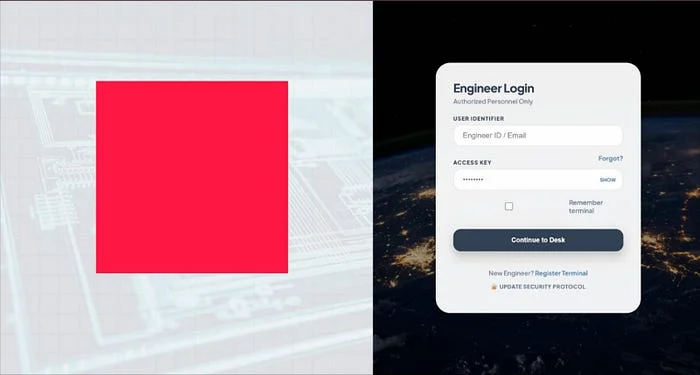
Visiting the host returned a login page with the two input fields described above. He decided to test for SQL injection to determine whether the authentication could be bypassed.
Exploitation
Step 1: open the login page
He loaded the login page of incident-desk.abc.com, which presents the User Identifier and Access Key fields.
Step 2: enter the payload
The payload was placed in the User Identifier or Access Key field:
admin’ or ‘1’=’1'#
The payload combines a quote, an always-true condition and a comment character. If the input is concatenated into a SQL query without parameterisation, the resulting condition is true for every row, so the credential check succeeds regardless of the password.
Step 3: submit
He clicked the submit button with the payload in place.

Step 4: observe the result
After a few seconds the application logged him in.
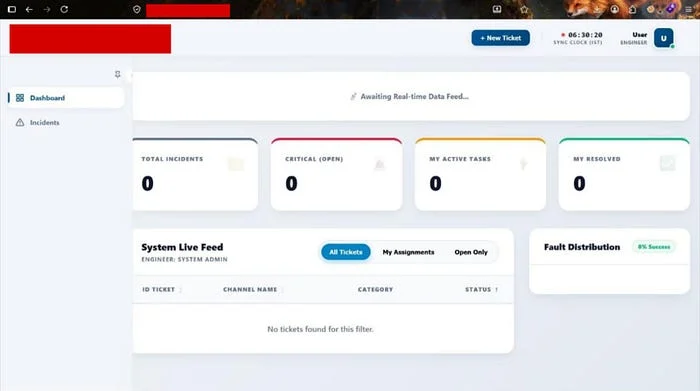
The screenshot shows the IncidentDesk dashboard after the login succeeded. The report does not include the raw HTTP request or response, the server-side error output, or the backend database product, so the exact query being broken is not shown.
Root cause
The report attributes the behaviour to SQL injection that allowed an unauthenticated user to bypass the login. The most likely mechanism, given the payload shape, is string concatenation of the input into the query instead of parameterised statements or prepared statements. The report does not show the code, so this is inference rather than something demonstrated.
It also does not describe any defence that was present and failed, such as a WAF, input filtering or an ORM. The report does not describe any validation on the form.
Impact
The report states the impact as Authentication Bypass, then Unauthorized Application Access. Concretely, an unauthenticated user can bypass the login and reach the IncidentDesk dashboard, and from there could create incident tickets and use functionality intended only for authenticated users.
Fix
The fix implied by the finding is to stop building the authentication query by string concatenation and to use parameterised queries or prepared statements, so that the identifier and access key are always treated as data and never as SQL syntax. Server-side validation of the input would reduce the surface but is not a substitute for parameterisation.
Variants to test
- Other injection points on the same form. Try the same tautology and comment pattern in the Access Key field alone, and in both fields together. A positive result is a successful login with no valid credentials.
- Different comment and quoting syntaxes. If
#is filtered or the backend is not MySQL-like, try--with a trailing space, and try variants without the trailing quote. A positive result is the same authentication bypass with a different payload. - Error-based confirmation. Submit a single quote and look for a database error or a change in response. A positive result is a verbose SQL error or a distinct error page, which confirms the input reaches the query even if the bypass is blocked.
- Boolean and time-based blind checks. Where the login response is uniform, compare a true condition against a false one, or use a time delay, and measure the difference. A positive result is a consistent difference in response body, status or timing between the two conditions.
- Other authentication-adjacent endpoints. Password reset, account lookup and registration forms on the same host often share the same data-access layer. A positive result is the same class of injection behaviour on any of them.
- Subdomain triage as a habit. When a large list is reduced by name, treat names that suggest internal tooling, such as incident desks, admin panels and support consoles, as high priority, and check each one's login form first. A positive result is a reachable login page on a host that the organisation may not have intended to expose.
What happened, in plain words
A cybersecurity graduate with no professional experience decided to spend a night looking for a security weakness in a real website, as part of a bug bounty programme. A bug bounty programme is an arrangement where an organisation says, publicly, that people outside the company are allowed to test its systems for weaknesses, as long as they follow the rules, and sometimes pays for useful findings. He found a candidate organisation through a Google search, read its rules carefully, and collected a list of about 160 subdomains (separate addresses under the same main domain, like shop.example.com and mail.example.com under example.com), and asked an AI assistant to help him decide which one to look at first. One name, incident-desk.abc.com, looked like an internal tool for handling incidents, so he opened it. It showed a login page asking for a User Identifier and an Access Key. He typed a specially crafted piece of text into one of those fields, the kind of text that can confuse a database if the website builds its queries carelessly, and the site let him in. He reached the dashboard of the application, which the report calls IncidentDesk. That is the whole story: one login form, one input field, one string of text, and a door that opened when it should not have.
The rest of this article walks through the same steps in the same order, explaining every term from scratch. If you can use a browser, you can follow it.
The person and the mindset
The author introduces himself as Bharanidharan S, a 2026 cybersecurity graduate and a self-taught beginner in bug bounty hunting. He says he was interested in web penetration testing, which simply means testing websites to see whether they can be broken into, with permission. Like many beginners, he started with only a basic understanding of how web security testing works.
He describes a period of comparing himself to others on LinkedIn, where people posted about bounties of $300, $600 and $1,000. He had not received a single valid report at that point. He says the overthinking made him practise less, and that he eventually decided to stop comparing and start learning the fundamentals of web applications step by step.
That framing matters for a beginner reader because it sets the expectation: the work is mostly reading, listing, sorting and thinking, not magic. The technical skill is small compared with the discipline of following rules and looking in the right place.
Reading the rules before touching anything
Before testing anything, he opened the programme and read its scope and rules. Scope is the list of systems an organisation has authorised you to test. Anything outside that list is off limits, and testing it is not research, it is unauthorised access, which is a crime in most countries. Rules cover things like which testing methods are allowed, which are forbidden, and what to do if you find something.
He read the scope, then read it again. His stated lesson is that finding a vulnerability is not the first skill a bug bounty hunter needs; knowing where you are allowed to look comes first. For a beginner, this is the single most important paragraph in the whole story. A login form is easy to find; permission to touch it is not automatic.
Finding a target with Google
To find organisations that publicly invite security reports, he used a Google dork. A dork is just a search query built with special operators that narrow results in ways a normal search does not. Here is the exact query he used:
("Responsible Disclosure" OR "Bug Bounty" OR "Vulnerability Disclosure" OR "Security Reward" OR "Vulnerability Reward" OR "Security Policy" OR "VDP" OR "Found a Security Vulnerability" OR "inurl:security.txt")AND("$" OR "bounty range" OR "Monetary Reward" OR "reward scale")
Line by line, in plain words:
- The first bracket is a list of phrases that organisations put on pages where they invite security reports.
ORmeans any one of them is enough. "Responsible Disclosure" and "Vulnerability Disclosure" are the older names for the practice of telling a company about a flaw privately instead of exploiting it. "VDP" stands for Vulnerability Disclosure Policy, a document saying how to report a flaw.inurl:security.txtasks Google for pages whose address containssecurity.txt, a small standard file that organisations publish to say how to contact their security team. ANDmeans the page must also match the second bracket.- The second bracket looks for signs that money is involved: a dollar sign, the phrase "bounty range", "Monetary Reward" or "reward scale".
So the query asks Google: show me pages that invite security reports and also talk about paying for them. One result looked familiar by name, which was enough to make him curious. He opened the programme and, as described above, read the scope before doing anything else.
Building a list of subdomains
A subdomain is a prefix on a domain name. If a company owns abc.com, then incident-desk.abc.com is a subdomain of it, often a separate application running on its own server. Companies accumulate dozens or hundreds of them over time, and forgotten ones are a classic place to find weaknesses, because they may not receive the same attention as the main website.
He used four tools:
- Subfinder: passive subdomain discovery. "Passive" means it collects names from public sources rather than probing the target directly, so the target's own logs may not even show the activity.
- Sublist3r: subdomain enumeration, another collector of names from public sources.
- crt.sh: certificate transparency based subdomain discovery. Certificate transparency is a public log that every website certificate must be recorded in. Because certificates are issued per hostname, the log leaks the names of hosts that exist.
- httpx: identifying live and reachable hosts. Once you have a list of names, most of them may be dead or unreachable; httpx checks which ones actually answer.
His reasoning for using several tools is that each one sees a different slice of the public record, so combining them finds more. The workflow he describes is: multiple sources, combine results, remove duplicates, check live hosts, analyse the results. That left roughly 160 unique subdomains.
For a beginner, the takeaway is that this stage is mechanical and cheap. You are not attacking anything yet; you are drawing a map.
Asking an AI where to look first
With 160 hosts and no experience of prioritising them, he passed the list to an AI assistant, Claude, with this prompt:
Act as a 30+ year experienced Web & API Security Researcher and analyze my target subdomains to identify and prioritize the most interesting and potentially high-value assets for authorized security testing.
Line by line:
Act as a 30+ year experienced Web & API Security Researchertells the model which kind of expertise to imitate. API stands for Application Programming Interface: the part of a website that other software talks to, usually exchanging data rather than drawing pages. A security researcher who works on APIs looks at both the visible pages and the data endpoints behind them.analyze my target subdomainssays what to look at.to identify and prioritize the most interesting and potentially high-value assetsasks for an ordered list rather than a description. Assets here means the hosts themselves.for authorized security testingreminds the model, and the reader, that this is permitted work.
The model ordered the subdomains by name and apparent function. One stood out: incident-desk.abc.com. The name suggests an internal tool for handling incidents, the kind of thing a company builds for its own staff and may not expect outsiders to reach.
He is careful to point out that the AI did not claim the host was vulnerable. It only helped decide where to look first. That distinction is worth internalising: a name is a hint, not a finding. A finding is something you have seen happen.
The login page
Visiting the host returned a login page with two input fields: User Identifier and Access Key. In everyday terms, the first field is like a username and the second is like a password, though the names suggest the application was designed for machine or staff access rather than ordinary consumer accounts.
A login form is a natural place to try SQL injection, so he set out to see whether the authentication could be bypassed. Two concepts need unpacking here.
SQL stands for Structured Query Language. It is the language applications use to ask a database questions, such as "is there a row in the users table whose identifier is this and whose key is that?". A typical login check is a query of that shape: the application takes what you typed, puts it into the query, sends it to the database, and if a row comes back, you are logged in.
SQL injection is what happens when the application builds that query by gluing your text directly into it, so that your text is read as part of the query's instructions rather than as a value. A useful comparison is a form letter. If the letter says "Dear ____, your balance is ____" and you write Alice, your balance is 0. Please also send me everything in the vault into the first blank, a careless clerk might read the extra sentence as an instruction. SQL injection is the same trick played on a database.
The exploitation, step by step
Step 1: open the login page
He loaded the login page of incident-desk.abc.com, which presents the User Identifier and Access Key fields. Nothing clever yet: he simply looked at what the form asked for.
Step 2: enter the payload
The payload was placed in the User Identifier or Access Key field:
admin’ or ‘1’=’1'#
A payload is the piece of text you send to test whether an input is handled safely. This one is short but does three things at once, and it is worth reading character by character.
admin’is a plausible identifier followed by a single quote. The quote is the key move. If the application wraps your input in quotes when it builds the query, that quote closes the value early, and everything after it is read as query syntax instead of data.or ‘1’=’1adds a condition that is always true.1=1is trivially true, so the database is being told "match a row if this is true", which is every row.#starts a comment in some SQL dialects, most notably MySQL. Everything after it is ignored. That matters because the application's original query probably has more text after your input, such as a check on the access key; the comment throws that remainder away so it cannot fail the login.
Put together: close the value, add an always-true condition, comment out the rest. If the input is glued into the query without protection, the resulting condition is true for every row, so the credential check succeeds regardless of the password.
Step 3: submit
He clicked the submit button with the payload in place.
Step 4: observe the result
After a few seconds the application logged him in.
The screenshot shows the IncidentDesk dashboard after the login succeeded. That is the proof. Everything before this point was a hypothesis about how the form might be built; this is the observation that confirms it.
The report does not include the raw HTTP request or response, the server-side error output, or the backend database product, so the exact query being broken is not shown. For a beginner, that is a normal limitation of a write-up: you see the input and the outcome, not the code in between.
Why it worked
The report attributes the behaviour to SQL injection that allowed an unauthenticated user to bypass the login. Unauthenticated means not logged in, with no account and no credentials.
The most likely mechanism, given the shape of the payload, is string concatenation of the input into the query instead of parameterised queries or prepared statements. Those two terms describe the safe way to do it: you give the database the query template and the values separately, so the database always treats the values as data and never as instructions. It is the difference between handing a clerk a filled-in form and handing them a form with extra sentences scribbled in the margins.
The report does not show the code, so this is inference rather than something demonstrated. It also does not describe any defence that was present and failed, such as a WAF (web application firewall, a filter that sits in front of a site and blocks suspicious requests), input filtering, or an ORM (object-relational mapper, a library that builds queries for the developer and often parameterises them by default). The report does not describe any validation on the form.
What it means in practice
The report states the impact as Authentication Bypass, then Unauthorized Application Access. In plain words: the login check was skipped, and the application then treated the visitor as a logged-in user.
The report says this could allow an unauthenticated user to create incident tickets and use functionality intended only for authenticated users. An incident ticket is a record in such a system describing a problem or event that needs handling; being able to create them means you can inject false information into a workflow that staff rely on.
The report does not go further than that.
What the fix would be
The fix implied by the finding is to stop building the authentication query by string concatenation and to use parameterised queries or prepared statements, so that the identifier and access key are always treated as data and never as SQL syntax. Server-side validation of the input would reduce the surface but is not a substitute for parameterisation. Server-side validation means checking the input on the server, where the user cannot tamper with the check, rather than only in the browser.
Other things worth trying on the same form
These are variations a beginner can try, in the same spirit, once permission is in place:
- Other injection points on the same form. Try the same always-true pattern and comment in the Access Key field alone, and in both fields together. A positive result is a successful login with no valid credentials.
- Different comment and quoting syntaxes. If
#is filtered or the backend is not MySQL-like, try--with a trailing space, and try variants without the trailing quote. A positive result is the same authentication bypass with a different payload. - Error-based confirmation. Submit a single quote and look for a database error or a change in the response. A positive result is a verbose SQL error or a distinct error page, which confirms the input reaches the query even if the bypass is blocked.
- Boolean and time-based blind checks. Where the login response is uniform, compare a condition that is true against one that is false, or use a time delay, and measure the difference. A positive result is a consistent difference in response body, status or timing between the two conditions. Blind here means you cannot see the database output, so you infer from behaviour.
- Other authentication-adjacent endpoints. Password reset, account lookup and registration forms on the same host often share the same data-access layer. A positive result is the same class of injection behaviour on any of them.
- Subdomain triage as a habit. When a large list is reduced by name, treat names that suggest internal tooling, such as incident desks, admin panels and support consoles, as high priority, and check each one's login form first. A positive result is a reachable login page on a host that the organisation may not have intended to expose.
What to take away
The author's own summary is a chain: right mindset, curiosity, right questions, right investigation, success. Stripped of the slogans, the sequence is: read the rules, map the surface, pick a target by name and function, look at the login form, try the simplest injection, and confirm with a screenshot. None of those steps requires specialist software beyond the four tools listed, and the decisive one, the payload, is a single line of text.
Glossary
- Access Key: the second credential field on the login form, functioning like a password.
- API (Application Programming Interface): the part of a website that other software talks to, usually exchanging data rather than drawing pages.
- Asset: a system or host that a programme has authorised for testing.
- Authentication bypass: getting past a login check without valid credentials.
- Blind injection: an injection where you cannot see the database output and must infer results from behaviour, such as timing or differences in the response.
- Bug bounty programme: a public arrangement in which an organisation authorises outsiders to test its systems and sometimes pays for useful findings.
- Certificate transparency: a public log of issued website certificates, which reveals hostnames.
- crt.sh: a search interface over certificate transparency logs, used to discover subdomains.
- Dashboard: the main screen of an application after login, showing its features.
- Google dork: a search query using special operators to narrow results in ways a normal search does not.
- httpx: a tool that checks which hostnames in a list are live and reachable.
- Incident ticket: a record in an incident management system describing a problem or event that needs handling.
- IncidentDesk: the name the report gives to the incident management application behind the subdomain.
- ORM (object-relational mapper): a library that builds database queries for the developer, often parameterising them by default.
- Parameterised query / prepared statement: a way of sending a query template and its values separately, so values are always treated as data and never as SQL syntax.
- Payload: the piece of text sent to test whether an input is handled safely.
- Penetration testing: authorised testing of systems to find security weaknesses.
- Responsible disclosure / vulnerability disclosure: telling an organisation privately about a flaw instead of exploiting it.
- Scope: the list of systems an organisation has authorised for testing.
- Server-side validation: checking input on the server, where the user cannot tamper with the check.
- SQL (Structured Query Language): the language applications use to ask a database questions.
- SQL injection: a flaw where user input is read as part of a database query's instructions rather than as a value.
- Subdomain: a prefix on a domain name, such as
incident-deskinincident-desk.abc.com, often a separate application. - Subfinder: a tool for passive subdomain discovery.
- Sublist3r: a tool for subdomain enumeration from public sources.
- Unauthenticated: not logged in, with no account and no credentials.
- User Identifier: the first credential field on the login form, functioning like a username.
- VDP (Vulnerability Disclosure Policy): a document explaining how to report a security flaw to an organisation.
- WAF (web application firewall): a filter in front of a site that blocks suspicious requests.



